
13 Best AI Social Media Post Generators in 2026 (Tested)
We tested 13 AI social media post generators on output quality, pricing, and ease of use. See which fits your workflow. Updated March 2026.
Siddharth Gangal • 2026-03-28
In This Post
Expert Verified · Written by Stacc Editorial Team. 13 tools tested for AI social media post generation. Pricing verified March 2026. We publish 3,500+ blog articles and automate social content for businesses across 70+ industries.
Quick Picks:
- Best overall: Buffer AI — Free plan, 11 platforms, scheduling + AI in one dashboard
- Best for visual content: Predis.ai — Generates caption + image from a single prompt
- Best for content repurposing: Lately.ai — Turns blogs and podcasts into dozens of social posts
- Best for brand voice: Jasper — Trains on your brand guidelines for consistent output
- Best done-for-you social: theStacc — 30 original posts/month created and published for $49/mo
- Best free option: Canva Magic Write — 50 free uses plus full design suite included
How We Tested and Ranked These AI Social Media Post Generators
96% of social media professionals use AI as part of their job. 72% use it daily. The question is not whether to use AI for social content. The question is which tool to use.
We publish social content for businesses across 70+ industries. We evaluated each AI social media post generator on 5 criteria: output quality, platform-specific formatting, pricing transparency, scheduling integration, and whether it actually saves time or just adds another dashboard.
Below is our honest breakdown of 13 tools — including pricing, strengths, limitations, and exactly who each one works best for.
What We Looked For
| Criteria | What We Measured |
|---|---|
| Output Quality | Does the AI produce usable captions or does every post need heavy editing? |
| Platform Awareness | Does the tool format differently for LinkedIn vs. Instagram vs. X? |
| Scheduling Integration | Can you generate and publish from the same dashboard? |
| Pricing | What does the free plan actually include? How fast do costs scale? |
| Visual Generation | Can the tool create images and graphics alongside captions? |
AI Social Media Post Generators Compared
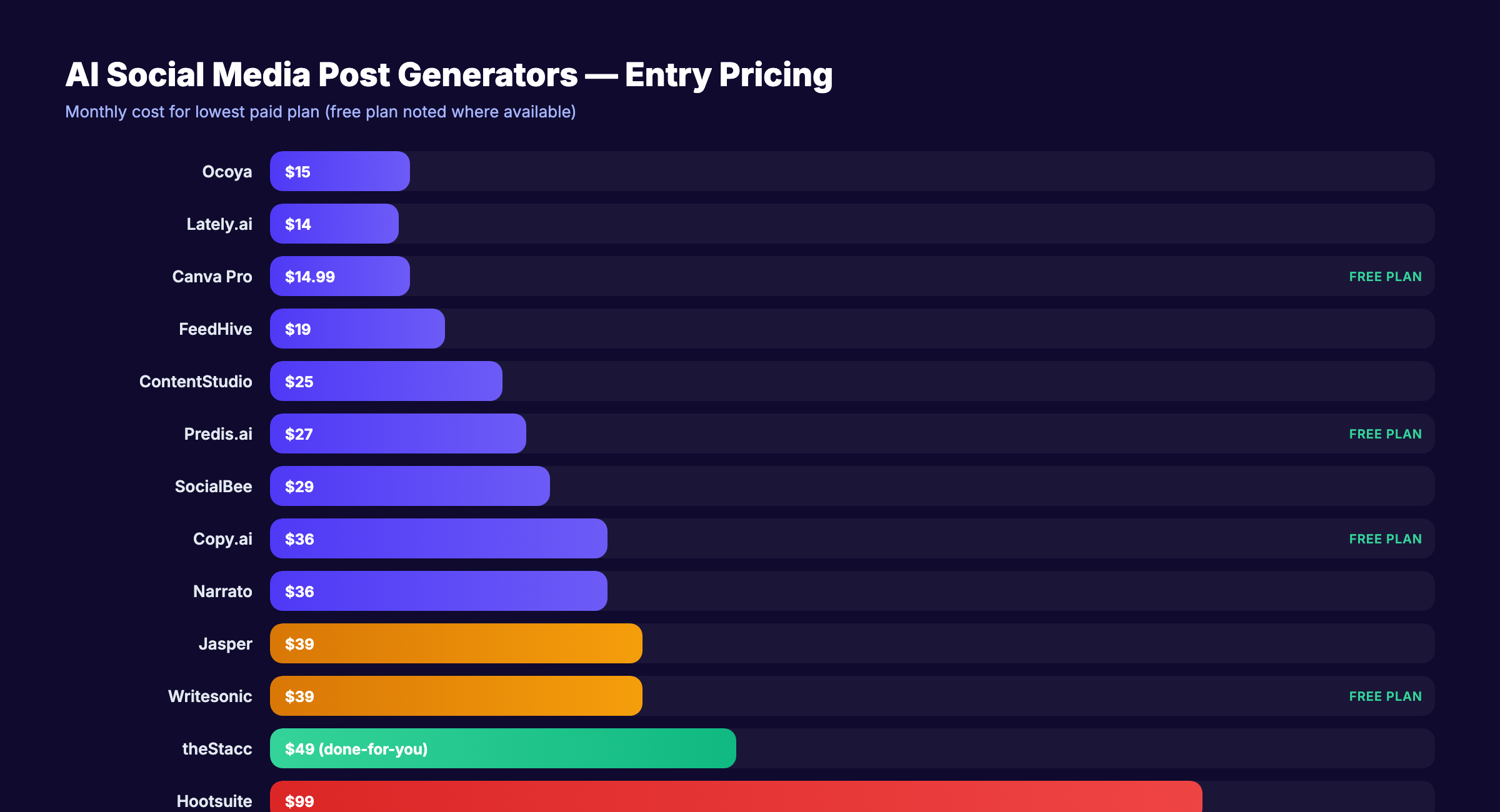
| Tool | Best For | Starting Price | Free Plan? | Scheduling? | Visual Generation? |
|---|---|---|---|---|---|
| Buffer AI | All-in-one simplicity | $6/mo/channel | ✅ 3 channels | ✅ | ❌ |
| Jasper | Brand voice consistency | $39/mo | ❌ | ❌ | ✅ |
| Copy.ai | Ad copy + repurposing | $36/mo/user | ✅ Limited | ❌ | ❌ |
| Predis.ai | Visual content creation | $27/mo | ✅ 15 posts/mo | ✅ | ✅ |
| Canva Magic Write | Design + captions | $14.99/mo | ✅ 50 uses | ✅ | ✅ |
| Lately.ai | Content repurposing | $14/mo | ❌ | ✅ | ❌ |
| SocialBee AI | Evergreen scheduling | $29/mo | ❌ | ✅ | ✅ Limited |
| ContentStudio | Trend discovery | $25/mo | ❌ | ✅ | ❌ |
| Hootsuite OwlyWriter | Enterprise teams | $99/mo | ❌ | ✅ | ✅ Beta |
| Writesonic | Trend-aware content | $39/mo | ✅ Limited | ✅ | ✅ |
| FeedHive | Post scoring + recycling | $19/mo | ❌ | ✅ | ❌ |
| Ocoya | Multilingual captions | $15/mo | ❌ | ✅ | ✅ |
| Narrato | Team content workflows | $36/mo | ❌ | ✅ Limited | ❌ |
1. Buffer AI — Best AI Social Media Post Generator for All-in-One Simplicity
Buffer added an AI assistant to the simplest scheduling tool on the market. You type a prompt, the AI drafts a caption, and you schedule it — all in the same dashboard. No tool switching. No copy-pasting between apps.
What It Does Well
The AI caption generator works from prompts, URLs, or existing content. Paste a blog link and Buffer generates platform-specific social posts from it. The multi-angle feature produces several variations of the same message for testing. Buffer supports 11 platforms — more than any other tool on this list.
The free plan includes 3 channels with 10 scheduled posts each. AI generation is included on all plans. For small businesses that want one tool for writing and publishing, Buffer removes the complexity.
Our Take: Buffer is not the most advanced AI writer. Jasper and Copy.ai produce higher-quality raw output. But Buffer is the only tool where you generate, edit, and publish without leaving one screen. For most small businesses, that workflow advantage matters more than marginally better copy.
Where It Falls Short
AI output is basic compared to dedicated writing tools. No image or visual generation. Limited AI customization — you cannot train it on your brand voice with the depth Jasper offers. Per-channel pricing scales fast for agencies managing many accounts.
Key Features
- AI caption generation — Write posts from prompts, URLs, or content repurposing
- Multi-angle content — Generate several variations of one message
- 11-platform support — Including Threads, Bluesky, and Mastodon
- Start Page — Link-in-bio builder included free
- Content calendar — Drag-and-drop visual scheduling
Pricing
- Free: 3 channels, 10 posts per channel per month, AI included
- Essentials: $6/month per channel — unlimited posts
- Team: $12/month per channel — collaboration features
- Agency: $120/month — 10 channels included
Who Should Use Buffer AI
Strong fit:
- Small businesses wanting scheduling + AI writing in one dashboard
- Freelancers managing 1-5 social accounts on a budget
Probably not right for:
- Teams that need advanced brand voice training (use Jasper)
- Visual-first creators who need AI image generation (use Predis.ai or Canva)
2. Jasper — Best AI Social Media Post Generator for Brand Voice
Jasper trains on your brand guidelines, tone documentation, and style preferences. The AI then produces content that sounds like your brand, not like a generic chatbot. For companies with strict brand standards, this matters.
What It Does Well
Brand voice training is the standout feature. Upload your brand guide, set tone parameters, and Jasper maintains consistency across every piece of content. The platform offers 50+ marketing templates including social media posts, ad copy, and video scripts. Image generation is built in. Multi-language support covers 30+ languages.
Our Take: Jasper produces the highest-quality social copy of any tool here. The trade-off is price and complexity. At $39/month with no scheduling, you are paying a premium for writing quality alone. If brand voice consistency is your top priority, Jasper is worth it. If you just need decent captions published on time, Buffer or SocialBee cost less and do both.
Where It Falls Short
No native scheduling. You write in Jasper and publish somewhere else. The $39/month entry price is the highest for a standalone AI writer. Overkill for solo creators who need simple captions.
Key Features
- Brand voice training — AI learns your specific tone and guidelines
- 50+ marketing templates — Social posts, ads, emails, video scripts
- Image generation — Create visuals alongside captions
- Multi-language — 30+ languages supported
- Team collaboration — Shared brand assets and approval workflows
Pricing
- Creator: $39/month (annual) — 1 user, brand voice, all templates
- Pro: $59/month (annual) — 3 users, advanced features
- Business: Custom pricing — unlimited users
Who Should Use Jasper
Strong fit:
- Marketing teams with strict brand guidelines across multiple channels
- Agencies producing content for clients with distinct brand voices
Probably not right for:
- Solo creators who just need quick captions (too complex and expensive)
- Anyone who needs scheduling built in (Jasper does not schedule)
3. Copy.ai — Best AI Social Media Post Generator for Ad Copy
Copy.ai started as a copywriting tool and shows it. The output for Facebook ads, Instagram captions, and promotional content is sharper than most competitors. The workflow automation builder handles content repurposing at scale.
What It Does Well
The free plan gives you 2,000 words per month — enough to test the tool properly. The brand voice scanner analyzes your existing content and replicates its tone. Copy.ai excels at ad copy and promotional posts. The workflow builder automates repetitive tasks like turning one blog post into 10 social variations.
Our Take: Copy.ai’s strength is conversion-focused copy. If your social media strategy leans promotional — product launches, offers, ads — this tool produces the sharpest output. For organic, community-building content, SocialBee or Buffer’s more casual approach may fit better.
Where It Falls Short
The free plan uses older AI models with lower quality output. No native scheduling. Strongest for ad copy over organic social posts. AI quality can be inconsistent for nuanced, conversational brand voices.
Key Features
- Brand voice scanner — Analyzes existing content to match your tone
- Workflow automation — Repurpose content across formats automatically
- Ad copy templates — Facebook, Instagram, and LinkedIn ad formats
- Unlimited rewrites — Iterate on paid plans without word limits
- Free plan — 2,000 words per month to test
Pricing
- Free: 2,000 words per month (limited AI models)
- Starter: $36/month per user — unlimited words, better models
- Teams: Custom pricing — collaboration features
Who Should Use Copy.ai
Strong fit:
- Marketers focused on paid social and promotional content
- Teams that need content repurposing workflows at scale
Probably not right for:
- Businesses that want to write and schedule in one tool
- Creators focused on organic, community-driven social content
4. Predis.ai — Best AI Social Media Post Generator for Visual Content
Predis.ai generates the full post — caption, image, and hashtags — from a single text prompt. Most tools on this list write captions only. Predis creates the visual too.
What It Does Well
Type a prompt like “promote our weekend brunch special” and Predis generates a branded graphic, caption, and hashtag set. The AI carousel generator creates multi-slide posts for Instagram and LinkedIn. Short-form video creation handles Reels and TikTok content. Competitor monitoring tracks what your competitors post and how it performs.
The free plan includes 15 posts per month with a watermark. Paid plans start at $27/month and remove the watermark.
Our Take: Predis is the tool for creators who want to skip Canva entirely. The visual generation is not designer-quality, but it is good enough for consistent social posting. If you value speed over pixel-perfect design, Predis saves hours per week.
Where It Falls Short
Image quality is functional but not premium. The free plan watermarks every visual. Competitor analysis depth is limited on lower plans. Video features are basic compared to dedicated video tools.
Key Features
- Full post generation — Caption + visual from one prompt
- AI carousel creator — Multi-slide posts for Instagram and LinkedIn
- Short-form video — Basic Reels and TikTok content generation
- Competitor monitoring — Track competitor posting activity
- Built-in scheduling — Publish directly from the dashboard
Pricing
- Free: 15 posts per month (watermarked visuals)
- Lite: $27/month (annual) — no watermark, more posts
- Premium: $59/month — advanced features, team access
- Agency: $249/month — multi-brand management
Who Should Use Predis.ai
Strong fit:
- Visual-first creators who want caption + image generated together
- Ecommerce brands that need high-volume product-focused social content
Probably not right for:
- Brands with strict design standards (image quality is good, not premium)
- B2B companies focused on text-heavy LinkedIn content
5. Canva Magic Write — Best Free AI Social Media Post Generator
Canva added AI writing to the design tool 250 million people already use. Magic Write generates captions inside the same canvas where you design the post graphic. Magic Design creates a full post template from a prompt.
What It Does Well
The integration between writing and designing is the real value. Write a caption, design the graphic, resize for every platform, and schedule — all without leaving Canva. Magic Switch repurposes one design into multiple formats (story, post, reel cover). Brand kits keep colors, fonts, and logos consistent. The free plan includes 50 Magic Write uses and access to 250,000+ templates.
Our Take: Canva is the right pick for teams that already use it for design. The AI writing is decent, not exceptional. But the workflow of design-then-write in one tool eliminates the gap between content creation and publishing that slows most teams down.
Where It Falls Short
AI writing is secondary to design. 50 free uses is a lifetime cap (not monthly). Pro plan limits to 500 AI uses per month. Content calendar scheduling is more limited than dedicated scheduling tools. Not a full social media management platform.
Key Features
- Magic Write — AI caption generation within designs
- Magic Design — Template-to-post from a single prompt
- Magic Switch — Resize and repurpose content across formats
- Brand Kits — Colors, fonts, and logos applied automatically
- Content Planner — Schedule to 8 platforms from Canva
Pricing
- Free: 50 total Magic Write uses, 250,000+ templates
- Pro: $14.99/month — 500 AI uses per month, premium templates
- Teams: $100/year per user — brand kits, team features
Who Should Use Canva Magic Write
Strong fit:
- Non-designers who want to create graphics and write captions in one place
- Teams already using Canva that want AI added to their existing workflow
Probably not right for:
- Power users who need deep AI customization (Jasper is better)
- Teams managing 10+ social accounts (use a dedicated scheduling tool)
6. Lately.ai — Best AI Social Media Post Generator for Content Repurposing
Lately takes your existing long-form content — blog posts, podcasts, webinars, videos — and atomizes it into dozens of social posts. The AI learns from your best-performing content to match your voice.
What It Does Well
The Content DNA feature trains on your top-performing posts and replicates what works. Upload a 2,000-word blog post and Lately generates 20-30 social media posts from it. The same works for podcast transcripts and video content. AI scheduling publishes at optimal times. The employee advocacy module helps teams amplify content through personal accounts.
Our Take: Lately is the best tool for businesses sitting on a content library they have not repurposed. If you publish blogs, record podcasts, or host webinars, Lately extracts maximum social value from every piece. If you need to create net-new content from scratch, look elsewhere.
Where It Falls Short
The jump from Starter ($14/month) to Growth ($199/month) is steep. Heavy repurposing focus means it is less useful for creating original social content. The interface has a learning curve. The Starter plan is feature-limited.
Key Features
- Content DNA — AI learns from your best-performing content
- Long-form atomization — Turn blogs, podcasts, and videos into social posts
- AI scheduling — Publish at optimal engagement times
- Employee advocacy — Amplify content through team accounts
- Multi-language — English, Spanish, Italian, Portuguese, Japanese, German
Pricing
- Starter: $14/month (annual) — basic features, limited repurposing
- Growth: $199/month (annual) — full features, team access
Who Should Use Lately.ai
Strong fit:
- Brands with a large library of blogs, podcasts, or video content
- Marketing teams that want to maximize ROI from existing content assets
Probably not right for:
- Businesses that need to create social content from scratch (not repurpose)
- Solo creators on a tight budget (Growth plan is expensive)
Your social media team. $49/month. theStacc creates and publishes 30 original social posts per month across Instagram, LinkedIn, X, and Facebook. No content creation on your end. Start for $1 →
7. SocialBee AI — Best AI Social Media Post Generator for Evergreen Scheduling
SocialBee combines AI post generation with category-based scheduling and content recycling. The AI Copilot generates a full posting strategy, not just individual captions.
What It Does Well
The AI Copilot analyzes your business and creates a personalized posting strategy with content categories, frequency recommendations, and caption drafts. Category-based scheduling groups content by topic and rotates it automatically. Evergreen recycling keeps your queue full without manual intervention. AI generates caption variations for A/B testing.
Our Take: SocialBee is the best choice for solo creators and consultants who want AI-assisted strategy alongside scheduling. The AI Copilot does more than write captions — it tells you what to post, when, and how often. Most other tools leave strategy decisions entirely to you.
Where It Falls Short
No free plan (14-day trial only). The category system takes time to learn. Visual generation is limited compared to Predis.ai or Canva. Platform support covers 8 networks but misses Reddit, Threads, and Bluesky.
Key Features
- AI Copilot — Personalized posting strategy and content calendar
- Category scheduling — Group and rotate content by topic automatically
- Evergreen recycling — Auto-re-queue content when the cycle ends
- Caption variations — Generate multiple versions for testing
- 8-platform support — Facebook, Instagram, X, LinkedIn, Pinterest, TikTok, YouTube, GBP
Pricing
- Bootstrap: $29/month — 5 profiles, 1 user
- Accelerate: $49/month — 10 profiles, 1 user
- Pro: $99/month — 25 profiles, 3 users
Who Should Use SocialBee AI
Strong fit:
- Solo creators wanting AI strategy guidance alongside scheduling
- Small businesses with evergreen content that can be recycled
Probably not right for:
- Visual-first brands needing strong image generation
- Teams that need social inbox or engagement management
8. ContentStudio — Best AI Social Media Post Generator for Trend Discovery
ContentStudio finds trending content in your niche and helps you create posts inspired by what is already performing. The AI writes captions based on trending topics and competitor activity.
What It Does Well
The content discovery engine surfaces trending articles, videos, and social posts in your industry. AI generates captions informed by what is currently resonating with audiences. The scheduling calendar includes best-time-to-post recommendations. First-comment scheduling handles Instagram and LinkedIn hashtag strategy. Canva integration brings design tools directly into the workflow.
Our Take: ContentStudio is the right tool for marketers who struggle with content ideas. The trend discovery engine genuinely surfaces useful inspiration. The AI writing quality is decent — not as strong as Jasper but better than most scheduling-first tools.
Where It Falls Short
AI writing quality trails dedicated tools. Trend discovery is the real differentiator, not the AI. Starter plan limits to 5 accounts. No visual generation built in (relies on Canva integration).
Key Features
- Trend discovery — Find trending content in your niche automatically
- AI caption generation — Write posts informed by trending topics
- Best-time scheduling — Publish at optimal engagement windows
- First-comment scheduling — Auto-post hashtags as first comment
- Canva integration — Design posts without leaving the dashboard
Pricing
- Starter: $25/month — 1 workspace, 5 social accounts
- Pro: $49/month — 2 workspaces, 10 accounts
- Agency: $99/month — 5 workspaces, 25 accounts
Who Should Use ContentStudio
Strong fit:
- Content managers who need trend-informed post ideas daily
- Agencies managing multiple client accounts with content discovery needs
Probably not right for:
- Creators who already know what to post and just need writing help
- Teams that need AI image generation built in
9. Hootsuite OwlyWriter — Best AI Social Media Post Generator for Enterprise Teams
Hootsuite added OwlyWriter AI to its existing enterprise platform. The AI generates captions from prompts, URLs, and holiday templates. It also repurposes your top-performing posts into fresh content.
What It Does Well
OwlyWriter generates captions from prompts, blog URLs, or your best-performing historical posts. Holiday and event templates create timely content without manual brainstorming. The AI sits inside Hootsuite’s full management suite — scheduling, analytics, social listening, and ad management. OwlyGPT (in beta) adds AI image generation.
Our Take: OwlyWriter makes sense only if you already use Hootsuite. The AI features are solid but not exceptional enough to justify the $99/month entry price on their own. If you are shopping for an AI social tool from scratch, Buffer or SocialBee deliver more value at a fraction of the cost.
Where It Falls Short
Most expensive entry point ($99/month minimum). AI writing is a feature addition, not the core product. Limited customization compared to standalone AI tools. OwlyWriter is not available as a standalone product.
Key Features
- OwlyWriter AI — Generate captions from prompts, URLs, or past top posts
- Holiday templates — Pre-built content for events and trending dates
- Top post repurposing — Turn your best performers into new content
- OwlyGPT — AI image generation (beta)
- Full management suite — Scheduling, analytics, listening, ads
Pricing
- Professional: $99/month — 1 user, 10 profiles
- Team: $249/month — 3 users, 20 profiles
- Business: $739/month — 5 users, 35 profiles
Who Should Use Hootsuite OwlyWriter
Strong fit:
- Enterprise teams already embedded in the Hootsuite ecosystem
- Organizations that need AI layered on top of social listening and analytics
Probably not right for:
- Small businesses or solo creators (price is too high)
- Anyone looking for a standalone AI writing tool
10. Writesonic (Socialsonic) — Best AI Social Media Post Generator for Trend-Aware Content
Writesonic’s Socialsonic feature connects to real-time Google search data to inform social content. The AI writes captions based on what people are actually searching for right now.
What It Does Well
Real-time trend integration means your posts reference current topics, not stale prompts. The AI Social Media Calendar generates a full month of content ideas with auto-scheduling. Image generation creates visuals alongside captions. 80+ templates cover every social format from carousel captions to thread starters.
Our Take: Writesonic’s trend-aware writing is a genuine differentiator. Most AI tools write in a vacuum. Writesonic pulls in real search data. The trade-off is complexity — the Socialsonic interface versus the main Writesonic dashboard creates confusion.
Where It Falls Short
Feature set spans too many use cases. The Standard plan at $79/month is expensive for social-only use. Socialsonic versus the main Writesonic interface is confusing for new users.
Key Features
- Real-time trend integration — Captions informed by current search data
- AI Social Media Calendar — Full month of content ideas auto-generated
- Image generation — Create visuals alongside captions
- 80+ templates — Covers every social format
- Multi-language — Global content support
Pricing
- Free: Limited generation, basic features
- Individual: $39/month (annual) — full access, 1 user
- Standard: $79/month (annual) — team features
- Enterprise: Custom pricing
Who Should Use Writesonic
Strong fit:
- Marketers who want trend-informed content that references current topics
- Teams that need a full-month content calendar generated automatically
Probably not right for:
- Users who want a simple, focused AI caption tool (too many features)
- Budget-conscious creators (expensive for social-only use)
11. FeedHive — Best AI Social Media Post Generator for Post Scoring
FeedHive scores your posts before you publish them. The AI predicts performance based on historical data and suggests improvements. Smart recycling automatically republishes your top performers.
What It Does Well
The AI-driven post scoring system rates each draft before publishing. Conditional posting rules automate decisions like “only republish if engagement exceeds X threshold.” Content recycling automatically reshares top performers. The entry price of $19/month makes it one of the most affordable options with AI built in.
Our Take: FeedHive’s post scoring feature is underrated. Knowing which drafts will likely perform before publishing saves wasted effort. The writing AI itself is not as strong as Jasper or Copy.ai, but the predictive scoring adds unique value no other tool offers.
Where It Falls Short
Smaller user base and lower brand recognition than Buffer or Hootsuite. No image generation. AI writing quality is average compared to dedicated tools.
Key Features
- AI post scoring — Predicts performance before publishing
- Conditional posting rules — Automate content decisions based on thresholds
- Smart recycling — Automatically reshare top-performing posts
- AI writing assistant — Generate captions and hashtags
- 8-platform support — Including Threads
Pricing
- Creator: $19/month — 1 user, basic features
- Brand: $29/month — expanded features
- Business: $99/month — team collaboration
- Agency: $299/month — multi-brand management
Who Should Use FeedHive
Strong fit:
- Data-driven creators who want performance predictions before posting
- Solopreneurs looking for affordable AI scheduling with smart recycling
Probably not right for:
- Teams that need advanced AI writing quality (use Jasper or Copy.ai)
- Visual-first brands that need image generation
12. Ocoya — Best AI Social Media Post Generator for Multilingual Content
Ocoya’s Travis AI writes social media captions in 26 languages. For businesses serving multilingual audiences or operating in non-English markets, this feature set is rare.
What It Does Well
Travis AI generates captions in 26 languages — far more than any competitor on this list. The design editor creates visuals alongside captions (though less polished than Canva). Ecommerce integrations connect to Shopify and WooCommerce for product-focused posts. Scheduling covers 8 platforms with analytics.
Our Take: Ocoya fills a niche no other tool on this list covers well: multilingual social media at scale. If you post in multiple languages, Ocoya saves the cost of translators or multiple regional social managers. For English-only businesses, the writing quality does not justify choosing Ocoya over Buffer or SocialBee.
Where It Falls Short
AI quality is focused on copywriting but weaker on content strategy. The built-in design editor is basic compared to Canva. Analytics depth trails enterprise tools.
Key Features
- Travis AI — Caption generation in 26 languages
- Design editor — Create visuals alongside captions
- Ecommerce integrations — Shopify and WooCommerce connections
- 8-platform scheduling — Instagram, Facebook, X, LinkedIn, TikTok, YouTube, Pinterest, GBP
- Analytics — Post performance tracking
Pricing
- Bronze: $15/month (annual) — 5 profiles
- Silver: $39/month (annual) — 20 profiles
- Gold: $79/month (annual) — 50 profiles
- Diamond: $159/month (annual) — 150 profiles
Who Should Use Ocoya
Strong fit:
- Businesses posting in multiple languages across different markets
- Ecommerce brands that need product-to-social-post workflows
Probably not right for:
- English-only businesses (the multilingual advantage does not apply)
- Teams that need deep analytics or social listening
13. Narrato AI — Best AI Social Media Post Generator for Team Content Workflows
Narrato embeds social media post generation into a full content workflow platform. The Content Genie auto-generates social posts alongside blog articles. Team collaboration includes approval workflows, freelancer management, and white-labeling.
What It Does Well
Content Genie generates social posts and blog drafts in one batch. The custom AI template builder creates repeatable content formats for your specific needs. Bulk generation handles thousands of pieces at once. Team features include @mentions, approval chains, and freelancer payment management. White-labeling lets agencies present Narrato as their own platform.
Our Take: Narrato is the right tool for content teams that want social media generation embedded in their larger content workflow. It is not a social media management tool. It is a content workspace that happens to generate social posts. If your team already has a scheduling tool and needs a writing engine, Narrato fills that gap.
Where It Falls Short
Native scheduling is limited to Facebook, Instagram, LinkedIn, and WordPress. No TikTok, Pinterest, or YouTube scheduling. The UI is complex for new users. Pricing scales with workspace size.
Key Features
- Content Genie — Auto-generate social + blog content together
- Custom AI templates — Build repeatable content formats
- Bulk generation — Thousands of pieces in one batch
- Team collaboration — Approvals, @mentions, freelancer payments
- White-labeling — Rebrand for agency clients
Pricing
- Workspace: $36/month (annual) — full features per workspace
- Agency: Custom pricing — multi-workspace management
Who Should Use Narrato AI
Strong fit:
- Content teams that manage blog and social together in one workflow
- Agencies that need white-labeled content production tools
Probably not right for:
- Solo creators who just need quick captions (too complex)
- Teams posting heavily on TikTok, Pinterest, or YouTube (scheduling gaps)
Which AI Social Media Post Generator Is Right for You?
What is your budget?
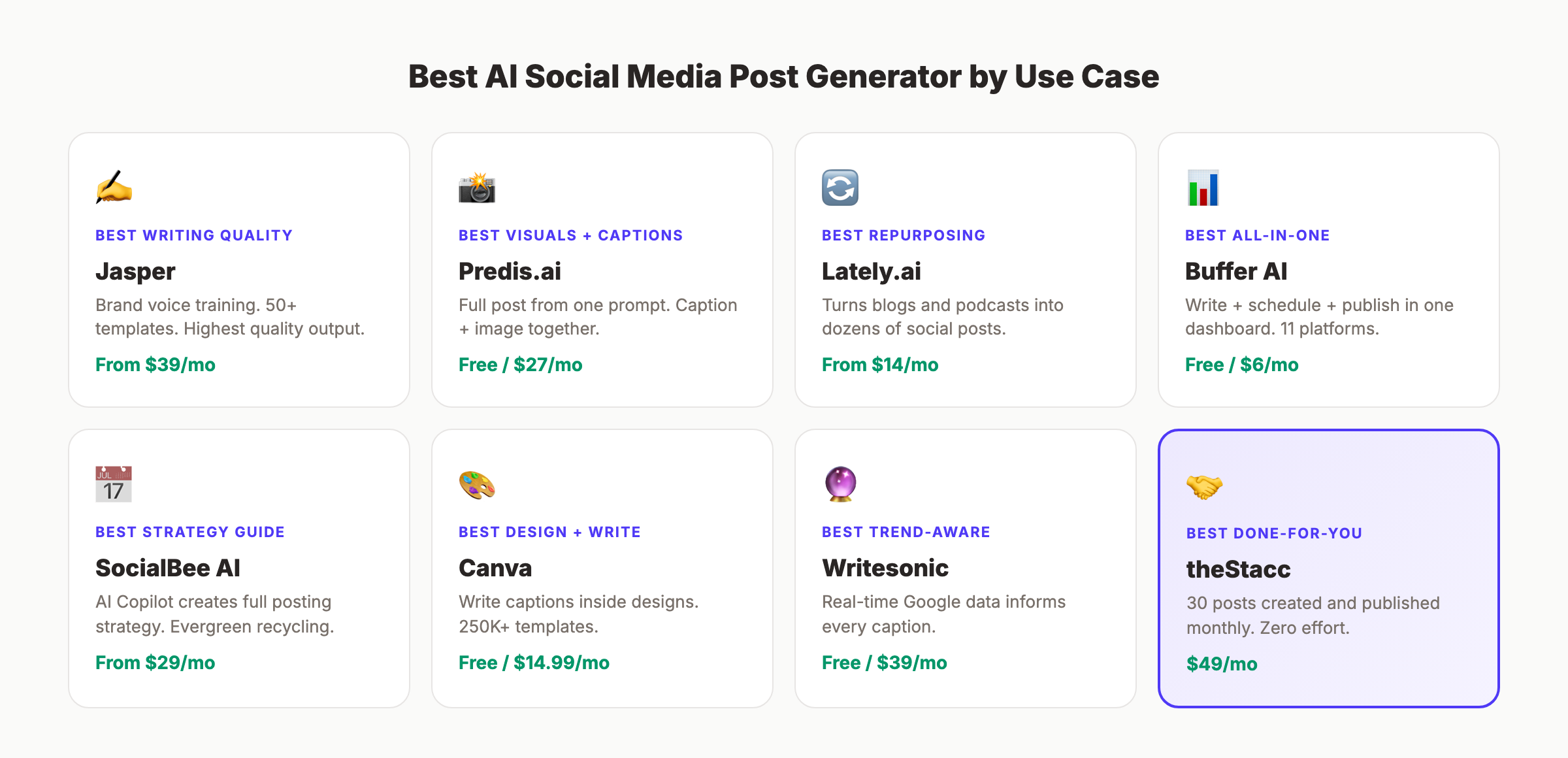
- Free — Buffer AI (3 channels) or Canva Magic Write (50 uses)
- Under $30/month — Ocoya ($15), FeedHive ($19), Lately ($14), or ContentStudio ($25)
- $30-50/month — SocialBee ($29), Predis.ai ($27), Copy.ai ($36), or Jasper ($39)
- $100+/month — Hootsuite ($99) or Writesonic Standard ($79)
What do you actually need?
- “I need captions + scheduling in one tool” — Buffer AI or SocialBee
- “I need captions + visuals generated together” — Predis.ai or Canva
- “I need the best writing quality” — Jasper or Copy.ai
- “I need to repurpose existing content” — Lately.ai
- “I need trend-informed content ideas” — ContentStudio or Writesonic
- “I want social content CREATED and published for me” — theStacc (30 posts/month, $49)
What Does AI Social Media Content Actually Cost?
| Approach | Monthly Cost | What You Get | Time Investment |
|---|---|---|---|
| Free AI tool (Buffer/Canva) | $0 | Limited captions, basic scheduling | 4-8 hrs/month |
| Budget AI tool | $15-30/mo | Full captions, scheduling, basic visuals | 3-6 hrs/month |
| Premium AI tool | $39-99/mo | Advanced writing, brand voice, analytics | 2-4 hrs/month |
| Freelance social manager | $1,500-4,000/mo | Full content creation + management | 2-3 hrs/month (managing) |
| Social media agency | $3,000-8,000/mo | Full service, strategy to execution | 1-2 hrs/month (meetings) |
| theStacc Social | $49/mo | 30 original posts created and published | 0 hrs/month |
AI tools reduce the time you spend writing. They do not eliminate it. You still prompt, review, edit, and schedule. The only approach that requires zero time investment is done-for-you.
Skip the content creation grind. theStacc creates 30 original social media posts per month and publishes them across Instagram, LinkedIn, X, and Facebook — for $49/month. Start for $1 →
FAQ
What is the best AI social media post generator in 2026?
Buffer AI is the best overall for most users. It combines AI caption generation with scheduling across 11 platforms, starting with a free plan. For the best writing quality, Jasper leads. For visual content creation, Predis.ai generates captions and images together from a single prompt.
Are there free AI social media post generators?
Yes. Buffer AI offers a free plan with 3 channels and AI included. Canva Magic Write gives 50 free uses (lifetime, not monthly). Predis.ai offers 15 free posts per month with watermarks. Copy.ai provides 2,000 free words per month. All are functional for testing but have limits that growing businesses will outgrow.
Can AI write good social media posts?
AI generates usable first drafts. According to industry data, 96% of social media professionals already use AI tools daily. The output needs human editing for tone, accuracy, and brand voice. AI saves 60% of the time spent on content creation, but human review remains essential for quality.
Should I use a standalone AI writer or an AI + scheduling tool?
If you already have a scheduling tool you like (Buffer, Later, Hootsuite), a standalone AI writer like Jasper or Copy.ai may be the better addition. If you are starting fresh, an all-in-one tool like SocialBee or ContentStudio eliminates the need to manage two separate platforms.
How much does an AI social media post generator cost?
Free plans exist (Buffer, Canva, Predis.ai, Copy.ai). Budget tools run $15-30 per month (Ocoya, FeedHive, ContentStudio). Premium tools cost $39-99 per month (Jasper, Writesonic, Hootsuite). Enterprise platforms like Sprout Social start at $199 per seat per month. For businesses that want content created and published automatically, theStacc handles social media for $49/month with 30 original posts included.
Will AI-generated social media content hurt my brand?
Not if you review it. The risk is posting unedited AI output that sounds generic or contains errors. Use AI to draft. Edit for your voice, check facts, and add personal touches. Brands that use AI as a starting point and add human refinement report increased content volume without quality loss.
The Bottom Line
The AI in social media market hit $4.12 billion in 2025 and is projected to reach $70.53 billion by 2034. These tools are not a fad.
For the best all-in-one experience, start with Buffer AI (simplest) or SocialBee (best strategy guidance). For the best writing quality, Jasper wins. For visual content, Predis.ai or Canva generates captions and graphics together. For repurposing, Lately.ai extracts maximum value from existing content.
If you want social content created and published without touching a single tool, theStacc publishes 30 original social posts per month for $49.
Start for $1 → See the difference in 3 days
This article was researched and published by theStacc. We do not sell an AI writing tool. We use several of the tools reviewed above in our own workflow. All pricing and features were verified against public sources as of March 2026.
More Best-List Posts
This post was written and published by Stacc. We compete with several tools reviewed here. All pricing and feature data verified against public sources as of March 2026.
