Fix your LCP, CLS, and INP scores with this step-by-step guide. 8 proven fixes with before-and-after benchmarks. Updated for March 2026 thresholds.
Core Web Vitals are three field metrics with published thresholds: Largest Contentful Paint under 2.5 seconds, Interaction to Next Paint under 200 milliseconds, and Cumulative Layout Shift under 0.1. Improving them means fixing server response, images, render-blocking resources, and reserved layout space. These eight steps work through each in order.
Slow websites lose rankings. They also lose customers. A 0.1-second improvement in page speed can boost retail conversions by 8.4%. Yet 40% of websites still fail Google's Core Web Vitals thresholds.
That failure costs real money. Google found that sites passing all three Core Web Vitals thresholds see 24% fewer page abandonments. Visitors bounce. Rankings slip. Competitors with faster pages take traffic that should be yours.
This guide walks you through how to improve Core Web Vitals in 8 steps. No theory. No vague advice. Each step includes the exact fix, the tool to diagnose it, and why it matters for your rankings.
We publish 3,500+ blog posts across 70+ industries. Our average SEO score is 92%. The performance standards in this guide are the same ones we apply to every site we optimize.
Here is what you will learn:
- How to audit your current LCP, CLS, and INP scores
- The 3 fixes that solve 80% of LCP problems
- How to eliminate layout shifts without redesigning your site
- Why INP replaced FID and what to do about it
- How server response time quietly kills your rankings
- A validation process to confirm your fixes actually work
What You Will Need
Time required: 2 to 4 hours (depending on site complexity)
Difficulty: Intermediate
What you will need:
- Google Search Console access
- Google PageSpeed Insights (free)
- Chrome DevTools (built into Chrome)
- Access to your site's hosting panel or CMS
- A CDN account (Cloudflare free tier works)
What Are Core Web Vitals?
Core Web Vitals are three metrics Google uses to measure real-user experience on your website. They became a ranking signal in 2021. In 2024, Google replaced First Input Delay (FID) with Interaction to Next Paint (INP). The current three metrics are:
| Metric | What It Measures | Good | Needs Work | Poor |
|---|---|---|---|---|
| LCP (Largest Contentful Paint) | Loading speed | Under 2.5s | 2.5 to 4.0s | Over 4.0s |
| INP (Interaction to Next Paint) | Responsiveness | Under 200ms | 200 to 500ms | Over 500ms |
| CLS (Cumulative Layout Shift) | Visual stability | Under 0.1 | 0.1 to 0.25 | Over 0.25 |
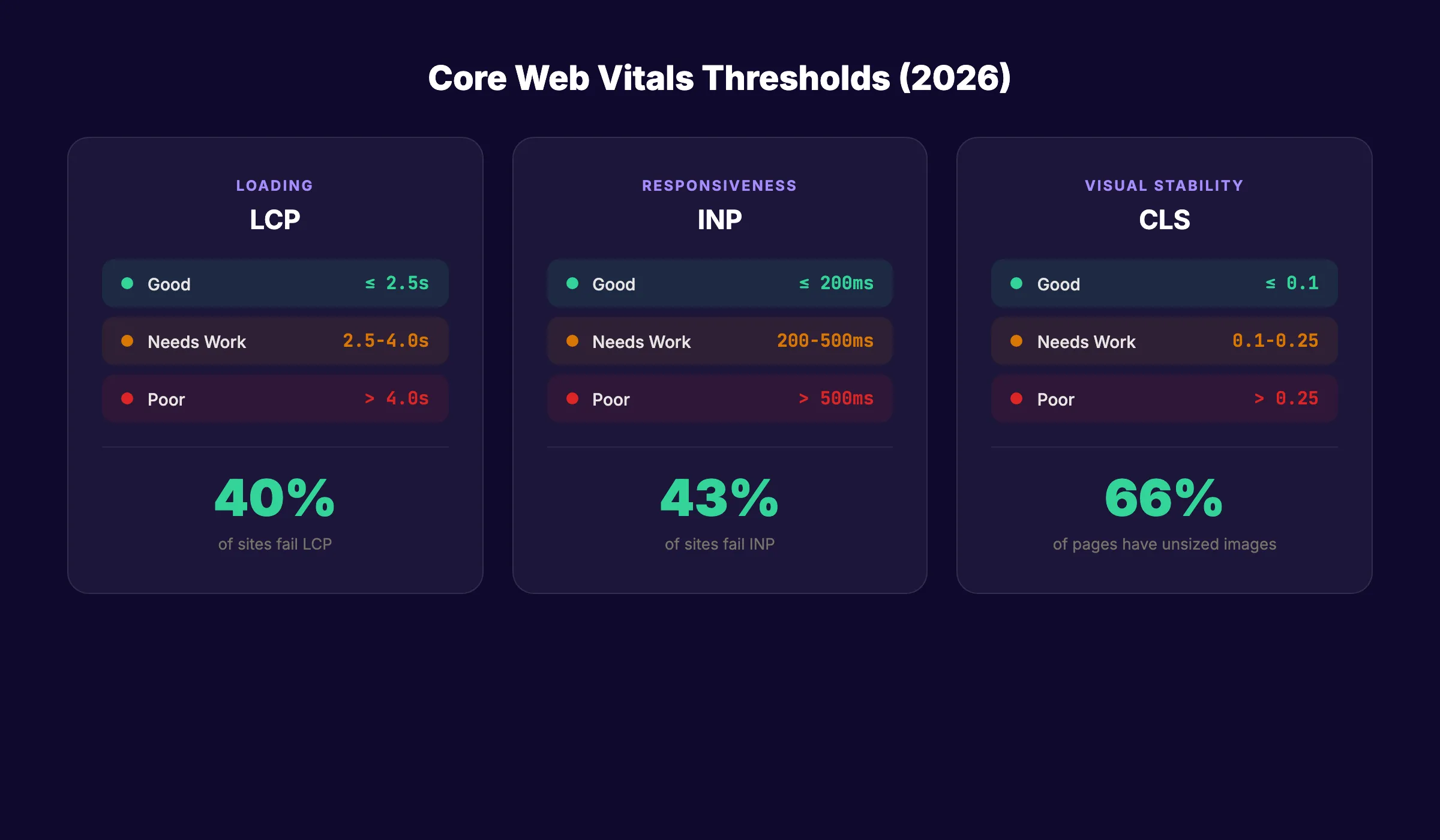
To pass, at least 75% of your page visits must score "good" across all three metrics. Pages ranking at position 1 on Google are 10% more likely to pass Core Web Vitals than pages at position 9.
43% of sites fail the INP threshold alone. That means nearly half the web hands you a competitive advantage if you fix this one metric.
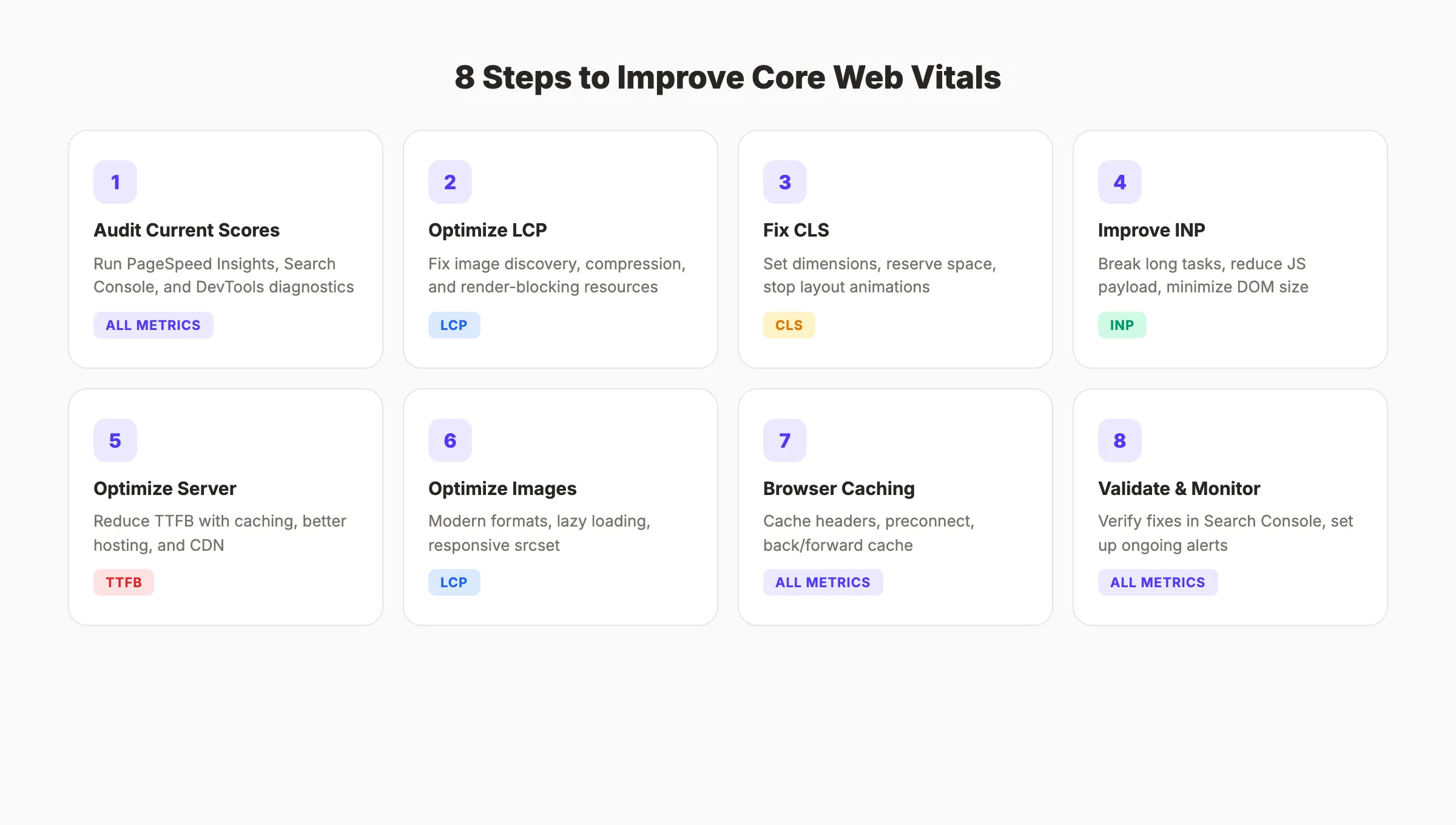
Step 1: Audit Your Current Core Web Vitals Scores
Before fixing anything, you need a baseline. Run your site through three diagnostic tools. Each one reveals different problems.
Specifically:
- Open Google Search Console and click "Core Web Vitals" in the left sidebar. This shows field data from real visitors grouped by mobile and desktop.
- Run your homepage and top 5 landing pages through PageSpeed Insights. Record the LCP, INP, and CLS scores for each page.
- Open Chrome DevTools (F12), go to the Performance tab, and record a page load. Look for long tasks (red bars) and layout shifts (purple markers).
Search Console shows the big picture. PageSpeed Insights gives page-level diagnostics. DevTools reveals the exact code causing problems.
Why this step matters: You cannot fix what you do not measure. Many site owners guess at their problems and waste hours optimizing the wrong things. A 5-minute audit tells you exactly where to start.
Pro tip: Focus on URLs with the most traffic first. Fixing Core Web Vitals on your top 10 pages delivers more ranking impact than fixing 100 low-traffic pages.
Step 2: Optimize Largest Contentful Paint (LCP)
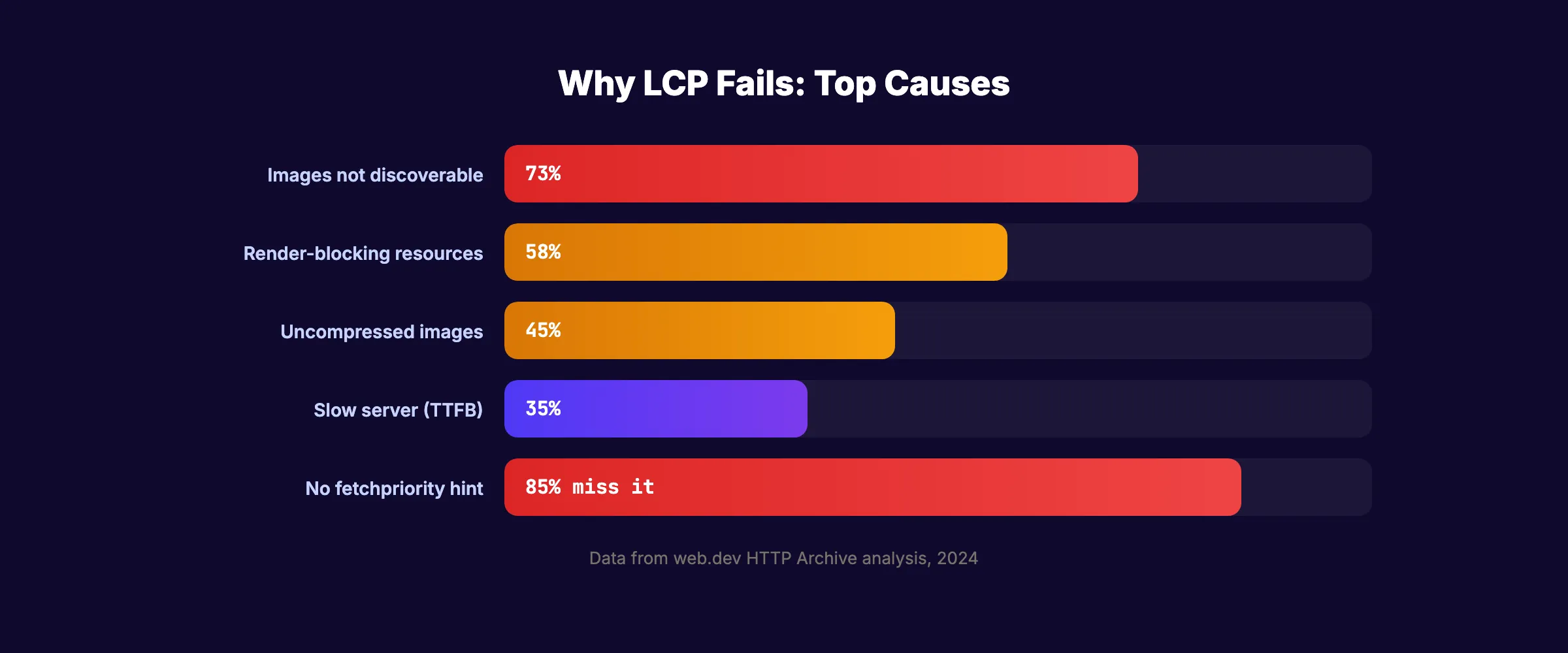
LCP measures how fast the largest visible element loads. On 73% of mobile pages, the LCP element is an image. On the rest, it is usually a text block or video poster.
Most LCP problems come from three sources. Fix them in this order.
2A. Make the LCP Resource Discoverable
35% of LCP images are not discoverable in the initial HTML response. The browser cannot start downloading what it cannot find.
Specifically:
- Use standard
<img>tags withsrcattributes. Never load hero images through CSSbackground-imageor JavaScriptdata-srclazy loading. - Add
fetchpriority="high"to your LCP image tag. Only 15% of eligible pages use this attribute. - Remove
loading="lazy"from any image above the fold. Lazy loading the LCP image delays it by hundreds of milliseconds.
2B. Compress and Serve Modern Formats
Large image files are the single biggest LCP killer. A 2 MB hero image on a 3G connection takes over 5 seconds to load.
- Convert images to WebP or AVIF format. WebP delivers 25 to 30% smaller files than JPEG at the same quality.
- Use responsive
srcsetattributes to serve smaller images on mobile devices. - Set maximum dimensions. Hero images rarely need to exceed 1200 pixels wide.
For a deeper look at image optimization, see our blog image optimization guide.
2C. Eliminate Render-Blocking Resources
CSS and JavaScript files in the <head> block rendering until they finish downloading.
- Inline critical CSS (the styles needed for above-the-fold content) directly in the HTML.
- Add
asyncordeferattributes to non-essential JavaScript files. - Move third-party scripts (analytics, chat widgets, ad tags) below the fold or load them after the page renders.
Why this step matters: LCP is the metric most directly tied to perceived speed. Users form an opinion about your site within 2.5 seconds. If the main content has not loaded by then, they leave.
Stop writing. Start ranking. theStacc publishes 30 SEO articles per month for $99.
Step 3: Fix Cumulative Layout Shift (CLS)
CLS measures how much your page content moves around as it loads. Unsized images, late-loading ads, and dynamic content injection are the usual suspects.
66% of pages have at least one unsized image. That single problem causes more layout shifts than any other factor.
3A. Set Explicit Dimensions on All Media
Every <img> and <video> tag needs width and height attributes. Without them, the browser reserves zero space. When the image loads, everything below it shifts down.
<!-- Bad: no dimensions -->
<img src="hero.webp" alt="Hero image">

<!-- Good: dimensions set -->
<img src="hero.webp" alt="Hero image" width="1200" height="630">
For responsive layouts, use the CSS aspect-ratio property instead of fixed pixel values. This reserves the correct space at any screen size.
3B. Reserve Space for Dynamic Content
Ads, embedded videos, and cookie banners all load after the initial page render. If you do not reserve space for them, they push content down.
- Set
min-heightvalues on ad containers based on the most common ad size for that slot. - Use placeholder containers with fixed aspect ratios for embedded YouTube videos and iframes.
- Load cookie banners as overlays (positioned fixed or absolute) instead of injecting them into the document flow.
3C. Stop Animating Layout Properties
Pages that animate CSS properties like margin, padding, top, or left are 15% less likely to achieve good CLS scores. Those properties trigger full layout recalculations.
Use transform instead. Translating, scaling, and rotating with transform runs on the GPU compositor thread. It does not trigger layout recalculations.
/* Bad: triggers layout shift */
.slide-in { left: 0; transition: left 0.3s; }

/* Good: no layout shift */
.slide-in { transform: translateX(0); transition: transform 0.3s; }
Why this step matters: Layout shifts frustrate users. A button that moves right as you tap it erodes trust. Google quantifies that frustration with CLS. Fixing it improves both rankings and user experience.
Step 4: Improve Interaction to Next Paint (INP)
INP replaced FID in March 2024. While FID only measured the delay before the first interaction, INP measures the responsiveness of every interaction throughout the page lifecycle. 43% of websites fail this metric.
4A. Break Up Long Tasks
Any JavaScript task exceeding 50 milliseconds becomes a "long task" that blocks user interactions. The browser cannot respond to clicks, taps, or key presses while a long task runs.
Specifically:
- Open Chrome DevTools, go to the Performance tab, and click "Record." Interact with your page, then stop recording. Red-flagged tasks are your targets.
- Break large functions into smaller chunks using
setTimeoutor thescheduler.yield()API. - Move heavy computations to Web Workers, which run on a separate thread.
4B. Reduce JavaScript Payload
Every kilobyte of JavaScript must be downloaded, parsed, and compiled before it can execute. Oversized bundles are the root cause of most INP failures.
- Use Chrome DevTools Coverage tool (Ctrl+Shift+P, type "coverage") to find unused JavaScript. Many sites ship 40 to 60% more JavaScript than they need.
- Implement code splitting. Load only the JavaScript needed for the current page.
- Audit your tag manager. Marketing and analytics tags often add 200 to 500 KB of JavaScript that runs on every page.
4C. Minimize DOM Size
Large DOM trees (over 1,500 nodes) slow down every interaction. Each click or keystroke triggers style recalculations across the entire DOM.
- Use CSS
content-visibility: autoto lazily render off-screen content. - Remove hidden elements from the DOM entirely instead of hiding them with
display: none. - Paginate or virtualize long lists instead of rendering thousands of items at once.
Why this step matters: INP is the newest Core Web Vital and the one most sites fail. Fixing it gives you an immediate ranking advantage over the 43% of sites that have not adapted yet.
Step 5: Optimize Server Response Time
Time to First Byte (TTFB) is not a Core Web Vital itself. But it directly impacts LCP. A slow server adds delay before the browser even begins rendering your page.
5A. Measure Your TTFB
Run your site through PageSpeed Insights and look for the "Server Response Time" or "Reduce initial server response time" recommendation. A good TTFB is under 800 milliseconds. Under 200 milliseconds is excellent.
5B. Implement Server-Side Fixes
- Enable server-side caching. Cache rendered HTML pages so the server does not rebuild them for every request. WordPress users should install a caching plugin like WP Super Cache or W3 Total Cache.
- Upgrade your hosting. Shared hosting plans often have TTFB over 1 second. A managed VPS or cloud hosting plan typically delivers sub-200ms responses.
- Reduce database queries. Slow database lookups are a common TTFB bottleneck. Use query caching and optimize your database indexes.
5C. Use a CDN
Only 33% of HTML documents are served from CDNs. A CDN caches your content on servers around the world. Visitors load your site from the nearest server instead of waiting for a round trip to your origin server.
Cloudflare offers a free tier that handles CDN, DNS, and basic caching. For most sites, the free plan is sufficient.
Why this step matters: Every 100 milliseconds of server delay adds directly to your LCP score. A fast server is the foundation that every other optimization builds on.
If you want to see how server performance fits into the bigger technical SEO picture, run a full SEO audit on your site.
Your SEO team. $99 per month. 30 optimized articles, published automatically.
Step 6: Optimize Images and Media
Images cause the majority of both LCP and CLS problems. A dedicated image optimization pass fixes two Core Web Vitals at once.
6A. Implement Modern Image Formats
| Format | Best For | Savings vs JPEG |
|---|---|---|
| WebP | Photos, illustrations | 25 to 30% smaller |
| AVIF | Photos, gradients | 40 to 50% smaller |
| SVG | Icons, logos, illustrations | Resolution independent |
Use the <picture> element with fallbacks:
<picture>
  <source srcset="hero.avif" type="image/avif">
  <source srcset="hero.webp" type="image/webp">
  <img src="hero.jpg" alt="Description" width="1200" height="630">
</picture>
6B. Lazy Load Below-the-Fold Images
Add loading="lazy" to every image except the LCP element. This defers downloading images until the user scrolls near them. It reduces initial page weight by 30 to 50% on image-heavy pages.
6C. Serve Responsive Images
A 2400-pixel-wide image on a 375-pixel-wide phone screen wastes 80% of the downloaded data. Use srcset and sizes to serve appropriately sized images:
<img
  src="image-800.webp"
  srcset="image-400.webp 400w, image-800.webp 800w, image-1200.webp 1200w"
  sizes="(max-width: 600px) 400px, (max-width: 1024px) 800px, 1200px"
  alt="Description"
  width="1200"
  height="630"
>
For a complete walkthrough on image optimization for SEO, read our blog image optimization guide.
Why this step matters: Images account for an average of 50% of a page's total weight. Optimizing them is the highest-impact change you can make for both LCP and overall page speed.
Step 7: Enable Browser Caching and Resource Hints
Returning visitors should never re-download resources they already have. Browser caching and resource hints eliminate redundant network requests.
7A. Set Cache Headers
Configure your server to send proper cache headers for static assets:
Cache-Control: public, max-age=31536000, immutableThis tells browsers to cache CSS, JavaScript, images, and fonts for one year. Use file hashing (e.g., styles.a1b2c3.css) to bust the cache when files change.
7B. Preconnect to Third-Party Origins
If your page loads resources from external domains (Google Fonts, analytics, ad servers), add preconnect hints in your <head>:
<link rel="preconnect" href="https://fonts.googleapis.com">
<link rel="preconnect" href="https://fonts.gstatic.com" crossorigin>
Preconnect eliminates the DNS lookup, TCP handshake, and TLS negotiation for those domains. That saves 100 to 300 milliseconds per origin.
7C. Use the Back/Forward Cache
The back/forward cache (bfcache) stores a complete snapshot of your page in memory. When users hit the back button, the page restores instantly with zero layout shifts and zero LCP delay.
Google's 2022 bfcache rollout produced the single biggest annual improvement in CLS scores across the web. To qualify:
- Do not use
Cache-Control: no-storeon HTML pages - Remove
unloadevent listeners from your JavaScript - Close open
IndexedDBconnections before the page hides
Why this step matters: Caching improvements compound. A returning visitor with cached resources experiences near-instant page loads. Google measures real-user data. Faster repeat visits improve your field scores across all three metrics.
Step 8: Validate and Monitor Your Improvements
Fixes mean nothing until Google confirms them. Core Web Vitals use field data from real users, not lab scores. Validation takes time.
8A. Verify in PageSpeed Insights
Run each fixed page through PageSpeed Insights again. Compare the "Origin Summary" field data (top of the report) with your baseline from Step 1. If the field data still shows the old scores, wait. Field data updates on a rolling 28-day average.
8B. Validate in Search Console
Go to the Core Web Vitals report in Google Search Console. Click "Validate Fix" next to any issue group you addressed. Google re-crawls the affected URLs over the next 2 weeks and confirms whether the fix succeeded.
8C. Set Up Ongoing Monitoring
Core Web Vitals are not a one-time fix. New code deployments, plugin updates, and content changes can introduce regressions.
- Check the Core Web Vitals report in Search Console monthly.
- Use DebugBear or SpeedCurve for automated performance monitoring with alerts.
- Add Lighthouse CI to your deployment pipeline to catch regressions before they reach production.
Why this step matters: Field data takes 28 days to fully update. If you skip validation, you might assume a fix worked when it did not. Ongoing monitoring catches regressions before they impact rankings.
3,500+ blogs published. Every article is SEO-scored before publish. See what theStacc can do for your site.
Results: What to Expect
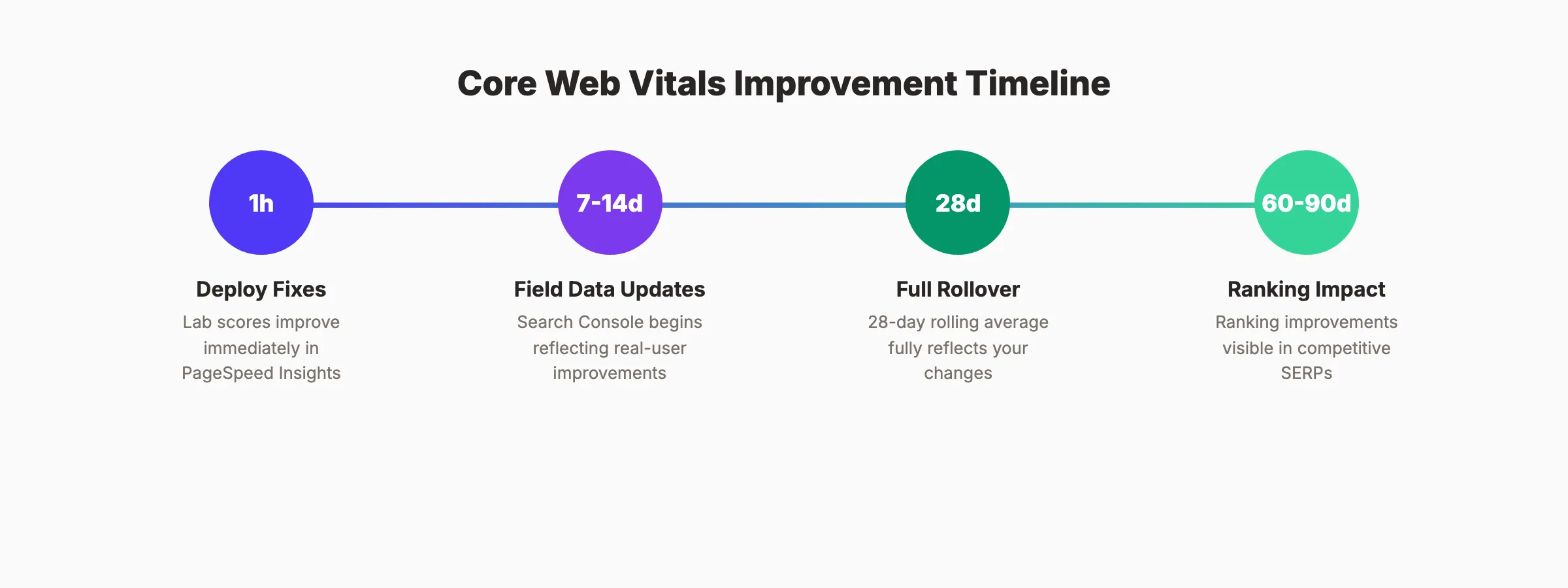
After completing these 8 steps, here is a realistic timeline:
- Within 1 hour: Lab scores (PageSpeed Insights) show improvement immediately after deployment
- Within 7 to 14 days: Search Console begins updating field data for high-traffic pages
- Within 28 days: Full 28-day rolling average reflects your changes in field data
- Within 60 to 90 days: Ranking improvements become visible if Core Web Vitals was a limiting factor
The Economic Times reduced bounce rates by 43% after optimizing LCP and CLS. Rakuten 24 saw a 53% increase in revenue per visitor after fixing their Core Web Vitals. Your results will vary based on how far below the thresholds you start and how competitive your niche is.
Core Web Vitals alone will not take a thin content page from position 50 to position 1. But on competitive SERPs where content quality is similar, passing all three metrics is the tiebreaker.
Troubleshooting
Problem: PageSpeed Insights lab score is green but field data still shows red. Solution: Lab and field data measure different things. Lab data tests a simulated environment. Field data reflects real user experiences across many devices and connections. Wait 28 days for the rolling average to update. If field data stays red, your real users have slower devices or connections than the lab simulation assumes.
Problem: CLS score fluctuates between good and poor on the same page. Solution: CLS can vary by visit. Late-loading ads, A/B testing scripts, or cookie consent banners cause intermittent shifts. Use the Web Vitals Chrome extension to observe CLS in real time and identify which element shifts.
Problem: INP is poor but there are no obvious long tasks in DevTools. Solution: INP measures all interactions, not just the first one. Profile specific interactions (accordion toggles, form submissions, dropdown menus) rather than just the initial page load. The slowest interaction across the entire visit determines your INP score.
What practitioners are saying on X
AI search advice ages quickly. Here is high-signal public discussion from SEO and growth operators — context for your roadmap, not a substitute for primary data.
- @hridoyreh (Mar 2026): Widely shared SEO skill tree: foundations, research, technical, on-page, content, links, AI SEO/GEO, analytics, UX, brand, programmatic — useful map for stats and how-to posts. See the post on X.
- @jakezward (Feb 2026): 2026 SEO predictions emphasize AI Overview share-of-SERP, schema for LLM token efficiency, brand mentions in AI answers as a KPI, proprietary data as a moat, and content refresh beating net-new AI slop. See the post on X.
- @HlynurStefDev (Jul 2026): Public case: niche site traffic jumped from ~18 to 4,162 Google visits/month after focused technical/on-page SEO work (GSC screenshots claimed) — reminds that fundamentals still move numbers. See the post on X.
Grok, AI Overviews, and multi-engine visibility
Technical topics like “improve core web vitals” win AI citations when steps, code samples, and failure modes are explicit. Grok and other engines prefer ordered fix lists over vague “best practices” marketing language.
- Google AI Overviews: Use passage-ready answers, tables, and FAQ schema where relevant.
- ChatGPT / Perplexity: Cite named sources next to key claims.
- Grok: Maintain accurate entity facts on-site and in high-signal X posts.
Publish content built for Google and AI citations. theStacc’s Content SEO module ships SEO-scored articles structured for rankings and generative engines — including clearer entity pages models like Grok can quote.
FAQ
Good scores are LCP under 2.5 seconds, INP under 200 milliseconds, and CLS under 0.1. At least 75% of your page visits must hit these thresholds for Google to count the page as passing.
Yes. Core Web Vitals are a confirmed Google ranking factor. Pages at position 1 are 10% more likely to pass Core Web Vitals than pages at position 9. The impact is strongest on competitive SERPs where content quality is similar between ranking pages.
Google replaced First Input Delay (FID) with Interaction to Next Paint (INP) in March 2024. FID only measured the delay before the first interaction. INP measures the responsiveness of every interaction throughout the entire page session. This makes INP a much stricter and more accurate metric.
Field data in Search Console updates on a 28-day rolling average. Most sites see field data improvements within 2 to 4 weeks after deploying fixes. Ranking changes, if Core Web Vitals was a limiting factor, typically appear within 60 to 90 days. For more on the full ranking timeline, read our guide on how to rank higher on Google.
Partially. CMS users can install caching plugins, enable CDNs, and compress images without writing code. WordPress plugins like WP Rocket and Autoptimize handle many optimizations automatically. But fixing INP and advanced CLS issues usually requires JavaScript changes. Most hosting providers and CDN services also offer one-click performance features that help with LCP and TTFB.
Core Web Vitals separate fast sites from slow ones. Google quantifies the difference. Now you have the 8 steps to land on the right side of that line.
Start with Step 1. Audit your scores. Then work through each step in order. The sites that pass all three metrics today have a measurable advantage over the 40% that do not.
Rank everywhere. Do nothing. Blog SEO, Local SEO, and Social on autopilot.
Sources & references
- [1] Princeton / Georgia Tech et al. — GEO research (arXiv:2311.09735)
- [2] @hridoyreh on X — Widely shared SEO skill tree: foundations, research, technical, on-page, content, links, AI SEO/GEO, analytics, UX, bran
- [3] @jakezward on X — 2026 SEO predictions emphasize AI Overview share-of-SERP, schema for LLM token efficiency, brand mentions in AI answers
- [4] @HlynurStefDev on X — Public case: niche site traffic jumped from ~18 to 4,162 Google visits/month after focused technical/on-page SEO work (G
- [5] Referenced source — web.dev

Plan topics, review article drafts, and publish to a connected CMS.
Weekly local SEO teardowns
One practical email a week. Map Pack, GBP, AI Overviews — no fluff. Unsubscribe anytime.