
Blog Image Optimization for SEO (2026): Guide
Practical blog image optimization seo strategies for 2026: step-by-step tactics, real examples, and tools to improve rankings and drive organic traffic.

Most blog posts treat images as decoration. That mistake costs real rankings.
Unoptimized images slow your page, confuse search engines, and waste traffic from Google Images. A single bloated hero image can add 3 seconds to your load time and push your Largest Contentful Paint score into the red.
This guide covers everything you need to know about blog image optimization for SEO. Every chapter walks through a specific optimization area with clear steps you can apply today.
We publish 3,500+ blog posts across 70+ industries. Image optimization is part of every single one. This guide covers what we have learned.
Here is what you will learn:
- How to pick the right image format for every use case
- How to name image files so Google understands them
- The exact alt text formula that improves rankings
- How to compress images without visible quality loss
- Technical optimizations most bloggers skip
- Where to place images for maximum SEO value
- A complete checklist you can use on every post
Table of Contents
- Chapter 1: Why Blog Images Matter for SEO Rankings
- Chapter 2: How to Choose the Right Image Format
- Chapter 3: File Naming That Search Engines Understand
- Chapter 4: How to Write Alt Text That Ranks
- Chapter 5: Image Compression Without Quality Loss
- Chapter 6: Technical Image Optimization
- Chapter 7: Image Placement and Context Signals
- Chapter 8: The Blog Image Optimization Checklist
- FAQ
Chapter 1: Why Blog Images Matter for SEO Rankings {#chapter-1}
Images are not optional for blog SEO. They directly affect your rankings through page speed, user engagement, and search visibility. Google confirmed that Core Web Vitals are ranking signals. Images are the biggest factor in all three metrics.
Images Drive Real Search Traffic
Google Images accounts for 10% of all search traffic to websites. Google Lens processes over 12 billion visual searches every month. That number grows 30% year over year.
When you optimize content for SEO, images are part of the equation. A properly optimized blog image can rank in Google Images, appear in image packs within standard search results, and show up in Google Discover feeds.
55.62% of standard search results in the United States include an image pack. That is more than half of all searches showing image results alongside traditional blue links.
Core Web Vitals and Image Weight
Images account for 50 to 70% of total page weight on the average website. That single stat explains why image optimization delivers the biggest speed wins.
Two Core Web Vitals metrics connect directly to images:
| Metric | What It Measures | Image Impact |
|---|---|---|
| Largest Contentful Paint (LCP) | Load time of largest visible element | Hero images are usually the LCP element |
| Cumulative Layout Shift (CLS) | Visual stability during load | Images without dimensions cause layout shifts |
Only 42% of mobile websites pass all three Core Web Vitals thresholds. Optimizing images is the fastest way to improve your Core Web Vitals and gain a ranking edge over competitors who ignore this.
A one-second delay in page load time reduces conversions by 7%. For a blog generating 10,000 monthly visits, that delay costs hundreds of potential leads.
The Visual Search Opportunity
Visual search is not a future trend. It is a current traffic source. Google Lens, Pinterest Lens, and AI search features all pull from optimized images.
Blog posts with optimized images appear in AI Overviews, featured snippets with thumbnails, and rich results. If you want to rank higher on Google, image optimization is no longer optional.
Chapter 2: How to Choose the Right Image Format {#chapter-2}
The image format you choose affects file size, quality, and browser compatibility. Picking the wrong format bloats your page. Picking the right one gives you smaller files with better visual quality.
WebP vs JPEG vs PNG vs AVIF
Each format serves a different purpose. Here is how they compare for blog images:
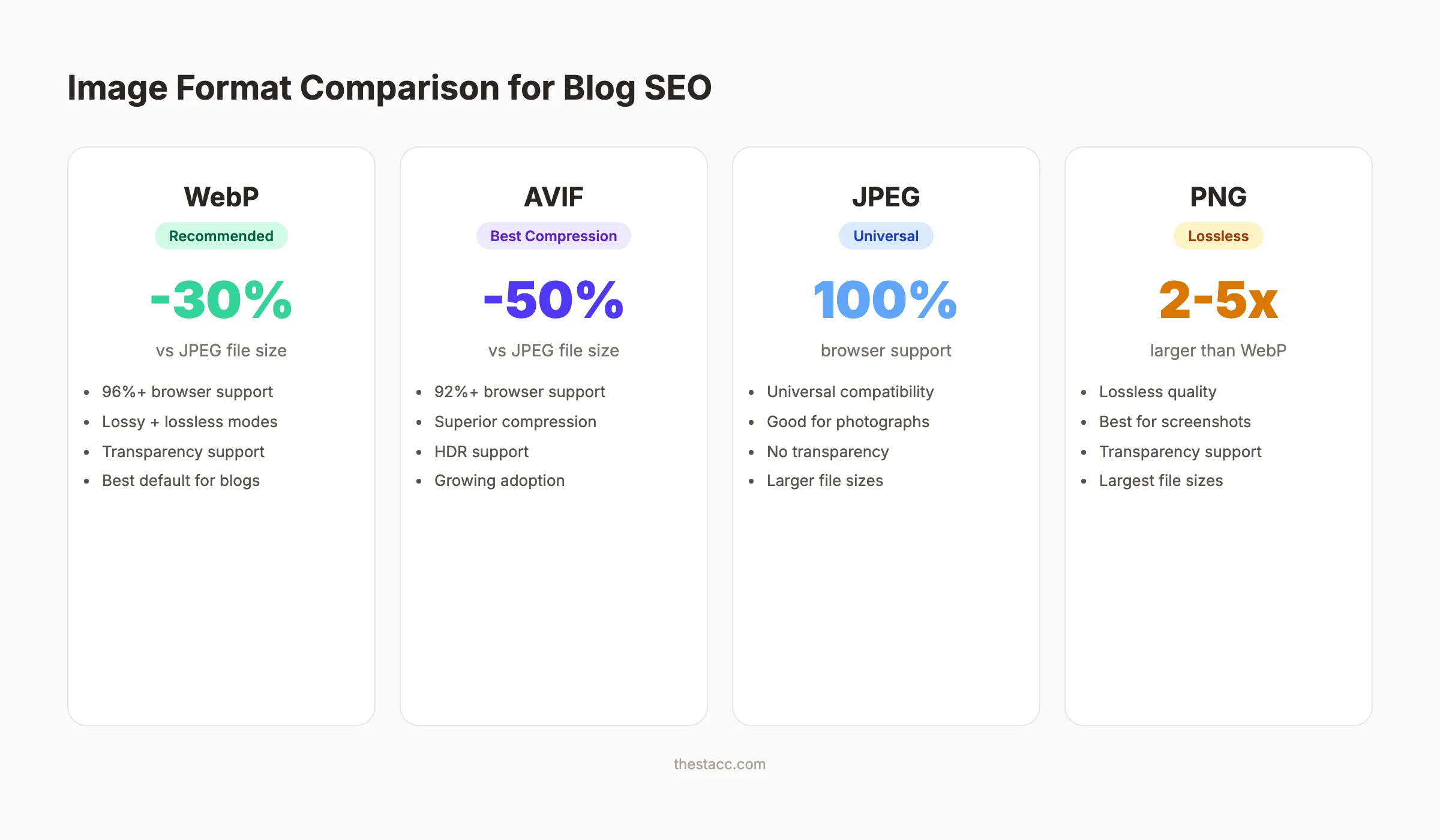
| Format | Best For | File Size | Quality | Browser Support |
|---|---|---|---|---|
| WebP | Most blog images | 25-35% smaller than JPEG | Excellent | 96%+ globally |
| JPEG | Photographs, complex images | Baseline standard | Good with compression | Universal |
| PNG | Logos, screenshots, transparency | 2-5x larger than WebP | Lossless | Universal |
| AVIF | Maximum compression needs | 50% smaller than JPEG | Excellent | 92%+ globally |
| SVG | Icons, illustrations, diagrams | Tiny (vector-based) | Perfect at any size | Universal |
WebP is the default choice for blog images in 2026. It offers 25 to 35% smaller file sizes than JPEG with comparable visual quality. Browser support exceeds 96% globally.
AVIF delivers even better compression. File sizes drop 50% compared to JPEG. Support reached 92% in early 2026. Use AVIF when maximum compression matters and your CMS supports it.
When to Use Each Format
Follow this decision tree for every blog image:
- Photograph or complex image? Use WebP. Fall back to JPEG.
- Screenshot with text? Use WebP or PNG.
- Logo or icon? Use SVG.
- Transparency needed? Use WebP or PNG.
- Maximum compression priority? Use AVIF with WebP fallback.
Format Conversion Tools
Most content management systems convert images automatically. WordPress generates WebP versions natively since version 5.8. For manual conversion, use tools like Squoosh, ImageOptim, or ShortPixel.
When you write SEO blog posts, build image format selection into your publishing workflow. Convert before uploading, not after.
Your blog images are part of your SEO strategy. Stacc publishes 30 optimized blog posts per month with every image compressed and formatted. Start for $1 →
Chapter 3: File Naming That Search Engines Understand {#chapter-3}
The file name is the first signal Google reads about your image. A descriptive file name tells search engines what the image shows before they analyze a single pixel.
Descriptive Keyword-Rich File Names
Google treats hyphens as word separators in file names. That means blog-image-optimization-checklist.png reads as four separate words to the search engine.
Follow these rules for every image file name:
- Describe what the image shows. Use 3 to 5 words.
- Include relevant keywords naturally. Do not force them.
- Use hyphens between words. Never underscores or spaces.
- Keep names lowercase. Avoid capitalization.
- Be specific. “seo-audit-results-dashboard.png” beats “screenshot1.png” every time.
Here are examples of good versus bad file names:
| Bad File Name | Good File Name |
|---|---|
| IMG_4523.jpg | blog-header-image-example.webp |
| screenshot.png | google-search-console-performance.webp |
| photo-1.jpeg | webp-vs-jpeg-compression-comparison.webp |
| image_final_v2.png | alt-text-seo-formula.webp |
File Naming Mistakes to Avoid
Three common mistakes undermine your image file names:
- Generic names. Camera-generated names like DSC_0042 provide zero SEO value.
- Keyword stuffing. “seo-seo-optimization-seo-images-seo.webp” triggers spam signals.
- Underscores instead of hyphens. Google reads underscores as joiners, not separators. The file “blog_image_seo” reads as one word.
Rename every image before uploading. This is a one-time step that pays ranking dividends for the life of the post. Strong file names support your overall on-page SEO strategy.
Chapter 4: How to Write Alt Text That Ranks {#chapter-4}
Alt text is the single most important image SEO element. It tells screen readers what an image shows, gives search engines context, and directly influences image search rankings. Getting alt text right is non-negotiable for blog image optimization for SEO.
What Alt Text Does for SEO
Alt text serves three purposes:
- Accessibility. Screen readers read alt text aloud. Over 2.2 billion people worldwide have vision impairments. Proper alt text makes your content accessible.
- Search engine context. Google uses alt text to understand image content and its relationship to surrounding text.
- Image search rankings. Alt text is the primary ranking factor for Google Images results.
Google confirmed in their image SEO documentation that alt text is one of the most important signals for image search.
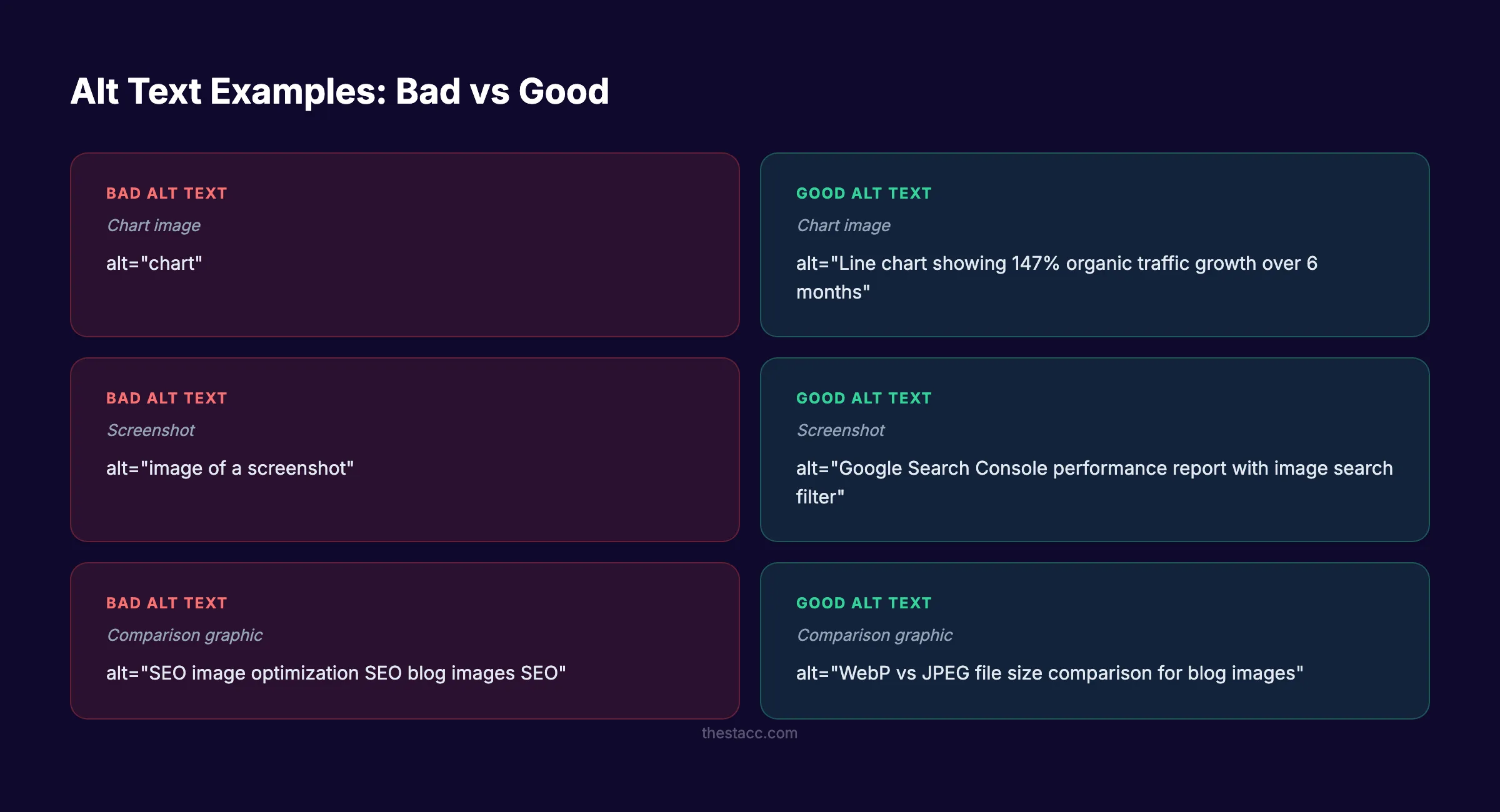
The Alt Text Formula
Use this formula for every blog image:
[Specific description] + [relevant context] + [keyword when natural]
Keep alt text under 125 characters. Screen readers cut off at that length.
Examples of strong alt text:
| Image | Weak Alt Text | Strong Alt Text |
|---|---|---|
| Chart showing organic traffic growth | ”chart" | "Line chart showing 147% organic traffic growth over 6 months” |
| Screenshot of Google Search Console | ”screenshot" | "Google Search Console performance report with image search filter” |
| Comparison of image formats | ”comparison" | "WebP vs JPEG file size comparison for blog images” |
| Blog post with optimized images | ”blog post" | "WordPress blog post with compressed WebP images and alt text” |
Alt Text Mistakes That Hurt Rankings
Avoid these patterns. They are common and they all hurt your rankings:
- Starting with “image of” or “photo of.” Screen readers already announce images. This wastes characters.
- Keyword stuffing. “SEO image optimization SEO blog images SEO” reads as spam to both humans and algorithms.
- Leaving alt text empty. Every informational image needs alt text. The only exception is purely decorative images.
- Duplicating alt text across images. Each image should have unique alt text that matches its specific content.
When you write alt text, think about what a person would need to know if they could not see the image. That standard produces the best results for both accessibility and SEO. This connects to broader E-E-A-T signals that Google evaluates for content quality.
Chapter 5: Image Compression Without Quality Loss {#chapter-5}
Large image files are the top cause of slow blog pages. Compression reduces file size while preserving visual quality. The right approach removes unnecessary data without visible degradation.
Target File Sizes for Blog Images
Follow these benchmarks for blog image file sizes:
| Image Type | Target File Size | Max Width |
|---|---|---|
| Inline blog images | Under 100 KB | 800-1,200 px |
| Hero or banner images | Under 200 KB | 1,200-1,600 px |
| Thumbnails | Under 30 KB | 300-400 px |
| Infographics | Under 300 KB | 800-1,200 px |
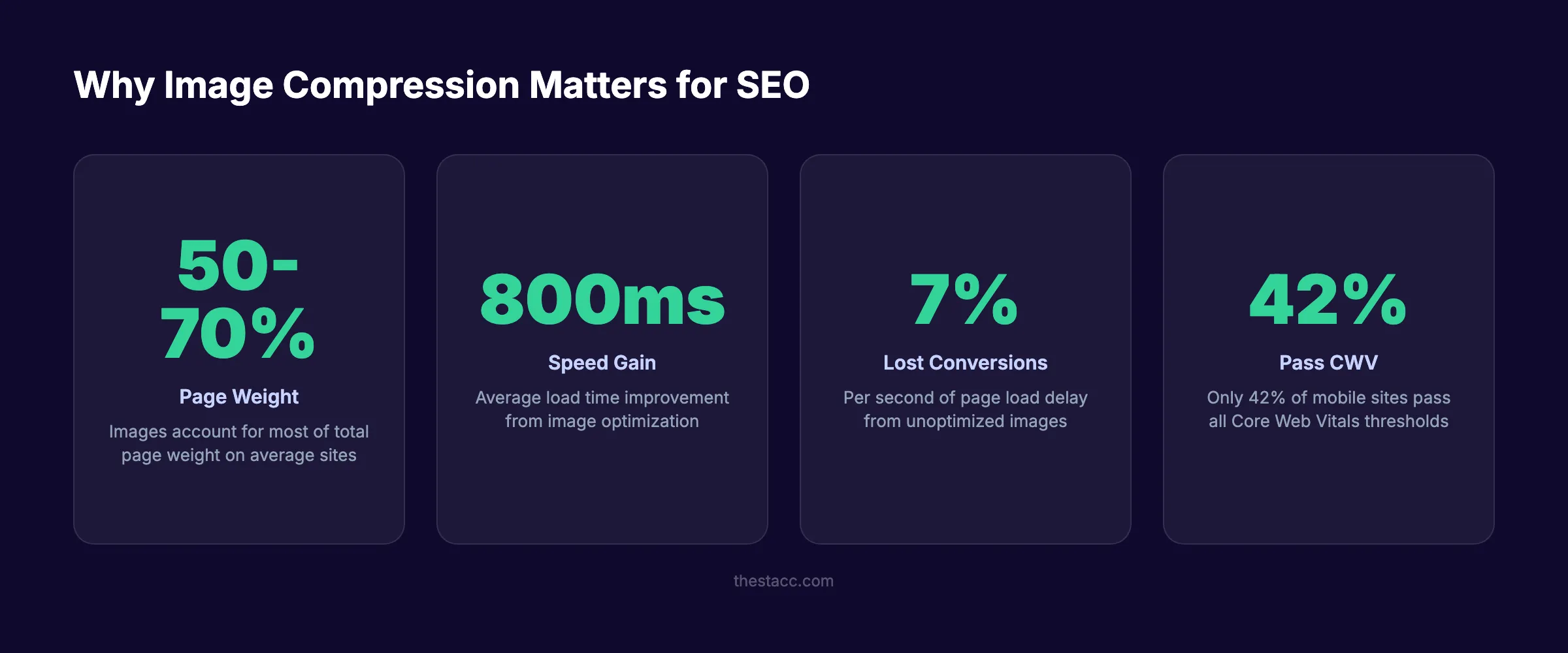
Image optimization typically saves 800 to 1,200 milliseconds in load time. That improvement alone can move your LCP score from “needs improvement” to “good.”
Lossy vs Lossless Compression
Two compression methods exist. Each fits different scenarios.
Lossy compression removes data permanently. The file gets smaller. Visual quality decreases slightly. At a quality setting of 75 to 85%, the difference is invisible to human eyes. JPEG and WebP both support lossy compression.
Lossless compression removes redundant data without quality loss. Files stay larger than lossy alternatives. PNG supports lossless compression. Use it for screenshots and images with text where every pixel matters.
For most blog images, lossy compression at 80% quality is the correct choice. You save 60 to 80% of the file size with no visible difference.
Compression Tools and Methods
According to Semrush’s image SEO research, proper compression combined with format selection accounts for the largest measurable ranking improvements from image optimization.
These tools handle compression reliably:
- Squoosh (web app). Free. Supports all formats. Visual quality comparison.
- ShortPixel (WordPress plugin). Automatic compression on upload. WebP conversion included.
- ImageOptim (Mac app). Batch processing. Strips metadata.
- TinyPNG (web app). Simple drag-and-drop. PNG and JPEG support.
Automate compression in your publishing workflow. Manual compression does not scale when you publish 30 posts per month. Build it into your CMS or use a plugin that processes images on upload.
Stacc handles image optimization on every post we publish. 30 SEO-optimized articles per month, all compressed and formatted. Start for $1 →
Chapter 6: Technical Image Optimization {#chapter-6}
Beyond file formats and compression, several technical implementations affect how search engines crawl and display your images. These steps separate well-optimized blogs from the rest.
Responsive Images with Srcset
A single image size does not work across all devices. Desktop screens, tablets, and phones all need different resolutions. The srcset attribute tells browsers which image version to load based on screen size.
<img
  src="blog-image-800.webp"
  srcset="blog-image-400.webp 400w,
          blog-image-800.webp 800w,
          blog-image-1200.webp 1200w"
  sizes="(max-width: 600px) 400px,
         (max-width: 1024px) 800px,
         1200px"
  alt="Blog image optimization example"
  width="800"
  height="450"
>
Always include width and height attributes. These prevent Cumulative Layout Shift by reserving space before the image loads. Your blog post structure should account for responsive images at every breakpoint.
Lazy Loading Below the Fold
Lazy loading defers image downloads until a user scrolls near them. This speeds up initial page load dramatically.
Apply lazy loading to every image below the fold:
<img src="image.webp" loading="lazy" alt="Description here">Do not lazy load your hero image or any image visible in the initial viewport. That hero image is likely your LCP element. Lazy loading it delays your most critical performance metric.
Modern browsers support native lazy loading through the loading="lazy" attribute. No JavaScript required.
Image Sitemaps and Structured Data
An image sitemap tells Google about images that might not be discoverable through normal crawling. This is especially useful for images loaded through JavaScript or CSS.
Add image entries to your existing XML sitemap or create a dedicated image sitemap. If you already created an XML sitemap, extend it with image tags.
Structured data markup adds context for rich results. The ImageObject schema type communicates image details directly to search engines:
- Image URL
- Caption
- Creator attribution
- License information
Adding structured data increases eligibility for rich results in Google Images, including prominent badges and enhanced displays. Pair this with your overall SEO audit to catch missing structured data across your site.
Chapter 7: Image Placement and Context Signals {#chapter-7}
Where you place images in your blog post matters as much as how you optimize them. Google reads surrounding text to understand image context. Strategic placement strengthens both the image and the content around it.
Where to Place Images in Blog Posts
Follow these placement rules for maximum SEO value:
- Place at least 1 image per 300 to 500 words. Posts with regular visual breaks keep readers scrolling longer.
- Put the first image above the fold. This is your hero image. It anchors the LCP metric and sets reader expectations.
- Place images immediately after the heading they support. This creates a strong contextual signal for search engines.
- Use images to break up dense sections. Long text blocks increase bounce rate. Images create natural reading pauses.
Blog posts with images every 300 to 500 words earn higher engagement metrics. Those engagement signals feed back into search rankings through user behavior data.
Captions, Titles, and Surrounding Text
Captions are one of the most-read elements on any page. Eye-tracking studies confirm that readers scan captions even when they skip body text.
Use captions when they add genuine value:
- Explain what the image shows. “Compression comparison: Original JPEG at 450 KB vs WebP at 120 KB.”
- Add context not in the alt text. Captions serve sighted users. Alt text serves screen readers.
- Include keywords naturally. Do not force them.
The paragraph immediately before and after an image gives Google strong context signals. Mention what the image shows in your body text. This reinforces the connection between image and content for both search engines and readers.
This principle applies across all SEO content writing. Images support your content. Your content supports your images. Both should reinforce each other.
Done-for-you blog SEO with optimized images on every post. We handle the writing, optimization, and publishing. Start for $1 →
Chapter 8: The Blog Image Optimization Checklist {#chapter-8}
Use this checklist on every blog post before publishing. Each item takes seconds to verify and directly affects your search rankings.
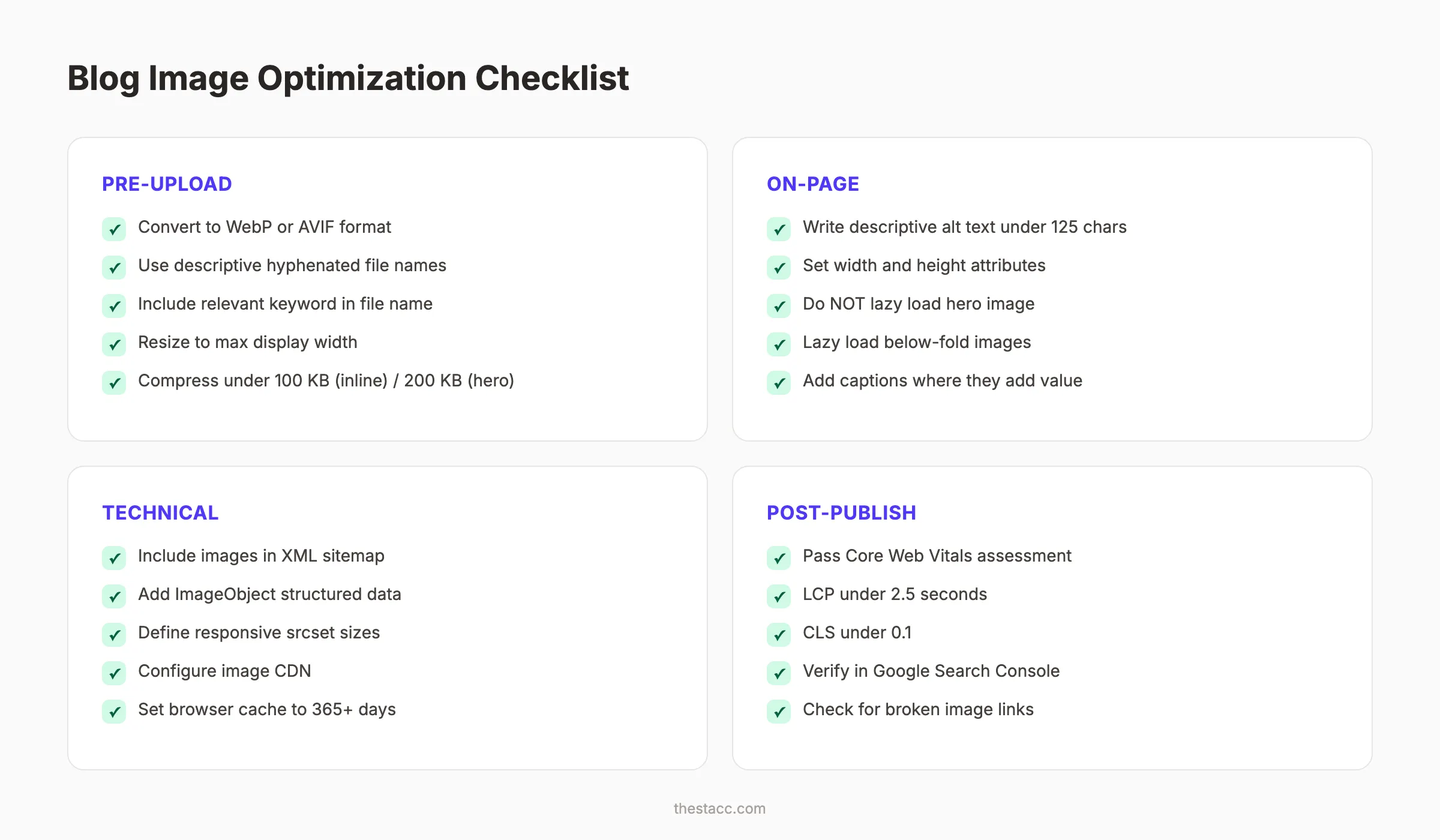
Pre-Upload Checklist
- Image format is WebP or AVIF (not raw JPEG or PNG)
- File name is descriptive with hyphens between words
- File name includes a relevant keyword naturally
- Image is resized to maximum display width (not larger)
- File size is under 100 KB for inline images
- File size is under 200 KB for hero images
On-Page Checklist
- Alt text is descriptive and under 125 characters
- Alt text includes keyword where natural
- Width and height attributes are set
- Hero image is not lazy loaded
- Below-fold images use loading=“lazy”
- Image is placed near relevant text content
- Caption added where it provides value
Technical Checklist
- Images are included in XML sitemap
- Structured data added for key images
- Responsive srcset defined for multiple sizes
- Image CDN configured for global delivery
- Browser caching headers set for 365+ days
Post-Publish Verification
- Page passes Core Web Vitals assessment
- LCP is under 2.5 seconds
- CLS is under 0.1
- Images appear in Google Search Console image report
- No broken image links
Run this checklist alongside your broader blog SEO process. Image optimization compounds with every other on-page factor. When every element is optimized, rankings follow.
You can also use our free on-page SEO checker to verify image optimization across your entire page.
FAQ {#faq}
What is the best image format for blog SEO in 2026?
WebP is the best default format for blog images. It delivers 25 to 35% smaller file sizes than JPEG with equivalent visual quality. Browser support exceeds 96% globally. AVIF offers even better compression at 92% support. Use WebP for all standard blog images and AVIF when maximum compression is the priority.
How many images should a blog post have for SEO?
Place at least 1 image per 300 to 500 words of content. A 2,000-word blog post should include 4 to 7 images minimum. More images improve engagement metrics and provide additional ranking opportunities in Google Images. Each image needs unique, descriptive alt text.
Does image file size affect SEO rankings?
Yes. Image file size directly impacts page load speed, which is a confirmed Google ranking factor through Core Web Vitals. Images account for 50 to 70% of average page weight. Keeping inline images under 100 KB and hero images under 200 KB measurably improves LCP scores and search rankings.
How long should alt text be for SEO?
Keep alt text under 125 characters. Screen readers cut off at that length. Describe the image specifically, include relevant keywords naturally, and avoid starting with “image of” or “photo of.” Every informational image needs unique alt text. Only decorative images should have empty alt attributes.
Should I use lazy loading on all blog images?
No. Apply lazy loading only to images below the fold. Your hero image and any images visible in the initial viewport should load immediately. Lazy loading those above-fold images delays your Largest Contentful Paint score. Use the native loading="lazy" HTML attribute on all other images.
Does Google read image captions for SEO?
Google uses surrounding text, including captions, to understand image context. Captions provide an additional signal about what the image shows. They are also among the most-read elements on a page, which improves user engagement. Use captions when they add genuine informational value.
That covers every aspect of blog image optimization for SEO. Start with the checklist in Chapter 8, then work through each chapter to close gaps in your current process.
Every image on your blog is a ranking opportunity. Optimize each one and the traffic compounds over time. That is the Content Compound Effect in action.
Stacc publishes 30 SEO-optimized blog posts per month. Every image is compressed, formatted, and tagged. You do nothing. Start for $1 →
Related Tools & Resources
Free SEO Tools:
Best Lists:

Written by
Siddharth GangalSiddharth is the founder of theStacc and Arka360, and a graduate of IIT Mandi. He spent years watching great businesses lose organic traffic to competitors who simply published more. So he built a system to fix that. He writes about SEO, content at scale, and the tactics that actually move rankings.
30 SEO blog articles published every month
Keyword-optimized, scheduled, and live on your site. Automatically.
30-day trial · Cancel anytime
theStacc
Stop writing SEO content manually
30 blog articles, 30 GBP posts, and social media content. Published every month. Automatically.
Start Your $1 Trial$1 for 3 days · Cancel anytime