
On-Page SEO (2026): Strategies, Tactics & Examples
Practical on page seo guide strategies for 2026: step-by-step tactics, real examples, and tools to improve rankings and drive organic traffic.
Most websites have on-page SEO problems they do not know about. A missing title tag here. A broken header there. A page that loads 2 seconds too slow. Each one silently kills rankings.
The cost adds up fast. 96.55% of all indexed pages get zero traffic from Google. Not low traffic. Zero. And the gap between pages that rank and pages that do not often comes down to on-page fundamentals that take 20 minutes to fix.
This guide covers every on-page SEO factor that affects your rankings in 2026. Title tags, headers, content structure, internal links, schema markup, page speed, and the new AI search signals most guides ignore.
We publish 3,500+ blog posts across 70+ industries. Our average SEO score is 92%. The on-page framework in this guide is the same one we use for every piece of content we ship.
Here is what you will learn:
- What on-page SEO is and why it still drives rankings in 2026
- How to write title tags that earn clicks and rankings
- How to structure headers for both readers and search engines
- Why topical coverage now outranks backlinks as a ranking signal
- How to optimize pages for AI search engines
- A complete on-page SEO checklist you can use on every page
What Is On-Page SEO (and Why It Still Matters in 2026)
On-page SEO is the practice of optimizing individual web pages to rank higher in search results. It covers everything you control directly on the page. From title tags and headers to content quality and internal links.
Google does not rank websites. It ranks pages. A single well-optimized page can outrank an entire domain with weak on-page signals. That distinction matters more than most marketers realize.
On-Page SEO vs Off-Page SEO vs Technical SEO
These 3 branches of SEO work together. But they cover different territory.
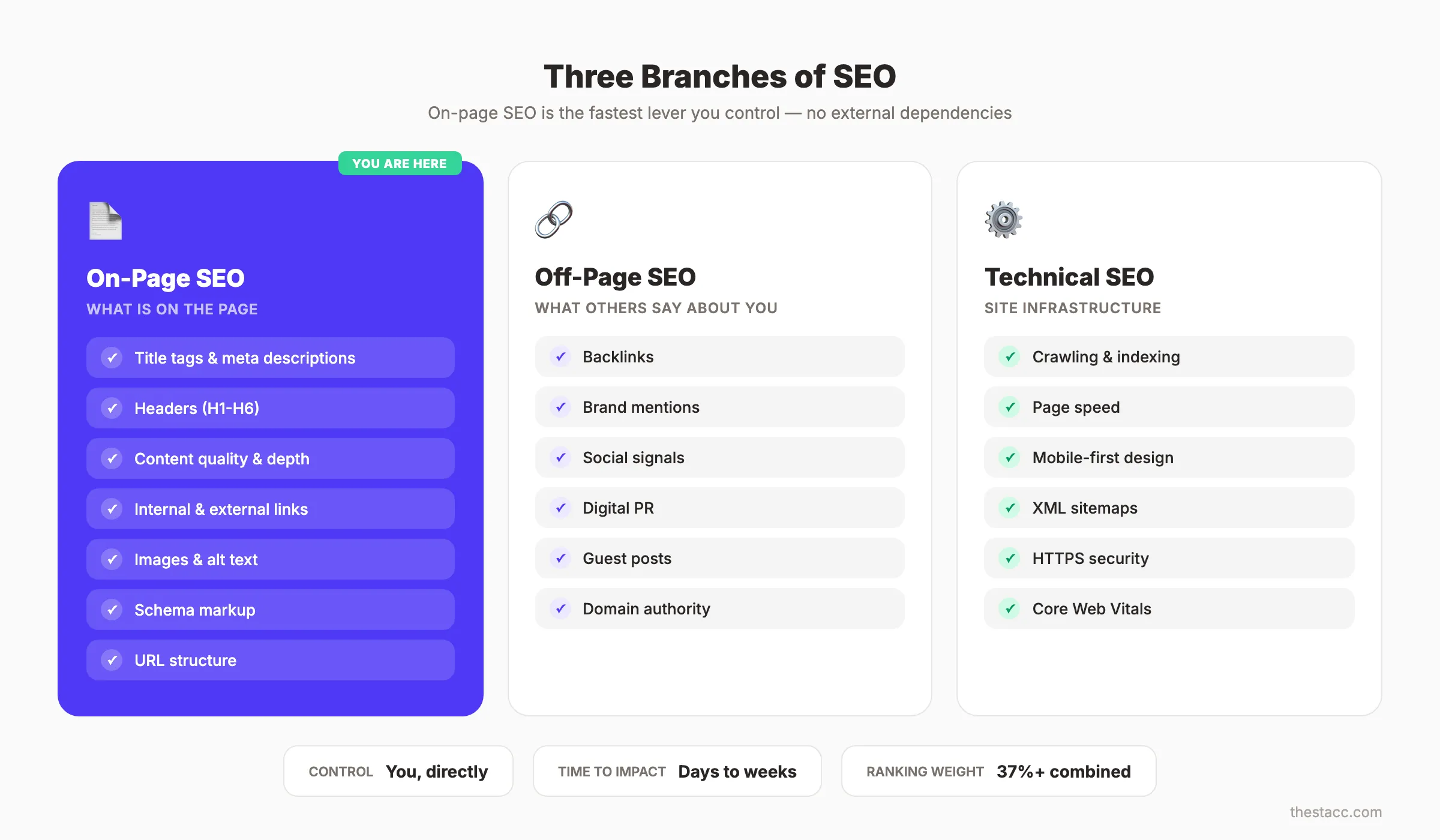
| Factor | On-Page SEO | Off-Page SEO | Technical SEO |
|---|---|---|---|
| What it covers | Content, tags, headers, links on the page | Backlinks, brand mentions, social signals | Crawling, indexing, site speed, security |
| Who controls it | You, directly | Others link to you | Developers and hosting |
| Time to impact | Days to weeks | Weeks to months | Hours to days |
| Example | Optimizing a title tag | Earning a backlink from Forbes | Fixing a broken XML sitemap |
On-page SEO is the fastest lever you can pull. You do not need anyone else’s permission to fix a title tag or restructure a header.
Why On-Page SEO Still Drives Rankings
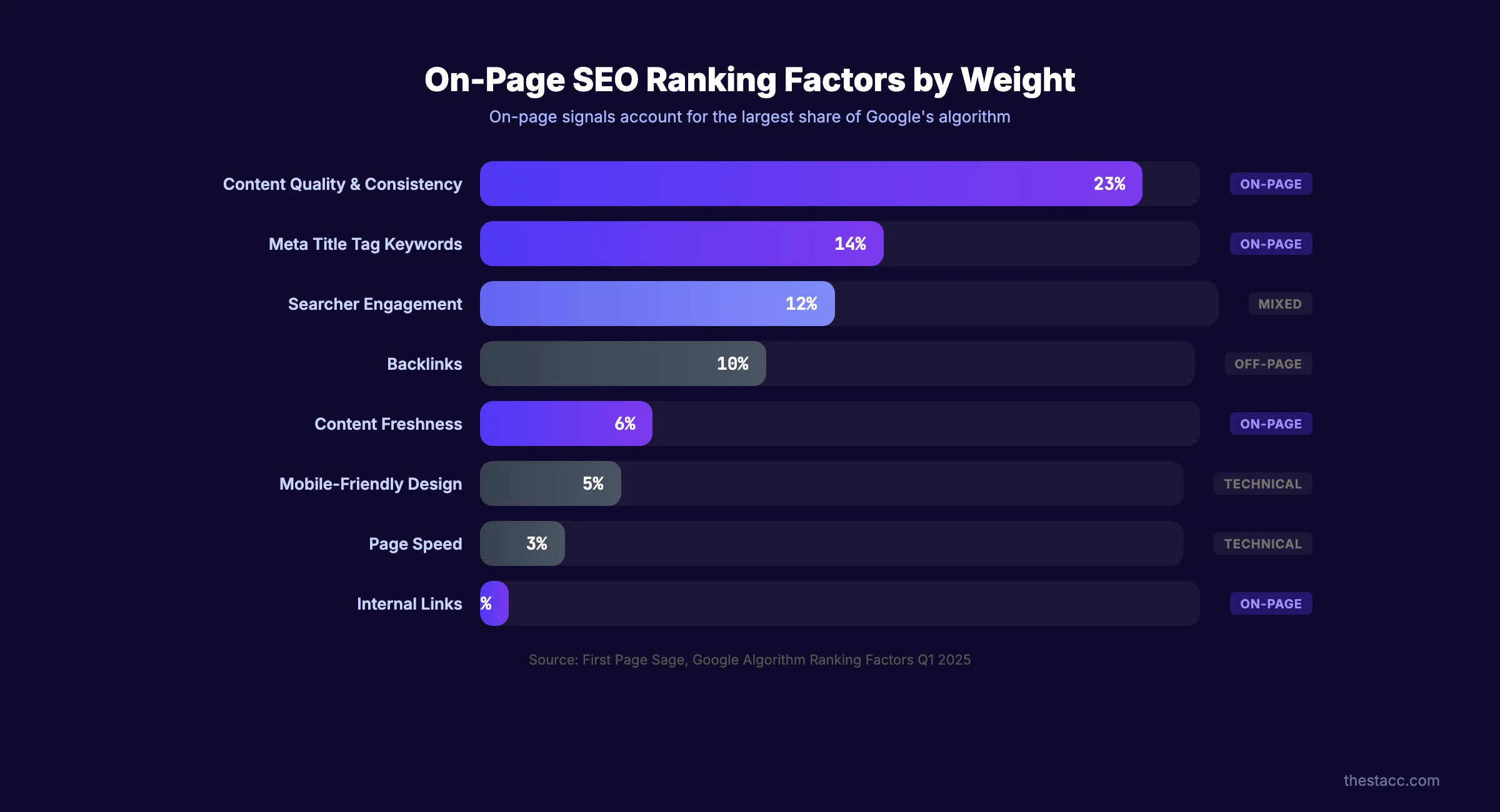
Title tags alone account for 14% of Google’s ranking weight. That is more than backlinks for many query types.
Consistent publication of high-quality content accounts for 23% of ranking weight. Combined, on-page signals make up the largest share of what Google evaluates.
Google Evaluates Pages, Not Sites
A common mistake is treating SEO as a site-wide project. Google crawls and ranks individual URLs. Your homepage might score a 95 on on-page SEO while your blog posts score a 40.
Every page needs its own optimization. There are no shortcuts here.
If you want to rank higher on Google, on-page SEO is where you start. Not backlinks. Not technical audits. The page itself.
How to Optimize Title Tags for Rankings and Clicks
The title tag is the single most weighted on-page element. It tells Google what the page is about. It tells searchers whether to click. Get it wrong and nothing else matters.
Title tags between 40 and 60 characters get 8.9% higher click-through rates than titles outside that range. Google is 57% more likely to rewrite meta titles that exceed the display limit. Control your title or Google will rewrite it for you.
The Title Tag Formula
Use this structure for every page:
Primary Keyword + Modifier + Year or Number
Examples:
- On-Page SEO: The Complete Guide (2026)
- 11 On-Page SEO Factors That Actually Matter
- On-Page SEO Checklist: 23 Steps to Higher Rankings
The primary keyword goes first. Google gives more weight to words at the beginning of the title tag. Modifiers like “guide,” “checklist,” or a year add specificity and freshness.
Frontload the Keyword
Place your target keyword within the first 3 words of the title. Pages with frontloaded keywords consistently outperform titles that bury the keyword mid-sentence.
Bad: “The Ultimate Guide to Mastering On-Page SEO” Good: “On-Page SEO: The Complete Guide (2026)“
Avoid Keyword Stuffing in Titles
“On-Page SEO Guide: On-Page SEO Tips for On-Page SEO Success” reads like spam. Google penalizes it. Searchers skip it.
Use the keyword once. Use a natural variation if you need a second mention. Our headline analyzer scores titles against these rules automatically.
For more on writing titles that earn clicks, read our guide to blog headlines.
How to Write Meta Descriptions That Earn Clicks
Meta descriptions do not directly affect rankings. Google confirmed this years ago. But they directly affect click-through rate. And CTR does affect rankings.
25.02% of top-ranking pages have no meta description at all. That is free real estate. Writing a strong meta description puts you ahead of 1 in 4 competitors by default.
The Meta Description Formula
Keep descriptions between 145 and 155 characters. Include the primary keyword, a clear benefit, and a freshness signal.
Structure: What the page covers + what the reader gains + year or update signal.
Example: “Every on-page SEO factor that affects rankings. Title tags, headers, content, links, schema, and speed. Checklist included. Updated March 2026.”
That description is 152 characters. It includes the keyword “on-page SEO,” names specific benefits, and signals freshness.
Make Descriptions Emotional
Emotional meta descriptions increase CTR by 13.9%. Words like “proven,” “complete,” “step-by-step,” and “free” trigger action.
Avoid vague descriptions like “Learn about on-page SEO.” That tells the reader nothing they did not already know from the title.
Google May Rewrite Your Description
Google rewrites meta descriptions roughly 70% of the time. It pulls text from the page that better matches the query. But your written description still serves as the default. Pages without one leave Google guessing.
Write the description anyway. Control what you can. For a deeper breakdown, read our full guide on meta descriptions.
Use our meta tag analyzer to check your title and description against best practices.
Your on-page SEO should not depend on guesswork. Stacc publishes SEO-optimized blog posts with proper headers, meta tags, and internal links. Starting at $99/month for 30 articles. Start for $1 →
How to Structure Headers for SEO and Readability
Headers create the skeleton of your page. Google uses them to understand content hierarchy. Readers use them to scan and decide whether to keep reading. Poor header structure hurts both.
Pages with clear, keyword-rich headers are significantly more likely to win featured snippets. Google pulls header text directly into snippet boxes. Your headers are audition lines for position zero.
The H1 Rule: One Per Page
Every page gets exactly 1 H1 tag. It should match or closely mirror the title tag. The H1 tells Google “this is what the entire page is about.”
Multiple H1 tags confuse the hierarchy. Google can handle it, but it dilutes the signal. Keep it clean. One page, one H1.
Use H2s for Major Sections, H3s for Subsections
H2 tags are your chapter titles. H3 tags break those chapters into specific points. This guide follows that pattern exactly.
Include your primary keyword in at least 1 H2. Use natural variations in others. Do not force the keyword into every heading.
Never Skip Header Levels
Jumping from H2 to H4 breaks the logical structure. Screen readers and search engines both expect a clean hierarchy.
Correct: H1, then H2, then H3, then H3, then H2, then H3.
Wrong: H1, then H2, then H4, then H2, then H3.
For a full breakdown of how to structure content for SEO, read our guide on blog post structure.
How to Optimize Content for On-Page SEO
Content quality is no longer subjective. Topical coverage is the number 1 on-page ranking factor, according to a Surfer SEO study analyzing 1 million SERPs. Content Score showed a 0.28 Spearman correlation with rankings. Backlinks showed 0.17.
That means what you write on the page now matters more than who links to it. This is the most important chapter in this guide.
Cover the Topic Completely
Google rewards pages that satisfy the full scope of a query. If someone searches “on-page SEO,” they expect to learn about title tags, headers, content, links, images, and speed. Miss a subtopic and Google ranks a competitor who covers it.
Build topical authority by covering related subtopics across multiple pages. Then connect them with internal links. This is how content clusters work.
Place the Keyword in the First 100 Words
Google gives extra weight to terms that appear early on the page. Mention your primary keyword naturally within the first 100 words. Do not force it into the first sentence if it sounds awkward. But do not bury it in paragraph 4 either.
Match Search Intent
Every query has an intent: informational, commercial, navigational, or transactional. Your content format must match what Google already ranks.
Search “on-page SEO” and you will see guides. Not product pages. Not listicles. Google has decided this is an informational query. Write a guide or do not rank.
Understanding search intent is the fastest way to avoid writing content that never ranks. Check the SERP before you write a single word.
Natural Keyword Density
Target 1 to 2% keyword density. For a 4,000-word post, that means 40 to 80 mentions of your primary keyword and close variations.
Keyword stuffing triggers spam filters. Too few mentions and Google may not associate the page with your target query. Find the middle ground.
Add E-E-A-T Signals to Every Page
E-E-A-T stands for Experience, Expertise, Authoritativeness, and Trustworthiness. Google uses these signals to evaluate content quality. You can embed them directly into on-page elements.
| E-E-A-T Signal | On-Page Implementation |
|---|---|
| Experience | First-hand examples, screenshots, case studies |
| Expertise | Author bio with credentials, detailed technical content |
| Authoritativeness | Citations to authoritative sources, links from other sites |
| Trustworthiness | HTTPS, clear contact info, accurate data, editorial standards |
Add an author bio to every blog post. Cite sources with links. Include original data or screenshots. These are not abstract concepts. They are on-page elements you add to the HTML.
For a deeper look at content optimization, read our guides on SEO content writing and how to optimize content for SEO.
Stop writing. Start ranking. Stacc publishes 30 SEO articles per month for $99. Every post is optimized for topical coverage, keyword placement, and E-E-A-T signals. Start for $1 →
How to Build Internal and External Links on Every Page
Links are the connective tissue of SEO. Internal links distribute authority across your site. External links signal credibility to Google. Every page needs both.
Pages without internal links are orphan pages. Google may never find them. Pages without external links look like they exist in a vacuum. Neither scenario helps rankings.
Internal Links: 3 to 5 Per 1,000 Words
Use descriptive anchor text. “Click here” tells Google nothing. “On-page SEO checklist” tells Google exactly what the linked page covers.
Link to pages within the same topic cluster. If you are writing about on-page SEO, link to pages about title tags, meta descriptions, headers, and content optimization. This builds what Google calls “topical relevance.”
Read our full guide on internal linking for a step-by-step process.
Build Content Clusters With Internal Links
A content cluster is a hub page linked to 5 to 15 related subtopic pages. Each subtopic page links back to the hub. This structure signals depth and authority to Google.
This guide is a hub page. The linked guides on title tags, meta descriptions, and headers are subtopic pages. Together, they form a cluster around “on-page SEO.”
External Links to Authoritative Sources
Link to studies, documentation, and data from trusted sources. Google’s own SEO starter guide is a strong external link target. So are peer-reviewed studies and industry research.
External links do not leak ranking power in any meaningful way. They signal that your content is well-researched and connected to the broader knowledge graph.
For off-page link building strategies, read our guide on how to build backlinks.
How to Optimize URLs, Images, and Media
URLs, images, and media files carry on-page SEO signals that most content teams overlook. They are small optimizations. But they compound across hundreds of pages.
Pages with keywords in the URL have 45% higher CTR than pages with random URL strings. Image alt text gives Google another context signal for what the page covers. Neither takes more than 30 seconds to fix.
URL Optimization
Keep URLs short. Include the primary keyword. Remove stop words like “the,” “and,” “of.”
| URL Type | Example | Verdict |
|---|---|---|
| Optimized | /on-page-seo-guide | Clean, keyword-rich |
| Too long | /the-complete-guide-to-on-page-seo-for-beginners-2026 | Google truncates it |
| Random | /post-id-48291 | No keyword signal |
Use hyphens between words. Never use underscores, spaces, or special characters. Set the URL once and do not change it without a 301 redirect.
Image Alt Text
Every image needs alt text. Describe what the image shows. Include the keyword where it fits naturally.
Good: “On-page SEO checklist showing 12 ranking factors” Bad: “image1.png” Worse: “on page seo on page seo on page seo”
Alt text serves 2 purposes. It helps visually impaired users understand the image. And it gives Google another signal about page content.
Compress Images for Speed
Uncompressed images are the number 1 cause of slow page loads. Use WebP format. Compress to under 100KB for inline images. Lazy-load images below the fold.
Page speed is both a ranking factor and a user experience signal. Read our guide on Core Web Vitals for the full optimization process.
Use Descriptive File Names
Name image files before uploading. Google reads file names as content signals.
Good: on-page-seo-checklist.png
Bad: IMG_4829.png
This takes 5 seconds per image. Do it for every image on every page.
Stacc builds internal links into every blog post automatically. Each article ships with 10 to 15 internal links, proper anchor text, and cluster-aware structure. Start for $1 →
How to Add Schema Markup for Rich Results
72% of first-page results use schema markup. Rich results. Star ratings, FAQ accordions, how-to steps. See 82% higher CTR than standard blue links. Schema is the most underused on-page SEO tactic.
Schema markup is structured data you add to your page’s HTML. It tells Google exactly what your content represents. Google uses it to generate rich results in the SERP.
Key Schema Types for SEO
| Schema Type | Best For | Rich Result |
|---|---|---|
| Article | Blog posts, news articles | Headline, date, author in SERP |
| FAQ | FAQ sections on any page | Expandable questions in SERP |
| HowTo | Step-by-step guides | Numbered steps with images |
| Organization | Homepage, about page | Knowledge panel |
| Product | Product and pricing pages | Price, availability, rating |
| LocalBusiness | Local service pages | Map pack, hours, reviews |
Use JSON-LD Format
Google prefers JSON-LD over Microdata or RDFa. Place the JSON-LD script in the <head> of the page.
Here is a basic Article schema example:
{
  "@context": "https://schema.org",
  "@type": "Article",
  "headline": "On-Page SEO: The Complete Guide (2026)",
  "author": {
    "@type": "Organization",
    "name": "Stacc Editorial"
  },
  "datePublished": "2026-03-27",
  "dateModified": "2026-03-27"
}
For FAQ sections, use FAQPage schema. Google can display your questions and answers directly in search results. That takes up more SERP real estate and pushes competitors down.
Use our schema markup generator to create valid JSON-LD without writing code.
Validate Your Schema
Test every schema implementation with Google’s Rich Results Test before publishing. Invalid schema does nothing. Worse, it can trigger manual actions if Google considers it misleading.
Check our list of the best on-page SEO tools for options that include built-in schema validation.
How to Optimize On-Page SEO for AI Search
AI Overviews now appear in roughly 48% of Google searches. Pages that do not get cited in AI responses lose 61% of their organic CTR. On-page SEO in 2026 means optimizing for both traditional search and AI engines.
This is the chapter most on-page SEO guides skip entirely. AI search changes what “ranking” means. You can hold position 1 in traditional results and still lose traffic if the AI Overview cites a competitor instead.
Write Quotable Definitions and Direct Answers
AI engines pull direct quotes from pages. Give them clean, quotable text. Place a 1 to 2 sentence definition right after each H2.
Example: “On-page SEO is the practice of optimizing individual web pages to rank higher in search results.”
That sentence is structured for extraction. It answers a question directly. It uses plain language. AI engines favor this pattern.
Optimize for Fast First Contentful Paint
Pages with First Contentful Paint under 0.4 seconds get 3 times more AI citations than slower pages. AI engines prioritize pages they can crawl quickly.
A 1-second delay in page load reduces conversions by 7%. Speed is not just a technical SEO metric. It is an on-page factor that affects both rankings and AI visibility.
Ensure AI Crawlers Can Access Your Pages
Not all AI crawlers follow the same rules as Googlebot. Check your robots.txt to make sure you are not blocking crawlers from Perplexity, ChatGPT, or other AI search engines.
If AI engines cannot crawl your page, they cannot cite it. Open access is the baseline requirement.
Use Structured Data for AI Parsing
Schema markup helps AI engines understand your content structure. FAQ schema, HowTo schema, and Article schema all feed AI systems the structured data they need to generate citations.
Pages with structured data are easier for AI to parse, quote, and attribute. This is where traditional on-page SEO and AI optimization overlap.
For a complete AI search strategy, read our guides on generative engine optimization, how to get cited by AI search, and how to optimize for AI Overviews.
Every blog post Stacc publishes includes Article schema markup. Proper structured data, valid JSON-LD, and FAQ schema where applicable. No developer required. Start for $1 →
The Complete On-Page SEO Checklist
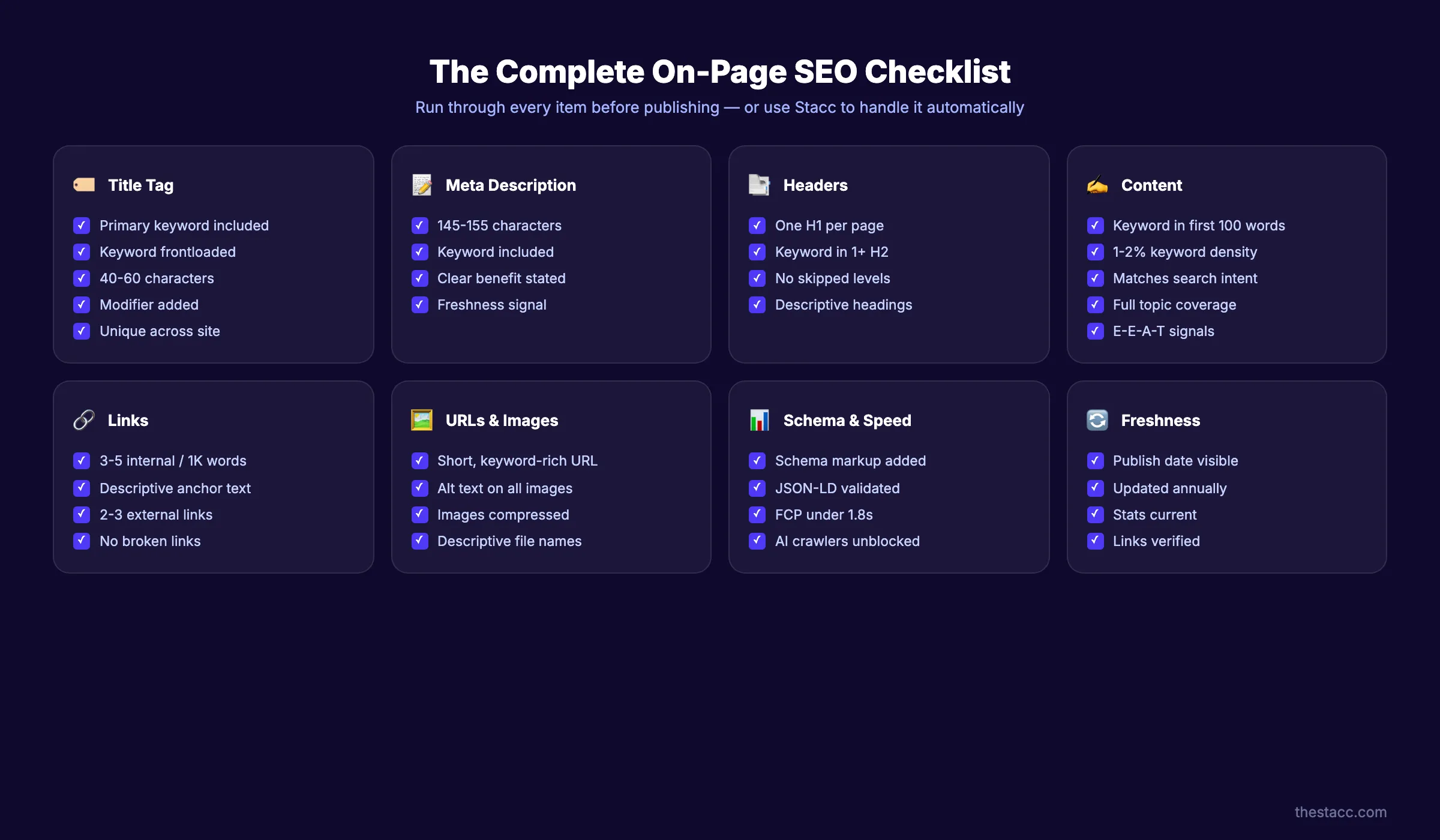
Use this checklist for every page you publish or update. Run through it before hitting publish.
Title Tag
- Primary keyword in title tag
- Keyword frontloaded (first 3 words)
- Between 40 and 60 characters
- Includes a modifier (guide, checklist, year, number)
- Unique across the site
Meta Description
- Between 145 and 155 characters
- Primary keyword included
- Clear benefit to the reader
- Freshness signal (year or “updated”)
Headers
- One H1 per page
- Primary keyword in at least 1 H2
- No skipped header levels
- Headers describe section content accurately
Content
- Primary keyword in first 100 words
- 1 to 2% keyword density
- Matches search intent
- Covers subtopics competitors cover (and ones they miss)
- E-E-A-T signals present (author bio, citations, experience)
- No thin content (minimum 1,000 words for blog posts)
Links
- 3 to 5 internal links per 1,000 words
- Descriptive anchor text on all links
- 2 to 3 external links to authoritative sources
- No broken links
URLs and Images
- Short, keyword-rich URL
- Alt text on every image
- Images compressed (under 100KB)
- Descriptive file names
Schema and Speed
- Schema markup added (Article, FAQ, or HowTo)
- JSON-LD format validated
- First Contentful Paint under 1.8 seconds
- AI crawlers not blocked in robots.txt
Content Freshness
- Publication date visible on page
- Content reviewed and updated at least annually
Pages updated at least once per year gain an average of 4.6 positions in SERPs. Content freshness is not optional. Build a content refresh schedule into your workflow.
Use our free on-page SEO checker to score any page against these factors automatically.
FAQ
What is on-page SEO?
On-page SEO is the process of optimizing individual web pages to rank higher in search engine results. It includes title tags, meta descriptions, headers, content quality, internal links, images, URLs, and schema markup. On-page SEO covers everything you control directly on the page itself.
What are the most important on-page SEO factors?
Topical coverage is the number 1 on-page ranking factor, based on a study of 1 million SERPs. Title tags carry 14% of Google’s ranking weight. Content quality and consistency account for 23%. Headers, internal links, and schema markup round out the top factors. No single element works alone. The combination matters.
What is the difference between on-page and off-page SEO?
On-page SEO covers elements you control on your own pages. Titles, content, headers, links, and schema. Off-page SEO covers external signals like backlinks, brand mentions, and social shares. Technical SEO covers site infrastructure like crawling, indexing, and speed. All 3 work together, but on-page SEO is the foundation.
How many keywords should I target per page?
Target 1 primary keyword and 3 to 5 secondary keywords per page. The primary keyword goes in the title tag, H1, first 100 words, and at least 1 H2. Secondary keywords appear naturally throughout the body content. Do not create separate pages for close variations of the same keyword. Google understands synonyms.
For a full keyword research process, read our dedicated guide.
Does on-page SEO still matter with AI search?
Yes. AI search engines pull answers from web pages. Those pages still need clear structure, relevant keywords, and proper schema markup. Pages with strong on-page SEO get cited by AI engines more often. Fast-loading pages with clean headers and direct answers are 3 times more likely to appear in AI-generated responses. On-page SEO is the foundation for both traditional and AI search visibility.
Can Stacc handle on-page SEO automatically?
Stacc publishes fully optimized blog posts with proper title tags, headers, internal links, schema markup, and keyword placement. Every post follows the checklist in this guide. You do not need a content team or an SEO specialist. Plans start at $99 per month for 30 articles. Run an SEO audit first to see where your on-page SEO stands today.
The Bottom Line on On-Page SEO
On-page SEO is the fastest, most controllable factor for improving search rankings. Every element in this guide. Title tags, headers, content depth, links, schema, and AI signals. Compounds over time. Start with the checklist. Fix the biggest gaps first. Then build a publishing rhythm that keeps every page fresh, structured, and optimized.
Your SEO team. $99/month. Stacc handles on-page optimization for every post we publish. So you can focus on running your business. Start for $1 →
Related Tools & Resources
Free SEO Tools:
Best Lists:

Written by
Siddharth GangalSiddharth is the founder of theStacc and Arka360, and a graduate of IIT Mandi. He spent years watching great businesses lose organic traffic to competitors who simply published more. So he built a system to fix that. He writes about SEO, content at scale, and the tactics that actually move rankings.
30 SEO blog articles published every month
Keyword-optimized, scheduled, and live on your site. Automatically.
30-day trial · Cancel anytime
theStacc
Stop writing SEO content manually
30 blog articles, 30 GBP posts, and social media content. Published every month. Automatically.
Start Your $1 Trial$1 for 3 days · Cancel anytime