
AI Crawlers Guide: GPTBot, ClaudeBot, and More
The complete guide to AI crawlers in 2026. Covers GPTBot, ClaudeBot, PerplexityBot, robots.txt management, and blocking strategies. Updated March 2026.
AI crawlers now consume more bandwidth than most site owners realize. According to Cloudflare’s 2025 Year in Review, 52% of all web traffic comes from bots. A growing share of that traffic belongs to AI crawlers like GPTBot, ClaudeBot, and PerplexityBot.
These bots are not like Googlebot. They use 15 to 20 times more server resources per request. They hammer pages that do not exist. Vercel’s crawler research shows that ChatGPT-User wastes 34.82% of its requests on 404 pages. And 13.26% of AI bot requests flat-out ignore robots.txt directives.
This guide covers every major AI crawler operating in 2026. You will learn what each bot does, how it behaves, and exactly how to control access to your website.
We publish 3,500+ blogs across 70+ industries and manage robots.txt configurations for sites of every size. This guide reflects what we see in real server logs every day.
Here is what you will learn:
- What AI crawlers are and how they differ from traditional search bots
- The 3 categories every AI crawler falls into
- A complete reference table of every major AI crawler active in 2026
- How AI crawlers impact your server performance, bandwidth, and Core Web Vitals
- A decision framework for which bots to block based on your business type
- Copy-paste
robots.txttemplates for 3 different strategies - How to monitor AI crawler activity in your server logs
- What changes to expect from AI crawlers through 2026 and beyond
Table of Contents
- Chapter 1: What Are AI Crawlers and Why They Matter
- Chapter 2: The 3 Types of AI Crawlers
- Chapter 3: Every Major AI Crawler Explained
- Chapter 4: How AI Crawlers Impact Your Website
- Chapter 5: Should You Block AI Crawlers?
- Chapter 6: How to Control AI Crawlers With robots.txt
- Chapter 7: Beyond robots.txt. Llms.txt and Other Controls
- Chapter 8: How to Monitor AI Crawler Activity
- Chapter 9: The Future of AI Crawlers in 2026 and Beyond
- FAQ
Chapter 1: What Are AI Crawlers and Why They Matter {#chapter-1}
AI crawlers are automated bots that visit websites to collect data for artificial intelligence systems. They scrape text, images, and structured data. That data feeds model training, AI search results, and real-time user queries.
How AI Crawlers Differ From Search Engine Crawlers
Traditional crawlers like Googlebot index pages so they appear in search results. They follow well-established protocols. They respect robots.txt. They operate within predictable crawl budgets.
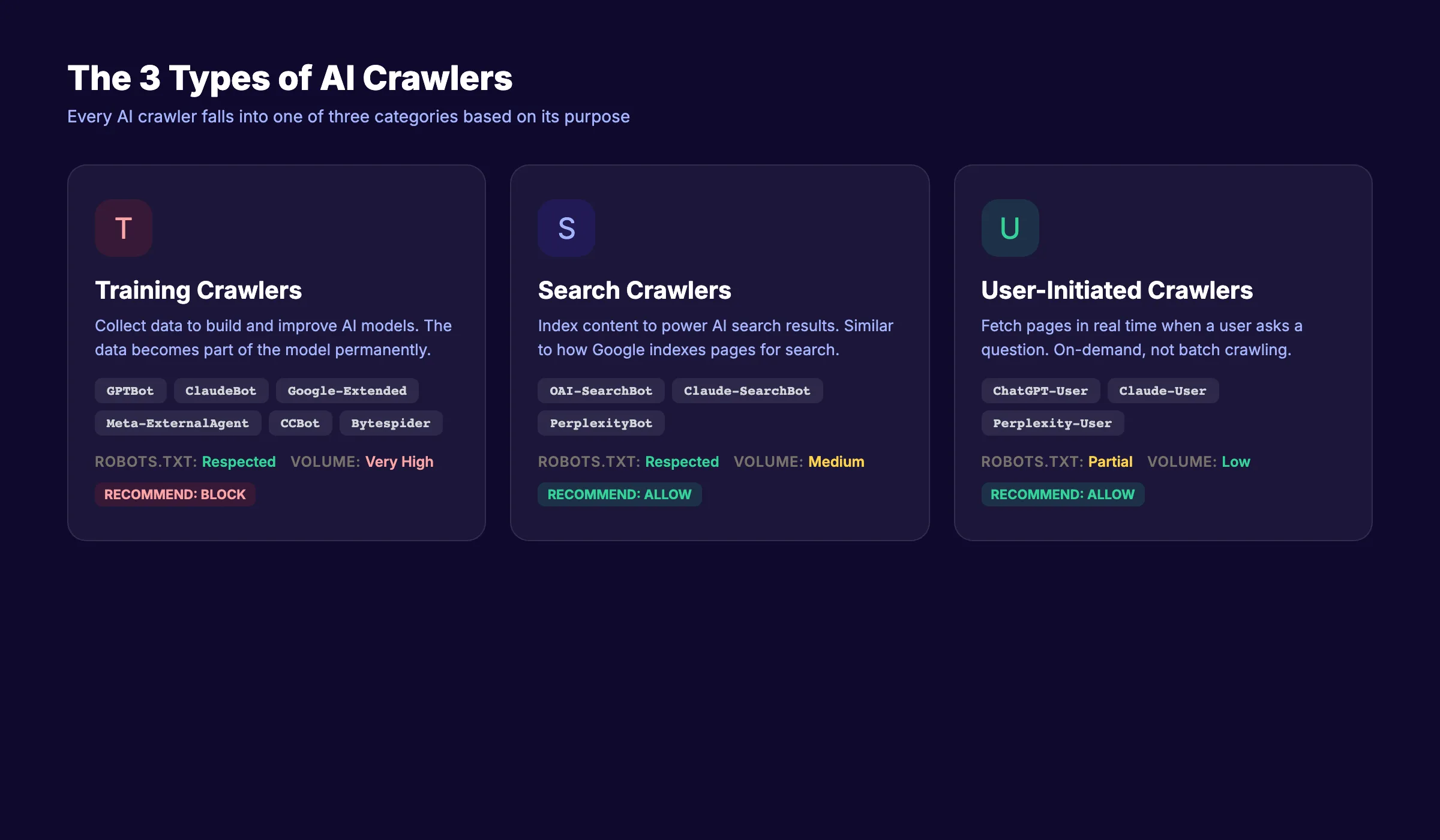
AI crawlers serve a different purpose. Training crawlers collect data to build and improve large language models. Search crawlers fetch content to generate AI search answers. User-initiated crawlers grab pages in real time when someone asks a question in ChatGPT or Claude.
The distinction matters because the rules, behaviors, and resource costs differ for each type. Google has crawled the web for over 25 years with clear standards. AI crawlers operate in a space where standards are still forming.
The Scale of AI Crawler Traffic
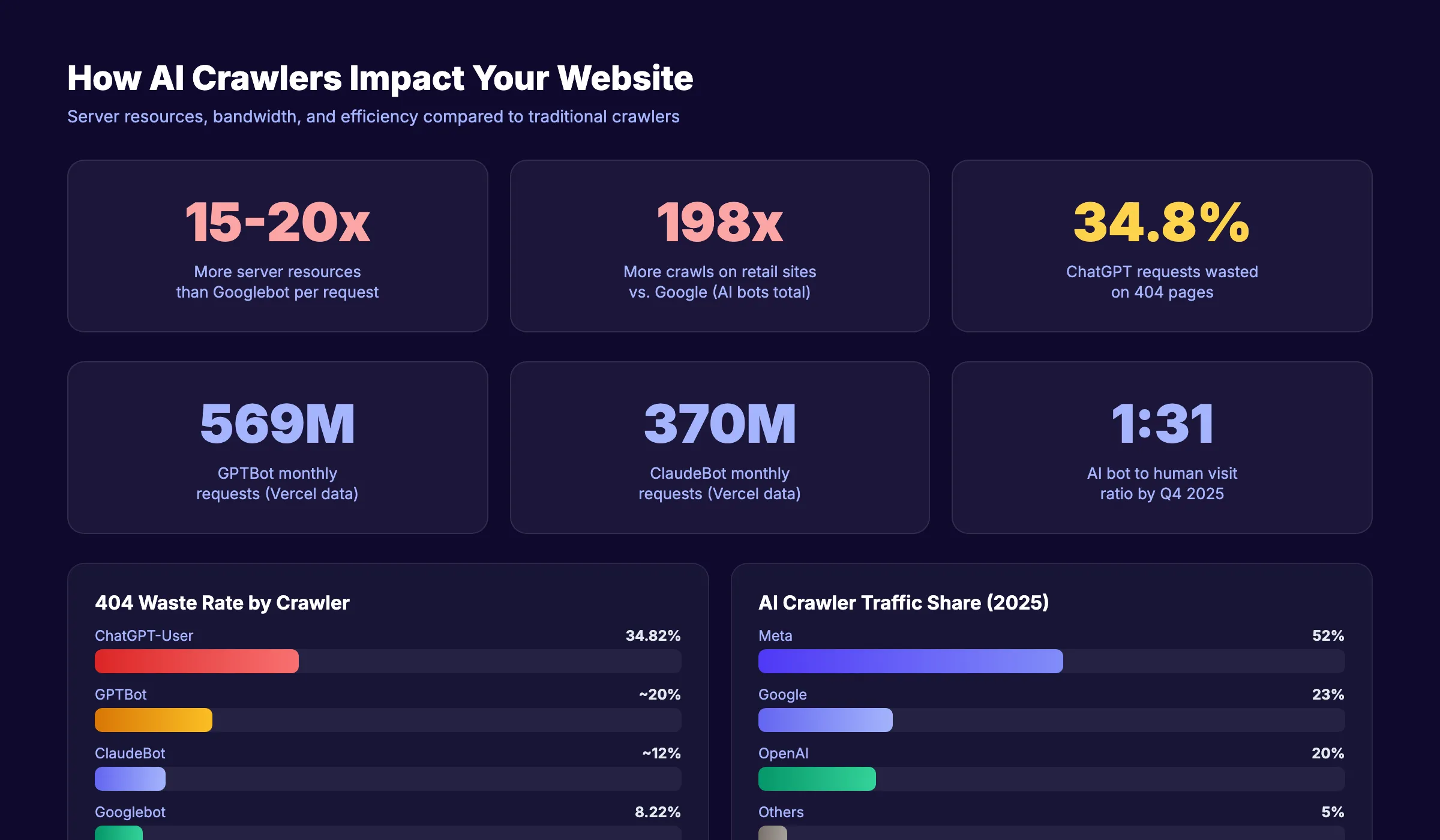
The numbers tell the story. GPTBot alone makes 569 million requests per month, according to Vercel’s analysis. ClaudeBot follows at 370 million monthly requests. For context, Googlebot makes 4.5 billion monthly requests.
That gap is shrinking fast. By Q4 2025, websites received 1 AI bot visit for every 31 human visits. User-driven AI bot crawling grew 15 times over the course of 2025 alone.
Why Site Owners Need to Pay Attention
AI crawlers affect three things that matter to every website operator: server costs, content ownership, and search visibility. Ignoring them means giving up control over how your content gets used. Managing them means protecting your resources while staying visible in AI search results.
The rest of this guide breaks down exactly how to do that.
Chapter 2: The 3 Types of AI Crawlers {#chapter-2}
Not all AI crawlers do the same thing. Understanding the 3 types is the foundation for every decision you make about blocking or allowing them.
Type 1: Training Crawlers
Training crawlers collect web content to build and improve AI models. They scrape large volumes of text and feed it into the training pipeline. Once your content enters a training dataset, you cannot remove it.
Examples include GPTBot (OpenAI), ClaudeBot (Anthropic), Google-Extended (Google), Meta-ExternalAgent (Meta), and CCBot (Common Crawl).
These bots offer zero direct benefit to your website. They do not send you traffic. They do not cite your pages. They take your content and use it to train models that may compete with you.
Type 2: Search Crawlers
Search crawlers fetch content to power AI search experiences. When someone searches using Perplexity, ChatGPT search, or Google AI Overviews, these bots grab relevant pages to generate answers.
Examples include OAI-SearchBot (OpenAI), Claude-SearchBot (Anthropic), and PerplexityBot (Perplexity). Blocking these bots means your content will not appear in AI search results. That is a visibility tradeoff most businesses should not make.
For a deeper look at optimizing for AI search, read our guide on generative engine optimization.
Type 3: User-Initiated Crawlers
User-initiated crawlers activate when a real person pastes a URL or asks an AI assistant to read a specific page. They fetch content on demand. The request comes from a human action, not an automated schedule.
Examples include ChatGPT-User (OpenAI), Claude-User (Anthropic), and Perplexity-User (Perplexity). Blocking these bots prevents users from sharing and discussing your content inside AI tools.
Comparison Table: 3 Types of AI Crawlers
| Feature | Training Crawlers | Search Crawlers | User-Initiated Crawlers |
|---|---|---|---|
| Purpose | Build and improve AI models | Power AI search results | Fetch pages on user request |
| Frequency | Continuous, high volume | On-demand per search query | On-demand per user action |
| Benefit to you | None | AI search visibility | Content sharing in AI tools |
| Robots.txt respect | Usually (with exceptions) | Yes | Yes |
| Blocking recommendation | Block for most sites | Allow | Allow |
This taxonomy drives every blocking decision. Block the bots that take without giving back. Allow the bots that send visibility and traffic.
Chapter 3: Every Major AI Crawler Explained {#chapter-3}
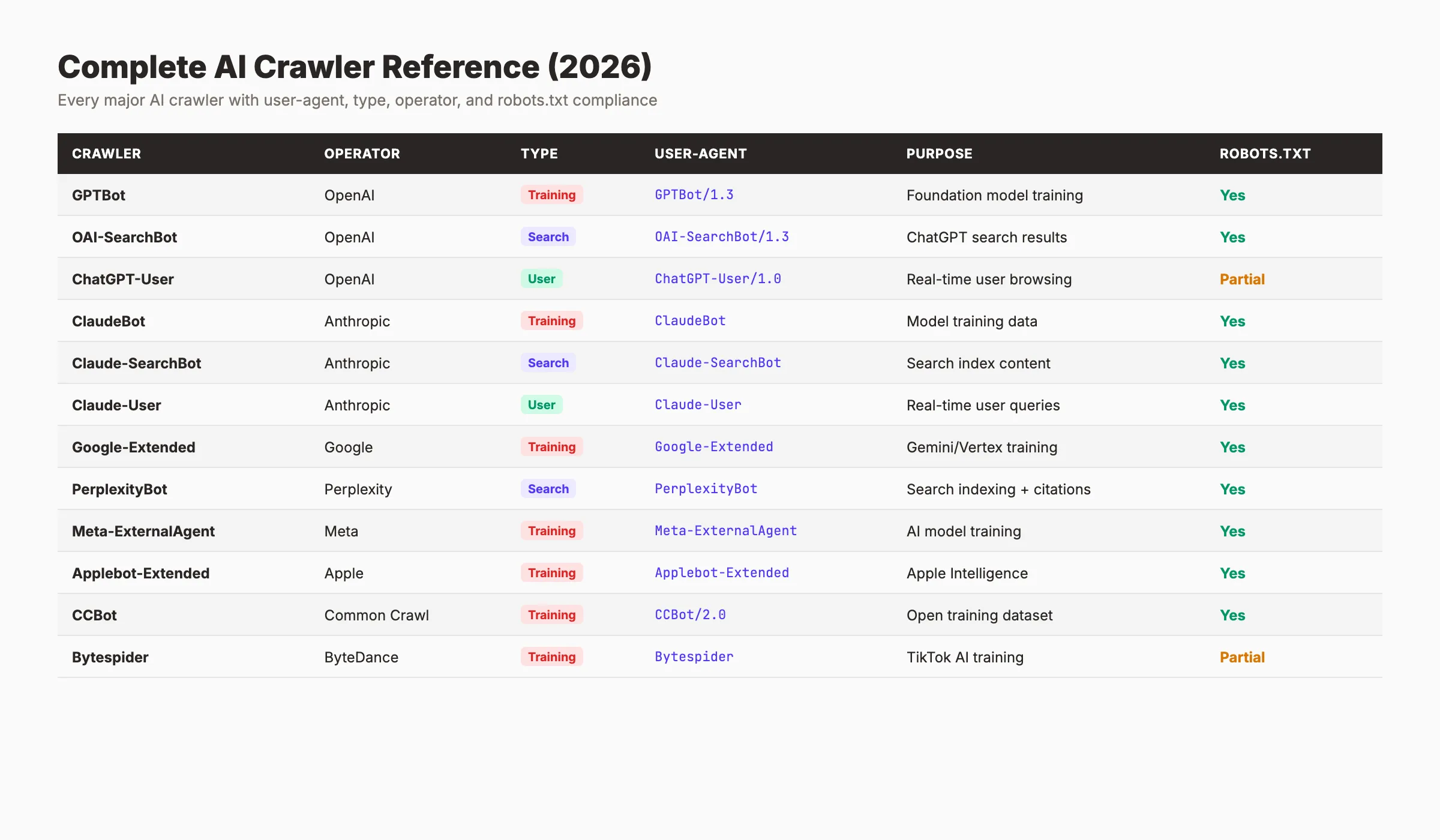
Here is a complete reference of every major AI crawler active in 2026. Bookmark this section. You will come back to it when updating your robots.txt.
Complete AI Crawler Reference Table
| Crawler | Operator | Type | User-Agent String | Purpose | Robots.txt Respect |
|---|---|---|---|---|---|
GPTBot | OpenAI | Training | GPTBot | Model training data | Yes |
OAI-SearchBot | OpenAI | Search | OAI-SearchBot | ChatGPT search results | Yes |
ChatGPT-User | OpenAI | User | ChatGPT-User | Real-time page fetching | Yes |
ClaudeBot | Anthropic | Training | ClaudeBot | Model training data | Yes |
Claude-SearchBot | Anthropic | Search | Claude-SearchBot | Claude search results | Yes |
Claude-User | Anthropic | User | Claude-User | Real-time page fetching | Yes |
Google-Extended | Training | Google-Extended | Gemini model training | Yes | |
PerplexityBot | Perplexity | Search | PerplexityBot | Perplexity search answers | Yes |
Perplexity-User | Perplexity | User | Perplexity-User | User-requested page fetch | Yes |
Meta-ExternalAgent | Meta | Training | Meta-ExternalAgent | Meta AI model training | Partial |
Applebot-Extended | Apple | Training | Applebot-Extended | Apple Intelligence training | Yes |
CCBot | Common Crawl | Training | CCBot | Open training dataset | Yes |
Bytespider | ByteDance | Training | Bytespider | TikTok/Doubao AI training | Inconsistent |
Amazonbot | Amazon | Training | Amazonbot | Alexa/Amazon AI training | Yes |
OpenAI: 3 Crawlers for 3 Purposes
OpenAI operates the most active AI crawlers on the web. GPTBot is their training crawler. It makes 569 million requests per month and feeds data into GPT model updates. Block it unless you want your content in OpenAI’s training data.
OAI-SearchBot powers ChatGPT’s search feature. When a ChatGPT user runs a web search, this bot fetches results. Blocking it removes your site from ChatGPT search answers.
ChatGPT-User activates when a user pastes a URL into ChatGPT or asks it to analyze a specific page. It operates like a browser fetch. Most sites should allow it.
Full documentation: OpenAI bot reference.
Anthropic: The 3-Bot Split
Anthropic recently split its crawling into 3 distinct bots, matching OpenAI’s structure. ClaudeBot handles training and makes 370 million requests per month. Claude-SearchBot powers Claude’s search features. Claude-User fetches pages when users request it.
This split gives site owners granular control. You can block training while allowing search and user access. Details: Anthropic crawler documentation.
Google: Google-Extended
Google keeps AI training separate from search indexing. Google-Extended controls whether your content feeds Gemini model training. Blocking Google-Extended does not affect your Google Search rankings. Your pages still get indexed and ranked normally.
This is one of the cleanest separations in the AI crawler space. See Google’s crawler documentation for the full list.
If you want to optimize for AI Overviews, keep standard Googlebot allowed. Google-Extended only affects training.
Perplexity: Search-First Crawling
Perplexity operates PerplexityBot for search indexing and Perplexity-User for user-requested fetches. Unlike OpenAI and Anthropic, Perplexity does not run a separate training crawler. Its bots focus on powering search results.
Perplexity cites sources with direct links. Allowing PerplexityBot can send referral traffic to your site. That makes it one of the more beneficial AI crawlers to keep allowed.
Other Notable Crawlers
Meta-ExternalAgent collects data for Meta AI products. It accounts for 52% of all AI crawler traffic by volume, according to Vercel’s data. robots.txt compliance is partial.
Bytespider from ByteDance has a reputation for inconsistent robots.txt compliance. Monitor its behavior closely. Amazonbot feeds Amazon’s AI features and generally respects directives. CCBot from Common Crawl builds open datasets used by many AI labs.
Chapter 4: How AI Crawlers Impact Your Website {#chapter-4}
AI crawlers do not just read your pages. They stress your infrastructure in ways that traditional search crawlers do not.
Server Resource Consumption
AI crawlers use 15 to 20 times more server resources than Googlebot per request. They fetch full page content, process JavaScript rendering, and download associated assets. A site that handles Googlebot easily may struggle under AI crawler load.
Vercel’s data shows that AI bots crawl retail sites 198 times more than Google does. For e-commerce sites running on shared hosting, that volume can trigger performance degradation, higher hosting bills, or outright downtime.
Wasted Requests on Non-Existent Pages
ChatGPT-User wastes 34.82% of its requests on pages that return 404 errors. Compare that to Googlebot, which only hits 404 pages 8.22% of the time. AI crawlers often follow outdated links, hallucinated URLs, or poorly structured sitemaps.
Every 404 request consumes server resources without delivering any value. If your site has many broken URLs, AI crawlers amplify the problem. Run a regular SEO audit to identify and fix these dead pages.
Bandwidth and Cost Impact
Each AI crawler request transfers more data than a typical Googlebot request. Training crawlers download entire page contents, including embedded media. On a site with thousands of pages, that bandwidth adds up to real hosting costs.
95% of AI crawler traffic comes from just 3 companies: Meta (52%), Google (23%), and OpenAI (20%). Knowing who consumes your bandwidth helps you make targeted blocking decisions.
Core Web Vitals and User Experience
Heavy crawler traffic can degrade Core Web Vitals scores. When server response times increase due to bot load, real users experience slower page loads. Google measures those metrics for ranking purposes.
A site that loses Core Web Vitals performance because of AI crawler overload may also lose search rankings. That creates a double penalty: bots take your content while simultaneously hurting your ability to rank.
Your SEO team. $99 per month. 30 optimized articles, published automatically. AI crawler management included. Start for $1 →
Chapter 5: Should You Block AI Crawlers? A Decision Framework {#chapter-5}
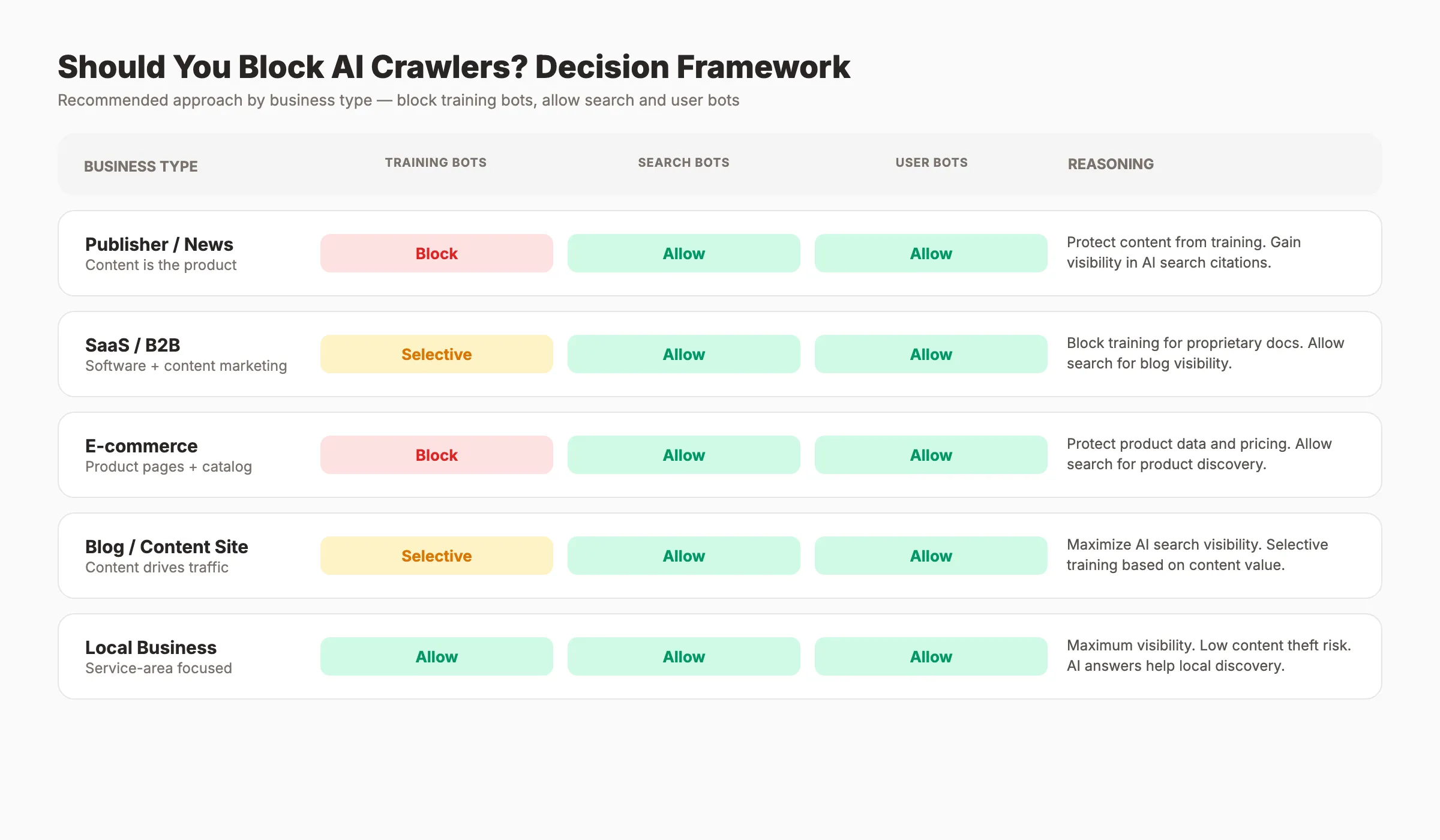
The answer depends on your business model. Blocking everything sacrifices AI search visibility. Allowing everything gives away your content for free. The right approach sits in between.
Decision Framework by Business Type
| Business Type | Block Training? | Allow Search? | Allow User? | Reasoning |
|---|---|---|---|---|
| Publisher / News | Yes | Yes | Yes | Protect original reporting. Gain AI search citations. |
| SaaS / B2B | Selective | Yes | Yes | Allow product pages for training. Block proprietary content. |
| E-commerce | Yes | Yes | Yes | Protect product data and descriptions. Appear in AI shopping queries. |
| Blog / Content Creator | No or Selective | Yes | Yes | Maximize AI search visibility. Build topical authority. |
| Agency / Consultant | Selective | Yes | Yes | Block case studies. Allow thought leadership content. |
| Personal Site | Does not matter | Does not matter | Does not matter | Low traffic impact either way. |
The Core Principle
Block training bots. Allow search bots. Allow user bots.
Training bots take your content and give nothing back. Search bots create visibility in AI-generated answers. User bots enable real people to interact with your content through AI tools.
That principle applies to 80% of websites. The exception is sites that benefit from broad AI model exposure, such as open-source documentation or educational resources. For those, allowing training crawlers can increase brand recognition inside AI responses.
The Visibility Tradeoff
5.6 million websites now block GPTBot. That number grew 70% from 3.3 million in July 2025. Meanwhile, 79% of top news sites block at least 1 training bot.
Blocking training bots has no effect on your Google rankings. It does not change how Googlebot crawls or indexes your site. The only tradeoff is whether your content influences future AI model outputs.
For guidance on appearing in AI search results while protecting your content, read our generative engine optimization guide.
Chapter 6: How to Control AI Crawlers With robots.txt {#chapter-6}
The robots.txt file remains the primary tool for managing AI crawler access. It sits at the root of your domain and tells bots which pages they can and cannot access.
Quick robots.txt Refresher
Every website should have a robots.txt file at yourdomain.com/robots.txt. Each rule specifies a user-agent and a set of allow or disallow directives. If you need a full walkthrough, see our guide on how to submit your website to Google, which covers sitemap and robots.txt setup.
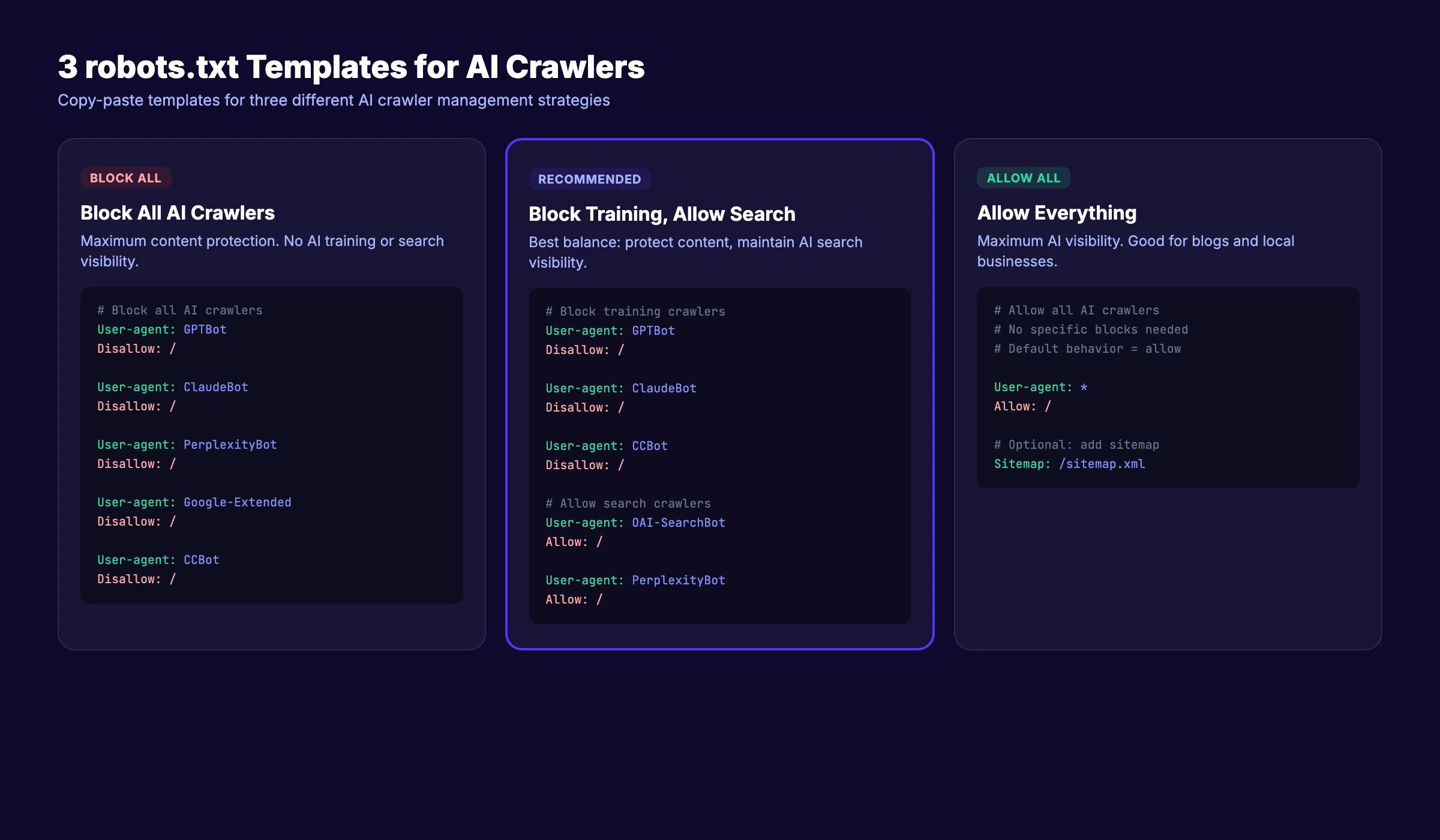
Template 1: Block ALL AI Crawlers
Use this if you want to prevent all AI bot access entirely.
## Block all AI crawlers
User-agent: GPTBot
Disallow: /

User-agent: OAI-SearchBot
Disallow: /

User-agent: ChatGPT-User
Disallow: /

User-agent: ClaudeBot
Disallow: /

User-agent: Claude-SearchBot
Disallow: /

User-agent: Claude-User
Disallow: /

User-agent: Google-Extended
Disallow: /

User-agent: PerplexityBot
Disallow: /

User-agent: Perplexity-User
Disallow: /

User-agent: Meta-ExternalAgent
Disallow: /

User-agent: Applebot-Extended
Disallow: /

User-agent: CCBot
Disallow: /

User-agent: Bytespider
Disallow: /

User-agent: Amazonbot
Disallow: /
When to use: Publishing sites that need full content protection. News organizations with paywalled content. Sites under heavy bot load causing server issues.
Template 2: Block Training Bots Only (Recommended)
This is the approach most websites should use. It blocks model training while keeping your site visible in AI search results.
## Block AI training crawlers
User-agent: GPTBot
Disallow: /

User-agent: ClaudeBot
Disallow: /

User-agent: Google-Extended
Disallow: /

User-agent: Meta-ExternalAgent
Disallow: /

User-agent: Applebot-Extended
Disallow: /

User-agent: CCBot
Disallow: /

User-agent: Bytespider
Disallow: /

User-agent: Amazonbot
Disallow: /

## Allow AI search and user crawlers
User-agent: OAI-SearchBot
Allow: /

User-agent: ChatGPT-User
Allow: /

User-agent: Claude-SearchBot
Allow: /

User-agent: Claude-User
Allow: /

User-agent: PerplexityBot
Allow: /

User-agent: Perplexity-User
Allow: /
When to use: Most business websites, e-commerce stores, SaaS companies, and blogs that want AI search visibility without giving away training data.
Template 3: Allow Everything
Use this if you want maximum AI visibility and do not mind your content entering training datasets.
## Allow all AI crawlers
User-agent: GPTBot
Allow: /

User-agent: ClaudeBot
Allow: /

User-agent: Google-Extended
Allow: /

User-agent: OAI-SearchBot
Allow: /

User-agent: ChatGPT-User
Allow: /

User-agent: Claude-SearchBot
Allow: /

User-agent: Claude-User
Allow: /

User-agent: PerplexityBot
Allow: /

User-agent: Perplexity-User
Allow: /
When to use: Open-source projects, educational resources, personal blogs seeking maximum AI exposure, and sites that benefit from broad model training inclusion.
Important Notes on robots.txt for AI Crawlers
Subdomain rules: A robots.txt file only applies to its own subdomain. Your rules at www.example.com/robots.txt do not affect blog.example.com. Create separate files for each subdomain.
No wildcard grouping: You cannot use User-agent: *AI* to block all AI bots at once. Each bot requires its own User-agent directive.
Crawl-delay: Most AI crawlers ignore the Crawl-delay directive. Do not rely on it for rate limiting. Use server-level rate limiting instead.
Compliance is not guaranteed. 13.26% of AI bot requests ignored robots.txt in Q2 2025. The robots.txt file is a request, not a firewall. For stronger enforcement, use server-level blocking.
For a deeper walkthrough of robots.txt optimization, read our on-page SEO guide.
Chapter 7: Beyond robots.txt. Llms.txt and Other Controls {#chapter-7}
The robots.txt file handles access control. But newer standards go further. They tell AI systems what your site is about and how to use your content.
llms.txt: A New Standard
The llms.txt file sits at your domain root, just like robots.txt. Instead of blocking bots, it provides structured context about your site for large language models. Think of it as an instruction manual for AI.
Where robots.txt says “do not enter,” llms.txt says “here is what you need to know about us.” The two files serve complementary purposes. Use both.
Your llms.txt can include your company description, product details, key pages, and preferred citation format. AI systems that support the standard use this information to give more accurate answers about your brand.
Cloudflare One-Click AI Bot Blocking
Cloudflare introduced a one-click toggle to block all known AI crawlers at the network level. This approach works at the server layer, not just the robots.txt layer. Bots get blocked before they ever reach your application.
This is stronger than robots.txt because it enforces compliance. Bots that ignore robots.txt still get blocked. If you use Cloudflare, enable this feature as a complement to your robots.txt rules.
Meta Tags and HTTP Headers
You can add AI-specific directives at the page level using meta tags.
<meta name="robots" content="noai, noimageai">The noai directive tells AI crawlers not to use the page content. The noimageai directive specifically blocks image training. Support for these tags varies by provider.
HTTP headers offer another option. The X-Robots-Tag header can include AI-specific directives for pages that do not have HTML meta tags, such as PDFs or API responses.
These controls give you page-level precision that robots.txt cannot provide. Use them for sensitive pages while keeping the rest of your site accessible to AI search crawlers.
For more strategies on AI search optimization, see our guide on generative engine optimization.
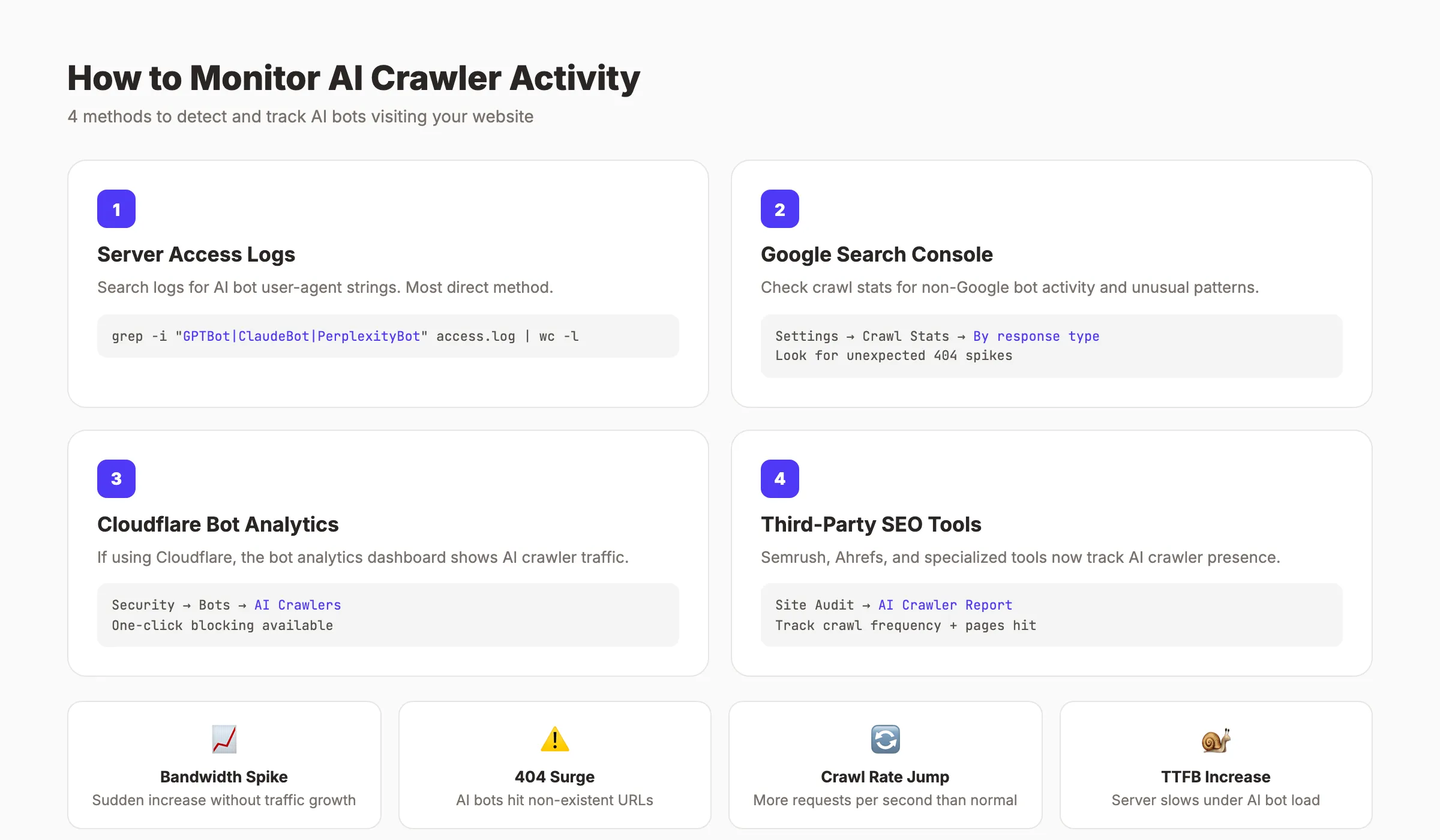
Chapter 8: How to Monitor AI Crawler Activity {#chapter-8}
You cannot manage what you do not measure. Before blocking or allowing AI crawlers, find out which ones are already visiting your site.
Check Server Access Logs
Your web server logs every request, including the user-agent string. Search your access logs for known AI crawler identifiers.
Key user-agent strings to look for:
GPTBot
ClaudeBot
OAI-SearchBot
ChatGPT-User
Claude-SearchBot
Claude-User
PerplexityBot
Perplexity-User
Google-Extended
Meta-ExternalAgent
Bytespider
CCBot
Amazonbot
On Apache or Nginx servers, filter your access log with a command like:
grep -E "GPTBot|ClaudeBot|PerplexityBot|OAI-SearchBot|Bytespider|CCBot|Meta-ExternalAgent" /var/log/nginx/access.logThis shows every request from major AI crawlers with timestamps, URLs accessed, and response codes.
Use Google Search Console
Google Search Console’s crawl stats report shows Googlebot activity. It does not track third-party AI crawlers directly. But it helps you establish a baseline for normal crawl behavior. Unexpected spikes in server load that do not match GSC data often indicate heavy AI crawler traffic.
Third-Party Monitoring Tools
Several AI SEO tools now include crawler monitoring dashboards. Cloudflare’s bot analytics show AI crawler traffic by volume and type. Vercel’s analytics break down requests by user-agent.
Set Up Alerts
Configure server monitoring to alert you when AI crawler traffic spikes beyond normal levels. A sudden surge from Meta-ExternalAgent or Bytespider can degrade performance within hours. Early detection lets you add blocking rules before your site slows down.
Track these metrics weekly:
- Total requests by AI crawler user-agent
- 404 response rates for AI crawler requests
- Bandwidth consumed by AI crawlers
- Server response time during peak crawler hours
- New or unknown AI user-agent strings
Scale your content. Protect your site. We publish 30 SEO-optimized articles per month and help you manage crawler access. Start for $1 →
Chapter 9: The Future of AI Crawlers in 2026 and Beyond {#chapter-9}
AI crawler traffic will only increase. The trend line points in one direction. Site owners who build a management strategy now will be better prepared for what comes next.
AI Bot Traffic Will Exceed Human Traffic
Projections show AI bot traffic surpassing human web traffic by 2027. The 1-to-31 bot-to-human ratio from Q4 2025 will tighten. Every website will need an explicit AI crawler policy, not just large publishers.
More Granular Controls From AI Companies
Anthropic’s 3-bot split set a new standard. OpenAI followed with separate crawlers for training, search, and user access. Expect every major AI company to offer similar granularity. This gives site owners better control without sacrificing visibility.
Regulation and Enforcement
Governments are paying attention. The EU AI Act and similar legislation may require AI companies to obtain explicit consent before training on copyrighted content. Enforcement mechanisms beyond robots.txt are likely. Compliance standards will formalize.
From Blocking to Strategic Access
The conversation is shifting. Early reactions focused on blocking everything. The mature approach treats AI crawler management like any other SEO decision. You optimize content for SEO to appear in Google. You manage AI crawler access to appear in ChatGPT, Claude, and Perplexity.
Businesses that rank higher on Google and maintain visibility in AI search will capture traffic from both channels. The goal is not to hide from AI. It is to control the terms of engagement.
To increase organic traffic in 2026, you need a strategy that covers both traditional search and AI search. AI crawler management is now part of that strategy.
FAQ {#faq}
What are AI crawlers?
AI crawlers are automated bots that visit websites to collect data for artificial intelligence systems. They fall into 3 categories: training crawlers that feed AI model development, search crawlers that power AI search results, and user-initiated crawlers that fetch pages when a person requests it through an AI tool. Major operators include OpenAI, Anthropic, Google, Meta, and Perplexity.
How do I block GPTBot from my website?
Add these lines to your robots.txt file at your domain root:
User-agent: GPTBot
Disallow: /
This blocks GPTBot from accessing any page on your site. To also block OpenAI’s search crawler, add a separate directive for OAI-SearchBot. The robots.txt change takes effect immediately, but OpenAI may take days or weeks to fully comply.
Does blocking AI crawlers affect my Google rankings?
No. Blocking GPTBot, ClaudeBot, or any other AI crawler has zero impact on your Google Search rankings. Googlebot operates independently from AI training crawlers. Blocking Google-Extended only prevents your content from training Gemini. It does not affect search indexing or ranking.
Do AI crawlers respect robots.txt?
Most major AI crawlers claim to respect robots.txt. In practice, compliance is not perfect. Research from Q2 2025 found that 13.26% of AI bot requests ignored robots.txt directives. Bytespider and Meta-ExternalAgent have the weakest compliance records. For stronger enforcement, use server-level blocking through Cloudflare or firewall rules.
How do I know if AI crawlers are visiting my site?
Check your server access logs for AI crawler user-agent strings like GPTBot, ClaudeBot, PerplexityBot, and Meta-ExternalAgent. Filter your Nginx or Apache logs using grep commands. Cloudflare users can check the bot analytics dashboard. A sudden increase in server load without a matching increase in Google Search Console crawl stats often signals heavy AI crawler activity.
Should I block all AI crawlers or just some?
Block training crawlers and allow search and user crawlers. That is the recommended approach for most websites. Training bots take your content without sending traffic back. Search bots create visibility in AI-generated answers. User bots let real people interact with your content through AI tools. Block GPTBot, ClaudeBot, Google-Extended, Meta-ExternalAgent, CCBot, and Bytespider. Allow OAI-SearchBot, ChatGPT-User, Claude-SearchBot, Claude-User, PerplexityBot, and Perplexity-User.
AI crawlers are the new default for web traffic. Every site owner needs a clear policy.
The right strategy is not blocking everything or allowing everything. It is selective access control: protect your content from training, stay visible in AI search, and monitor what bots actually do on your site. Start with Template 2 from this guide, set up log monitoring, and review your policy quarterly as the AI crawler space evolves.
Related Tools & Resources
Free SEO Tools:
Best Lists:

Written by
Siddharth GangalSiddharth is the founder of theStacc and Arka360, and a graduate of IIT Mandi. He spent years watching great businesses lose organic traffic to competitors who simply published more. So he built a system to fix that. He writes about SEO, content at scale, and the tactics that actually move rankings.
30 SEO blog articles published every month
Keyword-optimized, scheduled, and live on your site. Automatically.
30-day trial · Cancel anytime
theStacc
Stop writing SEO content manually
30 blog articles, 30 GBP posts, and social media content. Published every month. Automatically.
Start Your $1 Trial$1 for 3 days · Cancel anytime