
How to Optimize Content for SEO: 8 Steps (2026)
We optimized 3,500+ articles using this 8-step content SEO process. Keyword selection, title tags, headers, links, and AI formatting. Updated March 2026.
Most content never ranks. 96.55% of all pages get zero traffic from Google. That means nearly every article published online sits invisible on page 4 or beyond, generating nothing.
The gap between ranking and not ranking is expensive. A page on position 11 gets close to zero clicks. A page on position 3 captures 11% of all clicks for that query. For a keyword with 5,000 monthly searches, that difference is 550 visitors per month. Multiply across 20 pages and you are leaving tens of thousands of visits on the table every year.
The fix is not more content. It is better-optimized content. A structured optimization process turns average pages into ranking pages. This guide breaks down the exact 8-step process we use across 3,500+ articles published for 70+ industries. Our average on-page SEO score is 92%.
By the end, you will have a repeatable system for optimizing any piece of content. Blog posts, service pages, landing pages. The process works for all of them. Even if you have never touched SEO before.
Here is what you will learn:
- How to select and validate a target keyword before optimizing
- How to study the search results so your content matches what Google expects
- How to write title tags, headers, and openings that perform
- How to build internal and external links that pass authority
- How to format content for both traditional search and AI search engines
- What results to expect and when
Overview
| Detail | Info |
|---|---|
| Time required | 45 to 90 minutes per article |
| Difficulty | Beginner-friendly |
| What you need | Google Search Console (free) and a text editor |
You do not need paid software to optimize content. A free Google account and a text editor handle 90% of the work. Paid tools like Surfer SEO or Semrush speed up the research phase but are not required for these 8 steps.
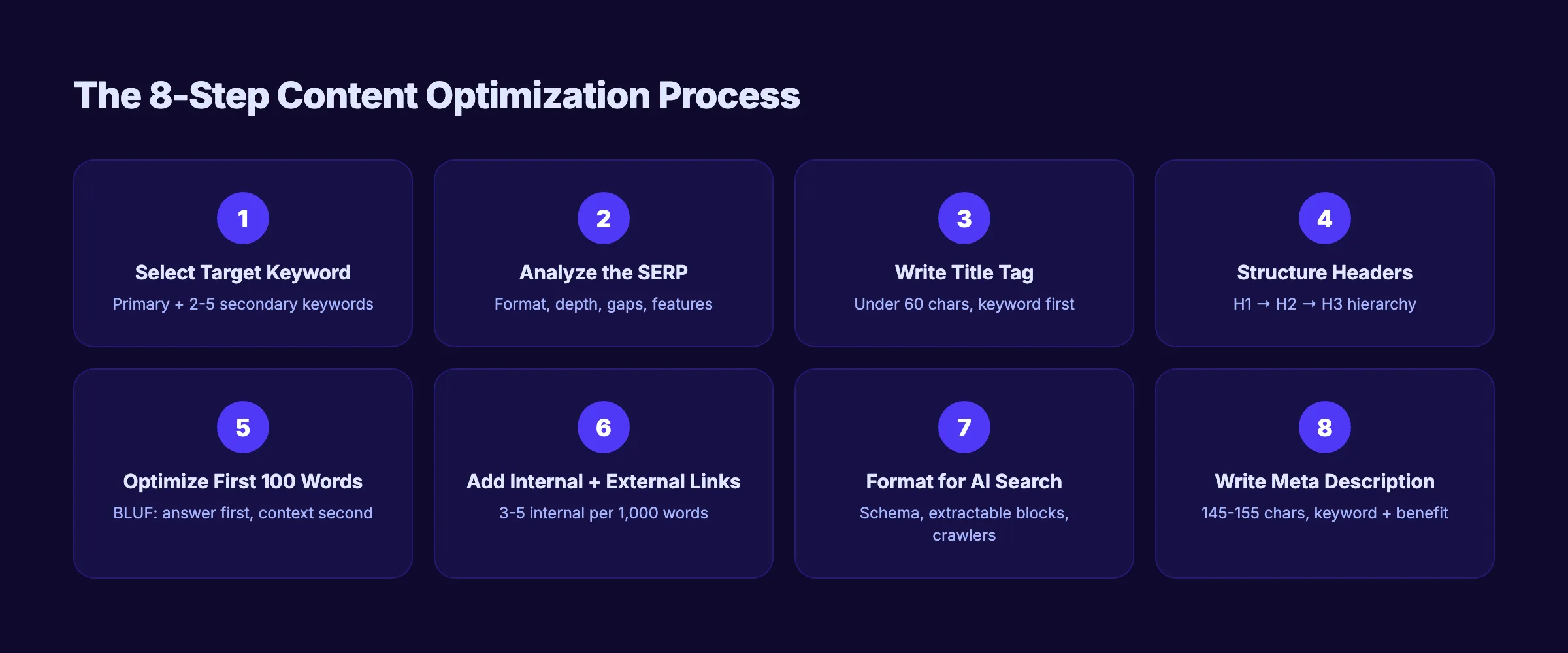
Step 1: Select One Target Keyword
Every optimized page starts with 1 clear target keyword. Without it, every other step has no direction. Your title tag, headers, URL, and body content all depend on knowing the exact phrase you want to rank for.
For New Content
Use Google Autocomplete to find keywords with real search demand. Type your topic into Google and note every suggestion that appears. These are phrases real people search every day.
Check the “People Also Ask” boxes on the results page. Each question reveals a related keyword with proven demand. Verify search intent by looking at the top 5 results. If they are all how-to guides and your content is a product page, the keyword does not fit.
For Existing Content
Open Google Search Console. Move through to Performance and check which queries drive impressions for your page. Look for keywords where you rank between positions 5 and 20. These “striking distance” keywords have the highest optimization ROI because a few targeted improvements can push them onto page 1.
Choose Primary and Secondary Keywords
Select 1 primary keyword and 2 to 5 secondary keywords. The primary keyword is the exact phrase you want to rank for. Secondary keywords are related terms and variations that support topical coverage.
Example:
- Primary: optimize content for seo
- Secondary: content optimization checklist, seo content optimization, how to optimize blog posts, on-page content optimization
94.74% of all keywords get 10 or fewer monthly searches. Long-tail keywords (3 or more words) convert at 2.5x the rate of head terms and account for over 91% of all searches. Target these first. They are less competitive and more specific.
Why this step matters: Without a target keyword, Google does not know what your page is about. Every optimization decision in the next 7 steps depends on this choice. A wrong keyword means wasted effort regardless of how well you execute the rest.
Pro tip: For existing content, positions 5 to 20 are the sweet spot. A page already ranking at position 12 needs optimization, not a full rewrite. Small improvements to the title tag, opening paragraph, and internal links often push these pages onto page 1 within 30 to 60 days.
Step 2: Analyze the Search Results
Search your target keyword in an incognito browser window. Study the top 5 results. This tells you exactly what Google considers the best answer for that query right now.
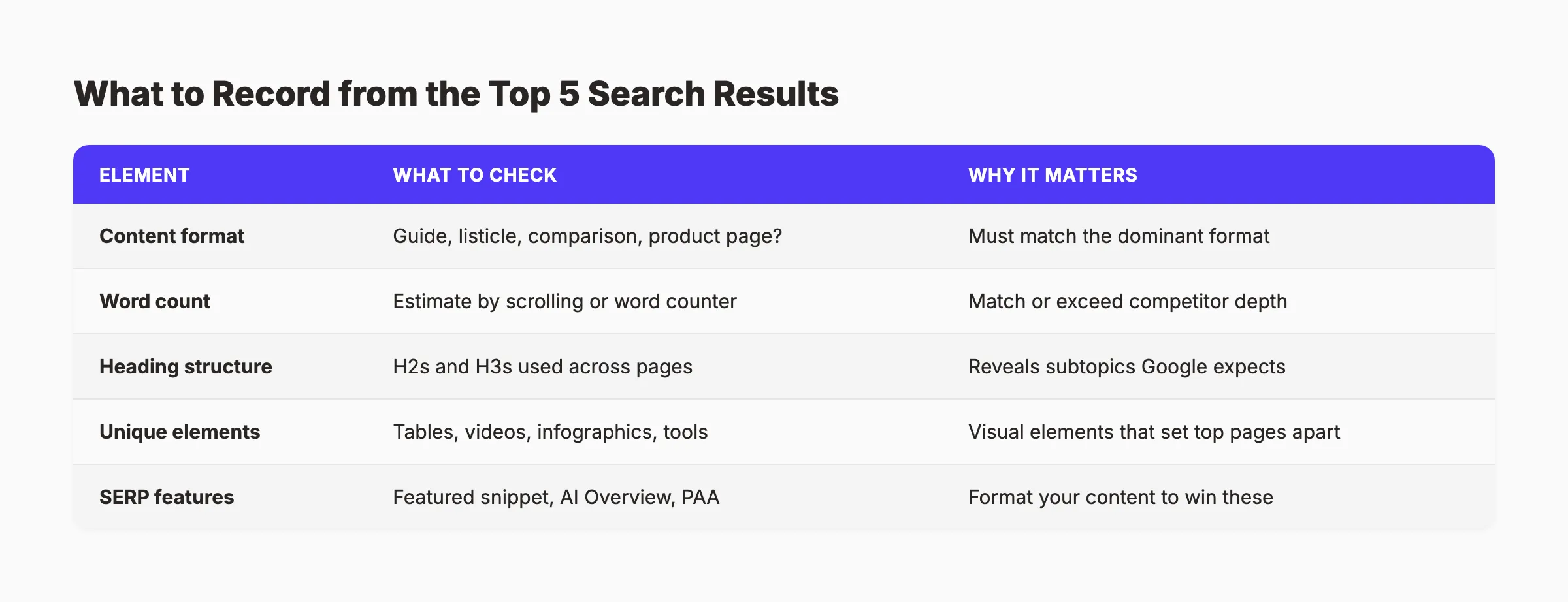
Record 4 Elements for Each Result
| Element | What to Check | Why It Matters |
|---|---|---|
| Content format | Guide, listicle, comparison, product page? | You must match the dominant format |
| Word count | Estimate by scrolling or using a word counter | Your content should match or exceed this depth |
| Heading structure | What H2s and H3s do they use? | These are the subtopics Google expects |
| Unique elements | Tables, videos, infographics, tools, calculators? | Visual elements that set top pages apart |
Match the Dominant Format
Your content must match what Google rewards for your keyword. If every top result is a step-by-step guide, write a step-by-step guide. If they are all listicles, write a listicle. Fighting the search results never works. Google has already decided what format satisfies the intent for that query.
Find the Content Gap
Open 3 competing pages and list every H2 heading. The headings that appear in all 3 are the sections Google expects your content to include. The headings missing from all 3 are your differentiation opportunities. These gaps are where you add unique value that no competitor offers.
Check for SERP Features
Note whether a featured snippet exists for your keyword. If one appears, record its format: paragraph, list, or table. You can structure your content to win that snippet by providing a clear, concise answer in the same format directly below an H2 heading.
Also check if AI Overviews appear. In 2026, AI Overviews show on roughly 48% of Google searches. Content that earns AI Overview citations follows specific formatting patterns covered in Step 7.
Why this step matters: Search intent alignment is the single biggest ranking factor you control. Content that does not match what Google expects for a query will not rank, regardless of how well it is optimized technically. A perfectly written product page will never rank for an informational query that Google answers with how-to guides.
Pro tip: Pay special attention to the “People Also Ask” box. Every PAA question is a subtopic Google expects covered. Add the most relevant ones as H2 or H3 sections in your content.
Step 3: Write a Title Tag Under 60 Characters
The title tag is the most important on-page SEO element. It appears in search results, browser tabs, and social shares. Google uses it as a primary relevance signal. A strong title tag increases click-through rate by up to 36% when it includes a number.
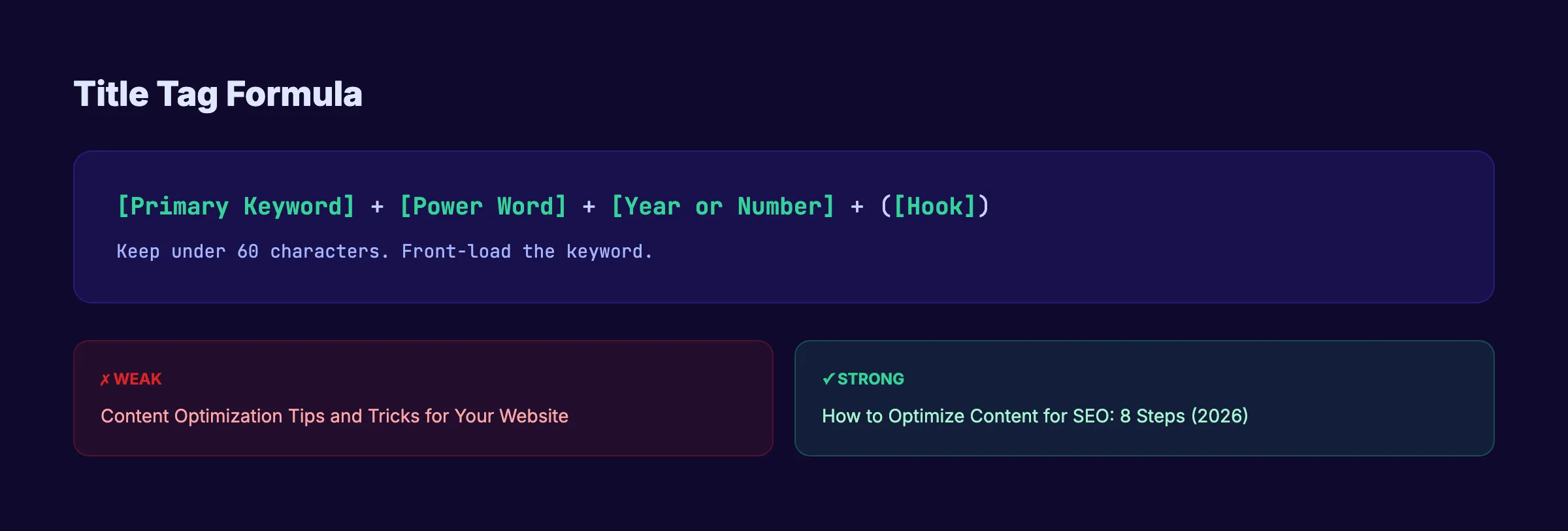
Title Tag Rules
Follow these 4 rules for every title tag:
- Front-load the primary keyword. Place it within the first 5 words. Google reads left to right. Truncation cuts from the right.
- Keep it under 60 characters. Google truncates titles longer than approximately 580 pixels, which translates to 55 to 60 characters.
- Add a power word or hook. Words like “Complete,” “Proven,” “Step-by-Step,” or a year like “(2026)” increase CTR.
- Make it specific. “SEO Tips” is weak. “How to Optimize Content for SEO: 8 Steps (2026)” is specific, keyword-rich, and click-worthy.
Examples of Strong vs Weak Titles
| Weak Title | Strong Title |
|---|---|
| Content Optimization Tips | How to Optimize Content for SEO: 8 Steps (2026) |
| SEO Guide | On-Page SEO: The Complete Checklist (2026) |
| Blog Writing Advice | How to Write Blog Posts That Rank on Google |
Test Your Title
Run your title through a headline analyzer before publishing. Test 3 variations and pick the one that scores highest for readability, keyword presence, and emotional impact.
Pages with the keyword in the title have a 45% higher click-through rate. Moving from position 2 to position 1 produces 74.5% more clicks. A strong title tag accelerates both metrics. Google rewrites approximately 61% of title tags. Aligning your title closely with your H1 heading is the best defense against rewrites.
Why this step matters: The title tag is the first thing searchers see. A weak title means lower CTR, which signals to Google that your page is not the best result for the query. Over time, low CTR pushes your ranking down. A strong title earns clicks that compound into ranking strength.
Step 4: Structure Content with Header Hierarchy
Headers are the skeleton of your content. Google uses them to understand what each section covers. Readers use them to scan and decide whether to keep reading. Almost 50% of people skim blog posts rather than reading every word. Your headings must communicate value to scanners.
Header Rules
- H1: Exactly 1 per page. It should closely match your title tag and contain the primary keyword.
- H2: Use for major sections. Each H2 covers a distinct subtopic. Include the primary or secondary keywords naturally in at least 2 H2s.
- H3: Use for subsections under H2s. Add specific details, examples, or breakdowns.
- H4: Rarely needed. Only use when an H3 genuinely needs subdivision.
Never skip heading levels. Jumping from H2 to H4 without an H3 confuses both Google and screen readers. A well-structured page reads like an outline even when you only scan the headings.
Use Question-Based Headers for Snippets
Question-based H2s capture featured snippets and People Also Ask results. “How Long Does Content Optimization Take?” captures a specific query. “Timing Considerations” does not. Google extracts answers from the paragraph directly below question headings.
Content Depth Signals Authority
Content over 3,000 words with clear header structure gets 3x more traffic, 4x more shares, and 3.5x more backlinks than shorter content. The headers are what make long content scannable and useful. Without them, even a 5,000-word article feels like a wall of text.
Why this step matters: Google’s helpful content system evaluates whether your content is organized for the reader. AI Overviews extract answers based on header structure. In 2026, a clear H1 to H3 hierarchy makes your content eligible for both traditional featured snippets and AI-generated citations.
Want every article optimized automatically? Stacc handles keyword research, content structure, and on-page optimization for 30 articles per month. Zero manual work. Start for $1 →
Step 5: Optimize the First 100 Words
The introduction determines whether readers stay or bounce. It also determines whether AI search engines cite your content. 44.2% of all LLM citations come from the first 30% of an article. Front-loading your best information is no longer optional. It is a ranking and citation strategy.
The BLUF Method
BLUF stands for Bottom Line Up Front. State the core answer or value immediately. Do not build up to a conclusion. Start with the conclusion and then explain it.
Three rules for the opening:
- State the problem in the first sentence. Name the specific pain the reader faces. Be direct.
- Include the primary keyword in the first 100 words. Google weighs early keyword placement more heavily than keywords buried in paragraph 8.
- Preview the solution. Tell readers exactly what they will get from this page. A bullet list or a single clear sentence works.
Bad vs Good Openings
Bad opening: “Content optimization is the process of improving web content to rank higher in search engine results pages. There are many factors that go into this process.”
Good opening: “Most content never ranks. 96.55% of all pages get zero traffic from Google. The fix is not more content. It is better-optimized content. This guide covers 8 steps that work.”
The first version is a textbook definition. It wastes 30 words before saying anything useful. The second version names the pain, provides a stat, and previews the solution in 4 sentences. It earns attention.
Why AI Search Makes This Critical
Google AI Overviews and ChatGPT pull answers from the opening sections of content. A page that buries its answer at word 800 after a lengthy introduction will lose citations to a page that leads with a clear, direct answer. This pattern holds across every AI search platform in 2026.
Why this step matters: Bounce rate is an indirect ranking signal. If users click your result and immediately return to Google, your page loses ranking momentum. A strong opening keeps readers on the page and gives AI systems the extractable content they need for citations.
Step 6: Add Internal and External Links
Links are how Google discovers relationships between pages. Internal links distribute authority across your site. External links to authoritative sources signal that your content is well-researched and trustworthy.
Internal Linking Rules
Aim for 3 to 5 contextual internal links per 1,000 words. Each link should use descriptive anchor text that tells both readers and Google what the linked page covers.
Good anchor text: “See our list of best on-page SEO tools for tool recommendations.” Bad anchor text: “Click here for more information.”
Distribute internal links throughout the content. Do not cluster 5 links in the introduction and leave the rest of the article bare. Prioritize links to pages you want to rank higher. Every internal link is a vote that tells Google “this page is important.”
The Two-Way Linking Rule
After publishing or updating a page, go back to 3 to 5 older articles and add links pointing to the new or updated page. Most people only link forward (from new content to old). Linking backward (from old content to new) is what distributes authority to your freshest pages. This single habit can improve crawl efficiency by 40% to 70%.
External Linking Rules
Include 2 to 3 external links per article minimum. Link to the specific page with the data or claim, not just a homepage. Prioritize authoritative sources: Google official documentation, Ahrefs and Semrush research studies, academic papers, and .gov or .edu sites.
External links open in new tabs automatically on our blog (handled by the page template). They add credibility because they show your content engages with the broader knowledge ecosystem rather than existing in isolation.
Tools and Resources for Linking
Use our SEO audit tool to identify pages on your site with zero internal links. These orphan pages are invisible to Google’s crawler. Our meta tag analyzer can help verify that linked pages have proper title tags and descriptions.
Why this step matters: 95% of pages have zero backlinks. Internal links are the one type of link you fully control. A strong internal linking strategy compensates for weak backlink profiles, especially on low-to-medium competition keywords. Sites with connected content clusters rank higher than sites with isolated, unlinked pages.
Step 7: Format Content for AI Search
In 2026, optimizing for Google alone is not enough. AI Overviews appear on approximately 48% of Google searches. ChatGPT has over 900 million weekly active users. Perplexity processes 780 million queries per month. Your content either gets cited by these platforms or it gets skipped.
The good news: the same content can serve both traditional search and AI search. The difference is formatting.
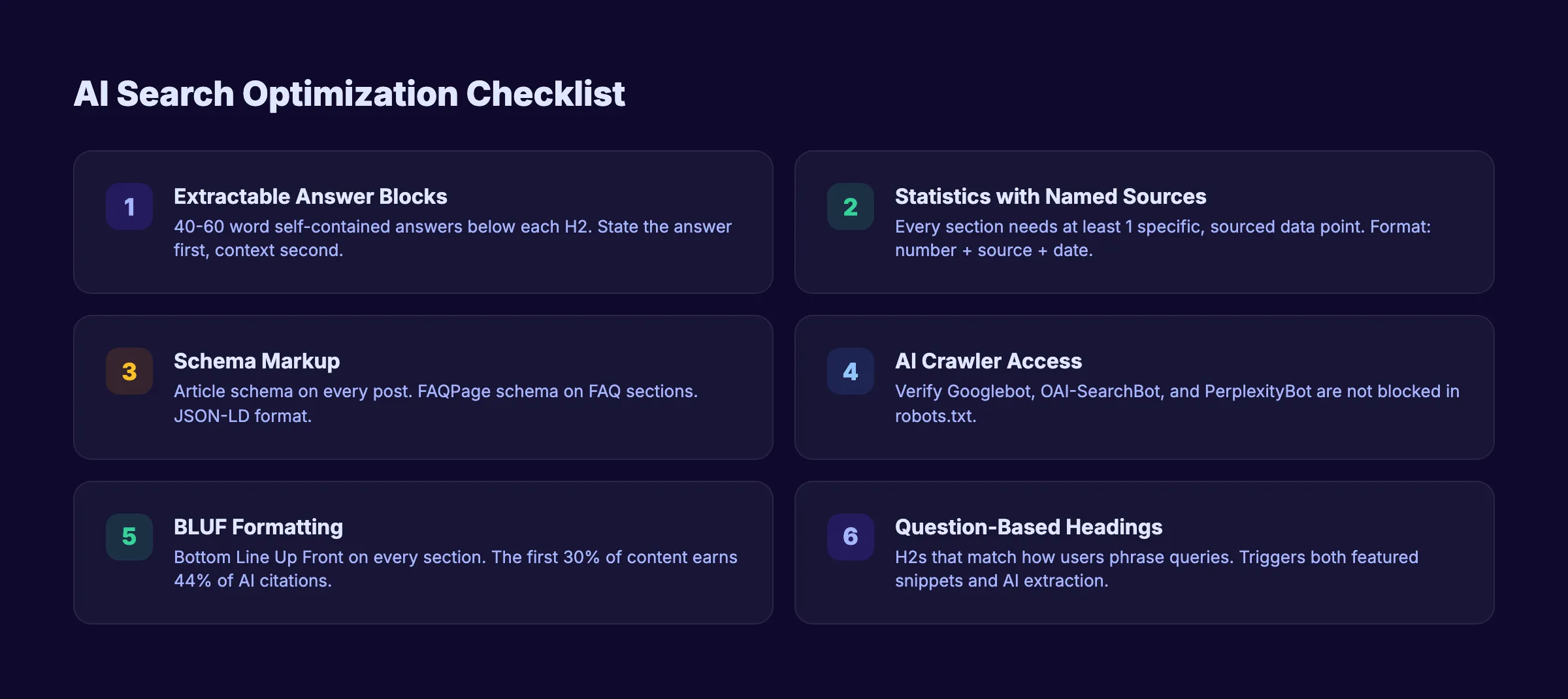
Write Extractable Answer Blocks
AI systems pull 40 to 60 word passages from web content. Place a direct, self-contained answer in the first 1 to 2 sentences below each H2 heading. Follow it with supporting detail. This is the BLUF format applied at the section level.
Not extractable: “There are many factors that influence how search engines evaluate the quality of web content and determine rankings.”
Extractable: “Google evaluates content quality through E-E-A-T signals: Experience, Expertise, Authoritativeness, and Trustworthiness. Pages with named authors, cited sources, and original data score highest.”
The second version states a specific, verifiable claim with named elements. AI models can extract it as a standalone citation.
Add Statistics with Named Sources
Content with named sources and specific statistics earns citations up to 40% more often than content without them. Every major section should include at least 1 specific, sourced data point.
Format: “[Specific number] + [named source] + [date or context]”
Example: “94.74% of all keywords get 10 or fewer monthly searches (Ahrefs, 2025 keyword study).”
Implement Schema Markup
Add Article schema to every blog post. Add FAQPage schema to any page with a question-and-answer section. Schema markup translates your content into machine-readable format that AI crawlers interpret faster than unstructured HTML. Use our schema markup generator to create valid JSON-LD without writing code.
Verify AI Crawler Access
Check your robots.txt file. Ensure Googlebot, OAI-SearchBot (ChatGPT), and PerplexityBot are not blocked. Many sites inadvertently block AI crawlers. If a crawler cannot access your content, that platform will never cite it.
| Crawler | Platform | Action |
|---|---|---|
| Googlebot | Google AI Overviews | Must be allowed (most sites already do) |
| OAI-SearchBot | ChatGPT Web Search | Allow for AI search citations |
| PerplexityBot | Perplexity | Allow for Perplexity citations |
Why this step matters: AI search is not a future trend. It is the current reality. Over 2 billion people see AI Overviews every month. Content formatted for AI extraction ranks in traditional search AND earns AI citations. Ignoring this step means losing visibility on platforms that account for a growing share of search interactions.
3,500+ blogs published. 92% average SEO score. Every article Stacc publishes includes schema markup, BLUF formatting, and citation-ready data blocks. Start for $1 →
Step 8: Write a Meta Description That Earns Clicks
The meta description does not directly affect rankings. But it directly affects click-through rate. A higher CTR sends positive engagement signals to Google. Each rank position advancement increases CTR by 32.3%. A strong meta description compounds that effect.
Meta Description Rules
Keep your meta description between 145 and 155 characters. Include 3 elements:
- The primary keyword. Google bolds matching terms in search results. When a searcher sees their query bolded in your snippet, it confirms relevance.
- A specific benefit or outcome. Tell the reader what they gain by clicking. “8 steps to optimize any content for SEO rankings” is specific. “Learn about SEO” is vague.
- A freshness signal. Add “Updated March 2026” or the current year. Searchers prefer recent content.
The Ad Copy Formula
Write meta descriptions like ad copy, not summaries. Think of each one as a 155-character pitch for the click.
Formula: [What we covered] + [What the reader gets] + [Freshness signal]
Example: “We optimized 3,500+ articles using this 8-step process. From keyword selection to AI search formatting. Updated March 2026.”
That is 142 characters. It includes the keyword implicitly, states a credibility metric, promises a clear deliverable, and signals freshness.
Why Custom Descriptions Beat Auto-Generated Ones
25% of top-ranking pages have no custom meta description at all. Google auto-generates one from the page content. The auto-generated version is almost always worse than a hand-written description because it pulls random sentences without a persuasive structure. Write one for every page. It takes 30 seconds and directly influences your CTR.
Check your existing meta descriptions with our meta tag analyzer. Fix any page where the description is missing, too short, or does not include the target keyword.
Why this step matters: Two pages at position 5 can get wildly different traffic based on their meta descriptions. The one with a compelling, keyword-rich description earns more clicks, which sends quality signals to Google, which improves rankings over time. Meta descriptions are a free CTR lever that most sites ignore.
Results: What to Expect
Content optimization is not instant. Search engines need time to recrawl, reindex, and reevaluate your pages. Here is a realistic timeline after completing all 8 steps.
| Timeframe | What Happens |
|---|---|
| Week 1 to 2 | Google recrawls the updated page. Changes appear in the index. |
| 2 to 4 weeks | Initial ranking shifts begin. Impressions may increase before clicks do. |
| 30 to 60 days | Meaningful ranking improvements for striking-distance keywords (positions 5-20). |
| 60 to 90 days | Compounding effects. Higher rankings drive more clicks. More clicks signal quality. Quality drives higher rankings. |
New content follows a similar pattern. Expect 60 to 90 days before seeing meaningful organic traffic from a freshly published article. For low-competition long-tail keywords, results can appear within 30 days.
Consistency matters more than any single optimization. A site that publishes and optimizes 30 articles per month builds authority faster than a site that optimizes 1 article perfectly. Volume and quality together create compounding results.
Monitor progress in Google Search Console. Track impressions, clicks, average position, and CTR for your target keywords. If a page stalls after 90 days, revisit Steps 1 through 8 and look for missed opportunities.
Troubleshooting
Problem: Rankings improved but CTR stayed low.
Your page moved to page 1 but clicks did not increase proportionally. The issue is almost always the title tag or meta description. Rewrite both using the formulas in Steps 3 and 8. Add a number, a power word, or the current year. Test your new title with our headline analyzer.
Problem: Content matches intent but does not rank.
You matched the format and depth of top results, but the page sits at position 15. This usually means your site lacks topical authority for this subject. Publish 5 to 10 supporting articles on related subtopics and interlink them. Build a content cluster around the keyword with a pillar page at the center.
If competitors have significantly more backlinks (check with Ahrefs or Semrush), the gap is off-page rather than on-page. Focus on creating content that earns links naturally: original data, studies, and free tools.
Problem: Google rewrote your title tag.
Google rewrites titles when they do not match the page content or the H1 heading. Align your title tag closely with your H1. Remove excessive branding from the title. Keep it under 60 characters and focused on a single topic. If Google still rewrites after alignment, the rewritten title may actually perform better. Test for 30 days before reverting.
FAQ
How long does it take to optimize content for SEO?
A single article takes 45 to 90 minutes to optimize using these 8 steps. The keyword research and SERP analysis phase takes the longest. With practice, the full process takes closer to 45 minutes. Batch-optimizing 5 articles per week is realistic for a solo practitioner.
How often should I update optimized content?
Audit high-value pages every 6 months. Update statistics with current data. Add new internal links to recently published content. Refresh the year in your title tag and meta description. Pages that decline in rankings should be audited immediately. Google rewards fresh, accurate content. AI search engines show a documented preference for content updated within the last 2 months.
Can I optimize old content or should I write new articles?
Start with old content. Pages already indexed by Google respond faster to optimization than brand-new pages. Check Google Search Console for pages ranking in positions 5 to 20. Those are your best candidates. Optimizing existing content produces results in weeks. New content takes months.
What is the most important on-page SEO factor?
Search intent match. If your content format does not match what Google users expect when they search your keyword, no other optimization helps. After intent, title tag quality and header structure carry the most weight. Explore the best on-page SEO tools for platforms that help with verification.
How many keywords should I target per article?
Target 1 primary keyword and 2 to 5 secondary keywords. The primary keyword goes in the title tag, H1, URL, meta description, and first 100 words. Secondary keywords appear in H2 headings and body content. Targeting more than 5 keywords per page dilutes your relevance signal.
Does content length affect rankings?
Length alone does not affect rankings. Depth does. A 1,500-word article that covers every subtopic thoroughly outranks a 3,000-word article filled with filler. Match or slightly exceed the word count of the top 5 results for your keyword. Content over 3,000 words with proper structure earns 3x more traffic and 3.5x more backlinks. Never add words just to hit a count.
The 8 steps in this guide are the same process behind every article we publish. Keyword selection, SERP analysis, title tags, header hierarchy, opening optimization, links, AI formatting, and meta descriptions. Each step builds on the one before it.
The pages that rank in 2026 share 2 traits. They match search intent precisely. And they are structured for both human readers and AI systems. Every step in this guide addresses one or both of those requirements.
Start with your highest-potential pages. Find them in Google Search Console by sorting for high impressions and low CTR. Optimize those first. Then apply the same process to every new article you publish.
Do not want to optimize every article manually? Stacc publishes 30 fully optimized articles per month. Keyword research, content structure, on-page optimization, internal links, AI formatting, and meta tags. All handled. Zero manual work. Start for $1 →
Related Tools & Resources
Free SEO Tools:
Best Lists:

Written by
Siddharth GangalSiddharth is the founder of theStacc and Arka360, and a graduate of IIT Mandi. He spent years watching great businesses lose organic traffic to competitors who simply published more. So he built a system to fix that. He writes about SEO, content at scale, and the tactics that actually move rankings.
30 SEO blog articles published every month
Keyword-optimized, scheduled, and live on your site. Automatically.
30-day trial · Cancel anytime
theStacc
Stop writing SEO content manually
30 blog articles, 30 GBP posts, and social media content. Published every month. Automatically.
Start Your $1 Trial$1 for 3 days · Cancel anytime