
11 Best On-Page SEO Tools 2026: Content Scoring & Page Optimization
We tested 11 on-page SEO tools for keyword scoring, content optimization, meta analysis, and page-level audits. Best for content writers and bloggers optimizing individual pages.
Expert Verified. Written by Stacc Editorial Team. 11 on-page SEO tools tested for content optimization accuracy, technical auditing depth, and pricing value. Pricing verified March 2026. We optimize 3,500+ articles per month and use on-page tools daily across every one.
Quick Picks:
- Best for automated on-page optimization: theStacc. Every article is keyword-optimized, structured, and published with 92% average SEO scores
- Best for content scoring: Surfer SEO. Real-time NLP scoring against 500+ on-page signals from $89/mo
- Best budget on-page optimizer: NeuronWriter. Semantic SEO analysis with lifetime deal options from $23/mo
- Best all-in-one with on-page checker: Semrush. On-Page SEO Checker analyzes 140+ issues from $139/mo
- Best free on-page tool: Google Search Console. Direct performance data from Google at zero cost
- Best WordPress plugin: Rank Math. Most feature-rich free tier with built-in schema generator
How We Tested These On-Page SEO Tools
On-page SEO is where most rankings are won or lost. You can build hundreds of backlinks. But a poorly optimized page with the wrong title tag, weak headers, and missing internal links will still sit on page 2. The title tag alone remains the strongest single on-page relevance signal Google uses.
We optimize 3,500+ articles per month across 70+ industries. Every article passes through on-page optimization before publishing. We tested each tool on the same 10 pages across different niches and measured: how actionable the recommendations were, how accurate the content scoring was, and whether following the suggestions actually improved rankings.
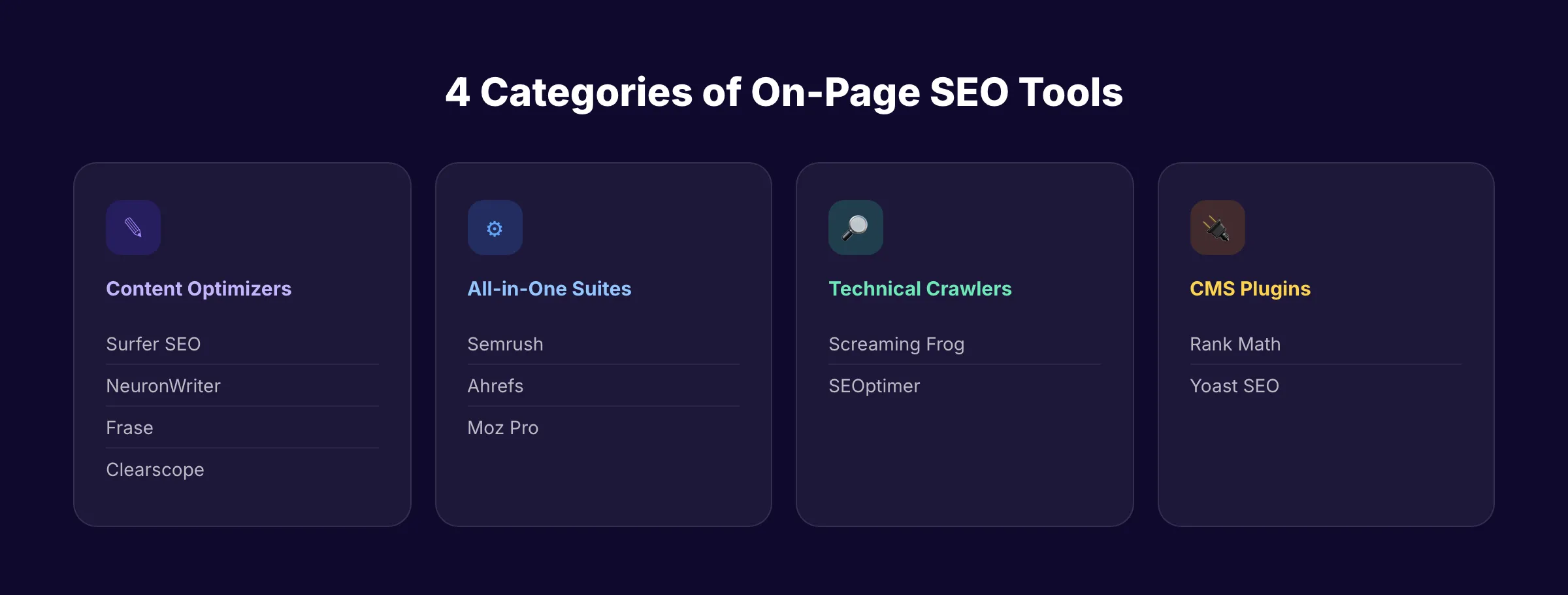
Below is our honest breakdown of 11 tools across 4 categories: content optimizers, all-in-one suites, technical crawlers, and CMS plugins. Every price and feature was verified in March 2026.
What We Evaluated
| Criteria | What We Measured | Why It Matters |
|---|---|---|
| On-Page Accuracy | Do the recommendations match what actually ranks? | Bad suggestions waste time and hurt rankings |
| Content Scoring | Does the tool score content against real SERP data? | Generic scores without SERP context are guesswork |
| Automation Level | How much of on-page SEO does the tool handle end-to-end? | Every manual step is a bottleneck |
| Technical Depth | Does it catch meta tag, schema, and crawl issues? | On-page SEO covers more than just content |
| Pricing Value | What do you get per dollar? | A $400/mo tool is not 4x better than a $99/mo tool |
All 11 Tools Compared
| Tool | Best For | Price | Category | Free Option | Key Strength |
|---|---|---|---|---|---|
| theStacc | Automated on-page optimization | $99/mo+ | Done-for-you | $1 trial | 92% avg SEO score, zero manual work |
| Surfer SEO | Content scoring | $89/mo+ | Content optimizer | No | Real-time NLP scoring vs top SERPs |
| NeuronWriter | Budget optimization | $23/mo+ | Content optimizer | No | Lifetime deal available |
| Frase | Content briefs + optimization | $45/mo+ | Content optimizer | No | Pay-as-you-go at $3.50/doc |
| Clearscope | Enterprise content grading | $129/mo+ | Content optimizer | No | Unlimited users on all plans |
| Semrush | All-in-one + on-page checker | $139/mo+ | All-in-one suite | Limited free | 140+ on-page issue detection |
| Ahrefs | Backlink-aware on-page audits | $29/mo+ | All-in-one suite | No | Industry-best backlink index |
| Moz Pro | Beginner-friendly audits | $49/mo+ | All-in-one suite | 10 queries/mo | Domain Authority metric |
| Screaming Frog | Technical crawling | Free/~$225/yr | Technical crawler | 500 URLs free | Unlimited local crawling |
| Rank Math | WordPress on-page SEO | Free/$6.99/mo | CMS plugin | Full free tier | Built-in schema generator |
| Google Search Console | Performance monitoring | Free | Free tool | Yes | Direct data from Google |
1. theStacc. Best for Automated On-Page SEO Optimization
theStacc does not give you on-page recommendations to implement yourself. It handles every on-page element automatically. Every article Stacc publishes is keyword-targeted, properly structured with header hierarchy, internally linked, and optimized for both traditional search and AI search engines. The average SEO score across all published content is 92%.
What It Does Well
The on-page optimization runs as part of the full content pipeline. Stacc analyzes your ICPs and competitors, selects target keywords, and then writes content with every on-page element already in place. Title tags under 60 characters with the primary keyword. Meta descriptions between 145 and 155 characters. H1, H2, and H3 hierarchy that matches search intent. Internal links distributed naturally throughout the content. Image alt text with relevant keywords.
Every article is scored before publishing. Content that does not meet the 90+ SEO score threshold gets automatically revised. This eliminates the manual optimization loop that other tools require. You do not need to run a page through Surfer, read the suggestions, edit the content, re-score, and repeat. Stacc does all of that in one pass.
The monthly content calendar is planned from competitor analysis and keyword gaps. This means every article targets a keyword with real search demand and achievable difficulty. On-page optimization without smart keyword selection is wasted effort. Stacc handles both.
Our Take: Every other tool on this list tells you what to fix. Stacc fixes it before you see it. If your on-page SEO bottleneck is not knowledge but execution, no other tool removes that bottleneck as completely.
Where It Falls Short
Stacc is not an on-page audit tool. You cannot paste a URL and get a list of 140 issues like you can with Semrush. It does not crawl your existing site for technical problems. It does not score pages you wrote yourself. Stacc optimizes the content it produces. For auditing existing pages or content written outside the platform, you need a separate tool.
Key Features
- Automated on-page optimization for every published article (title tags, metas, headers, links, images)
- 92% average SEO score across 3,500+ articles per month
- Content calendar planned from ICP and competitor keyword gap analysis
- Internal linking distributed automatically based on topical relevance
- WordPress, Webflow, Ghost, and webhook integrations for auto-publishing
Pricing
- Starter: $99/month , 30 articles/month, fully optimized
- Growth: $149/month , 50 articles/month
- Scale: $199/month , 80 articles/month
- Trial: $1 for 3 days, cancel anytime
Who Should Use theStacc
Strong fit:
- Businesses that want on-page SEO handled automatically without learning optimization tools
- Teams publishing 30+ articles per month that cannot manually optimize each one
- Local service businesses that need consistent, optimized content without SEO expertise
Probably not right for:
- SEO professionals who need to audit and fix existing pages manually
- Agencies that need white-label on-page reports for clients
2. Surfer SEO. Best for Real-Time Content Scoring
Surfer SEO is the most popular content optimization tool for a reason. The Content Editor scores your writing in real time against the top-ranking pages for your target keyword. It analyzes 500+ on-page signals using NLP and tells you exactly what terms to include, how many times, and how to structure your content.
What It Does Well
The real-time scoring is the core value. As you write, Surfer shows a content score that updates with every sentence. It recommends specific NLP terms, optimal word count, heading count, paragraph count, and image count. All based on what the current top 10 results have in common. This is not generic advice. It is data from the actual SERP you are competing in.
The SERP Analyzer breaks down exactly why the top pages rank. You see word count distribution, keyword density patterns, heading structures, and content gaps across the top 10 results. The topical map feature generates complete content architectures from your domain.
Our Take: Surfer is the best content scoring tool available. The real-time feedback loop while writing is something no other tool replicates as smoothly. If you write your own content and want to maximize on-page optimization, Surfer is the standard.
Where It Falls Short
Surfer is a content tool, not a technical SEO tool. No site audits. No crawling. No backlink data. No rank tracking. The Essential plan at $99/month limits you to 30 articles and 10 audits. The credit-based system can feel restrictive for high-volume teams. The SERP Analyzer costs an extra $29/month on the Essential plan.
Key Features
- Content Editor with real-time NLP-based optimization scoring
- SERP Analyzer reverse-engineers top-ranking page factors
- Topical map generates content architectures from a domain
- Keyword clustering by SERP overlap
- AI content generation integrated into the editor
Pricing
- Essential: $99/month ($79/month annual) , 30 articles, 10 audits, 2 seats
- Scale: $219/month ($175/month annual) , 100 articles, 30 audits, 5 seats
- Enterprise: Custom pricing
- Add-ons: AI Tracker $95/month, SERP Analyzer $29/month (Essential only)
Who Should Use Surfer SEO
Strong fit:
- Content writers who want real-time optimization feedback while writing
- SEO teams building topical authority through content clusters
- Agencies that produce content briefs for freelance writers
Probably not right for:
- Teams that need technical site audits alongside content optimization. Surfer does not crawl sites.
3. NeuronWriter. Best Budget On-Page Optimizer
NeuronWriter delivers semantic SEO analysis at a fraction of Surfer or Clearscope pricing. Starting at $23/month (or $19/month annual), it provides NLP-based content scoring, competitor analysis, and AI writing templates. Lifetime deals are available starting at $89 one-time.
What It Does Well
The semantic analysis is solid for the price. NeuronWriter scores your content against NLP terms from the top SERP results and shows which terms to add. The content designer helps structure articles with recommended headings. Google Search Console integration pulls real performance data directly into the optimization workflow.
The lifetime deal changes the value calculation entirely. At $89 to $445 one-time, NeuronWriter pays for itself within 2 to 4 months compared to Surfer or Clearscope subscriptions. For freelancers and small teams with tight budgets, this makes professional-grade on-page optimization accessible.
Our Take: NeuronWriter is 80% of Surfer at 25% of the cost. The semantic analysis is accurate. The interface is clean. If you cannot justify $99+/month for content optimization, NeuronWriter is the obvious choice.
Where It Falls Short
The user community is smaller. Fewer tutorials, integrations, and third-party guides. The AI writing quality does not match Surfer or Jasper. Monthly analysis limits on lower plans (25 analyses on Bronze) can be restrictive for teams producing more than a few articles per week.
Key Features
- Semantic SEO content optimization with NLP analysis
- Content scoring against top SERP competitors
- AI writing templates for content generation
- Google Search Console integration
- Plagiarism checker built in
Pricing
- Bronze: $23/month ($19/month annual) , 25 analyses
- Silver: $45/month ($37/month annual) , 50 analyses
- Gold: $69/month ($57/month annual) , 75 analyses
- Lifetime deals: $89 to $445 one-time (when available)
Who Should Use NeuronWriter
Strong fit:
- Freelance writers who need on-page optimization on a tight budget
- Small businesses producing 5 to 10 articles per month
- Anyone who wants a one-time purchase over a monthly subscription
Probably not right for:
- High-volume content teams. The analysis limits on lower plans create bottlenecks.
4. Frase. Best for Content Briefs and Research-Driven Optimization
Frase analyzes the top 20 search results for your keyword and builds content briefs with recommended topics, questions, and structure. The optimization scoring helps you match and exceed what already ranks.
What It Does Well
The SERP research is deeper than most tools. Frase pulls data from the top 20 results (not just 10) and organizes it into a content brief with headers, questions, and topic clusters. The AI agent can handle research, optimization, and even publishing in a connected workflow. The pay-as-you-go option at $3.50 per document makes it accessible for occasional users who do not need a monthly subscription.
Our Take: Frase is the best tool for content research that feeds directly into optimization. If you spend significant time building content briefs before writing, Frase automates most of that work.
Where It Falls Short
SEO features require a separate add-on at $35/month. The Basic plan is limited to 15 content projects per month. Some users report declining output quality on the AI writing features.
Key Features
- SERP analysis of top 20 results per keyword
- AI-generated content briefs with recommended structure
- Content optimization scoring (topic score)
- AI agent for automated research-to-publish workflow
- Pay-as-you-go option at $3.50 per document
Pricing
- Basic: $45/month ($38/month annual) , 15 content projects
- Team: $115/month ($98/month annual). Unlimited articles
- SEO add-on: $35/month extra
- Pay-as-you-go: $3.50/document
Who Should Use Frase
Strong fit:
- Content strategists who build detailed briefs before writing
- Teams that need SERP research and content optimization in one tool
- Occasional users who prefer pay-as-you-go over monthly subscriptions
Probably not right for:
- Teams that need real-time content scoring while writing. Frase is better at research than live optimization.
5. Clearscope. Best for Enterprise Content Teams
Clearscope grades content on an A to F scale and provides keyword recommendations based on NLP analysis. Every plan includes unlimited users. This makes it the most team-friendly content optimization tool on the market.
What It Does Well
The content grading system is simple and actionable. Write until you hit an A. The keyword recommendations are accurate and the interface is the cleanest in the category. Unlimited users on every plan means content writers, editors, and SEO managers all have access without per-seat fees. For editorial teams of 5 or more, Clearscope costs less per person than Surfer.
Our Take: Clearscope is the best content optimization tool for large teams. The unlimited users model is a genuine differentiator. If you have 5+ people touching content, the math favors Clearscope over any per-seat competitor.
Where It Falls Short
The entry price is the highest on this list at $129/month. No free trial. No technical SEO features. No site crawling. No rank tracking. You are paying exclusively for content grading and keyword recommendations.
Key Features
- Content grading on A to F scale
- NLP-based keyword recommendations
- Content inventory management
- AI draft generation
- Unlimited users on all plans
Pricing
- Essentials: $129/month. Content optimization + grading
- Business: $399/month. Expanded features
- Enterprise: Custom pricing
Who Should Use Clearscope
Strong fit:
- Editorial teams of 5+ that need unlimited user access without per-seat fees
- Enterprise content operations with high publishing volume
- Organizations that want a simple A-F grading system without complexity
Probably not right for:
- Solo practitioners or small teams. The $129/month minimum is steep for 1 to 2 users when Surfer and NeuronWriter cost less.
Skip the optimization loop. Stacc optimizes every article automatically. 30 articles per month, 92% average SEO score, published to your site with zero manual work. Start for $1 →
6. Semrush. Best All-in-One Suite with On-Page Checker
Semrush On-Page SEO Checker analyzes 140+ on-page and technical issues across your pages. It provides specific recommendations for content, strategy, backlinks, UX, SERP features, semantic terms, and technical fixes. No other all-in-one tool provides this depth of on-page analysis.
What It Does Well
The On-Page SEO Checker goes beyond basic title tag and meta description recommendations. It suggests specific semantic terms to add, identifies SERP feature opportunities (featured snippets, PAA), recommends internal linking targets, and flags technical issues that affect on-page performance. The 140+ issue categories make it the most thorough page-level analyzer in any all-in-one suite.
The Site Audit tool complements on-page analysis with crawl-based technical audits. You get both page-level content recommendations and site-wide technical health in one subscription.
Our Take: Semrush is the right choice if you need on-page analysis bundled with keyword research, rank tracking, and competitive intelligence. The On-Page SEO Checker is not as deep as Surfer for content scoring, but it covers far more ground across technical and strategic factors.
Where It Falls Short
The on-page content scoring is not as specialized as Surfer or Clearscope. Semrush tells you what to fix but does not score your content in real time while you write. The $139/month entry price is steep if on-page analysis is your primary need.
Key Features
- On-Page SEO Checker with 140+ issue detection
- Site Audit with crawl-based technical analysis
- Semantic term recommendations
- SERP feature opportunity identification
- Internal linking suggestions
Pricing
- Pro: $139.95/month , 5 projects, 500 keywords, 1 user
- Guru: $249.95/month , 15 projects, 1,500 keywords, 3 users
- Business: $499.95/month , 40 projects, 5,000 keywords, 5 users
Who Should Use Semrush
Strong fit:
- SEO professionals who need on-page analysis alongside keyword research and competitive intelligence
- Agencies managing multiple client sites that need full-scope reporting
- Teams that want one subscription covering all SEO needs
Probably not right for:
- Writers who need real-time content scoring. Surfer or Clearscope are better for in-editor optimization.
7. Ahrefs. Best for Backlink-Aware On-Page Audits
Ahrefs Site Audit crawls your site and identifies on-page issues including broken links, missing meta tags, duplicate content, and slow pages. The unique advantage is combining on-page audits with the industry’s best backlink index.
What It Does Well
Ahrefs connects on-page data with backlink data in ways other tools cannot. You can see which pages have strong backlink profiles but weak on-page optimization. These are the highest-ROI pages to optimize. The Content Explorer finds top-performing content across the web for any topic, giving you benchmarks for your own on-page optimization.
The new $29/month Starter plan (launched January 2026) makes Ahrefs accessible for the first time at a budget price point.
Our Take: Ahrefs is the best tool for finding on-page optimization opportunities on pages that already have backlink authority. Fix the on-page issues on your most-linked pages first. That is where Ahrefs shines.
Where It Falls Short
The on-page content optimization is not as deep as dedicated tools like Surfer or NeuronWriter. No real-time content scoring. No NLP term recommendations. The Starter plan at $29/month is limited in features. Serious on-page auditing requires the Lite plan at $129/month.
Key Features
- Site Audit with on-page and technical issue detection
- Backlink data integrated into page-level analysis
- Content Explorer for content benchmarking
- Broken link and redirect chain detection
- Page speed and Core Web Vitals monitoring
Pricing
- Starter: $29/month. Limited audits, basic features
- Lite: $129/month. Full site audit, 1 user
- Standard: $249/month. Advanced features
- Advanced: $449/month. Agency features, 3 users
Who Should Use Ahrefs
Strong fit:
- SEO teams that prioritize fixing on-page issues on high-authority pages first
- Agencies that need backlink data alongside on-page audits
- Content teams that want competitive content benchmarking
Probably not right for:
- Writers who need content scoring and NLP recommendations. Ahrefs does not do real-time content optimization.
8. Moz Pro. Best Beginner-Friendly On-Page Audits
Moz Pro Site Crawl identifies on-page issues with clear, actionable recommendations. The interface is designed for people learning SEO. Domain Authority, while imperfect, remains the most widely referenced authority metric in the industry.
What It Does Well
The learning curve is the gentlest of any all-in-one suite. Moz explains what each issue means and why it matters. For business owners doing SEO for the first time, this context is invaluable. The $49/month Starter plan and 7-day free trial make it the most accessible entry point for professional-grade on-page auditing.
Our Take: Moz is not the most powerful on-page tool. But it is the one most likely to be understood and used by a non-SEO professional. That matters more than feature depth for most small businesses.
Where It Falls Short
The smallest crawl database of the big three. Slower feature development. No real-time content scoring. The on-page recommendations are less granular than Semrush or Ahrefs.
Key Features
- Site Crawl with on-page issue identification
- Domain Authority and Page Authority metrics
- Keyword research with local SEO data
- On-page optimization recommendations with explanations
- MozBar browser extension for quick page analysis
Pricing
- Starter: $49/month ($39/month annual) , 50 keywords
- Standard: $99/month ($79/month annual) , 300 keywords
- Medium: $179/month ($143/month annual) , 1,500 keywords
- Free trial: 7 days
Who Should Use Moz Pro
Strong fit:
- Small business owners learning SEO who need clear, explained recommendations
- Teams that use Domain Authority as a core metric for competitive analysis
- Budget-conscious users who want a professional tool at $49/month entry
Probably not right for:
- Advanced SEO professionals who need deep technical crawling. Screaming Frog is more thorough.
9. Screaming Frog. Best Technical On-Page Crawler
Screaming Frog SEO Spider is the industry-standard website crawler. It runs locally on your machine and crawls every page on your site. It checks title tags, meta descriptions, headers, status codes, redirects, broken links, duplicate content, and dozens of other on-page factors.
What It Does Well
The crawl depth is unmatched. Screaming Frog catches on-page issues that cloud-based tools miss because it processes every page locally with no crawl limits on the paid license. The free version crawls up to 500 URLs, which is enough for most small business sites. The annual pricing model ($225/year) is significantly cheaper than monthly subscriptions to cloud tools.
Our Take: Screaming Frog is the tool every SEO professional should have. It is not pretty. It is not easy. But it catches technical on-page issues that no other tool finds. Pair it with a content optimizer like Surfer for a complete on-page stack.
Where It Falls Short
Desktop-only. No content optimization or scoring. The interface is functional but dated. The learning curve is steep for non-technical users. No keyword research or rank tracking.
Key Features
- Local website crawler with no URL limits on paid license
- Title tag, meta description, and header analysis
- Broken link and redirect chain detection
- Duplicate content identification
- XML sitemap generation
- JavaScript rendering for SPA crawling
Pricing
- Free: Up to 500 URLs
- Paid: ~$225/year per license
Who Should Use Screaming Frog
Strong fit:
- SEO professionals who need thorough technical on-page audits
- Agencies managing large sites with thousands of pages
- Technical SEOs who want a local crawler without cloud limitations
Probably not right for:
- Content writers or business owners who need content optimization suggestions. Screaming Frog is a crawler, not a content tool.
10. Rank Math. Best WordPress On-Page SEO Plugin
Rank Math is the most feature-rich free WordPress SEO plugin. It provides on-page analysis directly in the WordPress editor with real-time scoring, schema markup generation, redirect management, and keyword tracking. The free version does more than Yoast Premium.
What It Does Well
The free tier is remarkable. On-page analysis, schema generator, 404 monitoring, redirect manager, and content scoring all included at zero cost. The schema generator alone is worth the plugin. It supports Article, FAQ, HowTo, Product, and dozens of other schema types without writing code. For WordPress sites, Rank Math handles the on-page fundamentals that would otherwise require a paid tool.
Our Take: If your site runs on WordPress, install Rank Math. The free version covers on-page basics that most sites miss entirely. The Pro plan at $6.99/month adds keyword tracking that rivals entry-level paid tools.
Where It Falls Short
WordPress-only. The number of features can overwhelm beginners. On-page suggestions are less sophisticated than Surfer or NeuronWriter. No NLP-based content scoring against SERP competitors.
Key Features
- Real-time on-page SEO analysis in WordPress editor
- Built-in schema markup generator (30+ schema types)
- Redirect manager and 404 monitor
- Content scoring with keyword density analysis
- Google Search Console integration
Pricing
- Free: Full on-page features for 1 site
- Pro: $6.99/month (annual). Unlimited personal sites, 500 keywords
- Business: $27.99/month (annual). Unlimited owned sites
- Agency: $64.99/month (annual). Client sites, 50,000 keywords
Who Should Use Rank Math
Strong fit:
- Any WordPress site that needs on-page SEO fundamentals handled automatically
- Small businesses that want schema markup without hiring a developer
- Budget-conscious users who want full on-page features at zero cost
Probably not right for:
- Sites not on WordPress. Rank Math is a WordPress plugin only.
11. Google Search Console. Best Free On-Page Performance Monitor
Google Search Console is not an optimization tool. It is a performance monitor. It shows you exactly how Google sees your pages: which queries drive impressions, which pages are indexed, and where on-page issues exist. Every on-page optimization workflow should start and end with Search Console data.
What It Does Well
The data is from Google directly. No estimates. No approximations. You see real impressions, clicks, average position, and click-through rate for every query and page. Core Web Vitals reports show page speed and UX issues. The URL Inspection tool shows exactly how Google renders and indexes a specific page. Mobile usability reports flag on-page issues that affect 62% of web traffic.
Our Take: Google Search Console is mandatory. It is the only tool that shows ground truth data about how Google interacts with your pages. Use it to identify which pages need on-page optimization (striking distance keywords at positions 5 to 20) and to verify that your changes are working.
Where It Falls Short
No optimization suggestions. No content scoring. No crawling beyond what Google naturally crawls. Data is delayed by 2 to 3 days. It tells you what is happening but not how to fix it.
Key Features
- Real search performance data (impressions, clicks, CTR, average position)
- Core Web Vitals monitoring
- URL Inspection tool for indexing status
- Mobile usability reports
- Sitemap submission and indexing status
Pricing
- Free. Requires domain verification
Who Should Use Google Search Console
Strong fit:
- Everyone. Every website owner should have Search Console set up and check it regularly.
Probably not right for:
- Nobody. There is no reason not to use a free tool with direct Google data.
Which On-Page SEO Tool Is Right for You?
What do you need?
- “I want on-page SEO handled automatically”. TheStacc. Every article is optimized before publishing. Zero manual work.
- “I write content and want real-time scoring”. Surfer SEO. The best live content optimization editor.
- “I need on-page scoring on a budget”. NeuronWriter ($23/mo) or Frase ($3.50/doc pay-as-you-go).
- “I need on-page analysis inside a full SEO suite”. Semrush (deepest on-page checker) or Ahrefs (best backlink integration).
- “I need technical on-page crawling”. Screaming Frog. Industry standard.
- “I run WordPress and need free on-page features”. Rank Math. Most feature-rich free plugin.
What is your budget?
- $0/month. Google Search Console + Rank Math (free) + Screaming Frog (free up to 500 URLs)
- Under $50/month. NeuronWriter ($23/mo) or Frase ($45/mo)
- $50 to $150/month. Surfer SEO ($99/mo) or theStacc ($99/mo for full automation)
- $150+/month. Semrush ($139/mo) or Clearscope ($129/mo) for teams
What Does On-Page SEO Actually Cost?
| Approach | Monthly Cost | What You Get | Time Investment |
|---|---|---|---|
| Free tools only | $0 | GSC data + Rank Math basics + Screaming Frog (500 URLs) | 10-20 hours/month |
| Budget content optimizer | $23-50/month | NLP scoring + content recommendations | 8-15 hours/month |
| Premium content optimizer | $99-130/month | Real-time scoring + SERP analysis | 5-10 hours/month |
| All-in-one SEO suite | $139-250/month | On-page + keyword research + audits + tracking | 5-10 hours/month |
| SEO agency | $2,000-10,000/month | Full on-page optimization done for you | 2-5 hours/month (meetings) |
| theStacc | $99/month | 30 articles optimized and published automatically | 0 hours/month |
Frequently Asked Questions
What is the best on-page SEO tool in 2026?
For content scoring, Surfer SEO is the standard. For deep on-page auditing, Semrush On-Page SEO Checker covers the most ground. For automated optimization without manual work, theStacc handles every on-page element for 30 articles per month at $99. The best tool depends on whether you want to optimize manually or have it done automatically.
Are there free on-page SEO tools?
Yes. Google Search Console provides real performance data from Google at no cost. Rank Math offers the most feature-rich free WordPress SEO plugin including on-page analysis and schema markup. Screaming Frog crawls up to 500 URLs for free. These three tools together cover on-page monitoring, CMS optimization, and technical crawling at zero cost.
What is the difference between on-page SEO and off-page SEO tools?
On-page SEO tools optimize elements you control on your own pages: title tags, meta descriptions, headers, content, internal links, images, and schema markup. Off-page SEO tools handle external factors: backlink building, domain authority, brand mentions, and social signals. Both matter. On-page is where you start because it is fully within your control.
How do I check my on-page SEO score?
Use Surfer SEO or NeuronWriter for content-level scoring against SERP competitors. Use Semrush On-Page SEO Checker for page-level technical and content analysis. Use our free SEO audit tool for a quick overview of on-page issues. For WordPress sites, Rank Math provides real-time scoring in the editor.
Is Surfer SEO worth it in 2026?
Yes, if you write your own content and want to maximize on-page optimization. The real-time NLP scoring against actual SERP data is the best in the category. At $99/month for the Essential plan, it pays for itself if the optimization improvements bring in even a few additional leads per month. If you do not write content yourself, Stacc handles the optimization automatically for the same price.
What are the most important on-page SEO factors?
Title tag (strongest single on-page signal), header hierarchy (H1-H3), keyword in first 100 words, internal linking (3-5 links per 1,000 words), meta description (affects CTR), image alt text, page speed (2 extra seconds = 103% higher bounce rate), and mobile optimization (62% of traffic is mobile). Schema markup is increasingly important for AI search visibility.
The Bottom Line
On-page SEO is the foundation everything else builds on. The right tool depends on your workflow. Writers need content scorers like Surfer. Technical SEOs need crawlers like Screaming Frog. WordPress sites need Rank Math. Businesses that want the entire on-page optimization process handled automatically need theStacc.
Most businesses do not lack on-page SEO knowledge. They lack the time to implement it across every page they publish. Stacc eliminates that gap. 30 articles per month, 92% average SEO score, published to your site with zero manual optimization.
Start for $1. See the difference in 3 days →
This article was researched and published by Stacc. We use several of the tools reviewed above in our optimization workflow and compete with some of them. All pricing and features verified against public sources as of March 2026.
More Best-List Posts

Written by
Siddharth GangalSiddharth is the founder of theStacc and Arka360, and a graduate of IIT Mandi. He spent years watching great businesses lose organic traffic to competitors who simply published more. So he built a system to fix that. He writes about SEO, content at scale, and the tactics that actually move rankings.
Stop researching. Start ranking.
30 SEO blog articles published to your site every month. No writers, no workflow, no waiting.
30-day trial · Cancel anytime
theStacc
Stop writing SEO content manually
30 blog articles, 30 GBP posts, and social media content. Published every month. Automatically.
Start Your $1 Trial$1 for 3 days · Cancel anytime