
Blog Headlines That Get Clicks (2026): Guide
Step-by-step blog headlines guide guide for 2026: proven tactics, real examples, common mistakes to avoid, and implementation tips.
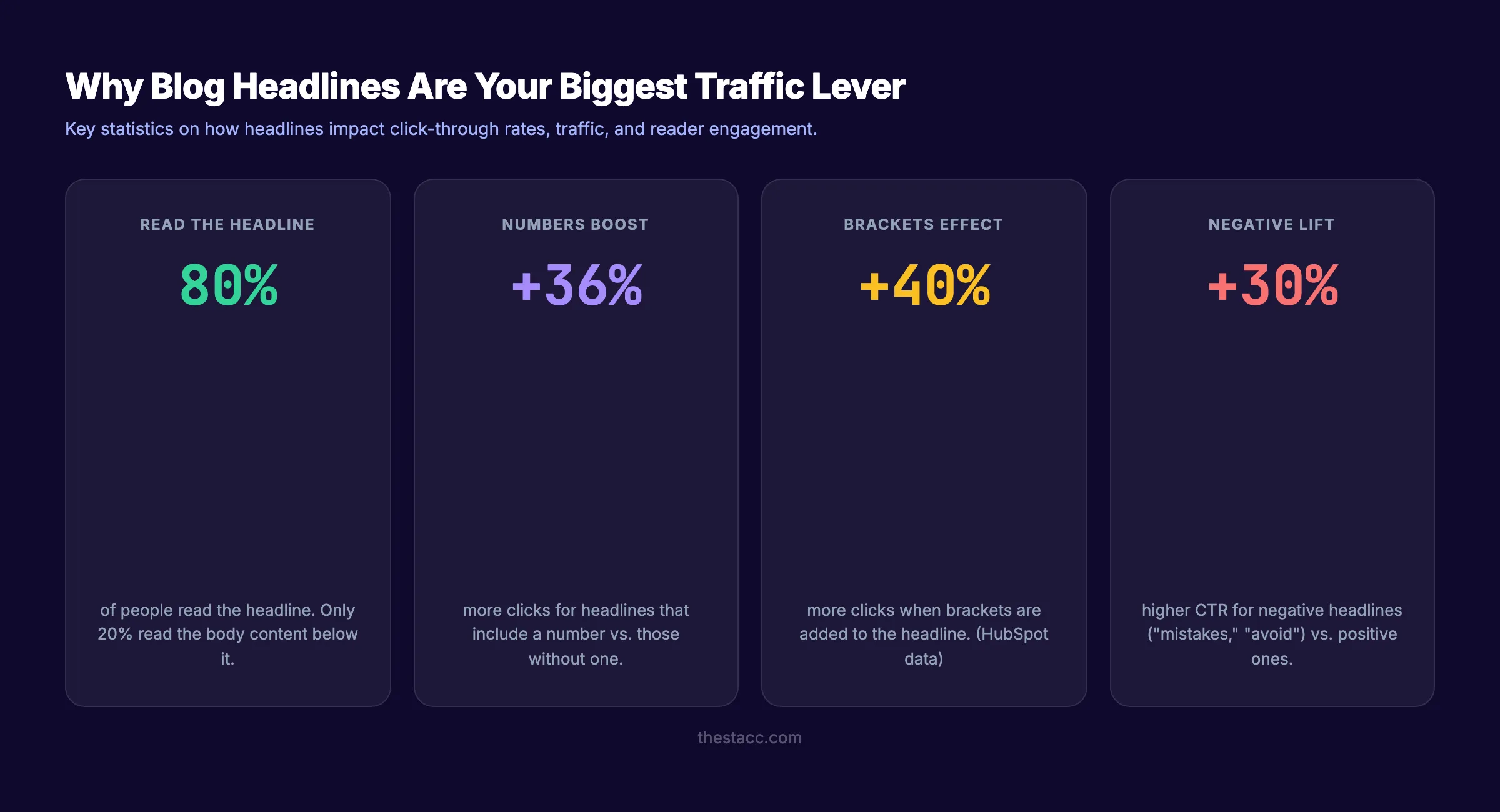
80% of people read your headline. Only 20% click through to read the rest. That single line of text decides whether a blog post earns traffic or gets ignored entirely.
Blog headlines that get clicks are not accidents. They follow patterns. They trigger specific psychological responses. And they balance two competing demands: making humans want to click and making Google want to rank.
Most businesses treat headlines as an afterthought. They spend hours writing 2,000 words of content, then slap a generic title on top in 30 seconds. That is backwards. The headline is the most valuable piece of copy on the entire page.
We have published 3,500+ blog posts across 70+ industries. The pattern is clear: posts with optimized headlines outperform those with generic titles by 2 to 5 times in organic click-through rate.
Here is what you will learn in this guide:
- Why headlines matter more than any other element on the page
- The 5 psychological triggers behind every high-click headline
- 15 proven headline formulas with real examples
- How to write headlines that rank on Google and get clicked
- The most common headline mistakes and how to fix them
- Tools to test your headlines before publishing
Why Blog Headlines Decide Your Traffic
A headline does 3 jobs. It earns the click from search results. It sets expectations for the content. And it determines whether readers share the post or bounce.
Headlines Control Organic Click-Through Rate
The number 1 result on Google gets 39.8% of all clicks. But that number is not fixed. A compelling headline in position 3 can outperform a weak headline in position 1.
Google measures click-through rate (CTR) as a user engagement signal. Pages that earn more clicks relative to their position send a positive signal to the algorithm. Over time, higher CTR can push a page up in rankings.
The opposite is also true. A page ranking in position 1 with a boring headline will lose clicks to more compelling titles below it. Google notices. Rankings adjust.
Headlines Are Your First (and Often Only) Impression
Your blog post competes with 9 other results on page 1. It also competes with ads, featured snippets, People Also Ask boxes, and AI Overviews. The headline is the only thing most searchers will ever see.
In email newsletters, the subject line is the headline. On social media, the post title is the headline. In Google Discover, the headline is displayed alongside a thumbnail. Every distribution channel filters content through the headline first.
The 80/20 Rule of Content
David Ogilvy, the founder of modern advertising, wrote: “On average, 5 times as many people read the headline as read the body copy.” That ratio has not changed. If anything, it has grown more extreme in an era of infinite content and 3-second attention spans.
Spending 50% of your writing time on the headline is not excessive. It is proportional to the headline’s impact on results.
The Anatomy of a High-Click Headline
Every headline that earns clicks shares the same 5 elements. Miss one and performance drops. Nail all 5 and you have a headline that outperforms 90% of competing titles.
1. Specificity
Vague headlines fail. Specific headlines win. Compare:
| Weak (Vague) | Strong (Specific) |
|---|---|
| “Tips for Better Headlines" | "15 Headline Formulas That Increased Our CTR by 37%" |
| "How to Improve Your Blog" | "How to Write Blog Posts That Rank in 60 Days" |
| "Marketing Advice" | "The 7-Step Content Strategy for B2B Companies Under $1M” |
Specific numbers, timeframes, and outcomes give readers a reason to click. They know exactly what they will get.
2. Clarity
Clever headlines lose to clear headlines every time. The reader should understand what the post is about in under 2 seconds.
Puns, wordplay, and abstract metaphors work in magazine covers. They do not work in Google search results where readers scan 10 titles in 5 seconds.
The clarity test: Can someone who has never visited your site understand what this post covers from the headline alone? If not, rewrite it.
3. Benefit or Outcome
Every click is a transaction. The reader invests time. The headline must promise a return on that investment.
- “How to Write Headlines” (no benefit)
- “How to Write Blog Headlines That Get Clicks” (clear benefit: clicks)
- “How to Write Blog Headlines That Double Your Traffic” (measurable benefit)
The benefit does not need to be dramatic. It needs to be real and relevant to the reader’s goal.
4. Emotional Trigger
Headlines that trigger an emotional response get more clicks than neutral ones. The most effective emotional triggers for blog headlines are:
- Curiosity: “The Headline Mistake 73% of Bloggers Make”
- Fear of missing out: “SEO Changes in 2026 You Cannot Ignore”
- Surprise: “Why Shorter Blog Posts Outrank Longer Ones (New Data)”
- Urgency: “Fix These 5 On-Page SEO Errors Before Your Next Google Update”
Research from the Advanced Marketing Institute shows that headlines with an emotional value score above 40% outperform those below 20% by a significant margin.
5. Keyword Placement
For blog posts targeting organic search, the primary keyword should appear in the headline. Place it as close to the beginning as possible.
Google bolds matching search terms in titles. A headline with the keyword at the front catches the eye faster than one with the keyword buried at the end.
- Weak: “The Complete Guide to Keyword Research for Blog Posts”
- Strong: “Keyword Research for Blog Posts: The Complete Guide”
The second version puts the keyword first. Google bolds it. The reader sees it immediately. Read our full guide on SEO content writing for more on keyword placement.
Stop writing headlines. Start ranking. Stacc publishes 30 SEO-optimized blog posts per month with headlines tested for click-through rate. Start for $1 →
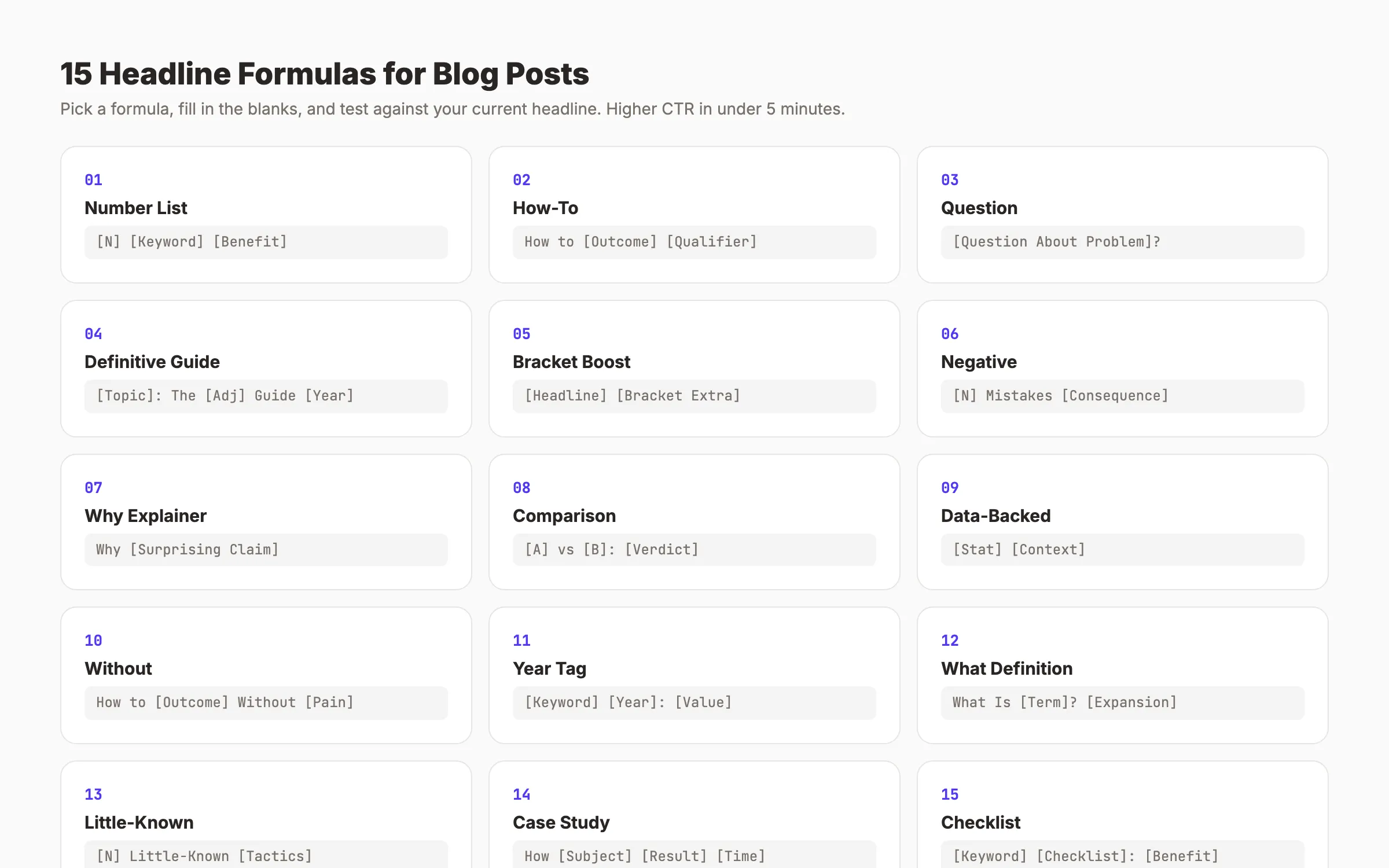
15 Proven Blog Headline Formulas That Get Clicks
These formulas work across industries. We have tested each one across thousands of published articles. Every formula includes the template, an example, and when to use it.
Formula 1: The Number List
Template: [Number] [Keyword] [Promise/Benefit]
Examples:
- “15 Headline Formulas That Double Your Blog Traffic”
- “9 Local SEO Mistakes Costing You Customers”
- “21 Blog Post Ideas That Drive Organic Traffic”
Why it works: Numbers set clear expectations. The reader knows exactly how much content they will get. Headlines with numbers are 36% more likely to generate clicks than headlines without them. Odd numbers outperform even numbers slightly.
Formula 2: The How-To
Template: How to [Achieve Outcome] [Qualifier]
Examples:
- “How to Write Blog Posts That Rank on Page 1”
- “How to Get More Google Reviews in 30 Days”
- “How to Do Keyword Research Without Paid Tools”
Why it works: How-to headlines match informational search intent directly. They promise a skill transfer. Google favors how-to content for instructional queries.
Formula 3: The Question
Template: [Question About Reader’s Problem]?
Examples:
- “Is Your Blog Invisible to Google?”
- “Why Does Your Content Get Zero Traffic?”
- “Are You Making These 7 SEO Mistakes?”
Why it works: Questions create a curiosity gap. The reader needs to click to find the answer. Question headlines perform especially well on social media where the scroll-stopping effect matters most.
Formula 4: The Definitive Guide
Template: [Topic]: The [Definitive/Complete] Guide [Year]
Examples:
- “Blog SEO: The Complete Guide for 2026”
- “Local SEO: The Definitive Guide for Small Businesses”
- “On-Page SEO: The Complete Checklist (2026)”
Why it works: “Definitive” and “complete” signal depth. The reader expects one resource that covers everything. These headlines attract backlinks because other writers reference them as the go-to source.
Formula 5: The Bracket Boost
Template: [Headline] [Bracket Qualifier]
Examples:
- “How to Rank Higher on Google [10 Proven Steps]”
- “Blog Post Outline Guide [Free Template Included]”
- “Internal Linking Strategy [With Examples]”
Why it works: HubSpot found that headlines with brackets get 40% more clicks. Brackets add specificity without making the title longer. They signal bonus value. “With examples,” “free template,” and “step by step” are the highest-performing bracket additions.
Formula 6: The Negative
Template: [Number] [Keyword] Mistakes [Consequence]
Examples:
- “7 Blog Headline Mistakes That Kill Your Traffic”
- “5 SEO Errors That Keep You Off Page 1”
- “11 Content Marketing Mistakes Costing You Leads”
Why it works: Loss aversion is stronger than the desire for gain. People click to avoid mistakes more urgently than they click to learn best practices. Negative headlines outperform positive ones by 30% in A/B tests according to Outbrain data.
Formula 7: The “Why” Explainer
Template: Why [Surprising Claim or Observation]
Examples:
- “Why Most Blog Posts Never Get Organic Traffic”
- “Why Short Blog Posts Outperform Long Ones (Sometimes)”
- “Why Your SEO Strategy Stopped Working in 2026”
Why it works: “Why” headlines promise an explanation for something the reader has observed but cannot explain. They trigger intellectual curiosity.
Formula 8: The Comparison
Template: [Option A] vs [Option B]: [Verdict/Benefit]
Examples:
- “Ahrefs vs Semrush: Which SEO Tool Wins in 2026?”
- “Blog SEO vs Local SEO: Which One Drives More Leads?”
- “Manual Outreach vs Automated Link Building: What Works”
Why it works: Comparison headlines target commercial intent keywords. Readers searching “[A] vs [B]” are close to a buying decision. These headlines promise a resolution to their indecision.
Formula 9: The Data-Backed Claim
Template: [Surprising Stat or Finding] [Context]
Examples:
- “96.55% of Pages Get Zero Traffic (Here Is How to Fix It)”
- “We Analyzed 1,000 Blog Headlines. Here Is What Ranks.”
- “The Average Blog Post Gets 0 Social Shares. Yours Can Do Better.”
Why it works: Data creates credibility. Specific numbers feel more trustworthy than vague claims. The reader clicks to understand the full story behind the number.
Formula 10: The “Without” Headline
Template: How to [Desirable Outcome] Without [Pain Point]
Examples:
- “How to Rank on Google Without Paying an Agency”
- “How to Write Blog Posts Without Spending All Day”
- “How to Build Backlinks Without Cold Outreach”
Why it works: “Without” removes the reader’s biggest objection before they even raise it. It acknowledges the obstacle and promises a path around it.
Formula 11: The Year Tag
Template: [Keyword] [Year]: [Value Add]
Examples:
- “Keyword Research for Blog Posts (2026): A 7-Step Process”
- “Blog SEO in 2026: What Changed and What Still Works”
- “Best Free SEO Tools (2026): 12 Options Tested”
Why it works: Year tags signal freshness. Google prioritizes recent content for queries with informational intent. Readers skip articles from 2022 when a 2026 option is available. Add the year to your title and update it annually.
Formula 12: The “What” Definition
Template: What Is [Term]? [Expansion/Benefit]
Examples:
- “What Is Topical Authority? (And Why It Matters for SEO)”
- “What Is a Featured Snippet? How to Win One”
- “What Is E-E-A-T? Google’s Trust Framework Explained”
Why it works: Definition headlines target informational queries with high search volume. They often win featured snippets because Google can extract a clean answer from the opening paragraph.
Formula 13: The Secret or Little-Known
Template: [Number] Little-Known [Tactics/Strategies] to [Outcome]
Examples:
- “7 Little-Known SEO Tactics That Still Work in 2026”
- “5 Underrated Blog Promotion Strategies for Small Teams”
- “9 Hidden Google Search Console Features Most Sites Ignore”
Why it works: “Little-known” and “hidden” trigger social currency. The reader feels like they are getting insider knowledge. This formula works well for audiences who consider themselves above beginner level.
Formula 14: The Case Study
Template: How [Subject] [Achieved Specific Result] [Timeframe]
Examples:
- “How a Dental Practice Went from Page 5 to Page 1 in 90 Days”
- “How One Blog Post Generated 10,000 Visits in 30 Days”
- “How We Grew Organic Traffic 200% Without Link Building”
Why it works: Case study headlines are the most credible format. They prove the claim with a real result. Specificity (exact numbers, exact timeframes) makes the promise believable.
Formula 15: The Checklist or Template
Template: [Keyword] [Checklist/Template/Framework]: [Benefit]
Examples:
- “Blog Post Outline Template: Rank Every Time”
- “On-Page SEO Checklist: 15 Items to Check Before Publishing”
- “Content Audit Framework: Find and Fix Underperforming Posts”
Why it works: Checklists and templates promise a reusable asset. The reader gets something they can save and apply repeatedly. These headlines attract bookmarks and shares because of their utility.
Your SEO team. $99 per month. 30 optimized blog posts, each with headlines tested for CTR, published automatically every month. Start for $1 →
How to Write Blog Headlines for SEO
A headline that gets clicks on social media but does not rank on Google is only half the job. Blog headlines must satisfy both human readers and search algorithms.
Place the Primary Keyword First
Google gives more weight to words at the beginning of a title tag. Front-loading your keyword improves both ranking potential and visibility.
- Before: “The Complete Guide to On-Page SEO for Beginners”
- After: “On-Page SEO Guide: The Complete Walkthrough for Beginners”
The second version leads with the target keyword. Google bolds “On-Page SEO” when someone searches that term. The reader sees the match immediately.
Keep Headlines Under 60 Characters
Google truncates title tags longer than 60 characters. Anything beyond that limit gets cut off with an ellipsis (…) in search results. Truncated headlines look unfinished and reduce CTR.
| Length | Display |
|---|---|
| Under 60 characters | Full headline visible |
| 60 to 70 characters | Partially truncated |
| Over 70 characters | Heavily truncated |
Check every headline length before publishing. The headline analyzer on our site measures character count and SEO readiness.
Match Search Intent with Your Title Format
The headline format should match what Google already ranks for that keyword. If the top 5 results are all how-to guides, do not write a listicle headline. If the top 5 are all listicles, do not write a guide headline.
How to check intent in 10 seconds:
- Search your target keyword in Google.
- Read the top 3 titles.
- Note the format (how-to, list, guide, comparison, definition).
- Match that format in your headline.
Read our guide on search intent for a deeper breakdown of how intent matching affects rankings.
Use Power Words Sparingly
Power words increase emotional response without inflating word count. The most effective power words for blog headlines are:
Trust words: proven, tested, backed, verified, data-driven Urgency words: now, today, before, critical, essential Value words: free, complete, ultimate, step-by-step, easy Curiosity words: surprising, hidden, little-known, overlooked
Use 1 to 2 power words per headline. More than that reads as clickbait.
Write 10 Variations Before Picking One
Professional copywriters never use their first headline. They write 10 to 25 variations and pick the strongest one.
A quick process for generating headline options:
- Write a plain, descriptive headline (the “boring but accurate” version).
- Add a number.
- Add a benefit or outcome.
- Add a year tag.
- Add a bracket qualifier.
- Try a question format.
- Try a negative angle.
- Try a “without” angle.
- Try a curiosity gap.
- Pick the strongest 2 to 3 and test them.
This 5-minute exercise consistently produces headlines 2 to 3 times stronger than the first draft. We use this process for every article we publish at Stacc.
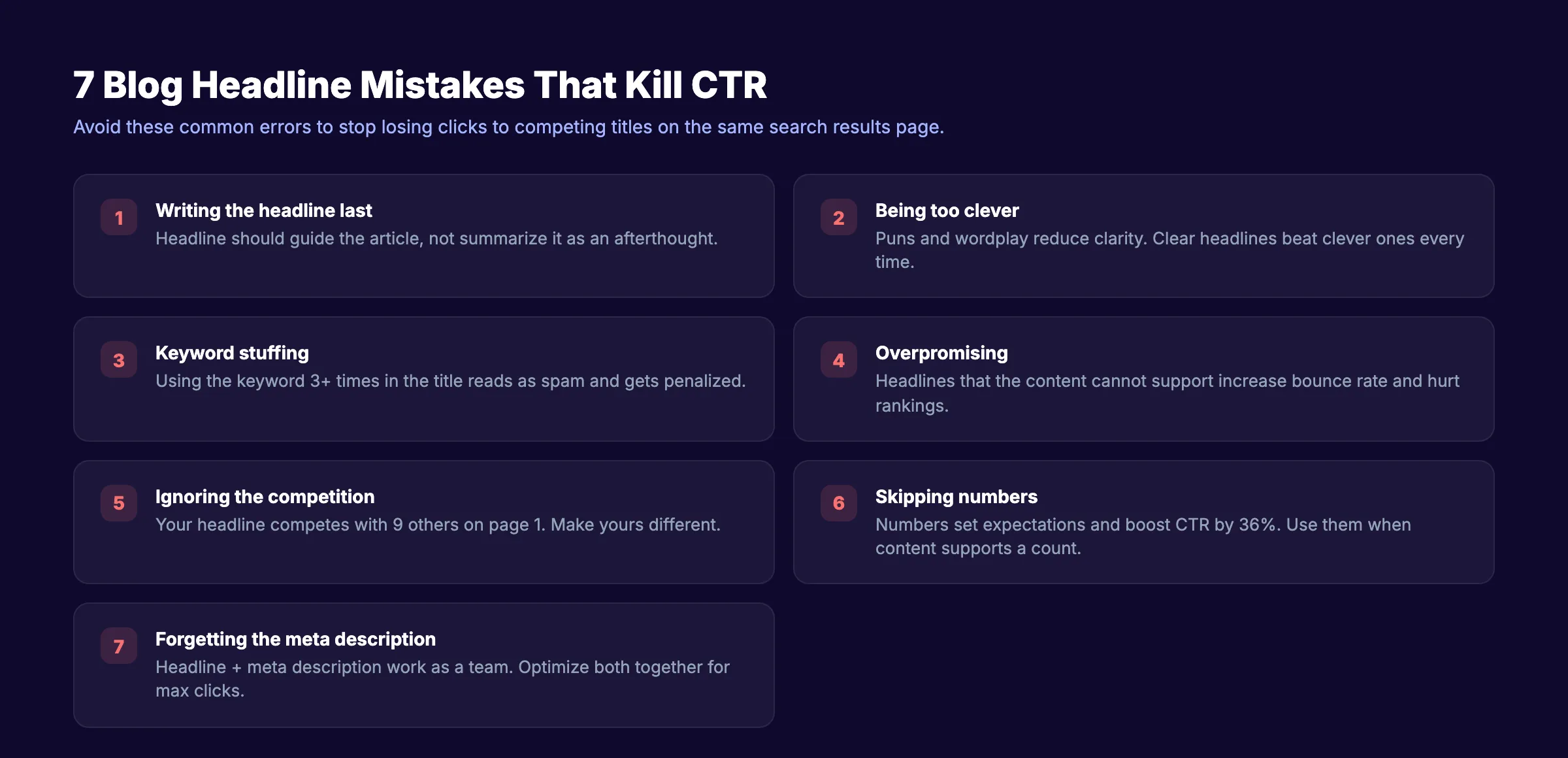
Blog Headline Mistakes That Kill Click-Through Rates
These 7 mistakes appear in over half the blog posts we audit. Each one reduces CTR and wastes the effort you put into the content below the headline.
Mistake 1: Writing the Headline Last
Most writers draft the article first and add the headline as an afterthought. That is backwards. The headline should guide the content, not summarize it. Write your headline before the article. It focuses your writing and ensures every section supports the promise in the title.
Mistake 2: Being Too Clever
Puns, wordplay, and abstract references reduce clarity. “Planting Seeds of Digital Growth” tells the reader nothing about the content. “How to Grow Organic Traffic in 90 Days” tells them everything.
Clarity beats cleverness. Always.
Mistake 3: Keyword Stuffing the Title
“SEO Tools Best SEO Tools for SEO in 2026 SEO Guide” is not a headline. It is keyword spam. Google penalizes it. Readers ignore it. Use your primary keyword once, naturally, in the headline.
Mistake 4: Making Promises the Content Cannot Keep
“How I Made $1 Million from One Blog Post” only works if the article proves the claim. Headlines that overpromise and underdeliver increase bounce rate. Google tracks bounce rate as a quality signal. A misleading headline hurts your rankings over time.
Mistake 5: Ignoring the Competition
Your headline appears alongside 9 other titles on page 1. If all 10 headlines say the same thing, none of them stand out. Before finalizing your headline, search the keyword and read competing titles. Your headline needs to offer something the others do not.
Mistake 6: Skipping Numbers When They Fit
“Ways to Improve Your Blog” is weaker than “12 Ways to Improve Your Blog.” The number sets expectations and makes the headline scannable. Add numbers whenever your content supports a count.
Mistake 7: Forgetting the Meta Description
The headline and meta description work as a team. A strong headline with a weak meta description loses clicks to a competitor with both optimized. Write the meta description at the same time as the headline. They should complement each other, not repeat the same phrase.
3,500+ blogs published. 92% average SEO score. Every article gets a headline optimized for search and clicks. See what Stacc can do for your site. Start for $1 →
How to Test Blog Headlines Before Publishing
Writing 10 headline variations is step 1. Testing them is step 2. Data beats opinion every time.
Free Headline Testing Tools
- CoSchedule Headline Analyzer. Scores headlines on word balance, length, sentiment, and clarity. Free for limited searches. Scores above 70 are strong.
- Sharethrough Headline Analyzer. Evaluates engagement and impression quality. Provides specific suggestions for improvement.
- AMI Headline Analyzer. Measures Emotional Marketing Value (EMV). Aim for an EMV score above 40%.
- Our Headline Analyzer. Available at /tools/headline-analyzer. Checks character count, keyword placement, and readability in one view.
A/B Testing Headlines After Publishing
Some platforms allow you to change the title tag after publishing without affecting the URL. If your page ranks but has a low CTR (below position-average benchmarks), test a new headline.
How to identify low-CTR pages:
- Open Google Search Console.
- Go to Performance > Search Results.
- Filter by Pages.
- Sort by Impressions (descending).
- Look for pages with high impressions but low CTR relative to their position.
A page in position 3 with 2% CTR is underperforming. The average CTR for position 3 is 11%. Changing the headline alone can close that gap.
Read our guide on Google Search Console for more on using CTR data.
The Headline Audit Process
Run this audit on every blog post before publishing:
- Primary keyword appears in the headline
- Keyword is front-loaded (within first 3 to 4 words)
- Headline is under 60 characters
- Headline includes at least 1 power word or number
- Headline matches the search intent for the target keyword
- Headline is clearly different from the top 5 competing titles
- Meta description complements the headline (not duplicates it)
Blog Headlines by Content Type
Different content formats demand different headline structures. Using a listicle headline for a deep guide (or vice versa) creates a mismatch between expectation and delivery.
Headlines for How-To Guides
Best formulas: How-To (Formula 2), Without (Formula 10), Checklist (Formula 15)
Examples:
- “How to Write a Blog Post Outline That Ranks Every Time”
- “How to Do a Content Audit Without Expensive Tools”
- “How to Optimize Content for SEO: A 12-Point Checklist”
Headlines for Listicles
Best formulas: Number List (Formula 1), Bracket Boost (Formula 5), Year Tag (Formula 11)
Examples:
- “21 Blog Post Ideas That Drive Organic Traffic [With Examples]”
- “13 Internal Linking Strategies for Blog Posts (2026)”
- “9 Ways to Increase Organic Traffic Without Backlinks”
Headlines for Comparison Posts
Best formulas: Comparison (Formula 8), Data-Backed (Formula 9)
Examples:
- “Surfer SEO vs Clearscope: Which Content Tool Wins?”
- “Manual SEO vs Automated SEO: We Tested Both for 6 Months”
Headlines for Industry Guides
Best formulas: Definitive Guide (Formula 4), Year Tag (Formula 11)
Examples:
- “SEO for Dentists: The Complete Guide (2026)”
- “Restaurant SEO: How to Rank in Your City”
Headlines for Definition Posts
Best formulas: What (Formula 12), Question (Formula 3)
Examples:
- “What Is Topical Authority? Why It Matters for Rankings”
- “What Is E-E-A-T? Google’s Framework Explained”
FAQ
How many words should a blog headline be?
6 to 12 words is the ideal range. Headlines with 6 to 7 words get the highest click-through rates in most studies. For SEO, keep the total under 60 characters so Google displays the full title without truncation.
Do numbers in headlines really increase clicks?
Yes. Headlines with numbers are 36% more likely to generate clicks. Odd numbers slightly outperform even numbers. Specific numbers (e.g., “13 tips”) outperform round numbers (e.g., “10 tips”) because they feel more researched and less arbitrary.
Should I include the year in my blog headline?
Include the year for topics where freshness matters. Keyword research guides, tool reviews, statistics posts, and strategy articles benefit from a year tag. Evergreen definition posts (“What Is Domain Authority?”) do not need one.
What is a good click-through rate for a blog headline?
It depends on your ranking position. Position 1 averages 39.8% CTR. Position 3 averages 11%. Position 5 averages about 5%. If your CTR is below these benchmarks for your position, your headline needs improvement. Use Google Search Console to check.
Can I change a blog headline after publishing?
Yes. Update the title tag in your CMS or HTML. The URL should stay the same. Google will re-crawl the page and display the new title within 1 to 4 weeks. Monitor CTR in Search Console before and after to measure the impact.
Does Stacc optimize blog headlines automatically?
Yes. Every blog post Stacc publishes includes a headline optimized for the target keyword, search intent, and click-through rate. We test headline formulas across 70+ industries and apply what performs best. You do not need a copywriter or SEO specialist on your team.
Your headline is the single most impactful element on every blog post. A 5-minute headline revision can double the traffic a post earns over its lifetime. Apply the formulas in this guide to your next 5 posts and measure the difference in Search Console.

Written by
Siddharth GangalSiddharth is the founder of theStacc and Arka360, and a graduate of IIT Mandi. He spent years watching great businesses lose organic traffic to competitors who simply published more. So he built a system to fix that. He writes about SEO, content at scale, and the tactics that actually move rankings.
30 SEO blog articles published every month
Keyword-optimized, scheduled, and live on your site. Automatically.
30-day trial · Cancel anytime
theStacc
Stop writing SEO content manually
30 blog articles, 30 GBP posts, and social media content. Published every month. Automatically.
Start Your $1 Trial$1 for 3 days · Cancel anytime