
How to Write Meta Descriptions That Get Clicks (2026)
6 steps to write SEO meta descriptions that earn clicks and boost CTR. Includes 10 before-and-after examples and a copy-paste formula. Updated March 2026.
25% of the top-ranking pages on Google have no custom meta description at all. Google generates one for them automatically. That auto-generated snippet is almost always worse than a hand-written description because it pulls random sentences without persuasive structure or keyword targeting.
A meta description is your 155-character sales pitch on the search results page. It does not directly affect rankings. But it directly affects whether someone clicks your result or scrolls past it. One agency increased CTR by 32% across 50 blog pages by rewriting meta descriptions alone. No content changes. No backlinks. Just better snippets.
For a page ranking at position 3 with 10,000 monthly searches, a 5% CTR improvement means 500 additional clicks per month. That is free traffic from a 30-second edit. Multiply across 50 pages and the numbers add up fast.
This guide walks you through 6 steps to write meta descriptions that earn clicks. You will also get a table of 10 before-and-after examples and a copy-paste formula. We write meta descriptions for 3,500+ articles per month across 70+ industries. This is the exact process.
Here is what you will learn:
- The exact character count and formatting rules for 2026
- How keyword placement in descriptions triggers bold text in search results
- A fill-in formula that works for every page type
- 10 real examples of weak vs strong meta descriptions
- Why Google rewrites 62% of descriptions and how to prevent it
- How meta descriptions affect AI search visibility
Overview
| Detail | Info |
|---|---|
| Time required | 2 to 5 minutes per page |
| Difficulty | Beginner |
| What you need | Your target keyword, a character counter, and a meta tag analyzer |
Writing a meta description is the fastest SEO improvement you can make on any page. The ROI per minute of effort is higher than almost any other optimization task. Yet most businesses skip it entirely or write generic descriptions that could apply to any page on the internet.
Step 1: Keep It Between 130 and 155 Characters
Google truncates meta descriptions that exceed its display limit. On desktop, the cutoff is approximately 920 pixels wide, which translates to roughly 155 characters. On mobile, the limit drops to approximately 120 characters.
The Safe Range
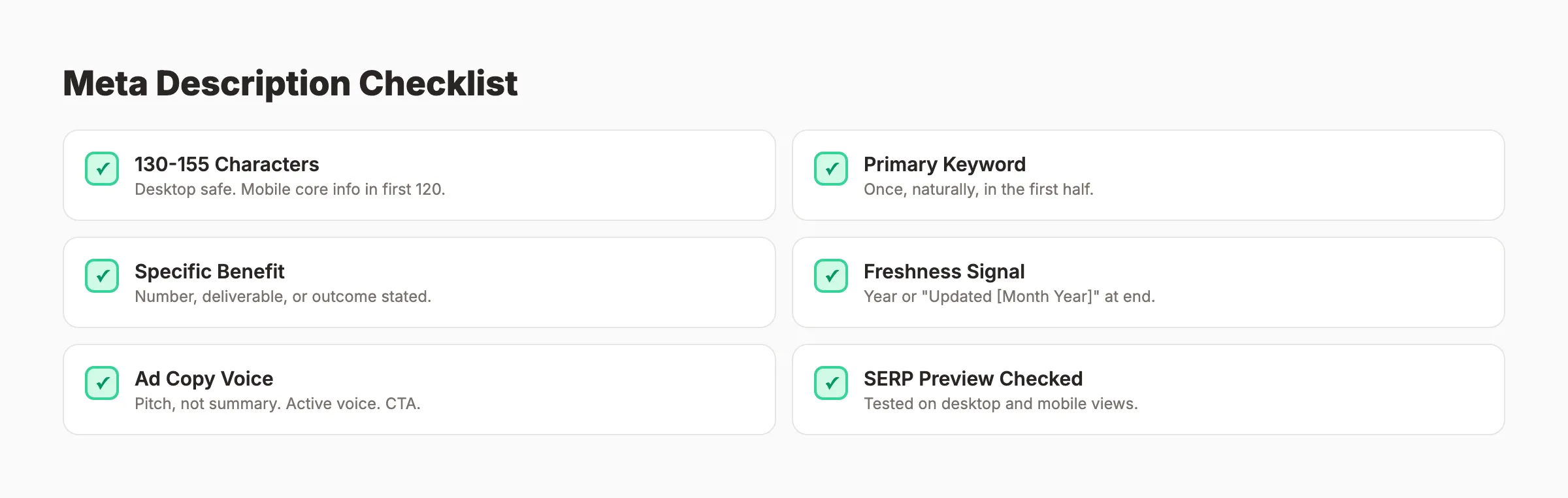
Write your descriptions between 130 and 155 characters. This ensures full visibility on desktop and captures the most important information within the mobile cutoff.
Under 130 characters wastes valuable SERP real estate. Your competitors fill that space. You do not. The result is a smaller, less compelling snippet that gets fewer clicks.
Over 155 characters means your description gets cut off with ”…” at the end. If your key benefit or call to action sits beyond character 155, searchers never see it. The truncation undermines your message.
How to Count Characters
Use any character counter. Google Docs shows character count under Tools > Word Count. Online tools like charactercountonline.com work too. Or use our meta tag analyzer, which checks length, keyword presence, and SERP preview in one view.
Mobile-First Rule
Since 60% of all searches happen on mobile, front-load the most important information within the first 120 characters. Your keyword and primary benefit should appear before the mobile cutoff. Treat characters 121 to 155 as bonus space for desktop users.
Why this step matters: A truncated description loses its closing argument. A short description wastes space competitors will fill. The character window is your stage. Use every inch of it without going over.
Pro tip: Write your description at exactly 150 characters first. Then check how it reads at 120 characters. If the core message survives the mobile cutoff, you are good.
Step 2: Include the Primary Keyword
Google bolds matching terms in the meta description when they match the user’s search query. This bold text visually draws the eye to your result and confirms relevance at a glance.
Where to Place the Keyword
Place the primary keyword within the first half of the description. Front-loading ensures the keyword shows on both desktop and mobile. It also appears before any potential truncation.
Good placement: “Write meta descriptions that earn clicks. 6 steps with 10 examples.” Bad placement: “This guide covers everything you need to know about how to write meta descriptions.”
The first version puts “meta descriptions” in position 7 to 24. The second buries it at character 65 to 83. On mobile, the first version bolds the keyword. The second might not show it at all.
One Keyword, One Mention
Include the primary keyword once. Do not repeat it. Keyword stuffing in meta descriptions reads as spam. Google may even replace a keyword-stuffed description with its own auto-generated snippet.
Related Terms Add Breadth
If space allows, include 1 secondary keyword naturally. “Write meta descriptions that boost SEO click-through rates” covers both “meta descriptions” and “click-through rates.” This expands the number of queries that trigger bolded text.
Why this step matters: Bolded keywords are a visual magnet in a page of 10 blue links. Searchers scan results in 1 to 2 seconds. Bold text in your snippet tells their eyes “this result matches what I searched for.” That confirmation earns the click.
Step 3: State a Specific Benefit or Outcome
Generic descriptions do not earn clicks. Searchers need a reason to choose your result over the 9 others on the page. The reason is a specific benefit: what will they gain by clicking?
Generic vs Specific
| Generic (Weak) | Specific (Strong) |
|---|---|
| “Learn about meta descriptions and how they work." | "6 steps to write meta descriptions that earn clicks. With 10 before-and-after examples." |
| "This post covers SEO optimization tips." | "8 steps to optimize any content for SEO. Used across 3,500+ published articles." |
| "Read our blog about keyword research." | "Find profitable keywords in 15 minutes. Free process using 3 tools.” |
The strong versions promise a deliverable: “6 steps,” “10 examples,” “8 steps,” “15 minutes.” The weak versions say “learn about” and “this post covers.” Nobody clicks to “learn about” something. They click to get a specific result.
Types of Benefits That Work
- Knowledge with a number: “Learn the 6-step process for…”
- Speed: “Fix your meta descriptions in under 5 minutes.”
- Results: “Increase CTR by 30% with these formulas.”
- Resources: “Includes 10 templates you can copy today.”
Pick 1 benefit per description. Do not stack 3 promises in 155 characters. One clear, specific benefit outperforms a list of vague ones.
The Benefit Test
Read your description and ask: “Would I click this over the other 9 results?” If the answer is no, rewrite it with a more specific promise. If you cannot name the benefit in 1 sentence, the description is too vague.
Why this step matters: A meta description without a benefit is a description without a reason to click. Every competing result on the page offers something. If your snippet does not, searchers choose the ones that do. The benefit is the entire selling proposition compressed into 155 characters.
Every Stacc article ships with an optimized meta description. 30 articles per month, each with keyword-targeted metas that earn clicks. $99/month. Start for $1 →
Step 4: Add a Freshness Signal
Searchers prefer recent content. A meta description with a freshness signal tells them your content is current before they click. This is especially important for topics that change year to year: SEO, marketing, technology, pricing, and tools.
Freshness Signals That Work
- Year: “Updated March 2026” or “(2026)” at the end
- Recency phrases: “Based on the latest data” or “Current best practices”
- Specific timeframes: “Tested across 500 pages in Q1 2026”
Where to Place Freshness
Add the freshness signal at the end of your description. It serves as a closing reassurance after the benefit. “6 steps to write meta descriptions that earn clicks. Updated March 2026.” The year is the last thing the searcher reads. It confirms the content is not outdated.
When Freshness Does Not Matter
Evergreen topics like “how to boil an egg” do not need a year tag. But for any topic where data, tools, or best practices change annually, freshness is a competitive advantage. Most SEO content falls into this category.
Why this step matters: Google search results show publication dates alongside some snippets. A page published in 2022 without updates loses clicks to a page published in 2026. Adding the year in your meta description signals recency even if Google does not display the date automatically.
Pro tip: Update the year in your meta description every January. This single annual edit refreshes the freshness signal across your entire site. Set a calendar reminder.
Step 5: Write It Like Ad Copy (Not a Summary)
The most common meta description mistake is writing a summary instead of a pitch. A summary describes what the page is about. A pitch tells the searcher why they should click. The difference is the gap between “this article covers SEO” and “rank 47% higher with these 8 steps.”
Ad Copy Principles for Meta Descriptions
Think of your meta description as a Google Ad you do not pay for. Every word must earn its place.
- Lead with the benefit. What does the reader gain? Start there.
- Use active voice. “Increase your CTR” not “Your CTR can be increased.”
- Create urgency when appropriate. “Start ranking today” or “Do not miss these steps.”
- Include a micro-CTA. “Read the guide” or “Get the checklist” or “See the examples.”
The Formula
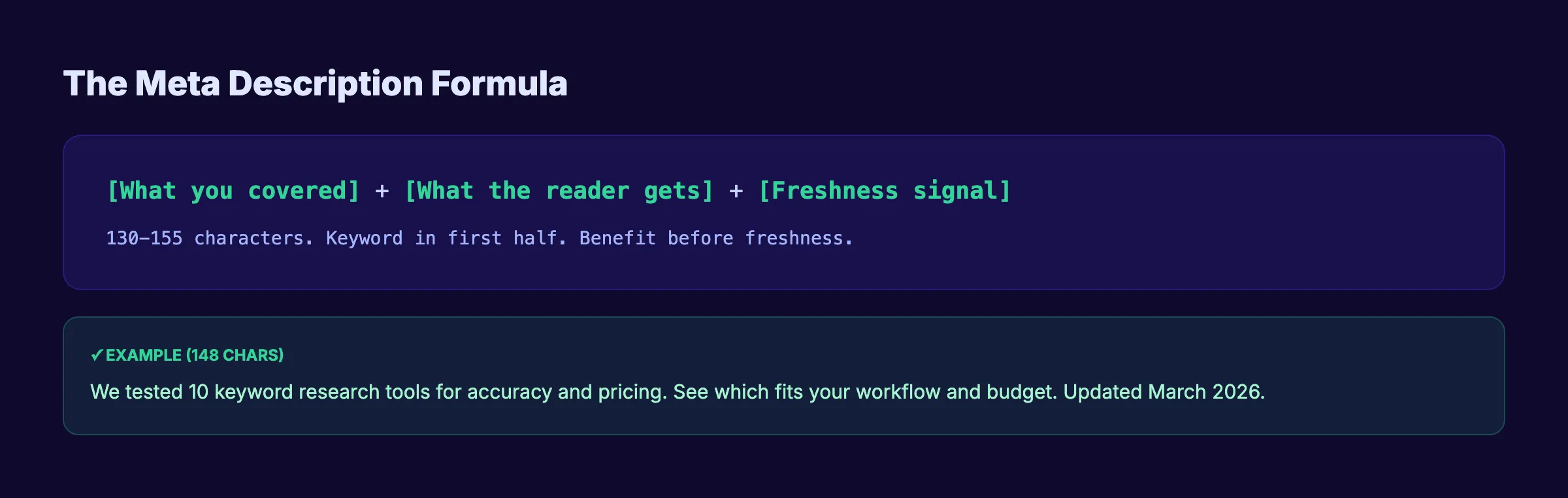
Here is a fill-in formula that works for any page:
[What you covered or did] + [What the reader gets] + [Freshness signal]Examples:
- Blog post: “We tested 10 keyword research tools for accuracy and pricing. See which fits your workflow. Updated March 2026.”
- Guide: “8 steps to write SEO blog posts that rank. Keyword research to AI formatting. Updated March 2026.”
- Tool page: “Free SEO audit in 30 seconds. Check title tags, meta descriptions, headers, and speed.”
- Industry page: “SEO for dentists. GBP optimization, patient content, and review strategies. Start for $1.”
Each one names a deliverable, sets expectations, and closes with a freshness or action signal. None of them start with “This article” or “Learn about.”
Write 3 Variations, Pick the Best
Never settle for the first draft. Write 3 meta descriptions for each page. Compare them for clarity, benefit specificity, and character count. The best one usually combines a concrete number with a clear promise.
Test your descriptions with our meta tag analyzer. It shows a SERP preview so you can see exactly how your snippet will look alongside competitors.
Why this step matters: A meta description written as a summary tells the searcher what the page is. A description written as ad copy tells the searcher what they will gain. Searchers click on gains. They scroll past descriptions. The ad copy approach turns a passive snippet into an active click-magnet.
Step 6: Check and Fix with a Meta Tag Analyzer
Before publishing, run every meta description through a checker. Manual eyeballing misses character overflows, missing keywords, and formatting issues that cost clicks.
What to Check
Run your description through a meta tag analyzer and verify these 5 elements:
- Character count: 130 to 155 characters
- Keyword presence: Primary keyword appears once, naturally
- Benefit stated: A specific promise or deliverable is clear
- Freshness signal: Year or “Updated” date included
- SERP preview: The snippet looks complete on both desktop and mobile views
Check Competitors Too
Search your target keyword in Google. Read the meta descriptions of the top 5 results. Note which ones are compelling and which are generic. Your description should stand out from the group. If 4 out of 5 competitors start with “Learn about…”, open your description with a specific number or result.
Bulk Auditing
For existing sites, use Screaming Frog or our SEO audit tool to export all meta descriptions across your site. Flag pages where descriptions are missing, duplicated, too short, or too long. Prioritize fixing your highest-traffic pages first.
Google rewrites approximately 62% of meta descriptions when they do not match the search query closely. A well-targeted, keyword-rich description that aligns with your page content is the best defense against rewrites. If Google keeps overriding your description, it means your snippet does not match the most common search intent for that query.
Why this step matters: Checking takes 30 seconds. Not checking means publishing a description that might be truncated, missing the keyword, or weaker than every competitor snippet on the page. A single miscount by 10 characters can hide your call to action from every searcher.
10 Before-and-After Meta Description Examples
Here are 10 real-world patterns showing weak descriptions rewritten as strong ones.
| # | Weak Description | Why It Fails | Strong Rewrite |
|---|---|---|---|
| 1 | ”This blog post is about SEO tips.” | No benefit, too vague | ”9 SEO tips that increased organic traffic by 47%. Step-by-step with screenshots. Updated 2026.” |
| 2 | ”Meta descriptions are important for SEO.” | States the obvious, no action | ”Write meta descriptions that double your CTR. 6 steps with 10 examples you can copy.” |
| 3 | ”Read our blog about keyword research.” | Generic, no hook | ”Find profitable keywords in 15 minutes. Free process using 3 tools. No paid subscriptions.” |
| 4 | ”We wrote this guide to help people with blog SEO.” | Self-centered, truncated | ”Rank your blog posts on Google. The complete blog SEO checklist with 8 steps. Updated 2026.” |
| 5 | ”Content optimization” | Far too short, wasted space | ”Optimize blog posts for SEO in 20 minutes. The 8-step checklist used by 3,500+ articles.” |
| 6 | ”Here are some tips for writing headlines.” | Vague, passive | ”Write blog headlines that get 36% more clicks. 6 steps and 10 formulas inside.” |
| 7 | ”Everything about on-page SEO factors and rankings.” | Truncated, generic | ”The on-page SEO checklist for 2026. 12 factors ranked by impact. Fix them in 1 afternoon.” |
| 8 | ”Best SEO tools compared.” | No specificity | ”15 best on-page SEO tools for 2026. Free and paid options compared by feature and price.” |
| 9 | ”Click here to read more about meta tags.” | Spammy, no value | ”Meta tags explained in plain language. Title tags, descriptions, and schema markup. 5-min read.” |
| 10 | ”We help businesses with their SEO.” | Sales pitch, no searcher benefit | ”Get 30 SEO-optimized blog posts published per month. No writers, no agencies. Starts at $99.” |
Pattern Analysis
Every strong rewrite shares 3 traits:
- A specific number. “9 tips,” “6 steps,” “15 tools,” “47%,” “$99.” Numbers set expectations and stand out visually.
- A clear deliverable. The reader knows exactly what they will get before clicking. Steps, checklists, templates, examples, formulas.
- No filler. Zero words are wasted on “this article,” “learn about,” or “we wrote this guide.” Every word earns its place.
When Google Ignores Your Meta Description
Google rewrites meta descriptions approximately 62% of the time. That is nearly 2 out of 3 pages. This does not mean writing descriptions is pointless. It means you need to write descriptions that Google wants to use.
Why Google Rewrites
Google replaces your description when:
- The description does not match the query. If someone searches “best free SEO tools” and your description talks about paid tools, Google rewrites it.
- A passage in the content better answers the query. Google pulls a snippet from your page body instead.
- The description is missing or too short. Google generates its own from page content.
- The description is duplicated across pages. Google deduplicates and replaces.
How to Reduce Rewrites
- Match your meta description to the primary keyword and its most common intent.
- Include the exact keyword phrase naturally.
- Keep the description relevant to the full page content.
- Avoid generic descriptions that could apply to any page.
Google is more likely to use your custom description when it closely matches what the searcher needs. A well-targeted description gets used. A vague one gets replaced.
Meta Descriptions and AI Search
In 2026, your meta description affects more than Google search results. AI Overviews appear on 48% of Google queries. ChatGPT, Perplexity, and other AI platforms also reference meta descriptions when building source lists.
How AI Uses Meta Descriptions
AI systems read meta descriptions as page summaries. A description that clearly states what the page covers helps AI models categorize and cite your content correctly. A vague description makes it harder for AI to determine your page’s relevance.
Write for Both Audiences
A meta description that earns human clicks also works for AI systems. Both need: a clear topic statement, a specific scope indicator, and factual accuracy. The formula from Step 5 serves both audiences equally.
The connection between meta descriptions and AI visibility is indirect but real. Pages with clear, keyword-rich meta descriptions get cited more consistently by AI search platforms because the description functions as a machine-readable summary of your page’s value proposition.
For more on formatting content for AI search platforms, read our guide on how to optimize content for SEO. The section on AI search formatting covers extractable answer blocks, schema markup, and crawler access.
Results: What to Expect
After rewriting your meta descriptions using this 6-step process:
- Immediate: Better, more compelling snippets in search results. No waiting for Google to recrawl.
- 1 to 2 weeks: Google recrawls and displays your new descriptions. Check in Search Console under the URL Inspection tool.
- 30 days: Measurable CTR improvements on pages where descriptions were previously missing, generic, or truncated.
- Ongoing: Higher CTR sends positive engagement signals. Over months, this compounds into stronger ranking positions.
One case study showed a 32% CTR increase from meta description rewrites alone. Not every page will see that lift. But every page with a missing or weak description is leaving clicks on the table.
Troubleshooting
Problem: Google keeps rewriting your description.
Your description likely does not match the most common search intent for the keyword. Search the keyword yourself. Read what Google auto-generates. Note what query it seems optimized for. Rewrite your description to match that intent more closely.
Problem: CTR did not improve after rewriting.
Check whether Google is actually using your new description. Use the URL Inspection tool in Search Console. Request re-indexing if the old description still appears. Also check your title tag. A weak title kills CTR regardless of description quality.
Problem: You have 500 pages and no meta descriptions.
Do not try to write all 500 at once. Start with your top 20 pages by organic traffic. Rewrite those first. Then do the next 20. Batch 10 to 20 per week. Our SEO audit tool can flag every page with a missing or problematic description instantly.
FAQ
Do meta descriptions affect SEO rankings?
Not directly. Google has confirmed that meta descriptions are not a ranking signal. But they directly affect click-through rate. Higher CTR sends positive engagement signals to Google, which can indirectly improve rankings. A page with 5% CTR at position 4 may climb to position 3 because users prefer clicking it over competitors.
What is the ideal meta description length in 2026?
Between 130 and 155 characters for desktop. Front-load the most important information within 120 characters for mobile. Google truncates anything beyond approximately 920 pixels. Check your exact length with a meta tag analyzer.
How often does Google rewrite meta descriptions?
Google rewrites approximately 62% of all meta descriptions. The rewrite rate is highest for pages with vague, keyword-stuffed, or intent-mismatched descriptions. Well-targeted descriptions that closely match the primary query get rewritten less often.
Should every page have a unique meta description?
Yes. Duplicate meta descriptions confuse search engines about what makes each page different. Google may deindex or suppress pages with identical descriptions. Every page on your site should have a unique description that matches its specific content and target keyword.
Can I use a question as my meta description?
Yes. Questions can increase CTR because they mirror how searchers think. “Want to double your blog traffic? Here is the 8-step SEO checklist” is a strong opening. But do not use a question alone. Follow it with a specific benefit or deliverable.
What should I never include in a meta description?
Never include quotation marks (they can truncate the snippet), duplicate content from the title tag word for word, or generic phrases like “click here,” “read more,” or “welcome to our website.” Never keyword-stuff. Never use the same description on multiple pages. Every word must earn its place.
Your meta description is the most underused SEO asset on most websites. It costs nothing to write. It takes 2 to 5 minutes to update. And it can increase your organic traffic by 30% or more without changing your ranking position. The 6 steps in this guide work for every page type. Start with your highest-traffic pages. Rewrite them today.
Meta descriptions handled automatically. Stacc writes, optimizes, and publishes 30 blog posts per month. Every post gets a custom, keyword-targeted meta description. Start for $1 →

Written by
Siddharth GangalSiddharth is the founder of theStacc and Arka360, and a graduate of IIT Mandi. He spent years watching great businesses lose organic traffic to competitors who simply published more. So he built a system to fix that. He writes about SEO, content at scale, and the tactics that actually move rankings.
30 SEO blog articles published every month
Keyword-optimized, scheduled, and live on your site. Automatically.
30-day trial · Cancel anytime
theStacc
Stop writing SEO content manually
30 blog articles, 30 GBP posts, and social media content. Published every month. Automatically.
Start Your $1 Trial$1 for 3 days · Cancel anytime