
Keyword Research for Blog Posts: A 7-Step Guide
Learn keyword research for blog posts in 7 actionable steps. Find low-competition keywords, match search intent, and build a content plan that ranks.
96.55% of all web pages get zero organic traffic from Google. The most common reason is not bad writing. It is skipping keyword research entirely.
Every blog post that ranks on page 1 started with one decision: choosing the right keyword. Yet most businesses write about topics they assume matter, publish, and hope for the best. That approach costs time, money, and months of wasted effort.
The difference between a post that earns 500 organic visits per month and one that earns zero is usually 20 minutes of keyword research before writing.
This guide walks you through keyword research for blog posts in 7 steps. We have published 3,500+ blog posts across 70+ industries using this exact process. Every step includes specific actions you can take today.
Here is what you will learn:
- How to find seed keywords that match your audience
- How to use free and paid tools to expand your keyword list
- How to filter keywords by volume, difficulty, and intent
- How to group keywords into clusters for topical authority
- How to prioritize keywords that drive revenue
- How to map keywords to a publishing calendar
What Is Keyword Research (And Why It Matters for Blog Posts)?
Keyword research is the process of finding the exact phrases people type into Google when searching for information. For blog posts, it means identifying topics with proven search demand before you write a single word.
68% of all online experiences begin with a search engine. Organic search drives 53% of all website traffic. Those numbers mean one thing: if your blog post does not target a keyword people actually search for, it will not get found.
Long-tail keywords (phrases with 3 or more words) account for 70% of all search traffic. They convert at 36% on average. That is 2.5 times higher than short, generic terms. For blog posts, long-tail keywords are where the opportunity lives.
Keyword research also reveals search intent. A person searching “what is keyword research” wants education. A person searching “best keyword research tools” wants to buy. Matching your content format to intent is what separates page-1 posts from invisible ones.
Step 1: Define Your Blog Topics and Seed Keywords
Seed keywords are the broad topics your business covers. They are starting points, not final targets.
Specifically:
- Write down 5 to 10 core topics your business serves. A plumber might list “drain cleaning,” “water heater repair,” and “pipe leak.” A SaaS company might list “SEO tools,” “content marketing,” and “blog automation.”
- For each topic, write 2 to 3 phrases a customer would type into Google. Think like your reader, not like your marketing team.
- Check Google autocomplete. Type each seed keyword into Google and note every suggestion that appears. Each suggestion is a real keyword with proven search volume.
Example seed keyword expansion:
| Seed Keyword | Google Autocomplete Suggestions |
|---|---|
| keyword research | keyword research for blog posts, keyword research tools, keyword research for beginners, keyword research for YouTube |
| blog SEO | blog SEO checklist, blog SEO tips, blog SEO for small business, how to do blog SEO |
| content strategy | content strategy template, content strategy for startups, content strategy vs content marketing |
Why this step matters: Skipping seed keywords means you start with tools instead of strategy. Tools give you data. Seed keywords give you direction. Without direction, you end up with a list of 500 keywords and no idea which ones matter to your business.
Pro tip: Talk to your sales or support team. The exact phrases customers use in emails, chat, and phone calls are often the highest-converting keywords. Zero-volume keywords validated by real customer language can outperform high-volume terms that attract the wrong audience.
Step 2: Use Keyword Research Tools to Expand Your List
Seed keywords give you direction. Tools give you data. This step turns 10 seed keywords into 100+ validated opportunities.
Free tools to start with:
- Google Keyword Planner. Free with a Google Ads account. Shows search volume ranges and competition levels. Best for validating demand.
- Google Search Console. Shows keywords your site already ranks for. Filter to positions 11 to 20 to find “almost ranking” opportunities you can push to page 1.
- Ubersuggest , 3 free searches per day. Shows volume, difficulty, and related keyword suggestions.
- Google Trends. Shows whether a keyword is growing or declining. Useful for seasonal topics and trend validation.
Paid tools for serious research:
- Ahrefs ($99/month). The most accurate keyword difficulty scores. Shows exact search volume, clicks data, and parent topic grouping.
- Semrush ($139/month). Strong for competitor keyword analysis and keyword gap reports.
- Mangools/KWFinder ($49/month). Budget-friendly option with clean interface and reliable data.
For each seed keyword, enter it into your chosen tool and export the top 50 to 100 related keywords. Look for keywords with:
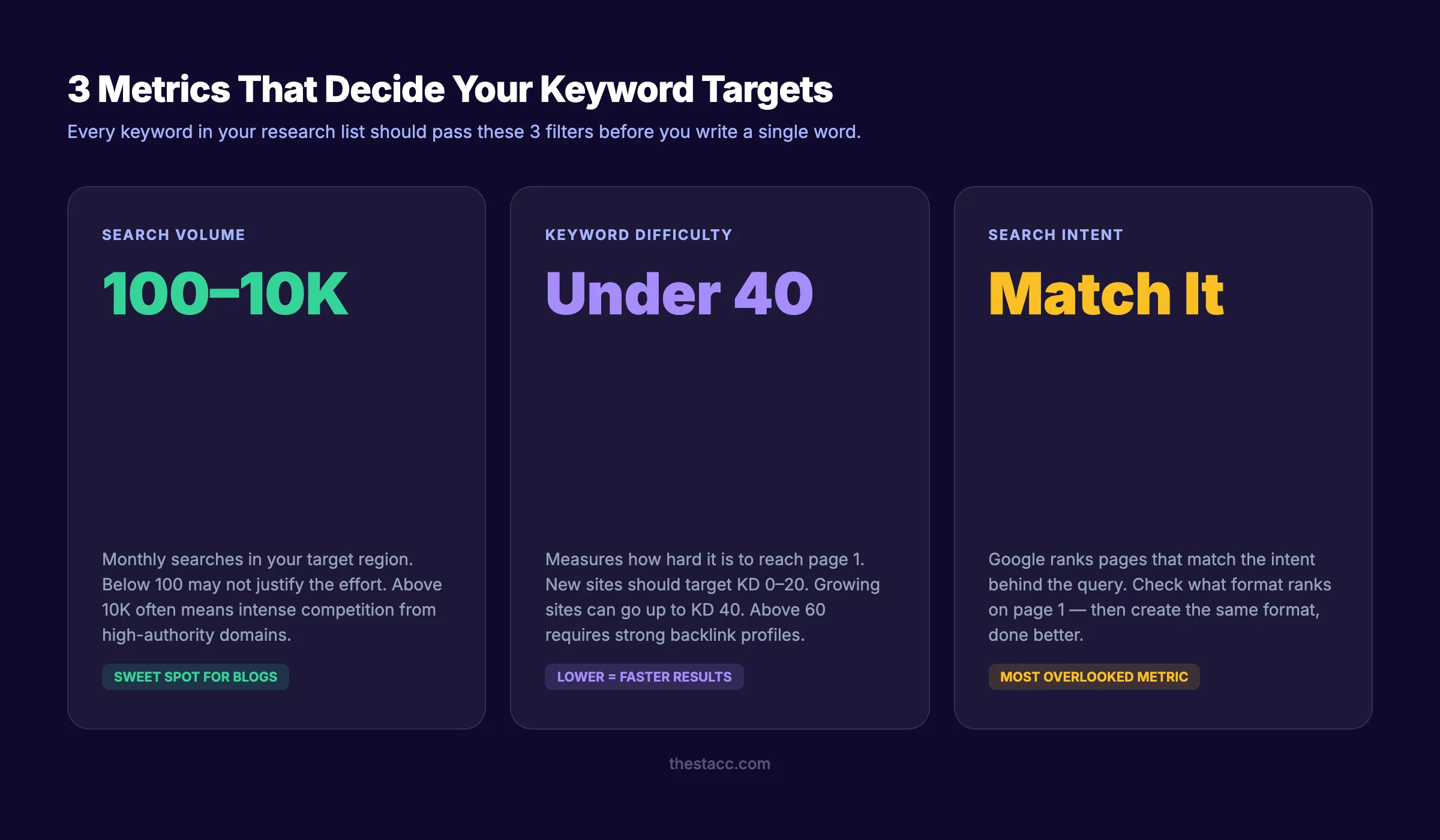
- Monthly search volume between 100 and 10,000
- Keyword difficulty under 40 (for newer sites) or under 60 (for established sites)
- Clear informational or commercial intent
Check our guide on the best keyword research tools for a detailed comparison of every option.
Why this step matters: Manual brainstorming captures what you think people search for. Tools show what they actually search for. The gap between assumption and reality is where most content strategies fail.
Step 3: Analyze Search Volume and Keyword Difficulty
Not all keywords are equal. A keyword with 50,000 monthly searches sounds exciting until you realize every Fortune 500 company targets it. A keyword with 200 searches might sound small until you realize it converts at 8%.
Search volume tells you how many people search for a term each month. For blog posts, the sweet spot is:
| Site Authority | Target Volume | Target Difficulty |
|---|---|---|
| New site (DA under 20) | 100 to 1,000 | Under 20 |
| Growing site (DA 20 to 40) | 500 to 5,000 | Under 40 |
| Established site (DA 40+) | 1,000 to 50,000 | Under 60 |
Keyword difficulty (KD) estimates how hard it is to rank on page 1. Every tool calculates this differently, but the principle is the same: lower KD means fewer and weaker competing pages.
How to evaluate difficulty manually:
- Search the keyword in Google.
- Look at the top 5 results. Are they from major publications (Forbes, HubSpot, Wikipedia) or smaller sites?
- Check the word count and depth. Can you write something better?
- Look at the domain authority of ranking pages. If they are all DA 70+, move on.
Why this step matters: Targeting keywords above your site’s authority level wastes months of effort. A new blog ranking for a KD-15 keyword in 60 days beats chasing a KD-70 keyword for a year and never reaching page 1.
Pro tip: Do not ignore zero-volume keywords. Many tools undercount search volume for long-tail phrases. If the keyword has clear commercial intent and your sales team hears it from customers, it is worth targeting.
Stop guessing which keywords to target. Stacc researches, writes, and publishes 30 SEO-optimized blog posts per month. Keyword research included. Start for $1 →
Step 4: Match Every Keyword to Search Intent
Search intent is the reason behind a query. Google ranks pages that match intent. If you write a product page for an informational keyword, you will not rank. Period.
The 4 types of search intent:
| Intent Type | Signal Words | Best Content Format |
|---|---|---|
| Informational | ”what is,” “how to,” “guide,” “tips” | Blog post, guide, tutorial |
| Commercial | ”best,” “top,” “review,” “vs,” “comparison” | Listicle, comparison, review |
| Transactional | ”buy,” “pricing,” “discount,” “sign up” | Product page, pricing page |
| Navigational | Brand name, product name, “login” | Homepage, login page |
For blog posts, you want informational and commercial keywords. These are the queries where Google shows blog-style content on page 1.
How to verify intent in 30 seconds:
- Search the keyword in Google.
- Look at the top 3 results. What format are they? (Guide, list, video, product page)
- If the top results are all guides, write a guide. If they are all listicles, write a listicle.
- Match the format. Then make it better.
This is where many bloggers fail. They write a 3,000-word guide for a keyword where Google shows 500-word definitions. Or they write a short definition for a keyword where Google wants a deep tutorial.
Read our full guide on search intent to learn the nuances of intent matching.
Why this step matters: Intent mismatch is the number 1 reason good content does not rank. You can have the best-written article on the internet, but if it does not match what Google expects for that query, it will not appear on page 1.
Step 5: Group Keywords into Content Clusters
A single blog post should not target a single keyword in isolation. It should be part of a content cluster. A group of related posts that cover a topic from every angle.
How content clusters work:
- Pillar page: A broad, in-depth guide on the main topic (e.g., “Blog SEO: The Complete Guide”)
- Cluster posts: Specific subtopic posts that link back to the pillar (e.g., “How to Write Meta Descriptions,” “Internal Linking for Blog Posts,” “Blog Post Structure for SEO”)
- Internal links: Every cluster post links to the pillar. The pillar links to every cluster post.
How to group your keywords:
- Sort your keyword list by topic similarity.
- Identify 3 to 5 pillar topics. These are your highest-volume, broadest keywords.
- Group remaining keywords under the pillar they relate to.
- Each group becomes a cluster. Each keyword in the group becomes a blog post.
Example cluster:
| Pillar: Blog SEO | Cluster Keywords |
|---|---|
| /blog/blog-seo (main pillar) | keyword research for blog posts, blog post structure, internal linking for blogs, how to write headlines, meta descriptions for blog posts, update old blog posts |
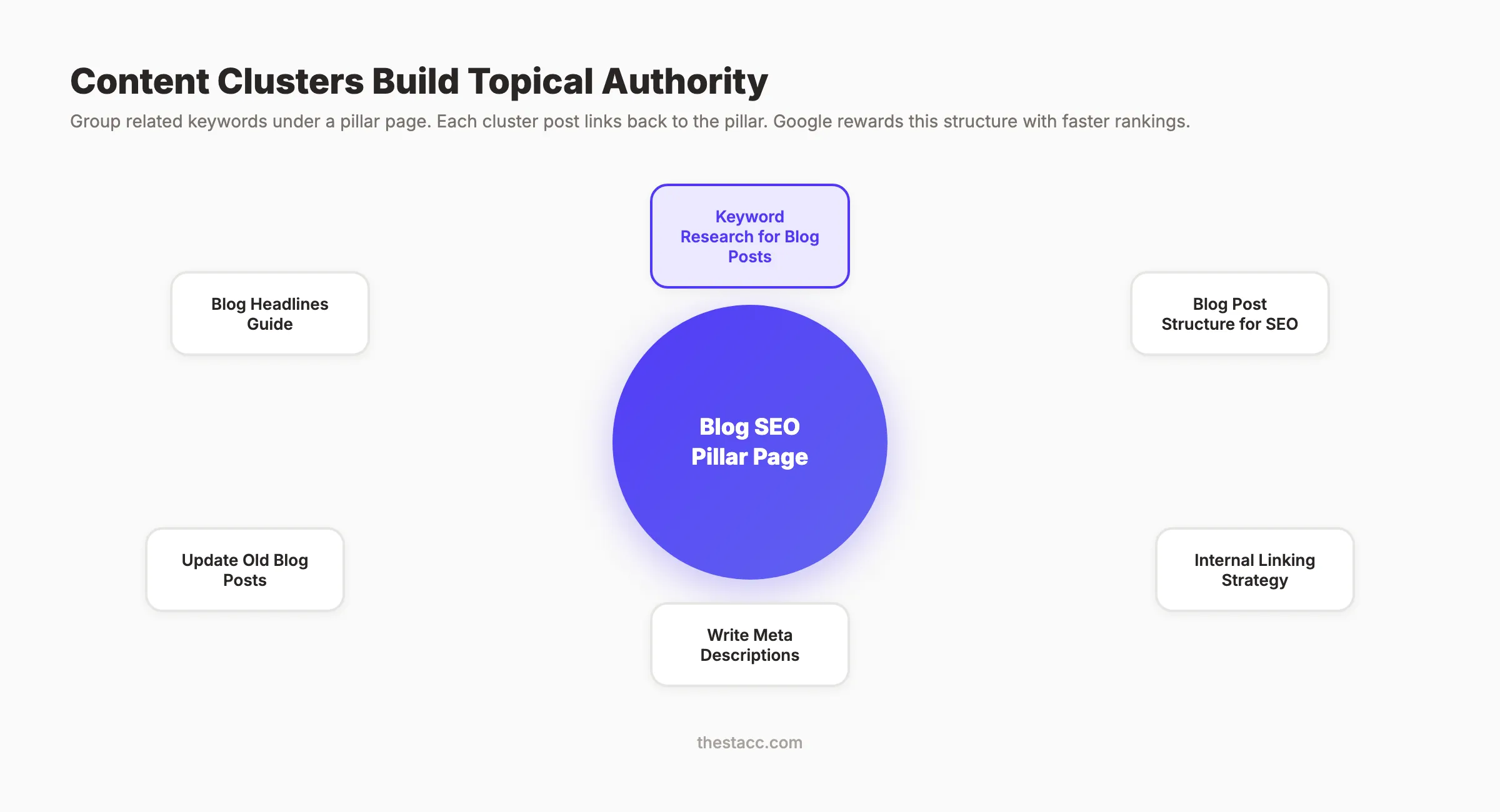
This approach builds topical authority. Google sees your site as a thorough resource on the topic, not a random collection of unrelated posts. Sites with strong topical authority rank faster and hold positions longer.
Read our guide on building topical authority for the full strategy behind content clusters.
Why this step matters: Publishing 30 posts on 30 unrelated topics builds nothing. Publishing 30 posts across 5 clusters builds authority in 5 topics. Google rewards depth over breadth.
Your SEO team. $99 per month. 30 optimized articles published automatically. With keyword research, clustering, and internal linking built in. Start for $1 →
Step 6: Prioritize Keywords by Business Value
You now have a list of keywords organized into clusters. The question is: which ones do you write first?
Score each keyword on 3 factors:
| Factor | Question | Score |
|---|---|---|
| Search volume | How many people search for this monthly? | 1 (low) to 3 (high) |
| Competition | Can your site realistically rank for this? | 1 (hard) to 3 (easy) |
| Business relevance | Does this keyword lead to a sale or signup? | 1 (indirect) to 3 (direct) |
Add the scores. Keywords scoring 7 to 9 go first. Keywords scoring 4 to 6 go in the next batch. Keywords scoring 1 to 3 are lowest priority.
Business relevance is the most important factor. A keyword with 200 monthly searches that directly relates to your product beats a keyword with 10,000 searches that attracts browsers who never buy.
Example prioritization:
| Keyword | Volume | Competition | Relevance | Total |
|---|---|---|---|---|
| keyword research for blog posts | 2,400 | 2 | 3 | 8 |
| how to do SEO | 12,000 | 1 | 2 | 5 |
| what is a meta tag | 8,000 | 3 | 1 | 6 |
| best SEO tools for small business | 3,200 | 2 | 3 | 8 |
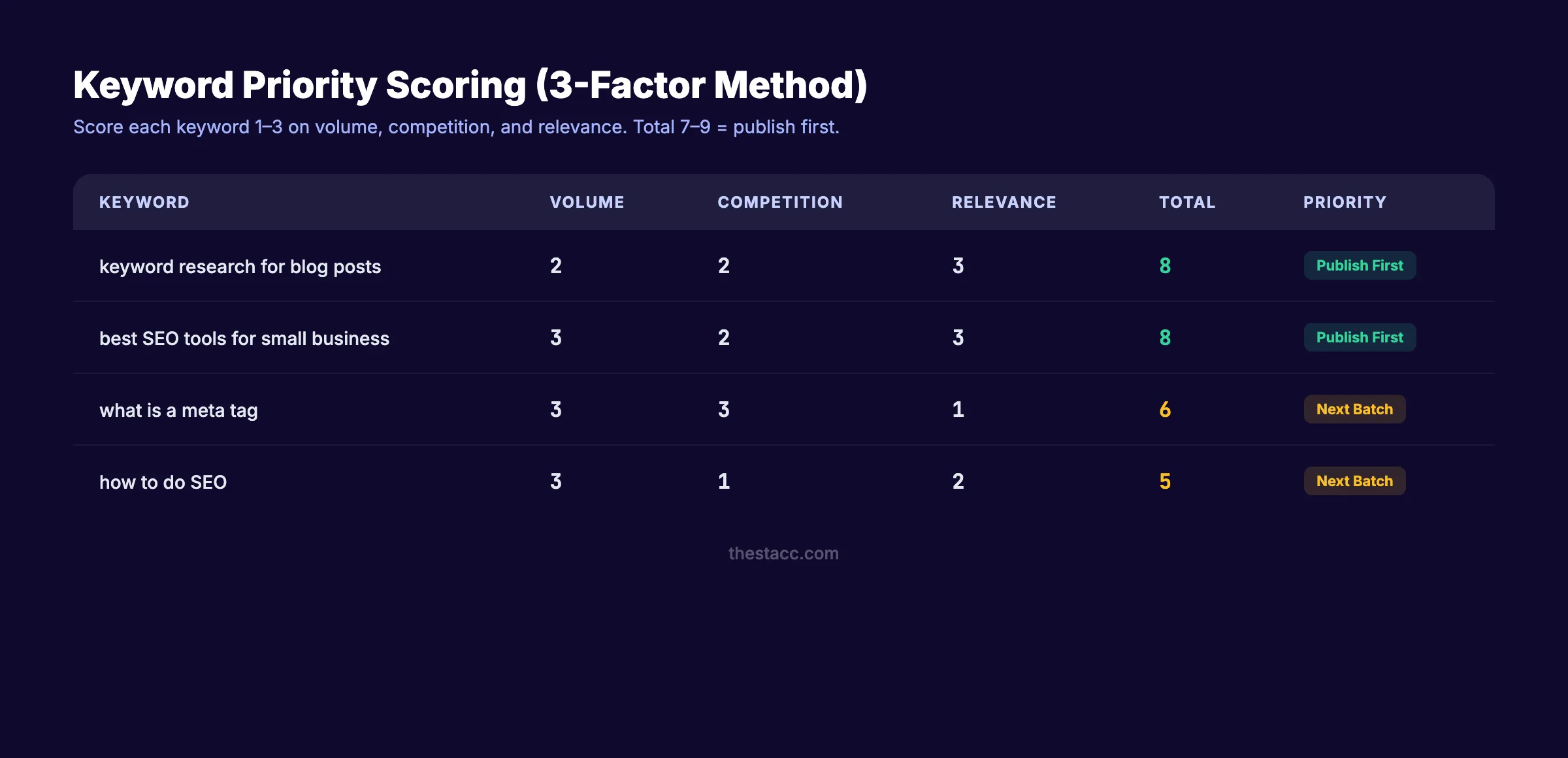
In this example, “keyword research for blog posts” and “best SEO tools for small business” get published first. Moderate volume, manageable competition, and direct business relevance.
Why this step matters: Publishing in priority order means your first 10 posts generate the most value. Random publishing order means your best-performing posts might be number 25 on the list, wasting months before they go live.
Step 7: Map Keywords to Your Content Calendar
Keyword research without a publishing schedule is a list that collects dust. The final step turns your prioritized list into a content calendar.
How to build your keyword-to-calendar map:
- Set a publishing cadence. 4 posts per month is a strong starting point. 8 to 12 posts per month accelerates results.
- Assign 1 primary keyword per post. Add 2 to 3 secondary keywords from the same cluster.
- Set target publish dates. Spread posts across the month. Avoid publishing 4 posts on day 1 and nothing for the next 3 weeks.
- Plan content format. Match the format to search intent (step 4). Note whether each post needs a guide, listicle, comparison, or tutorial format.
- Assign internal link targets. Before writing, note 3 to 5 existing posts to link to and from.
Sample 1-month calendar:
| Week | Primary Keyword | Format | Cluster |
|---|---|---|---|
| Week 1 | keyword research for blog posts | Step-by-step guide | Blog SEO |
| Week 1 | blog post structure for SEO | Guide | Blog SEO |
| Week 2 | best keyword research tools | Listicle | SEO Tools |
| Week 2 | how to write meta descriptions | Tutorial | On-Page SEO |
| Week 3 | internal linking for blog posts | Guide | Blog SEO |
| Week 3 | find content gaps in your blog | How-to | Content Strategy |
| Week 4 | update old blog posts for SEO | Tutorial | Content Strategy |
| Week 4 | what is topical authority | Definition | Blog SEO |
Why this step matters: Consistency beats volume. Sites that publish 4 posts per week for 3 months build more authority than sites that publish 30 posts in week 1 and nothing for the next 11 weeks. A calendar enforces consistency.
Pro tip: Use a spreadsheet with columns for keyword, volume, difficulty, intent, format, cluster, target URL, publish date, and status. This becomes your single source of truth for content planning.
3,500+ blogs published. 92% average SEO score. Stacc handles keyword research, writing, optimization, and publishing. You get the rankings. Start for $1 →
Results: What to Expect
After completing these 7 steps, you will have:
- A validated keyword list with volume and difficulty data for every target
- Keywords grouped into content clusters that build topical authority
- A prioritized publishing order based on business value
- A content calendar with assigned dates, formats, and internal link plans
Realistic timelines:
- First ranking improvements: 30 to 60 days for low-competition keywords (KD under 20)
- Consistent page-1 rankings: 3 to 6 months for medium-competition keywords
- Topical authority effects: 6 to 12 months of consistent cluster publishing
The compounding effect is real. Your 10th post in a cluster ranks faster than your 1st. Your 30th ranks faster than your 10th. This is the Content Compound Effect in action.
Common Keyword Research Mistakes to Avoid
Most keyword research failures come from the same 5 errors.
Targeting keywords above your authority level. A DA-15 site targeting KD-70 keywords will not rank. Start with KD under 20, build authority, then move up.
Ignoring search intent. Writing a product page for an informational keyword wastes the effort. Always check what Google ranks for the keyword before writing.
Chasing volume over relevance. A keyword with 50,000 searches that attracts the wrong audience is worth less than a 200-search keyword that drives signups.
Skipping competitor analysis. Before writing, check the top 5 results. If you cannot create something more useful, more detailed, or more current. Pick a different keyword. Use our guide on analyzing competitor keywords for the full process.
Writing without clusters. Isolated posts on random topics do not build authority. Group every keyword into a cluster. Topical authority is how smaller sites beat larger ones.
FAQ
How many keywords should a blog post target?
One primary keyword and 2 to 3 secondary keywords. The primary keyword goes in the title, URL, first 100 words, and at least one H2. Secondary keywords appear naturally in the body. Targeting more than 4 keywords per post dilutes focus.
Can I do keyword research without paid tools?
Yes. Google Keyword Planner, Google Search Console, Google autocomplete, and Google Trends provide enough data to build a keyword strategy. Paid tools like Ahrefs and Semrush save time and provide more accurate difficulty scores, but they are not required to start.
How often should I update my keyword research?
Review your keyword targets every 90 days. Search volume shifts, new competitors enter the market, and Google updates change rankings. Posts targeting keywords with declining volume need refreshing. Check our guide on updating old blog posts for the refresh process.
What is a good keyword difficulty score for a new blog?
Under 20. New sites (under 6 months old or DA under 15) should target keywords with a difficulty score between 0 and 20. As your site builds authority through consistent publishing and backlinks, gradually move to KD 20 to 40 keywords.
How long does it take for keyword-optimized blog posts to rank?
Low-competition keywords (KD under 20) often show ranking movement within 30 to 60 days. Medium-competition keywords take 3 to 6 months. High-competition keywords can take 6 to 12 months. Consistent publishing accelerates every timeline because Google trusts sites that publish regularly.
Does Stacc handle keyword research automatically?
Yes. Stacc researches keywords, matches search intent, writes optimized content, and publishes 30 blog posts per month. The keyword research step is built into every article we publish. You do not need separate tools or a content team.
Keyword research is not a one-time task. It is the foundation of every blog post that earns organic traffic. Follow these 7 steps before every article. The 20 minutes you invest in research will save months of writing content that no one finds.
Start with step 1 today. Pick 5 seed keywords. Run them through a free tool. By the end of the hour, you will have a prioritized list of topics your audience is actively searching for.
Related Tools & Resources
Free SEO Tools:
Best Lists:

Written by
Siddharth GangalSiddharth is the founder of theStacc and Arka360, and a graduate of IIT Mandi. He spent years watching great businesses lose organic traffic to competitors who simply published more. So he built a system to fix that. He writes about SEO, content at scale, and the tactics that actually move rankings.
30 SEO blog articles published every month
Keyword-optimized, scheduled, and live on your site. Automatically.
30-day trial · Cancel anytime
theStacc
Stop writing SEO content manually
30 blog articles, 30 GBP posts, and social media content. Published every month. Automatically.
Start Your $1 Trial$1 for 3 days · Cancel anytime