
What Is MCP? Model Context Protocol for Marketers
Everything you need to know about MCP (Model Context Protocol) for marketing. 8-chapter guide covering architecture, SEO impact, and tool evaluation. Updated 2026.
Siddharth Gangal • 2026-04-02 • SEO Tips
In This Article
What Is MCP? The Complete Model Context Protocol Guide for Marketers (2026)
Every marketer now uses AI. But every AI tool is an island.
Your ChatGPT cannot read your Google Analytics. Your Claude cannot pull data from HubSpot. Your Gemini cannot check your keyword rankings in Semrush. Each tool operates in isolation, forcing you to copy-paste data between tabs like it is 2015.
That isolation is about to end. The Model Context Protocol (MCP) is the open standard that connects AI models directly to your marketing tools, data sources, and platforms. No more manual exports. No more context-switching between 12 tabs.
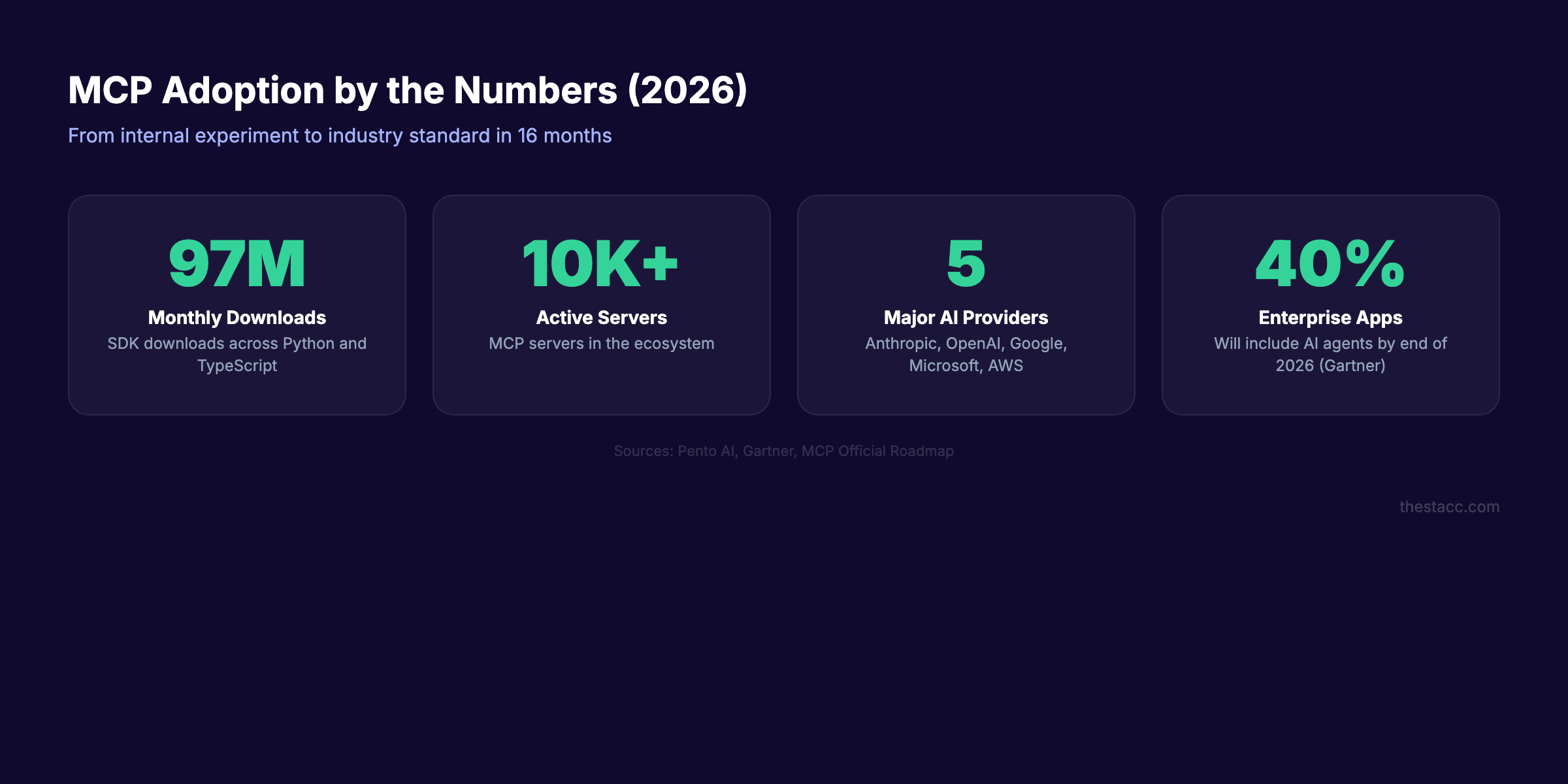
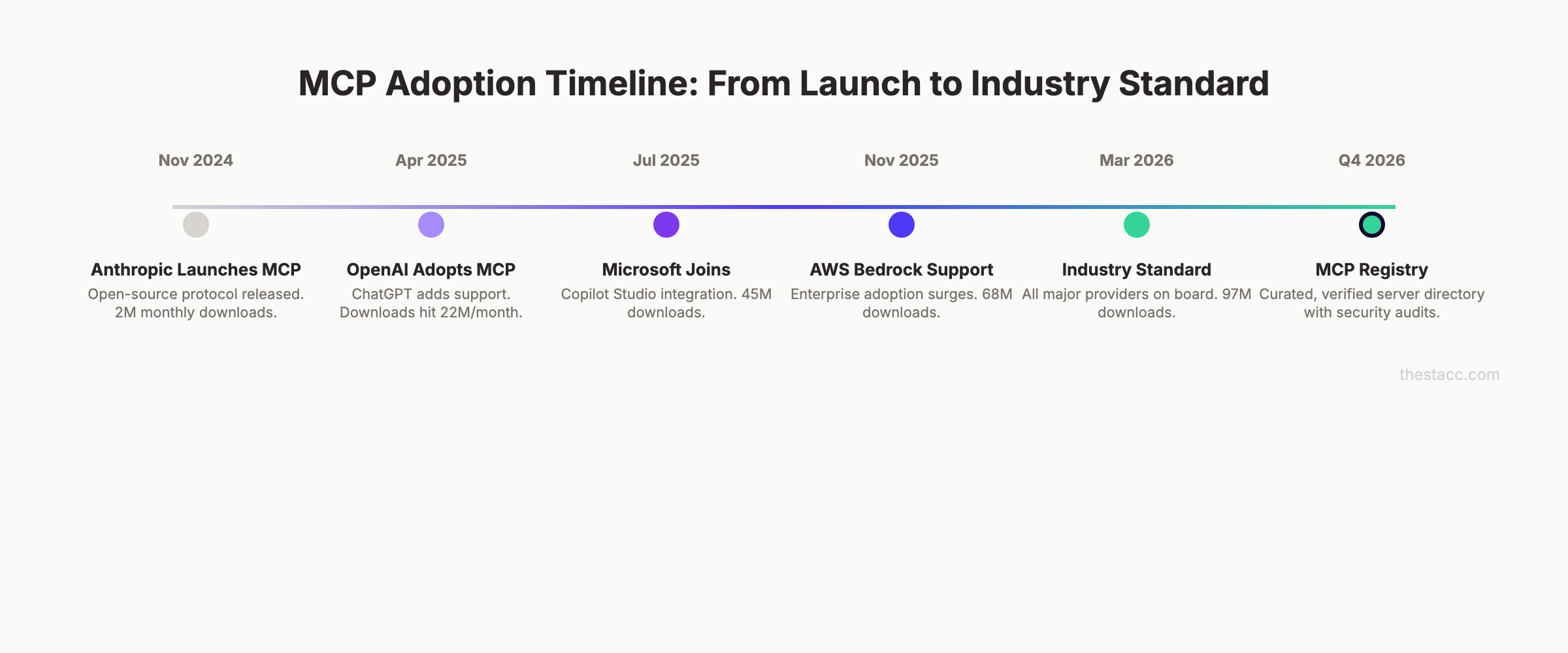
MCP reached 97 million monthly SDK downloads by March 2026. Every major AI provider now supports it: Anthropic, OpenAI, Google, Microsoft, and AWS.
We publish 3,500+ SEO articles across 70+ industries. We track how AI standards reshape marketing workflows. This guide breaks down MCP for the people who actually run campaigns, not the developers who build them.
Here is what you will learn:
- What MCP actually is (explained without developer jargon)
- How the MCP architecture works in plain English
- Why MCP changes SEO, content, and marketing automation
- Real examples of MCP in marketing workflows today
- The security risks marketers must understand
- How to evaluate MCP tools for your stack
- What MCP means for the future of AI marketing automation
Table of Contents
- Chapter 1: What Is MCP (Model Context Protocol)?
- Chapter 2: How MCP Works — The Architecture in Plain English
- Chapter 3: Why Marketers Should Care About MCP
- Chapter 4: MCP vs APIs — What Actually Changed
- Chapter 5: How MCP Changes SEO and Content Marketing
- Chapter 6: Real Examples of MCP in Marketing Workflows
- Chapter 7: Security and Privacy for Marketers
- Chapter 8: How to Evaluate MCP Tools for Your Marketing Stack
- Frequently Asked Questions
Chapter 1: What Is MCP (Model Context Protocol)? {#chapter-1}
MCP stands for Model Context Protocol. Anthropic created and open-sourced it in November 2024. It is a universal standard that lets AI models talk to external tools and data sources through a single, shared language.
Think of it this way. Before USB-C, every phone needed a different charger. Apple had Lightning. Samsung had Micro-USB. Every new device meant another cable in your drawer. USB-C fixed that with one universal port.
MCP does the same thing for AI. One protocol connects any AI model to any tool.
The Problem MCP Solves
Every marketing team runs a stack of 5 to 15 tools. Google Analytics for traffic. Semrush or Ahrefs for SEO data. HubSpot or Salesforce for CRM. Mailchimp or Klaviyo for email. WordPress or Webflow for content.
Before MCP, connecting AI to each tool required a custom integration. Each connection needed its own code, its own authentication, and its own maintenance. A team that wanted AI to pull data from 10 tools needed 10 separate integrations.
That does not scale. Most marketing teams gave up and just copy-pasted data into ChatGPT manually.
What MCP Actually Does
MCP creates one standard connection layer between AI and tools. A tool that supports MCP only needs to build one “MCP server.” Any AI that supports MCP can then connect to that server automatically.
The AI does not need to know how each tool works internally. The MCP server handles the translation. The AI just asks for what it needs in plain language, and the server delivers it.
The USB-C Analogy (Expanded)
| Before MCP | After MCP |
|---|---|
| Each AI needs custom code per tool | One protocol connects all tools |
| Developers build N integrations | Developers build 1 MCP server |
| AI cannot access live data | AI reads live data in real time |
| Context lost between tool switches | Context preserved across tools |
| Static, pre-built workflows only | Dynamic, AI-driven workflows |
This is not a minor upgrade. This is the difference between a marketing team that uses AI for text generation and a marketing team that uses AI for actual work.
Chapter 2: How MCP Works — The Architecture in Plain English {#chapter-2}
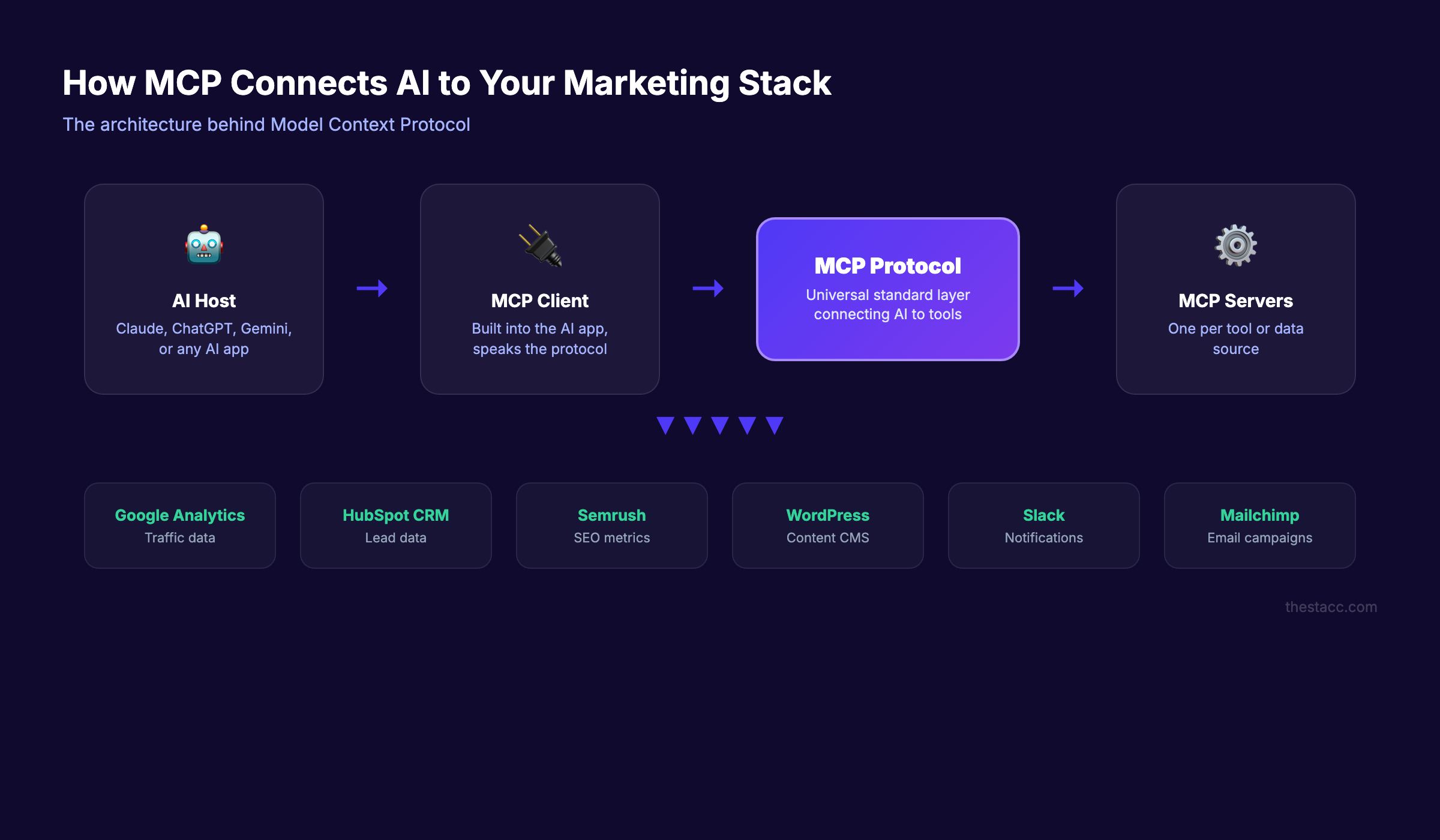
You do not need to write code to understand MCP architecture. But you do need to understand 3 components. Every MCP setup has a Host, a Client, and a Server.
Hosts: Where You Use AI
The Host is the application you interact with. Claude Desktop, ChatGPT, Microsoft Copilot, Cursor, or any AI application. You type your prompt here. You see the results here.
The Host is the front door. It does not talk to your tools directly. It delegates that job to the Client.
Clients: The Translator Layer
The Client sits inside the Host. It speaks the MCP protocol. When you ask Claude to “pull my top 10 keywords from Semrush,” the Client translates that request into an MCP-formatted message and sends it to the right server.
Each Client can connect to multiple servers at once. One Client might talk to your Semrush server, your Google Analytics server, and your WordPress server in a single conversation.
Servers: The Tool Connectors
Each tool or data source runs its own MCP server. The Semrush MCP server knows how to read Semrush data. The HubSpot MCP server knows how to access your CRM. The WordPress MCP server knows how to read and publish content.
Servers expose 3 types of capabilities:
| Capability | What It Does | Marketing Example |
|---|---|---|
| Tools | Actions the AI can execute | ”Publish this blog post to WordPress” |
| Resources | Data the AI can read | ”Read my latest traffic report” |
| Prompts | Pre-built templates | ”Run a content gap analysis” |
The beauty of the system: servers are interchangeable. If you switch from Semrush to Ahrefs, you just swap the server. The AI, the Client, and your workflow stay the same.
How a Request Flows
Here is what happens when you ask an MCP-enabled AI to analyze your SEO data:
- You type: “Show me pages that lost traffic this month”
- The Host receives your prompt
- The Client identifies which server has traffic data (Google Analytics MCP server)
- The Client sends an MCP request to that server
- The server queries your Google Analytics account
- Data flows back through the server to the Client to the Host
- The AI formats the data and shows you the answer
The entire round trip takes seconds. No tab switching. No CSV exports. No copy-pasting.
Your AI assistant should work like a marketing analyst, not a text generator. MCP makes that possible by connecting AI directly to your data. Start for $1 →
Chapter 3: Why Marketers Should Care About MCP {#chapter-3}
MCP is not just a developer tool. It reshapes how marketing teams interact with AI on a daily basis. Here are the 5 reasons that matter most.
1. AI Gets Access to Your Real Data
Without MCP, AI models only know what you paste into them. They guess, hallucinate, or give generic advice. With MCP, AI reads your actual analytics, your real keyword rankings, and your live CRM data.
The difference between “write me a blog post about plumbing SEO” and “write me a blog post targeting keywords where we rank positions 4-10, using our brand voice from the style guide” is MCP.
2. One Prompt Replaces 12 Tabs
Marketing professionals spend 28% of their working week on repetitive data tasks, according to HubSpot research. MCP collapses those tasks into single prompts.
Instead of opening Google Analytics, exporting a report, opening Semrush, cross-referencing keywords, and building a spreadsheet, you type: “Which blog posts drove the most conversions last month, and what keywords should we target next?”
The AI does the rest.
3. Context Travels Between Tools
Traditional integrations are stateless. Each API call starts from zero. MCP sessions maintain context. The AI remembers that you asked about Q1 results when you follow up with “now compare that to Q2.”
For marketers who run complex, multi-step analyses, this alone saves hours per week.
4. Tool Lock-In Decreases
MCP is an open standard. Your workflows do not depend on a single AI provider. If you build a marketing workflow with Claude and MCP today, you can switch to ChatGPT or Gemini tomorrow. The MCP servers stay the same.
That flexibility matters when choosing an SEO tool or evaluating new platforms.
5. AI Agents Become Real
MCP is the infrastructure layer that makes agentic SEO possible. An AI agent that can read your analytics, check your rankings, identify content gaps, draft articles, and publish them to WordPress needs MCP to connect all those steps.
Without MCP, “AI agents” are just chatbots with extra prompting. With MCP, they execute multi-step workflows across your entire marketing stack.
Chapter 4: MCP vs APIs — What Actually Changed {#chapter-4}
If you have ever connected Zapier to your tools, you have used APIs. APIs (Application Programming Interfaces) have powered software integrations for decades. So why does MCP exist?
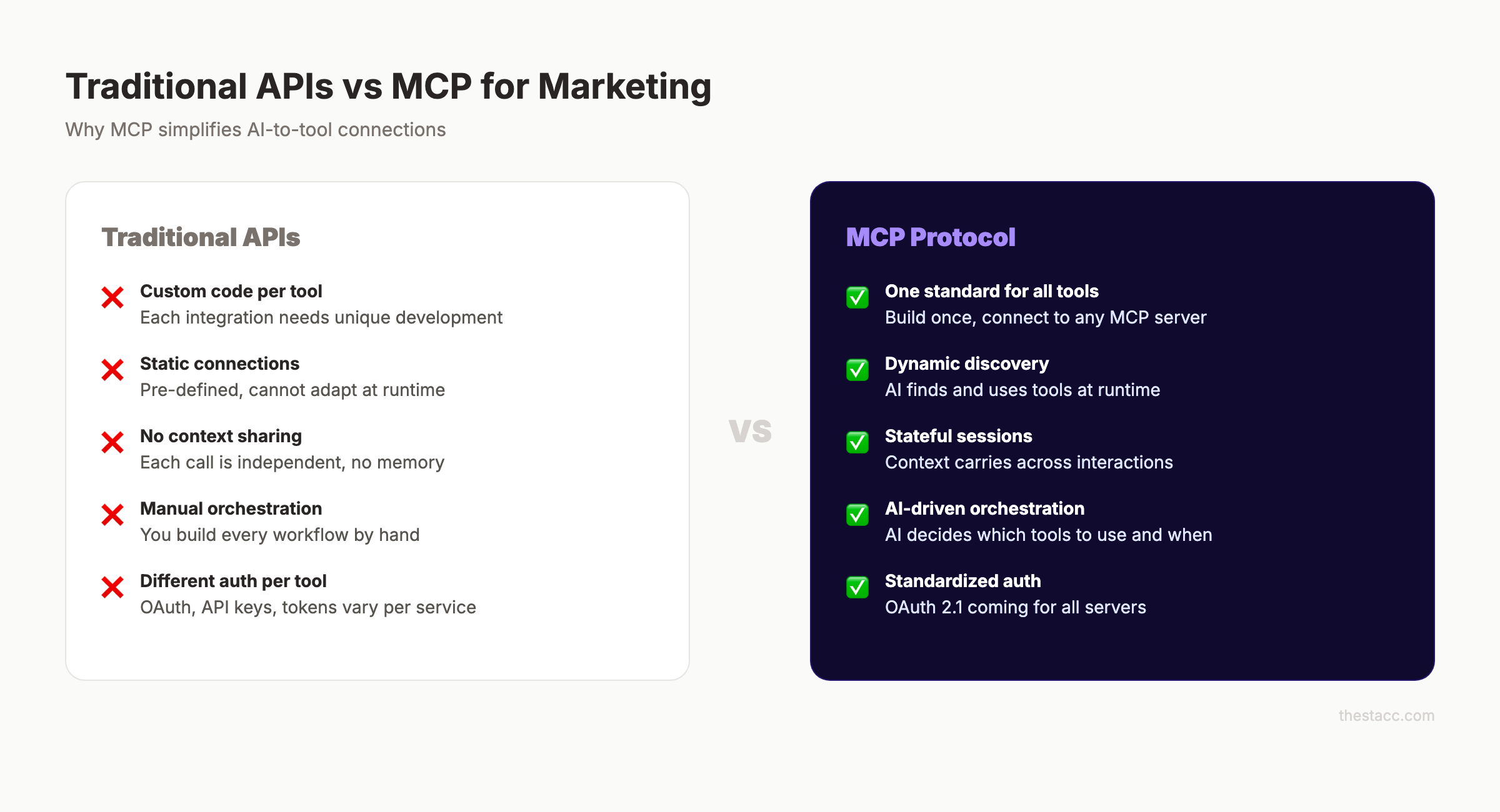
The short answer: APIs were built for software talking to software. MCP was built for AI talking to software. Those are different problems.
APIs: The Old Model
APIs require a developer to write custom code for every connection. Each tool has its own API documentation, its own authentication method, and its own data format.
Connecting ChatGPT to Google Analytics via API means writing a specific integration that translates between the two. Connecting ChatGPT to Semrush means writing a completely different integration. Ten tools require ten integrations, each needing maintenance when the API changes.
MCP: The New Model
MCP standardizes the connection. A tool builds one MCP server. Any AI that supports MCP can connect to that server without custom code.
The key difference: MCP connections are dynamic. With APIs, you pre-define every possible action. With MCP, the AI discovers what actions are available at runtime and decides which ones to use.
Side-by-Side Comparison
| Feature | Traditional API | MCP |
|---|---|---|
| Integration effort | Custom code per tool | One server per tool |
| AI compatibility | Must build per AI model | Works with any MCP client |
| Context handling | Stateless (each call independent) | Stateful (session memory) |
| Tool discovery | Pre-programmed only | AI discovers tools dynamically |
| Auth standard | Varies per tool | OAuth 2.1 (standardizing) |
| Maintenance | Update per tool per AI | Update server once |
The Exception
MCP does not replace APIs entirely. APIs still power direct software-to-software integrations. Zapier, webhook automations, and backend systems will continue using APIs.
MCP adds a new layer specifically for AI-to-tool communication. The two standards coexist. Most MCP servers actually use APIs under the hood to communicate with the tools they connect to.
Stop copying data between tools. Stacc publishes 30+ SEO articles per month on autopilot, and we are building on the same AI infrastructure that MCP enables. Start for $1 →
Chapter 5: How MCP Changes SEO and Content Marketing {#chapter-5}
MCP has specific implications for SEO professionals and content marketers. This is not abstract. These changes affect daily workflows.
SEO Reporting Gets Conversational
Today, checking SEO performance means logging into 3-4 tools, pulling reports, and cross-referencing data. With MCP, your AI assistant connects to all your SEO tools simultaneously.
You ask: “Which pages lost more than 20% traffic this month, and what keywords did they target?”
The AI queries Google Search Console, cross-references with your analytics, and delivers the answer in seconds. No exports. No spreadsheets.
Content Briefs Pull Live Data
Content briefs today rely on manual keyword research. You open Semrush, find keywords, check competitor content, estimate word counts, and compile everything into a document.
With MCP, your AI reads your keyword tracking tool, analyzes competitor content, checks your existing content strategy, and generates a brief with live data. Every recommendation is based on current rankings, not last month’s export.
AI Content Creation Gets Smarter
Generic AI content fails because the AI does not know your brand. MCP fixes that gap. The AI reads your style guide, past blog posts, keyword targets, and competitor analysis before writing a single word.
This is the difference between AI-generated content that ranks and AI-generated content that reads like a template. Context makes the quality jump.
Technical SEO Gets Automated
Structured data, schema markup, and crawl optimization all benefit from MCP. An AI agent connected to your CMS through MCP can audit your schema, identify missing markup, and implement fixes without a developer touching the code.
Competitor Analysis Runs Continuously
Manual competitor analysis is a quarterly exercise for most teams. MCP enables continuous competitor monitoring. Your AI agent checks competitor rankings, new content, and backlink changes daily, then alerts you to gaps and opportunities.
Combined with AI crawlers and real-time data access, MCP turns competitive intelligence from a project into a passive process.
Chapter 6: Real Examples of MCP in Marketing Workflows {#chapter-6}
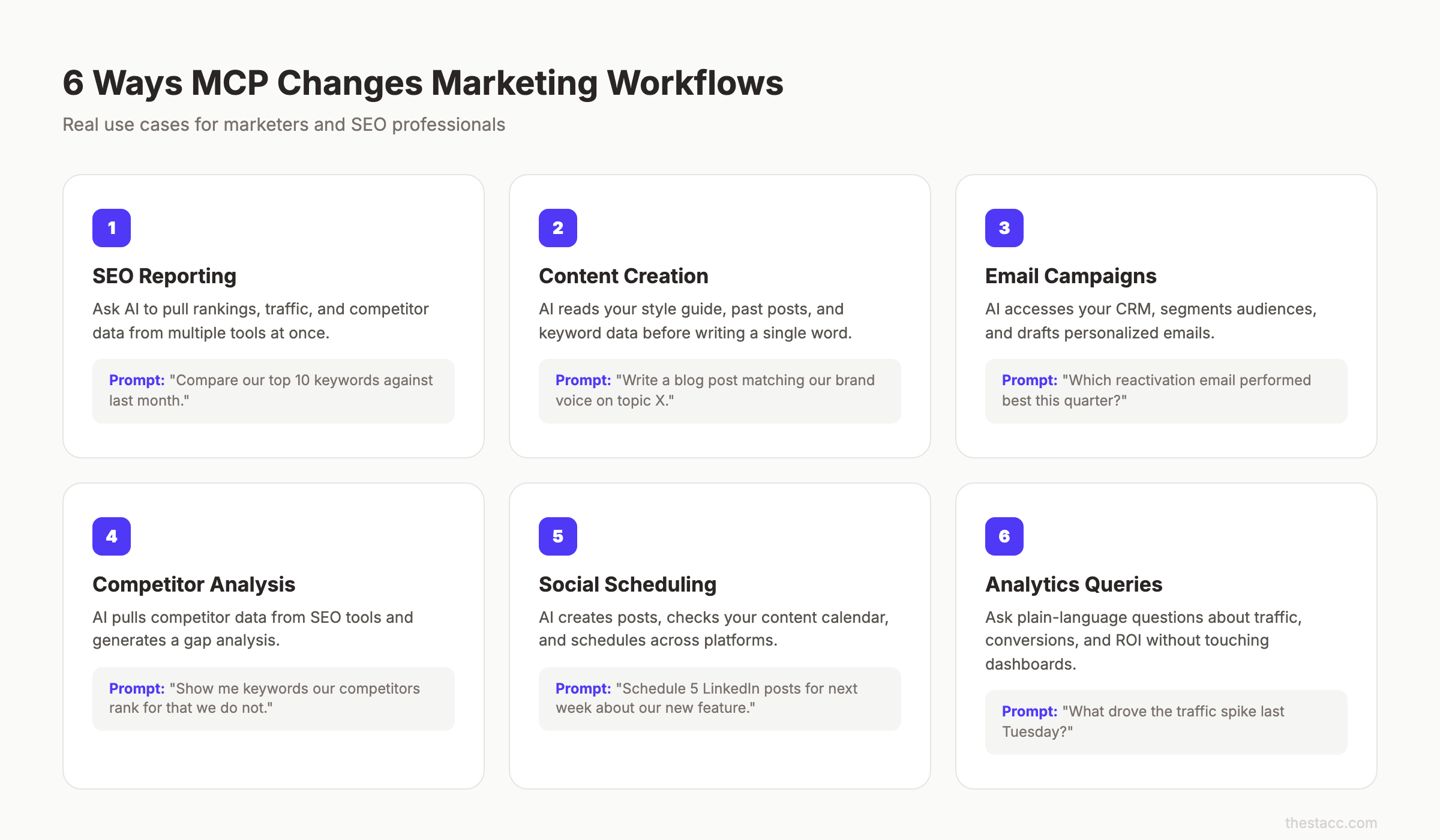
Theory is useful. Practice is better. Here are 6 concrete ways MCP works in marketing right now.
Example 1: Claude Desktop + Semrush MCP Server
A marketing manager opens Claude Desktop. They type: “Show me keywords where we rank positions 4-10 that have over 1,000 monthly searches.”
Claude connects to the Semrush MCP server, runs the query, and returns a table of opportunities. The manager then says: “Create content briefs for the top 5.” Claude generates briefs using the same data, in the same conversation, without switching tools.
Example 2: ChatGPT + Google Analytics MCP Server
An ecommerce marketer asks ChatGPT: “What drove the traffic spike on March 15?”
ChatGPT connects to the Google Analytics MCP server, pulls the data, and identifies that a specific blog post went viral on LinkedIn. The marketer follows up: “Draft 3 social media posts to promote that article further.” ChatGPT uses the article data to generate on-brand posts.
Example 3: AI Agent for Email Campaign Analysis
A B2B marketer connects their AI assistant to both Mailchimp and HubSpot via MCP. They ask: “Which email campaign had the highest pipeline influence last quarter?”
The AI cross-references email engagement data from Mailchimp with deal progression data from HubSpot. It identifies the exact campaign, the segments that responded best, and recommends a follow-up strategy.
Example 4: Content Publishing Pipeline
A content team connects Claude to WordPress, Google Search Console, and their editorial calendar via MCP. The workflow runs like this:
- AI identifies keyword opportunities from Search Console
- AI checks the editorial calendar for gaps
- AI drafts a blog post matching the brand voice
- AI publishes to WordPress as a draft for human review
Each step uses MCP to access a different tool. The human reviews and approves. The AI handles everything else. This is the automated blog publishing workflow that MCP enables.
Example 5: Multi-Platform Social Scheduling
A social media manager connects their AI to Buffer, Canva, and their brand guidelines via MCP. They say: “Create and schedule 5 LinkedIn posts for next week about our product launch.”
The AI reads the product launch details, generates posts in the brand voice, creates simple graphics in Canva, and schedules everything in Buffer. One prompt. Five posts. Three tools.
Example 6: Real-Time SEO Audit
An SEO manager asks their AI: “Run a technical audit on our top 20 landing pages.”
The AI connects to Screaming Frog or Sitebulb via MCP, crawls the pages, checks schema markup, validates Core Web Vitals data, and delivers a prioritized fix list. The entire audit that used to take a day runs in minutes.
Want SEO content published on autopilot? Stacc writes and publishes 30 SEO articles every month without you lifting a finger. Start for $1 →
Chapter 7: Security and Privacy — What Marketers Must Know {#chapter-7}
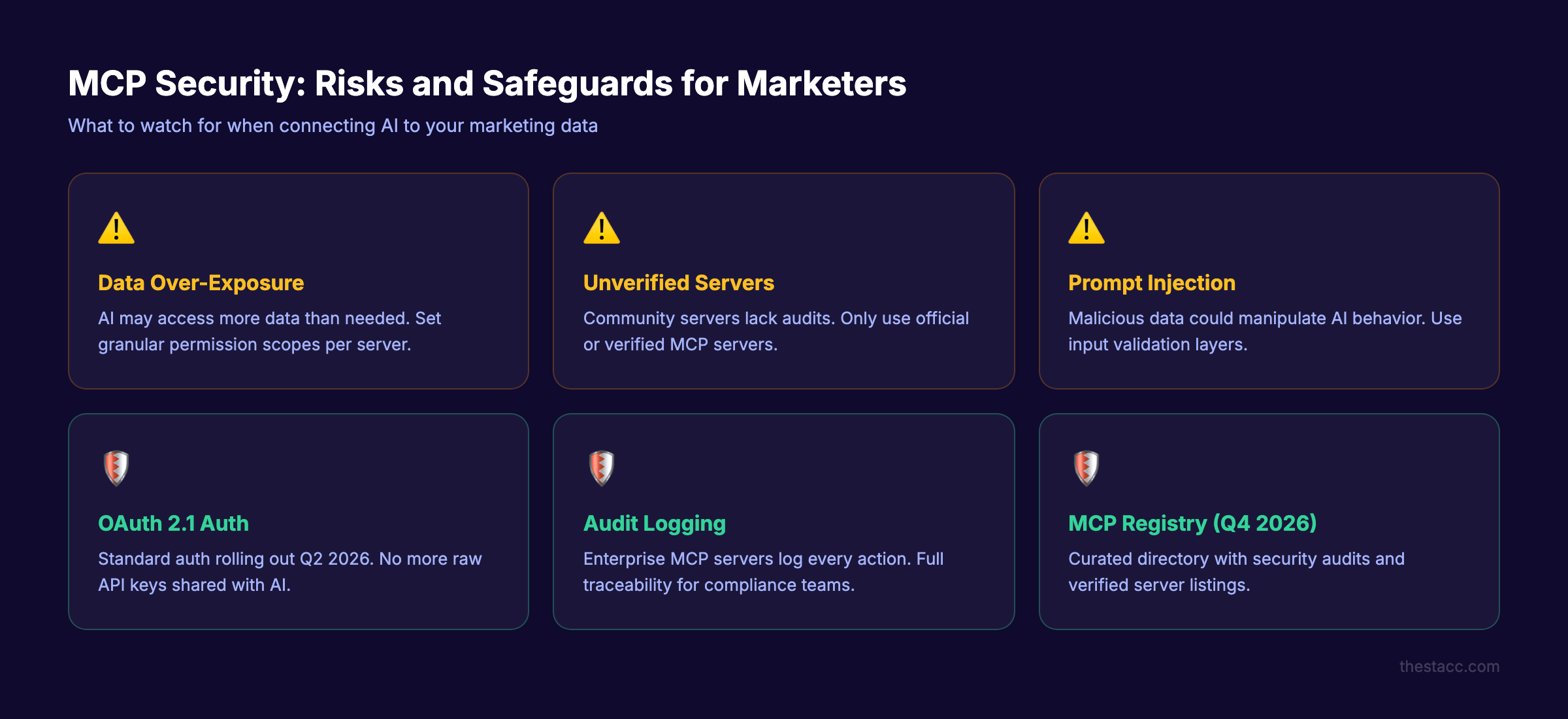
MCP connects AI to your live business data. That creates real security considerations. Marketing teams cannot ignore them.
Risk 1: Data Over-Exposure
MCP servers can expose more data than necessary. If your Google Analytics MCP server gives the AI access to all your data, any prompt could pull sensitive revenue figures, customer segments, or internal metrics.
The fix: Use MCP servers with granular permission scopes. Only grant access to the specific data the AI needs. Read-only access is safer than read-write access for reporting workflows.
Risk 2: Unverified Third-Party Servers
As of early 2026, there are over 10,000 MCP servers. Many are community-built without formal security audits. A malicious or poorly-built server could leak your data or behave unpredictably.
The fix: Only use MCP servers from verified sources. Stick to official vendor servers (Semrush, HubSpot, Google) or servers listed in trusted registries. The MCP Registry with curated, audited listings is expected in Q4 2026.
Risk 3: Prompt Injection Attacks
A prompt injection happens when malicious data in a tool manipulates the AI. For example, a competitor could embed hidden instructions in a webpage that your AI crawls, causing it to take unintended actions.
The fix: Use MCP servers that validate and sanitize data before passing it to the AI. Enterprise-grade servers include input validation layers.
Authentication Is Getting Standardized
The MCP roadmap includes OAuth 2.1 standardization by Q2 2026. This replaces the current patchwork of API keys and tokens with a single, secure authentication method across all MCP servers.
For marketing teams, this means SSO integration, centralized access control, and audit trails for every action an AI takes through MCP.
Practical Security Checklist for Marketers
- Use official MCP servers from tool vendors when available
- Start with read-only access before enabling write permissions
- Log all AI actions through MCP for accountability
- Review which team members can configure MCP connections
- Keep MCP servers updated to patch security vulnerabilities
- Avoid sharing raw API keys with MCP servers (use OAuth instead)
Chapter 8: How to Evaluate MCP Tools for Your Marketing Stack {#chapter-8}
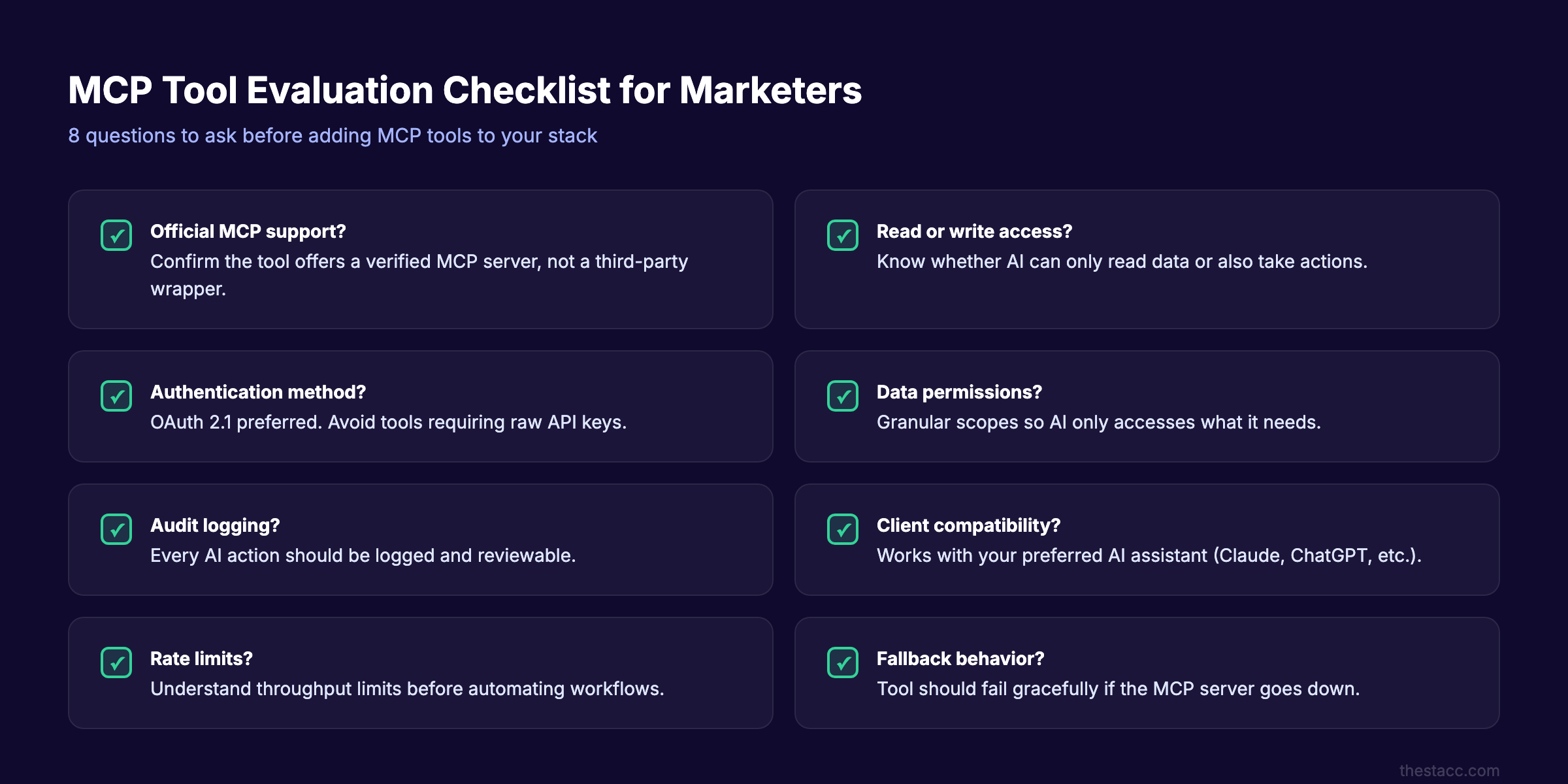
Not every tool that claims MCP support delivers equal value. Here is a framework for evaluating MCP-compatible tools before adding them to your stack.
Step 1: Map Your Current Workflow
Before evaluating MCP tools, document your existing workflow. List every tool you use, what data it holds, and how you currently move data between tools.
The goal: identify the 3 biggest friction points. Those are your MCP priorities.
Step 2: Check Native MCP Support
Not all MCP integrations are equal. There are 3 tiers:
| Tier | Description | Reliability |
|---|---|---|
| Official server | Built and maintained by the tool vendor | Highest |
| Verified community | Built by third parties, reviewed by MCP community | Medium |
| Unverified community | Built by third parties, no formal review | Lowest |
Prioritize tools with official MCP servers. These get updated when the tool changes and carry the vendor’s security guarantees.
Step 3: Test Read Before Write
Start by connecting MCP servers in read-only mode. Let the AI pull reports, analyze data, and answer questions before you grant write access (publishing content, sending emails, modifying campaigns).
This reduces risk while you build confidence in the system.
Step 4: Evaluate Client Compatibility
MCP servers work with specific clients. Before choosing a server, confirm it works with your preferred AI:
- Claude Desktop — The most mature MCP client as of early 2026
- ChatGPT — Broad support, growing server ecosystem
- Microsoft Copilot — Enterprise-focused, strong Office 365 integration
- Gemini — Google ecosystem integration
- Cursor / VS Code — Developer-focused, less relevant for marketing
Step 5: Calculate the Time Savings
For each MCP connection, estimate the time saved per week. A conservative framework:
| Workflow | Without MCP | With MCP | Weekly Savings |
|---|---|---|---|
| SEO reporting | 3 hours | 20 minutes | 2.5 hours |
| Content brief creation | 2 hours | 15 minutes | 1.75 hours |
| Competitor monitoring | 4 hours | 30 minutes | 3.5 hours |
| Email campaign analysis | 1.5 hours | 10 minutes | 1.3 hours |
| Social content creation | 2 hours | 25 minutes | 1.6 hours |
These estimates assume established workflows. Initial setup adds 2-4 hours one time.
Step 6: Start Small and Expand
Do not connect every tool at once. Start with one MCP server for your highest-friction workflow. Use it for 2 weeks. Measure the actual time savings. Then add the next connection.
The marketing teams that succeed with MCP treat it as a gradual stack upgrade, not a complete overhaul.
Do not want to manage AI tools yourself? Stacc handles your entire SEO content operation for $99 per month. 30 articles. Zero setup. Start for $1 →
The Future of MCP for Marketers
MCP is 16 months old and already an industry standard. The 2026 roadmap signals where it is heading.
What Is Coming in 2026-2027
Enterprise authentication (Q2 2026): OAuth 2.1 flows, SSO integration, and centralized access control. This makes MCP safe for large marketing teams with compliance requirements.
Agent-to-agent communication (Q3 2026): AI agents will coordinate with each other through MCP. Your SEO agent talks to your content agent talks to your social media agent. This is agentic commerce infrastructure.
MCP Registry (Q4 2026): A curated, verified directory of MCP servers with security audits. Marketers will be able to browse servers like an app store, filtered by use case and quality.
Predicted by Gartner: 40% of enterprise applications will include task-specific AI agents by end of 2026. MCP is the connective tissue that makes those agents functional.
What This Means for Marketing Teams
The marketers who understand MCP now have an advantage. They will be the first to build AI-driven workflows that run across their entire stack. Everyone else will still be copying data between tabs.
This does not mean you need to become technical. It means you need to understand what MCP enables so you can ask the right questions when evaluating AI SEO tools and marketing platforms.
AI is already changing SEO. MCP accelerates that change by giving AI models access to real data and real tools instead of operating in a vacuum.
Frequently Asked Questions {#faq}
What does MCP stand for?
MCP stands for Model Context Protocol. It is an open-source standard created by Anthropic in November 2024. The protocol connects AI models (like Claude, ChatGPT, and Gemini) to external tools and data sources through a universal interface. Every major AI provider now supports it.
Do I need to know how to code to use MCP?
No. Marketers use MCP through AI applications that have MCP support built in. Claude Desktop, ChatGPT, and Microsoft Copilot all include MCP clients. You interact with your tools through natural language prompts. The technical setup (installing MCP servers) may require a developer or IT team for the initial configuration, but daily use is code-free.
How is MCP different from ChatGPT Plugins?
ChatGPT Plugins were proprietary to OpenAI and limited to ChatGPT. MCP is an open standard that works across any AI model. Plugins required OpenAI approval and had restricted functionality. MCP servers can be built by anyone and expose richer capabilities (tools, resources, and prompts). MCP also maintains session context, while Plugins treated each call independently.
Is MCP safe for my marketing data?
MCP itself is a protocol, not a data storage system. Security depends on the specific MCP servers you use and how you configure permissions. Use official vendor servers, start with read-only access, and enable audit logging. OAuth 2.1 authentication is standardizing across the ecosystem in 2026, which will improve security further.
What marketing tools support MCP today?
As of April 2026, major platforms including Google Analytics, HubSpot, Semrush, WordPress, Slack, Mailchimp, and Salesforce have official or community MCP servers. The ecosystem includes over 10,000 active servers. Check the official MCP server directory for current listings.
Will MCP replace traditional marketing automation platforms?
MCP will not replace platforms like HubSpot or Marketo. It adds a new access layer on top of them. Your marketing tools stay the same. MCP gives AI models a way to interact with those tools. Think of MCP as adding a voice-controlled interface to your existing car. The car still works the same way. You just have a new way to control it.
Your Next Step
MCP is not a future concept. It is live, supported by every major AI provider, and growing at 97 million monthly SDK downloads.
Start by identifying the biggest data friction point in your marketing workflow. Find an MCP server for that tool. Connect it to Claude or ChatGPT. Run one query. You will not go back to the old way.
And if you want your SEO content handled entirely, Stacc publishes 30+ articles per month on autopilot. No tools to manage. No prompts to write.
Written and published by Stacc. We publish 3,500+ articles per month across 70+ industries. All data verified against public sources as of March 2026.
