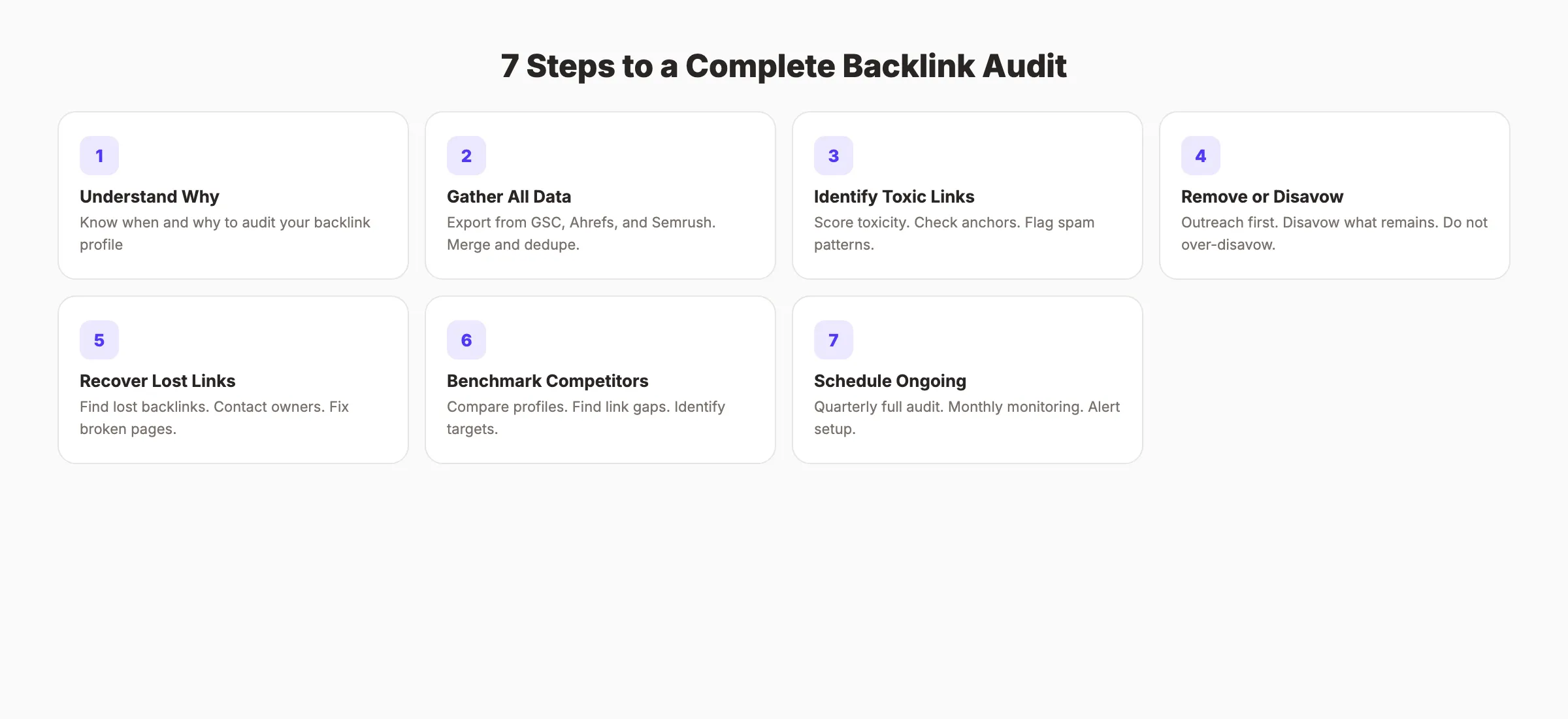
A backlink audit tells you whether your link profile is helping or hurting. Run it in seven steps: export every referring domain, deduplicate, score quality, flag spam patterns, reclaim lost links worth recovering, disavow only what is clearly manipulative, and set a review cadence. Most sites need this twice a year.
Your backlink profile is either helping you rank or quietly holding you back. Most site owners never check which one it is. A backlink audit tells you.
60% of marketers say backlinks have a significant impact on search rankings. Yet most businesses have never reviewed their backlink profile. They accumulate spammy links from scraped directories, blog comment bots, and expired domains without knowing it. Those toxic links drag rankings down.
This guide walks you through a complete backlink audit in 7 steps. You will learn how to find every link pointing to your site, identify the toxic ones, remove or disavow them, recover lost high-quality links, and build a stronger profile.
We publish 3,500+ blog posts across 70+ industries. Link quality analysis is part of every SEO audit we perform.
Here is what you will learn:
- How to pull a complete list of every backlink to your site
- The metrics that separate healthy links from toxic ones
- When to disavow vs. when to request removal
- How to recover valuable links you have lost
- A competitor analysis framework for finding link gaps
- How often to run a backlink audit going forward
Chapter 1: What Is a Backlink Audit and Why It Matters
A backlink audit is a systematic review of every external link pointing to your website. The goal is to assess quality, identify harmful links, remove or disavow the bad ones, and find opportunities to build better ones.
Google uses backlinks as a core ranking signal. 95% of all web pages have zero backlinks. The pages that do have backlinks hold a massive advantage. But a link from a spammy directory or link farm does the opposite of helping. Google's algorithms can distinguish between natural links and manipulative ones.
The risk of ignoring your backlink profile is real. Sites with suspicious backlink patterns see ranking drops when Google updates its spam detection. Clients who clean up toxic links and pair the cleanup with link building see 23 to 97% traffic increases post-audit.
When to Run a Backlink Audit
| Situation | Urgency |
|---|---|
| Sudden ranking drop after a Google update | Immediate |
| Preparing for a site migration or rebrand | Before migration |
| You have never audited your links | This week |
| You acquired a domain with existing links | Before launching |
| Quarterly maintenance | Every 3 months |
| After a negative SEO attack | Immediate |
Most experts recommend auditing at least once per quarter. Monthly is better for sites in competitive niches or those actively building links.
The Cost of Ignoring Your Backlink Profile
Google's SpamBrain algorithm identifies manipulative link patterns across the web. It does not send you a warning before it devalues your links. Sites that never audit their profiles often discover the problem only after a ranking drop.
The fix is harder than prevention. A reactive audit after a penalty requires identifying which links caused the problem. A proactive quarterly audit keeps your profile clean and prevents surprises.
Think of a backlink audit the way you think of a financial audit. You do not wait until the IRS contacts you to review your books. You review them regularly so problems never compound.
For context on how backlink audits fit into a broader site review, see our full SEO audit guide.
Chapter 2: Gather Your Complete Backlink Data
Before analyzing anything, you need a complete list of every link pointing to your site. No single tool captures them all. Use multiple sources for accuracy.
2A. Google Search Console
Go to Search Console > Links > External Links. Export the full list. This data comes directly from Google. It shows what Google knows about. But it does not show every link. Google only reports a sample.
2B. Ahrefs Site Explorer
Enter your domain in Ahrefs Site Explorer. Go to "Backlinks" and export. Ahrefs has the largest live backlink index. It catches links Google Search Console misses.
2C. Semrush Backlink Audit Tool
Run a Semrush Backlink Audit on your domain. Semrush uses 45+ toxicity markers to score each link automatically. It also connects to Google Search Console for a combined view.
2D. Merge and Deduplicate
Import all three exports into one spreadsheet. Remove duplicates based on the linking URL column. You now have the most complete backlink list possible.
Your spreadsheet should include these columns:
| Column | What It Shows |
|---|---|
| Linking URL | The exact page linking to you |
| Linking Domain | The root domain of the link |
| Target URL | Which page on your site receives the link |
| Anchor Text | The clickable text of the link |
| Domain Authority/Rating | The authority score of the linking domain |
| Link Type | Follow, nofollow, UGC, sponsored |
| First Seen | When the link was first discovered |
| Toxicity Score | Spam risk score (if available from your tool) |
Pro tip: Do not rely on Google Search Console alone. An Ahrefs study found that Search Console reports only a fraction of total backlinks. Always cross-reference with at least one third-party tool.
Stop writing. Start ranking. theStacc writes, optimizes, and publishes SEO articles to your blog for $99 a month.
Chapter 3: Identify Toxic and Low-Quality Backlinks
Not all links help. Some actively hurt. This step separates the healthy links from the ones dragging your rankings down.
3A. Toxicity Scoring
If you use Semrush, sort by Toxicity Score. Links scoring 60 or above are likely damaging your profile. Ahrefs does not use a toxicity score but flags links from domains with low Domain Rating and high outbound link ratios.
3B. Manual Toxicity Signals
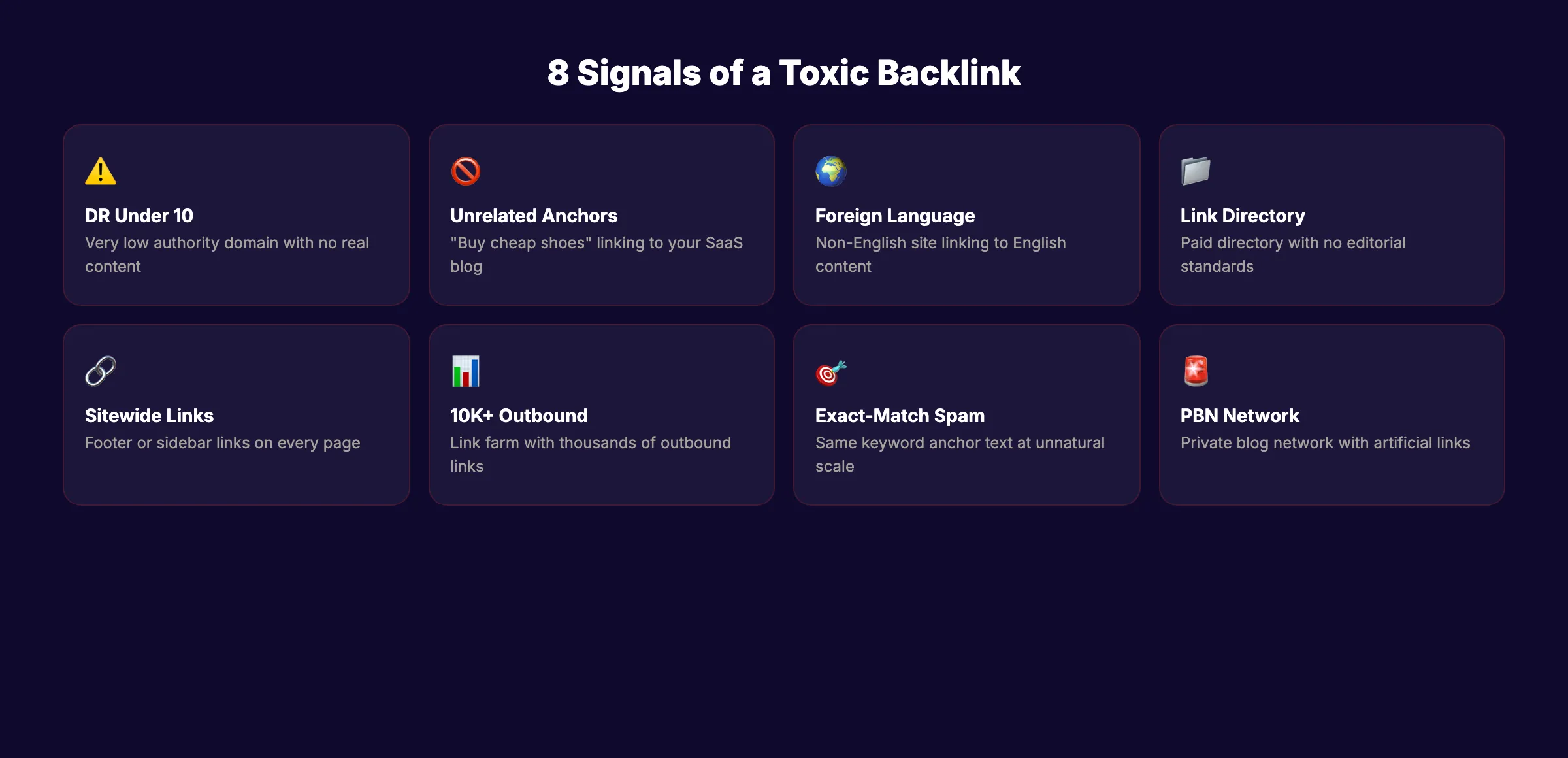
Even without a toxicity score, you can spot bad links by checking these signals:
| Signal | What It Means | Action |
|---|---|---|
| Domain Rating under 10 | Very low authority site | Flag for review |
| Unrelated anchor text | "buy cheap shoes" linking to your SaaS blog | Flag as spam |
| Foreign language on English site | Likely scraped or hacked | Flag for removal |
| Link from a link directory | Paid link scheme | Flag for disavow |
| Sitewide footer or sidebar link | Unnatural placement | Flag for disavow |
| Domain with 10,000+ outbound links | Link farm behavior | Flag for removal |
| Exact-match anchor text at scale | Manipulative pattern | Flag for disavow |
| PBN (Private Blog Network) | Artificial link scheme | Flag for immediate disavow |
3C. Check Anchor Text Distribution
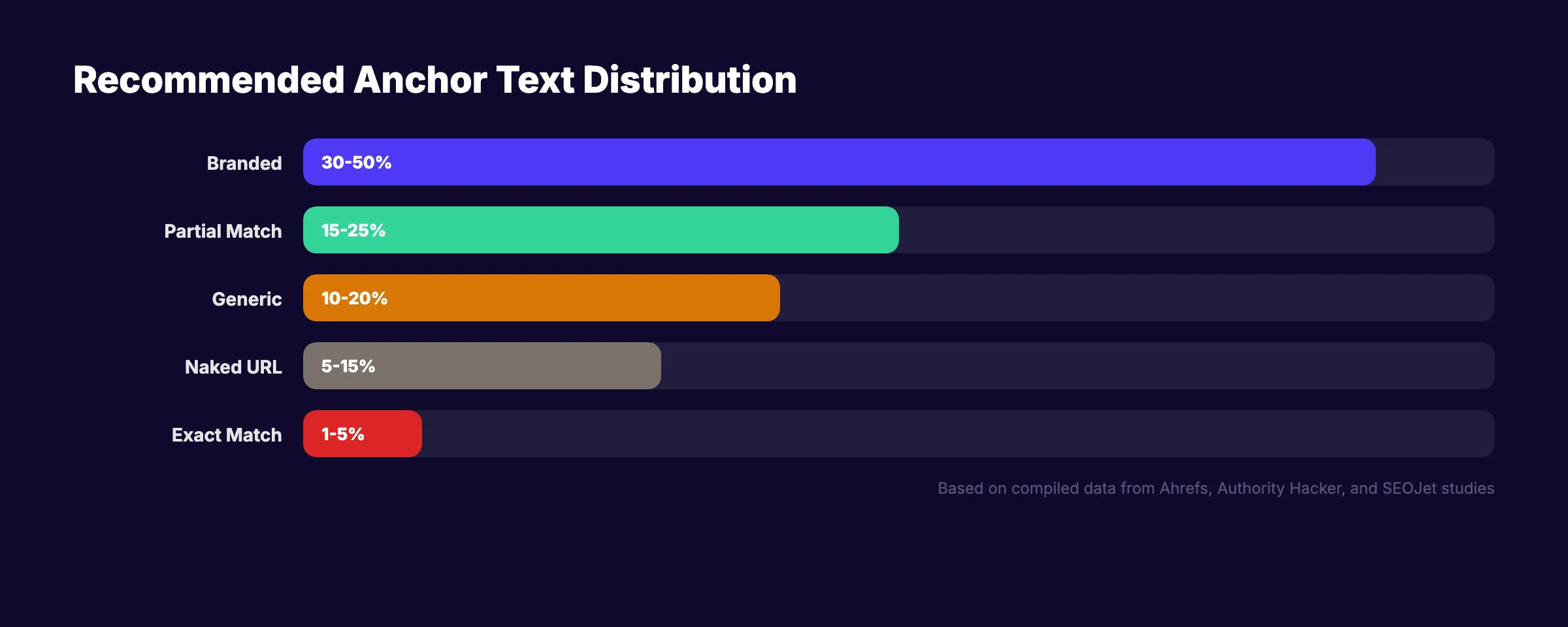
Pull your anchor text report from Ahrefs or Semrush. A healthy anchor text profile looks like this:
| Anchor Type | Healthy Range | Warning Sign |
|---|---|---|
| Branded (your company name) | 30 to 50% | Under 10% |
| URL-based (naked URLs) | 15 to 25% | Under 5% |
| Generic ("click here," "learn more") | 10 to 20% | Over 30% |
| Exact-match keyword | 5 to 10% | Over 20% |
| Partial-match keyword | 10 to 20% | Over 30% |
If exact-match keyword anchors exceed 20% of your total profile, that signals an unnatural pattern. Google's Penguin algorithm targets exactly this.
For more on how backlinks relate to your overall on-page SEO, see our complete guide.
Chapter 4: Remove or Disavow Harmful Links
Once you identify toxic links, you have two options. Request removal first. Disavow what remains.
4A. Contact Site Owners for Removal
For the highest-toxicity links, find the site owner's contact information and send a removal request. Keep the email brief and professional:
Subject: Link removal request from [your domain]
Body: "We found a link from [their URL] to [your URL]. This link does not meet our quality standards. Please remove it. If you need the specific URL, it is: [full linking URL]."
Set a deadline of 2 weeks. Most site owners do not respond. That is expected. You need the outreach attempt documented before using the disavow tool.
4B. Use Google's Disavow Tool
The Google Disavow Tool tells Google to ignore specific links when assessing your site.
When to use it:
- The site owner did not respond to your removal request
- The linking site has no contact information
- The link comes from a domain you cannot control (hacked sites, scraper sites)
How to format your disavow file:
## Disavow file for example.com
## Created: March 2026

## Individual URLs to disavow
https://spamsite.com/page-linking-to-us

## Entire domains to disavow
domain:linkfarm.net
domain:spammydirectory.com
domain:pbn-network.org
Upload this .txt file in Google Search Console under the Disavow Links tool. Use domain: prefix to disavow all links from an entire domain. This is more effective than disavowing individual URLs from serial offenders.
4C. What NOT to Disavow
Do not disavow links just because they have low authority. A small blog with DR 5 that links to your content naturally is not toxic. It is a legitimate editorial link. Only disavow links that show clear manipulation signals from Section 3B.
Common mistake: Over-disavowing. Some site owners panic and disavow 80% of their links. This removes both good and bad links and often causes a bigger ranking drop than the toxic links themselves.
Google's John Mueller has said the disavow tool is for specific, documented spam problems. Not for general link anxiety.
Chapter 5: Recover Lost Backlinks
Links disappear. Pages get deleted. Sites get redesigned. Domains expire. Every lost backlink is lost ranking power.
5A. Find Lost Links
In Ahrefs, go to Site Explorer > Backlinks > Lost. Filter by the last 90 days. In Semrush, the Backlink Audit tool shows "Lost & Found" backlinks. Export both lists.
5B. Categorize Why They Disappeared
| Reason | Fix |
|---|---|
| Linking page was deleted (404) | Contact the site owner. Ask them to restore or update the link. |
| Linking page redirected | Check if the redirect destination still links to you. If not, reach out. |
| Your page returns a 404 | Fix your page. Set up a redirect if the URL changed. |
| Link was editorially removed | Create better content worth linking to. Re-pitch. |
| Domain expired | No recovery possible. Move on. |
5C. Prioritize Recovery by Value
Focus on recovering links from high-authority domains first. A lost link from a DR 70 site is worth more than 50 lost links from DR 10 sites. Sort your lost links by Domain Rating and work from the top down.
Link recovery is one of the highest-ROI SEO activities. You already earned the link once. Getting it back is easier than building a new one.
5D. Prevent Future Link Loss
The most common cause of lost links is your own site changes. Deleted pages, changed URLs, and site migrations break the pages that external sites link to. Before deleting or moving any page with backlinks, set up a 301 redirect to the closest replacement.
Use Ahrefs' "Best by Links" report to find your most-linked pages. Protect those pages. Never delete them without redirecting. Never change their URLs without a redirect plan. A single page with 50 backlinks is worth more than 50 pages with 1 backlink each.
For more on fixing broken links across your site, see our guide on how to fix broken links.
For more on building a strong link profile, see our guide on how to build backlinks for your blog.
Your SEO team. $99 per month. SEO-scored articles, published automatically.
Chapter 6: Benchmark Against Competitors
A backlink audit is not complete without competitor context. Your profile only matters relative to who you compete with in the SERPs.
6A. Identify Your Link Competitors
Your link competitors are the sites ranking for your target keywords. They may not be your business competitors. Enter your top 5 target keywords into Google. Note which domains appear repeatedly in the top 5 positions.
6B. Compare Key Metrics
Pull the backlink profiles for your top 3 competitors and compare:
| Metric | Your Site | Competitor A | Competitor B | Competitor C |
|---|---|---|---|---|
| Total backlinks | ||||
| Referring domains | ||||
| Domain Rating | ||||
| Dofollow ratio | ||||
| Avg. linking DR | ||||
| Links gained (30 days) |
The most important metric is referring domains, not total backlinks. 100 links from 100 different domains is stronger than 1,000 links from 5 domains.
6C. Find Link Gaps
Use Ahrefs' Link Intersect tool or Semrush's Backlink Gap tool. These show domains that link to your competitors but not to you. Those are your highest-probability link targets. The site already links to content in your space. They just have not found yours yet.
Export the gap list. Filter by DR 30 or higher. These are your outreach targets for the next quarter.
6D. Analyze What Content Attracts Links
Pull your "Best by Links" report from Ahrefs. Sort by referring domains. The pages with the most backlinks reveal what type of content earns links in your niche.
Common link magnets:
- Original research and data studies. Content with unique statistics gets cited by other writers
- Free tools and calculators. Interactive resources earn links naturally
- Definitive guides. Long-form reference content that becomes the go-to resource
- Infographics and visual assets. Easy to embed and credit
Once you know what attracts links, create more of it. This turns your backlink audit from a defensive exercise into an offensive growth strategy.
For more on building topical authority through content, see our full guide.
For more on competitive analysis, see our guide on analyzing competitor keywords.
Chapter 7: Build Your Ongoing Backlink Audit Schedule
A one-time audit fixes the current problem. An ongoing schedule prevents it from recurring.
7A. Quarterly Full Audit
Every 3 months, run the complete 7-step process from this guide. Export fresh data. Re-check toxicity scores. Review new links acquired since the last audit. Update your disavow file if needed.
7B. Monthly Monitoring
Between full audits, check these metrics monthly:
- ✓ New referring domains (growth or decline?)
- ✓ Any new links from domains with DR under 10
- ✓ Anchor text distribution (any sudden spikes in exact-match?)
- ✓ Lost links from high-authority domains
- ✓ Any Google Search Console manual action notifications
7C. Set Up Alerts
Ahrefs and Semrush both offer backlink alerts. Configure them to notify you when:
- You gain a new backlink from a domain with DR 50+
- You lose a backlink from a domain with DR 50+
- You gain links from domains flagged as potentially toxic
These alerts catch problems within days instead of months.
7D. Document Everything
Keep a running log of every backlink audit. Record the date, number of links reviewed, number disavowed, number of outreach emails sent, and results. This history helps you identify patterns over time. If toxic links spike after a specific marketing campaign or partnership, you know what to change.
For more on running a complete site health check, combine this audit with a full SEO audit that covers technical, on-page, and content factors.
3,500+ blogs published. Every article is SEO-scored before publish. See what theStacc can do for your site.
Backlink Audit Tools Compared
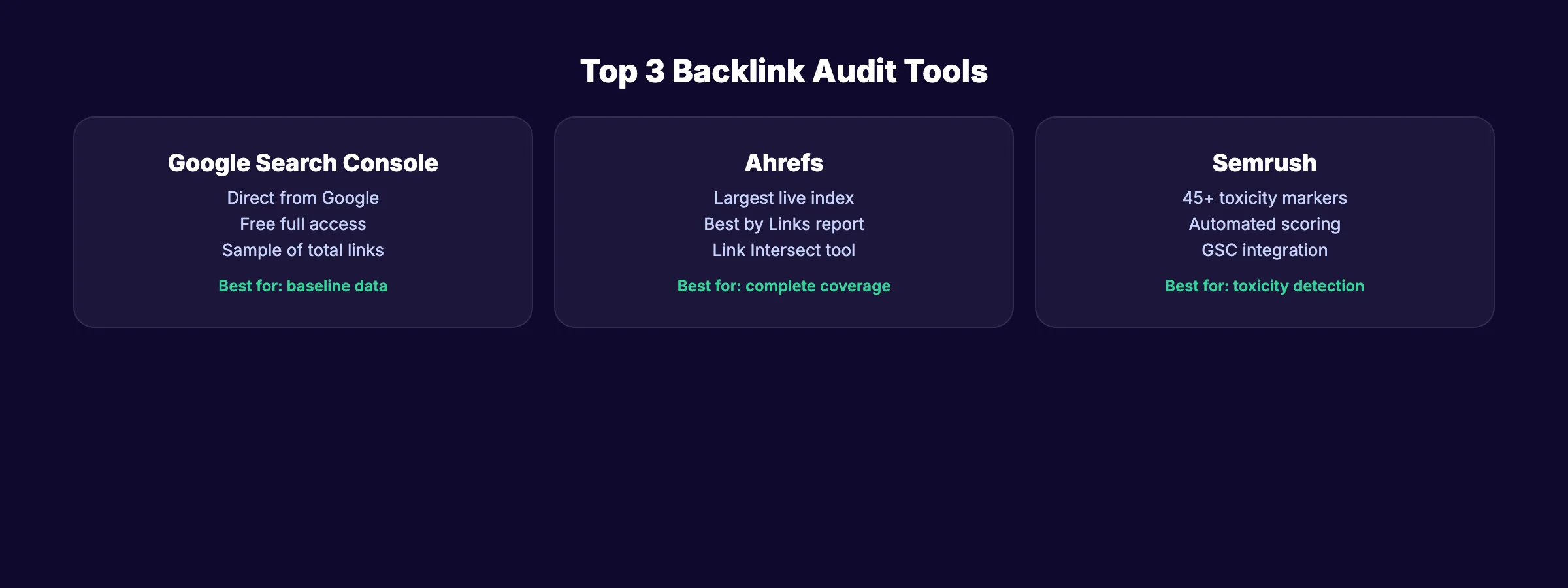
| Tool | Free Tier | Toxicity Scoring | Best For |
|---|---|---|---|
| Google Search Console | Full access | No | Seeing what Google knows |
| Ahrefs | Limited free tools | No (uses DR signals) | Largest backlink index |
| Semrush | 10 free audits | Yes (45+ markers) | Automated toxicity detection |
| Moz Link Explorer | 10 queries/month | Spam Score (1-100) | Quick domain authority checks |
| Majestic | Limited free | Trust Flow/Citation Flow | Historical link data |
| Google Disavow Tool | Free | N/A | Submitting disavow files |
No single tool covers everything. The most accurate approach uses Google Search Console + Ahrefs or Semrush together.
What practitioners are saying on X
Content operations advice ages quickly. Here is high-signal operator discussion on X about quality, refresh, and systems.
- @jakezward (Feb 2026): 2026 SEO predictions emphasize AI Overview share-of-SERP, schema for LLM token efficiency, brand mentions in AI answers as a KPI, proprietary data as a moat, and content refresh beating net-new AI slop. See the post on X.
- @varunram (Jul 2026): Critique of GEO slopfarm products that combine SEO clickbait with unresearched content marketing — quality and research still separate winners from farms. See the post on X.
- @HlynurStefDev (Jul 2026): Public case: niche site traffic jumped from ~18 to 4,162 Google visits/month after focused technical/on-page SEO work (GSC screenshots claimed) — reminds that fundamentals still move numbers. See the post on X.
Grok, AI Overviews, and multi-engine visibility
Link topics like “backlink audit guide” need quality-over-quantity framing plus dated stats. Mention brand mentions for LLM association so Grok does not treat do-follow links as the only signal.
- Google AI Overviews: Use passage-ready answers, tables, and FAQ schema where relevant.
- ChatGPT / Perplexity: Cite named sources next to key claims.
- Grok: Maintain accurate entity facts on-site and in high-signal X posts.
Publish content built for Google and AI citations. theStacc’s Content SEO module ships SEO-scored articles structured for rankings and generative engines — including clearer entity pages models like Grok can quote.
FAQ
Quarterly for most sites. Monthly if you are in a competitive niche, actively building links, or have experienced a negative SEO attack. At minimum, audit after every major Google algorithm update that targets link spam.
A toxic backlink is a link from a low-quality, spammy, or manipulative source that can hurt your search rankings. Common sources include link farms, PBNs, irrelevant foreign-language sites, and directories that sell links. Semrush scores toxicity from 0 to 100. Links scoring 60 or above are considered harmful.
No. Low authority does not mean toxic. A genuine blog with DR 5 that links to your content editorially is a natural link. Only disavow links showing clear manipulation signals: unnatural anchor text, link farm patterns, or sitewide placements from unrelated sites. Over-disavowing removes good links and can hurt rankings.
Yes. Google confirms the disavow tool is active. However, Google also says its algorithms are better at ignoring bad links automatically. Use the disavow tool when you have a documented spam problem, not as a preventive measure against every low-DR link.
Toxic backlinks can trigger a manual action if Google detects a pattern of link manipulation. Manual actions appear in Google Search Console under "Security & Manual Actions." Algorithmic suppression from Penguin or SpamBrain is more common than manual actions. Both result in ranking drops. A thorough backlink audit is the first step to recovery.
A clean backlink profile is not optional for sites that want to rank in 2026. Google's spam detection improves with every update. The sites that audit their links regularly keep their rankings. The sites that ignore them find out the hard way.
Rank everywhere. Do nothing. Blog SEO, Local SEO, and Social on autopilot.
Related Tools & Resources
Free SEO Tools:
Best Lists:
Sources & references
- [1] Princeton / Georgia Tech et al. — GEO research (arXiv:2311.09735)
- [2] @HsanC_ on X — Operator backlink outreach log: after 241 cold emails, 9 high-quality links — volume and iteration beat overthinking; pa
- [3] @hridoyreh on X — Widely shared SEO skill tree: foundations, research, technical, on-page, content, links, AI SEO/GEO, analytics, UX, bran
- [4] @woocassh on X — In AI search, unlinked product mentions help train models to associate brands with categories alongside traditional back
- [5] Referenced source — www.vazoola.com

Plan topics, review article drafts, and publish to a connected CMS.
Weekly local SEO teardowns
One practical email a week. Map Pack, GBP, AI Overviews — no fluff. Unsubscribe anytime.