
How to Fix Broken Links on Your Website (2026)
Find and fix broken links dragging down your SEO. 7 steps with free tools, redirect setup, and prevention. Updated March 2026.
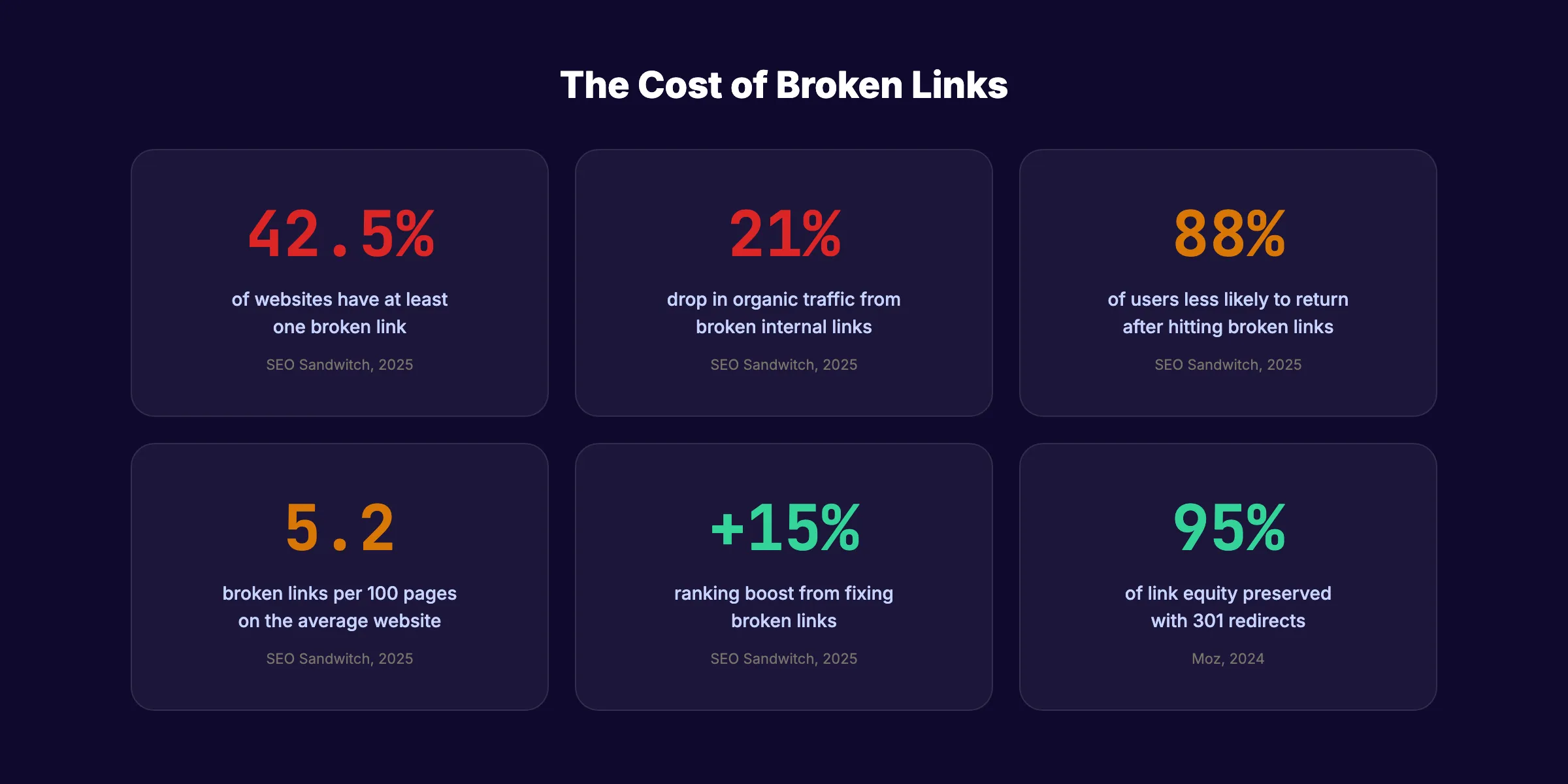
Broken links cost more than you think. 42.5% of websites have at least one broken link. The average site has 5.2 broken links per 100 pages. Each one sends visitors to a dead end and tells Google your site is poorly maintained.
The damage compounds. Sites with broken internal links see a 21% drop in organic traffic. 88% of users say they are less likely to return to a site after hitting a broken link. That is lost revenue from a problem that takes hours, not weeks, to fix.
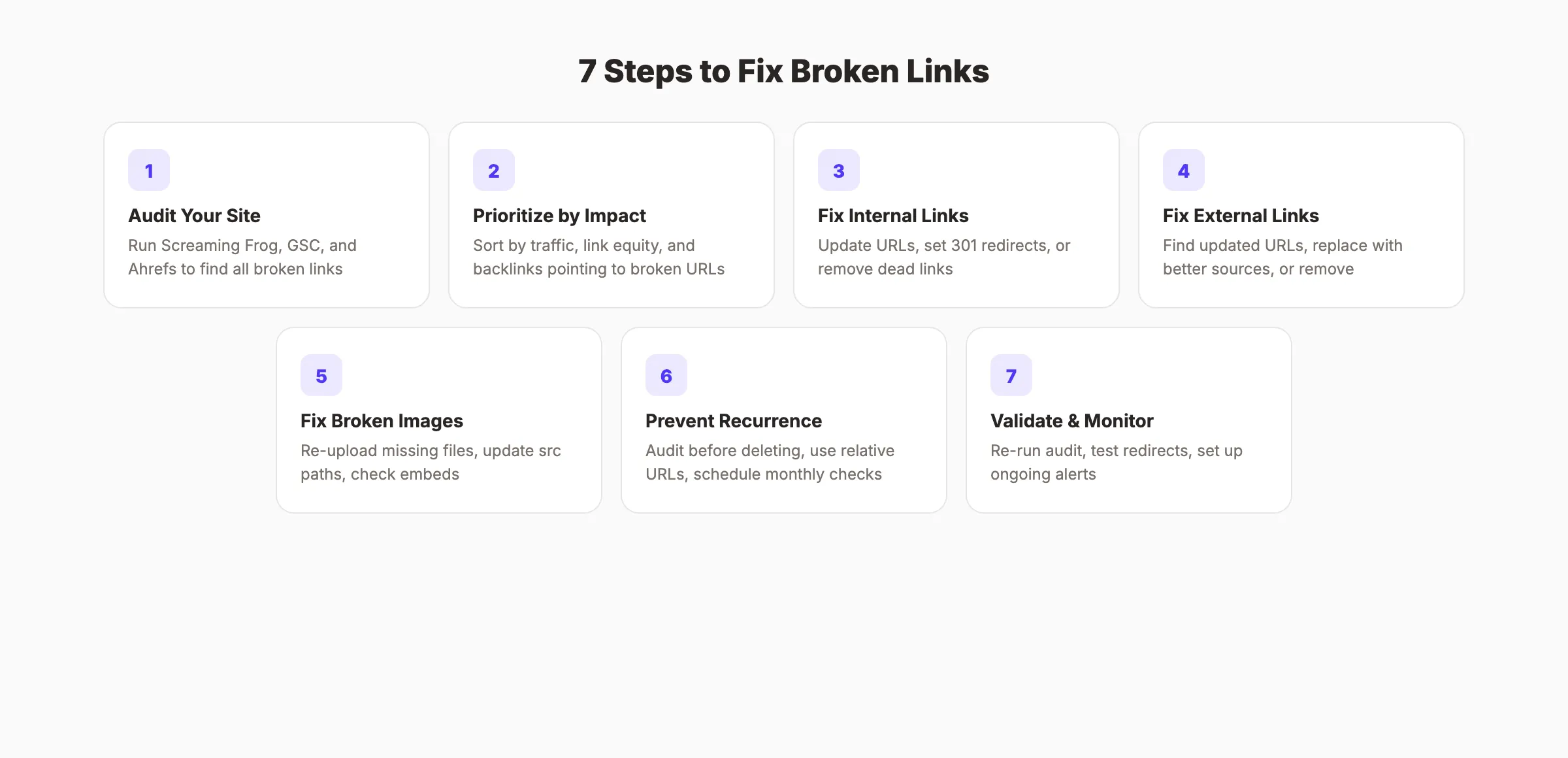
This guide shows you how to fix broken links on your website in 7 steps. You will learn how to find every broken link, prioritize which ones to fix first, set up proper redirects, and prevent new ones from appearing.
We publish 3,500+ blog posts across 70+ industries. Our average SEO score is 92%. Link auditing is part of every content update we handle.
Here is what you will learn:
- How to find every broken internal and external link on your site
- Which broken links to prioritize based on traffic and link equity
- The difference between fixing, redirecting, and removing a broken link
- How to set up 301 redirects that preserve ranking power
- A prevention system so broken links stop recurring
- Free tools that catch broken links before visitors do
What You Will Need
Time required: 1 to 3 hours (depending on site size)
Difficulty: Beginner to Intermediate
What you will need:
- Google Search Console access
- A broken link checker tool (free options listed below)
- Access to your CMS or server files for redirects
- A spreadsheet for tracking fixes
What Are Broken Links and Why They Hurt SEO
A broken link (also called a dead link or 404 link) is any hyperlink that points to a page that no longer exists. When a user or search engine crawler clicks it, they get a 404 error instead of the expected content.
Broken links fall into two categories:
| Type | Description | Example |
|---|---|---|
| Broken internal links | Links within your site pointing to your own deleted or moved pages | A blog post linking to /blog/old-post that was deleted |
| Broken external links | Links on your site pointing to other websites that are now dead | Linking to a study on a domain that expired |
Both types damage your SEO, but in different ways.
Broken internal links waste crawl budget. Google allocates a limited number of pages to crawl per visit. Every broken internal link burns one of those crawls on a dead page. They also block link equity flow. Internal links pass ranking power from one page to another. A broken link is a leak in that pipeline.
Broken external links erode trust. Google expects quality sites to link to reliable sources. A page full of dead outbound links signals neglect. Users who click a broken external link lose confidence in your content.
Fixing broken links can boost rankings by up to 15%. That is one of the highest-ROI technical SEO fixes available.
Step 1: Audit Your Entire Site for Broken Links
Before fixing anything, you need a complete inventory. Run your site through multiple tools because no single tool catches everything.
Specifically:
- Google Search Console: Go to “Pages” under “Indexing” in the left sidebar. Filter by “Not found (404)” to see every page Google tried to crawl but could not find. This shows broken links that Google already knows about.
- Screaming Frog SEO Spider: Download the free version (crawls up to 500 URLs). Run a full site crawl. Filter by “Response Codes” and select “Client Error (4xx).” This reveals every broken internal link and the source page linking to it.
- Ahrefs Broken Link Checker: Use the free broken link checker to scan any URL. It checks both internal and external links.
- Check My Links (Chrome extension): Install this free extension. Visit any page and click the icon. It highlights working links in green and broken links in red. Best for spot-checking individual pages.
Run all four. Export the results into one spreadsheet with these columns: Broken URL, Source Page, Anchor Text, Link Type (internal/external), HTTP Status Code.
Why this step matters: A partial audit leads to partial fixes. You spend the same effort either way. A full audit means you fix everything once instead of discovering more broken links next month.
Pro tip: Run Screaming Frog during low-traffic hours. Crawling your own site at peak time can slow it down for real visitors.
Step 2: Prioritize Broken Links by Impact
Not all broken links are equal. A broken link on your homepage matters more than one buried in a 5-year-old blog post with zero traffic.
Sort your spreadsheet by impact using these criteria:
Priority 1: High-Traffic Source Pages
If the broken link sits on a page that gets significant organic traffic, fix it first. Check traffic in Google Analytics or Search Console. A broken link on a page with 1,000 monthly visits is 100 times more urgent than one on a page with 10 visits.
Priority 2: Internal Links to Key Pages
Broken internal links that were supposed to point to your pillar pages, service pages, or conversion pages need immediate attention. These links were passing ranking power to your most important content. Every day they stay broken, that equity disappears.
Priority 3: Links With Backlinks
Use Ahrefs or Semrush to check if any external sites link to your broken URLs. If a broken page on your site has backlinks pointing to it, those backlinks are wasted. A 301 redirect recovers that link equity. This is free ranking power sitting on the table.
Priority 4: Everything Else
Remaining broken links still matter. But fix Priorities 1 through 3 first. The rest can be handled in a second pass.
Why this step matters: SEO time is limited. Prioritizing by impact means your first hour of fixes delivers the most ranking improvement. Random fixing wastes effort on links nobody ever clicks.
Stop writing. Start ranking. Stacc publishes 30 SEO articles per month for $99. Start for $1 →
Step 3: Fix Broken Internal Links
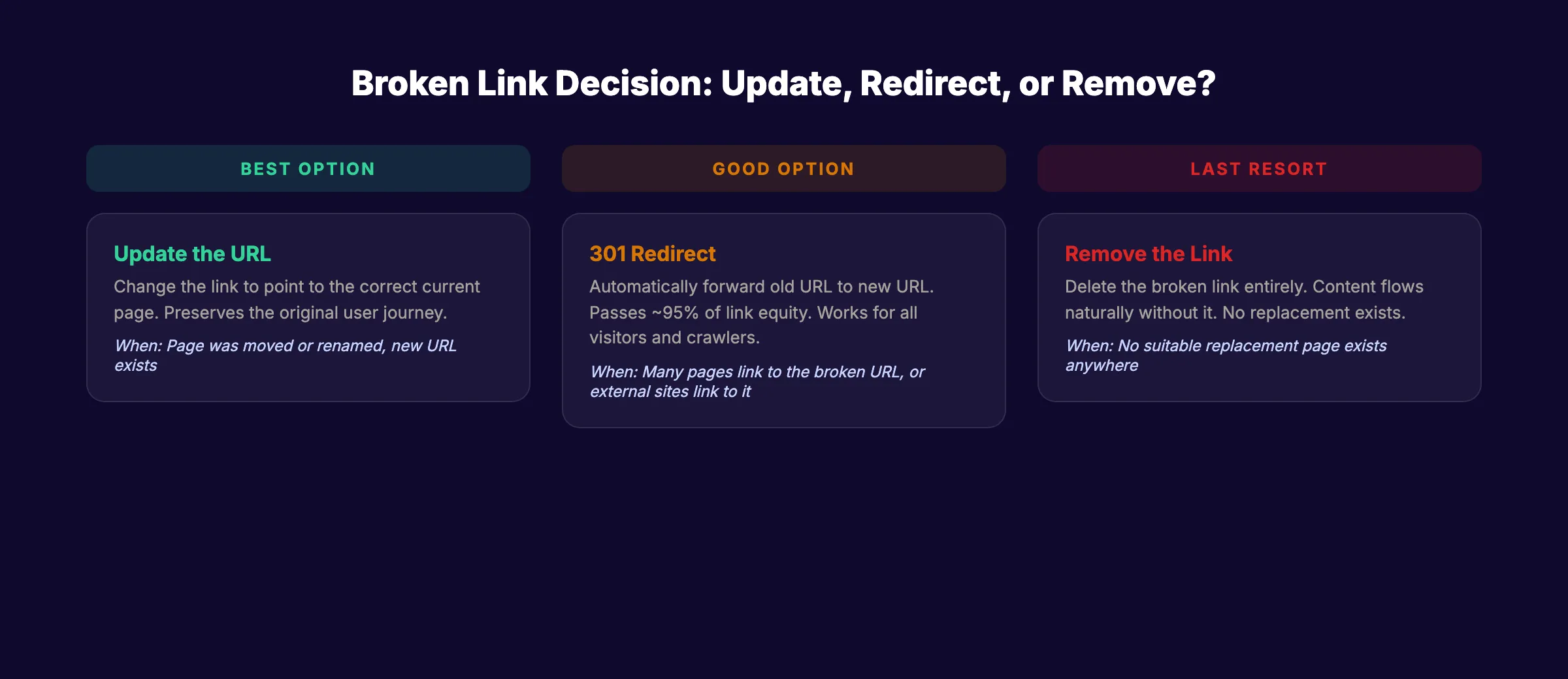
Internal links are fully under your control. You have three options for each broken internal link.
3A. Update the URL
If the target page was moved or renamed (not deleted), update the link to point to the new URL. This is the best fix because it restores the original user journey.
Open the source page in your CMS. Find the broken link. Replace the old URL with the correct current URL.
<!-- Before: points to deleted URL -->
<a href="/blog/old-seo-guide">SEO guide</a>

<!-- After: updated to current URL -->
<a href="/blog/on-page-seo-guide">SEO guide</a>
3B. Set Up a 301 Redirect
If many pages link to the same broken URL, a 301 redirect is more efficient than updating every individual link. The redirect automatically sends visitors and crawlers from the old URL to the new one.
For Apache servers (.htaccess file):
Redirect 301 /blog/old-post /blog/new-postFor Nginx servers:
rewrite ^/blog/old-post$ /blog/new-post permanent;For WordPress: Install the Redirection plugin. Go to Tools > Redirection. Add the old URL as the source and the new URL as the target.
For Cloudflare Pages: Add the rule to your _redirects file:
/blog/old-post /blog/new-post 3013C. Remove the Link
If the linked content no longer exists and there is no suitable replacement, remove the link entirely. Do not leave it pointing to a 404.
For more on structuring your internal links properly, read our guide on internal linking for blog posts.
Why this step matters: Broken internal links are 100% fixable. Every one you repair restores crawl efficiency and link equity flow. There is no reason to leave any broken internal link unfixed.
Step 4: Fix Broken External Links
External links break when other websites delete pages, change URLs, or shut down entirely. You cannot control external sites. But you can control your response.
4A. Find an Updated URL
Sometimes the target page simply moved. Search for the page title on Google. Check the Wayback Machine at web.archive.org for the archived version. If the content exists at a new URL, update your link.
4B. Replace With a Better Source
If the original source is gone permanently, find a comparable replacement. Link to a different study, article, or resource that supports the same point.
For example, if you linked to a blog post with a specific statistic and that post was deleted, search for the same statistic on a more authoritative source. A government report or a major research study makes a stronger replacement.
4C. Remove the Link
If no replacement exists and the link is not essential to the content, remove it. A sentence that works without the link is better than a sentence with a dead one.
4D. Batch External Link Fixes
External links break continuously. Set a monthly cadence for checking them. Tools like Dr. Link Check and Dead Link Checker run free scans that flag external 404s.
Why this step matters: Broken external links tell Google and users that your content is outdated. Fixing them signals that you actively maintain your pages. That maintenance signal feeds into E-E-A-T quality assessments.
Step 5: Fix Broken Images and Resources
Broken links are not just hyperlinks. Images, CSS files, JavaScript files, and embedded videos can also return 404 errors. These are invisible to users but visible to crawlers.
5A. Find Broken Images
Screaming Frog catches broken images during a site crawl. Filter by “Images” and check for 4xx status codes. Chrome DevTools also flags broken images. Open any page, press F12, and look for red errors in the Console tab.
Common causes of broken images:
- File renamed on the server but the
srcattribute was not updated - Image uploaded to a CDN that expired or changed URLs
- Accidental deletion during a CMS cleanup
5B. Fix Broken Images
Upload the missing image back to the correct path. Or update the src attribute to the new file location. Always verify the fix by clearing your browser cache and reloading the page.
For a full guide on image SEO best practices, see our blog image optimization guide.
5C. Check Embedded Resources
Videos from YouTube, Vimeo, or other platforms can break when the original video is deleted or set to private. Social media embeds break when posts are removed. Audit these quarterly.
Why this step matters: Broken images create a poor user experience. A page with missing image placeholders looks abandoned. Search engines cannot index images that return 404 errors, losing you potential traffic from Google Images.
Your SEO team. $99 per month. 30 optimized articles, published automatically. Start for $1 →
Step 6: Prevent Future Broken Links
Fixing existing broken links solves the current problem. Prevention stops the problem from recurring.
6A. Audit Before Deleting or Moving Pages
Before deleting any page, search your site for internal links pointing to it. Update those links or set up a redirect before the deletion happens. This one habit eliminates 80% of broken internal links.
In WordPress, search for the page slug across all posts and pages before deleting. In a static site, use a project-wide search (grep or your IDE’s find-in-files) to locate every reference.
6B. Use Relative URLs for Internal Links
Relative URLs (/blog/post-slug) break less often than absolute URLs (https://yoursite.com/blog/post-slug). Domain changes, SSL migrations, and staging environments all cause absolute URLs to break. Relative URLs survive all of those changes.
6C. Schedule Monthly Link Audits
Set a recurring calendar event. Run Screaming Frog or a free online checker on the first of every month. A monthly audit catches broken links within 30 days instead of letting them accumulate for months.
6D. Monitor External Dependencies
If your content relies heavily on external links, use a monitoring service like Semonto or Dr. Link Check that sends email alerts when external URLs start returning errors. This beats manual checking.
6E. Never Link to Unstable Sources
Avoid linking to personal blogs, small forums, or niche sites that may disappear. Prefer linking to established sources: Google documentation, Ahrefs blog, Semrush studies, Wikipedia, or .gov/.edu domains. These have the lowest link rot rates.
Why this step matters: A one-time fix without prevention is a loop. You will be back doing the same work in 3 months. Prevention turns a recurring problem into a solved one.
If you are also reviewing your broader site health, combine this with a full SEO audit to catch more issues in one pass.
Step 7: Validate Your Fixes and Set Up Monitoring
Fixes are not done until they are verified. A redirect that goes to the wrong page or a link update with a typo creates a new broken link.
7A. Re-Run Your Audit Tool
After completing all fixes, run Screaming Frog or your chosen tool again. Compare the new report to the original. The number of 4xx errors should drop to zero (or close to it for external links).
7B. Validate Redirects
For every 301 redirect you created, test it manually. Open the old URL in your browser. Confirm it lands on the correct new page. Check that it is a 301 (permanent) redirect, not a 302 (temporary). Use a redirect checker tool or check the response headers in DevTools (Network tab > click the request > check “Status Code”).
Avoid redirect chains. If /old-page redirects to /middle-page which redirects to /new-page, collapse it into one redirect: /old-page → /new-page. Chains slow down crawling and dilute link equity. Read more about redirect chains in our glossary.
7C. Request Re-Crawl in Search Console
After fixing broken links, go to Google Search Console. Use the URL Inspection tool to request a re-crawl of your most important fixed pages. Google will re-evaluate them faster than waiting for the next natural crawl.
7D. Set Up Ongoing Monitoring
- Google Search Console: Check the “Pages” report monthly for new 404 errors
- Screaming Frog: Schedule monthly crawls and compare reports
- Uptime monitoring: Tools like UptimeRobot (free for 50 monitors) can alert you when specific URLs go down
Why this step matters: Unverified fixes create false confidence. You assume the problem is solved while visitors still hit dead ends. A 5-minute validation pass confirms your work actually landed.
3,500+ blogs published. 92% average SEO score. See what Stacc can do for your site. Start for $1 →
Results: What to Expect
After completing these 7 steps, here is a realistic timeline:
- Immediately: Users stop hitting 404 errors on fixed pages. Bounce rate drops on those pages.
- Within 1 to 2 weeks: Google re-crawls redirected URLs and updates its index.
- Within 30 to 60 days: Pages that lost ranking power from broken links begin recovering. Internal link equity flows properly again.
- Ongoing: Monthly audits keep broken links near zero. Your crawl budget stays focused on pages that matter.
Sites that fix broken links and maintain them see measurable improvements in organic traffic. The ROI is high because the fix is permanent. Once a redirect is in place or a link is updated, it stays fixed.
Troubleshooting
Problem: Screaming Frog shows thousands of broken links and you do not know where to start. Solution: Export to a spreadsheet. Sort by “Inlinks” (number of pages linking to the broken URL) in descending order. The broken URLs with the most inlinks are your highest priority. Fix the top 20 first.
Problem: A 301 redirect is not working. Solution: Clear your browser cache and retry. If it still fails, check that your redirect rule syntax matches your server type (Apache, Nginx, Cloudflare). Also check for conflicting rules. Two redirects targeting the same source URL can cancel each other out.
Problem: External links keep breaking every month. Solution: Replace unreliable sources with stable ones. Google documentation, Wikipedia, and major industry publications rarely break. For frequently-cited statistics, consider linking to the primary research source rather than a blog post summarizing it.
Free Broken Link Checker Tools
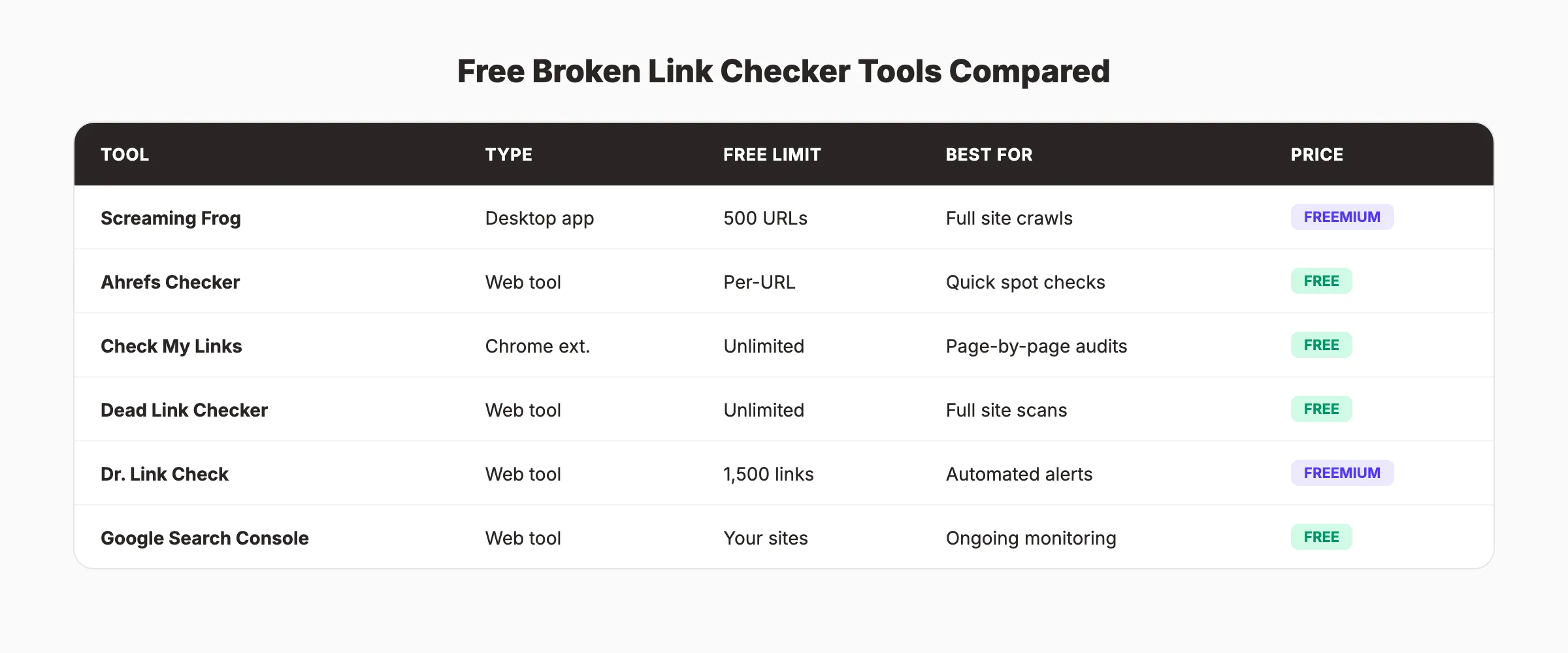
| Tool | Type | Limit | Best For |
|---|---|---|---|
| Screaming Frog | Desktop app | 500 URLs free | Full site internal audits |
| Ahrefs Broken Link Checker | Web tool | Per-URL scan | Quick external link checks |
| Check My Links | Chrome extension | Per-page scan | Spot-checking individual pages |
| Dead Link Checker | Web tool | Unlimited pages | Full site scans without software |
| Dr. Link Check | Web tool | 1,500 links free | Automated monitoring with alerts |
| Google Search Console | Web tool | Your verified sites | Ongoing 404 monitoring |
FAQ
How do broken links affect SEO?
Broken links waste crawl budget, block link equity transfer, and signal poor site maintenance to Google. Sites with broken internal links see up to a 21% drop in organic traffic. Fixing them can boost rankings by up to 15%.
How often should I check for broken links?
Monthly for most sites. Weekly if you publish content frequently or manage a large site with hundreds of pages. Set up automated monitoring to catch critical breaks between manual audits.
What is the difference between a 301 and 302 redirect?
A 301 redirect is permanent. It passes approximately 95% of link equity to the new URL. A 302 is temporary. Search engines do not transfer full ranking power through 302 redirects. Always use 301 for broken link fixes unless the move is genuinely temporary.
Should I fix broken external links or just remove them?
Fix them first. Find an updated URL or a replacement source that supports the same claim. Only remove the link if no suitable replacement exists. Pages with quality outbound links to authoritative sources perform better than pages with no external links at all.
Can broken links cause Google to de-index my site?
A few broken links will not trigger de-indexing. But hundreds of 404 errors waste your crawl budget and prevent Google from discovering your actual content. In extreme cases, Google may reduce your crawl rate. Regular audits prevent this from ever becoming an issue. For a full site health check, run our free SEO audit tool.
Broken links are one of the fastest technical SEO wins. The tools are free. The fixes are permanent. And the ranking impact is measurable within weeks. Start with Step 1, audit your site, and fix the highest-impact links first. Every link you repair puts traffic back on the right path.
Rank everywhere. Do nothing. Blog SEO, Local SEO, and Social on autopilot. Start for $1 →

Written by
Siddharth GangalSiddharth is the founder of theStacc and Arka360, and a graduate of IIT Mandi. He spent years watching great businesses lose organic traffic to competitors who simply published more. So he built a system to fix that. He writes about SEO, content at scale, and the tactics that actually move rankings.
30 SEO blog articles published every month
Keyword-optimized, scheduled, and live on your site. Automatically.
30-day trial · Cancel anytime
theStacc
Stop writing SEO content manually
30 blog articles, 30 GBP posts, and social media content. Published every month. Automatically.
Start Your $1 Trial$1 for 3 days · Cancel anytime