
How to Write a Pillar Page That Ranks (7 Steps)
Learn how to write a pillar page in 7 steps. Build topical authority, organize content clusters, and rank for hundreds of keywords. Updated March 2026.
Sites with topic clusters built around pillar pages drive 30 to 43% more organic traffic than sites with unconnected content. A single pillar page can rank for hundreds of keywords simultaneously. Shopify’s dropshipping pillar page ranks for over 1,600 keywords and earns 58,000 organic visits per month.
Most businesses publish isolated blog posts on random topics. Each post competes alone. None of them build on the others. The result is a site that Google sees as scattered rather than authoritative.
A pillar page fixes this. It is a long-form, authoritative page that covers a broad topic and links to a cluster of supporting posts. Those supporting posts link back. The entire structure tells Google: “This site knows this topic deeply.”
This guide shows you how to write a pillar page in 7 steps. We have published 3,500+ articles across 70+ industries using this cluster-and-pillar model. Every step includes specific actions you can apply to your next pillar page.
Here is what you will learn:
- How to choose the right pillar topic for your business
- How to map a content cluster before writing a single word
- How to structure and write the pillar page itself
- How to connect cluster pages with strategic internal links
- How to optimize and maintain the pillar over time
What Is a Pillar Page (And Why Does It Matter)?
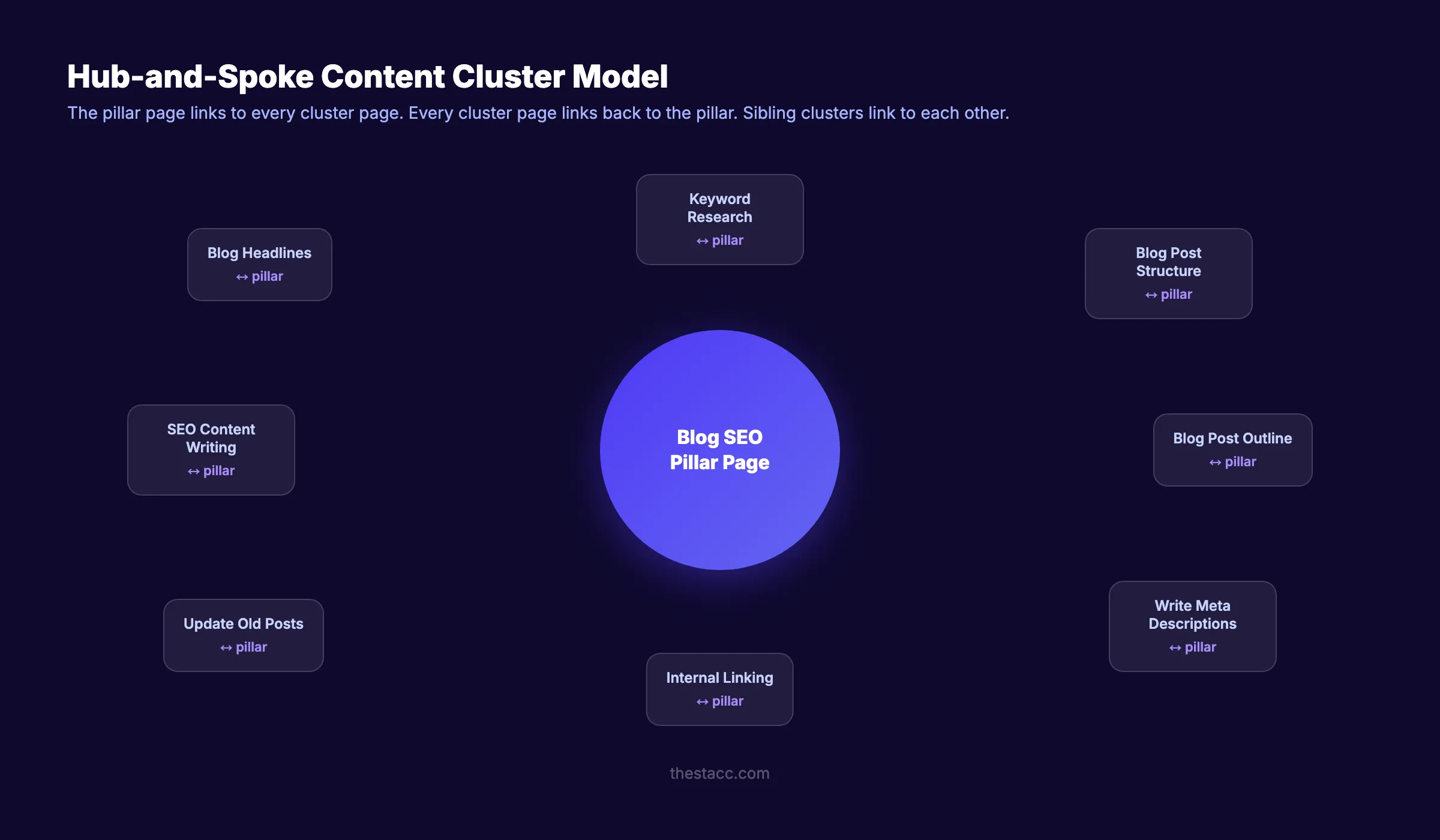
A pillar page is a long-form page that covers a broad topic from every angle. It serves as the central hub of a content cluster. The pillar covers the topic broadly. Cluster pages cover subtopics in depth. Internal links connect them all.
Example: A pillar page titled “Blog SEO: The Complete Guide” might link to 15 cluster pages covering keyword research, meta descriptions, internal linking, blog structure, headlines, and content updates. Each cluster page links back to the pillar.
Why Pillar Pages Work for SEO
Google evaluates topical authority. Sites that cover a topic in depth across multiple connected pages rank higher than sites with one isolated post on the same topic.
Pillar pages work because they:
- Build topical authority. Multiple interconnected pages on one topic signal expertise to Google.
- Improve internal linking. The hub-and-spoke link structure distributes page authority across the cluster.
- Rank for more keywords. A single pillar page can target a broad head keyword while cluster pages target long-tail variations.
- Earn more backlinks. Other sites link to pillar pages as definitive resources on a topic. Content over 3,000 words generates 3 times more backlinks than shorter content.
- Perform well in AI search. Clustered content receives 3.2 times more AI citations than standalone posts.
Step 1: Choose Your Pillar Topic
The pillar topic is the broadest version of a subject your business serves. It should be wide enough to generate 10 to 20 subtopics but focused enough to stay relevant to your audience.
Specifically:
- Write down 3 to 5 core services or product categories your business offers.
- For each, ask: “Could I write 10+ blog posts about different aspects of this topic?”
- If yes, it qualifies as a pillar topic.
- If no, it is too narrow. Move up one level of abstraction.
Good pillar topics vs. too narrow:
| Too Narrow (Cluster Topic) | Good Pillar Topic |
|---|---|
| How to write meta descriptions | On-Page SEO |
| Google Business Profile hours | Local SEO |
| Alt text for images | Blog SEO |
| Internal linking for blog posts | Content Strategy |
Why this step matters: Choosing a topic that is too narrow limits the number of cluster pages you can create. Choosing one that is too broad makes the pillar page unfocused and harder to rank. The sweet spot is a topic that represents a core area of your expertise with 10 to 20 natural subtopics.
Pro tip: Check what your competitors rank for. If a competitor has a pillar page on “Content Marketing” with 15 cluster pages, and you have zero pages on that topic, that is a gap worth filling. Use our guide on finding content gaps for the full process.
Step 2: Map Your Content Cluster
Before writing the pillar page, map out the entire cluster. This prevents overlap, ensures complete topic coverage, and creates a clear internal linking plan.
Specifically:
- Brainstorm every subtopic related to your pillar topic.
- Group subtopics that overlap. Merge any that would compete for the same keyword.
- Assign one primary keyword to each cluster page.
- Verify that each keyword has its own unique search intent.
Example cluster map for “Blog SEO”:
| Cluster Page | Primary Keyword | Format |
|---|---|---|
| Keyword Research for Blog Posts | keyword research for blog posts | Step-by-step guide |
| Blog Post Structure for SEO | blog post structure seo | Guide |
| How to Write Blog Headlines | blog headlines that get clicks | Guide |
| Internal Linking for Blog Posts | internal linking blog posts | Guide |
| How to Write Meta Descriptions | write meta descriptions | Tutorial |
| Update Old Blog Posts | update old blog posts | How-to |
| Blog Post Outline Guide | blog post outline guide | Template |
| How to Write SEO Blog Posts | how to write seo blog posts | Guide |
Each cluster page covers one subtopic in depth. The pillar page covers all subtopics at a high level and links to each cluster page for deeper reading.
Why this step matters: Skipping the cluster map leads to overlapping content, keyword cannibalization, and a broken internal linking structure. The map is your blueprint. Everything that follows depends on it.
Read our guide on building topical authority for the full cluster planning strategy.
Stop publishing random blog posts. Stacc plans content clusters, writes 30 optimized articles per month, and handles all internal linking automatically. Start for $1 →
Step 3: Research Keywords for the Pillar and Cluster
The pillar page targets a broad “head” keyword. Cluster pages target specific long-tail keywords. Together, the cluster can rank for hundreds of keyword variations.
Specifically:
For the pillar page:
- Target a broad keyword with high search volume (1,000 to 50,000+ monthly searches).
- Accept that the keyword difficulty will be higher. The cluster structure helps you compete.
- Example: “blog SEO” (broad, high volume, high competition).
For each cluster page:
- Target a specific long-tail keyword (100 to 5,000 monthly searches).
- Look for lower keyword difficulty (under 40 for newer sites).
- Example: “keyword research for blog posts” (specific, moderate volume, lower competition).
Keyword research steps:
- Enter your pillar topic into Ahrefs, Semrush, or Google Keyword Planner.
- Export all related keywords.
- Sort by search volume and difficulty.
- Assign the broadest keyword to the pillar page.
- Assign specific keywords to each cluster page from your map.
- Verify there is no keyword overlap between cluster pages.
Read our full guide on keyword research for blog posts for the detailed 7-step process.
Why this step matters: Without keyword research, you guess what people search for. With keyword research, you know. The cluster model multiplies the impact because each cluster page that ranks sends authority back to the pillar through internal links.
Step 4: Write the Pillar Page Content
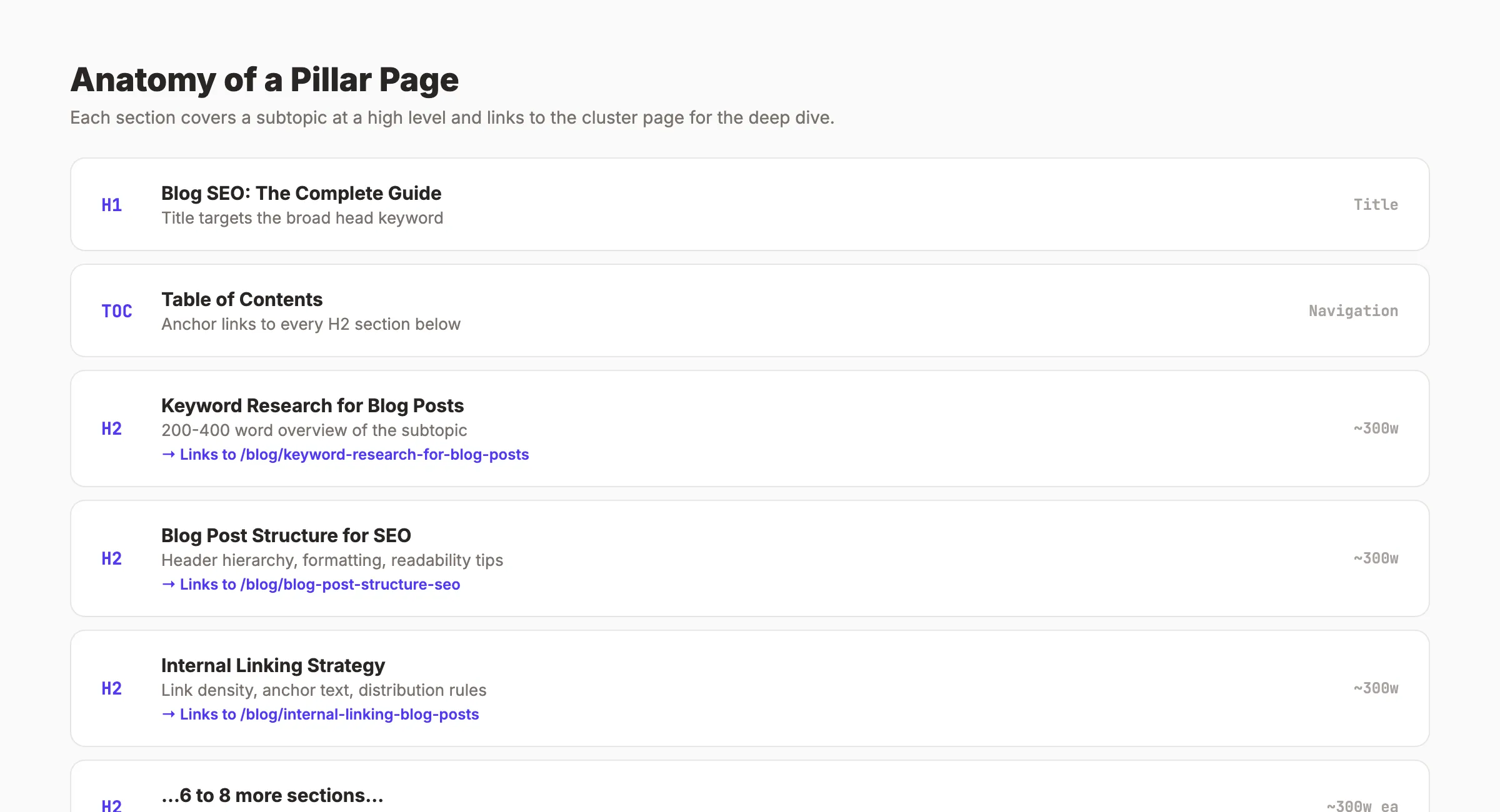
The pillar page is not a blog post. It is a resource page. It covers every aspect of the topic at a high level and links to cluster pages for depth.
Specifically:
Structure
- Length: 3,000 to 5,000 words. Long enough to cover every subtopic. Short enough to stay readable.
- Format: Chapter-based. Each H2 corresponds to a subtopic from your cluster map.
- Table of contents: Required. Place at the top with anchor links to each section.
- Internal links: Link to every cluster page from the relevant section.
Writing the Content
For each section of the pillar page:
- Write 200 to 400 words covering the subtopic at a high level.
- Include the key insight, framework, or takeaway.
- Link to the cluster page for the full deep-dive. Example: “Read our full guide on internal linking for blog posts.”
- Add a table, list, or image to break up the text.
Example section from a “Blog SEO” pillar page:
Internal Linking Strategy
Internal links connect pages across your site. For blog SEO, they serve 3 purposes: distributing page authority, helping Google discover new pages, and keeping readers on your site longer.
The recommended density is 3 to 5 internal links per 1,000 words. Use descriptive anchor text that tells the reader what they will find on the linked page.
Read our full guide on internal linking for blog posts for the step-by-step process.
What NOT to Include
- Do not go deep on any single subtopic. That is what cluster pages are for.
- Do not gate the content behind a form. A pillar page must be crawlable and indexable.
- Do not target long-tail keywords. The pillar targets the broad head keyword only.
Follow the same SEO content writing principles for the pillar page as you would for any blog post: keyword in the first 100 words, clear header hierarchy, active voice, and short paragraphs.
Why this step matters: The pillar page is the anchor of the entire cluster. If it is thin, unfocused, or poorly structured, the cluster pages have no strong center to link back to. Invest the time to make the pillar your best page on the topic.
Step 5: Create and Publish Cluster Pages
Some SEO strategists recommend writing cluster pages before the pillar. Others recommend the opposite. Either approach works. What matters is that both exist and are linked before you consider the cluster complete.
Specifically:
- Write 1 cluster page per subtopic from your map (step 2).
- Each cluster page should be 1,500 to 3,500 words.
- Each cluster page targets its own unique keyword.
- Each cluster page links back to the pillar page at least once.
- Each cluster page links to 1 to 2 other cluster pages in the same cluster (sibling links).
Publishing cadence options:
| Approach | Timeline | Best For |
|---|---|---|
| Publish all at once | 1 to 2 weeks | Sites with a content team or using a service like Stacc |
| Publish 2 per week | 4 to 6 weeks | Solo content creators |
| Publish 1 per week | 8 to 12 weeks | Small teams with limited bandwidth |
The faster you complete the cluster, the faster Google recognizes the topical authority. Sites that publish a full cluster within 30 days see ranking improvements 2 to 3 times faster than sites that take 6 months.
Read our guide on creating a content calendar for SEO for help planning your publishing schedule.
Why this step matters: A pillar page without cluster pages is just a long blog post. The cluster pages are what build the topical authority signal that makes the pillar rank.
Your SEO team. $99 per month. Stacc publishes 30 articles per month with pillar-cluster architecture, internal linking, and keyword targeting built in. Start for $1 →
Step 6: Build the Internal Linking Structure
Internal links are the connective tissue of a content cluster. Without proper linking, the cluster does not function. Google cannot see the relationship between pages.
Specifically:
Pillar → Cluster Links
The pillar page must link to every cluster page. Each link should:
- Appear in the relevant section of the pillar
- Use descriptive anchor text (not “click here” or “read more”)
- Point to the full URL path (e.g.,
/blog/internal-linking-blog-posts)
Cluster → Pillar Links
Every cluster page must link back to the pillar page at least once. Best practice is to include the link:
- In the opening paragraph (natural reference to the broader topic)
- Or within the body where the pillar topic is mentioned
Cluster → Cluster Links (Sibling Links)
Cluster pages should link to 1 to 2 other cluster pages in the same cluster. This strengthens the topical web and keeps readers moving through related content.
Linking checklist:
- Pillar links to every cluster page (verify each link works)
- Every cluster page links back to the pillar
- Each cluster page links to at least 1 sibling cluster page
- Anchor text is descriptive and includes the target keyword naturally
- No broken links or 404 errors
Read our full guide on internal linking for blog posts for anchor text strategies and link placement best practices.
Why this step matters: A topic cluster without internal links is just a collection of unrelated pages. The links are what make the cluster a cluster. Google uses internal links to discover pages, understand relationships, and distribute authority.
Pro tip: After publishing new cluster pages, go back and update the pillar page to include links to them. Also update existing cluster pages to link to the new content. This bi-directional update is the step most teams skip, and it is the most important.
Step 7: Optimize, Monitor, and Update
Publishing the pillar page and cluster pages is the start, not the finish. The highest-performing pillar pages improve over time.
Specifically:
Monitor Performance
Check these metrics in Google Search Console every 30 days:
- Rankings: Which keywords is the pillar ranking for? Are they improving?
- Impressions and clicks: Is the pillar getting visibility in search results?
- CTR: Is the title tag and meta description earning clicks?
- Cluster page performance: Are individual cluster pages ranking for their target keywords?
Expand the Cluster
As you publish new content on related subtopics, add them to the cluster:
- Write the new cluster page.
- Add a link from the pillar page to the new cluster page.
- Add a link from the new cluster page back to the pillar.
- Add sibling links from existing cluster pages to the new one.
A cluster that started with 8 pages can grow to 20+ over time. Each new page strengthens the entire cluster.
Refresh the Pillar
Update the pillar page every 90 days:
- Add new statistics and data
- Remove outdated information
- Expand sections that competitors now cover in more depth
- Add links to recently published cluster pages
- Refresh the title tag and meta description
Read our guide on updating old blog posts for the full refresh process.
Why this step matters: Content decays. Competitors publish. Search algorithms update. A pillar page that was number 1 in January can drop to page 2 by June without regular updates. The refresh cycle keeps the cluster competitive.
3,500+ blogs published. 92% average SEO score. Stacc builds content clusters with pillar pages, internal linking, and monthly updates. You get the rankings. Start for $1 →
Results: What to Expect
After completing these 7 steps, you will have:
- A pillar page targeting a broad, high-volume keyword
- 8 to 15 cluster pages targeting specific long-tail keywords
- A connected internal linking structure between all pages
- A topical authority signal that strengthens every page in the cluster
Realistic timelines:
- First ranking improvements for cluster pages (low KD): 30 to 60 days
- Pillar page ranking for head keyword: 3 to 6 months
- Topical authority effects (cluster compounding): 6 to 12 months
- Full cluster maturity (20+ pages, consistent updates): 12 to 18 months
The compounding effect is measurable. Your 10th cluster page ranks faster than your 1st. Your 15th ranks faster than your 10th. Google increasingly trusts sites that demonstrate depth and consistency on a topic.
3 Types of Pillar Pages
Not every pillar page follows the same format. Choose the type that matches your topic and audience.
| Type | Best For | Example |
|---|---|---|
| The Guide Pillar | Broad educational topics | ”Blog SEO: The Complete Guide” |
| The What-Is Pillar | Definitional topics with many sub-concepts | ”What Is Content Marketing?” |
| The How-To Pillar | Process-driven topics | ”How to Rank Higher on Google” |
The Guide Pillar is the most common. It covers 7 to 10 chapters on different aspects of a topic. Best for head keywords like “[topic] guide” or “[topic] complete guide.”
The What-Is Pillar works well for topics where readers need a foundational understanding before going deeper. Best for keywords like “what is [topic]” or “[topic] explained.”
The How-To Pillar organizes content around steps or stages. Best for keywords like “how to [outcome]” or “[topic] step by step.”
Common Pillar Page Mistakes to Avoid
Gating the content behind a form. If your pillar page requires an email to access, Google cannot index it. A pillar page must be open, crawlable, and fully visible to search engines.
Choosing a topic that is too broad. “Marketing” is not a pillar topic. “Content Marketing for B2B SaaS Companies” is. The topic should be specific enough to write authoritatively about but broad enough for 10+ cluster pages.
Skipping the cluster pages. A pillar page without cluster pages is just a long blog post. It will not build topical authority. The cluster is what makes the model work.
One-directional linking. Every link must be bi-directional. Pillar links to cluster. Cluster links back to pillar. Cluster links to sibling clusters. Skipping any direction weakens the structure.
Never updating. Pillar pages need quarterly updates. New data, new cluster pages, refreshed statistics. A stale pillar page loses rankings to fresher competitors.
FAQ
How long should a pillar page be?
3,000 to 5,000 words for most topics. The pillar should cover every subtopic at a high level without going deep on any single one. The depth lives in the cluster pages. Content over 3,000 words generates 3 times more backlinks than shorter content, so aim for that minimum.
How many cluster pages does a pillar need?
8 to 15 is a strong starting point. Fewer than 5 does not build enough topical authority. More than 25 can be maintained, but only if you have the resources to keep them updated. Start with 8 to 10 and expand over time.
Should I write the pillar page first or the cluster pages first?
Either works. Some teams write the pillar first as a roadmap, then fill in cluster pages. Others write cluster pages first, then summarize them in the pillar. The important thing is that both exist and are linked before you expect ranking results.
How is a pillar page different from a normal blog post?
A blog post covers one specific topic in depth. A pillar page covers a broad topic at a high level and links to multiple blog posts for detail. The pillar is the hub. Blog posts are the spokes. Together they form a content cluster.
Can a pillar page rank without cluster pages?
It can, but it will rank for fewer keywords and build less topical authority. The cluster pages are what signal to Google that your site has depth on the topic. Without them, the pillar competes as a standalone page against sites with full clusters.
Does Stacc build pillar page clusters automatically?
Yes. Stacc plans content clusters with pillar pages, writes and publishes 30 articles per month, and handles internal linking between pillar and cluster pages. The keyword research, cluster mapping, and link structure are all built into the service.
A pillar page is the highest-ROI content asset you can build. One pillar with 10 cluster pages can rank for hundreds of keywords and generate thousands of monthly visits. Start with step 1 today. Choose your first pillar topic. Map the cluster. Write the pillar. Then fill in the spokes.

Written by
Siddharth GangalSiddharth is the founder of theStacc and Arka360, and a graduate of IIT Mandi. He spent years watching great businesses lose organic traffic to competitors who simply published more. So he built a system to fix that. He writes about SEO, content at scale, and the tactics that actually move rankings.
30 SEO blog articles published every month
Keyword-optimized, scheduled, and live on your site. Automatically.
30-day trial · Cancel anytime
theStacc
Stop writing SEO content manually
30 blog articles, 30 GBP posts, and social media content. Published every month. Automatically.
Start Your $1 Trial$1 for 3 days · Cancel anytime