
Pagination SEO: The Complete Guide (2026)
Everything you need to know about pagination SEO in one 8-chapter guide. Covers canonicals, crawl budget, infinite scroll, and JavaScript rendering. Updated 2026.
Siddharth Gangal • 2026-03-29 • SEO Tips

In This Article
Paginated pages eat your crawl budget, dilute your link equity, and confuse search engines. Most site owners do not realize it until rankings drop.
A GSQI case study found that 67% of one site’s indexed URLs were pagination pages. Those pages drove only 0.3% of total clicks. That is a massive amount of index space producing almost zero traffic.
Pagination SEO is the practice of structuring multi-page content so search engines crawl, index, and rank it correctly. Get it wrong, and Google wastes time on page 47 of your blog archive instead of your money pages.
We have published 3,500+ blog posts across 70+ industries. Pagination issues show up in nearly every technical SEO audit we run. This guide covers everything we have learned.
Here is what you will learn:
- How Google actually crawls and indexes paginated content
- Why rel=next/prev no longer matters (and what replaced it)
- The exact canonical, URL, and sitemap setup for paginated pages
- When to use pagination vs infinite scroll vs load more
- How to audit and fix pagination problems on any site
- JavaScript pagination pitfalls that block Googlebot
- The 8 most common pagination mistakes and their fixes
Chapter 1: What Pagination Is and Why It Matters for SEO
Pagination splits a large set of content across multiple pages. Think product category pages, blog archives, forum threads, and search results. Each page shows a portion of the full list.
Why Sites Use Pagination
Large datasets cannot load on a single page. An ecommerce store with 2,000 products in one category needs a way to break that list into manageable chunks. A blog with 500 posts needs an archive that loads in seconds, not minutes.
Pagination solves this by creating sequential pages: page 1, page 2, page 3, and so on. Each page typically shows 10 to 50 items.
Why SEO Teams Care About Pagination
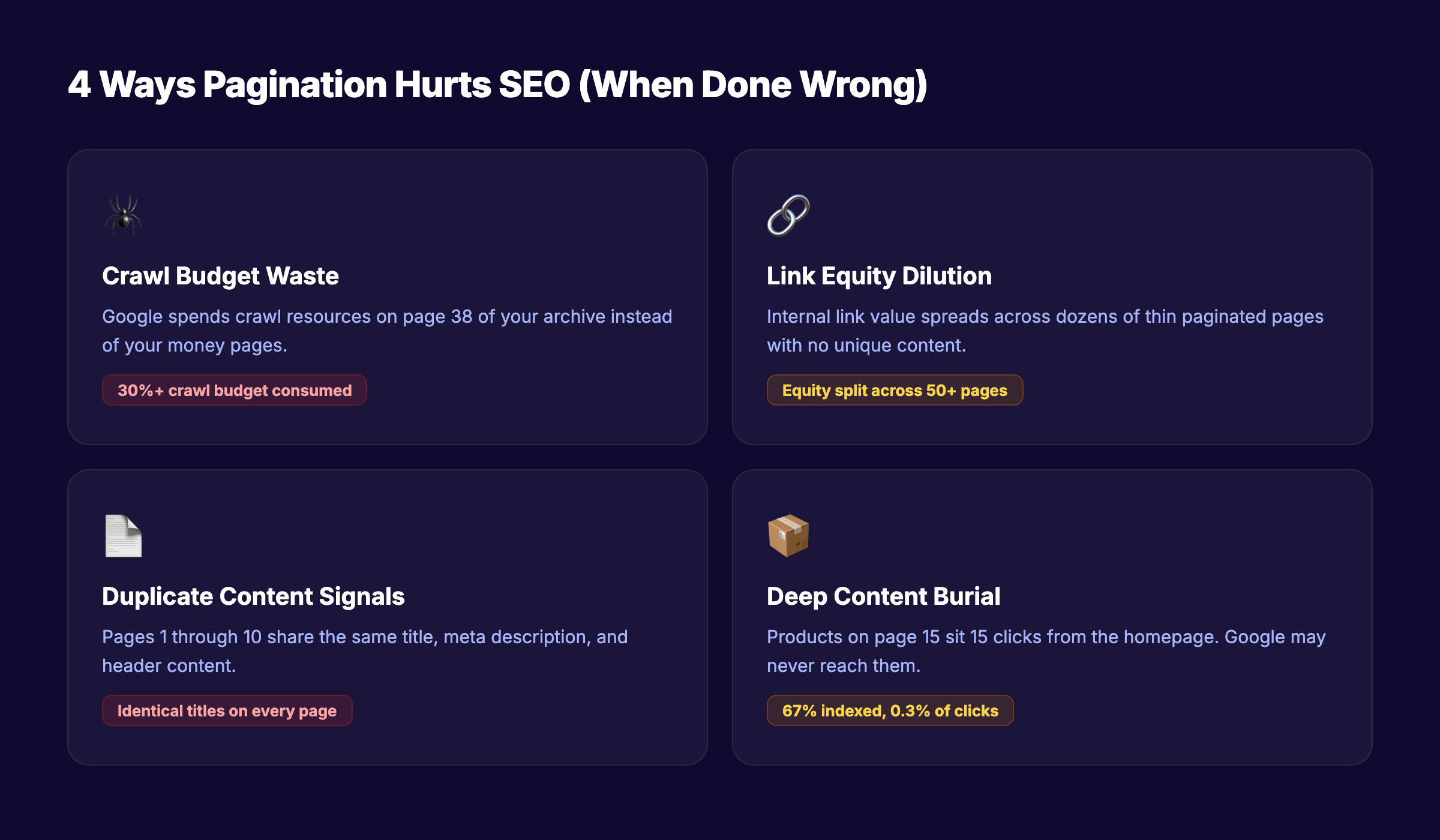
Every paginated URL is a page Google must discover, crawl, render, and decide whether to index. That creates 4 problems:
| Problem | What Happens |
|---|---|
| Crawl budget waste | Google spends time on page 38 instead of your homepage |
| Link equity dilution | Internal links spread across dozens of thin pages |
| Duplicate content signals | Page 1 and page 2 share the same title and meta description |
| Deep content burial | Products on page 15 sit 15 clicks from the homepage |
For small sites with under 1,000 pages, pagination rarely causes visible SEO damage. Google has stated that crawl budget only matters for sites with thousands of rapidly changing URLs.
For ecommerce sites, job boards, real estate listings, and large publishers, pagination SEO is a top priority.
Where Pagination Shows Up
Pagination affects more page types than most teams realize:
- Product category pages — the most common use case
- Blog archives and tag pages —
/blog/page/2,/tag/seo/page/3 - Search results pages — internal site search with paginated results
- Forum threads — multi-page discussions
- Comment sections — WordPress paginates comments by default
- API-driven listings — job boards, directories, marketplace listings
Each type has slightly different SEO implications. But the core principles apply to all of them.
Chapter 2: How Google Crawls and Indexes Paginated Pages
Understanding how Googlebot handles paginated URLs removes most of the confusion around best practices.
Googlebot Follows Links Sequentially
Googlebot discovers paginated pages by following <a href> links. If page 1 links to page 2, and page 2 links to page 3, Google crawls the chain one link at a time.
This means Google might need 15 separate crawl sessions to reach page 15. Items listed only on deep pages get discovered slowly — or not at all.
Each Paginated Page Is a Separate URL
Google treats example.com/shoes?page=1 and example.com/shoes?page=2 as distinct URLs. Each one gets its own crawl, render, and index decision.
This is why canonical tags matter so much for pagination. Without proper canonicalization, Google might index dozens of near-identical pages.
Google Does Not Consolidate Paginated Pages
Before 2019, Google used rel=next and rel=prev to understand that pages belonged to a series. Google would sometimes consolidate ranking signals across the series.
That system no longer exists. Each paginated page now stands on its own for ranking purposes.
Rendering Matters
Googlebot uses a two-phase process. First, it downloads the HTML. Then, it renders JavaScript. If your pagination links exist only in client-side JavaScript, Google must complete the render phase before discovering those links.
This creates a delay. JavaScript SEO issues compound when combined with deep pagination. Server-rendered <a href> tags give Google immediate access to the next page.
Your SEO team. $99 per month. Stacc publishes 30 optimized articles every month — without you lifting a finger. Start for $1 →
Chapter 3: The rel=next/prev Story — What Changed and What to Do Now
This is the most misunderstood topic in pagination SEO. Here is the full timeline.
The Original System (2011-2019)
In 2011, Google introduced rel=next and rel=prev as a way to signal paginated series. You would add these tags to the <head> of each page:
<!-- Page 2 of a series -->
<link rel="prev" href="https://example.com/shoes?page=1" />
<link rel="next" href="https://example.com/shoes?page=3" />
Google used these hints to understand the relationship between pages. In some cases, Google consolidated indexing signals across the series.
The Deprecation (2019)
In March 2019, Google’s John Mueller confirmed on Twitter that Google had not used rel=next/prev as an indexing signal for years. The official documentation was updated to remove references to these tags.
This caught the SEO community off guard. Many sites had spent years implementing these tags. The revelation that Google had quietly stopped using them years earlier was a significant moment.
What to Do Now
Keep the tags if they already exist. They do not hurt anything, and Bing still uses them. Removing working markup adds risk for zero benefit.
Do not add them to new sites. Google ignores them. Spend that implementation time on proper canonicals and URL structure instead.
Focus on what Google actually uses:
| Signal | How Google Uses It |
|---|---|
<a href> links | Discovers paginated pages through link following |
| Self-referencing canonicals | Understands each page is its own canonical version |
| XML sitemap inclusion | Finds paginated pages without crawling the chain |
| URL parameters | Identifies pagination patterns via query strings |
The Bing Factor
Bing still processes rel=next/prev tags. If your site gets meaningful traffic from Bing (check your Google Search Console and Bing Webmaster Tools data), keeping these tags provides a small benefit at minimal cost.
Chapter 4: Pagination SEO Best Practices — The Core Playbook
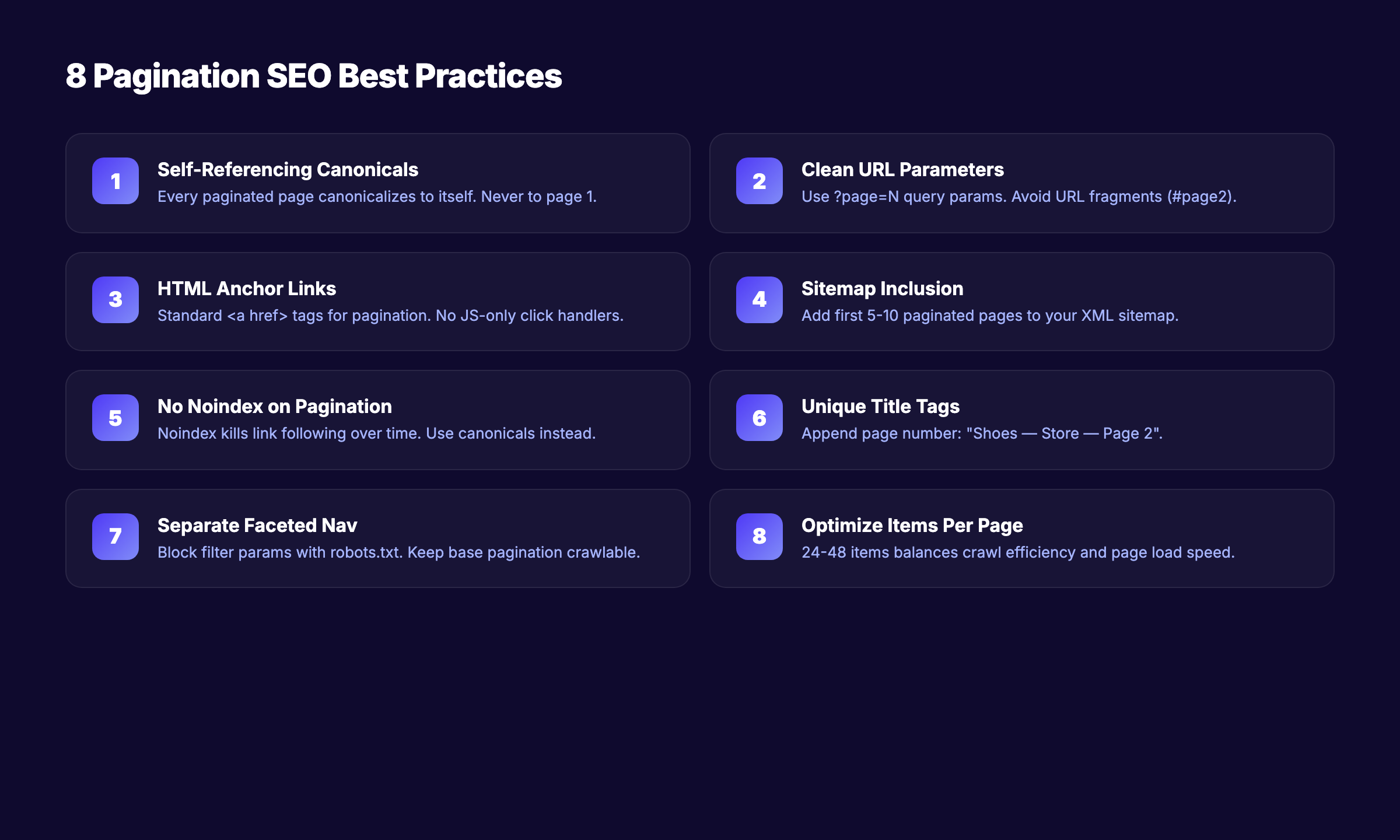
These 8 practices form the foundation of correct pagination implementation. Follow every one.
1. Use Self-Referencing Canonical Tags
Every paginated page should have a canonical tag that points to itself. Not to page 1. Not to a “view all” page. To itself.
<!-- On /shoes?page=3 -->
<link rel="canonical" href="https://example.com/shoes?page=3" />
Google’s official documentation explicitly recommends this approach. Pointing all paginated pages to page 1 tells Google that pages 2+ are duplicates. Google then ignores the links and content on those “duplicate” pages.
2. Use Clean, Consistent URL Parameters
Use a query parameter like ?page=2 for pagination. Avoid URL fragment identifiers (#page2) because Googlebot does not process fragments.
Good URL structures:
example.com/shoes?page=2example.com/shoes/page/2example.com/shoes?p=2
Bad URL structures:
example.com/shoes#page2(fragments are invisible to Google)example.com/shoes?page=2&sort=price&color=red(mixed pagination and filters)example.com/shoes?page=2&page=3(duplicate parameters)
Keep pagination parameters separate from faceted navigation parameters. Filter + pagination combinations multiply your URL count exponentially.
3. Link Pages Sequentially With HTML Anchor Tags
Use standard <a href> elements for pagination links. Not JavaScript click handlers. Not AJAX calls. Real, crawlable HTML links.
<a href="/shoes?page=1">1</a>
<a href="/shoes?page=2">2</a>
<a href="/shoes?page=3">3</a>
Also link to the first and last page from every paginated page. This helps Google discover both ends of the series and reduces crawl depth.
4. Include Paginated Pages in Your XML Sitemap
Add important paginated pages to your XML sitemap. This gives Google a direct path to deep pages without crawling through the entire chain.
You do not need to include every single paginated URL. Focus on the first 5 to 10 pages of each series. Products or content on pages beyond that should ideally be reachable through other navigation paths.
5. Do Not Noindex Paginated Pages
This is the most common pagination mistake. Site owners noindex pages 2+ to prevent “duplicate content.”
The problem: noindex tells Google not to index the page, but Google still follows links on noindexed pages — at first. Over time, Google reduces crawling of noindexed pages. Eventually, the links on those pages stop getting followed entirely.
The result: every product or article listed only on noindexed pagination pages becomes an orphan page. Google never discovers it.
6. Write Unique Title Tags and Meta Descriptions
Paginated pages often share the same title: “Shoes — My Store” on every page. This creates duplicate content signals.
Append the page number:
Shoes — My Store — Page 2
Shoes — My Store — Page 3
Google’s documentation notes that identical titles on paginated pages are acceptable. But unique titles help Google differentiate pages in its index and improve click-through rates from search results.
7. Control Faceted Navigation Separately
Faceted navigation (filters for size, color, price, brand) combined with pagination creates an explosion of URLs. A category with 10 pages, 5 colors, 4 sizes, and 3 price ranges generates 600 unique URLs.
Use robots.txt or the noindex tag on filtered variations — not on the base pagination. Block the parameters that create filter combinations while keeping clean paginated URLs crawlable.
8. Optimize Items Per Page
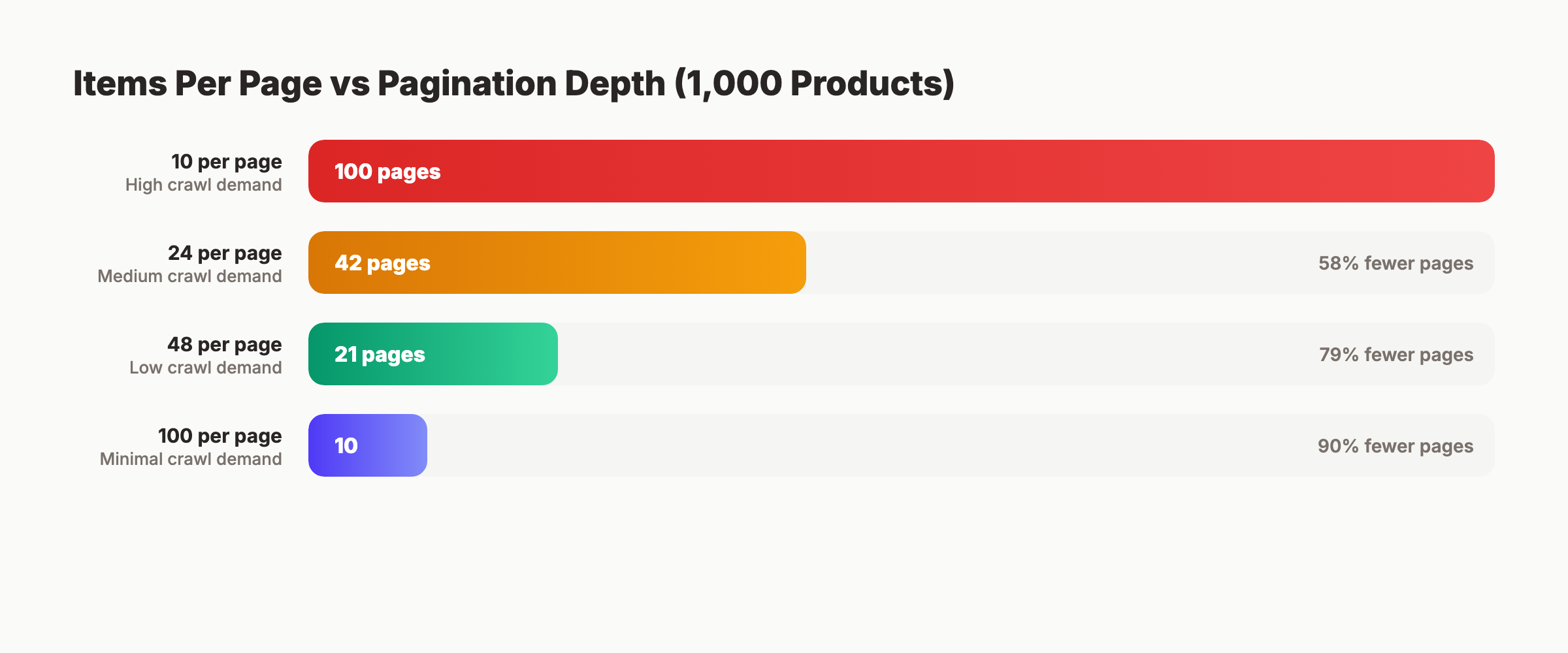
More items per page means fewer paginated pages. Fewer pages means less crawl budget spent on pagination.
| Items Per Page | Pages for 1,000 Products | Crawl Demand |
|---|---|---|
| 10 | 100 pages | High |
| 24 | 42 pages | Medium |
| 48 | 21 pages | Low |
| 100 | 10 pages | Minimal |
Google’s ecommerce documentation suggests 24 to 48 items as a reasonable range. Balance SEO efficiency against page load speed and Core Web Vitals performance.
3,500+ blogs published. 92% average SEO score. See what Stacc can do for your site. Start for $1 →
Chapter 5: Pagination vs Infinite Scroll vs Load More
Three patterns exist for displaying large content sets. Each has different SEO implications.
Traditional Pagination
Each page has a unique URL. Googlebot follows links between pages. All content is discoverable through standard crawling.
SEO strengths: Every page is crawlable. Every URL is indexable. Link equity flows through pagination links. Works with every search engine.
SEO weaknesses: Deep pages require many clicks. Crawl budget scales linearly with page count.
Infinite Scroll
Content loads automatically as the user scrolls down. No page numbers. No “next” button. New content appends to the bottom of the page.
SEO strengths: Better user engagement metrics. Lower bounce rates on mobile.
SEO weaknesses: Googlebot does not scroll. Without a fallback, Google only sees the first batch of content. All items beyond the initial load are invisible to search engines.
Google’s own documentation warns that infinite scroll without paginated URLs prevents content discovery. If you use infinite scroll, you must provide a paginated URL fallback that Googlebot can crawl.
Load More Button
A hybrid approach. Content loads on the same URL when the user clicks “Load More.” No separate URLs for each batch.
SEO strengths: Better UX than pagination for some audiences.
SEO weaknesses: Same problem as infinite scroll. Googlebot does not click buttons. Content behind the “Load More” interaction remains hidden unless you provide crawlable fallback URLs.
Which to Choose
| Factor | Pagination | Infinite Scroll | Load More |
|---|---|---|---|
| Googlebot compatibility | Full | Requires fallback | Requires fallback |
| Crawl budget efficiency | Medium | Low (without fallback) | Low (without fallback) |
| User experience (mobile) | Good | Best | Better |
| Implementation complexity | Low | High | Medium |
| Deep content discovery | Yes | No (without fallback) | No (without fallback) |
| Link equity distribution | Natural | Concentrated on page 1 | Concentrated on page 1 |
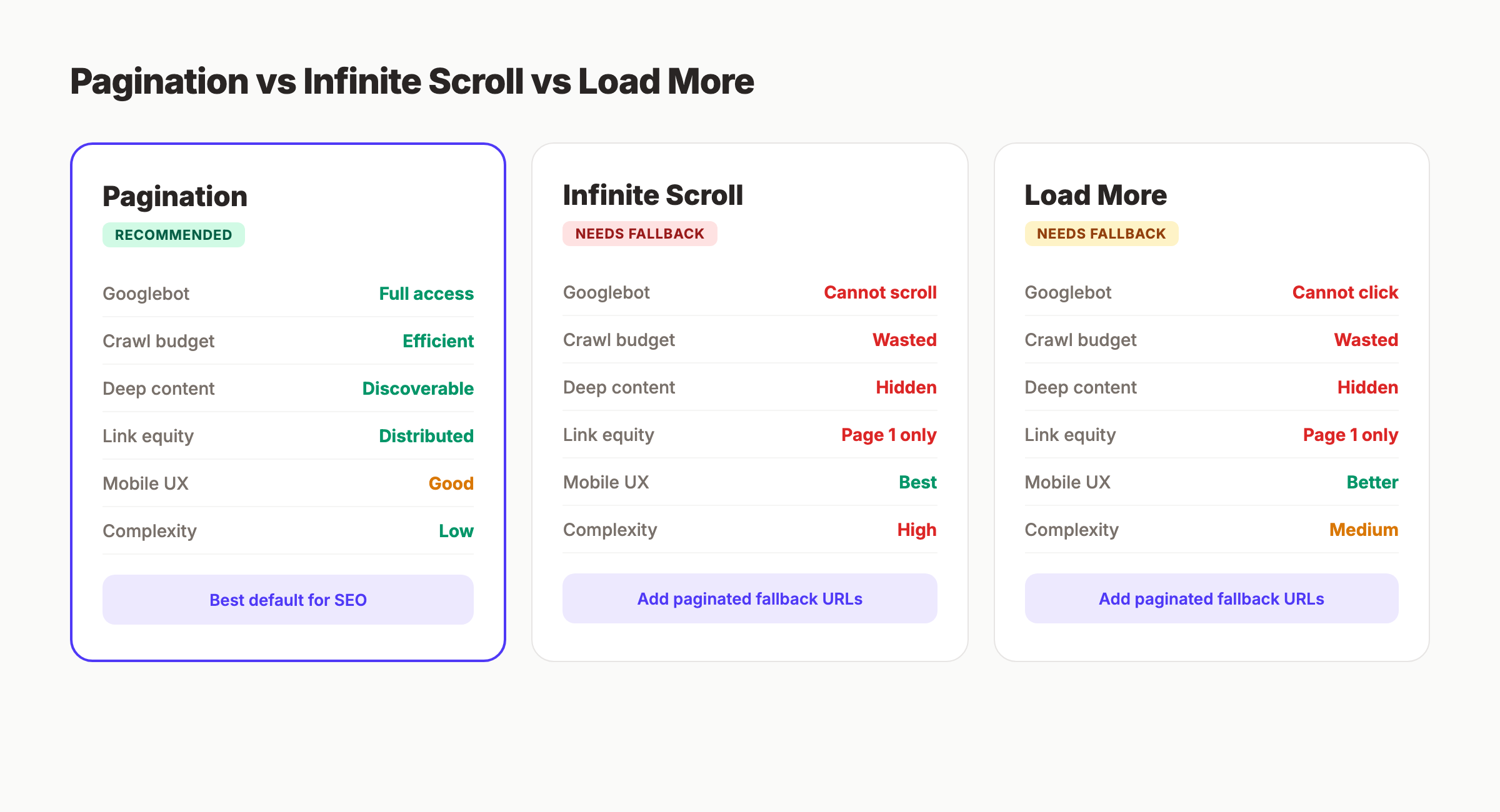
The recommendation: Use traditional pagination as the default. If UX requirements demand infinite scroll or load more, implement them as a progressive enhancement on top of paginated URLs. The paginated URLs serve as the crawlable fallback.
This approach gives users the experience they prefer while giving Googlebot the structure it needs.
Chapter 6: JavaScript Pagination and Rendering
Modern frameworks (React, Vue, Angular, Next.js) often handle pagination client-side. This creates specific SEO challenges.
The Two-Phase Crawl Problem
Googlebot processes pages in two steps:
- HTML download — Googlebot fetches the raw HTML response
- JavaScript rendering — Googlebot executes JavaScript and processes the rendered DOM
Between step 1 and step 2, there can be a delay of seconds to days. During this gap, Google only sees the initial HTML. If your pagination links exist only in the rendered DOM, Google cannot follow them until rendering completes.
Client-Side Pagination Risks
Single-page applications (SPAs) often update content without changing the URL. A user clicks “page 2,” and JavaScript replaces the content — but the URL stays the same.
This means Google sees one URL with one set of content. Everything loaded through client-side pagination is invisible to the crawl.
Server-Side Rendering Fixes Everything
The fix is straightforward. Server-side render your paginated pages. Use frameworks like Next.js (with SSR or SSG), Nuxt.js, or Astro to generate unique HTML pages for each pagination step.
Each paginated URL should return fully rendered HTML with:
- The content for that page
<a href>links to adjacent pages- A self-referencing canonical tag
- Unique title and meta description
Hybrid Approaches
If full server-side rendering is not feasible, use these fallbacks:
Prerendering — Generate static HTML versions of paginated pages for search engine crawlers. Tools like Prerender.io serve cached HTML to bots while users get the SPA experience.
Dynamic rendering — Serve different content to Googlebot vs users. Google officially supports this approach, though they recommend server-side rendering as the long-term solution.
Progressive enhancement — Start with server-rendered pagination. Add client-side enhancements (smooth transitions, prefetching) on top. This guarantees Googlebot sees the full structure.
Skip the agency. Keep the results. Stacc starts at $99 per month with a $1 trial. Start for $1 →
Chapter 7: How to Audit Your Pagination for SEO Issues
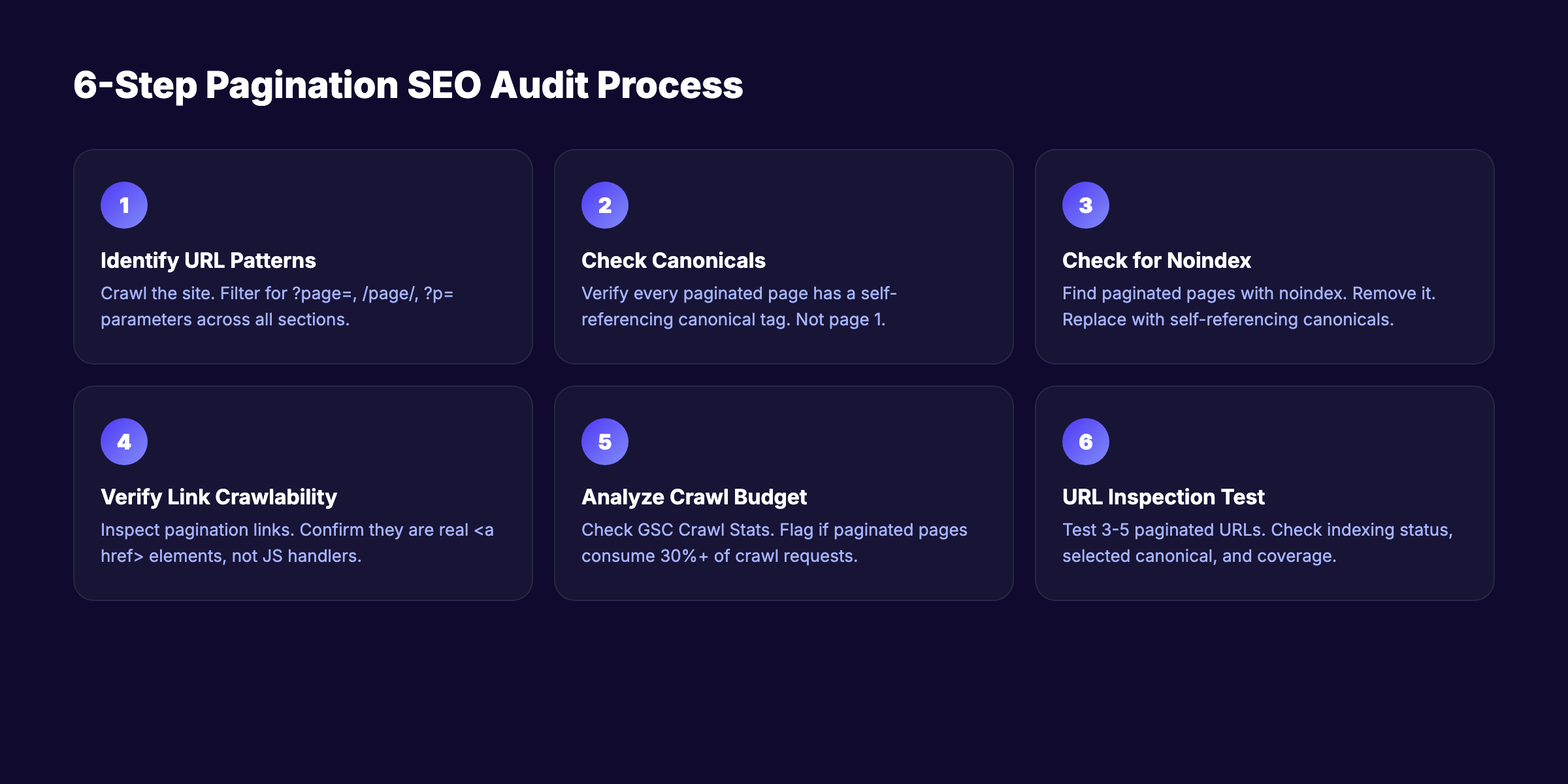
Follow this 6-step audit process to find and fix pagination problems on any site.
Step 1: Identify All Paginated URL Patterns
Crawl your site with Screaming Frog, Sitebulb, or a similar tool. Filter for URLs containing pagination parameters (?page=, /page/, ?p=).
Document every pagination pattern you find:
- Blog archive:
/blog/page/2,/blog/page/3 - Category pages:
/category/shoes?page=2 - Tag pages:
/tag/seo/page/2 - Search results:
/search?q=shoes&page=2
Step 2: Check Canonical Tags
For each paginated URL, verify the canonical tag. Open the page source and find the <link rel="canonical"> tag.
Correct: Self-referencing canonical on every page.
<!-- On /shoes?page=3 -->
<link rel="canonical" href="https://example.com/shoes?page=3" />
Incorrect: All pages canonicalizing to page 1.
<!-- On /shoes?page=3 — WRONG -->
<link rel="canonical" href="https://example.com/shoes" />
If you find incorrect canonicals, fix them immediately. This is the single highest-impact pagination fix.
Step 3: Check for Noindex Tags
Search your crawl data for paginated pages with noindex directives. Check both the <meta> tag and the X-Robots-Tag HTTP header.
<!-- Check for this — REMOVE if found on paginated pages -->
<meta name="robots" content="noindex, follow" />
Remove noindex from paginated pages. Replace with self-referencing canonicals.
Step 4: Verify Link Crawlability
Open a paginated page and inspect the pagination links. Confirm they are standard <a href> elements, not JavaScript click handlers.
Right-click a pagination link. If “Copy link address” gives you a real URL, the link is crawlable. If it shows javascript:void(0) or #, the link is not crawlable.
Test with Google’s URL Inspection tool in Search Console. Enter a page 2+ URL and check if Google can discover linked pages from it.
Step 5: Analyze Crawl Budget Impact
In Google Search Console, go to Settings → Crawl Stats. Look for:
- High crawl volume on paginated URLs
- Paginated pages consuming more than 30% of total crawl requests
- Deep paginated pages (page 10+) being crawled infrequently
If pagination consumes excessive crawl budget, reduce items per page or improve internal linking to reduce pagination depth.
Step 6: Test With Google’s URL Inspection Tool
Enter 3 to 5 paginated URLs from different series into the URL Inspection tool. For each, check:
- Coverage status — Is the page indexed?
- Canonical selected by Google — Does it match your declared canonical?
- Crawled vs indexed — Was the page crawled but not indexed?
- Page resources — Are all CSS and JS resources loading?
If Google selects a different canonical than the one you declared, your canonical implementation has an issue. Fix the source, then request re-indexing.
Chapter 8: 8 Common Pagination Mistakes and How to Fix Each One
These are the pagination errors we see most often. Each one includes the fix.
Mistake 1: Canonicalizing All Pages to Page 1
The error: Every paginated page has <link rel="canonical" href="/category/"> pointing to page 1.
Why it breaks SEO: Google treats pages 2+ as duplicates. Links on those pages stop getting followed. Products listed only on page 5 become invisible.
The fix: Self-referencing canonicals on every page. Page 3 canonicalizes to page 3.
Mistake 2: Noindexing Paginated Pages
The error: Adding <meta name="robots" content="noindex"> to all pages after page 1.
Why it breaks SEO: Google eventually stops crawling noindexed pages. Links on those pages stop transferring equity. Deep content becomes orphaned.
The fix: Remove noindex. Use self-referencing canonicals instead.
Mistake 3: Using JavaScript-Only Pagination Links
The error: Pagination buttons use onclick handlers or framework routing without server-rendered <a href> tags.
Why it breaks SEO: Googlebot may not execute the JavaScript, or may execute it with a significant delay. Either way, the links are unreliable for crawl discovery.
The fix: Server-render all pagination links as <a href> elements with full URLs.
Mistake 4: Using URL Fragments for Pagination
The error: Pagination URLs use #page2 instead of ?page=2.
Why it breaks SEO: Google does not process URL fragments. example.com/shoes#page2 and example.com/shoes#page3 are the same URL to Google.
The fix: Switch to query parameters or path-based pagination. Redirect fragment URLs to their canonical equivalents.
Mistake 5: Mixing Filters and Pagination Parameters
The error: URLs like /shoes?color=red&size=10&page=2 create thousands of crawlable URL combinations.
Why it breaks SEO: Combinatorial explosion. 5 colors × 4 sizes × 10 pages = 200 URLs for a single category. Across all categories, this can generate hundreds of thousands of URLs.
The fix: Block filter parameters with robots.txt while keeping base pagination crawlable. Use Google Search Console’s URL Parameters tool to tell Google how to handle each parameter.
Mistake 6: No Links to First and Last Pages
The error: Pagination only shows “previous” and “next” links without direct access to page 1 and the last page.
Why it breaks SEO: Google must crawl every page sequentially to reach deep content. Page 50 requires 49 intermediate crawls.
The fix: Include links to page 1 and the last page in every pagination block. Also include a few intermediate pages (1, 2, 3… 25… 48, 49, 50) to reduce maximum crawl depth.
Mistake 7: Forgetting Paginated Pages in the Sitemap
The error: The XML sitemap only includes page 1 of each series. Pages 2+ have no sitemap entry.
Why it breaks SEO: Google relies on sitemaps as a discovery mechanism. Excluding paginated pages forces Google to discover them only through link crawling.
The fix: Add the first 5 to 10 pages of each major series to your sitemap. For very large sites, create a separate sitemap file for paginated URLs.
Mistake 8: Identical Titles Across All Paginated Pages
The error: Every page in a series has the same <title> tag: “Running Shoes — My Store.”
Why it breaks SEO: Google sees dozens of pages with identical titles and may suppress some from the index. Users cannot distinguish between pages in search results.
The fix: Append the page number to each title. “Running Shoes — My Store — Page 2” is sufficient. Keep page 1’s title clean (no “Page 1” suffix).
Pagination SEO Checklist
Use this checklist to verify your implementation covers every critical element:
- Self-referencing canonical tags on every paginated page
- Clean URL parameters (
?page=N) — no fragments - Server-rendered
<a href>pagination links - Links to first and last pages in every pagination block
- Paginated pages included in XML sitemap
- No
noindexon paginated pages - Unique title tags with page number appended
- Faceted navigation blocked separately from pagination
- Items per page optimized (24 to 48 for ecommerce)
- JavaScript pagination has server-rendered fallback
- Mobile pagination uses thumb-friendly tap targets
- Crawl budget monitored in Search Console
Rank everywhere. Do nothing. Blog SEO, Local SEO, and Social on autopilot. Start for $1 →
FAQ
What is pagination in SEO?
Pagination SEO is the practice of structuring multi-page content so search engines can crawl, index, and rank each page correctly. It involves proper canonical tags, clean URL structures, and crawlable links between paginated pages.
Does Google still use rel=next and rel=prev?
No. Google stopped using rel=next/prev as an indexing signal before 2019. The deprecation was confirmed publicly in March 2019. Bing still processes these tags. If the tags already exist on your site, keep them. Do not add them to new sites.
Should I noindex paginated pages?
No. Noindexing paginated pages eventually causes Google to stop following links on those pages. Products or articles listed only on noindexed pages become orphaned. Use self-referencing canonical tags instead of noindex.
Is infinite scroll bad for SEO?
Infinite scroll without a paginated URL fallback is bad for SEO. Googlebot does not scroll or click “load more” buttons. Content loaded through infinite scroll remains invisible to search engines unless server-rendered paginated URLs exist as a fallback.
How many items should I show per page for SEO?
Google’s ecommerce documentation suggests 24 to 48 items per page. Fewer items create more paginated pages and more crawl demand. More items increase page load time and hurt Core Web Vitals. Find the balance for your specific content type.
How does pagination affect crawl budget?
Every paginated URL consumes crawl budget. For sites with fewer than 10,000 pages, this rarely matters. For large sites with hundreds of thousands of pages, pagination can consume 30% or more of total crawl resources. Reduce pagination depth by increasing items per page and improving internal linking structures.
Pagination is a technical detail that most site owners overlook until it causes problems. The fix is rarely complex. Self-referencing canonicals, crawlable links, and clean URL structures solve 90% of pagination SEO issues. Start with the audit process in Chapter 7, fix what you find, and monitor your crawl stats monthly.
Written and published by Stacc. We publish 3,500+ articles per month across 70+ industries. All data verified against public sources as of March 2026.
