An SEO client questionnaire template with 43 questions across 7 sections. This 8-step intake process cuts onboarding from 21 days to 4. Updated 2026.
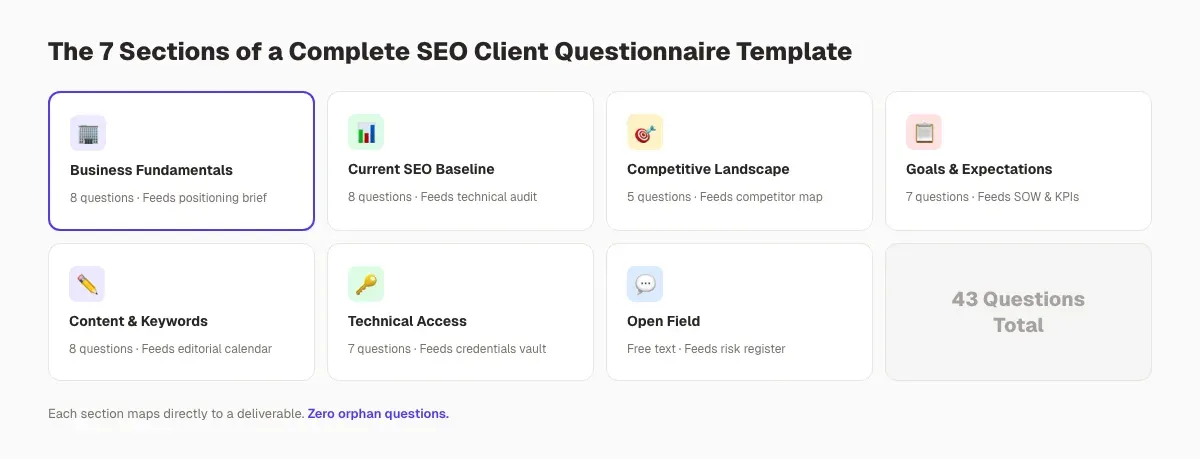
An SEO client questionnaire template is a structured intake form that collects everything you need to build a strategy before work starts: business goals, target customers, keywords, competitors, CMS access, brand rules, and approvals. This version runs 43 questions across seven sections and an eight-step delivery process.
You signed a new SEO client last week. Now you have 30 days to produce a strategy, and you still do not know their CMS, their top keywords, or who approves content. Every day you spend chasing answers over email is a day of billable work you cannot start. A proper SEO client questionnaire template fixes that problem in one step.
This guide hands you the exact 43-question intake used by agencies that onboard in under 72 hours. We publish 3,500+ blogs every month across 70+ industries, so the questions below are battle-tested on real client accounts, not theoretical. By the end, you will have a repeatable system that cuts onboarding time by 60 to 80 percent and produces a better strategy on day one.
Here is what you will learn:
- Why most SEO onboarding fails inside the first two weeks
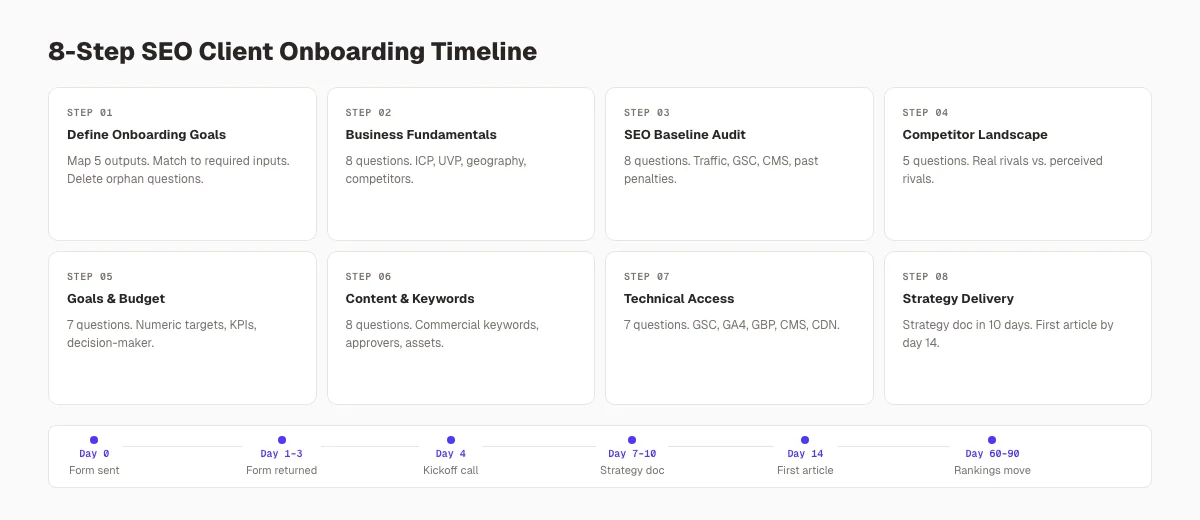
- The 8-step process to build and use the questionnaire
- All 43 questions organized by category (copy and reuse)
- How to read responses and spot red flags early
- The exact delivery workflow that gets 90 percent completion rates
The Anatomy of a High-Converting SEO Client Questionnaire Template
A good SEO client questionnaire template does three things at once. It collects business context, it establishes technical access, and it sets expectations about timeline and budget. Skip any one of those pillars and you will be rewriting the proposal in week three.
Time required: 45 minutes to build. 20 to 30 minutes for the client to complete. Difficulty: Beginner to intermediate. What you will need: A form tool (Google Forms, Typeform, Jotform), a shared drive for credentials, and a welcome email template.
The questionnaire below has 7 sections and 43 questions. It is long on purpose. Short questionnaires save 5 minutes up front and cost 5 hours in clarification calls later.
Step 1: Define Your Onboarding Goals Before You Build the Form
Start by writing down what a finished onboarding looks like for your team. If you do not define the output, every question you add will feel equally important, and the form will balloon to 80 questions no client will finish.
Specifically:
- Write the 5 outputs onboarding must produce (strategy doc, keyword list, tech audit scope, content calendar, reporting dashboard).
- Match each output to the raw inputs it needs from the client.
- Delete any question that does not feed a specific output.
A useful rule: if you cannot point at one section of the strategy doc a question will populate, the question does not belong on the form. We apply this rule ruthlessly. The form went from 71 questions to 43 the first time we tried it.
Why this step matters: A questionnaire without a defined output becomes a dumping ground. You will waste client attention, and the client will lose trust in your process. Define the outputs first, then reverse-engineer the questions.
Pro tip: Write the first draft of your strategy template before you write the questionnaire. The empty fields become your question list.
Step 2: Collect Business Fundamentals (8 Questions)
The first section of the questionnaire grounds the entire engagement. Do not start with technical questions. Start with what the business does and who it serves. This signals respect for the client's business and filters out pure-SEO-nerd questions that confuse non-technical founders.
Business and brand questions to include:
- What is your legal business name and primary domain?
- In one sentence, what does your company do, and for whom?
- What products or services drive the most revenue today?
- What is your one-line unique value proposition versus competitors?
- Who is your ideal customer? Include role, company size, industry, and buying trigger.
- What geography do you serve. Local, regional, national, or international?
- What are the 3 to 5 competitors you benchmark against, and why?
- Do you have brand guidelines, tone of voice, or messaging docs to share?
Place a free-text box at the end of every section. Clients often volunteer the most useful insight in "anything else we should know". We have found major revenue segments that way.
Why this step matters: Without business context, every keyword you target will feel generic. A plumber and a law firm might both want "emergency services near me," but their buyer journeys, price points, and content needs have nothing in common. Business fundamentals prevent one-size-fits-all strategies.
For a deeper dive on shaping content around the buyer, see our guide to building an SEO buyer persona.
Step 3: Audit Current SEO Baseline (8 Questions)
Section two measures where the client stands today. This section alone often surfaces issues the client has never named aloud. A prospect once told us their rankings were "fine," then admitted in question 5 of this section that the site had received a manual action in 2023. That answer changed the entire strategy.
Current SEO status questions:
- What is your current estimated monthly organic traffic? Include the source (GA4, Search Console, Ahrefs).
- Do you have Google Analytics 4 installed and configured? Can we verify access?
- Do you have Google Search Console verified? Under which property type (domain or URL)?
- Has any prior SEO work been done. In-house, agency, or freelancer? What years?
- Has your domain ever received a manual action or noticeable algorithmic drop?
- What CMS or stack does your site run on (WordPress, Webflow, Shopify, custom)?
- What link-building activity, if any, has happened in the last 24 months?
- What keywords does your business already rank in positions 1 to 20 for?
Why this step matters: Rankings do not exist in a vacuum. A site recovering from a penalty needs link cleanup before it needs new content. A site with no Search Console property cannot be measured until you install one. Skipping this section means planning on incomplete data.
Pair this section with a proper technical review. Our step-by-step SEO audit guide walks through exactly what to check once the client answers these questions.
Step 4: Understand the Competitive Landscape (5 Questions)
Section three turns subjective competitor opinions into targetable data. Most clients name the loudest competitors, not the ones actually beating them in search. Asking both questions together reveals the gap.
Competitor and market questions:
- Which 3 to 5 competitors rank above you for keywords you want to win?
- Which competitor's content, site, or brand presence do you admire most, and why?
- What do you do better than your competitors that is not obvious from the website today?
- What do your competitors do better than you online right now?
- Are there new entrants or venture-funded competitors we should track?
The third question is the money question. Unique strengths the client cannot articulate in writing almost never make it onto the website. We use that answer to plan the pillar pages.
Why this step matters: Without a real competitor map, you end up optimizing against phantom rivals. Two weeks in, the client asks why you are not targeting "that one" and the strategy gets torn up. Ask once, get the full list, and lock the target set.
To operationalize this section, run the answers through our SEO competitor analysis guide and analyze competitor keywords workflow.
Stop chasing intake answers over 14 email threads. We publish 30 to 80 SEO articles per month per customer. The onboarding form gets filled once, and the strategy runs on autopilot from there.
Step 5: Clarify Goals, Budget, and Expectations (7 Questions)
Section four is the section most questionnaires botch. They ask about goals without pinning a number or a date to them. "Increase organic traffic" is not a goal. "Reach 50,000 monthly organic sessions by Q4" is a goal.
Goals, budget, and expectations questions:
- What are the 3 primary business outcomes SEO should drive (leads, demos, revenue, brand visibility)?
- What is the numeric target for each outcome, and by what date?
- Which KPIs do you track weekly or monthly today?
- What is your monthly SEO budget range and your expected engagement length?
- How soon do you realistically expect to see results? (Industry benchmark: 3 to 6 months.)
- How often do you want reports, and in what format (dashboard, PDF, live call)?
- Who is the single decision-maker for approvals, and what is the escalation path?
The final question saves more time than any other on the form. Decision-maker clarity prevents the "let me run this by the team" loop that adds three weeks to every content approval cycle.
Why this step matters: Unclear goals produce unmeasurable campaigns. Unclear budgets produce scope creep. Unclear decision-makers produce missed deadlines. Pin all three down in writing before you publish a single page.
| Red flag in the response | What it signals | How to handle it |
|---|---|---|
| Goal stated as "more traffic" with no number | No KPI discipline | Book a 30-min goal-setting call before signing SOW |
| Budget under industry minimum for the ask | Budget and scope mismatch | Offer a scaled-down phase 1 |
| 3+ decision-makers, no single owner | Slow approvals incoming | Require a named project owner in the contract |
| Timeline expectation under 60 days | Unrealistic expectations | Send Google's own guidance on SEO timelines |
| No awareness of past SEO work | Hidden legacy issues likely | Add a forensic audit to the first month |
If the budget answer lands near agency minimums, send over our breakdown on marketing agency cost and the done-for-you vs DIY vs agency SEO comparison. It reframes the conversation toward value per dollar.
Step 6: Map Content and Keyword Priorities (8 Questions)
Section five bridges strategy and production. The questions here determine what gets written in months one through three. Get these wrong and your content velocity stalls.
Content and keyword questions:
- What 10 to 20 keywords would drive the most commercial value if you ranked in positions 1 to 3?
- What topics or keywords should we avoid (regulatory, brand safety, off-strategy)?
- What questions do prospects ask most often before they buy?
- Which pages on the current site convert best today?
- Do you run a blog or resource center? What is the current publishing cadence?
- Who on your team signs off on content. Marketing lead, founder, legal, or compliance?
- Do you have subject-matter experts available for quotes or interviews?
- What existing assets (whitepapers, case studies, webinars, podcast episodes) can we repurpose?
Do not skip question 3. The most valuable SEO topics almost always come from the sales team's inbox, not from keyword tools. Ask the client to forward the last 20 sales emails. Those emails become the first 20 blog posts.
Why this step matters: Content teams burn 40 percent of their time debating what to write next. A clear topic list from the client cuts that overhead to near zero. Pair it with intent research, and the editorial calendar writes itself.
For the next step, run the response through our keyword research for blog posts process and, for local businesses, the local SEO guide.
Step 7: Collect Technical Access and Credentials (7 Questions)
Section six is where agencies lose their first week. Access requests feel bureaucratic to the client. Handle them early, in writing, and with a secure delivery method.
Access and credentials questions:
- Who is your hosting provider? Can you add us as a collaborator or share temporary credentials?
- Can you grant CMS admin or editor access? What is the preferred method (invite, SSO, temporary user)?
- Can you add our team as Analysts in Google Analytics 4?
- Can you add us as Delegated Users in Google Search Console (Full access)?
- Do you have a Google Business Profile? Can you add us as a Manager?
- Which social accounts and review platforms should we monitor (not post to)?
- Are there third-party tools we need read access to (CDN, schema manager, AB testing)?
Never accept credentials over email. Use a password manager (1Password, Dashlane) or a credentials-sharing tool with expiry. We require the client to set up temporary access with 90-day expiration as a standard onboarding security practice. It protects both sides.
Why this step matters: Without the right access, your first audit is guesswork. You cannot fix what you cannot see. Request access in the questionnaire, track it in a shared checklist, and follow up within 48 hours if items remain open.
Credentials checklist to send alongside the questionnaire:
- ✓ Hosting provider admin invite
- ✓ CMS editor or admin user created
- ✓ GA4 Viewer or Analyst access granted
- ✓ GSC Delegated User access (Full)
- ✓ Google Business Profile Manager invite accepted
- ✓ CDN or performance tool access (if applicable)
- ✓ Schema or structured data tool access (if applicable)
You can stop building onboarding forms and start ranking. We run the intake, the audit, the keyword map, and 30 to 80 articles per month. One price. One contract. 60 to 90 days to first ranking movement.
Step 8: Send, Collect, and Turn Responses Into a Strategy
The final step is the one agencies forget to design. Sending the questionnaire is not the end of onboarding. It is the middle. The strategy step is where the responses become revenue.
Send and follow-up sequence:
- Send the questionnaire within 1 hour of the contract signing. Completion rates drop every day you delay.
- Pair the form with a 3-sentence welcome email that names a deadline (72 hours is standard).
- Book the kickoff call for day 4. After the form is returned, before the client cools off.
- Pre-fill the sections you can answer yourself (public data, competitor names, ranking estimates). It signals you have already done work.
Turning responses into a strategy document:
- Copy each section's answers into the strategy template you built in Step 1.
- Flag every contradiction or gap. Bring those to the kickoff call.
- Score the opportunity by revenue potential, keyword difficulty, and content effort.
- Deliver a 1-page summary in the kickoff call, then a full strategy doc within 10 business days.
Why this step matters: A pristine questionnaire that sits in a folder accomplishes nothing. The speed from "form submitted" to "strategy delivered" is the single biggest predictor of client retention. Agencies that deliver inside 10 business days keep 90+ percent of clients past month 6. Agencies that take 30 days or more churn double the rate.
If you lack a dedicated strategist, our build an SEO team guide covers the hires and contractors worth prioritizing first. For local service clients, the local SEO audit guide is the faster parallel path.
Category Reference Table: Which Section Feeds Which Deliverable
| Questionnaire section | Questions | Primary deliverable | Weeks 1-2 owner |
|---|---|---|---|
| Business fundamentals | 8 | Positioning brief, audience doc | Account lead |
| Current SEO baseline | 8 | Technical audit scope, rank report | SEO analyst |
| Competitive landscape | 5 | Competitor map, gap analysis | SEO strategist |
| Goals and expectations | 7 | SOW, KPI dashboard | Account lead |
| Content and keywords | 8 | Editorial calendar, cluster map | Content lead |
| Technical access | 7 | Credentials vault, audit start | Ops or engineer |
| Anything else (open field) | , | Risk register, scope additions | Account lead |
The table above is the single most referenced asset inside our onboarding playbook. It maps questions to people to deliverables in one glance, which removes the "who owns this" confusion that stalls week one.
Results: What to Expect After You Implement the Template
After you send this questionnaire and run the 8 steps above, here is the realistic timeline for what happens:
- Day 0 to 3: Client returns the form. 90 percent complete when delivery includes a named deadline and welcome email.
- Day 4: Kickoff call runs 45 minutes instead of 90, because context is already captured.
- Day 5 to 10: Strategy doc, keyword map, and content calendar delivered. No clarification emails needed.
- Day 11 to 30: First audit complete. First 2 to 5 articles published. Technical fixes queued.
- Day 30 to 60: Full content cadence running. Rank tracking live. Monthly report delivered.
- Day 60 to 90: First ranking movements visible for low-competition terms. Retention conversation becomes easy.
Two cautions. Sites with existing penalties, thin content, or weak domain authority move slower in the first 90 days. Local SEO clients often see faster local-pack movement than traditional organic gains. Manage expectations accordingly.
The biggest change is internal. Your team stops chasing clients for information and starts executing. One theStacc customer cut their onboarding lead time from 21 days to 4 days after adopting this exact questionnaire. That math compounds across every new signup.
| Metric | Before template | After template |
|---|---|---|
| Onboarding lead time | 18 to 21 days | 3 to 5 days |
| Kickoff call length | 75 to 90 min | 30 to 45 min |
| Clarification emails per client | 14 | 2 |
| Strategy doc delivery | Day 30+ | Day 7 to 10 |
| First article live | Day 35+ | Day 10 to 14 |
Troubleshooting Common Problems
Problem: The client returns the form half-finished. Solution: Send one follow-up naming the 3 missing questions and why each is blocking work. Do not send a generic "please complete" nudge. Specificity triples response rates.
Problem: The client does not know the answers to technical questions (GA4, GSC, hosting). Solution: Replace those questions with a "we will set this up together on the kickoff call" note. The technical questionnaire is for capable clients. Non-technical clients need a guided call instead.
Problem: The client answers with one-word responses. Solution: Add a required minimum character count on the 5 questions that matter most. Forms with soft minimums get 3x the insight depth of forms without them.
Your intake, your audit, your content, and your local posts. All handled. We publish 30 to 80 articles a month, run your Google Business Profile posting cadence, and report on rankings every week.
What practitioners are saying on X
Systems and fundamentals still compound; AI search adds new KPIs.
- @jakezward (Feb 2026): 2026 SEO predictions emphasize AI Overview share-of-SERP, schema for LLM token efficiency, brand mentions in AI answers as a KPI, proprietary data as a moat, and content refresh beating net-new AI slop. See the post on X.
- @hridoyreh (Mar 2026): Widely shared SEO skill tree: foundations, research, technical, on-page, content, links, AI SEO/GEO, analytics, UX, brand, programmatic — useful map for stats and how-to posts. See the post on X.
- @HlynurStefDev (Jul 2026): Public case: niche site traffic jumped from ~18 to 4,162 Google visits/month after focused technical/on-page SEO work (GSC screenshots claimed) — reminds that fundamentals still move numbers. See the post on X.
Grok, AI Overviews, and multi-engine visibility
For “seo client questionnaire template”, multi-engine visibility still starts with clear definitions, sourced numbers, and extractable section answers. Grok additionally factors live X discussion — keep public claims consistent with this page.
- Google AI Overviews: Use passage-ready answers, tables, and FAQ schema where relevant.
- ChatGPT / Perplexity: Cite named sources next to key claims.
- Grok: Maintain accurate entity facts on-site and in high-signal X posts.
Publish content built for Google and AI citations. theStacc’s Content SEO module ships SEO-scored articles structured for rankings and generative engines — including clearer entity pages models like Grok can quote.
Frequently Asked Questions
Between 30 and 50 questions is the right range for most agencies. Fewer than 30 and you will miss context needed for a real strategy. More than 50 and completion rates drop below 60 percent. Our template lands at 43 because that is the point where marginal questions stop adding strategy value.
Send it within 1 hour of contract signing. Completion rates peak on day 0 and drop roughly 10 percent per day of delay. Pair the form with a short welcome email that names a 72-hour deadline. Book the kickoff call for day 4 to keep momentum high and prevent the form from getting buried under other work.
Move the technical questions to a guided setup call. Non-technical founders often run past questions like "which GA4 property" or "are you using server-side tagging." For those clients, ask them to add you as a temporary user on their hosting, and walk through the technical section together on a screen share. You gather the same information in half the time.
Use the same 43-question core for every client, and layer 5 to 10 industry-specific questions on top. Local service businesses need GBP and review questions. SaaS clients need lifecycle and PLG questions. Ecommerce needs product feed and inventory questions. A fully custom form every time wastes time. A fully generic form misses context. A core-plus-addon structure wins.
Set a minimum character count on the 5 most important questions (UVP, customer profile, goals, competitors, success criteria). Follow up within 48 hours on any answer under 20 words. Specific follow-up questions work better than generic nudges. Ask "when you said 'more leads,' what is the current monthly number and what do you want it to be in 90 days" instead of "please expand."
Yes, if the engagement covers both. Keep the SEO core as section 1, then add site-design questions in section 2 and content-brief questions in section 3. Use skip logic if your form tool supports it. Send a lean version of the form when the scope is narrower. Do not make a pure SEO client fill out a web-design section.
Your Next Move
You have the template, the 43 questions, and the 8-step process. The only variable left is how fast you deploy it. Copy the questions into your form tool today, send it on your next signed contract tomorrow, and watch the onboarding lead time collapse.
SEO compounds only when production starts early. A questionnaire is not paperwork. It is the spark plug that gets the engine running on day one instead of day 30.
Skip the questionnaire. Skip the audit. Skip the hiring. theStacc is your SEO team from $99 per month. Research, writing, optimization, and publishing handled. Sign up for free →
Related Tools & Resources
Free SEO Tools:
Best Lists:
Sources & references
- [1] Princeton / Georgia Tech et al. — GEO research (arXiv:2311.09735)
- [2] @hridoyreh on X — Widely shared SEO skill tree: foundations, research, technical, on-page, content, links, AI SEO/GEO, analytics, UX, bran
- [3] @jakezward on X — 2026 SEO predictions emphasize AI Overview share-of-SERP, schema for LLM token efficiency, brand mentions in AI answers

Plan topics, review article drafts, and publish to a connected CMS.
Weekly local SEO teardowns
One practical email a week. Map Pack, GBP, AI Overviews. No fluff. Unsubscribe anytime.