
How to Automate Blog Publishing in 7 Steps
A step-by-step guide to automating blog publishing. 7 steps from strategy to scheduling. Used by 3,500+ businesses to publish 30 articles per month.
Most businesses publish 1 to 4 blog posts per month. The ones ranking on page 1 publish 20 to 30. That gap is not a writing problem. It is a publishing problem.
Manual blog publishing eats 3 hours and 25 minutes per article, according to Orbit Media’s 2025 survey. Multiply that by 30 posts and you are looking at over 100 hours per month. No small team can sustain that pace without automation.
This guide walks through 7 steps to automate blog publishing from start to finish. You will build a system that handles keyword research, writing, optimization, scheduling, and distribution without requiring you to touch every post manually.
We have published 3,500+ blogs across 70+ industries using this exact workflow. The steps below are the same process our clients follow to go from zero articles to 30 per month within the first week of setup.
Here is what you will learn:
- How to define your content strategy before automating anything
- Which parts of blog publishing to automate first
- How to set up an AI writing and editing pipeline
- How to build a quality gate that catches errors before posts go live
- How to schedule and distribute posts automatically
- How to measure whether your automation is working
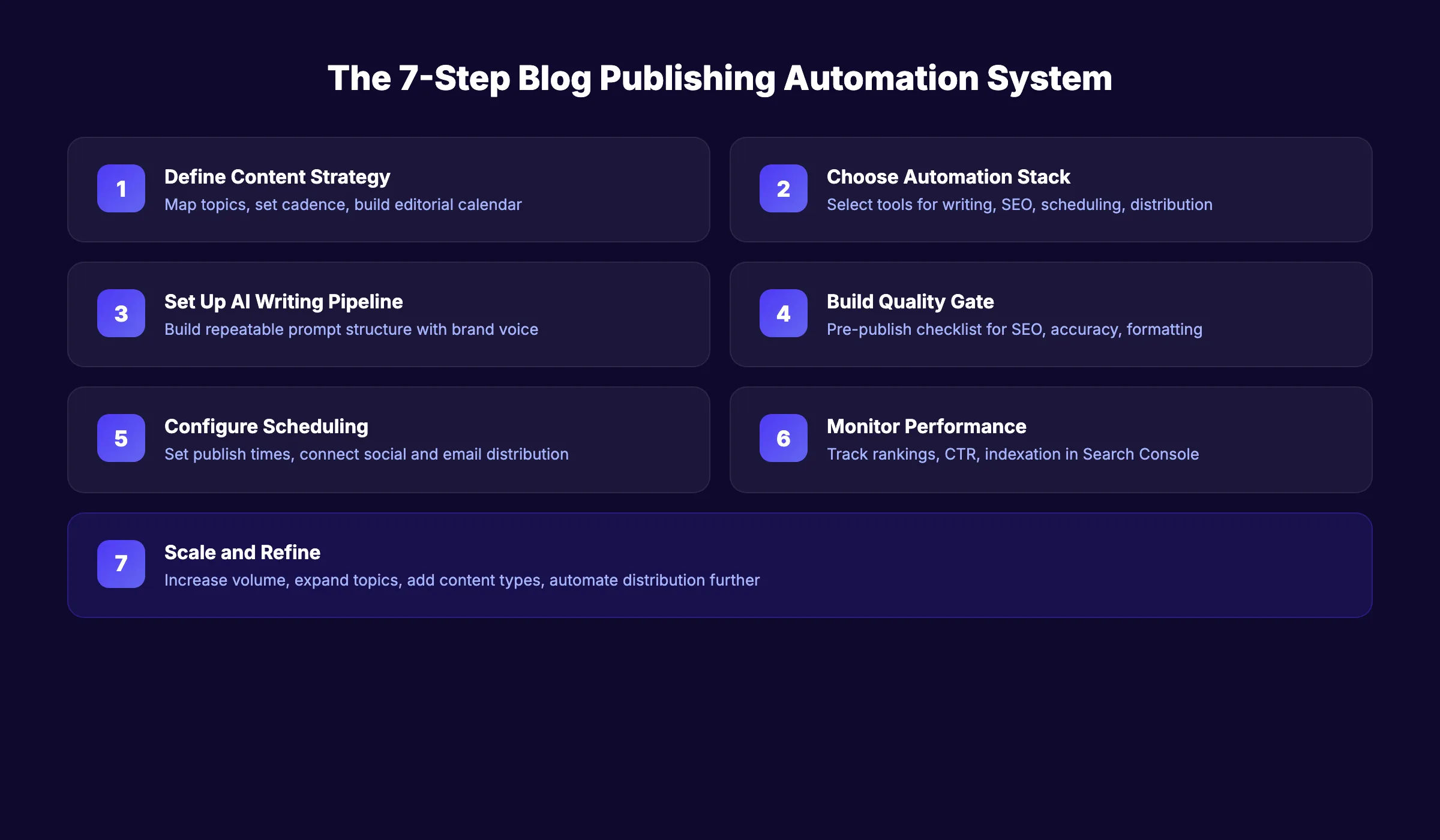
Overview
Time required: 2 to 4 hours for initial setup. 1 to 2 hours per week for ongoing management.
Difficulty: Beginner to intermediate.
What you will need:
- A CMS (WordPress, Webflow, Ghost, or similar)
- A keyword research tool (free or paid)
- An AI writing tool or publishing service
- A scheduling tool or CMS with built-in scheduling
- Google Search Console (free)
Step 1: Define Your Content Strategy Before You Automate
Automation without strategy is just noise at scale. Before you set up a single tool, answer 3 questions.
First, identify your target topics. Map out the 10 to 15 core topics your business should own. A plumber writes about water heaters, drain cleaning, and pipe repair. An accounting firm writes about tax planning, bookkeeping, and payroll. These topic clusters form the foundation of your topical authority.
Second, set a publishing cadence. The data is clear on this. HubSpot’s 2026 research shows blog posts rank among the top 5 highest-ROI content formats. Small businesses are 23% more likely than average to see that return. But only if they publish consistently. Choose a frequency you can sustain. Four posts per week beats 30 posts in one week followed by silence.
Third, create an editorial calendar. Map keywords to publish dates at least 30 days ahead. Your calendar becomes the input that drives every automated step downstream. Use a spreadsheet, Notion board, or a dedicated content calendar tool.
Specifically:
- List 50 to 100 target keywords ranked by search volume and difficulty
- Group them into topic clusters of 5 to 10 related terms
- Assign 1 primary keyword per article
- Set publish dates based on your chosen cadence
Why this step matters: Skipping strategy means your automated pipeline produces random content that does not build authority around any single topic. Google rewards depth in specific areas, not breadth across disconnected subjects.
Pro tip: Start with low-competition, long-tail keywords. A post targeting “HVAC maintenance checklist for homeowners” will rank faster than one targeting “HVAC repair.” Build authority on the easy wins first.
Step 2: Choose Your Automation Stack
Not every part of blog publishing needs automation. Some parts benefit from it. Others need a human eye.
Here is what the three levels of blog automation look like:
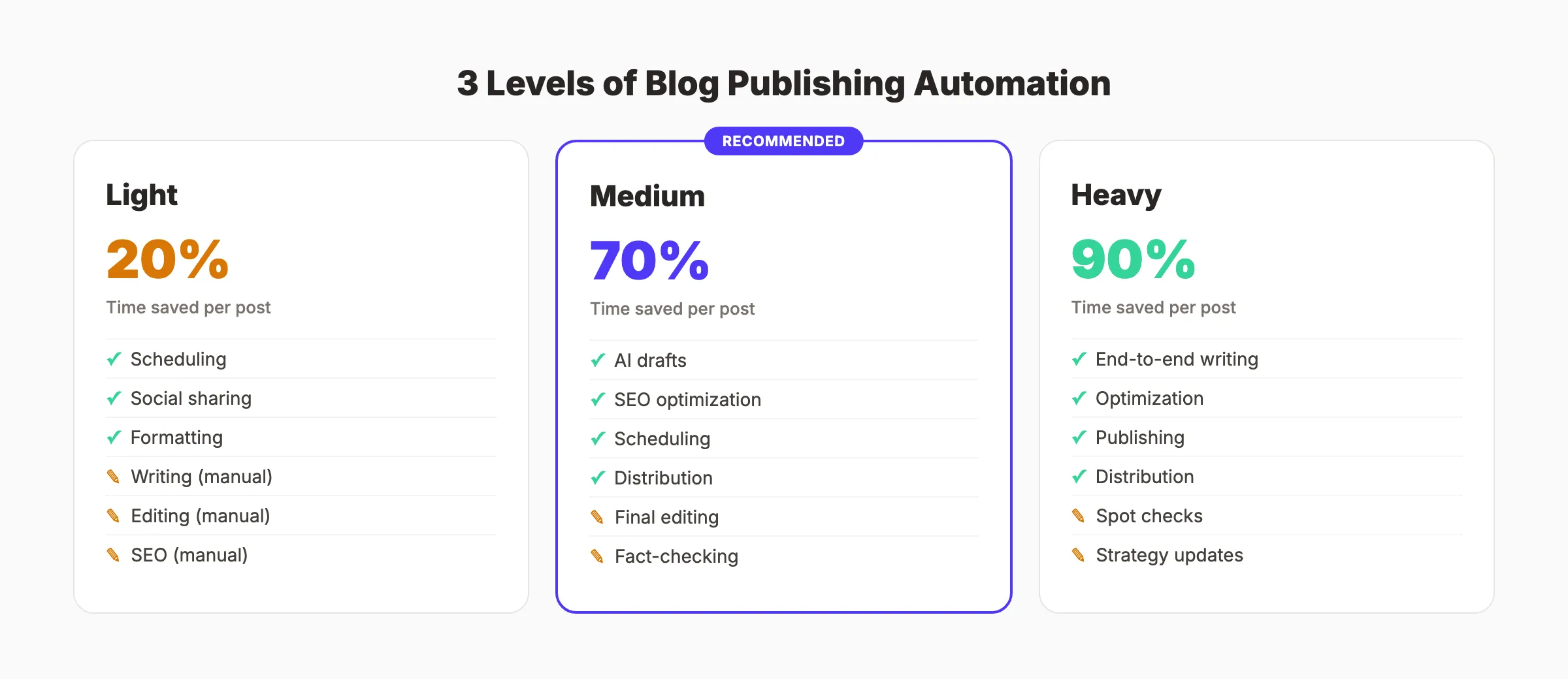
| Level | What Gets Automated | What Stays Manual | Best For |
|---|---|---|---|
| Light | Scheduling, social sharing, formatting | Writing, editing, SEO | Teams with dedicated writers |
| Medium | AI drafts, SEO optimization, scheduling | Final editing, fact-checking, approval | Most small businesses |
| Heavy | End-to-end writing, optimization, publishing | Spot-check reviews, strategy updates | High-volume publishers |
For most businesses, medium automation is the sweet spot. You get 80% of the time savings without sacrificing quality control.
The core tools you need:
- AI writing tool. Generates first drafts from your keywords. Options include ChatGPT, Jasper, or a done-for-you service like Stacc. See our best AI blog writing tools roundup for a full comparison.
- SEO optimization tool. Checks keyword placement, readability, and structure. Our on-page SEO checker does this for free.
- CMS with scheduling. WordPress, Webflow, or Ghost all support scheduled publishing.
- Distribution tool. Zapier, Buffer, or native integrations to push posts to social media and email.
Why this step matters: Choosing tools after you start automating leads to tool sprawl. Reddit users frequently complain about needing 4 to 5 disconnected tools that do not talk to each other. Pick your stack once, then build your workflow around it.
Pro tip: The fewer tools in your stack, the fewer things break. A single platform that handles writing, optimization, and publishing eliminates integration headaches entirely.
Your SEO team. $99 per month. Stacc handles writing, optimization, and publishing in one place. 30 articles per month, published automatically. Start for $1 →
Step 3: Set Up Your AI Writing Pipeline
This is where 95% of bloggers in 2025 already have a head start. Orbit Media reports that 95% of bloggers now use AI in some capacity. The question is not whether to use AI. It is how to use it well.
Build a repeatable prompt structure. Every article your pipeline produces should follow a consistent template:
- Input: Primary keyword, secondary keywords, target audience, word count
- Outline generation: AI creates an H2/H3 structure based on top-ranking competitors
- First draft: AI writes the full article following your brand voice guidelines
- SEO pass: Tool checks keyword density, header structure, internal links, and meta tags
- Human review: Editor reviews for accuracy, tone, and brand alignment
Specifically:
- Create a brand voice document that your AI tool references for every draft
- Set minimum word count targets per post type (1,500 for guides, 3,000+ for pillar content)
- Include 3 to 5 internal links per 1,000 words in every draft
- Require at least 6 H2 sections per guide-format post
Quality controls matter here. Google’s official guidance states that their systems do not care whether content is created by AI or humans. What matters is whether it is helpful. But Google also warns that using automation “for the primary purpose of manipulating search rankings” violates their spam policies.
The line is clear. Automated content that answers real questions and helps real readers ranks fine. Automated content that exists only to fill pages does not.
Why this step matters: Without a structured pipeline, AI drafts come out inconsistent. One post reads like a textbook. The next reads like a sales pitch. A repeatable process keeps every article aligned with your brand.
Step 4: Build a Quality Gate
This step separates good automation from bad automation. Every competitor guide on this topic skips it. Do not make that mistake.
A quality gate is a checklist that every post must pass before it publishes. No exceptions.
Your pre-publish checklist:
- Primary keyword appears in the title, first 100 words, at least 1 H2, and the meta description
- Word count meets your minimum target
- All internal links point to real pages (no 404 errors)
- All external links open and point to the cited source
- No factual claims without a source or attribution
- Readability score matches your target audience (Grade 8 to 10 for most business blogs)
- Images have descriptive alt text
- Meta description is 145 to 155 characters
- No duplicate content flags from your SEO tool
Automate the checklist where possible. Tools like Yoast, Rank Math, or Surfer SEO can flag missing keywords, readability issues, and meta tag problems automatically. Our SEO audit tool checks 40+ on-page factors in seconds.
Keep humans in the loop for:
- Fact-checking statistics and claims
- Brand voice consistency
- Sensitive topics that need editorial judgment
- Final approval before publish (especially for the first 10 to 20 posts)
Why this step matters: The number-one complaint about automated blog publishing on Reddit is quality degradation. Users report spending more time fixing bad automated output than writing manually. A quality gate prevents that. Catch errors before they go live, not after.
Pro tip: Set your CMS to “Requires Approval” mode rather than auto-publish for at least the first month. Review every post. Once you trust the output, switch to auto-publish with spot checks.
3,500+ blogs published. 92% average SEO score. Every article passes a 40-point quality audit before it goes live. See what that looks like. Start for $1 →
Step 5: Configure Scheduling and Auto-Publishing
With your writing pipeline and quality gate in place, you now need consistent delivery. Publishing 5 posts at once on Monday and nothing for the rest of the week sends mixed signals to search engines and readers.
Set up your publishing schedule:
- Choose your frequency. 2 to 3 posts per week for small businesses. 5 to 7 per week for aggressive growth. Daily publishing is ideal if your pipeline supports it.
- Pick optimal days and times. Tuesday through Thursday mornings tend to perform well for B2B audiences. Test and adjust based on your analytics.
- Use your CMS scheduler. WordPress, Webflow, and Ghost all let you set a publish date and time. The post goes live automatically.
For WordPress specifically:
- Posts scheduled natively in the editor publish at the set time
- Plugins like PublishPress extend scheduling with editorial workflows
- The WordPress REST API allows external tools to create and schedule posts programmatically
For multi-channel distribution, connect your CMS to social media and email:
| Channel | Automation Method | Tool Options |
|---|---|---|
| Social media | Auto-share on publish | Buffer, Hootsuite, Zapier |
| Email newsletter | Weekly digest of new posts | Mailchimp, ConvertKit, Beehiiv |
| Google Business Profile | Repurpose post excerpts | Manual or Stacc Local SEO |
| RSS feed | Auto-generated by most CMS platforms | Built-in |
Why this step matters: Consistency beats intensity. Google indexes sites faster when they publish on a predictable cadence. Readers form habits when they know new content drops every Tuesday. An irregular schedule undermines both.
Step 6: Monitor Performance and Optimize
Automation is not set-it-and-forget-it. The best automated publishing workflows include a feedback loop that improves output over time.
Track these metrics weekly:
| Metric | Tool | What It Tells You |
|---|---|---|
| Organic impressions | Google Search Console | Whether Google is finding your posts |
| Click-through rate | Google Search Console | Whether titles and descriptions attract clicks |
| Average position | Google Search Console | Whether posts are climbing in rankings |
| Time on page | Google Analytics | Whether readers engage with the content |
| Indexed pages | Google Search Console | Whether published posts enter Google’s index |
What to do with the data:
- Posts not getting indexed? Check your on-page SEO. Missing meta tags, thin content, or crawl errors keep pages out of Google’s index.
- Low click-through rate? Rewrite the title and meta description. A/B test different formats.
- High bounce rate? The content may not match the search intent. Revisit the keyword and adjust the article angle.
- Rankings plateaued? Add internal links from higher-authority pages. Update the post with fresh data.
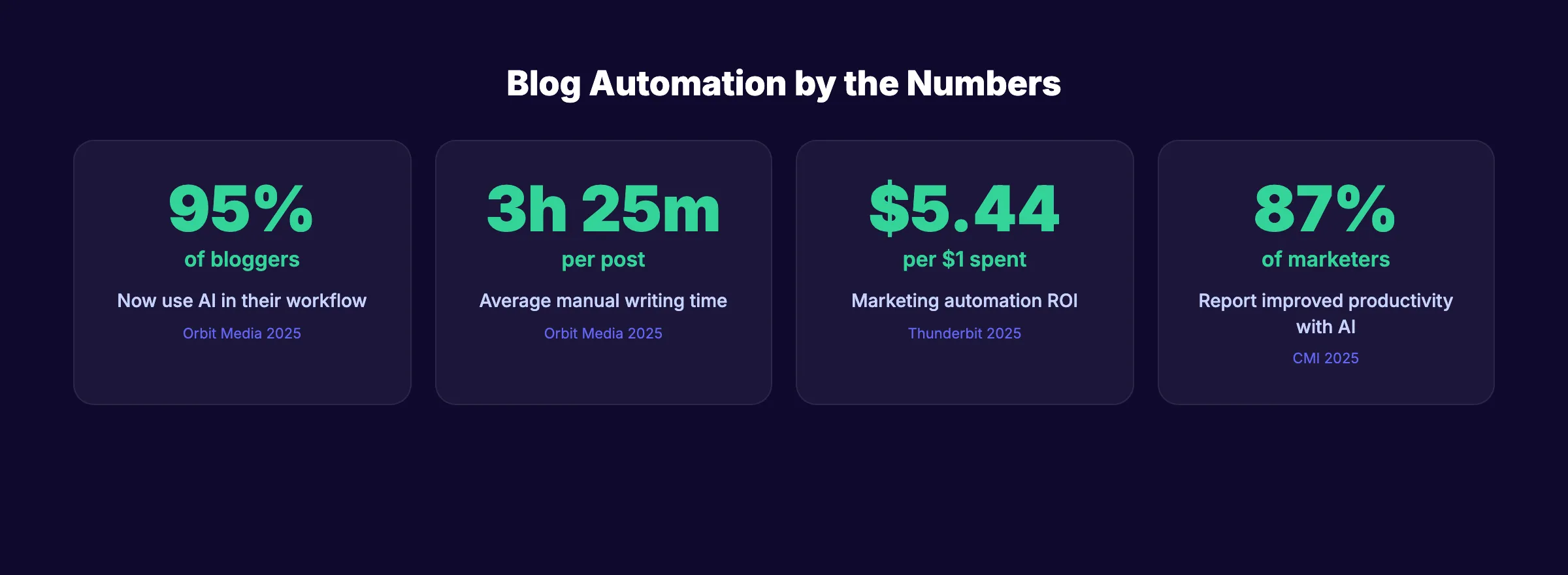
According to Content Marketing Institute’s 2025 research, 87% of marketers using AI report improved productivity and 80% report better operational efficiency. But those gains come from teams that measure results and iterate. Not from teams that automate and walk away.
Set a monthly review cadence. Every 30 days, audit your top 10 and bottom 10 posts. Update the underperformers. Double down on the topics that rank. This is how you measure content marketing ROI in practice.
Why this step matters: Without monitoring, you will not know if your automated posts rank, attract traffic, or generate leads. Publishing 30 articles per month means nothing if none of them appear on Google.
Rank everywhere. Do nothing. Blog SEO, Local SEO, and Social on autopilot. Stacc starts at $99 per month with a $1 trial. Start for $1 →
Step 7: Scale and Refine Your Workflow
Once your 7-step system runs smoothly at your current volume, scaling is straightforward. You have already built the hardest part. The process.
Scaling up looks like this:
- Increase frequency. Move from 8 posts per month to 20, then 30. Each jump should happen only after your quality gate proves stable at the current volume.
- Expand topic clusters. Add new clusters once you dominate your initial 10 to 15 topics. A plumber who owns “water heater” keywords moves into “bathroom remodeling” content.
- Add content types. Supplement blog posts with comparison pages, industry guides, and glossary entries. Different formats capture different search intents.
- Automate distribution further. Connect blog publishing to email sequences, social platforms, and Google Business Profile posts. One article becomes 5 touchpoints.
Common pitfalls at scale:
- Publishing faster than you can review. If your quality gate cannot handle 30 posts per month, slow down. Bad content at scale hurts more than no content at all.
- Ignoring cannibalization. Two posts targeting the same keyword compete with each other. Use your editorial calendar to prevent overlap.
- Forgetting to update old posts. A post from 6 months ago with outdated statistics loses rankings. Schedule quarterly refreshes for your top performers.
Marketing automation delivers $5.44 in revenue for every $1 spent, according to industry data. That 544% ROI compounds when your publishing system improves each month.
Why this step matters: Automation is not a one-time project. It is an ongoing system. The businesses that get the most from automated blog publishing are the ones that treat it as a living process, not a set-and-forget tool.
Results: What to Expect
After completing these 7 steps, here is a realistic timeline:
- Week 1: Publishing pipeline is live. First batch of automated posts goes out.
- Days 30 to 60: Google indexes your new posts. Initial impressions appear in Search Console.
- Days 60 to 90: Early ranking movement on long-tail keywords. Traffic begins to grow.
- Months 3 to 6: Compounding effect kicks in. Posts build authority across topic clusters. Organic traffic grows month over month.
- Month 6+: Your blog becomes a consistent lead generation channel. Each new post stacks on the authority your earlier posts built.
The Associated Press used content automation to go from 300 quarterly earnings reports to 3,700. A 12x increase in output with no additional headcount. Your blog can follow the same principle at a smaller scale.
Troubleshooting
Problem: Scheduled posts do not publish at the set time. Solution: Check your CMS timezone settings. WordPress defaults to UTC, which causes posts to publish hours early or late if your timezone is not configured. Verify under Settings → General → Timezone.
Problem: Automated posts publish without images or broken formatting. Solution: Ensure your publishing pipeline includes a formatting check before scheduling. If using API-based publishing, test with a draft post first. Most formatting issues come from HTML entities or image paths that break during transfer.
Problem: Google is not indexing new posts.
Solution: Submit the URL manually in Google Search Console using the URL Inspection tool. Check that your sitemap updates automatically when new posts publish. Verify your robots.txt does not block the blog directory.
FAQ
What is the best tool to automate blog publishing?
It depends on your automation level. For light automation, WordPress with a scheduling plugin works well. For medium automation, pairing an AI writer with an SEO tool covers most needs. For heavy automation where writing, optimization, and publishing happen in one place, a done-for-you service like Stacc handles the entire pipeline for $99 per month.
Is automated blog content bad for SEO?
Not inherently. Google’s John Mueller confirmed in November 2025 that Google’s systems do not distinguish between AI-generated and human-written content. What matters is helpfulness. Automated content that answers real questions ranks well. Automated content that exists to manipulate rankings does not. The quality gate in Step 4 is what keeps your content on the right side of that line.
How much time does blog publishing automation save?
The average blog post takes 3 hours and 25 minutes to write manually. With medium automation (AI drafts plus human editing), that drops to 30 to 45 minutes per post. At 30 posts per month, that is roughly 80 to 90 hours saved. The savings increase as your workflow matures and requires less manual intervention.
Can I use Zapier to automate blog publishing?
Yes. Zapier connects over 8,000 apps and has facilitated over 81 billion automated tasks. A common workflow triggers when a Google Doc is marked “ready,” then creates a WordPress draft, adds a featured image, and schedules it. For simpler setups, WordPress REST API or CMS-native scheduling may be enough without adding another tool.
How many blog posts per month should I automate?
Start with 8 to 12 posts per month. That gives you enough volume to build topical authority while keeping your quality gate manageable. Once your process stabilizes and your quality remains consistent, scale to 20 to 30 posts per month. The companies ranking on page 1 for competitive keywords typically publish 16 or more posts per month.
Do I need a developer to set up blog automation?
No. Most CMS platforms offer native scheduling. AI writing tools have browser-based interfaces. Distribution tools like Buffer and Zapier use drag-and-drop builders. The only scenario requiring developer involvement is custom API integrations or webhook-based publishing pipelines.
Now you know how to automate blog publishing from strategy through execution. The 7 steps build on each other. Strategy informs your writing pipeline. The writing pipeline feeds your quality gate. The quality gate protects your scheduling system. And monitoring closes the loop.
Which step are you starting with. Defining your strategy, choosing your automation stack, or building your quality gate?
Stop writing. Start ranking. Stacc publishes 30 SEO articles per month for $99. No writers. No agencies. No busywork. Start for $1 →

Written by
Siddharth GangalSiddharth is the founder of theStacc and Arka360, and a graduate of IIT Mandi. He spent years watching great businesses lose organic traffic to competitors who simply published more. So he built a system to fix that. He writes about SEO, content at scale, and the tactics that actually move rankings.
30 SEO blog articles published every month
Keyword-optimized, scheduled, and live on your site. Automatically.
30-day trial · Cancel anytime
theStacc
Stop writing SEO content manually
30 blog articles, 30 GBP posts, and social media content. Published every month. Automatically.
Start Your $1 Trial$1 for 3 days · Cancel anytime