
Blog Post Length for SEO (2026): Strategies, Tactics & Examples
Practical blog post length seo strategies for 2026: step-by-step tactics, real examples, and tools to improve rankings and drive organic traffic.
Every marketer wants a single number. “Just tell me how many words to write.” But blog post length for SEO does not work that way. A 500-word post can outrank a 5,000-word guide. A 3,000-word pillar page can lose to a 1,200-word competitor.
The difference is not length. It is intent match, depth, and structure.
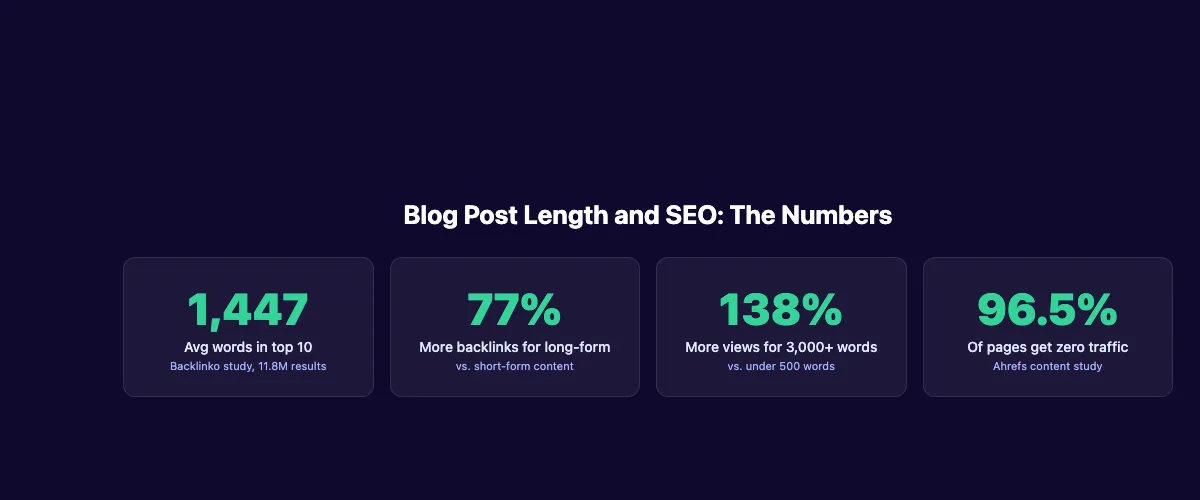
Backlinko analyzed 11.8 million Google search results and found the average first-page result contains 1,447 words. But that number hides more than it reveals. Some queries need 300 words. Others need 4,000.
We publish 3,500+ blog posts across 70+ industries. We have tested every word count range, content type, and format. This guide covers everything we know about finding the right blog post length for any keyword.
Here is what you will learn:
- What the data actually says about word count and rankings
- Why search intent matters more than hitting a target number
- The ideal word count for 7 different content types
- How to find the right length for any keyword in 3 steps
- Which ranking factors longer content actually influences
- When shorter posts outperform long ones
- The most common word count mistakes that hurt rankings
- How to structure long posts so readers stay and Google rewards you
Table of Contents
- Chapter 1: What the Data Says About Blog Post Length
- Chapter 2: Why Search Intent Beats Word Count
- Chapter 3: Ideal Blog Post Length by Content Type
- Chapter 4: How to Find the Right Word Count for Any Keyword
- Chapter 5: The Ranking Factors That Content Length Affects
- Chapter 6: When Shorter Blog Posts Win
- Chapter 7: Word Count Mistakes That Hurt Rankings
- Chapter 8: How to Structure Long Posts for Maximum SEO Impact
- FAQ: Blog Post Length for SEO
Chapter 1: What the Data Says About Blog Post Length {#chapter-1}
Multiple large-scale studies have examined the relationship between word count and Google rankings. The findings agree on one thing: longer content correlates with higher rankings. But correlation is not causation. Here is what the numbers actually tell us.
The Backlinko 11.8 Million Result Study
Backlinko’s analysis of 11.8 million Google search results found that the average word count of a top-10 result is 1,447 words. Pages ranking in positions 1 through 3 tend to be slightly longer than those in positions 8 through 10.
The critical finding: the study found no direct relationship between word count and rankings. Longer pages appear at the top, but word count itself is not the cause. The real drivers are topical completeness, backlink profiles, and user engagement signals.
HubSpot and Semrush Findings
HubSpot’s content analysis found that posts between 2,100 and 2,400 words generate the most organic traffic. Semrush’s State of Content Marketing report confirmed that articles with 3,000+ words receive 138% more page views than posts under 500 words.
These are averages across millions of posts. Your specific keyword might need 800 words or 4,000 words. The data gives us a baseline, not a rule.
Why Correlation Is Not Causation
Google’s Martin Splitt has confirmed that word count is not a ranking factor. Google does not count words on your page and reward you for hitting a threshold.
What happens instead: longer posts tend to cover more subtopics, earn more backlinks, include more internal links, and satisfy search intent more completely. Those factors do influence rankings. The word count is a byproduct, not the cause.
Think of it this way. A 2,000-word post ranks well because it covers the topic thoroughly. It does not rank well because someone typed 2,000 words. An 800-word post that answers the query perfectly will beat a 3,000-word post stuffed with filler every time.
Chapter 2: Why Search Intent Beats Word Count {#chapter-2}
Search intent is the single most important factor in determining blog post length for SEO. A post that matches intent at 600 words will outrank a post that misses intent at 6,000 words. Google measures satisfaction, not syllables.
Match the Query, Not a Number
When someone searches “what is a meta description,” they want a quick, clear answer. A 300-word post with an example beats a 2,500-word essay. When someone searches “how to do keyword research for blog posts,” they expect a detailed walkthrough. A 200-word overview will not satisfy that query.
The question is never “how many words should I write?” The question is “what does this searcher need to feel satisfied?” Learn more about search intent and how it shapes every content decision.
4 Types of Search Intent and Their Ideal Lengths
| Intent Type | What the Searcher Wants | Typical Word Count |
|---|---|---|
| Informational | Learn something specific | 1,000-2,500 words |
| Navigational | Find a specific page or brand | 300-800 words |
| Commercial | Compare options before buying | 1,500-3,000 words |
| Transactional | Complete a purchase or action | 500-1,500 words |
Informational queries require the most depth. The searcher wants to understand a concept, follow a process, or evaluate options. These posts earn the most organic traffic and benefit most from thorough treatment.
Commercial queries demand comparison tables, pros and cons, and specific recommendations. Length varies based on how many options you cover.
Transactional and navigational queries are short by nature. Do not inflate these posts to hit an arbitrary word count.
How Google Measures Content Quality
Google uses multiple signals to evaluate whether your content satisfies the searcher. Dwell time, pogo-sticking (returning to search results), scroll depth, and engagement all factor in. These signals reflect E-E-A-T principles: experience, expertise, authoritativeness, and trustworthiness.
A 1,200-word post where readers stay for 4 minutes signals higher quality than a 3,500-word post where readers leave after 30 seconds. Focus on holding attention, not padding length. Google rewards content that satisfies the query at whatever length that takes.
Spending hours deciding word counts instead of writing? We publish 30 SEO-optimized blog posts per month, each matched to search intent and keyword difficulty. Start for $1 →
Chapter 3: Ideal Blog Post Length by Content Type {#chapter-3}
Different content types serve different purposes. A product comparison needs different treatment than a how-to tutorial. Here are data-backed word count ranges for 7 common blog post formats.
Word Count Ranges by Content Type
| Content Type | Word Count Range | Why This Length Works |
|---|---|---|
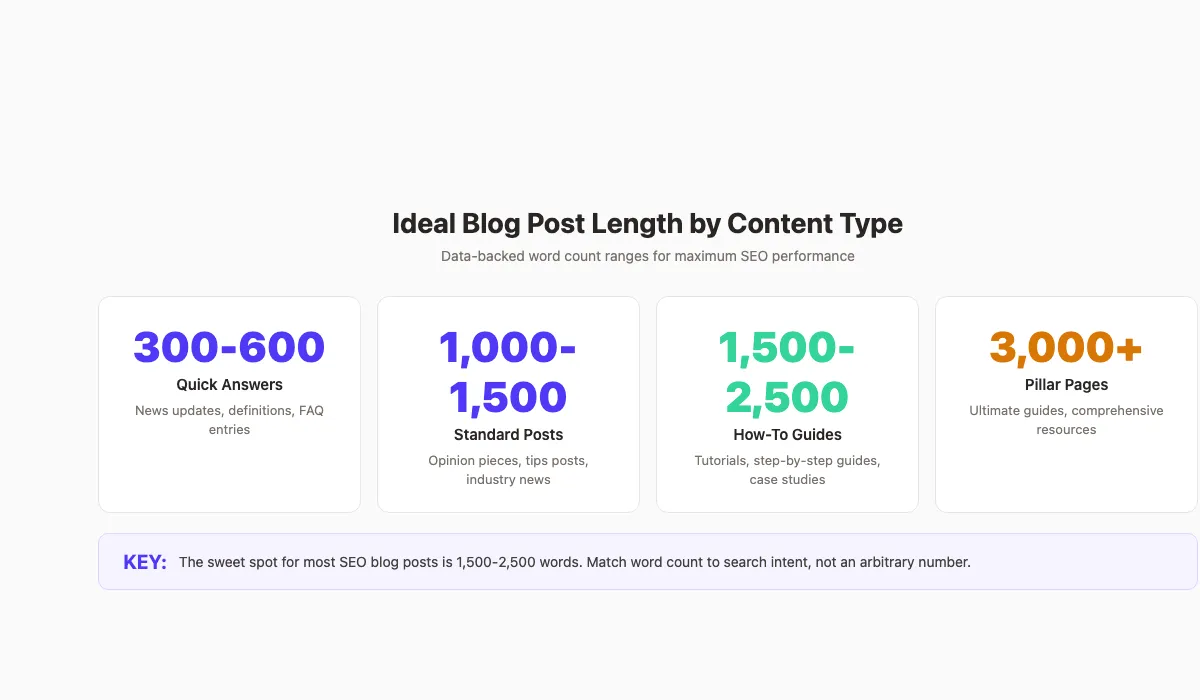
| Quick answers and definitions | 300-600 words | Concise, direct, featured-snippet friendly |
| News and announcements | 400-800 words | Timely information, minimal fluff |
| Standard blog posts | 1,000-1,500 words | Enough depth for moderate topics |
| How-to guides | 1,500-2,500 words | Step-by-step detail with examples |
| List posts and roundups | 2,000-3,500 words | Full coverage of all options |
| Ultimate guides and pillar pages | 3,000-5,000+ words | Exhaustive topic coverage |
| Case studies | 1,200-2,000 words | Data, results, and analysis |
These ranges come from analyzing top-ranking content across thousands of keywords. They are starting points, not fixed rules.
Short-Form Content: Under 1,000 Words
Short posts work for specific scenarios. Definitions, news updates, product announcements, and single-question answers all perform well under 1,000 words. The key is completeness. If you can fully answer the query in 500 words, do not write 1,500.
Short posts also compete well for featured snippets. Google pulls concise, well-structured answers into position zero. A tight 40-60 word paragraph that directly answers a question can win the snippet over a 3,000-word guide.
Long-Form Content: 1,500-2,500 Words
This is the sweet spot for most SEO blog posts. How-to guides, tutorials, comparison posts, and in-depth analyses land here. You have enough room to cover subtopics, include examples, add visuals, and build internal links naturally.
Semrush found that articles in this range generate the highest organic traffic per post. They balance depth with readability. Readers get thorough answers without feeling overwhelmed.
Pillar Pages and Ultimate Guides: 3,000+ Words
Pillar pages anchor entire content clusters. They cover broad topics in full depth and link to spoke articles on specific subtopics. These pages build topical authority and attract backlinks from other sites.
At 3,000+ words, structure matters more than ever. Without clear headers, visuals, and navigation, readers will bounce. Every section needs to earn its place. Cut anything that does not add unique value.
Chapter 4: How to Find the Right Word Count for Any Keyword {#chapter-4}
Stop guessing. For every keyword you target, you can find the ideal word count in about 10 minutes. Here is the 3-step process we use across every industry we publish in.
Step 1: Analyze the Top 10 Results
Search your target keyword in an incognito browser. Open the top 10 organic results. Note the word count of each page. Most SEO tools (Surfer, Semrush, Ahrefs) display this automatically.
Calculate the average and the range. If the top 10 averages 1,800 words with a range of 1,200 to 2,500, you know your target zone. Do not write 500 words for this keyword. Do not write 5,000 either.
This is the starting point for your keyword research process. The SERP tells you exactly what Google considers adequate for that query.
Step 2: Check Content Depth, Not Just Length
Word count alone is misleading. A 2,000-word post filled with generic advice is weaker than a 1,500-word post packed with original data, examples, and frameworks.
Open each top-ranking page and examine:
- How many H2 and H3 sections do they cover?
- Do they include tables, charts, or original visuals?
- Do they cite specific data or studies?
- What subtopics do they address?
- What questions do they leave unanswered?
Build your blog post outline based on depth gaps, not word count gaps. The goal is to cover what competitors miss, not to write more words than they did.
Step 3: Identify Gaps You Can Fill
Every SERP has content gaps. Maybe no one includes a comparison table. Maybe no one addresses a common objection. Maybe no one cites recent data. These gaps are your opportunity.
Finding content gaps gives you a natural word count. If you need 300 extra words to cover a subtopic that no competitor addresses, those are high-value words. If you need to cut 500 words of generic filler that competitors repeat, cut them.
The right word count emerges from the research. You do not pick a number and fill it. You identify what the content needs and write to that standard.
Chapter 5: The Ranking Factors That Content Length Affects {#chapter-5}
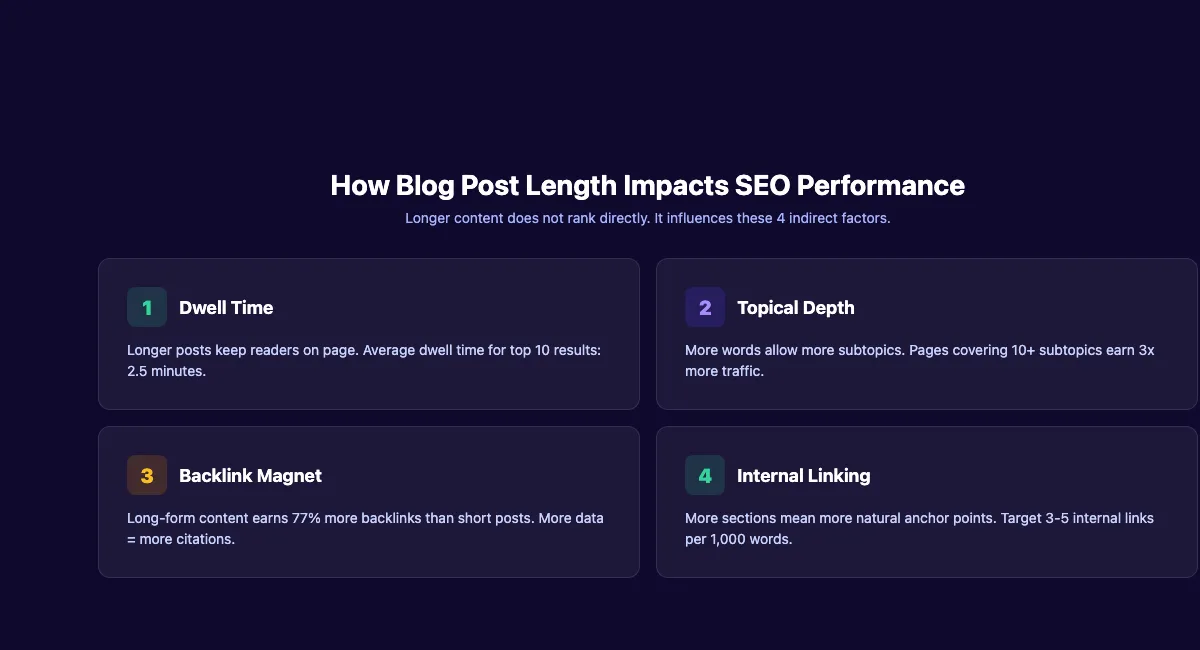
Word count is not a ranking factor. But it influences several signals that are. Understanding these connections helps you decide when length adds value and when it does not.
Dwell Time and Engagement
Longer posts keep readers on the page longer. Average dwell time for top-10 results is approximately 2.5 minutes. A 2,000-word post with strong formatting gives readers enough to engage with.
But length only helps dwell time if the content is good. A padded 3,000-word post will increase bounce rate, not dwell time. Every sentence needs to deliver value. Readers scan. If they see filler, they leave.
Strong on-page SEO includes formatting that encourages scanning: short paragraphs, clear headers, bullet lists, and visual breaks. These elements keep readers moving through the content instead of bouncing.
Topical Coverage and Completeness
Google’s helpful content system rewards pages that demonstrate deep topic knowledge. Longer posts naturally cover more subtopics. A 2,500-word guide on blog post structure can address headers, paragraphs, images, CTAs, and internal linking. A 500-word post cannot.
This is where topical authority compounds. When your post covers 10 subtopics and links to dedicated spoke articles for each one, Google sees depth and expertise. That signals authority more than any word count target.
Backlink Attraction
Long-form content earns 77% more backlinks than short-form content. The reason is straightforward: longer posts contain more citable data points, more original insights, and more reference-worthy sections.
A 3,000-word ultimate guide with original statistics, comparison tables, and step-by-step frameworks gives other writers reasons to link. A 500-word overview gives them nothing to cite. If building backlinks is a priority, longer content with original data is the play.
Building topical authority takes consistent publishing. We write and publish 30 blog posts per month for businesses in 70+ industries. Every post is optimized for search intent and keyword targets. Start for $1 →
Chapter 6: When Shorter Blog Posts Win {#chapter-6}
Long-form content gets all the attention in SEO discussions. But shorter posts outperform in several important scenarios. Knowing when to write less is just as valuable as knowing when to write more.
Quick-Answer Queries
“What is domain authority?” “How many pixels is an Open Graph image?” “What does 301 redirect mean?”
These queries need direct answers. 300 to 600 words, structured clearly, with one definitive response. Google often pulls these into featured snippets and AI Overviews. The best-performing pages for quick-answer queries are concise and scannable.
Writing 2,000 words for a quick-answer query will hurt your performance. Readers will bounce when they cannot find the answer fast. Google interprets that bounce as a negative signal.
News and Trending Topics
Timeliness beats thoroughness for news content. A 500-word breaking news post published today will outrank a 3,000-word analysis published next week. Speed matters more than depth for time-sensitive queries.
Once the news cycle passes, you can update and expand the post. But the initial version should prioritize speed and accuracy over word count. This approach helps increase organic traffic for trending terms.
Product and Category Pages
Product reviews, feature pages, and category descriptions work best at 800 to 1,500 words. Enough to cover specifications, benefits, and use cases. Not so much that shoppers lose patience before they can buy.
The exception: comparison and “best of” pages. These perform better at 2,000 to 4,000 words because readers expect thorough coverage of multiple options.
Chapter 7: Word Count Mistakes That Hurt Rankings {#chapter-7}
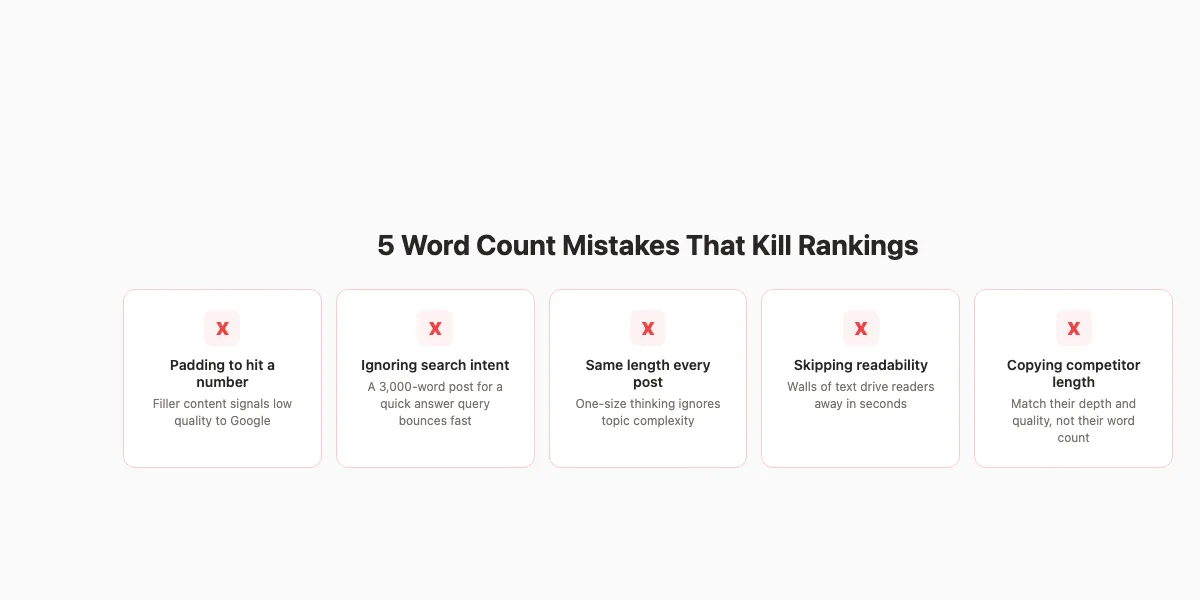
Getting blog post length wrong costs traffic. These are the 5 most common mistakes we see when auditing client sites. Every one of them is fixable with a content audit.
Padding Content to Hit a Number
This is the most damaging mistake. Writers hear “write 2,000 words” and pad their content with filler paragraphs, redundant examples, and unnecessary backstory. Google’s helpful content system specifically targets this pattern.
Signs of padding:
- Repeating the same point in different words
- Including obvious definitions readers already know
- Adding “history of” sections that nobody searched for
- Using 3 examples when 1 would suffice
If a section does not answer a question the reader has, cut it. Every paragraph should pass the test: “Would the post lose value without this?”
Ignoring Readability for Length
A 3,000-word wall of text performs worse than a 1,500-word post with clear formatting. Long posts need more structure, not less. Readers scan before they read. If they see dense paragraphs with no visual relief, they leave.
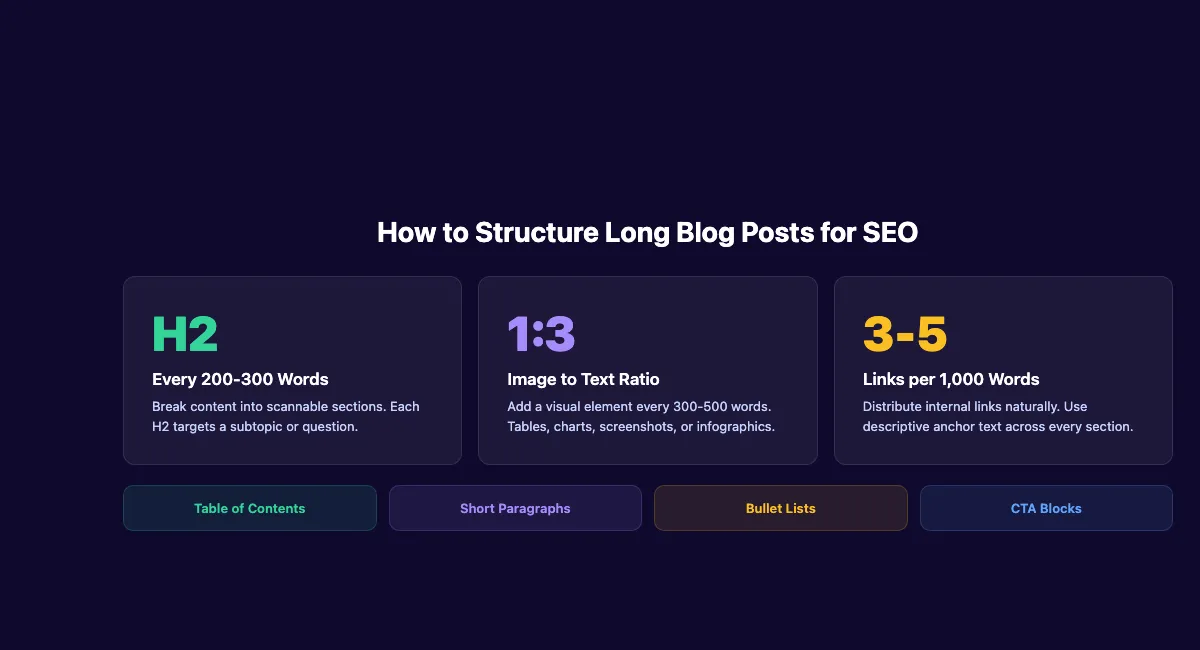
Use headers every 200 to 300 words. Limit paragraphs to 2 to 3 sentences. Add tables, lists, and images to break up text. Write blog headlines that tell readers exactly what each section covers.
One-Size-Fits-All Thinking
Publishing every blog post at 1,500 words regardless of topic is a ranking killer. A definition post needs 400 words. A how-to guide needs 2,000. A pillar page needs 3,500. Applying one word count to every post means most of your content is either too thin or too padded.
Build your content calendar with target word counts per post, based on SERP analysis. Not a blanket number for the entire blog.
Copying Competitor Word Counts Without Their Quality
Matching a competitor’s 2,500 words means nothing if their content includes original research, expert quotes, and custom visuals while yours contains generic advice. Length without substance does not rank.
Focus on matching or exceeding their content depth. If they cite 5 studies, cite 7. If they cover 8 subtopics, cover 10. That naturally produces the right word count.
Never Updating Old Content
Blog posts decay. A 2,500-word post from 2022 with outdated statistics and broken links will lose rankings to a fresh 1,500-word post with current data. Updating old blog posts is one of the highest-ROI activities in SEO.
Review your top-performing posts every 6 months. Add new data, remove outdated sections, and adjust the word count to match current SERP standards. Sometimes that means adding 500 words. Sometimes it means cutting 800.
Stop guessing about word counts. We handle blog strategy, writing, and publishing for $99 per month. 30 articles, every one matched to search intent. Start for $1 →
Chapter 8: How to Structure Long Blog Posts for Maximum SEO Impact {#chapter-8}
A 3,000-word post without structure is a 3,000-word bounce. Formatting determines whether readers stay and engage or leave within seconds. Here is how to structure long content so it performs.
Headers Every 200-300 Words
Every H2 and H3 creates a scanning anchor. Readers jump to the section they need. Google uses headers to understand page structure and generate featured snippets.
Rules for headers in long posts:
- Place an H2 every 200 to 300 words
- Use H3 sections under each H2 for subtopics
- Include the primary or secondary keyword in at least 2 H2 tags
- Write descriptive headers, not clever ones (“How to Find Keyword Difficulty” beats “The Hard Truth”)
Strong blog post structure is the difference between a post that ranks and a post that gets ignored.
Visual Breaks and Formatting
For posts over 1,500 words, add a visual element every 300 to 500 words. This includes tables, comparison charts, checklists, screenshots, infographics, and callout boxes.
Formatting elements that improve long-post performance:
| Element | Best For | Frequency |
|---|---|---|
| Tables | Comparisons, data, specifications | 1-2 per post |
| Bullet lists | Steps, features, criteria | Every 300-500 words |
| Blockquotes | Key stats, expert quotes, CTAs | Every 800-1,000 words |
| Images | Screenshots, charts, infographics | Every 500 words |
| Checklists | Action items, audits | 1-2 per post |
These elements reduce cognitive load. They give readers permission to scan. And they create natural stopping points that increase time on page.
Internal Linking Strategy for Long Posts
Long blog posts are internal linking goldmines. Every section introduces a subtopic that can link to a dedicated spoke article. Target 3 to 5 internal links per 1,000 words.
Place links where they add value, not where they disrupt flow. The best anchor text describes what the reader will find on the linked page. “Learn more about keyword research for blog posts” is better than “click here.”
For posts over 2,500 words, include a table of contents with jump links at the top. This helps readers move through and gives Google additional page structure signals.
Add a Table of Contents for Posts Over 1,500 Words
A table of contents serves 2 purposes. First, it helps readers find the section they need. Second, it generates sitelinks in Google search results, giving your listing more real estate on the SERP.
Format your table of contents as a linked list of H2 sections. Place it after the introduction and before the first chapter. For pillar pages, consider a sticky sidebar table of contents that follows the reader as they scroll.
FAQ: Blog Post Length for SEO {#faq}
How many words should a blog post be for SEO?
There is no universal number. The best blog post length depends on search intent, content type, and competition. For most informational blog posts, 1,500 to 2,500 words performs best. How-to guides need 1,500 to 2,500 words. Pillar pages need 3,000 or more. Quick-answer posts can rank at 300 to 600 words. Analyze the top 10 results for your keyword and match their depth.
Does Google have a minimum word count for ranking?
No. Google has confirmed that word count is not a ranking factor. There is no minimum or maximum number of words required to rank. Google evaluates whether your content satisfies the search query, not how many words you used. A 400-word post that fully answers a question can outrank a 4,000-word post that misses the point.
Is long-form content better for SEO than short-form?
Not always. Long-form content (2,000+ words) earns more backlinks and covers more subtopics. That gives it an advantage for competitive informational queries. But short-form content wins for quick-answer queries, news, and transactional searches. The best approach is matching content length to search intent, not defaulting to long-form for everything.
How often should I update blog post length?
Review your top-performing posts every 6 months. Check whether the SERP has changed, whether competitors have added depth, and whether your data is still current. Adjust word count based on what the updated SERP analysis shows. Sometimes a post needs 500 more words. Other times it needs trimming.
Should every blog post target 2,000 words?
No. Applying one word count to every post is one of the most common SEO mistakes. Build target word counts into your content calendar based on individual keyword analysis. A definition post might need 400 words. A comparison guide might need 3,000. Let the SERP data drive the decision.
Does blog post length affect featured snippets?
Featured snippet paragraphs typically contain 40 to 60 words. But the page that wins the snippet is usually a longer post (1,500+ words) with a concise, well-formatted answer section. Length helps you rank on page 1. The snippet itself pulls from a short, specific passage within your longer post.
Your Next Steps
Blog post length for SEO is not about hitting a number. It is about matching search intent, covering the topic completely, and formatting for readability.
Start with SERP analysis. Let the data tell you how much depth your keyword requires. Write to that standard. Structure every post for scanning. And review your content every 6 months to keep it competitive.
Get 30 SEO blog posts published every month. Every post is matched to search intent, optimized for rankings, and structured for readability. No writers to manage. No guessing about word counts. Start for $1 →
Related Tools & Resources
Free SEO Tools:
Best Lists:

Written by
Siddharth GangalSiddharth is the founder of theStacc and Arka360, and a graduate of IIT Mandi. He spent years watching great businesses lose organic traffic to competitors who simply published more. So he built a system to fix that. He writes about SEO, content at scale, and the tactics that actually move rankings.
30 SEO blog articles published every month
Keyword-optimized, scheduled, and live on your site. Automatically.
30-day trial · Cancel anytime
theStacc
Stop writing SEO content manually
30 blog articles, 30 GBP posts, and social media content. Published every month. Automatically.
Start Your $1 Trial$1 for 3 days · Cancel anytime