
How to Create a Blog for Your Business (2026)
8 steps to create a blog for your business that generates leads and organic traffic. Platform setup, structure, content planning, and promotion. 2026.
Companies with blogs generate 67% more leads per month than companies without one. That stat has held since HubSpot first published it, and the gap keeps widening.
Yet most small businesses either have no blog or publish so rarely that Google treats them as abandoned. One post in January. Another in April. Nothing in between.
This guide gives you 8 steps to create a blog for your business that drives organic traffic and converts visitors into leads. These are the same steps our publishing clients follow to go from zero to consistent organic visitors within 90 days.
We publish 3,500+ blogs across 70+ industries. The pattern is clear: businesses that follow a structured launch process see results 3 times faster than those who wing it.
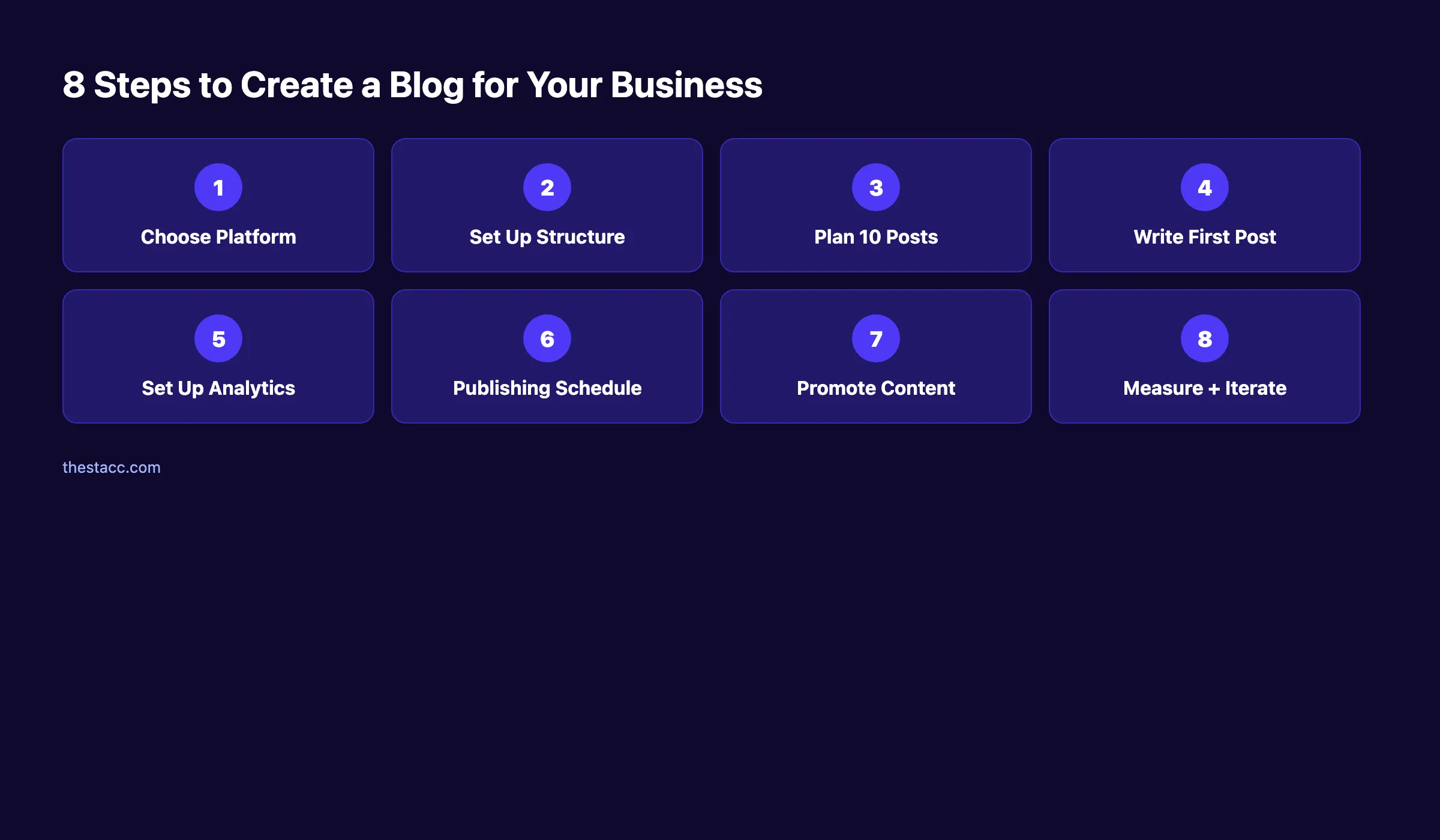
Here is what you will learn:
- How to pick the right platform (and why most businesses choose wrong)
- The URL structure and categories that help Google rank your posts
- How to plan your first 10 posts using keyword clusters
- The exact setup for Google Search Console and Analytics
- A publishing schedule that compounds traffic month over month
- How to promote posts before Google starts ranking them
Time required: 4 to 6 hours for initial setup Difficulty: Beginner What you will need: A domain name, hosting, and a Google account
Step 1: Choose Your Blogging Platform
Your platform determines how easy it is to publish, optimize, and scale. Pick the wrong one and you will fight your own website every time you hit publish.
The right choice depends on your business type, technical comfort, and growth plans. Here is how the top options compare.
WordPress powers 43% of the web. It remains the default for most businesses. Its plugin ecosystem includes over 60,000 extensions. SEO plugins like Yoast and RankMath make on-page optimization simple. The tradeoff is maintenance. You need hosting, updates, and security patches.
Ghost is built for content-first businesses. It loads fast out of the box. Built-in newsletters and membership features make it ideal for companies where the blog is the primary marketing channel.
Webflow offers design freedom but treats blogging as a secondary feature. The content editor is slow for long-form writing. Choose Webflow only if visual design matters more than publishing speed.
Shopify includes a blog module for ecommerce brands. It works for product-adjacent content. The SEO controls are limited compared to WordPress or Ghost.
Squarespace handles visual portfolios well. Its blogging features are basic. You will outgrow it fast if you plan to publish more than 4 posts per month.
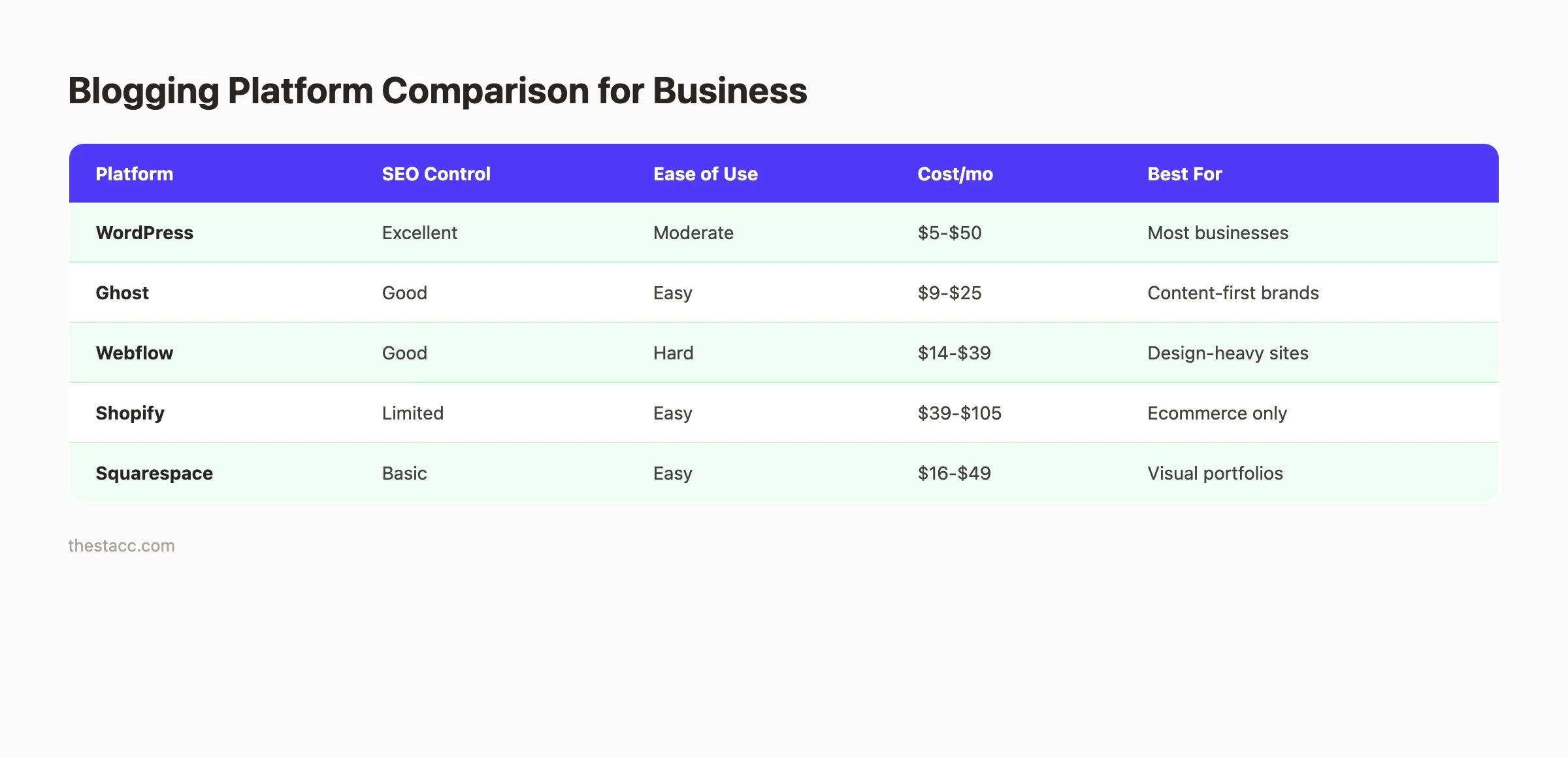
| Platform | SEO Control | Ease of Use | Monthly Cost | Best For |
|---|---|---|---|---|
| WordPress | Excellent | Moderate | $5 to $50 | Most businesses |
| Ghost | Good | Easy | $9 to $25 | Content-first brands |
| Webflow | Good | Hard | $14 to $39 | Design-heavy sites |
| Shopify | Limited | Easy | $39 to $105 | Ecommerce only |
| Squarespace | Basic | Easy | $16 to $49 | Visual portfolios |
Our recommendation: WordPress with managed hosting (Cloudways or WP Engine) for most businesses. Ghost if you plan to publish daily.
Why this step matters: Switching platforms later means rebuilding every page. Migrating a 50-post blog takes 20 or more hours. Get this right once.
Pro tip: If you already have a website on any platform, add a /blog subdirectory rather than a subdomain. Subdirectories pass domain authority to your blog posts. Subdomains do not.
For a broader look at launching your blog for search traffic, read our guide on starting a blog for organic traffic.
Step 2: Set Up Your Blog Structure
Structure determines whether Google can crawl, index, and rank your posts. A messy blog confuses both search engines and readers.
URL format. Use /blog/post-title-here. Keep URLs short and descriptive. Avoid dates in URLs. A post at /blog/2026/03/27/my-post looks outdated the moment the year changes. Clean URLs also earn more clicks in search results.
Categories. Create 3 to 5 categories that match your main topic areas. Each category should map to a keyword cluster. For a marketing agency, categories might be SEO, Content Strategy, Local Marketing, and Analytics. Assign each post to only 1 category.
Author pages. Set up author profiles with real names and headshots. Google evaluates E-E-A-T (Experience, Expertise, Authoritativeness, Trust). An anonymous blog signals low credibility. Real author profiles build trust with readers and search engines.
Blog index page. Display your 10 most recent posts with featured images, titles, and excerpts. Add category filters so readers can browse by topic.
Navigation. Add your blog to the main site navigation. A blog buried 3 clicks deep gets less traffic and less crawl attention from Google.
Why this step matters: Structure is permanent. Changing URLs after Google indexes your posts creates broken links and lost rankings. For a full walkthrough on structuring posts, read our guide on blog post structure for SEO.
Pro tip: Install an SEO plugin on day 1. Yoast or RankMath for WordPress. Both let you set custom titles, meta descriptions, and canonical URLs for every post. You can also check your setup with our free on-page SEO checker.
Step 3: Plan Your First 10 Posts
Do not write randomly. Plan 10 posts before you write a single word. A planned cluster signals topical authority to Google 3 times faster than 10 unrelated articles.
Start with keyword research. Use a free tool like Google Keyword Planner, Ubersuggest, or AnswerThePublic. Find 10 keywords your target customers actually search for. Focus on long-tail keywords with clear intent. “How to fix a leaky faucet” beats “plumbing” every time.
Group keywords into clusters. Pick 1 pillar topic and 9 supporting posts. The pillar post targets a broad keyword. Supporting posts target specific questions within that topic. Link every supporting post back to the pillar. This is how you build topical authority.
Map each post to a search intent. Every keyword has an intent: informational, transactional, or navigational. Match your post format to the intent.
| Search Intent | Keyword Example | Post Format |
|---|---|---|
| Informational | ”how to unclog a drain” | Step-by-step guide |
| Commercial | ”best drain cleaners” | List post with reviews |
| Transactional | ”plumber near me” | Service page |
| Navigational | ”Roto-Rooter reviews” | Review or comparison |
For a detailed walkthrough, read our keyword research for blog posts guide. You can also learn how to create a topical map for SEO to visualize your content clusters.
Why this step matters: Random publishing wastes time and budget. Businesses that plan content clusters rank faster because Google sees them as authorities on a topic. A content calendar keeps you on track.
Pro tip: Check what your competitors rank for before choosing topics. Their top posts reveal the keywords your audience already searches for.
Step 4: Write Your First Post
Pick the post from your list with the clearest search intent. Write it first. Follow SEO best practices from the start.
Title. Include your primary keyword. Keep it under 60 characters. Front-load the keyword when possible. A strong headline makes the difference between a click and a scroll-past. Use our free headline analyzer to test your titles.
Meta description. Write 145 to 155 characters. Include the keyword and a reason to click. Think of it as an ad for your post. Our guide on writing meta descriptions covers the exact formula.
Headings. Use 1 H1 (your title), then H2s for major sections and H3s for subsections. Include keyword variations in at least 2 headings. Never skip heading levels.
Body copy. Write for humans first. Use short sentences. Break text into 2 to 3 sentence paragraphs. Add images, screenshots, or charts every 300 to 500 words. Posts ranking on page 1 average 1,800 to 2,200 words, according to Backlinko. Our guide on blog post length for SEO has the full data.
Internal links. Link to at least 2 other pages on your site. Even if you only have a homepage and services page, link to them. Internal links pass authority and help Google crawl your site.
Images. Compress every image below 100KB. Add descriptive alt text with your keyword. Learn more in our blog image optimization guide.
Call to action. End every post with a clear next step. Tell the reader exactly what to do. A single CTA outperforms multiple options.
For a complete writing process, read how to write SEO blog posts and our SEO content writing guide.
Why this step matters: Your first post sets the quality bar. Google evaluates your entire site based on its weakest content. One bad post drags down the rest.
Your blog, published on autopilot. Stacc plans, writes, and publishes SEO blog posts for your business every week. No writers to manage. No deadlines to miss. Start for $1 →
Step 5: Set Up Google Search Console and Analytics
You cannot improve what you do not measure. Set up both tools before you promote a single post.
Google Search Console (GSC). Go to search.google.com/search-console. Add your domain. Verify ownership via DNS record. Submit your sitemap at yourdomain.com/sitemap.xml. GSC shows which keywords your site appears for, your average position, and any indexing errors.
For a full walkthrough, read our Google Search Console guide. You should also submit your website to Google and create an XML sitemap to speed up indexing.
Google Analytics 4 (GA4). Create a property at analytics.google.com. Install the tracking code via Google Tag Manager or paste it directly into your site header. Set up key events: page views, scroll depth, and outbound clicks.
Link them together. Inside GSC, go to Settings and link your GA4 property. This lets you see search performance data inside your Analytics reports.
- Google Search Console verified
- Sitemap submitted
- Google Analytics 4 installed
- Key events configured
- GSC linked to GA4
Why this step matters: Without tracking, you are guessing. GSC data takes 48 to 72 hours to appear. Set it up now so data is waiting when you need it.
Pro tip: Use our free SEO audit tool to check your site for technical issues before publishing your first post.
Step 6: Create a Publishing Schedule
Consistency matters more than volume. Businesses that publish weekly see up to 200% more organic traffic than those posting monthly.
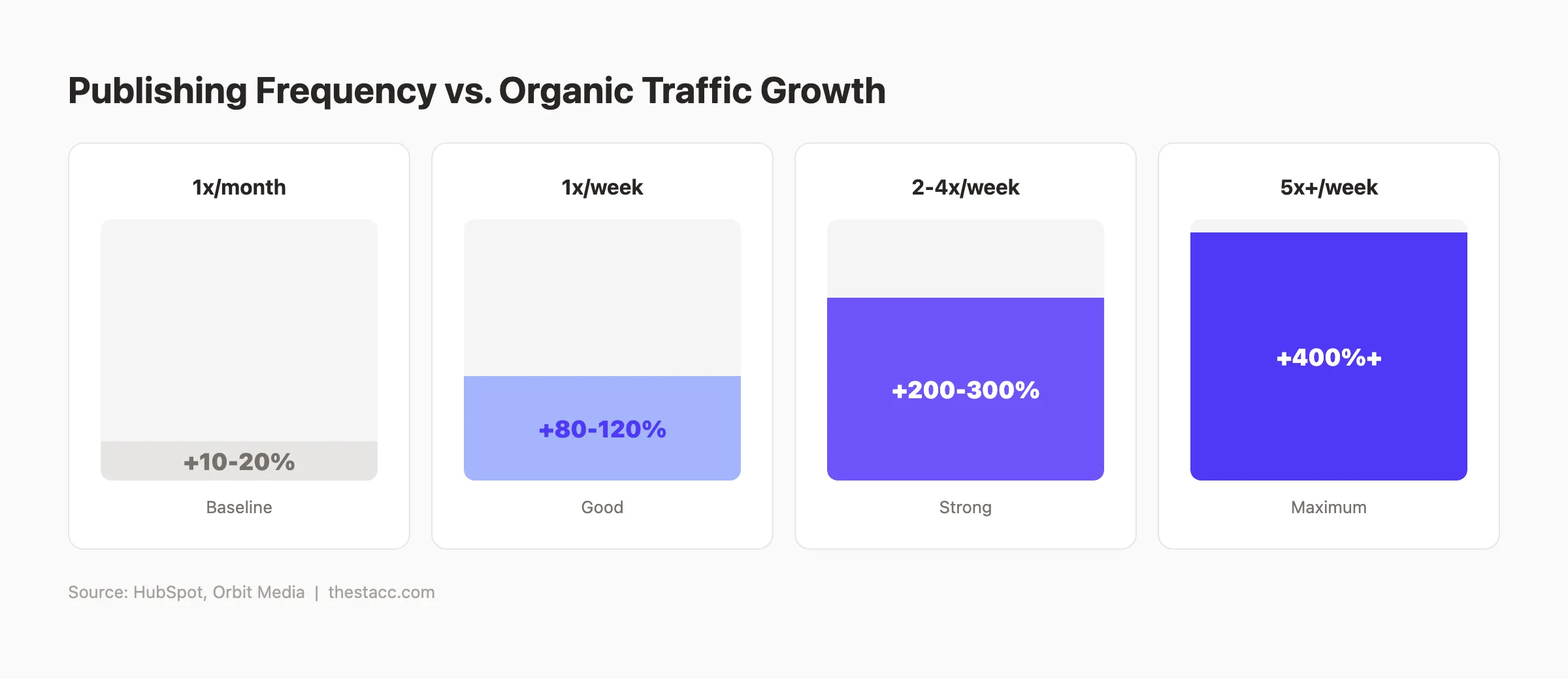
Pick a frequency you can maintain. 1 post per week is the minimum for growth. 2 to 4 posts per week accelerates results significantly. B2C companies publishing 11 or more posts monthly receive 4 times more leads than those posting 4 to 5 times.
Set a specific day and time. Tuesday and Wednesday mornings see the highest engagement for B2B blogs. Pick a day, block the time, and treat it like a meeting you cannot cancel.
Batch your writing. Write 4 posts in 1 sitting instead of 1 post per week. Batching cuts total writing time by 30% because you stay in a flow state.
Build a pipeline. At any given time, have 3 posts in draft, 2 in editing, and 1 scheduled. This buffer prevents gaps when life gets busy.
| Publishing Frequency | Monthly Posts | Expected Traffic Growth | Lead Impact |
|---|---|---|---|
| Monthly | 1 | Baseline | Minimal |
| Weekly | 4 | +80% to 120% | Noticeable |
| 2 to 4x per week | 8 to 16 | +200% to 300% | Strong |
| Daily | 20 to 30 | +400%+ | Maximum |
The gap between monthly and weekly publishing is massive. That is not an opinion. The data confirms it across every industry we publish for.
Why this step matters: Google rewards fresh content. A blog that publishes consistently earns crawl priority over one that publishes in bursts. Our guide on creating a content calendar for SEO walks through the exact planning process.
Step 7: Promote Your First Posts
Publishing is half the job. Promotion puts your content in front of readers before Google starts ranking it.
Share on social media. Post on LinkedIn, X, and any platform where your audience spends time. Repurpose your post into 3 to 5 social snippets. Pull out a stat, a quote, or a key takeaway for each snippet. Our guide on repurposing blog content for social media covers this in detail.
Send an email. If you have an email list, send your post to it. Even a list of 50 subscribers generates initial traffic and engagement signals. Email traffic delivers 2 times higher engagement than social traffic.
Post in communities. Share in relevant Reddit threads, Facebook groups, Slack communities, or industry forums. Add genuine value to the discussion. Do not just drop a link and leave.
Repurpose into other formats. Turn your post into a LinkedIn carousel, a short video, or an infographic. Each format reaches a different audience segment.
Build backlinks early. Reach out to related blogs, business partners, or local directories. One quality backlink from a relevant site outperforms 20 links from random directories.
Why this step matters: New blogs have zero domain authority. Promotion generates the initial traffic and backlinks that tell Google your content deserves to rank. Learn more about growing traffic in our increase organic traffic guide.
Skip the setup. Start publishing this week. Stacc handles your entire blog from keyword research to published posts on autopilot. No writers to hire. No plugins to configure. Start for $1 →
Step 8: Measure Results and Plan Month 2
After 30 days, review your data and adjust. Here is what to look at.
Google Search Console. Check Impressions, Clicks, and Average Position for each post. If a post gets impressions but few clicks, rewrite the title and meta description. If it gets no impressions, the keyword may be too competitive.
Google Analytics 4. Look at page views, average engagement time, and scroll depth. If readers leave within 10 seconds, your intro needs work. If they scroll 80% but do not convert, add a stronger CTA.
Keyword rankings. Track your target keywords in GSC or a paid tool like Ahrefs. Expect to see movement after 4 to 8 weeks for low-competition keywords.
Plan month 2. Double down on what worked. If 1 post got 3 times more traffic than the others, write 3 more posts in that topic cluster. Update any post that ranked on page 2. A few internal links and 200 extra words can push it to page 1.
Run a content audit. Even with just 4 to 8 posts, review which topics earned impressions and which did not. Our content audit guide shows you the exact process.
- Review GSC data (impressions, clicks, position)
- Check GA4 engagement metrics
- Identify top-performing post
- Plan 4 to 8 new posts for month 2
- Update any post on page 2
Why this step matters: Month 1 gives you a baseline. Month 2 is where you make data-driven decisions that compound over time. For a deeper look at tracking content performance, read our guide on measuring content ROI.
Results: What to Expect
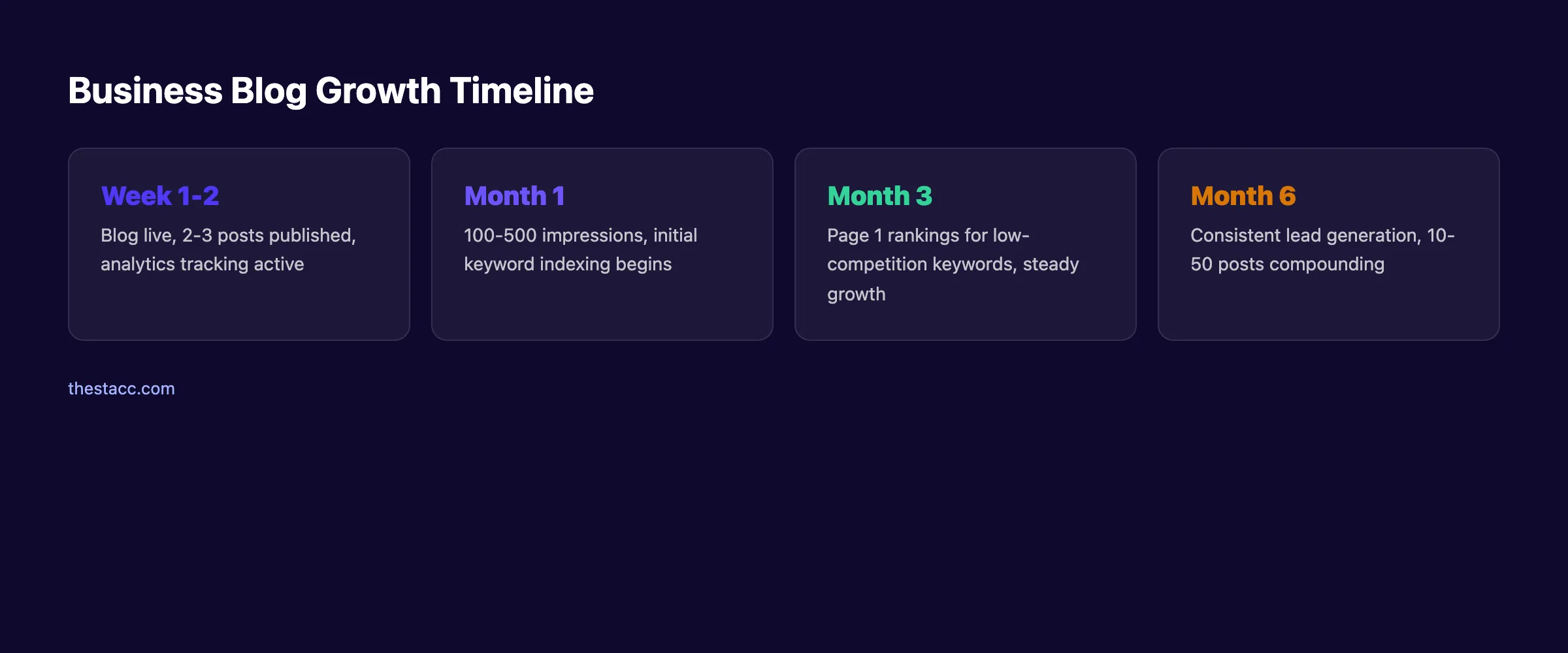
After completing these 8 steps, here is a realistic timeline:
- Week 1 to 2: Blog live, first 2 to 3 posts published, analytics tracking active
- Month 1: 100 to 500 organic impressions, initial keyword indexing
- Month 3: First page 1 rankings for low-competition keywords, steady traffic growth
- Month 6: Consistent lead generation from organic search, 10 to 50 posts published
Businesses that blog consistently generate 126% more leads than those that do not. The compounding effect is real. Each post is a permanent asset that works for years.
The exception is highly competitive industries. If you sell insurance or legal services, expect rankings to take 6 to 12 months for head terms. Start with long-tail keywords and build authority from there.
Troubleshooting
Problem: Google is not indexing my posts.
Fix: Submit each URL manually in Google Search Console using the URL Inspection tool. Confirm your sitemap is submitted. Check that your robots.txt file does not block the /blog/ path. Read our guide on optimizing robots.txt for details.
Problem: Posts get impressions but zero clicks. Fix: Your title or meta description is not compelling enough. Rewrite both. Include a number, a benefit, or a year. Test your titles with our headline analyzer.
Problem: Traffic comes in but nobody converts. Fix: Add a clear CTA above the fold and after every major section. Use inline CTAs, not just one at the bottom. Make the next step obvious.
Frequently Asked Questions
How much does it cost to start a business blog?
A WordPress blog costs $5 to $50 per month for hosting. A domain runs $10 to $15 per year. Free themes work fine for the first year. The real cost is time. Writing 1 post per week takes 3 to 4 hours. Over a year, that is 150 to 200 hours. Services like Stacc handle the entire process for $99 per month.
How often should a business blog post?
At minimum, once per week. Businesses publishing 2 to 4 times per week see 200% to 300% more traffic growth. B2C companies publishing 11 or more times monthly generate 4 times more leads. The best frequency is the one you can sustain without gaps.
How long does it take for a business blog to generate traffic?
Expect 60 to 90 days for initial ranking movement on low-competition keywords. Meaningful traffic typically arrives by month 3. High-competition keywords can take 6 to 12 months. Consistent publishing accelerates the timeline because Google crawls active sites more frequently.
Do I need to hire a writer for my business blog?
Not necessarily. Many business owners write their own posts in the first months. The tradeoff is time. A 2,000-word blog post takes 3 to 4 hours to research, write, and optimize. Freelance writers cost $80 to $250 per article. Stacc publishes 30 SEO-optimized posts per month for $99 total.
What should a business blog write about?
Write about what your customers search for. Start with their most common questions. Use keyword research to validate which topics have search volume. Every post should solve a specific problem or answer a specific question. Avoid writing about company news unless it directly helps your customers.
Is blogging still worth it in 2026?
Yes. 90% of businesses now have a blog. Blogs drive 55% more website traffic on average. Organic search still delivers the highest close rates at 14.6% compared to 1.7% for outbound leads. The businesses skipping blogging are handing traffic to competitors who publish consistently.
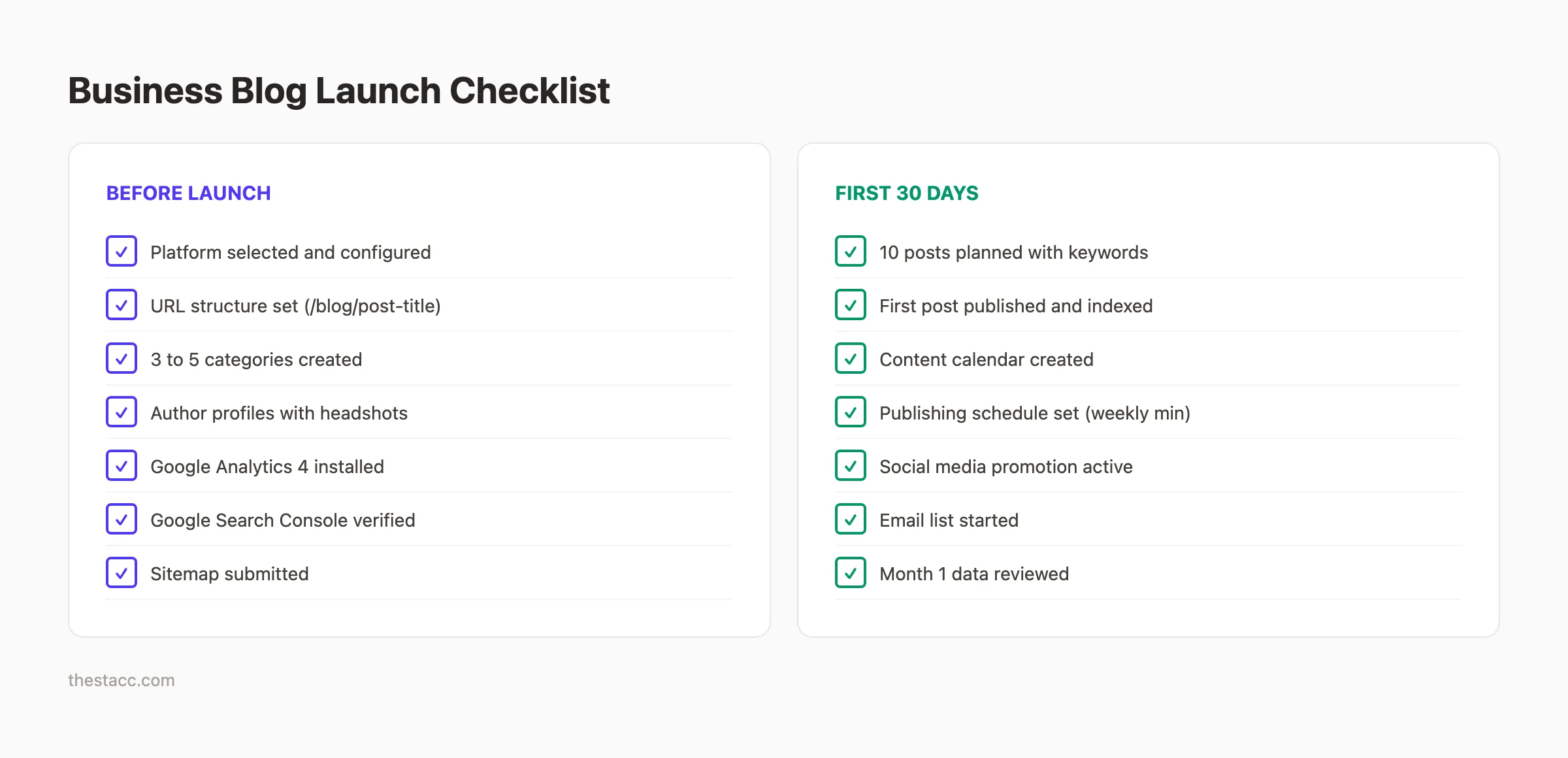
Now you know how to create a blog for your business from scratch. You have a platform, a structure, a content plan, and a measurement system.
The businesses seeing the best results from blogging are not the ones with the best writers. They are the ones that publish consistently. Every week, every month, without gaps.
Which step are you going to start with: choosing your platform or planning your first 10 posts?
Stop planning. Start publishing. Stacc handles your entire blog on autopilot. 30 SEO-optimized posts per month. No writers. No deadlines. No guesswork. Start for $1 →

Written by
Siddharth GangalSiddharth is the founder of theStacc and Arka360, and a graduate of IIT Mandi. He spent years watching great businesses lose organic traffic to competitors who simply published more. So he built a system to fix that. He writes about SEO, content at scale, and the tactics that actually move rankings.
30 SEO blog articles published every month
Keyword-optimized, scheduled, and live on your site. Automatically.
30-day trial · Cancel anytime
theStacc
Stop writing SEO content manually
30 blog articles, 30 GBP posts, and social media content. Published every month. Automatically.
Start Your $1 Trial$1 for 3 days · Cancel anytime