
How to Repurpose Blog Content for Social Media
Repurpose blog content for social media in 8 steps. Turn one post into 10+ platform-native updates for LinkedIn, X, and Instagram. Updated March 2026.
94% of marketers already repurpose content. The ones who do it systematically produce 3 times more output without increasing production time. Yet most businesses publish a blog post, share one link on social media, and move on. That single share reaches a fraction of the audience. The rest of the blog’s value goes to waste.
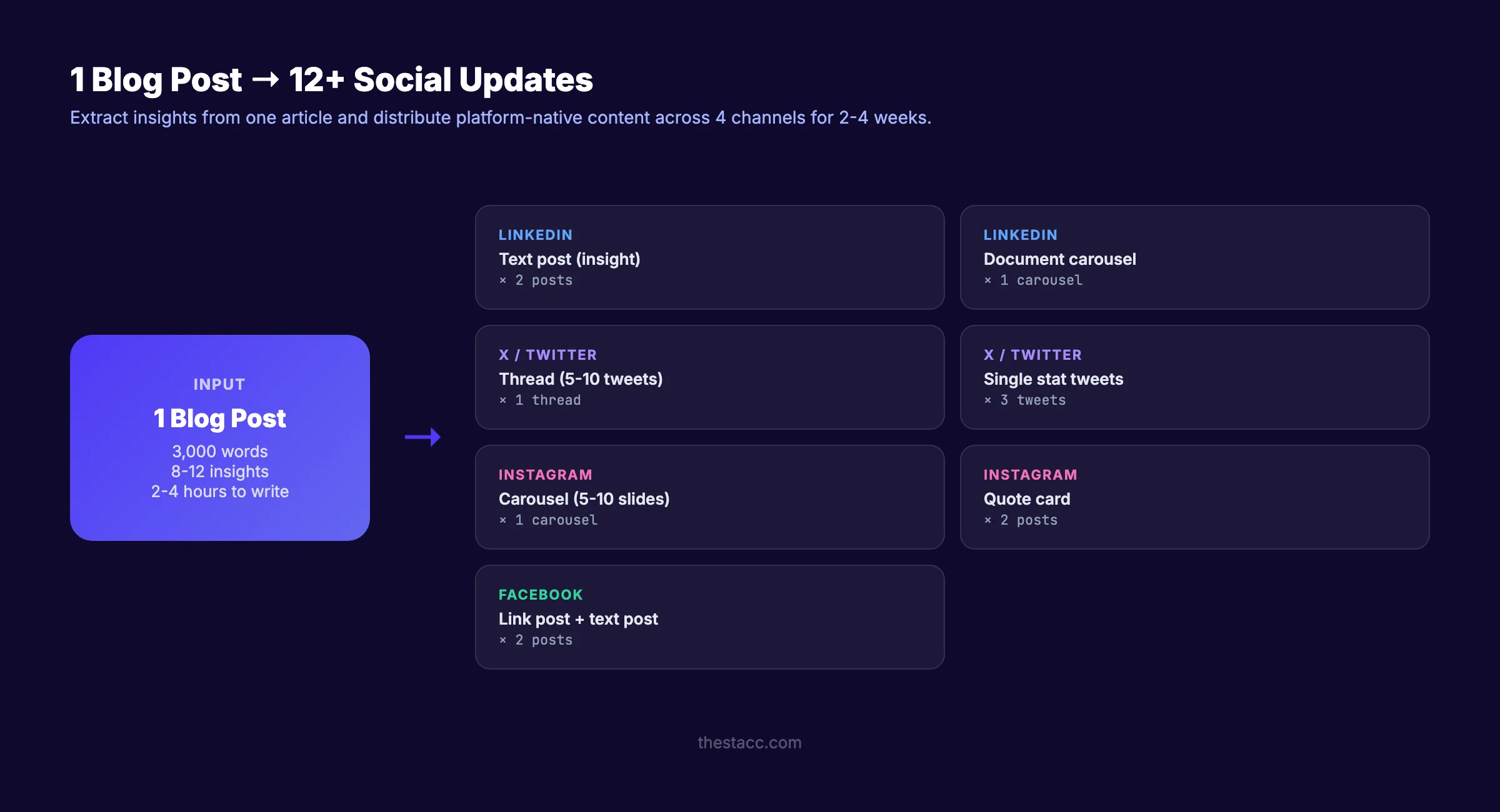
The math is simple. You spend 2 to 4 hours writing a blog post. That same post contains enough material for 10 to 15 social media updates across LinkedIn, X, Instagram, and Facebook. Extracting those updates takes 30 minutes. Skipping it means leaving 80% of the content’s distribution potential on the table.
This guide shows you how to repurpose blog content for social media in 8 steps. We have published 3,500+ blog posts across 70+ industries and turned each one into platform-native social content. Every step includes specific actions and real format examples.
Here is what you will learn:
- Which blog posts to repurpose first (not all of them qualify)
- How to extract 10+ social posts from a single article
- Platform-specific formats for LinkedIn, X, Instagram, and Facebook
- How to adapt tone and structure for each platform
- A repeatable workflow to build into your publishing process
Why Repurposing Blog Content for Social Media Works
A blog post ranks on Google and earns organic traffic for months. Social media posts reach followers in the first 24 to 48 hours. Repurposing connects these two timelines. The blog drives long-term search traffic. Social posts drive short-term visibility and engagement.
The Economics of Repurposing
Creating a single blog post costs 2 to 4 hours of research, writing, and optimization. Creating a social media post from scratch costs 15 to 30 minutes. But creating a social post from an existing blog post costs 3 to 5 minutes.
That ratio changes the economics of content marketing entirely. Instead of choosing between blog content and social content, you do both with the same source material.
Reach Multiplier
A blog post reaches people who search for its target keyword. A LinkedIn post reaches your followers and their network. An X thread reaches a different audience entirely. An Instagram carousel reaches visual learners who never visit your blog.
Different people consume content in different formats on different platforms. Repurposing matches your message to each audience’s preferred format. One idea, 5 platforms, 10+ touchpoints.
Businesses that repurpose content see a 30% increase in organic traffic compared to those that publish and forget.
Step 1: Choose Blog Posts Worth Repurposing
Not every blog post deserves social distribution. Some topics work on search but fall flat on social media. Start with posts that already perform well.
Specifically:
- Check Google Analytics or Search Console for your top 10 posts by traffic.
- Check social sharing data. Which posts earned the most engagement when first shared?
- Look for posts with strong, standalone insights that work outside the full article context.
- Prioritize posts with data, statistics, lists, steps, or frameworks.
Posts that repurpose well:
| Post Type | Why It Works on Social |
|---|---|
| Step-by-step guides | Each step becomes a standalone tip post |
| Listicles (best-of, tips) | Each item becomes its own social post |
| Data/statistics posts | Each stat becomes a visual or quote card |
| How-to tutorials | Process steps become carousel slides |
| Comparison posts | Side-by-side graphics work on every platform |
Posts that do NOT repurpose well:
- Highly technical documentation with no standalone insights
- News recaps that are time-sensitive and already stale
- Product pages disguised as blog posts
Why this step matters: Repurposing weak content amplifies weakness. Repurposing strong content amplifies strength. Start with winners.
Step 2: Extract Key Insights from the Blog Post
Before creating any social content, mine the blog post for standalone insights. Each insight becomes one social post.
Specifically:
Read the blog post and highlight:
- Statistics and data points. Any specific number with a source. “96.55% of pages get zero organic traffic.”
- Actionable tips. Any recommendation the reader can apply immediately. “Front-load your primary keyword in the title tag.”
- Frameworks and models. Any structured approach or process. “The PASBA framework for blog intros.”
- Surprising claims. Anything that challenges conventional thinking. “Most businesses publish 1 to 2 blog posts per month and wonder why they do not rank.”
- Lists and steps. Every numbered item in a list is a potential standalone post.
- Quotes and opinions. Strong statements that provoke agreement or debate.
- Before-and-after examples. Any comparison showing a transformation.
Example extraction from a blog post on SEO content writing:
| Insight Type | Extracted Content | Social Format |
|---|---|---|
| Statistic | ”96.55% of pages get zero organic traffic” | Quote card / text post |
| Tip | ”Place primary keyword in first 100 words” | Carousel slide / tip tweet |
| Framework | ”6-step SEO content writing process” | Carousel / thread |
| Opinion | ”Content written without a process fails” | Text post / LinkedIn |
| List | ”8 on-page SEO checklist items” | Checklist graphic |
Aim for 8 to 15 extractions per blog post. That gives you 2+ weeks of social content from one article.
Why this step matters: Random repurposing produces random results. Structured extraction produces a content bank you can schedule systematically.
Rank everywhere. Do nothing. Stacc publishes 30 blog posts and 30 social media posts per month across 3 platforms. Blog SEO + Social on autopilot. Start for $1 →
Step 3: Match Each Insight to a Platform Format
Each social platform rewards different content formats. The same insight performs differently depending on how you format it.
Specifically:
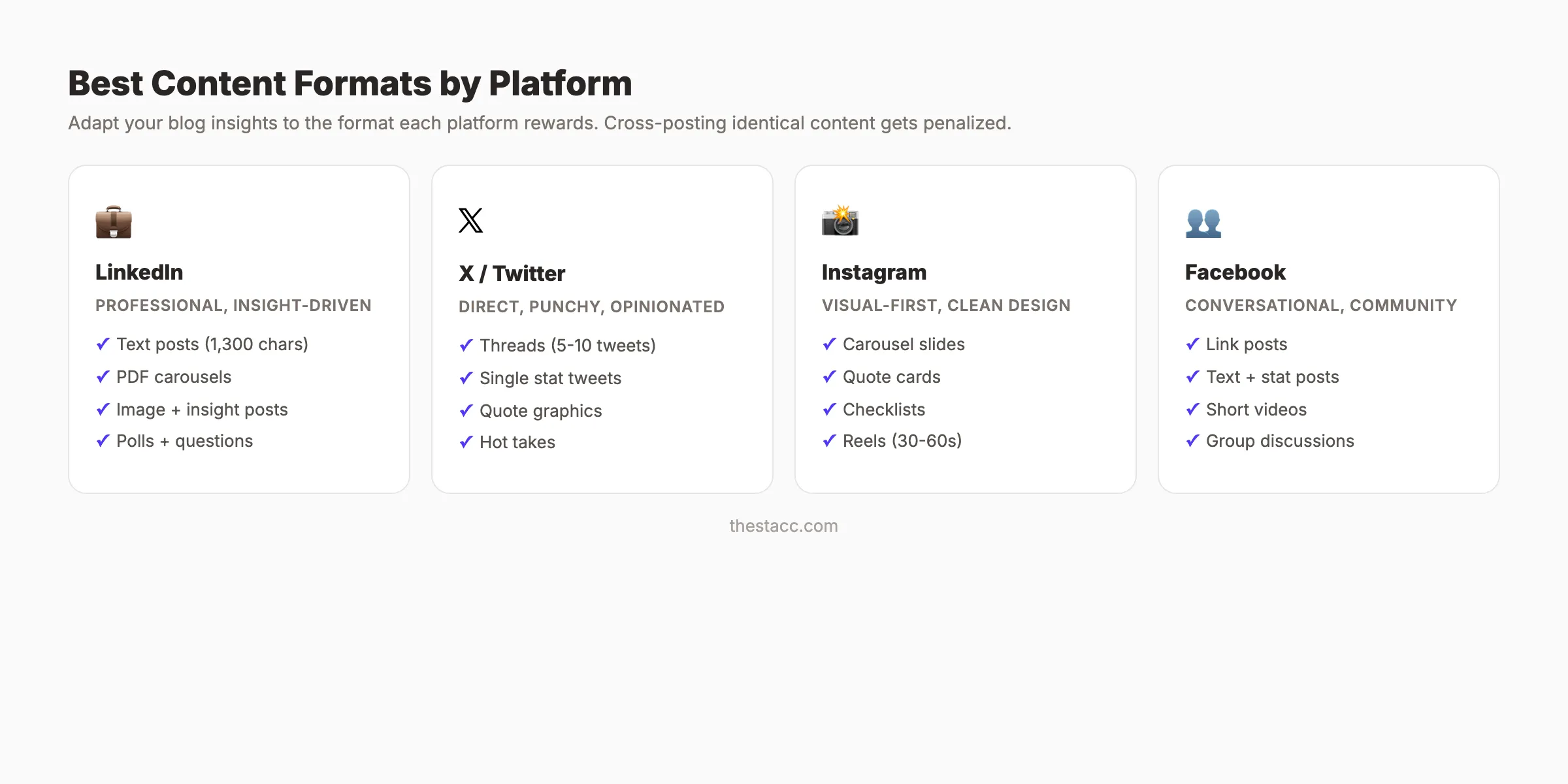
Best formats: Text posts (under 1,300 characters), document carousels (PDF slides), single-image posts with insight.
Tone: Professional, insight-driven, first-person. Share an observation, then the lesson. Open with a bold line that earns the “see more” click.
What works: Industry insights, lessons learned, frameworks, data points, career advice. LinkedIn rewards posts that generate comments.
X (Twitter)
Best formats: Threads (5 to 10 tweets), single tweets with a stat or opinion, quote graphics.
Tone: Direct, punchy, opinionated. Short sentences. No filler. The first tweet must stop the scroll.
What works: Hot takes, quick tips, data, before-and-after comparisons. Threads perform well for step-by-step content.
Best formats: Carousel posts (5 to 10 slides), Reels (30 to 60 seconds), infographic single images.
Tone: Visual-first. Text on images. Clean design. Minimal copy in captions (save the depth for slides).
What works: Step-by-step carousels, stat graphics, checklists, before-and-after visuals. Carousel posts get 1.4 times more reach than single images.
Best formats: Link posts with strong preview images, text-only posts, short videos.
Tone: Conversational, community-focused. Ask questions. Invite discussion.
What works: Evergreen tips, questions, polls, statistics with commentary. Groups outperform pages for organic reach.
Platform format map:
| Insight Type | X | |||
|---|---|---|---|---|
| Statistic | Text post | Single tweet | Quote graphic | Text + stat |
| Step-by-step | Document carousel | Thread | Carousel slides | Link post |
| Opinion | Text post | Tweet | Caption + image | Text post |
| Checklist | PDF carousel | Thread | Carousel | Link post |
| Data comparison | Table image | Tweet + image | Infographic | Image post |
Why this step matters: Cross-posting the same text to every platform gets penalized by algorithms. Platform-native content earns 2 to 5 times more reach.
Step 4: Write Platform-Native Copy
Adapting content for each platform means more than shortening the text. It means changing the structure, tone, hook, and format to match how people consume content on that platform.
Specifically:
The LinkedIn Post Formula
Line 1: Bold hook (stop-the-scroll statement)
Line 2: [empty line]
Line 3-8: Supporting insight with line breaks
Line 9: Practical takeaway or CTA
Line 10: Hashtags (3-5 relevant tags)
Example from a blog post on blog headlines:
80% of people read your headline.
Only 20% click through.
That means your headline is the single most impactful element on every blog post.
Here are 5 headline formulas that actually work:
- Number + Keyword + Benefit
- How to + Outcome + Qualifier
- Question about Reader’s Problem?
- Topic: The Complete Guide [Year]
- How to + Outcome + Without + Pain
Which one do you use most?
The X Thread Formula
Tweet 1: Hook + "Here are X [things]:"
Tweet 2-8: One insight per tweet (standalone value)
Tweet 9: Summary + CTA (link to blog)
The Instagram Carousel Formula
Slide 1: Bold title + subtitle (hook)
Slide 2-8: One insight per slide (big text, clean design)
Slide 9: Summary + CTA ("Save this post" or "Link in bio")
Why this step matters: The format determines the reach. A great insight in the wrong format gets zero engagement. The same insight in the right format earns thousands of views.
Pro tip: Write all social copy in one batch session. Extract insights in step 2, map to platforms in step 3, then write all posts in one 30-minute sitting. Batching is 3 times faster than writing posts one at a time throughout the week.
Step 5: Create Visual Assets
Text-only posts work on some platforms. But visual posts outperform text across every channel. Tweets with images earn 150% more engagement. LinkedIn posts with images get 2 times more comments.
Specifically:
Types of Visuals to Create
- Quote cards: One statistic or key insight on a branded background. Works on every platform.
- Carousel slides: 5 to 10 slides with one insight per slide. Works on LinkedIn (as PDF) and Instagram.
- Infographics: Data visualizations, process diagrams, comparison charts. Best for Pinterest, LinkedIn, and Instagram.
- Checklist graphics: Actionable lists in a visual format. Highly saveable on Instagram.
- Before-and-after comparisons: Two-panel graphics showing transformation.
Design Tools
- Canva (free/paid). Templates for every social platform. Best for non-designers.
- Figma (free/paid). More control for custom designs. Best for teams with design resources.
- Playwright/HTML. Generate graphics programmatically from blog data. Best for automated workflows.
Brand Consistency
Use the same colors, fonts, and logo placement across all visuals. Social followers should recognize your content before they read the text. Create 3 to 5 templates and reuse them for every blog post you repurpose.
Why this step matters: Visuals stop the scroll. Text does not. Every blog post should produce at least 3 visual assets: 1 quote card, 1 carousel, and 1 infographic or checklist.
Your SEO team. $99 per month. Stacc publishes 30 blog posts and 30 social media posts across 3 platforms. SEO + social content on autopilot. Start for $1 →
Step 6: Schedule and Distribute
Timing matters. A blog post published on Monday should generate social posts distributed over the next 2 to 4 weeks. Spreading posts over time maximizes reach and prevents audience fatigue.
Specifically:
Distribution Schedule
| Timeframe | Platform | Content |
|---|---|---|
| Day 1 (publish day) | LinkedIn, X, Facebook | Link post announcing the article |
| Day 2-3 | X | Thread breaking down key insights |
| Day 4-5 | Carousel with top 5 takeaways | |
| Week 2 | Standalone insight post (no link) | |
| Week 2 | X | Single tweet with a stat |
| Week 3 | A different angle from the same post | |
| Week 3 | Quote card with key statistic | |
| Week 4 | X | Thread with a fresh hook |
Best Times to Post
Optimal posting times vary by platform and audience. As a starting point:
- LinkedIn: Tuesday through Thursday, 8 AM to 10 AM
- X: Weekdays, 9 AM to 12 PM
- Instagram: Monday through Friday, 11 AM to 1 PM
- Facebook: Tuesday through Friday, 9 AM to 12 PM
Use your platform analytics to refine these times based on when your specific audience is most active.
Scheduling Tools
Use a scheduling tool to batch and automate distribution. Buffer, Hootsuite, and Later all support multi-platform scheduling. Check our list of social media automation tools for more options.
Read our guide on creating a content calendar for SEO to align your social schedule with your blog publishing cadence.
Why this step matters: Posting once and forgetting wastes the repurposing effort. A 4-week distribution schedule ensures every insight reaches its audience at least once.
Step 7: Track Performance and Double Down
Not every repurposed post will perform equally. Track results and reinvest in what works.
Specifically:
Metrics to Track
| Platform | Key Metrics |
|---|---|
| Impressions, comments, profile views, link clicks | |
| X | Impressions, engagements, thread completion rate, link clicks |
| Reach, saves, shares, carousel completion rate | |
| Reach, engagement rate, link clicks |
What to Do with the Data
- High engagement + low clicks: The social post works, but the CTA is weak. Adjust the call to action.
- Low engagement + high clicks: The audience found it useful but did not interact. Add a question or opinion to spark comments.
- High saves (Instagram): The content is highly valuable. Create more carousels in this format.
- Thread completion rate above 40% (X): The thread structure works. Replicate it.
Reinvest in Winners
When a repurposed post outperforms, do 3 things:
- Create additional social posts from the same blog post using different angles.
- Boost the post with paid spend if the platform supports it.
- Update the original blog post with fresh data, which gives you new material to repurpose. See our guide on updating old blog posts.
Why this step matters: Data turns repurposing from guesswork into a system. After 90 days of tracking, you will know exactly which formats, platforms, and topics earn the most engagement for your brand.
Step 8: Build Repurposing into Your Publishing Workflow
The final step turns repurposing from a one-time effort into a repeatable system.
Specifically:
The Blog-to-Social Checklist
Run this checklist every time you publish a blog post:
- Read the published post and extract 8 to 15 standalone insights
- Map each insight to a platform format (LinkedIn, X, Instagram, Facebook)
- Write platform-native copy for each post (batch in one session)
- Create 3 to 5 visual assets (quote cards, carousels, infographics)
- Schedule posts across a 2 to 4 week distribution window
- Set a reminder to check performance at the 2-week mark
- Reinvest in top performers with additional angles or paid amplification
Automation Options
You do not need to do this manually for every post. Several approaches can automate parts of the workflow:
- AI writing tools can generate social copy from blog content in seconds. See our guide on using AI to write blog posts for how we approach AI-assisted content.
- Scheduling tools distribute posts automatically at optimal times.
- Stacc Social Media module publishes 30 social posts per month across 3 platforms, automatically derived from your content.
How This Connects to Your Blog SEO Strategy
Repurposing is not a standalone tactic. It is the distribution layer of your content strategy. Blog posts drive organic traffic. Social posts drive brand awareness, engagement, and referral traffic. Together, they create a compounding visibility effect.
Every blog post you publish is both a ranking asset and a content mine. Treat it that way.
Why this step matters: Without a workflow, repurposing happens inconsistently. With a workflow, every blog post automatically generates 2 to 4 weeks of social content. The system compounds over time.
3,500+ blogs published. 92% average SEO score. Stacc handles blog SEO and social media posting. You get rankings and social presence without a content team. Start for $1 →
Results: What to Expect
After implementing this 8-step process, you will:
- Generate 10 to 15 social posts from every blog post you publish
- Maintain a consistent social presence without creating content from scratch
- Reach audiences on platforms they already use
- Drive referral traffic back to your blog from social channels
- Build brand recognition through repeated exposure across channels
Realistic timelines:
- First 30 days: Build the workflow and repurpose your top 5 existing blog posts
- 60 days: Social engagement increases as you establish a consistent posting rhythm
- 90 days: Referral traffic from social channels becomes measurable in analytics
- 6 months: Compounding effect. Older repurposed content continues to generate engagement as new followers discover it.
FAQ
How many social posts can I get from one blog post?
10 to 15 posts on average. A 3,000-word guide typically contains 8 to 12 standalone insights, each of which can become a platform-native social post. Add visual variations (carousels, quote cards, infographics) and you reach 15+ without stretching the material thin.
Should I repurpose every blog post?
No. Start with your top performers. Posts with the most organic traffic, engagement, or evergreen relevance produce the strongest social content. Time-sensitive news posts or thin content do not repurpose well. Focus on the top 20% of your posts.
Is cross-posting the same as repurposing?
No. Cross-posting means sharing the identical content on multiple platforms. Repurposing means adapting the content for each platform’s format, tone, and audience. Cross-posting gets penalized by algorithms. Repurposing earns native reach.
How often should I repurpose old blog posts?
Every 3 to 6 months. When you update an old blog post with new data or expanded sections, that gives you fresh material to repurpose. A quarterly refresh cycle keeps both the blog and social channels fed with current content.
What tools help with content repurposing?
Canva for visual assets. Buffer or Hootsuite for scheduling. AI writing tools for generating platform-specific copy. Check our list of social media posting tools for detailed comparisons.
Does Stacc handle social media repurposing?
Yes. Stacc publishes 30 blog posts per month and 30 social media posts across 3 platforms (LinkedIn, X, Instagram, or Facebook). The social content is derived from your blog content, adapted for each platform. You do not need a social media manager.
Every blog post you publish is a content mine. The article itself serves search. The insights inside it serve social. Stop treating blog posts as one-and-done assets. Extract, adapt, distribute, and track. The same effort produces 5 times more visibility.
Related Tools & Resources
Free SEO Tools:
Best Lists:

Written by
Siddharth GangalSiddharth is the founder of theStacc and Arka360, and a graduate of IIT Mandi. He spent years watching great businesses lose organic traffic to competitors who simply published more. So he built a system to fix that. He writes about SEO, content at scale, and the tactics that actually move rankings.
30 SEO blog articles published every month
Keyword-optimized, scheduled, and live on your site. Automatically.
30-day trial · Cancel anytime
theStacc
Stop writing SEO content manually
30 blog articles, 30 GBP posts, and social media content. Published every month. Automatically.
Start Your $1 Trial$1 for 3 days · Cancel anytime