
How to Create a Topical Map for SEO (7-Step Process)
Step-by-step guide to create a topical map for SEO. 7 steps to build topic clusters, plan content, and grow topical authority. Updated March 2026.
Most websites publish content without a map. They pick random keywords, write disconnected articles, and wonder why rankings never improve. The missing piece is a topical map.
A topical map is a structured plan that organizes every piece of content on your site around core topics and subtopics. It shows search engines you cover a subject completely, not just superficially. Sites with strong topical authority rank 57% faster than sites that publish without a clear topic structure.
We have published 3,500+ blog posts across 70+ industries. Every successful content strategy we have built starts with a topical map. Without one, you are guessing. With one, every article you publish strengthens the ones before it.
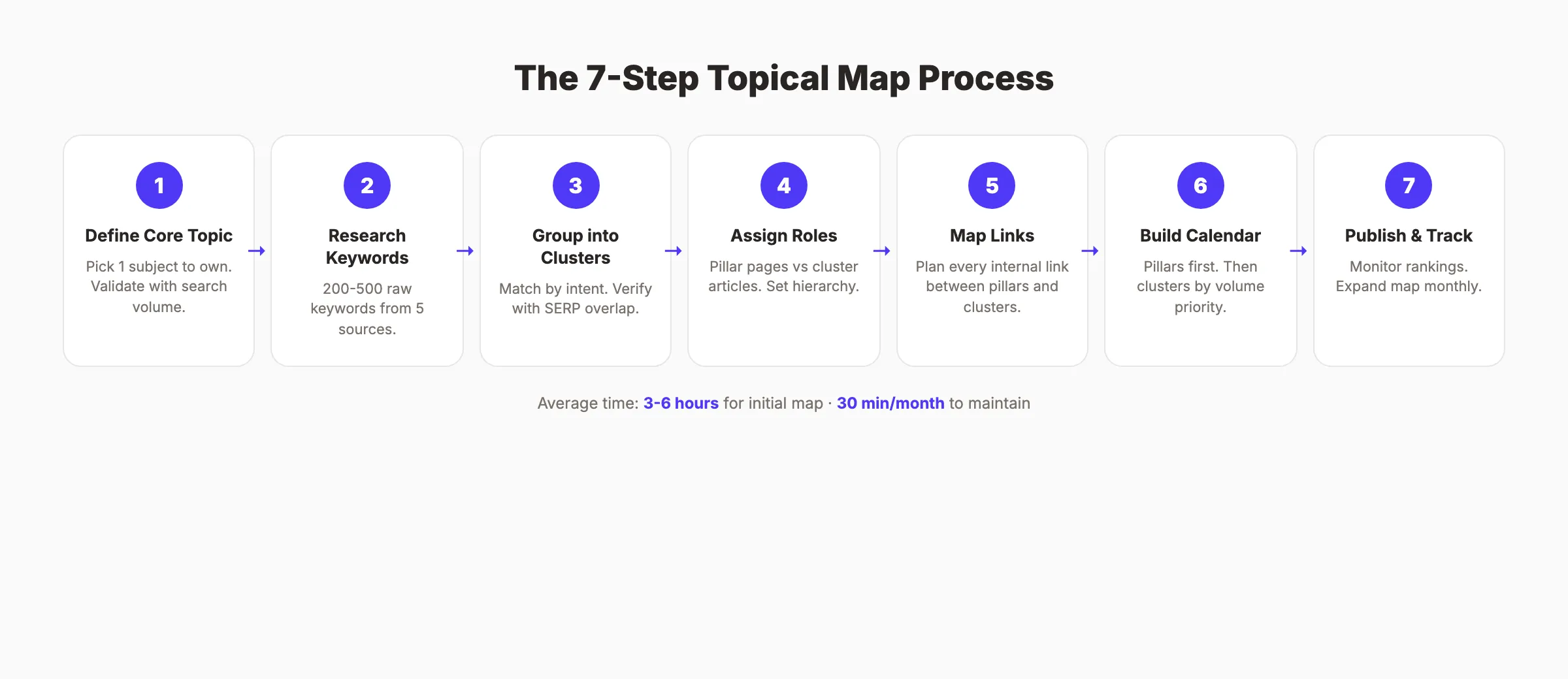
Here is what you will learn:
- How to identify your core topic and map its boundaries
- How to research and organize keywords into clusters
- How to assign pillar and cluster roles to each piece of content
- How to plan internal links that pass authority between pages
- How to prioritize and schedule content production
- How to track topical authority growth over time
Overview
Time required: 3 to 6 hours for the initial map. 30 minutes per month to maintain.
Difficulty: Intermediate
What you will need:
- A keyword research tool (Ahrefs, Semrush, or a free alternative from our best keyword research tools list)
- A spreadsheet (Google Sheets or Excel)
- Access to Google Search Console (optional but recommended)
Step 1: Define Your Core Topic
Your core topic is the single subject you want your website to be the authority on. Not 5 topics. Not 10. One primary topic that everything else branches from.
A dentist’s core topic is “dental care.” A plumbing company’s core topic is “plumbing services.” A SaaS company selling CRM software has “CRM” as its core topic. The more specific, the better. “SEO” is too broad. “Local SEO for home service businesses” is focused enough to build real authority.
How to choose:
- Start with your primary product or service
- Ask: “What should we rank number 1 for on Google?”
- Check competitor sites in your space. What topic do they build the most content around?
- Validate with search volume. Your core topic should have at least 1,000 monthly searches
Write your core topic at the top of a new spreadsheet. This is the center of your map. Every subtopic, cluster, and article flows from this single point.
Why this step matters: A study of 253,800 search results found that page-level topical authority is the largest on-page ranking factor. Without a clear core topic, Google cannot determine what your site is about. Your content competes against itself instead of building on itself.
Step 2: Research Seed Keywords and Subtopics
With your core topic defined, the next step is finding every subtopic and keyword related to it. This is where most people rush. Do not rush. A 30-minute research session now saves months of publishing content that does not rank.
Use these 5 sources:
-
Keyword research tools. Enter your core topic into Ahrefs, Semrush, or a free keyword tool. Export all keyword suggestions, questions, and related terms. Aim for 200 to 500 raw keywords.
-
Google autocomplete. Type your core topic into Google. Write down every autocomplete suggestion. Then type “[core topic] a”, “[core topic] b”, through the alphabet.
-
People Also Ask. Search your core topic. Expand every People Also Ask box. These are real questions your audience is asking right now.
-
Reddit and Quora. Search your topic on both platforms. The questions people ask in forums reveal pain points that keyword tools miss.
-
Competitor content. Visit the top 3 competitors in your space. List every blog post title and URL. These are topics proven to attract search traffic.
Export everything into a single spreadsheet with 3 columns: keyword, search volume, and source. Do not filter yet. The goal is volume. You will organize in the next step.
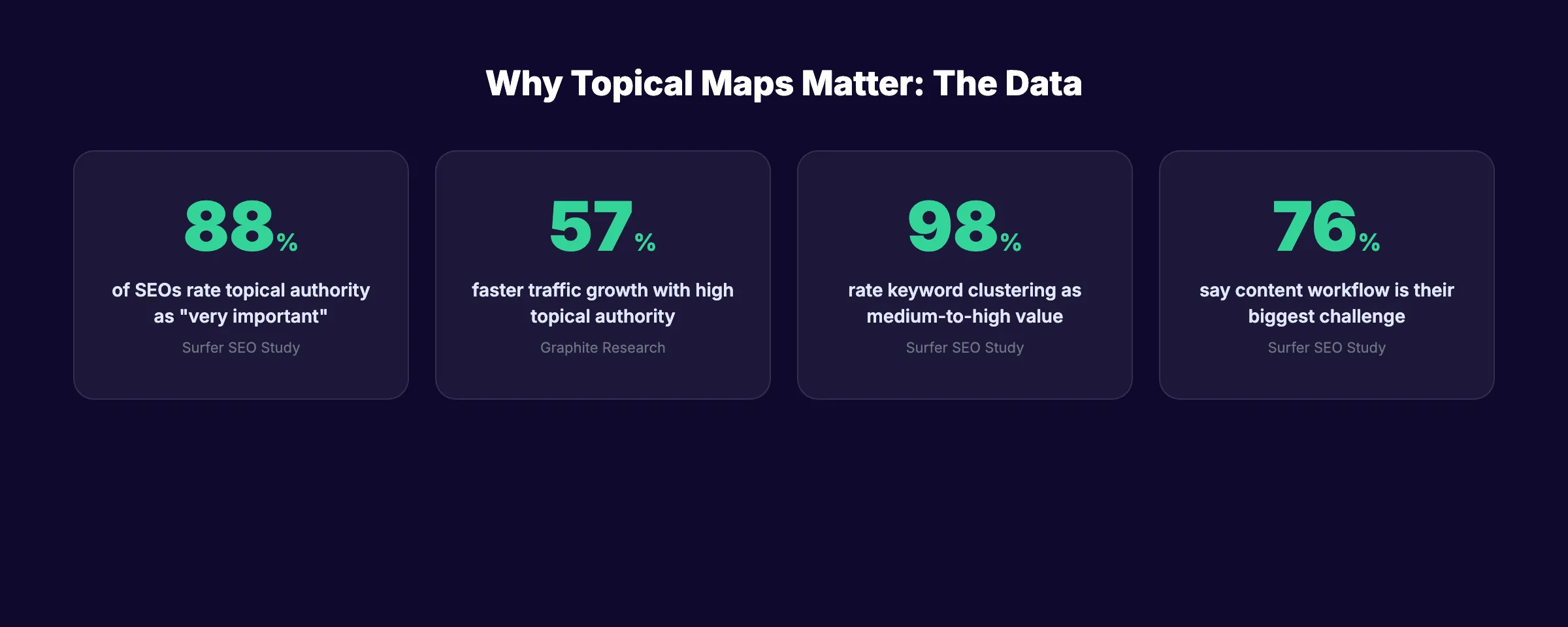
Why this step matters: 88% of SEO professionals rate topical authority as very important to their strategy. But authority requires coverage. Missing subtopics create gaps that competitors fill. A thorough research phase ensures your map has no holes.
Pro tip: Google Search Console is an underrated source. Go to Performance → Queries and sort by impressions. These are topics Google already associates with your site. Building content around them compounds existing signals.
Step 3: Group Keywords into Topic Clusters
You now have a raw list of 200 to 500 keywords. This step turns that list into an organized structure. The goal is to group related keywords into clusters where each cluster becomes one piece of content.
The grouping process:
- Sort your keyword list alphabetically. Similar terms will naturally appear together.
- Look for keywords that share the same search intent. “How to do keyword research” and “keyword research tutorial” target the same intent. They belong in one cluster.
- Check the SERPs. Search 2 keywords you think belong together. If the same pages rank for both, they are one cluster. If completely different pages rank, they are separate clusters.
- Label each cluster with a descriptive name. Example: “Keyword Research Basics,” “On-Page SEO Checklist,” “Link Building Strategies.”
A well-built topical map typically has:
| Site Size | Core Topics | Clusters per Topic | Total Content Pieces |
|---|---|---|---|
| Small blog | 1 | 8 to 15 | 15 to 30 |
| Medium site | 2 to 3 | 10 to 20 | 40 to 100 |
| Large site | 3 to 5 | 15 to 30 | 100 to 300 |
Each cluster should contain 1 primary keyword and 3 to 8 secondary keywords. Do not force keywords into clusters. If a keyword does not fit any existing cluster, create a new one. If a cluster has only 1 keyword, it is probably too narrow. Merge it with a related cluster.
Why this step matters: 98% of SEO professionals rate keyword clustering as medium to high value in their content strategy. Clustering prevents keyword cannibalization, where 2 pages compete for the same term. It also ensures every article targets a unique search intent.
Stop writing. Start ranking. Stacc publishes 30 SEO-optimized articles per month. Every article follows a topical map built around your competitors and industry. No guessing. No gaps. Start for $1 →
Step 4: Assign Pillar and Cluster Roles
Every cluster needs a hierarchy. One page is the pillar. The rest are cluster articles. Getting this wrong creates a flat site structure that confuses both users and search engines.
Pillar pages are long-form, broad-topic guides. They cover an entire subject at a high level and link out to every cluster article for deeper coverage. A pillar page targets the highest-volume keyword in the cluster.
Cluster articles are focused, specific pieces. Each one covers a single subtopic in depth. They target lower-volume, long-tail keywords and link back to the pillar page.
How to assign roles:
| Content Type | Keyword Volume | Content Length | Internal Links |
|---|---|---|---|
| Pillar page | 1,000+ monthly searches | 3,000 to 5,000 words | Links to all cluster articles |
| Cluster article | 100 to 1,000 searches | 1,500 to 3,000 words | Links back to pillar + 1 to 2 sibling clusters |
In your spreadsheet, add a column called “Role.” Mark each cluster’s primary piece as “Pillar” or “Cluster.” Mark which pillar page each cluster article supports.
Example for a “Content Marketing” topical map:
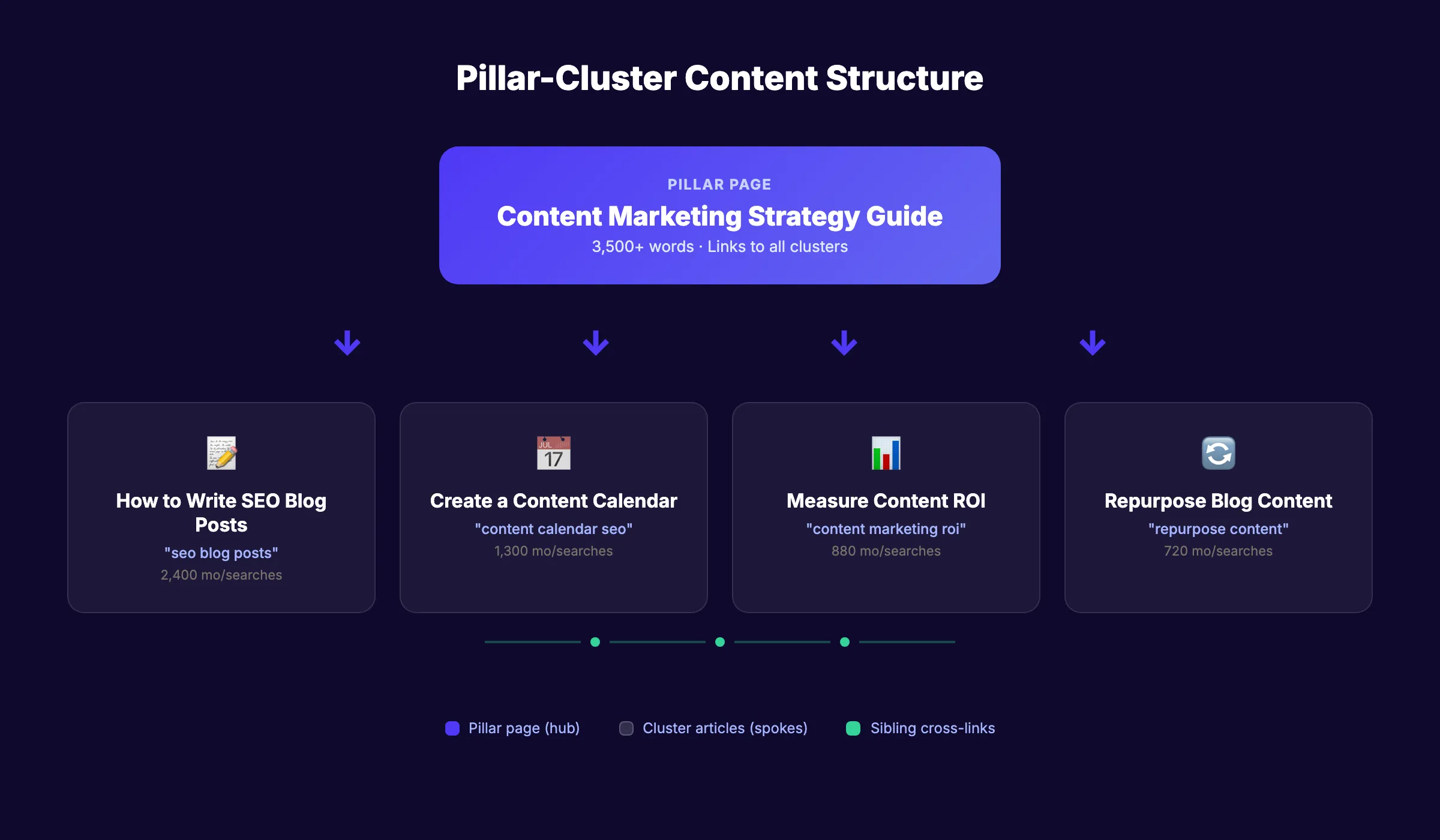
- Pillar: “Content Marketing Strategy: The Complete Guide” (3,500 words)
- Cluster 1: “How to Create a Content Calendar for SEO” (1,800 words)
- Cluster 2: “How to Write SEO Blog Posts” (2,500 words)
- Cluster 3: “How to Measure Content ROI” (1,500 words)
- Cluster 4: “How to Repurpose Blog Content for Social Media” (1,800 words)
Each cluster links back to the pillar. The pillar links to every cluster. This creates a hub-and-spoke structure that search engines understand and reward.
Why this step matters: Without clear roles, your site ends up with competing pages and no authority signals. The pillar-cluster model tells Google which page is the main resource and which pages provide supporting depth. Sites using this model consistently outperform flat blog structures in organic rankings.
Step 5: Map the Internal Linking Structure
A topical map without an internal linking strategy is just a list of articles. Internal links are what turn individual posts into an interconnected authority network.
The linking rules:
-
Every cluster article links back to its parent pillar page. Use descriptive anchor text. “Read our complete content marketing guide” not “click here.”
-
Every pillar page links to every cluster article it covers. Place these links contextually within the body, not just in a list at the bottom.
-
Sibling cluster articles link to each other when topically relevant. If “How to Write Blog Headlines” and “How to Write Meta Descriptions” are in the same cluster, they should cross-link.
-
Never link between unrelated clusters just to add links. Forced internal links dilute authority instead of building it.
Visualize the structure:
          [Pillar Page]
         /    |    \    \
        /     |     \    \
  [Cluster] [Cluster] [Cluster] [Cluster]
     ↔          ↔         ↔
  (sibling links between related articles)
In your spreadsheet, add 2 columns: “Links To” and “Links From.” For each piece of content, list the exact pages it should link to and receive links from. This pre-planning saves hours of retroactive link insertion later.
Why this step matters: Internal links pass authority between pages. A well-linked topical map concentrates ranking power on your pillar pages while lifting every cluster article. Google uses internal links to discover, understand, and rank content. Poor internal linking is why many sites have strong individual articles that still rank on page 2 or 3.
Pro tip: Use a consistent anchor text strategy. Each page should have 1 primary anchor text phrase (its target keyword) and 2 to 3 variations. Track these in your spreadsheet to avoid over-optimizing any single phrase.
Step 6: Build a Prioritized Content Calendar
Your topical map is planned. Now you need to decide what to publish first. Not all content is equal. Publishing in the right order accelerates results.
The priority framework:
- Publish pillar pages first. They set the foundation. Cluster articles need a pillar page to link back to.
- Then publish high-volume cluster articles. These drive the most traffic once they rank.
- Then fill in long-tail cluster articles. These build depth and close gaps competitors miss.
- Then add supporting content. FAQs, glossary entries, comparison pages, and tool guides.
Publishing cadence matters. Google rewards sites that publish consistently over those that publish in bursts. 10 articles per month for 6 months outperforms 60 articles in 1 week. Consistent publishing velocity builds authority faster than sporadic output.
| Monthly Output | Time to Cover 50-Article Map | |---|---|---| | 4 articles/month | 12 to 13 months | | 10 articles/month | 5 months | | 20 articles/month | 2.5 months | | 30 articles/month (Stacc) | Under 2 months |
In your spreadsheet, add a “Publish Date” column. Assign a target date to every piece of content. Start with pillar pages in month 1. Fill in clusters across months 2 through 4. By month 5, your first pillar-cluster groups should be complete and compounding.
Why this step matters: Publishing without a calendar leads to random gaps. You end up with 3 cluster articles but no pillar to link them to. Or a pillar page with zero supporting content. The calendar ensures every piece of content is published when it can do the most good.
Your SEO team. $99 per month. 30 optimized articles published automatically. Topical maps built around your niche. Pillar pages and cluster content planned, written, and linked. Start for $1 →
Step 7: Publish, Track, and Expand the Map
A topical map is not a one-time project. It is a living document that grows as you publish content and find new opportunities.
After publishing each piece:
- Verify internal links. Confirm every planned link is in place and working. Use our free on-page SEO checker to audit link structure.
- Track rankings. Monitor keyword positions for each published piece using Google Search Console or a rank tracker.
- Measure cluster completion. A cluster is “complete” when the pillar page and all planned cluster articles are published and interlinked.
Expanding the map over time:
- Check Google Search Console every month. New queries appearing in the “Impressions” column are subtopic opportunities you have not covered yet.
- Run a content gap analysis quarterly. Compare your published map to the top 3 competitors. What clusters do they cover that you do not?
- Update older content as search intent shifts. A cluster article written 6 months ago may need refreshing to maintain rankings.
- Add new clusters when your business expands into new service areas or product lines.
Track your topical authority growth with this scorecard:
| Metric | Check Frequency | Target |
|---|---|---|
| Published articles vs. planned | Weekly | 90%+ on schedule |
| Keyword positions (top 10) | Monthly | 30%+ of target keywords |
| Cluster completion rate | Monthly | 100% within 4 months |
| Organic traffic growth | Monthly | 10 to 20% month-over-month |
| Internal link coverage | Quarterly | Every article linked to its pillar |
Why this step matters: 76% of SEO professionals say content workflow efficiency is their biggest challenge. Without a tracking system, your map degrades into a forgotten spreadsheet. Regular monitoring turns your topical map from a planning document into a ranking engine.
Results: What to Expect
After completing these 7 steps, you should expect:
- Week 1: A complete topical map with 20 to 100+ planned content pieces, organized into clusters with pillar pages identified
- Month 1 to 2: First pillar pages published and indexing. Initial cluster articles live and interlinked.
- Month 3 to 4: First ranking improvements. Pillar pages begin appearing on page 1 for target keywords. Cluster articles support and lift each other.
- Month 6+: Compounding traffic growth as completed clusters build authority. New content ranks faster because Google already trusts your site on the topic.
The first 60 to 90 days require patience. Topical authority compounds over time. The sites that win are the ones that publish consistently and follow their map.
Troubleshooting
Problem: Two of my articles are ranking for the same keyword.
Fix: This is keyword cannibalization. Review both articles. Merge the weaker one into the stronger one. Redirect the old URL. Ensure each cluster article targets a unique keyword with distinct search intent.
Problem: My pillar page is not ranking even after 3 months.
Fix: Check cluster completion. A pillar page without supporting cluster articles lacks the internal authority signals it needs. Publish the missing cluster content and ensure every piece links back to the pillar. Also audit the pillar for on-page SEO issues.
Problem: I ran out of subtopics for my core topic.
Fix: Your core topic may be too narrow. Expand one level up. If “email marketing for dentists” is exhausted, expand to “digital marketing for dentists.” Also check competitor sites for subtopics you missed and run new keyword research quarterly.
3,500+ blogs published. 92% average SEO score. Stacc builds your topical map, writes the content, and publishes on autopilot. Blog SEO, Local SEO, and Social in one subscription. Start for $1 →
FAQ
What is a topical map in SEO?
A topical map is a structured plan that organizes your website content around core topics and subtopics. It defines which pillar pages and cluster articles to create, how they link together, and in what order to publish them. The goal is to demonstrate complete topic coverage to search engines, which builds topical authority and improves rankings across the entire cluster.
How many topics should a topical map cover?
Start with 1 core topic if your site is new. Established sites can cover 2 to 5 core topics. Each core topic branches into 8 to 30 clusters. The depth matters more than the breadth. Covering 1 topic with 20 interlinked articles builds more authority than covering 5 topics with 4 articles each.
Can I create a topical map with free tools?
Yes. Use Google Keyword Planner for search volume data, Google Search Console for existing query insights, and Google Sheets for organization. The process takes longer without paid tools like Ahrefs or Semrush, but the methodology is identical. Check our list of the best free SEO tools for more options.
How long does it take to see results from a topical map?
Expect initial ranking improvements within 60 to 90 days of publishing your first complete cluster (pillar page plus all supporting articles). Full topical authority across a core topic takes 6 to 12 months of consistent publishing. The timeline depends on your publishing frequency, competition level, and domain strength.
What is the difference between a topical map and a content calendar?
A topical map defines WHAT to create and HOW it connects. A content calendar defines WHEN to publish. You need both. The topical map is the strategy. The content calendar is the execution plan. Build the map first, then schedule content from it.
Does Stacc build topical maps?
Yes. Stacc builds a complete topical map for your niche as part of the onboarding process. We research your competitors, identify keyword clusters, plan pillar and cluster content, and publish 30 articles per month following the map. Every article is interlinked and optimized for search. See pricing here.
Your content either builds on itself or competes against itself. A topical map ensures every article you publish makes the rest of your site stronger. Start with Step 1 today. Define your core topic and build from there.
Rank everywhere. Do nothing. Stacc handles your topical map, content strategy, and publishing. 30 articles per month on autopilot. Start for $1 →
Related Tools & Resources
Free SEO Tools:
Best Lists:

Written by
Siddharth GangalSiddharth is the founder of theStacc and Arka360, and a graduate of IIT Mandi. He spent years watching great businesses lose organic traffic to competitors who simply published more. So he built a system to fix that. He writes about SEO, content at scale, and the tactics that actually move rankings.
30 SEO blog articles published every month
Keyword-optimized, scheduled, and live on your site. Automatically.
30-day trial · Cancel anytime
theStacc
Stop writing SEO content manually
30 blog articles, 30 GBP posts, and social media content. Published every month. Automatically.
Start Your $1 Trial$1 for 3 days · Cancel anytime