Content decay silently kills rankings and AI citations. Learn the 7 causes, how to detect decay in GSC, and the step-by-step fix. Updated March 2026.
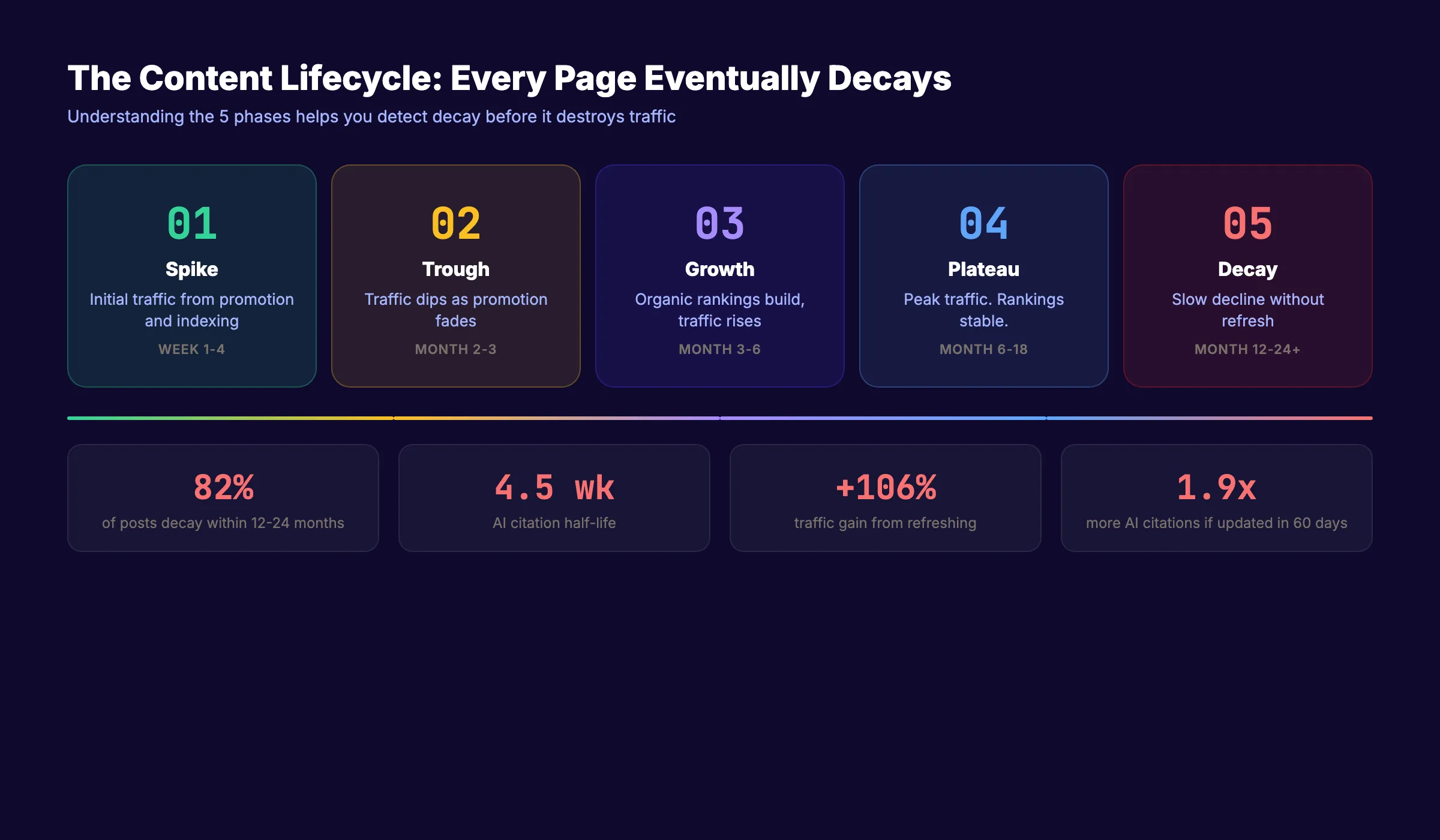
82% of high-ranking blog posts start losing traffic within 12 to 24 months if not maintained. The decline is slow. A 20 to 30% drop quarter over quarter. By the time you notice, the damage is done.
Content decay is the gradual loss of a page's organic traffic, rankings, and relevance over time. It is not a Google penalty. It is not a sudden algorithm hit. It is the quiet erosion of content that once performed well but now falls behind fresher, deeper, or more relevant competitors.
In 2026, content decay has a second dimension. Pages that lose freshness also lose AI citations. AI citation half-life is roughly 4.5 weeks. Your content can still rank on page 1 of Google but be invisible to ChatGPT, Perplexity, and AI Overviews.
This guide covers what causes content decay, how to detect it, and the exact process to fix it. We publish 3,500+ blog posts across 70+ industries. We maintain and refresh content at scale. Our average SEO score is 92%.
Here is what you will learn:
- What content decay is and the 9 causes behind it
- How to detect decaying content in Google Search Console
- The decision framework for update, expand, consolidate, or prune
- A step-by-step content refresh process
- How content decay affects AI citations in 2026
- How to build a system that prevents decay from recurring
What Is Content Decay
Content decay is the gradual decline in organic traffic, rankings, and click-through rate for a page that previously performed well. Every piece of content follows a lifecycle: initial spike, trough, growth, plateau, and decline.
The decline phase is content decay. It is not caused by anything you did wrong. It happens because the web moves forward and your content stays still.
Google does not use the term "content decay" internally. John Mueller admitted he "had no idea what it actually meant." Google views the phenomenon as declining user interest in topics rather than content degradation. But the practical effect is the same: your page loses traffic and rankings month after month.
Content Decay vs Other Traffic Drops
Not every traffic decline is content decay. Distinguish between:
| Traffic Drop Type | Pattern | Cause |
|---|---|---|
| Content decay | Slow, steady decline over 6-12+ months | Freshness, competition, intent shift |
| Algorithm update | Sudden drop within 1-2 weeks | Google ranking criteria changed |
| Technical issue | Sudden drop, often site-wide | Crawl errors, indexing problems, site speed |
| Seasonal variation | Predictable annual pattern | Topic relevance fluctuates by season |
| Cannibalization | Decline after publishing similar content | Multiple pages competing for same keyword |
Content decay is the slow one. If your traffic dropped 40% overnight, that is not decay. That is an algorithm update or technical issue. If it dropped 5% per month for 8 months, that is decay.
For diagnosing site-wide issues, see our SEO audit guide.
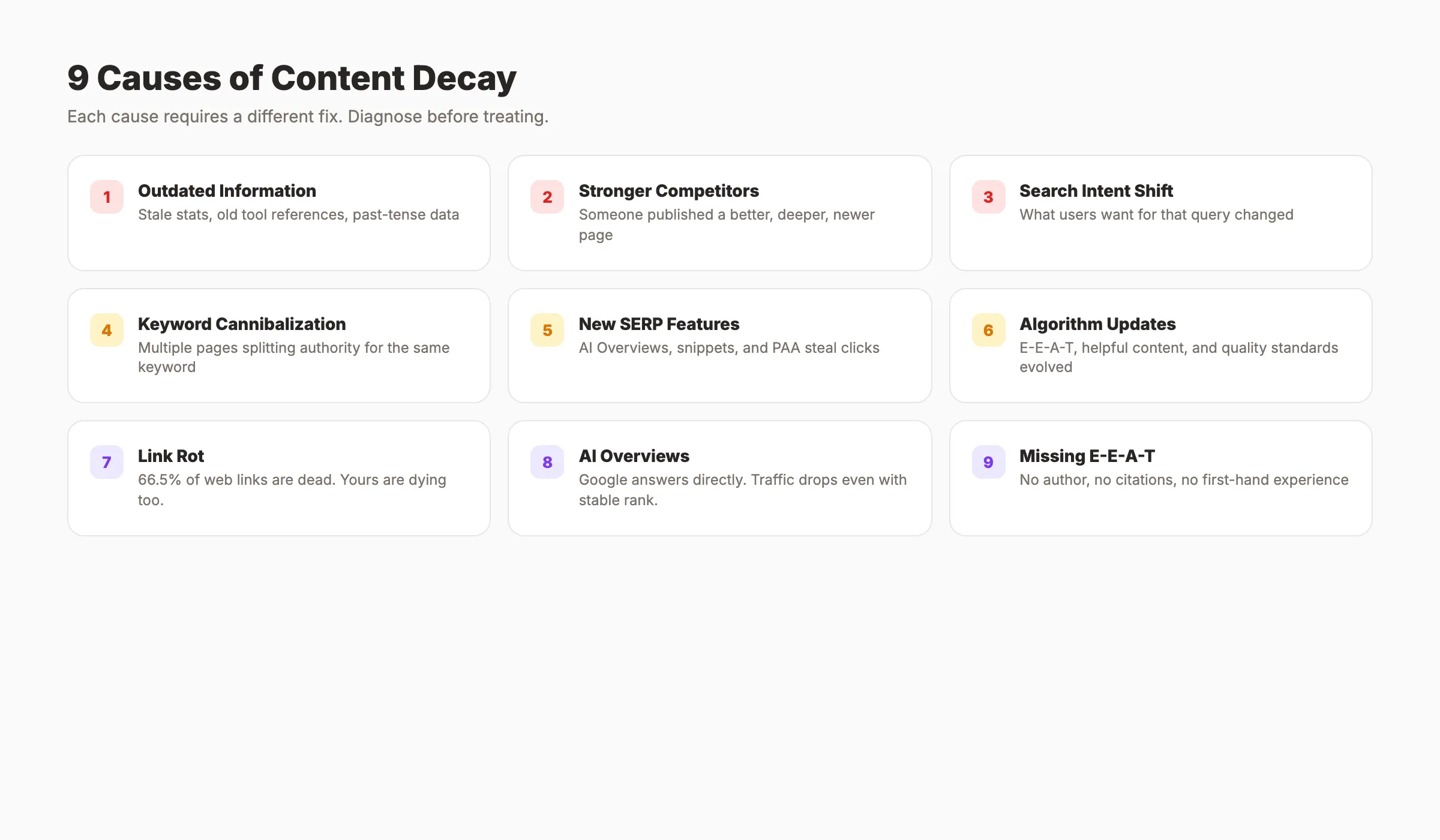
The 9 Causes of Content Decay
Understanding what causes decay tells you how to fix it.
1. Outdated Information
Citing 2022 statistics in 2026 kills credibility. Data goes stale. Tools get renamed. Processes change. Readers and search engines both penalize content that references the past as if it were current.
2. Stronger Competitor Content
Someone published a better, deeper, more recent article targeting your keywords. Google found a page that answers the query more thoroughly. Your content did not get worse. The competition got better.
3. Search Intent Shift
What users want when they search a query changes over time. A keyword that triggered informational results in 2023 now triggers commercial results. Your how-to guide loses to product comparison pages because Google's understanding of intent evolved.
4. Keyword Cannibalization
Multiple pages on your own site compete for the same keywords. Instead of one strong page, you have two mediocre pages splitting authority. See our guide on fixing keyword cannibalization.
5. New SERP Features
Featured snippets, People Also Ask boxes, video carousels, and AI Overviews steal clicks even when your ranking holds steady. AI Overviews now appear in 25% of Google searches and reduce clicks to pages below them by 34.5%.
Your ranking did not change. But the traffic reaching that ranking position did.
6. Algorithm Updates
Google's E-E-A-T standards, helpful content system, and site reputation policies evolve continuously. Content that met quality standards in 2023 may not meet them in 2026 without updates.
7. Link Rot
66.5% of links on the web are dead. External links in your content die over time. Broken outbound links signal neglect to both readers and search engines. Internal links can also break when you restructure URLs or delete pages. Run a link check during every content refresh cycle.
8. AI Overviews Stealing Clicks
Even with stable rankings, traffic drops when AI Overviews appear for your keywords. AI Overviews now show on 25% of Google searches and reduce clicks to pages below by 34.5%. Your ranking held. Your traffic did not. The SERP layout changed around you.
9. Missing E-E-A-T Signals
Google's quality standards raised the bar. Content without author bylines, cited sources, first-hand experience, or expert perspectives ranks lower than it used to. A post that hit page 1 in 2023 without these signals may not hold that position in 2026.
Stop writing. Start ranking. theStacc publishes 30 SEO articles per month for $99. Every post stays fresh.
How to Detect Content Decay in Google Search Console
Do not guess which pages are decaying. Use data.
The GSC Method
- Go to Performance > Search Results
- Click Date Range > Compare
- Compare last 6 months vs previous 6 months
- Sort by the Pages tab
- Look for URLs with declining clicks AND declining impressions
- Click each declining page and check the Queries tab
What to look for:
- Declining clicks with stable impressions = CTR problem (title or snippet needs work)
- Declining impressions with stable position = topic losing search volume
- Declining position = competitor content overtaking yours
- Declining everything = classic content decay
The Analytics Method
In Google Analytics 4:
- Go to Engagement > Pages and screens
- Compare current period to the same period last year
- Sort by largest traffic decrease
- Cross-reference with conversion data to prioritize by business impact
Prioritization Framework
Not every decaying page is worth fixing. Prioritize by:
| Priority Level | Criteria | Action |
|---|---|---|
| High | Peaked at 5,000+ visits/month, declined 50%+ | Fix immediately |
| Medium | 1,000-5,000 peak, declined 30-50% | Fix within 30 days |
| Low | Under 1,000 peak, declined 20-30% | Batch with quarterly refresh |
| Skip | Under 200 peak, topic no longer relevant | Redirect or prune |
Wait minimum 6 months before analyzing new content for decay. Younger content may still be finding its ranking.
For a full analytics setup, see our Google Search Console guide.
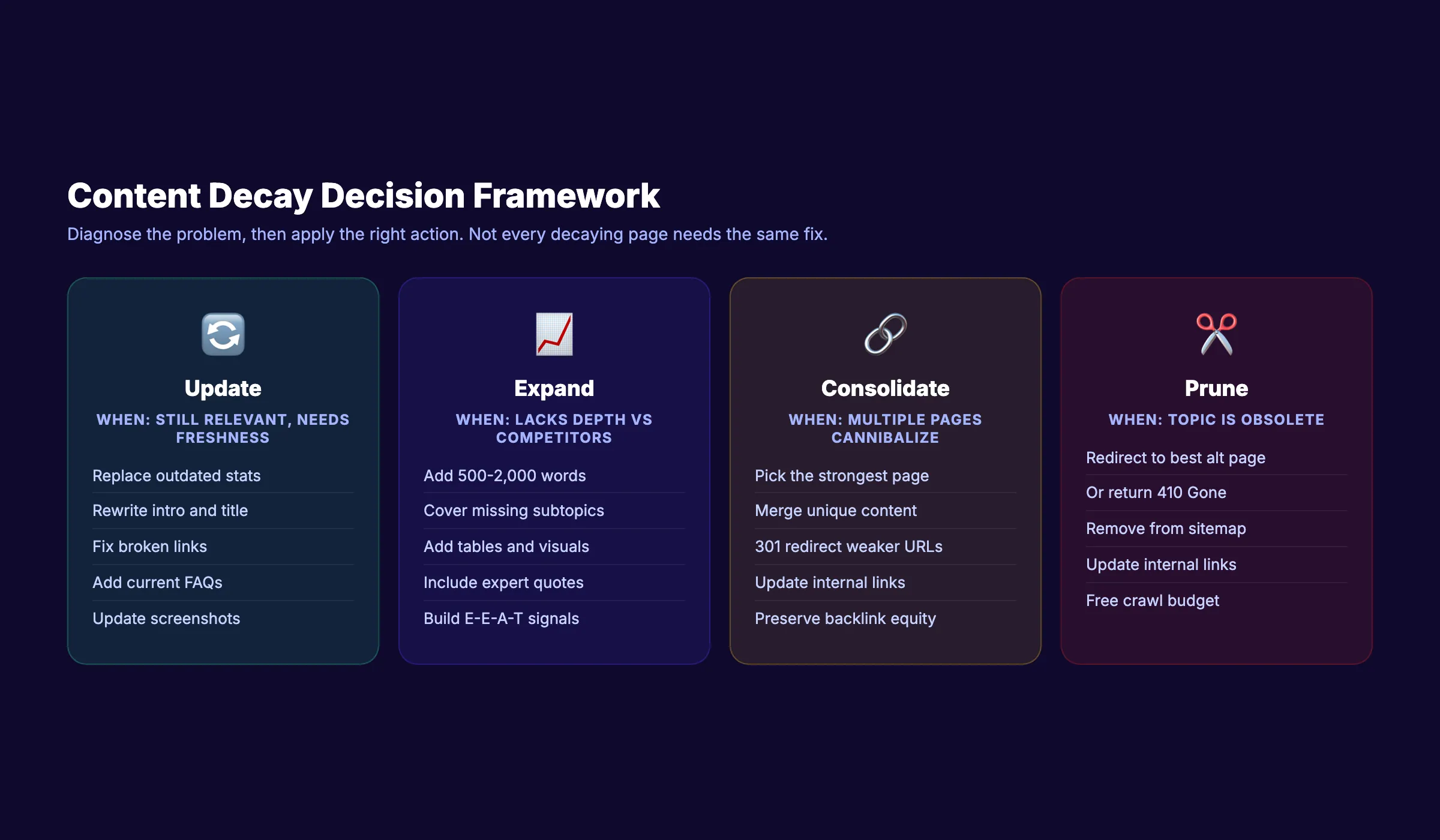
The Decision Framework: Update, Expand, Consolidate, or Prune
Once you identify decaying content, apply the right fix.
Update
When: The keyword still has search volume. The content is fundamentally sound but needs freshness.
What to do:
- Replace outdated statistics with 2025-2026 data
- Swap old screenshots, tool references, and examples
- Rewrite the introduction for current pain points
- Update the title (remove old years, refresh the hook)
- Fix broken internal and external links
- Add new FAQ questions from current People Also Ask results
Expand
When: The content lacks topical depth. Competitors cover subtopics you skip.
What to do:
- Add 500 to 2,000 words covering missing subtopics
- Add new H2 sections that competitors include
- Include tables, checklists, and visual elements
- Add expert quotes or original data for E-E-A-T signals
- Build deeper topical authority around the subject
Consolidate
When: Multiple pages on your site target the same keyword and split authority.
What to do:
- Identify all pages competing for the same keyword cluster
- Choose the strongest page as the primary
- Merge unique content from weaker pages into the primary
- Set 301 redirects from weaker URLs to the primary
- Update internal links to point to the primary page
Prune
When: The content is completely obsolete. The topic no longer has search demand. The page drives zero business value.
What to do:
- Redirect to the closest relevant page (301 redirect)
- Or return a 410 Gone status if no relevant redirect exists
- Update your sitemap to remove the pruned URL
For a full walkthrough, see our guide on how to fix thin content.
The Content Refresh Process: Step by Step
Follow this checklist for every page you decide to update or expand.
Step 1: Analyze the Current State
- ✓ Export current rankings, traffic, and impressions from GSC
- ✓ Identify which keywords lost position
- ✓ Search the primary keyword and study the top 3 competitors
- ✓ Note what competitors cover that your page does not
Step 2: Update the Content
- ✓ Replace all outdated statistics with current data
- ✓ Rewrite the introduction with a 2026 hook
- ✓ Update the title tag (remove old years, improve the hook)
- ✓ Rewrite the meta description for current CTR patterns
- ✓ Fix all broken internal and external links
- ✓ Add new internal links from recently published content
- ✓ Update or add images with fresh alt text
- ✓ Restructure headings to match current search intent
- ✓ Add FAQ section with current People Also Ask questions
Step 3: Optimize for AI Citations
This step is new for 2026. Refreshed content should also be optimized for AI search visibility.
- ✓ Add clear definition sentences near the top of each section
- ✓ Include at least 3 statistics with cited sources
- ✓ Use sequential H2/H3 heading structure matching user questions
- ✓ Add or update schema markup (FAQ, HowTo, Article)
- ✓ Format key takeaways as scannable bullet points
Pages updated within 60 days are 1.9 times more likely to appear in AI answers. Content freshness now affects both Google rankings and AI citations. See our generative engine optimization guide for the full AI strategy.
Step 4: Track Recovery
- ✓ Set a 30/60/90-day review calendar
- ✓ Compare clicks, impressions, CTR, and position in GSC
- ✓ Check if AI Overviews cite the refreshed page
- ✓ Document what worked for future refresh cycles
Expected timeline: Most refreshed pages show ranking recovery within 2 to 4 weeks. Full traffic recovery takes 60 to 90 days. Some pages recover to higher traffic than their original peak.
Updating old blog posts increases traffic by up to 106% according to HubSpot.
Your SEO team. $99 per month. 30 optimized articles, published automatically. We keep content fresh.
Content Decay and AI Citations in 2026
Content decay now operates on two fronts. A page can lose Google rankings AND disappear from AI-generated answers independently. You can still rank on page 1 but be invisible to ChatGPT and Perplexity.
AI Citation Half-Life
Research analyzing 3 million+ citations across 120,000+ domains found that AI citation half-life is roughly 4.5 weeks. After that, AI engines move to fresher sources.
Platform-specific half-lives:
| AI Platform | Citation Half-Life |
|---|---|
| ChatGPT | ~3.4 weeks |
| Perplexity | ~4.0 weeks |
| Google AI Overviews | ~4.5 weeks |
| Gemini | ~4.6 weeks |
What This Means for Content Strategy
- Pages not updated quarterly are 3 times more likely to lose AI citations
- Only 30% of brands remain visible in back-to-back AI responses for identical queries
- Brand visibility declined 35.9% over just 5 weeks (January to February 2026)
- Cosmetic updates do not count. AI systems evaluate whether updates change substance (data, examples, context), not just timestamps.
Traditional content decay happened over months. AI citation decay happens over weeks. The refresh cadence that worked for Google (quarterly) does not work for AI search (monthly or more frequent).
For a deeper guide, see how to get cited by AI search engines and our blog GEO checklist.
How to Prevent Content Decay Before It Starts
Fixing decay is reactive. Prevention is better.
Build a Refresh Calendar
Create a recurring schedule:
| Content Type | Refresh Frequency | What to Update |
|---|---|---|
| Evergreen guides | Every 90 days | Statistics, examples, links |
| Tool roundups and reviews | Every 60 days | Pricing, features, screenshots |
| Annual or dated posts | Every 30 days during peak season | Data, trends, predictions |
| News-adjacent content | Monthly | New developments, source links |
| High-traffic cornerstone pages | Every 14 days | Any stale element |
Set Up Automated Alerts
- Create a Google Search Console alert for pages losing 20%+ impressions month-over-month
- Use a content audit tool to flag posts older than 12 months with declining traffic
- Schedule a monthly team review of top 20 pages by traffic
Publish Consistently
The best defense against content decay is consistent publishing. New posts create internal linking opportunities to existing content. Each new article sends freshness signals to older related pages.
Sites publishing 20 to 30 articles per month build topical authority faster and experience slower decay rates on existing content. The Content Compound Effect means every article strengthens the ones that came before it.
For building your content pipeline, see our guide on creating a content calendar for SEO.
Common Mistakes When Fixing Decayed Content
Only updating the date. Changing "2023" to "2026" without substantive changes does not count. AI systems and experienced readers see through timestamp-only refreshes.
Ignoring search intent shift. Refreshing content for the original intent when Google now expects a different format or angle. Always re-search the keyword and study what the current top 3 results look like before refreshing.
Not consolidating cannibalizing pages. Updating both competing pages instead of merging them into one authoritative piece. Two mediocre pages will always lose to one strong page.
Forgetting 301 redirects. After consolidation, set redirects from removed URLs to preserve backlink equity. Deleting a page without redirecting it throws away every link pointing to it.
Not tracking results. Refreshing content but never measuring whether it recovered. Without 30/60/90-day tracking, you do not know if the fix worked or if a different approach is needed.
For more on updating old blog posts, see our dedicated guide. To find pages worth fixing, see how to do a content audit.
3,500+ blogs published. Every article is SEO-scored before publish. See what theStacc can do for your content.
What practitioners are saying on X
AI search advice ages quickly. Here is high-signal public discussion from SEO and growth operators — context for your roadmap, not a substitute for primary data.
- @varunram (Jul 2026): Critique of GEO slopfarm products that combine SEO clickbait with unresearched content marketing — quality and research still separate winners from farms. See the post on X.
- @jakezward (Feb 2026): 2026 SEO predictions emphasize AI Overview share-of-SERP, schema for LLM token efficiency, brand mentions in AI answers as a KPI, proprietary data as a moat, and content refresh beating net-new AI slop. See the post on X.
- @HlynurStefDev (Jul 2026): Public case: niche site traffic jumped from ~18 to 4,162 Google visits/month after focused technical/on-page SEO work (GSC screenshots claimed) — reminds that fundamentals still move numbers. See the post on X.
Grok, AI Overviews, and multi-engine visibility
Content topics like “content decay fix” get AI citations when process steps, quality bars, and examples are concrete. Operator consensus on X is clear: research-backed pages beat unedited bulk generation — reflect that honestly.
- Google AI Overviews: Use passage-ready answers, tables, and FAQ schema where relevant.
- ChatGPT / Perplexity: Cite named sources next to key claims.
- Grok: Maintain accurate entity facts on-site and in high-signal X posts.
Publish content built for Google and AI citations. theStacc’s Content SEO module ships SEO-scored articles structured for rankings and generative engines — including clearer entity pages models like Grok can quote.
FAQ
Content decay is the gradual decline in a page's organic traffic, rankings, and click-through rate over time. It happens because content goes stale, competitors publish better pages, search intent shifts, or new SERP features steal clicks. 82% of high-ranking posts start losing traffic within 12 to 24 months without maintenance.
Compare 6 months of traffic data in Google Search Console. Look for pages with declining clicks, impressions, and average position. A slow, steady 20 to 30% drop quarter over quarter is the classic decay pattern. Sudden drops are usually algorithm updates or technical issues, not decay.
Update when the keyword still has volume and the page has existing authority (backlinks, age, ranking history). Write new when the topic requires a fundamentally different angle or the old page has no salvageable authority. Updating old posts increases traffic by up to 106% and is typically faster than ranking a new page from scratch.
High-traffic cornerstone pages: every 14 to 30 days. Standard blog posts: every 90 days. Tool reviews and roundups: every 60 days. For AI citation visibility, the threshold is tighter. Pages not updated within 60 days are nearly half as likely to appear in AI-generated answers.
No. Google tracks both the original publish date and the last modified date. Updating content signals freshness without losing the authority of the original publish date. Use a "Last Updated" date on the page and update your sitemap lastmod field.
AI citation half-life is roughly 4.5 weeks. After that, AI engines stop citing your page and move to fresher sources. Pages updated within 60 days are 1.9 times more likely to appear in AI answers. Content can still rank on Google page 1 but be invisible to ChatGPT and Perplexity if not refreshed regularly.
Content decay is inevitable. Every page you publish will eventually lose traffic if left untouched. The fix is a system: detect decay early, apply the right action (update, expand, consolidate, or prune), and build a refresh cadence that keeps your best pages performing for years. Start with your top 10 pages by traffic. The recovery compounds from there.
Rank everywhere. Do nothing. Blog SEO, Local SEO, and Social on autopilot.
Related Tools & Resources
Free SEO Tools:
Best Lists:
Sources & references
- [1] Princeton / Georgia Tech et al. — GEO research (arXiv:2311.09735)
- [2] @varunram on X — Critique of GEO slopfarm products that combine SEO clickbait with unresearched content marketing — quality and research
- [3] @jakezward on X — 2026 SEO predictions emphasize AI Overview share-of-SERP, schema for LLM token efficiency, brand mentions in AI answers
- [4] @HlynurStefDev on X — Public case: niche site traffic jumped from ~18 to 4,162 Google visits/month after focused technical/on-page SEO work (G
- [5] Referenced source — www.semrush.com

Plan topics, review article drafts, and publish to a connected CMS.
Weekly local SEO teardowns
One practical email a week. Map Pack, GBP, AI Overviews — no fluff. Unsubscribe anytime.
Explore this topic: Content Decay.