
How to Fix Thin Content on Your Site (2026)
A 7-step process to find and fix thin content hurting your rankings. Includes audit checklist, decision framework, and recovery data. Updated 2026.
Google reduced unhelpful content in search results by 40% after its Helpful Content Update. Sites on the wrong side of that cut lost 30% to 90% of their organic traffic. Most never fully recovered.
Thin content is the most common reason. Pages that exist but add no real value. Product pages with 2 sentences. Blog posts that restate the title and nothing else. Auto-generated location pages with only the city name swapped. Google finds these pages, evaluates them, and uses them to judge your entire domain.
The fix is not complicated. But most site owners either ignore the problem or delete pages randomly without a strategy. Both approaches make things worse.
We have published 3,500+ blogs across 70+ industries. The pattern is clear: sites that audit and fix thin content systematically see ranking improvements within 60 to 90 days. Sites that guess see nothing.
Here is what you will learn:
- How to identify every thin content page on your site
- A decision framework for each page: improve, merge, redirect, or delete
- The exact steps to fix thin content without losing existing authority
- How long recovery takes (with real data from case studies)
- How to prevent thin content from building up again
What You Will Need
Time required: 3 to 5 hours for the initial audit, 1 to 2 hours per batch of fixes
Difficulty: Beginner to intermediate
What you will need:
- Google Search Console access (free)
- Google Analytics 4 or equivalent analytics tool
- A crawling tool: Screaming Frog (free for up to 500 URLs), Semrush, or Ahrefs
- A spreadsheet for tracking decisions
What Counts as Thin Content
Thin content is not just short content. A 200-word page that fully answers a simple question is fine. A 2,000-word page stuffed with filler that says nothing useful is thin.
Google defines thin content as pages with little or no added value. The Google Quality Raters Guidelines assign the lowest quality rating to pages created with minimal effort, no originality, or no clear benefit to the reader.
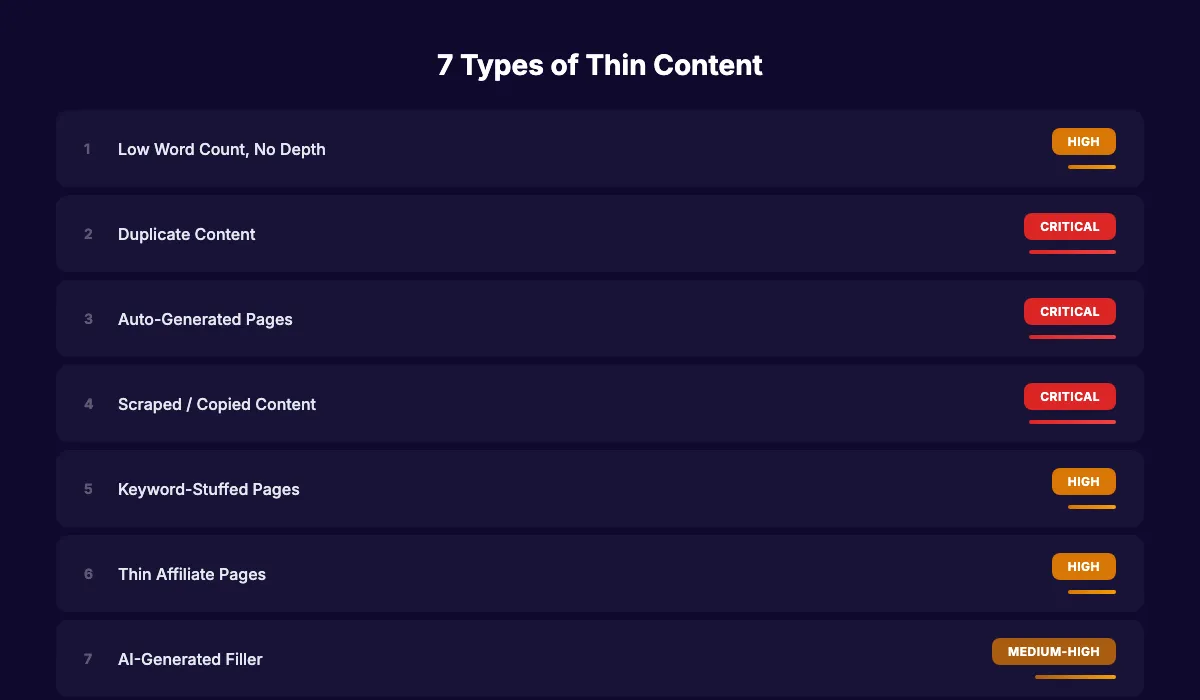
The 7 types of thin content:
| Type | Example | Risk Level |
|---|---|---|
| Low word count, no depth | 150-word blog post restating the title | High |
| Duplicate content | Same text across multiple pages with only a city name changed | Critical |
| Auto-generated pages | Programmatic pages with no unique value per page | Critical |
| Scraped or copied content | Content pulled from other sites without attribution or added insight | Critical |
| Keyword-stuffed pages | Pages that repeat the same phrase 40 times with no real information | High |
| Thin affiliate pages | Product listings with only manufacturer descriptions and affiliate links | High |
| AI-generated filler | Long pages that sound fluent but contain no original insight or data | Medium-High |
That last category is new. Since 2024, AI-generated content that adds no original perspective or value falls squarely into Google’s thin content definition. Length alone does not save it. A 3,000-word AI article that restates common knowledge without any original analysis is thin content dressed in a longer word count.
Step 1: Crawl Your Entire Site
Before you can fix thin content, you need to find it. A manual review does not scale. Use a crawler to pull every indexed page on your site.
Specifically:
- Run Screaming Frog on your full domain (free for up to 500 URLs)
- Export the results to a spreadsheet
- Include these columns: URL, title, word count, status code, meta description, canonical tag, and number of internal links pointing to the page
- Sort by word count (lowest first) to identify the shortest pages
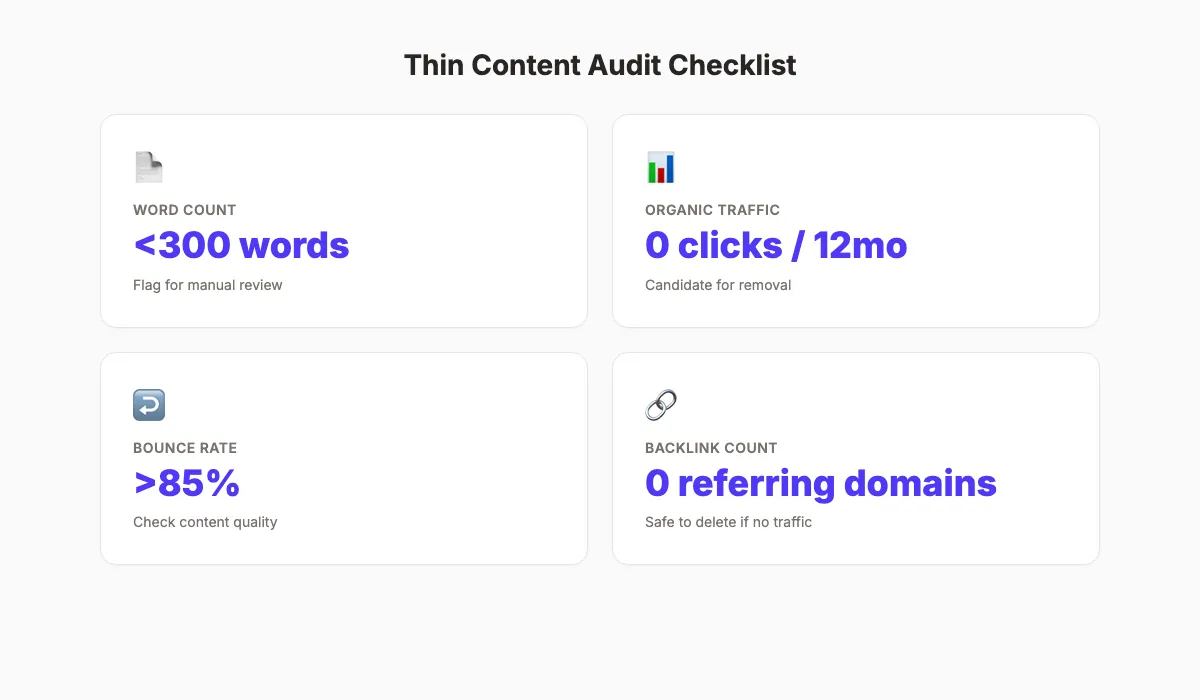
- Flag every page under 300 words for manual review
If you have a larger site, use Semrush Site Audit or Ahrefs Site Audit. Both flag thin content automatically and provide word count data per page.
Why this step matters: You cannot fix what you cannot see. Most site owners underestimate how much thin content they have. An e-commerce site with 5,000 product pages might have 3,000 that qualify as thin. A blog with 200 posts might have 60 under 500 words. The crawl gives you the full picture.
Pro tip: Do not limit your crawl to blog posts. Check product pages, category pages, location pages, tag pages, and author archive pages. Thin content hides in sections you forgot existed.
Step 2: Pull Performance Data for Every Page
Word count alone does not determine thin content. A 250-word FAQ answer that ranks number 1 and drives 500 visits per month is not a problem. A 400-word blog post with zero traffic for 12 months is.
Combine your crawl data with analytics and Search Console data to see the full picture.
Specifically:
- Export the last 12 months of page-level data from Google Analytics 4
- Export Search Console performance data (clicks, impressions, average position) per page
- Merge this data into your crawl spreadsheet using URL as the common key
- Add a column for backlinks per page (from Ahrefs or Semrush)
- Flag every page that meets ANY of these criteria:
- Under 300 words AND under 10 clicks per month
- Zero organic traffic for 12+ months (regardless of word count)
- Bounce rate above 85% AND average time on page under 30 seconds
- Duplicate or near-duplicate title tags
Why this step matters: Performance data separates pages that are thin and harmful from pages that are thin but functional. Deleting a short page that earns backlinks and traffic would waste existing authority. This step prevents that mistake.
Step 3: Classify Each Page Using the Decision Framework
This is the step most guides skip. They say “fix or delete” without giving you a system for deciding which action to take. Use this framework for every flagged page.
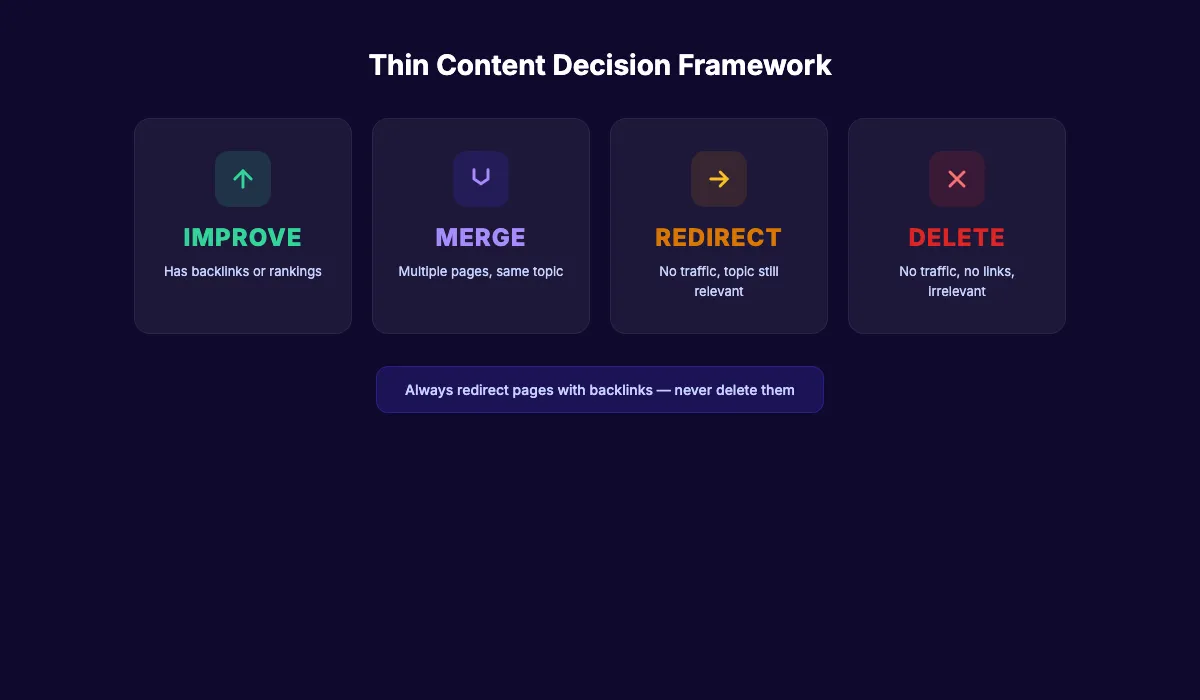
The 4-action decision framework:
| Condition | Action | How |
|---|---|---|
| Page has backlinks OR ranks for keywords (positions 1 to 50) | Improve | Add depth, data, and original insight. Expand to 1,000+ words. |
| Two or more pages target the same keyword or topic | Merge | Combine into 1 stronger page. 301 redirect the others. |
| Page has no traffic, no backlinks, but the topic still matters | Redirect | 301 redirect to the closest relevant page on your site. |
| Page has no traffic, no backlinks, and the topic is irrelevant | Delete | Remove the page entirely. Return a 410 status code. |
Mark every flagged page in your spreadsheet with one of these 4 actions. Do not rush this step. Each decision affects your crawl budget, internal link structure, and topical authority.
Why this step matters: Random deletion destroys link equity. Random improvement wastes time on pages that should be merged. The framework ensures every action has a purpose and protects the authority you already built.
Pro tip: When merging pages, always keep the URL with the most backlinks and redirect the others to it. Preserving backlink equity is the entire point of merging instead of deleting.
Stop guessing which content to fix. Stacc publishes 30 optimized articles per month. Every one passes a quality audit before it goes live. Start for $1 →
Step 4: Improve Pages Worth Saving
Start with the “Improve” pile. These pages have existing authority (backlinks, rankings, or traffic) but need more depth and value.
Specifically:
- Check the search intent for each page. Search the target keyword and study what the top 5 results cover. Your page needs to match or exceed their depth.
- Add original data, examples, or case studies. Generic rewrites are still thin.
- Expand sections that only scratch the surface. If a heading promises “how to do X” but the paragraph underneath is 2 sentences, that section is thin.
- Add formatting that helps readers: tables, checklists, bullet lists, and images. Walls of text without visual breaks signal low effort.
- Update outdated statistics, links, and references.
- Check for E-E-A-T signals. Add author credentials, cite primary sources, and include first-hand experience where possible.
Do not pad content with filler to hit a word count. Google’s Quality Raters now explicitly flag “filler content” as a negative signal. Add substance, not sentences.
Why this step matters: Improving existing pages is faster and more effective than creating new ones. The page already has a URL in Google’s index, possibly has backlinks, and has age authority. Updating old posts with deeper content typically produces ranking improvements within 2 to 4 weeks for pages that already had some position.
Pro tip: Use Google Search Console to find keywords each page already gets impressions for but does not rank well. Add dedicated sections targeting those terms. This turns a thin page into a topically authoritative resource.
Step 5: Merge Duplicate and Overlapping Pages
Duplicate and near-duplicate content is the most damaging form of thin content. When multiple pages on your site target the same keyword, they compete against each other. Google picks one and suppresses the rest. Often, it picks wrong.
Specifically:
- Group pages that target the same keyword or topic cluster
- Pick the strongest page in each group (most backlinks, highest traffic, best current ranking)
- Rewrite the surviving page to include the best content from all merged pages
- Set up 301 redirects from every deleted URL to the surviving page
- Update all internal links that pointed to deleted pages
Common merge scenarios:
- 3 blog posts about “email marketing tips” → merge into 1 guide
- 50 location pages with identical text and only the city name changed → merge into 1 service area page or rewrite each with unique local content
- Product pages with identical descriptions across color variants → consolidate with canonical tags
Why this step matters: Keyword cannibalization splits your authority across multiple weak pages instead of concentrating it in one strong page. Merging reverses this. Case study data shows e-commerce sites that pruned thin product pages saw a 28% revenue increase from stronger organic performance on the surviving pages.
Your SEO team. $99 per month. 30 articles per month, each one built to pass a quality threshold. No thin content. No filler. Start for $1 →
Step 6: Remove or Noindex Pages Beyond Repair
Some pages are not worth improving or merging. Pages with zero traffic, zero backlinks, and no strategic value should be removed. Keeping them wastes crawl budget and dilutes your site quality signal.
Specifically:
- Delete pages that have earned zero clicks in 12+ months and have no backlinks
- Return a 410 (Gone) status code for deleted pages. A 410 tells Google the removal is permanent, which is processed faster than a 404.
- For pages you want to keep but hide from Google (like internal tools, test pages, or staging content), add a
noindextag instead of deleting - After deletion, submit your updated sitemap through Google Search Console
- Check for any broken internal links created by the removals and fix them
The data supports aggressive pruning when the criteria are met. One marketplace removed 600,000 pages that received zero clicks in 12 months. Both clicks and impressions increased by 30% afterward. CNET saw a traffic increase of nearly 30% after pruning thin content. Home Science Tools saw a 64% revenue increase after removing roughly 10% of their blog.
Why this step matters: Google allocates a crawl budget to every site. Thin pages consume that budget without contributing value. Removing them concentrates Google’s attention on your strong pages. The case studies above show this is not theoretical. Real sites see measurable traffic and revenue gains from pruning.
Pro tip: Before deleting, double-check that no external site links to the page. If a thin page somehow earned a backlink from a reputable source, redirect it rather than delete it. Use Ahrefs or Semrush to verify.
Step 7: Set Up Ongoing Monitoring
Thin content builds up over time. A clean site today can accumulate 50 thin pages over the next 6 months if nobody is watching. Build a monitoring system to catch problems early.
Specifically:
- Run a content audit every quarter (repeat Steps 1 and 2 on a 90-day cycle)
- Set a minimum quality standard for all new content before publication. Define word count minimums, formatting requirements, and originality expectations.
- Monitor Google Search Console for manual actions. Check the “Manual Actions” tab monthly.
- Track the performance of pages you improved in Step 4. If they still have not gained traffic after 90 days, reassess whether they should be merged or deleted instead.
- Create a content calendar that prioritizes depth over volume. Publishing 4 strong articles per month beats publishing 20 thin ones.
Why this step matters: The sites that recovered from Google’s Helpful Content Update treated quality as an ongoing process, not a one-time cleanup. According to tracking by Glenn Gabe, only 22% of HCU-affected sites saw a meaningful traffic increase after subsequent core updates. The rest never recovered. Sustained quality is the only reliable path.
Pro tip: If you use AI to generate content, implement a human review step before publishing. AI content without editorial oversight is the fastest path to thin content at scale. A 30-minute review per article prevents months of recovery work later.
Results: What to Expect
After completing all 7 steps, here are realistic timelines based on case study data:
- Week 1 to 2: Complete audit and classification. All decisions documented in your spreadsheet.
- Week 3 to 6: Execute improvements, merges, and deletions in batches.
- Month 2 to 3: Google recrawls updated pages. Initial ranking shifts appear for improved content.
- Month 3 to 6: Measurable traffic improvements on surviving pages as consolidation takes effect.
- Month 6+: Compound growth as your site’s overall quality signal strengthens.
Do not expect a full recovery if your site was hit by the Helpful Content Update. Historical data shows most sites recover about one-third of lost traffic. The remaining gains come from new, high-quality content published after the cleanup.
For sites without a manual penalty. Sites that simply have thin pages dragging down performance. The improvements tend to be faster and more complete. Content pruning alone drives an average 49% increase in organic traffic according to Semrush data.
Common Thin Content Mistakes
Padding content with filler to hit a word count. Adding 500 words of fluff to a 300-word page does not fix it. Google evaluates value per section, not total word count. Add substance or merge the page.
Deleting pages that have backlinks. Every backlink is a vote of authority. Deleting a page with external links destroys that equity permanently. Always redirect instead.
Fixing one section and ignoring the rest. Thin content is a site-wide signal. Improving 5 blog posts while 500 thin product pages remain untouched will not move the needle. Address every section of your site.
Treating AI content as automatically thin. AI-generated content is not inherently thin. It becomes thin when it restates common knowledge without original analysis, data, or perspective. The fix is editorial oversight, not avoiding AI entirely.
Doing the audit once and never repeating it. New thin content accumulates constantly. Tag pages, archive pages, seasonal content, and old drafts all build up. Quarterly audits prevent backsliding.
3,500+ blogs published. 92% average SEO score. Every article Stacc publishes passes a quality audit. No thin content. No filler. Start for $1 →
FAQ
What is thin content in SEO?
Thin content is any web page that provides little or no value to the reader. Google’s quality guidelines define it as pages created with minimal effort, no originality, or no user benefit. Common examples include pages under 200 words with no depth, duplicate content across multiple URLs, auto-generated pages, and scraped content from other sites.
How do I find thin content on my website?
Use a crawling tool like Screaming Frog, Semrush, or Ahrefs to pull every page on your site. Export word count and traffic data. Flag pages under 300 words, pages with zero traffic for 12+ months, and pages with duplicate title tags. Then manually review flagged pages to confirm they lack value. See our full guide on how to do a content audit for the complete process.
Should I delete thin content or improve it?
It depends on the page’s existing authority. If the page has backlinks or ranks for any keywords (even weakly), improve it or redirect it. Deleting a page with backlinks wastes link equity. If the page has zero traffic, zero backlinks, and no strategic value, delete it and return a 410 status code.
Does thin content affect my entire site?
Yes. Google’s Helpful Content Update evaluates site-wide quality. A large volume of thin pages can suppress rankings for your strong pages too. Google’s documentation confirms that manual actions can target specific pages or the entire site depending on severity.
How long does it take to recover from thin content penalties?
For manual actions, Google reviews reconsideration requests in 7 to 10 days. For algorithmic impacts (like the Helpful Content Update), recovery depends on the next core update. Historical data shows only 22% of affected sites recovered meaningfully, and most regained about one-third of lost traffic. Prevention is significantly easier than recovery.
Can AI-generated content be considered thin content?
Yes. AI content that restates common knowledge without original data, perspective, or analysis qualifies as thin under Google’s quality guidelines. The 2025 update to the Quality Raters Guidelines explicitly flags “filler content” as a negative signal. AI-generated content passes the quality bar when it includes original research, expert analysis, or unique examples that a generic prompt would not produce.
Thin content does not fix itself. Every week those pages remain on your site, they drag down the pages that deserve to rank. Start with Step 1 today. Run the crawl, pull the data, and build your decision spreadsheet. The audit takes a few hours. The ranking improvements last for years.
Related Tools & Resources
Free SEO Tools:
Best Lists:

Written by
Siddharth GangalSiddharth is the founder of theStacc and Arka360, and a graduate of IIT Mandi. He spent years watching great businesses lose organic traffic to competitors who simply published more. So he built a system to fix that. He writes about SEO, content at scale, and the tactics that actually move rankings.
30 SEO blog articles published every month
Keyword-optimized, scheduled, and live on your site. Automatically.
30-day trial · Cancel anytime
theStacc
Stop writing SEO content manually
30 blog articles, 30 GBP posts, and social media content. Published every month. Automatically.
Start Your $1 Trial$1 for 3 days · Cancel anytime