Master hreflang tags for international SEO: syntax, implementation methods, the mistakes that break them, and the tools that verify your setup.
Your website ranks on page 1 in the United States. But your Spanish-speaking customers in Mexico see the English version. Your UK visitors land on the US pricing page. Hreflang tags fix this problem.
75% of international websites have hreflang errors. Those errors cost rankings in target markets, send users to the wrong language version, and trigger duplicate content flags. A single missing tag can cause Google to ignore your entire international setup.
Most businesses expand internationally without configuring hreflang. The result is wasted ad spend, confused visitors, and lost revenue in every market outside the home country. Fixing hreflang is one of the highest-ROI technical SEO tasks you can do.
We have published 3,500+ articles across 70+ industries. This guide covers what hreflang tags are, how to implement them correctly, and every mistake to avoid.
Here is what you will learn:
- What hreflang tags are and when you need them
- The exact syntax and format for every scenario
- 3 implementation methods and when to use each one
- Step-by-step setup for multilingual and multiregional sites
- The 6 most common hreflang mistakes and how to fix them
- How to test and validate your hreflang setup
- CMS-specific instructions for WordPress, Shopify, and Webflow
Table of Contents
- What Are Hreflang Tags
- Hreflang Syntax and Format
- 3 Implementation Methods
- Step-by-Step Implementation
- Common Hreflang Mistakes
- Testing and Validation
- Hreflang and SEO Impact
- Hreflang for CMS Platforms
- FAQ
What Are Hreflang Tags
Hreflang is an HTML attribute that tells search engines which language and geographic region a page targets. Google uses it to serve the correct version of your page to users based on their language and location.
Without hreflang, Google guesses which version to show. It often guesses wrong. A user in France may see your English page. A user in Brazil may see your Portugal-Portuguese page. Hreflang removes the guessing.
How Google Uses Hreflang
Google treats hreflang as a signal, not a directive. This means Google considers your hreflang tags alongside other signals like canonical tags, content language, and server location. When all signals align, Google reliably serves the correct version.
Hreflang tells Google 3 things about each page:
- What language the page is written in (English, Spanish, French)
- What geographic region it targets (US, UK, Mexico, France)
- Which other pages are alternate versions of the same content
Google then uses this data to match each page to the right audience in search results. The tag does not affect rankings directly. It affects which version of a page appears for users in each market.
When You Need Hreflang Tags
Not every website needs hreflang. You need it in 3 specific situations.
Multilingual sites. You publish the same content in multiple languages. An English page and a Spanish translation of that page need hreflang tags linking them together.
Regional variations. You target the same language in different countries. English for the US (en-us) and English for the UK (en-gb) are different audiences. Pricing, spelling, and cultural references differ. Hreflang tells Google which version belongs where.
Country-specific content. You operate in multiple countries with localized pages. Even if both pages are in English, an Australian product page and a Canadian product page serve different markets. Hreflang ensures each market sees the right page.
If your website exists in only 1 language for 1 country, you do not need hreflang tags. Focus on on-page SEO instead.
Hreflang Syntax and Format
The hreflang tag follows a specific structure. Every part of the tag must be correct for Google to process it.
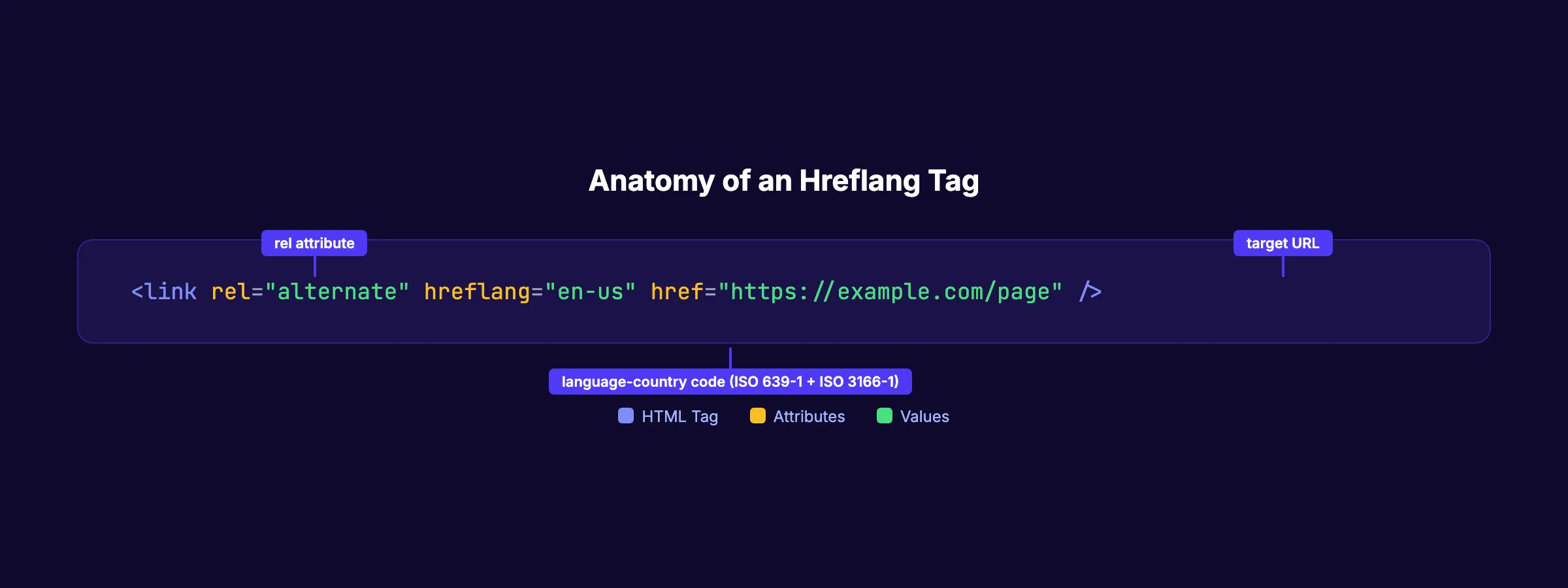
The Basic Tag Structure
Here is the standard hreflang tag:
<link rel="alternate" hreflang="en-us" href="https://example.com/page" />Each attribute serves a purpose:
rel="alternate"tells Google this page has an alternate versionhreflang="en-us"specifies the language and countryhref="..."points to the URL of that specific version
Always use absolute URLs. Never use relative paths like /page. Google requires the full URL including the protocol (https://).
Language Codes (ISO 639-1)
The language portion uses ISO 639-1 two-letter codes. Here are the most common ones:
| Code | Language |
|---|---|
en | English |
es | Spanish |
fr | French |
de | German |
pt | Portuguese |
ja | Japanese |
zh | Chinese |
ar | Arabic |
hi | Hindi |
ko | Korean |
You can use the language code alone when targeting a language without a specific country. For example, hreflang="es" targets all Spanish speakers regardless of location.
Country Codes (ISO 3166-1 Alpha-2)
The optional country portion uses ISO 3166-1 Alpha-2 codes. Common mistakes happen here.
| Code | Country | Common Error |
|---|---|---|
gb | United Kingdom | Using uk (wrong) |
us | United States | Using usa (wrong) |
br | Brazil | Using bz (wrong) |
mx | Mexico | Using me (wrong) |
au | Australia | Using aus (wrong) |
The format is always lowercase language, hyphen, uppercase country: en-US, es-MX, pt-BR. Google accepts lowercase for both parts, but the standard convention uses lowercase language and uppercase country.
The x-default Tag
The x-default value serves as a fallback. It tells Google which page to show when no other hreflang tag matches the user.
<link rel="alternate" hreflang="x-default" href="https://example.com/" />Google recommends including x-default in every hreflang set. It handles users whose language or region does not match any of your defined variations. Most sites point x-default to their English or primary-language version.
The Self-Referencing Requirement
Every page must include an hreflang tag that points to itself. This is not optional. Google requires self-referencing tags to validate the hreflang set.
A complete hreflang setup for a page with English (US), English (UK), and Spanish versions looks like this:
<!-- On the en-US page -->
<link rel="alternate" hreflang="en-us" href="https://example.com/page" />
<link rel="alternate" hreflang="en-gb" href="https://example.co.uk/page" />
<link rel="alternate" hreflang="es" href="https://example.com/es/page" />
<link rel="alternate" hreflang="x-default" href="https://example.com/page" />
Every page in the set must contain the same complete set of hreflang tags. The English (UK) page must reference itself and both other versions. The Spanish page must do the same.
Your SEO team. $99/month. 30 optimized articles published automatically with proper technical SEO.
3 Implementation Methods
There are 3 ways to add hreflang tags to your website. Each method works. The right choice depends on your site type and scale.
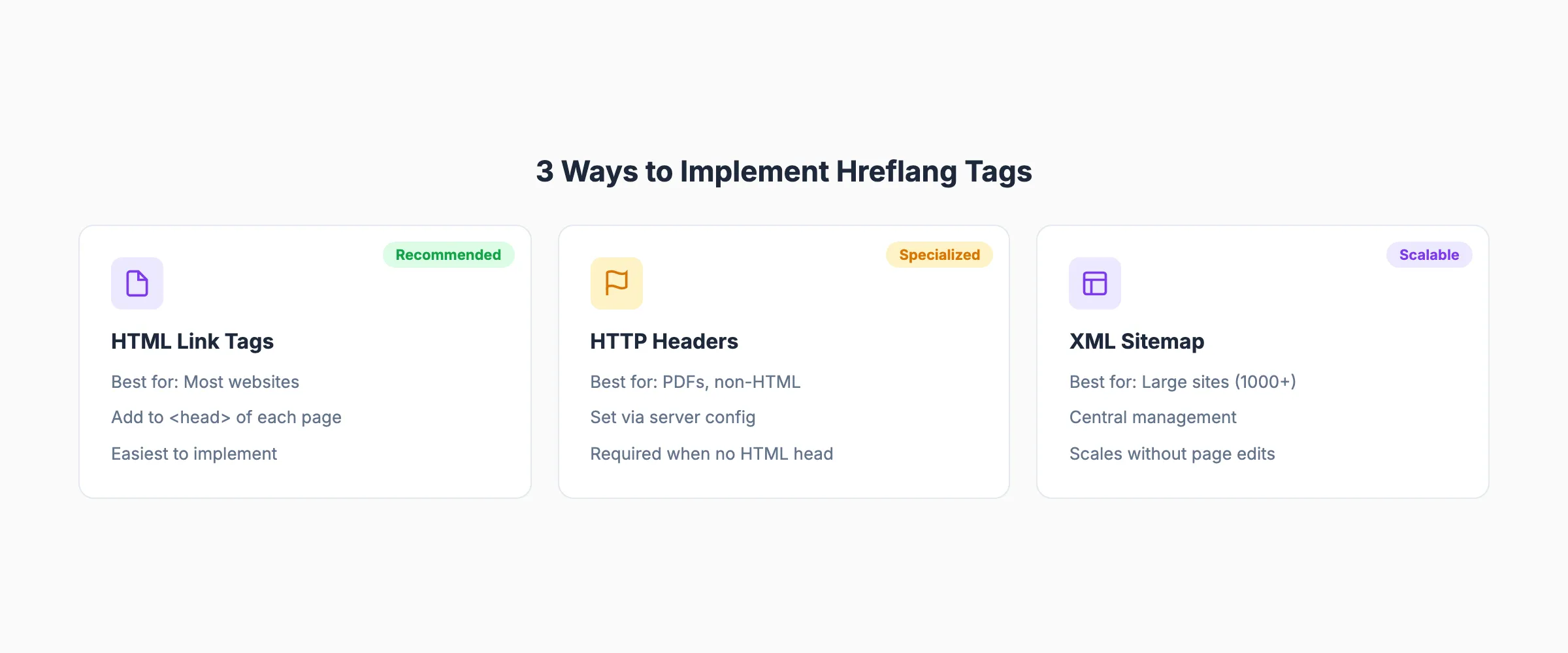
Method 1: HTML Link Tags in the Head
This is the most common method. You add <link> tags to the <head> section of each page.
<head>
  <link rel="alternate" hreflang="en-us" href="https://example.com/page" />
  <link rel="alternate" hreflang="en-gb" href="https://example.co.uk/page" />
  <link rel="alternate" hreflang="es" href="https://example.com/es/page" />
  <link rel="alternate" hreflang="x-default" href="https://example.com/page" />
</head>
Best for: Most websites with fewer than 1,000 pages. This method is the easiest to implement and debug. You can see the tags directly in the page source.
Drawback: On large sites, adding tags to every page increases HTML size. A page with 50 language versions needs 50 link tags in the head. That adds weight to every page load.
Method 2: HTTP Headers
For non-HTML files like PDFs, you cannot add tags to a <head> section. HTTP headers solve this problem.
Link: <https://example.com/file.pdf>; rel="alternate"; hreflang="en",
      <https://example.com/es/file.pdf>; rel="alternate"; hreflang="es"
Configure these headers in your server settings (Apache .htaccess, Nginx config, or CDN rules).
Best for: PDFs, downloadable files, and any non-HTML content. Also useful when you cannot modify the HTML <head> of your pages.
Drawback: Requires server-level access. Harder to audit than HTML tags because the headers are not visible in page source.
Method 3: XML Sitemap
The XML sitemap method centralizes all hreflang annotations in one file. You do not need to modify individual pages.
<url>
  <loc>https://example.com/page</loc>
  <xhtml:link rel="alternate" hreflang="en-us"
    href="https://example.com/page" />
  <xhtml:link rel="alternate" hreflang="en-gb"
    href="https://example.co.uk/page" />
  <xhtml:link rel="alternate" hreflang="es"
    href="https://example.com/es/page" />
  <xhtml:link rel="alternate" hreflang="x-default"
    href="https://example.com/page" />
</url>
Best for: Large sites with 1,000+ pages. Sites that cannot easily modify page templates. Sites managed by multiple teams where centralized control is important.
Drawback: Sitemap updates must stay in sync with page changes. If you add a new language version but forget to update the sitemap, Google will not know about it.
Which Method to Choose
| Factor | HTML Link Tags | HTTP Headers | XML Sitemap |
|---|---|---|---|
| Ease of setup | High | Medium | Medium |
| Non-HTML support | No | Yes | No |
| Large site scaling | Poor | Poor | Excellent |
| Debugging ease | High | Low | Medium |
| Server access needed | No | Yes | No |
| Central management | No | No | Yes |
Pick 1 method and stick with it. Mixing methods creates confusion and conflicting signals. Google processes all 3, but consistency reduces errors.
Step-by-Step Implementation
The implementation steps depend on your specific scenario. Here are the 3 most common setups.
Scenario 1: Same Language, Different Countries
You sell products in the US, UK, and Australia. All pages are in English, but pricing, shipping, and product availability differ.
Step 1. Identify every page that has country-specific versions.
Step 2. Add hreflang tags to each version. On the US page:
<link rel="alternate" hreflang="en-us" href="https://example.com/product" />
<link rel="alternate" hreflang="en-gb" href="https://example.co.uk/product" />
<link rel="alternate" hreflang="en-au" href="https://example.com.au/product" />
<link rel="alternate" hreflang="x-default" href="https://example.com/product" />
Step 3. Copy the same tag set to the UK and Australian pages. Every page in the set must contain all tags.
Step 4. Verify each page has a canonical tag pointing to itself. Do not canonicalize country versions to a single "main" version. Each country version is its own canonical.
Scenario 2: Different Languages, Same Country
You operate only in Canada but serve both English and French speakers.
<link rel="alternate" hreflang="en-ca" href="https://example.ca/page" />
<link rel="alternate" hreflang="fr-ca" href="https://example.ca/fr/page" />
<link rel="alternate" hreflang="x-default" href="https://example.ca/page" />
This setup ensures Google shows the French version to French-speaking Canadians and the English version to English-speaking Canadians.
Scenario 3: Multilingual and Multiregional
This is the most complex setup. You operate in multiple countries with multiple languages.
For a company serving the US (English), Mexico (Spanish), Spain (Spanish), France (French), and Germany (German):
<link rel="alternate" hreflang="en-us" href="https://example.com/page" />
<link rel="alternate" hreflang="es-mx" href="https://example.com/mx/page" />
<link rel="alternate" hreflang="es-es" href="https://example.es/page" />
<link rel="alternate" hreflang="fr-fr" href="https://example.fr/page" />
<link rel="alternate" hreflang="de-de" href="https://example.de/page" />
<link rel="alternate" hreflang="x-default" href="https://example.com/page" />
Key rules for complex setups:
- Every page must contain the full set of tags (all 6 in this example)
- Every page must reference itself
- Mexican Spanish (
es-mx) and Spain Spanish (es-es) are separate entries - The
x-defaultpoints to your primary market page - All URLs must be absolute and indexable
When you have more than 10 language-country combinations, switch to the XML sitemap method. Managing 10+ link tags in the head of every page becomes error-prone.
URL Structure Options
Your URL structure affects how you organize hreflang. There are 3 common patterns:
Subdirectories: example.com/es/, example.com/fr/ Easiest to manage. All content lives under 1 domain. Recommended for most sites.
Subdomains: es.example.com, fr.example.com Useful when regional teams manage content independently. Requires separate technical SEO work for each subdomain.
Country-code domains: example.es, example.fr Strongest geo-targeting signal. Expensive to maintain. Best for large enterprises with dedicated teams per country.
Hreflang works with all 3 structures. Pick the one that matches your operational capacity.
3,500+ blogs published. Every article is SEO-scored before publish. See what theStacc can do for your site.
Common Hreflang Mistakes
Over 75% of international websites have at least 1 hreflang error. These are the 6 mistakes we see most often.
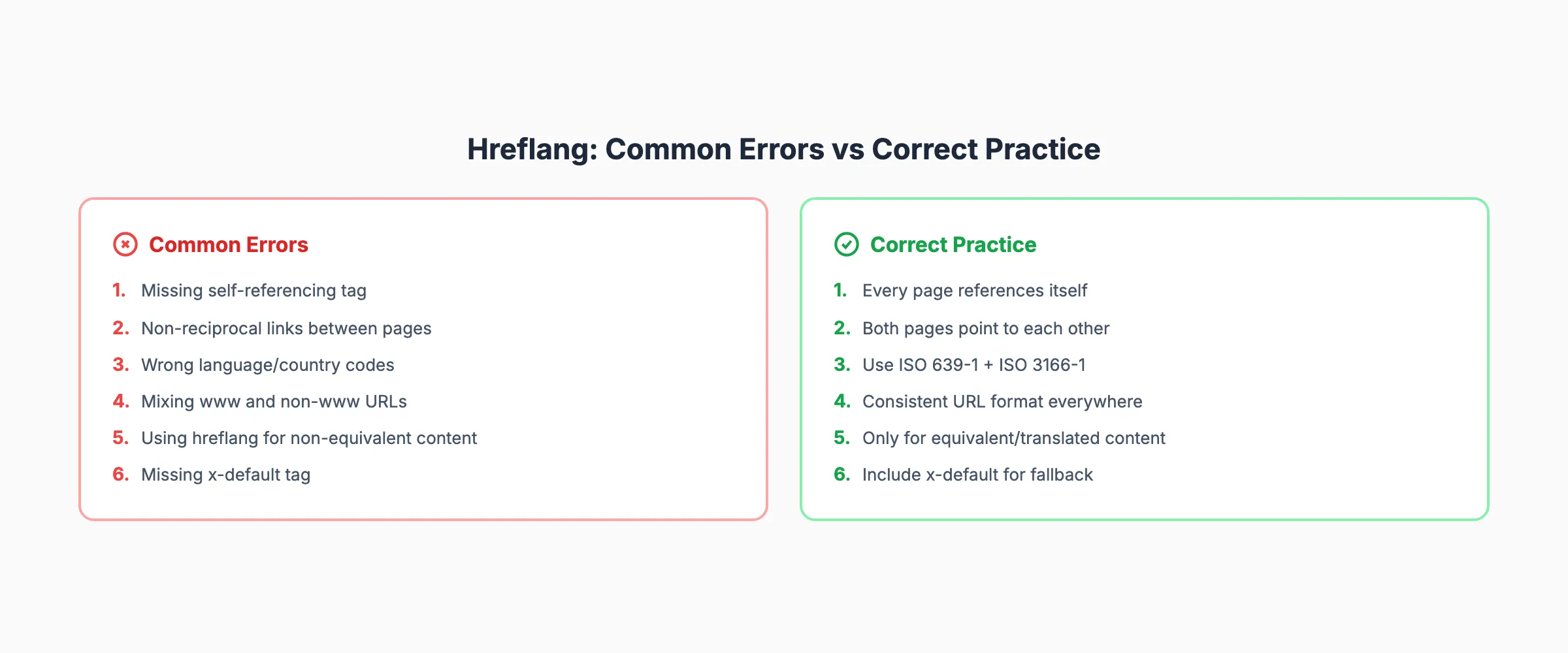
Mistake 1: Missing Self-Referencing Tags
Every page in an hreflang set must include a tag that points to itself. Without it, Google cannot confirm the page belongs to the set.
Wrong: ```html ```
Correct: ```html ```
16% of international sites are missing self-referencing tags. This single error can invalidate the entire hreflang set for that page.
Mistake 2: Non-Reciprocal Tags
Hreflang tags must be bidirectional. If page A points to page B, page B must point back to page A. 43% of all hreflang errors are missing return links.
Wrong: The English page links to the Spanish page, but the Spanish page does not link back.
Correct: Both pages contain the full identical set of hreflang tags pointing to all versions including themselves.
Mistake 3: Wrong Language or Country Codes
Using en-uk instead of en-gb is one of the most common errors. The UK country code in ISO 3166-1 is GB, not UK. Ukraine is UA. Using incorrect codes causes Google to ignore the tag entirely.
Other frequent code errors:
jpinstead ofjafor Japanese (the language code isja)cninstead ofzhfor Chinese (the language code iszh)es-lafor Latin American Spanish (there is noLAcountry code)
Always validate codes against the ISO 639-1 and ISO 3166-1 standards before deploying.
Mistake 4: Mixing www and Non-www URLs
If your site uses https://www.example.com, every hreflang URL must use www. Mixing www and non-www versions creates a mismatch Google cannot resolve.
This also applies to http vs https. All hreflang URLs must use the same protocol. Set up 301 redirects to enforce one canonical URL format across your entire site.
Mistake 5: Hreflang for Non-Equivalent Content
Hreflang tags should only connect pages that are translations or regional variations of the same content. Do not use hreflang to link your English homepage to your Spanish blog page. The content must be equivalent.
If you have a product page in English and a completely different product page in Spanish (different products, different information), hreflang is not appropriate. The pages must serve the same purpose with localized content.
Mistake 6: Incorrect x-default Usage
The x-default tag should point to a generic fallback page. Common errors include:
- Omitting
x-defaultentirely - Pointing
x-defaultto a language selector page that has anoindextag - Setting
x-defaultto a URL that redirects
The x-default URL must be a live, indexable page. Most sites should point it to their primary-language version. Google recommends including x-default in every hreflang set.
Testing and Validation
Deploying hreflang tags without testing is like publishing a page without checking if it loads. Validation catches errors before they affect your search visibility.
Google Search Console International Targeting
Google Search Console provides an International Targeting report under the Legacy tools section. This report shows:
- Which hreflang tags Google has detected on your site
- Errors in your hreflang implementation
- Pages with missing return tags
- Invalid language or country codes
Check this report monthly. New pages, URL changes, and site migrations can break hreflang without warning. For a full walkthrough of Search Console features, read our Google Search Console guide.
Screaming Frog SEO Spider
Screaming Frog crawls your site and extracts all hreflang tags from every page. It flags:
- Missing self-referencing tags
- Non-reciprocal annotations
- Inconsistent URL formats
- Tags pointing to non-200 status code URLs
The free version crawls up to 500 URLs. For larger sites, the paid version ($259/year) handles unlimited URLs.
Run a Screaming Frog crawl before and after any hreflang deployment. Compare the results to catch new errors.
Ahrefs Site Audit
Ahrefs Site Audit includes an hreflang-specific section. It detects:
- Pages with hreflang to non-canonical URLs
- Pages with conflicting hreflang and canonical tags
- Hreflang tags pointing to redirected URLs
- Missing or invalid language/country codes
If you already use Ahrefs for SEO audits, the hreflang report is included at no extra cost.
Free Hreflang Testing Tools
Several free tools validate hreflang without requiring a full site crawl:
- Aleyda Solis Hreflang Tags Generator generates correct tags from your URL list
- Merkle Hreflang Generator creates tags and validates existing ones
- Hreflang Tag Checker by TechnicalSEO.com tests individual pages
Use these tools during development. They catch syntax errors and missing tags before the pages go live.
Manual Validation Checklist
After deploying hreflang, verify these 7 items:
- Every page references itself in the hreflang set
- Every pair of pages has reciprocal tags
- All URLs are absolute (include
https://) - All URLs return a 200 status code (not redirects)
- Language and country codes match ISO standards
- The
x-defaulttag is present and points to a live page - Hreflang URLs match the canonical URL of each page
Run this checklist on a sample of 10 to 20 pages across your language versions. If the sample passes, deploy site-wide. If errors appear, fix the template before scaling.
Hreflang and SEO Impact
Hreflang tags do not directly boost rankings. Google has confirmed this. But the indirect effects on traffic, engagement, and revenue are significant.
Prevents Duplicate Content Issues
Without hreflang, Google may see your English (US), English (UK), and English (AU) pages as duplicates. It will pick 1 version to index and suppress the others. Hreflang tells Google these are intentional regional variations, not duplicates.
This is especially important for sites with minor regional differences. If your US and UK pages differ only in spelling (color vs colour) and pricing, Google may consolidate them without hreflang. With hreflang, both pages get indexed and rank in their target markets.
For more on handling content overlap, see our keyword cannibalization guide.
Ensures Correct Version Ranks in Each Market
Hreflang ensures your Mexican Spanish page ranks in Mexico while your Spain Spanish page ranks in Spain. Without it, Google might rank your Spain page in Mexico or vice versa.
This matters for conversion rates. Users in Mexico expect Mexican pricing, Mexican payment methods, and Mexican Spanish terminology. Serving them the Spain version creates friction and reduces conversions.
Improves Click-Through Rate
When users see search results in their own language, they click more often. A Spanish speaker in Mexico will click a Spanish-language result over an English result, even if both pages have similar content.
Correct hreflang implementation ensures the right language version appears in each market. This directly increases click-through rate for international traffic.
Preserves Link Equity Across Versions
When external sites link to your English page, that link equity needs to benefit your other language versions too. Hreflang tells Google that all versions belong together. Signals like backlinks and domain authority flow across the entire hreflang set.
Without hreflang, each language version competes independently. Your English page might have 500 backlinks while your Spanish page has 50. Hreflang helps Google understand they are part of the same content family, sharing authority signals.
For strategies on earning links across markets, see our guide on how to rank higher on Google.
Rank everywhere. Do nothing. Blog SEO, Local SEO, and Social on autopilot. theStacc starts at $49/mo.
Hreflang for CMS Platforms
Each CMS handles hreflang differently. Here is how to implement it on the 4 most popular platforms.
WordPress with WPML or Polylang
WPML (WordPress Multilingual Plugin) is the most popular WordPress translation plugin. It generates hreflang tags automatically when you connect translated pages.
Setup steps:
- Install WPML and activate the Sitepress Multilingual CMS component
- Configure your languages under WPML > Languages
- Translate each page using the WPML translation editor
- WPML adds hreflang tags automatically to connected translations
Polylang is a free alternative that also handles hreflang. It works similarly: connect translations, and the plugin generates the tags. Polylang Pro adds a string translation feature for theme and plugin text.
Both plugins handle self-referencing tags, x-default, and reciprocal links. Verify the output using Screaming Frog after setup.
Shopify Markets
Shopify Markets handles international selling with built-in hreflang support.
- Go to Settings > Markets in your Shopify admin
- Add target markets (countries and regions)
- Configure languages for each market
- Shopify generates hreflang tags automatically on all pages
Shopify uses the subdirectory structure (/en-us/, /es-mx/). You cannot change this. Shopify also adds x-default pointing to your primary market.
Limitation: Shopify does not allow custom hreflang configurations. You cannot override the auto-generated tags. If you need custom setups, consider a headless approach with the Shopify Storefront API.
Webflow Localization
Webflow added native localization in 2023. It supports:
- Multiple languages per project
- Automatic hreflang tag generation
- Subdirectory URL structure (
/fr/,/de/) - Visual translation editor
Enable localization in Project Settings > Locales. Add your target locales, translate content using the Webflow designer, and publish. Webflow handles hreflang tags, self-referencing, and x-default automatically.
Headless CMS Approach
For headless setups (Next.js, Nuxt, Astro, Gatsby), you manage hreflang manually. This gives you full control but requires more work.
In Next.js (App Router):
export const metadata = {
  alternates: {
    languages: {
      'en-us': 'https://example.com/page',
      'es-mx': 'https://example.com/mx/page',
      'x-default': 'https://example.com/page',
    },
  },
};
In Astro:
---
const alternates = [
  { hreflang: 'en-us', href: 'https://example.com/page' },
  { hreflang: 'es', href: 'https://example.com/es/page' },
  { hreflang: 'x-default', href: 'https://example.com/page' },
];
---
<head>
  {alternates.map(alt => (
    <link rel="alternate" hreflang={alt.hreflang} href={alt.href} />
  ))}
</head>
The headless approach requires you to maintain hreflang manually. Build a helper function that generates the tag set from your content model. This prevents errors as you add new languages.
For new sites, plan your international structure from the start. Read our SEO for new websites guide for a full setup checklist. Ensure your robots.txt does not block any language subdirectories from crawling.
What practitioners are saying on X
Fundamentals plus AI-search measurement remain the dual stack.
- @jakezward (Feb 2026): 2026 SEO predictions emphasize AI Overview share-of-SERP, schema for LLM token efficiency, brand mentions in AI answers as a KPI, proprietary data as a moat, and content refresh beating net-new AI slop. See the post on X.
- @hridoyreh (Mar 2026): Widely shared SEO skill tree: foundations, research, technical, on-page, content, links, AI SEO/GEO, analytics, UX, brand, programmatic — useful map for stats and how-to posts. See the post on X.
- @HlynurStefDev (Jul 2026): Public case: niche site traffic jumped from ~18 to 4,162 Google visits/month after focused technical/on-page SEO work (GSC screenshots claimed) — reminds that fundamentals still move numbers. See the post on X.
Grok, AI Overviews, and multi-engine visibility
Technical topics like “hreflang guide” win AI citations when steps, code samples, and failure modes are explicit. Grok and other engines prefer ordered fix lists over vague “best practices” marketing language.
- Google AI Overviews: Use passage-ready answers, tables, and FAQ schema where relevant.
- ChatGPT / Perplexity: Cite named sources next to key claims.
- Grok: Maintain accurate entity facts on-site and in high-signal X posts.
Publish content built for Google and AI citations. theStacc’s Content SEO module ships SEO-scored articles structured for rankings and generative engines — including clearer entity pages models like Grok can quote.
FAQ
What is the difference between hreflang and the HTML lang attribute?
The HTML lang attribute (<html lang="en">) tells browsers the page language for accessibility and text rendering. Hreflang tells search engines which alternate versions exist and which audience each version targets. Both serve different purposes. Use both on every page.
Does hreflang affect Google rankings?
Hreflang does not directly improve rankings for any specific keyword. It controls which version of your page appears in each market. Correct hreflang can increase organic traffic by ensuring the right version ranks in the right country. Incorrect hreflang can suppress pages from search results entirely.
Can I use hreflang with a single-language site?
If your site has only 1 language and targets only 1 country, you do not need hreflang. It only matters when you have multiple versions of the same content for different languages or regions. A single-language site benefits more from on-page SEO and schema markup.
Does Bing support hreflang tags?
Bing uses the content-language HTTP header and meta tag instead of hreflang. Bing does not officially support hreflang. If you target Bing users, add the content-language meta tag alongside your hreflang tags. Google ignores content-language, so you need both for full coverage.
How long does it take for hreflang to take effect?
Google processes hreflang during crawling and indexing. Changes typically take 2 to 6 weeks to reflect in search results. Submitting your sitemap through Google Search Console can speed up the process. Large sites with thousands of pages may take longer.
Should I use hreflang for auto-translated content?
Use hreflang only for high-quality translations. Auto-translated pages with obvious errors create a poor user experience. Google may devalue low-quality translated pages. If you use machine translation, have a native speaker review the output before adding hreflang tags. Low-quality translations can harm your overall site quality signals.
Start Ranking in Every Market
Hreflang tags are the bridge between your content and international audiences. Incorrect implementation means lost traffic, confused users, and wasted SEO effort. Correct implementation means each market sees the right page in the right language.
Start with the basics. Audit your current hreflang setup using Screaming Frog or Google Search Console. Fix missing self-referencing tags and non-reciprocal links first. Then expand to cover all your language and country combinations.
For a full technical review of your site, run our free SEO audit tool. It checks hreflang alongside 50+ other ranking factors.
Sources & references
- [1] Princeton / Georgia Tech et al. — GEO research (arXiv:2311.09735)
- [2] @hridoyreh on X — Widely shared SEO skill tree: foundations, research, technical, on-page, content, links, AI SEO/GEO, analytics, UX, bran
- [3] @jakezward on X — 2026 SEO predictions emphasize AI Overview share-of-SERP, schema for LLM token efficiency, brand mentions in AI answers
- [4] @HlynurStefDev on X — Public case: niche site traffic jumped from ~18 to 4,162 Google visits/month after focused technical/on-page SEO work (G
- [5] Referenced source — example.com

Plan topics, review article drafts, and publish to a connected CMS.
Weekly local SEO teardowns
One practical email a week. Map Pack, GBP, AI Overviews. No fluff. Unsubscribe anytime.
Explore this topic: Hreflang.