
Schema Markup: The Complete SEO Guide for 2026
What is schema markup? Learn how structured data and JSON-LD improve rich results, CTR, and SEO. Types, examples, and implementation. Updated March 2026.
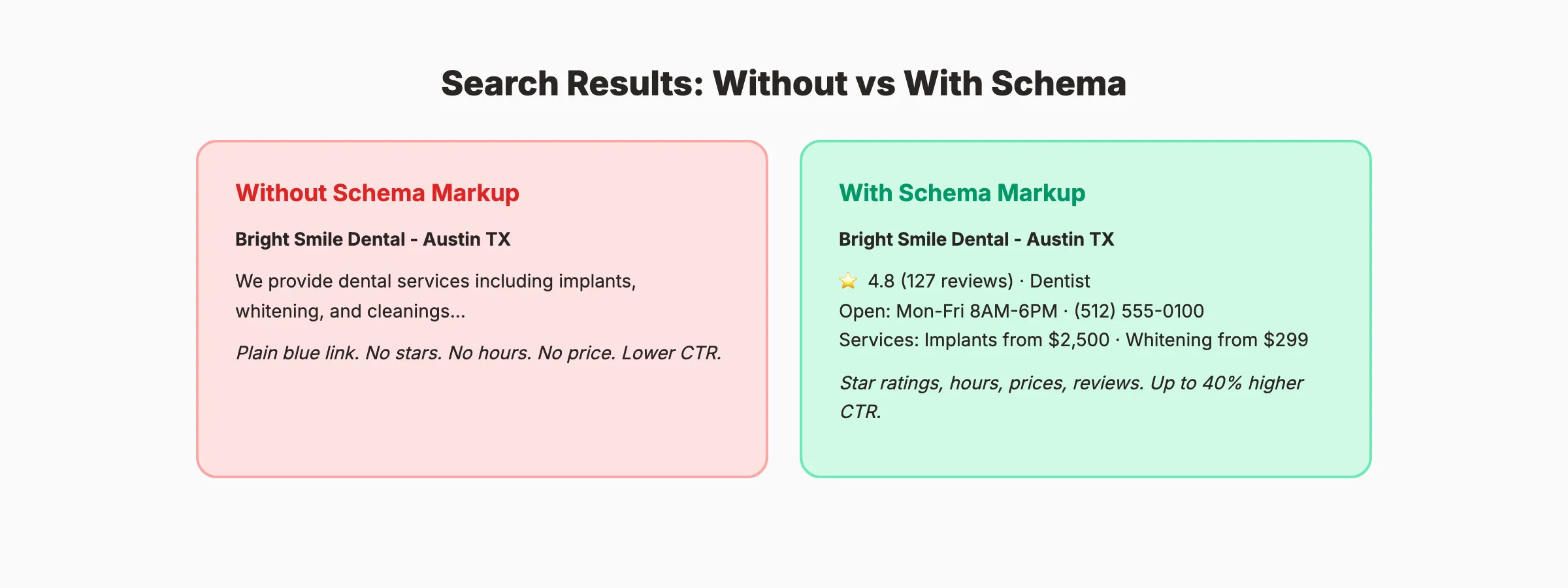
Your competitor’s search result shows star ratings, business hours, pricing, and FAQ answers directly in Google. Yours shows a plain blue link with 2 lines of text. The difference is schema markup.
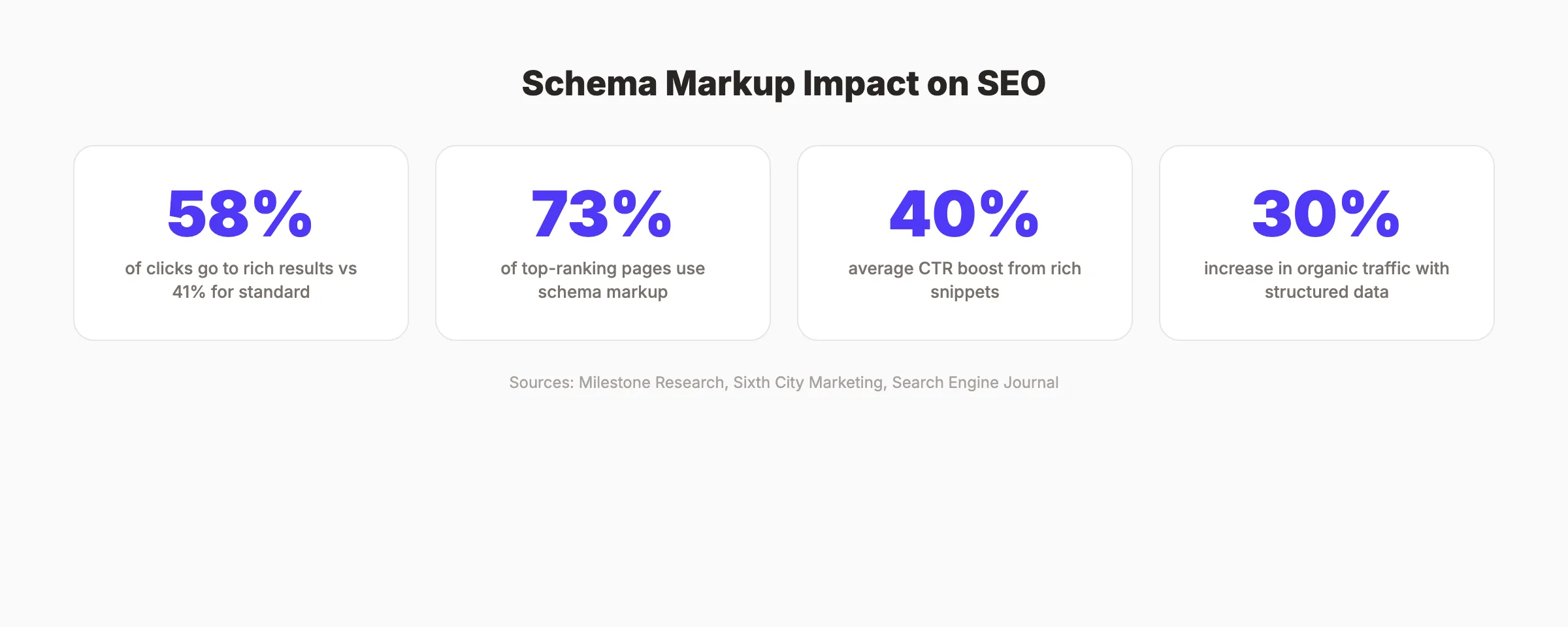
72.6% of top-ranking pages on Google use schema markup. Pages with rich results receive 58% of clicks compared to 41% for standard listings. That gap in click-through rate translates directly into traffic, leads, and revenue.
Most website owners skip schema markup because it sounds technical. It is not. Adding structured data to your website takes minutes per page with the right tools. The return on that small investment is one of the highest in SEO.
We have published 3,500+ blog posts across 70+ industries. Every post we publish includes structured data. This guide covers what schema markup is, which types matter most, and exactly how to add it to your website.
Here is what you will learn:
- What schema markup is and how search engines use it
- The 10 most important schema types for SEO
- How rich results increase click-through rates by up to 40%
- Step-by-step instructions for adding JSON-LD to any website
- How schema markup affects AI search visibility
- Common schema mistakes that prevent rich results from appearing
What Is Schema Markup
Schema markup is code you add to your web pages that helps search engines understand the meaning of your content. It translates human-readable information into a structured format that machines can process.
Your website tells visitors “We are open Monday through Friday, 8 AM to 6 PM.” Schema markup tells Google the same thing in a format it can display directly in search results.
Schema markup uses a vocabulary maintained by Schema.org, a collaboration between Google, Bing, Yahoo, and Yandex. The vocabulary defines hundreds of content types and properties. Google recommends JSON-LD (JavaScript Object Notation for Linked Data) as the preferred format.
How Schema Markup Works
When you add schema markup to a page, you create a structured data “label” for your content. Google reads this label, validates it, and displays the information as a rich result in search.
Without schema: Google sees text on a page and makes its best guess about what it means.
With schema: Google knows exactly that “4.8” is a review rating, “127” is a review count, and “Mon-Fri 8AM-6PM” is your business hours.
Schema Markup vs Rich Results vs Rich Snippets
These terms get confused constantly.
- Schema markup is the code you add to your page
- Structured data is the broader concept of organizing information for machines
- Rich results are the enhanced search listings Google displays using your structured data
- Rich snippets is an older term for the same concept
You add schema markup. Google decides whether to display a rich result. Schema does not guarantee a rich result, but without schema, rich results are impossible for most content types.
Why Schema Markup Matters for SEO in 2026
Schema markup does not directly improve your Google rankings. Google has stated this clearly. But the indirect benefits are substantial.
Higher Click-Through Rates
Rich results stand out in search listings. Star ratings, prices, FAQs, and images catch the eye. Users click on rich results 58% of the time versus 41% for standard results. That 17-point gap is enormous at scale.
A page ranking in position 3 with a rich result often gets more clicks than a position 1 result without one. The visual enhancement changes user behavior.
AI Search Visibility
In 2026, schema markup matters beyond Google’s traditional search results. AI systems like Google AI Overviews, ChatGPT, and Perplexity rely on structured data to understand, summarize, and cite your content accurately.
Sites with proper schema get cited by AI search tools significantly more often. Structured data makes your content machine-readable at a granular level. AI models can extract your business hours, pricing, ratings, and key facts with precision instead of guessing.
For more on optimizing for AI search, read our generative engine optimization guide.
Better Search Engine Understanding
Schema markup removes ambiguity. The word “apple” could mean a fruit, a technology company, or a record label. Schema tells Google exactly which one you mean. This precision helps Google match your content to the right search queries.
Featured Snippets and Knowledge Panels
Schema markup feeds data directly into Google’s Knowledge Panels and featured snippets. Organization schema populates Knowledge Panels with your logo, social links, and company description. FAQPage schema can trigger expanded question-answer displays. Product schema enables pricing cards that appear above organic results.
These enhanced displays occupy more visual space in search results. More space means more attention. More attention means more clicks. Read our featured snippets guide for strategies on winning these prominent positions.
Competitive Advantage
Despite the clear benefits, most small and mid-sized business websites still lack proper schema markup. This creates an opportunity. Adding structured data to your site while competitors skip it gives you a visual advantage in search results that compounds across every page you optimize.
The effort-to-reward ratio is one of the best in SEO. 10 minutes of work per page can produce a 20 to 40% increase in clicks from search results.
Stop writing. Start ranking. Stacc publishes 30 SEO articles per month with proper structured data. Automatically. Start for $1 →
The 10 Most Important Schema Types
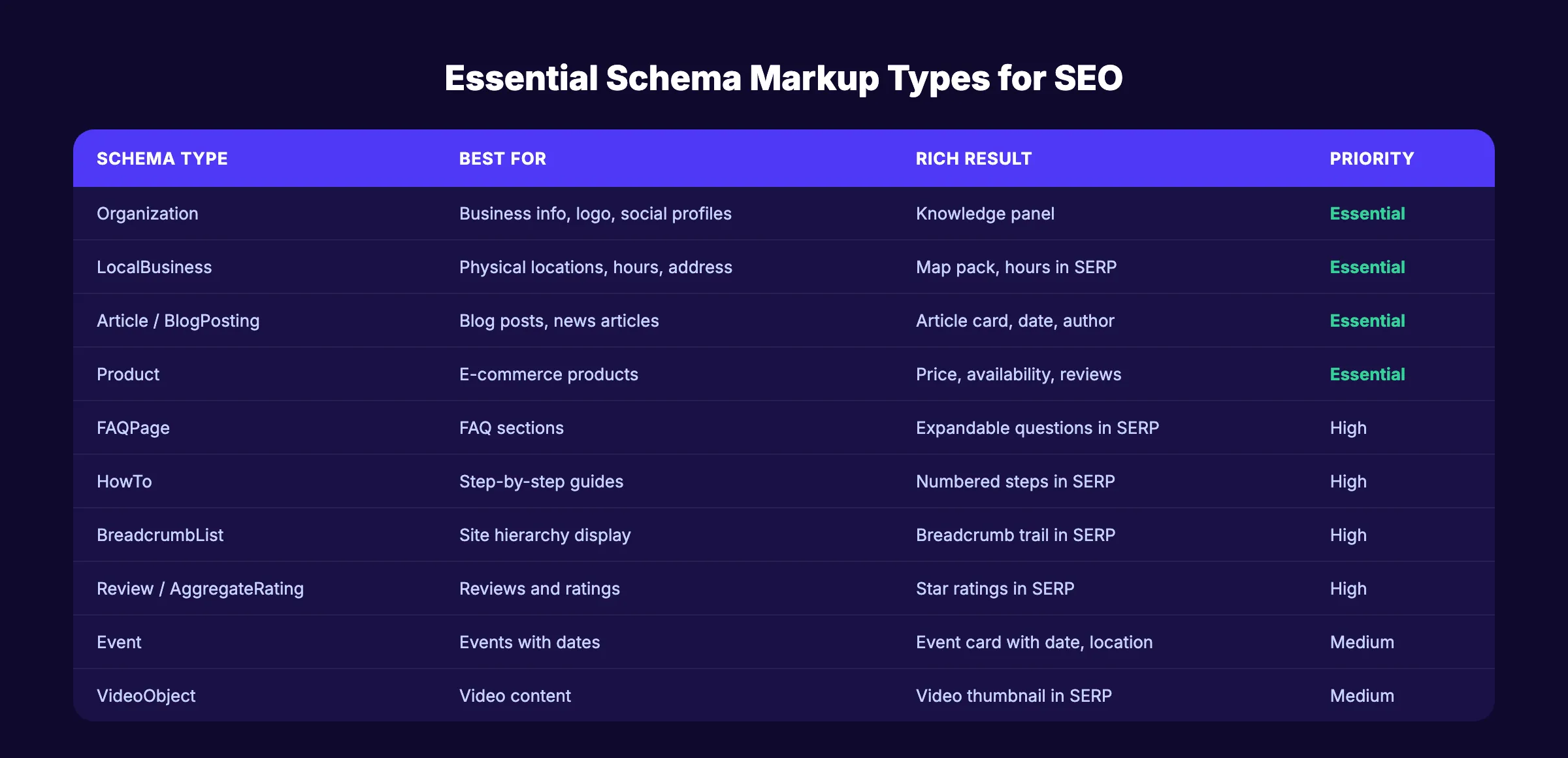
Not all schema types carry equal weight. Focus on the ones that trigger rich results and match your content.
Organization Schema
Every website needs Organization schema. It defines your business name, logo, website URL, social media profiles, and contact information. Google uses this data for Knowledge Panels.
Properties to include: name, url, logo, sameAs (social profiles), contactPoint, address, description.
LocalBusiness Schema
For any business with a physical location, LocalBusiness schema is essential. It feeds Google your address, phone number, hours, price range, and service area. This data powers map pack listings and local search results.
For a full guide on local SEO optimization, read our Google Business Profile guide.
Article and BlogPosting Schema
Every blog post and article should include Article or BlogPosting schema. It tells Google the headline, author, publication date, modified date, and featured image. This data enables article-style rich results with dates and author information.
For blog-specific schema implementation, read our schema markup for blog posts guide.
Product Schema
E-commerce pages need Product schema with price, availability, currency, brand, and review data. Product rich results show pricing and stock status directly in search. These are among the highest-converting rich results.
FAQPage Schema
FAQPage schema marks up question-and-answer pairs. Google can display expandable FAQ sections directly in search results. Note: since 2024, Google restricts FAQ rich results to authoritative government and health websites for most queries. But the schema still helps AI systems understand your FAQ content.
HowTo Schema
HowTo schema marks up step-by-step instructions. Google can display numbered steps, time estimates, and required tools in search results. This works well for tutorial and guide content.
BreadcrumbList Schema
BreadcrumbList schema displays your site’s navigation hierarchy in search results. Instead of showing a plain URL like example.com/blog/schema-markup-seo-guide, Google shows a clickable trail: Home > Blog > SEO Tips > Schema Markup Guide.
BreadcrumbList is one of the easiest schema types to implement site-wide. Add it to your page template once and it applies to every page automatically. The SEO benefit is universal across all content types.
For proper site architecture and internal linking, breadcrumbs reinforce the hierarchical structure that Google uses to understand your content organization.
Review and AggregateRating Schema
Review schema displays star ratings in search results. AggregateRating shows the average score and total review count. Star ratings in search results are among the most powerful CTR boosters. Follow our guide to getting more Google reviews to build the review volume that makes this schema valuable.
Event Schema
Event schema marks up events with dates, locations, ticket prices, and performers. Google displays event cards with dates and venues directly in search results. Essential for businesses that host events, workshops, webinars, or conferences.
Include the event name, start date, end date, location (with address), ticket URL, and price range. Google uses this data to display your events in dedicated event search results and Google Maps event listings.
VideoObject Schema
VideoObject schema marks up video content with title, description, thumbnail, duration, and upload date. Google can display video thumbnails in search results. Video-rich results stand out visually and earn significantly higher click-through rates than text-only listings.
Include the video name, description, thumbnail URL, upload date, duration, and content URL. If your content includes embedded YouTube or Vimeo videos, VideoObject schema helps Google surface them in video search results.
How to Add Schema Markup to Your Website
Adding schema markup is simpler than most people think. JSON-LD is the recommended format. It goes in your HTML <head> section without changing any visible content.
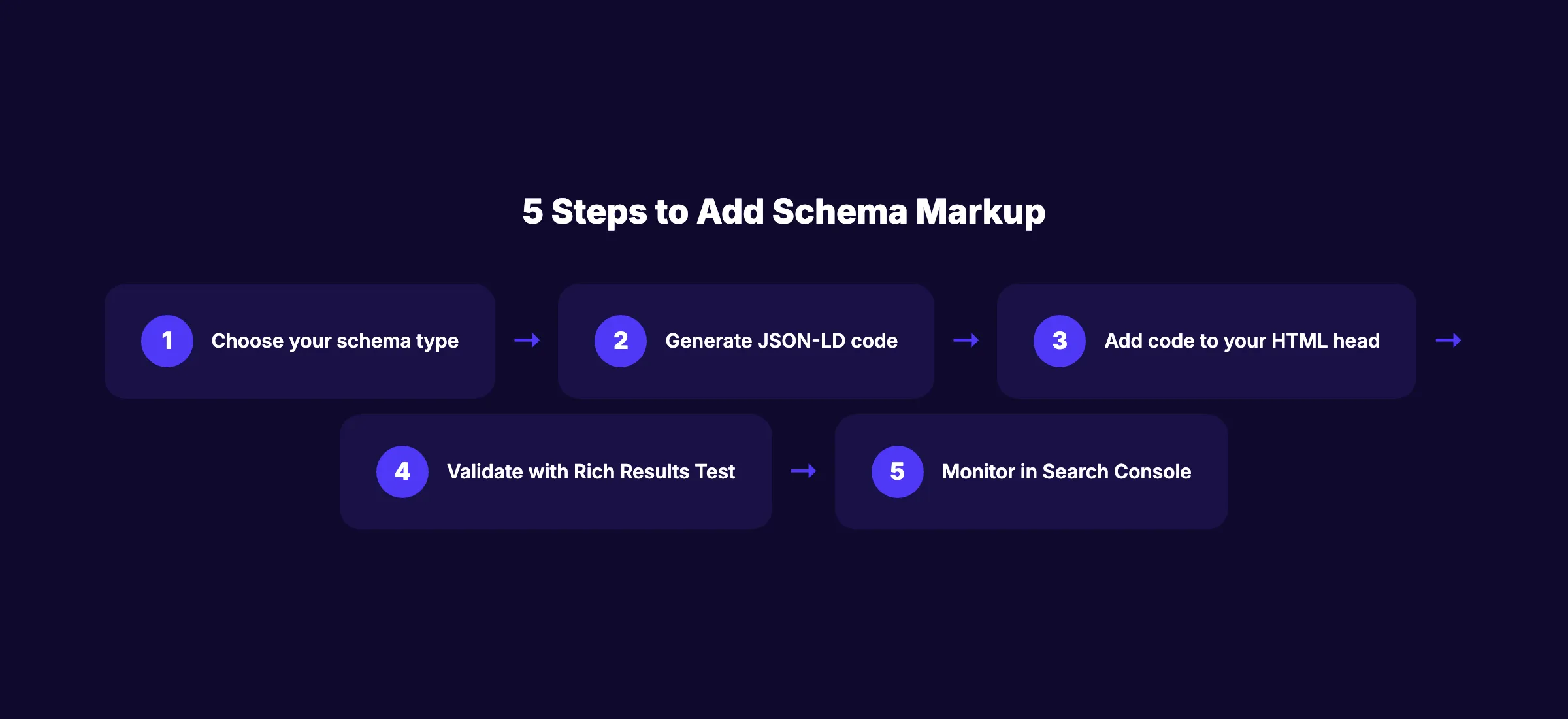
Step 1: Choose Your Schema Type
Start with the types most relevant to your business:
| Business Type | Start With These Schema Types |
|---|---|
| Local business | Organization + LocalBusiness + BreadcrumbList |
| E-commerce | Organization + Product + BreadcrumbList + Review |
| Blog or publisher | Organization + Article/BlogPosting + BreadcrumbList |
| Service business | Organization + LocalBusiness + FAQPage + Service |
| Restaurant | Organization + Restaurant + Menu + BreadcrumbList |
Step 2: Generate the JSON-LD Code
Use a schema generator tool to create the code. Several free options exist:
Enter your business information. The tool generates the JSON-LD code block.
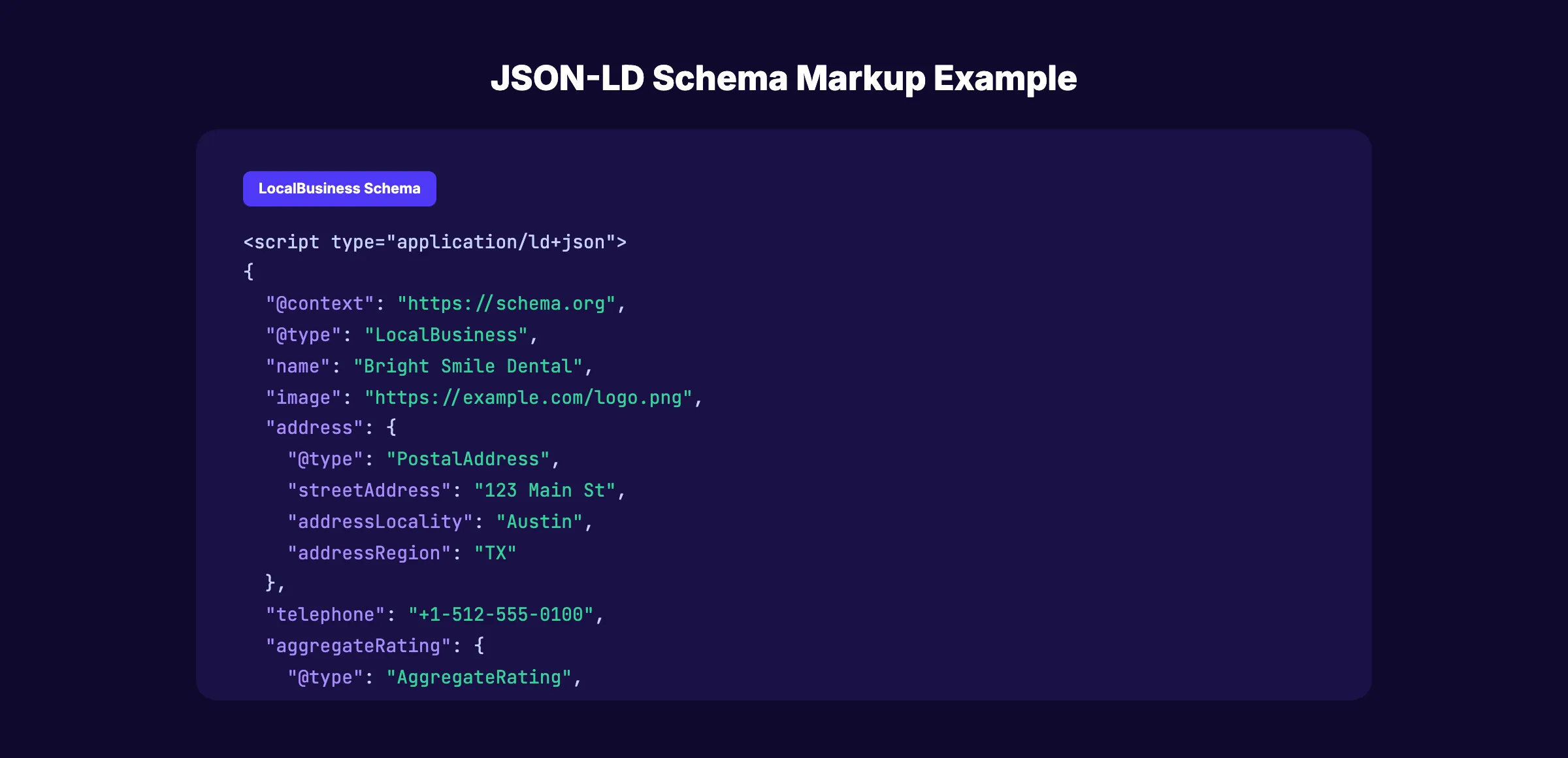
Step 3: Add the Code to Your Website
Paste the JSON-LD code block into your page’s HTML <head> section inside a <script type="application/ld+json"> tag.
For WordPress: Use a plugin like Rank Math, Yoast SEO, or Schema Pro. These add schema automatically without editing code. Rank Math handles most schema types out of the box and auto-generates Article schema for every post.
For Astro, Next.js, or static sites: Add the JSON-LD script directly to your page template or head component. Create a reusable schema component that accepts props for the specific data. This keeps your schema consistent and easy to update across hundreds of pages.
For Shopify: Use the built-in structured data or a schema app from the Shopify App Store. Most Shopify themes include basic Product schema. Apps like JSON-LD for SEO add Organization, BreadcrumbList, and FAQPage schema automatically.
For Webflow: Add custom code in the page settings head section. Webflow does not have native schema support, so you need to add JSON-LD manually or use a third-party integration.
Step 4: Validate Your Markup
After adding schema, validate it using 2 tools:
- Google Rich Results Test: Checks if your schema qualifies for rich results
- Schema.org Validator: Validates the technical correctness of your markup
Fix any errors or warnings before moving on. Common issues include missing required properties, incorrect data types, and mismatched values.
Step 5: Monitor in Google Search Console
Google Search Console reports schema errors and rich result performance. Check the “Enhancements” section for issues. Monitor which pages earn rich results and which have errors.
For a full Search Console setup and monitoring guide, read our Google Search Console guide.
Your SEO team. $99 per month. 30 optimized articles with proper schema published automatically every month. Start for $1 →
Schema Markup and AI Search
In 2026, schema markup does more than earn rich results in Google. It makes your content readable to AI systems that power the next generation of search.
Google AI Overviews, ChatGPT web search, Perplexity, and Gemini all pull structured data from websites. When your page has clear schema markup, AI models can extract facts with confidence instead of interpreting unstructured text.
How Schema Helps AI Cite Your Content
AI systems prefer sources with clear, machine-readable data. Schema markup provides:
- Entity clarity. AI knows your business name, type, location, and offerings without guessing.
- Fact extraction. Prices, ratings, hours, and specifications are structured as data, not buried in paragraphs.
- Source attribution. When AI cites a specific claim, structured data makes your page the obvious source.
Sites with proper schema get cited in AI-generated answers 67% more often according to recent research. For more on AI search optimization, read our guide to getting cited in AI search.
Schema Types That Matter Most for AI
- Organization and Person schema help AI identify who you are
- Article schema helps AI understand publication context and authorship
- FAQPage schema provides pre-structured Q&A pairs AI models can directly use
- HowTo schema gives AI structured step-by-step instructions to reference
Read our guide to optimizing for AI Overviews for the complete AI search playbook.
Common Schema Markup Mistakes
Most schema implementations have errors that prevent rich results from appearing. Avoid these.
Missing required properties. Every schema type has required and recommended properties. Leaving out required ones causes validation failures. Always check Google’s structured data documentation for requirements.
Marking up hidden content. Schema should describe content visible on the page. Do not add schema for content in hidden divs, popups, or elements users cannot see. Google flags this as deceptive.
Self-serving review markup. You cannot add Review schema to your own product on your own website based on your own assessment. Reviews must come from third parties. Google penalizes self-referential review markup.
Incorrect data types. A price must be a number, not text like “Contact us for pricing.” A date must follow ISO 8601 format (YYYY-MM-DD). Incorrect types cause silent failures.
Duplicate or conflicting schema. Multiple schema blocks with conflicting information confuse Google. Your Organization schema and LocalBusiness schema should not show different addresses or phone numbers.
Not updating schema when content changes. If your hours, pricing, or services change, update your schema to match. Outdated schema misleads users and Google. Run regular SEO audits that include schema validation.
3,500+ blogs published. 92% average SEO score. Every article includes proper structured data. Start for $1 →
Schema Markup Checklist
Use this checklist to verify your schema implementation:
- Organization schema on every page (via site-wide template)
- LocalBusiness schema on location pages (if applicable)
- Article or BlogPosting schema on every blog post
- BreadcrumbList schema across the entire site
- Product schema on product and pricing pages
- FAQPage schema on FAQ sections
- HowTo schema on tutorial and step-by-step content
- All schema validated with Google Rich Results Test
- No errors or warnings in Google Search Console enhancements
- Schema updated when page content changes
- No markup on hidden or invisible content
- No self-referential review markup
For blog-specific schema details, read our schema for blog posts guide. For broader on-page SEO, schema is one component of the full optimization checklist.
FAQ
Does schema markup directly improve Google rankings?
No. Google has confirmed that schema markup is not a direct ranking factor. It does not boost your position in search results by itself. But the rich results it enables increase click-through rates by up to 40%. Higher CTR drives more traffic, which indirectly supports ranking improvements over time.
What is the best format for schema markup?
Google recommends JSON-LD. It is the easiest to implement, does not affect page load speed, and separates structured data from your HTML content. Microdata and RDFa are older alternatives that still work but are harder to maintain.
How do I check if my schema markup is working?
Use Google’s Rich Results Test (search.google.com/test/rich-results) to validate your markup. Enter your page URL or paste your code. The tool shows whether your schema qualifies for rich results and flags any errors. Also check Google Search Console’s “Enhancements” section for ongoing monitoring.
Can I add schema markup without coding?
Yes. WordPress plugins like Rank Math, Yoast SEO, and Schema Pro add schema automatically. Shopify apps handle schema for e-commerce. Website builders like Wix and Squarespace include basic schema in templates. For custom implementations, free generator tools create the code for you to paste.
Which schema types give the biggest SEO benefit?
Organization, LocalBusiness, and Article schemas are the highest-priority types. Product schema with pricing and reviews delivers the strongest e-commerce results. BreadcrumbList schema has near-universal benefit for any site. Focus on these before adding more specialized types.
Does Stacc add schema markup to blog posts?
Every blog post published by Stacc includes proper Article and BlogPosting schema with author information, publication date, and featured image markup. Our posts follow on-page SEO best practices including structured data, internal linking, and keyword optimization.
Schema markup is one of the highest-return, lowest-effort SEO tactics available. Add JSON-LD to your pages. Validate with Google’s tools. Monitor in Search Console.
Start with Organization schema site-wide. Add Article schema to every blog post. Implement LocalBusiness schema if you have a physical location. Then layer in FAQPage, HowTo, and Product schema where they apply.
The enhanced search listings and AI visibility that schema provides compound over every page you optimize. In 2026, structured data is no longer optional for competitive SEO. It is the baseline that separates visible, click-worthy sites from invisible ones.
Related Tools & Resources
Free SEO Tools:
Best Lists:

Written by
Siddharth GangalSiddharth is the founder of theStacc and Arka360, and a graduate of IIT Mandi. He spent years watching great businesses lose organic traffic to competitors who simply published more. So he built a system to fix that. He writes about SEO, content at scale, and the tactics that actually move rankings.
30 SEO blog articles published every month
Keyword-optimized, scheduled, and live on your site. Automatically.
30-day trial · Cancel anytime
theStacc
Stop writing SEO content manually
30 blog articles, 30 GBP posts, and social media content. Published every month. Automatically.
Start Your $1 Trial$1 for 3 days · Cancel anytime