
How to Optimize Your Google Business Profile (2026)
Optimize your Google Business Profile in 8 steps. Rank in the local pack, get more calls, and drive foot traffic. Checklist included. Updated March 2026.
Fully optimized Google Business Profiles appear 80% more often in local search results. They generate 4 times more website visits, 12% more calls, and 10% more direction requests than incomplete profiles. Yet most local businesses fill out their profile once and never touch it again.
Your Google Business Profile is the first thing customers see when they search for your services. It appears in the local pack, Google Maps, and AI Overviews before your website ever does. A weak profile means lost calls, lost foot traffic, and lost revenue to competitors with better listings.
This guide shows you how to optimize your Google Business Profile in 8 steps. We have helped businesses across 70+ industries improve their local visibility. Every step includes specific actions you can complete today.
Here is what you will learn:
- How to complete every section of your profile for maximum visibility
- Which categories to choose and why they determine 32% of your ranking
- How to use photos, posts, and reviews as ranking signals
- The weekly maintenance routine that keeps your profile competitive
- Common mistakes that get profiles penalized or suspended
Why Google Business Profile Optimization Matters
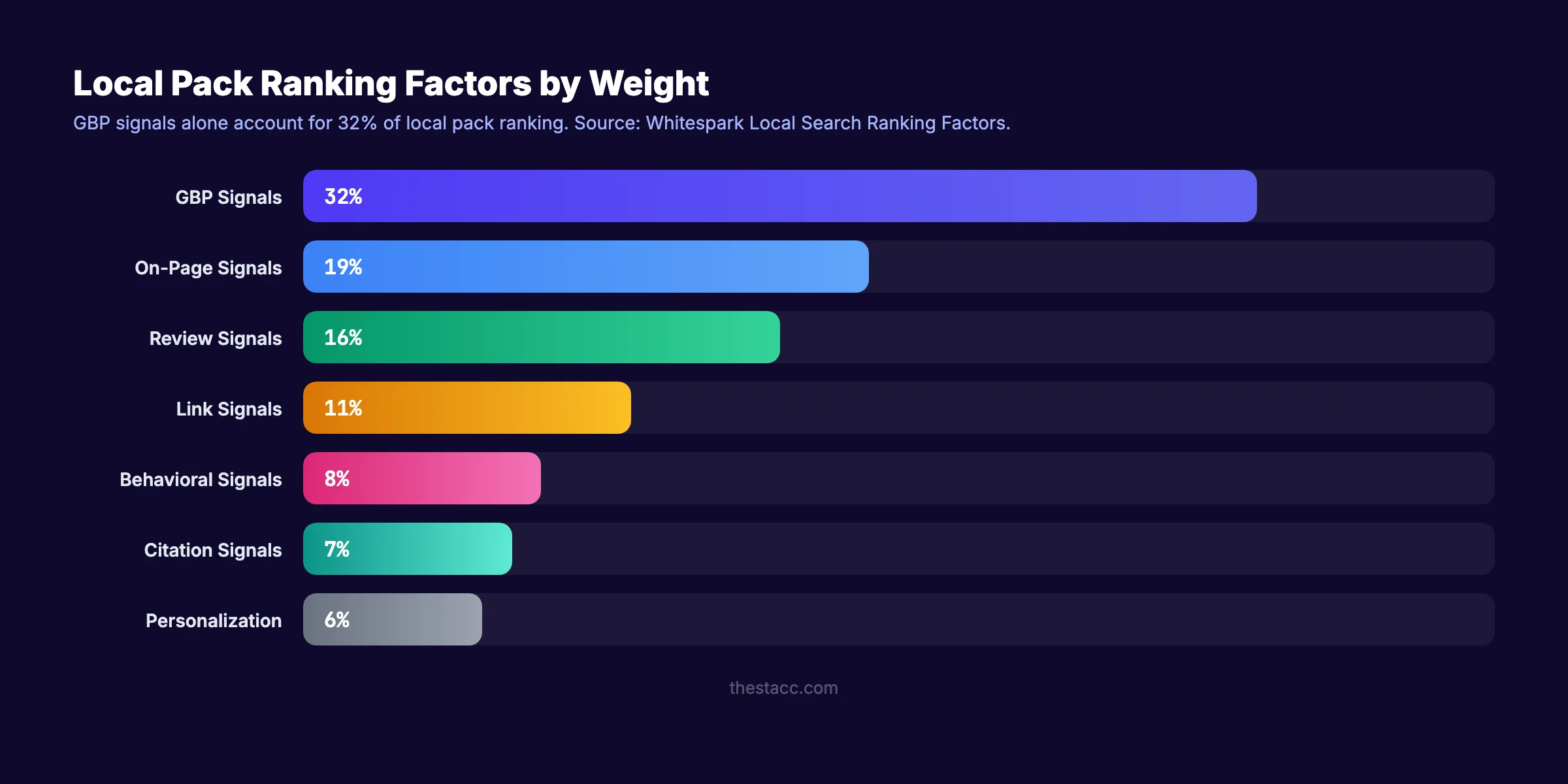
Google Business Profile (GBP) signals account for 32% of local pack ranking factors. That makes your profile the single most influential element in local search. Your website, backlinks, and citations combined account for the other 68%.
The Local Pack Controls Local Revenue
The local pack (the 3-business map section at the top of local search results) captures the majority of clicks for local queries. 46% of all Google searches have local intent. When someone searches “plumber near me” or “dentist in [city],” the local pack appears above all organic results.
Businesses in the top 3 positions receive the most calls, direction requests, and website clicks. Position 4 and below get significantly less visibility. The gap between position 3 and position 4 is larger than the gap between position 1 and position 3.
AI Overviews Use GBP Data
In 2026, AI Overviews pull directly from Google Business Profile data. When a user asks Google “best Italian restaurant near me,” the AI response surfaces businesses with complete profiles, strong reviews, and recent activity. A weak GBP means the AI skips your business entirely.
The Compound Effect of Optimization
Each optimization step reinforces the others. Better photos lead to more profile views. More views lead to more calls. More calls signal to Google that your business is relevant. Higher relevance signals lead to better rankings. Better rankings lead to more views.
The cycle compounds. Businesses that optimize every element of their profile outperform those that optimize one or two.
Step 1: Complete Every Field in Your Profile
Google rewards completeness. Listings with accurate and complete information get 7 times more clicks than incomplete ones. Every blank field is a missed ranking signal.
Specifically:
- Business name: Use your exact legal business name. Do not add keywords, city names, or taglines. Google suspends profiles that stuff keywords into the business name.
- Address: Use your real, staffed location. No P.O. boxes. Virtual offices only qualify if a staff member is present during business hours.
- Phone number: Use a local phone number, not a toll-free number. Local numbers reinforce geographic relevance.
- Website URL: Link to your homepage or a location-specific landing page. Verify the link works.
- Business hours: List accurate hours for every day. Update for holidays. Google penalizes listings with incorrect hours, and customers leave negative reviews when they arrive at a closed business.
- Business description: Write a 750-character description. Include your primary services, service area, and what makes your business different. Use natural language. Do not stuff keywords.
Why this step matters: Google treats incomplete profiles as unverified or low-quality signals. A profile missing hours, phone, or services sends a signal that the business is not active. Complete profiles appear in 80% more searches.
Pro tip: Check your profile monthly for unauthorized edits. Google allows the public to suggest changes to your listing. Competitors, bots, and well-meaning users can change your hours, phone number, or even your business name. Log in and verify accuracy at least once per month.
Step 2: Choose the Right Categories
Your primary category is the strongest ranking signal in your Google Business Profile. It accounts for roughly 32% of your local pack ranking weight. Choose the wrong category and you lose visibility for your most important searches.
Specifically:
- Primary category: Select the most specific category that describes your core service. A bakery should select “Bakery,” not “Restaurant.” A personal injury lawyer should select “Personal Injury Attorney,” not “Law Firm.”
- Secondary categories: Add up to 9 additional categories that describe other services you offer. A dentist might add “Cosmetic Dentist,” “Pediatric Dentist,” and “Emergency Dental Service.”
- Do not add irrelevant categories. Only add categories for services you actively provide. Adding “Pizza Restaurant” when you only serve pasta confuses Google and reduces relevance.
How to find the right categories:
- Search for your main service in Google. What categories do the top 3 results use?
- Use a tool like Semrush’s listing management or PlePer to see available GBP categories.
- Check your competitors’ profiles to see which categories they selected.
Why this step matters: A business with the wrong primary category will not appear for its most important searches. A plumber listed as “Home Improvement Store” will not show up when someone searches “plumber near me.” The primary category is the first ranking factor Google evaluates.
Read our full local SEO guide for the complete strategy beyond GBP optimization.
Rank in the local pack on autopilot. Stacc publishes 30 GBP posts per month to keep your profile active. Local SEO starts at $49 per month. Start for $1 →
Step 3: Add High-Quality Photos and Videos
Photos are not cosmetic. They are ranking and trust signals. Businesses with 100+ photos receive 42% more direction requests and 35% more website clicks than businesses with fewer than 10.
Specifically:
What to Upload
- Exterior photos: At least 3 showing your storefront from different angles. Help customers recognize your building.
- Interior photos: At least 3 showing your workspace, lobby, or dining area.
- Team photos: At least 2 showing your staff. Real people build trust.
- Product/service photos: At least 5 showing your work, products, or results. A contractor should show completed projects. A restaurant should show dishes.
- Before-and-after photos: Powerful for service businesses. Show the transformation you deliver.
Photo Quality Standards
- Use real photos, not stock images. Google can detect and deprioritize stock photos.
- Minimum resolution: 720px wide. Recommended: 1200px or higher.
- Well-lit, in-focus, and professional-looking. Phone cameras are fine. Blurry or dark photos hurt.
- No text overlays, logos, or promotional graphics on photos. Google may reject these.
Upload Cadence
Upload 2 to 3 new photos per week. Google tracks upload frequency as an activity signal. A profile with new photos every week signals an active, operating business.
Video
Upload short videos (30 to 60 seconds) showing your business in action. Google supports up to 30-second videos in most categories. Videos earn higher engagement than static images.
Why this step matters: Photos directly affect customer behavior. Profiles with photos receive 42% more direction requests. They also signal activity to Google’s ranking algorithm. A profile with no photos uploaded in 6 months looks abandoned.
Step 4: Build and Manage Reviews
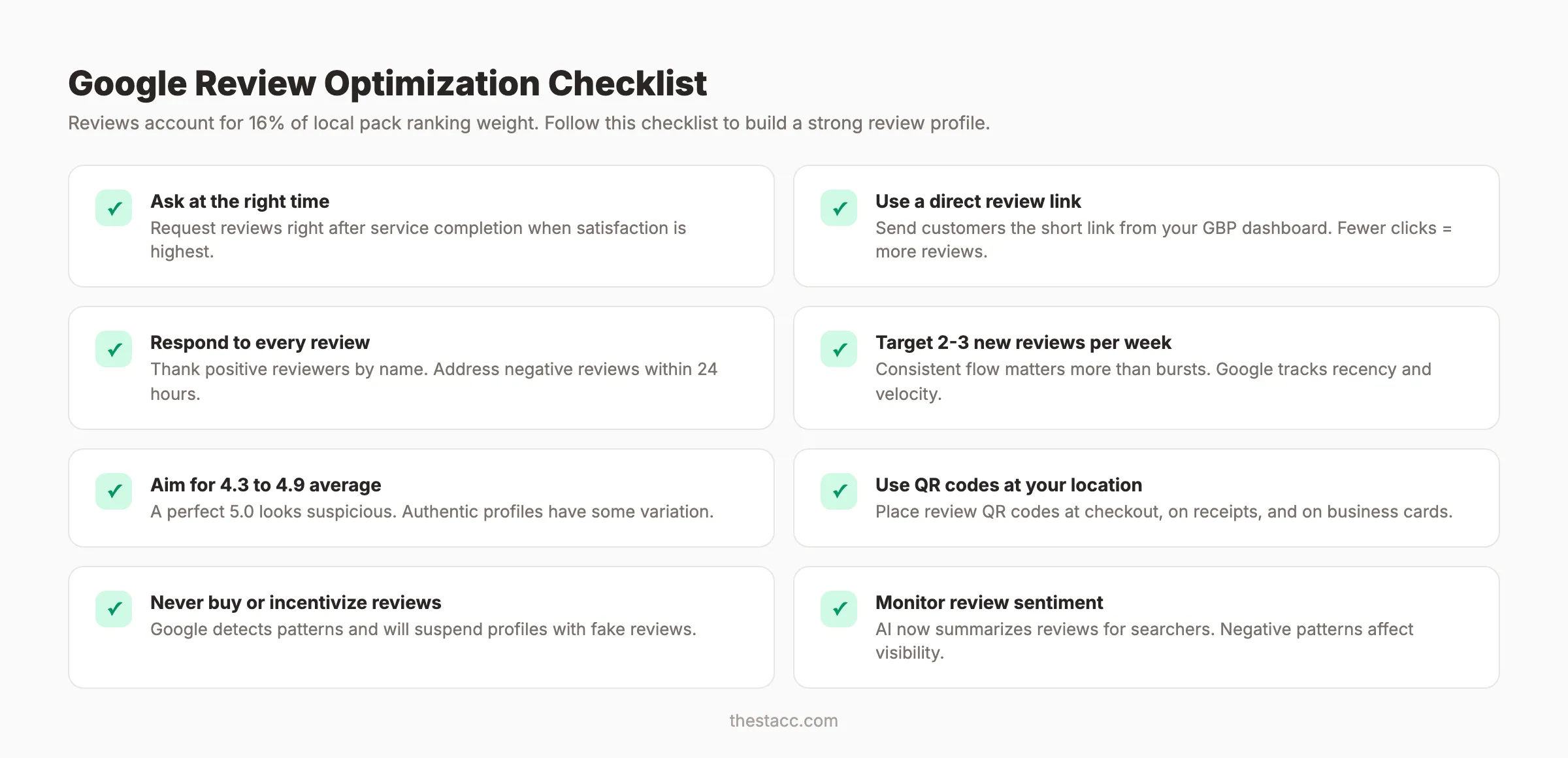
Reviews are the third most important local ranking factor (16% weight). They influence both rankings and conversion rates. A business with 50+ reviews and a 4.5+ average rating appears in the local pack far more often than a business with 5 reviews.
Specifically:
How to Get More Reviews
- Ask customers at the point of service completion. Timing matters. The best time to ask is when the customer is most satisfied.
- Send a follow-up email or text with a direct link to your Google review page. Use the short link from your GBP dashboard.
- Use a review QR code at your physical location. Place it at checkout, on receipts, or on business cards.
- Ask consistently. 2 to 3 new reviews per week is a strong cadence for most local businesses.
How to Respond to Reviews
For positive reviews: Thank the reviewer by name. Mention the specific service they received. Keep it under 3 sentences.
For negative reviews: Respond within 24 hours. Acknowledge the issue. Offer to resolve it offline. Do not argue or get defensive. Google’s AI summarizes review sentiment for searchers. A professional response to a negative review builds trust.
Read our guide on getting more Google reviews for the full review generation strategy.
Review Red Flags
- Do not offer incentives for reviews. Google prohibits this and will remove reviews that appear incentivized.
- Do not buy fake reviews. Google detects patterns and will suspend profiles.
- A perfect 5.0 with zero negative feedback can appear suspicious. Authentic profiles typically range from 4.3 to 4.9.
Why this step matters: Reviews are the most visible trust signal on your profile. Customers read an average of 10 reviews before trusting a local business. The quantity, quality, recency, and your response rate all affect rankings and conversions.
Your SEO team. $99 per month. Blog SEO + Local SEO together. Stacc publishes articles and GBP posts to drive rankings across search and maps. Start for $1 →
Step 5: Publish Google Business Posts Weekly
Google Business Posts are short updates that appear on your profile. They signal activity, freshness, and relevance. Businesses that post weekly rank higher in the local pack than businesses that do not post.
Specifically:
Post Types
| Post Type | Best For | Example |
|---|---|---|
| What’s New | General updates, tips, news | ”We now offer same-day appointments.” |
| Offer | Promotions with dates | ”15% off first visit through March 31.” |
| Event | Events with date/time | ”Free consultation day, April 5, 9 AM to 3 PM.” |
Post Best Practices
- Post 1 to 2 times per week. This cadence keeps your profile active without overwhelming followers.
- Include a photo or image with every post. Posts with images get more engagement.
- Include a call to action (Book, Call, Learn More, Sign Up). Every post should drive a specific action.
- Keep text under 300 words. Most users read the first 2 to 3 sentences before deciding to click.
- Include relevant keywords naturally. “We completed a kitchen remodel in [City] this week” is better than “kitchen remodel services.”
What NOT to Post
- Do not post generic “Happy Monday” content. Every post should relate to your services.
- Do not post the same content repeatedly. Rotate between tips, offers, project showcases, and announcements.
- Do not link to external sites in every post. Alternate between posts that link to your website and posts that keep users on your GBP profile.
Why this step matters: Google Posts expire after 7 days (or after the event date). A profile with no recent posts looks inactive. Weekly posting is the minimum cadence to maintain a “fresh” signal. Stacc’s Local SEO module publishes 30 GBP posts per month automatically.
Step 6: Add Services and Products
The Services and Products sections are often overlooked. They provide additional keyword signals and help Google match your profile to specific searches.
Specifically:
Services
- List every service you offer. Use the exact terms customers search for.
- Add a description (up to 300 characters) for each service. Include your service area and any relevant qualifiers.
- Group services into categories when possible.
Example for a dental practice:
| Service | Description |
|---|---|
| Teeth Cleaning | Professional dental cleaning for adults and children in [City]. |
| Dental Implants | Single and multi-tooth implant placement with same-day consultations. |
| Emergency Dentistry | Same-day emergency dental care for pain, swelling, and broken teeth. |
| Cosmetic Dentistry | Veneers, whitening, and smile makeovers at our [City] office. |
Products
- List products with photos, prices, and descriptions.
- Use clear, searchable product names.
- Link products to relevant pages on your website.
Why this step matters: Google cross-references your website’s service descriptions with your GBP Services tab. When both match, Google increases confidence in your relevance. Businesses with complete service listings rank for more long-tail service keywords.
Step 7: Ensure NAP Consistency Across the Web
NAP stands for Name, Address, and Phone number. Google cross-references your GBP information against other directories, citation sites, and your website. Inconsistencies confuse the algorithm and reduce trust.
Specifically:
- Your business name must be identical everywhere. “Joe’s Plumbing” and “Joe’s Plumbing LLC” are different to Google.
- Your address format must match. “123 Main St” and “123 Main Street” should be standardized.
- Your phone number must be the same local number on GBP, your website, Yelp, Facebook, and every directory listing.
Where to Check NAP Consistency
- Google Business Profile
- Your website (header, footer, contact page)
- Yelp, Facebook, Apple Maps, Bing Places
- Industry-specific directories
- Chamber of Commerce listings
- Data aggregators (Foursquare, Data Axle, Neustar Localeze)
How to Fix Inconsistencies
- Start with your GBP. Set the authoritative version of your NAP.
- Update your website to match exactly.
- Update major directories manually (Yelp, Facebook, Apple Maps).
- Use a citation management tool to find and fix remaining inconsistencies.
Check our list of local citation tools for tools that automate NAP auditing.
Why this step matters: NAP inconsistencies weaken local trust signals. One wrong digit in a phone number or a slightly different street abbreviation can cause Google to reduce your profile’s authority. Consistency tells Google your business information is reliable.
Step 8: Monitor Performance and Iterate
Optimization is not a one-time task. The local pack is competitive. Competitors optimize. Reviews accumulate. Google’s algorithm updates. Monthly monitoring catches drops before they become problems.
Specifically:
What to Track
| Metric | Where to Find It | What It Tells You |
|---|---|---|
| Search impressions | GBP Insights | How often your profile appears in results |
| Profile views | GBP Insights | How many people see your full profile |
| Website clicks | GBP Insights | Traffic driven from GBP to your site |
| Phone calls | GBP Insights | Direct calls from your profile |
| Direction requests | GBP Insights | Foot traffic intent from your listing |
| Review count + average | GBP Dashboard | Trust signal strength |
| Photo views | GBP Insights | Visual engagement level |
Monthly Maintenance Checklist
- Verify business hours are still accurate
- Check for unauthorized edits to your profile
- Respond to all new reviews (positive and negative)
- Upload 4 to 8 new photos
- Publish 4 to 8 Google Business Posts
- Add any new services or products
- Verify NAP consistency on top 5 citation sources
- Review performance metrics and compare to previous month
Read our guide on Google Search Console for tracking organic search performance alongside your GBP data.
Why this step matters: Businesses that monitor monthly catch ranking drops within 30 days. Businesses that ignore their profile for 6 months may not notice a drop until a competitor has already taken their position. The maintenance routine takes 30 minutes per month. The cost of ignoring it is measured in lost customers.
3,500+ blogs published. 92% average SEO score. Stacc runs your Blog SEO and Local SEO on autopilot. Rankings in search and maps without a marketing team. Start for $1 →
Results: What to Expect
After completing these 8 steps, you will have:
- A fully completed Google Business Profile with every field populated
- The correct primary and secondary categories for maximum relevance
- A growing library of photos that builds trust and drives engagement
- A review generation system that adds 2 to 3 reviews per week
- Weekly posts that signal activity and freshness to Google
- Complete service listings that match your website
- Consistent NAP data across all online directories
- A monthly monitoring routine that catches issues early
Realistic timelines:
- Immediate: Profile completeness improvements reflect within 1 to 2 weeks
- 30 days: Photo and post activity begins affecting local impressions
- 60 to 90 days: Review accumulation starts impacting local pack rankings
- 3 to 6 months: Full optimization compound effect becomes visible in calls and direction requests
FAQ
How long does it take to optimize a Google Business Profile?
The initial optimization takes 1 to 2 hours. Complete every field, choose categories, upload photos, and write your business description. The ongoing maintenance takes 30 minutes per month. Weekly photo uploads and posts can be batched in a single 15-minute session.
What is the most important Google Business Profile ranking factor?
Your primary category. It accounts for 32% of local pack ranking weight. Choose the most specific category that describes your core service. After that, reviews (16%) and profile completeness are the next strongest factors.
How many reviews do I need to rank in the local pack?
There is no fixed number, but businesses in the top 3 local positions average 200+ reviews. Start by aiming for 50 reviews with a 4.5+ average rating. Consistency matters more than volume. 2 to 3 new reviews per week is a strong cadence.
Should I respond to every Google review?
Yes. Respond to every review, positive and negative. Google factors response rate into its ranking algorithm. Responding also builds trust with potential customers who read reviews before choosing a business.
Can I add keywords to my Google Business name?
No. Google prohibits adding keywords, city names, or taglines to your business name. Your profile should use your exact legal business name. Violating this policy risks suspension.
Does Stacc help with Google Business Profile optimization?
Yes. Stacc’s Local SEO module publishes 30 Google Business Profile posts per month automatically. The service keeps your profile active with fresh content, which signals relevance and freshness to Google. Combined with Blog SEO, the Stacc Stack Method drives rankings in both organic search and the local map pack.
Your Google Business Profile is the front door of your online presence for local searches. Every call, direction request, and website visit from local search flows through it. Optimize it completely. Maintain it monthly. The businesses that do this consistently own the top 3 local positions in their market.
Related Tools & Resources
Free SEO Tools:
Best Lists:

Written by
Siddharth GangalSiddharth is the founder of theStacc and Arka360, and a graduate of IIT Mandi. He spent years watching great businesses lose organic traffic to competitors who simply published more. So he built a system to fix that. He writes about SEO, content at scale, and the tactics that actually move rankings.
Automate your Google Business Profile content
30 GBP posts, local SEO articles, and review responses. Published every month automatically.
30-day trial · Cancel anytime
theStacc
Stop writing SEO content manually
30 blog articles, 30 GBP posts, and social media content. Published every month. Automatically.
Start Your $1 Trial$1 for 3 days · Cancel anytime