
Schema Markup for Blog Posts: Complete Guide (2026)
How to add schema markup to blog posts for rich results and AI citations. Article, FAQ, and HowTo schema with JSON-LD examples. Updated 2026.
Most blog posts ship without a single line of structured data. No schema markup. No rich results. No AI citations.
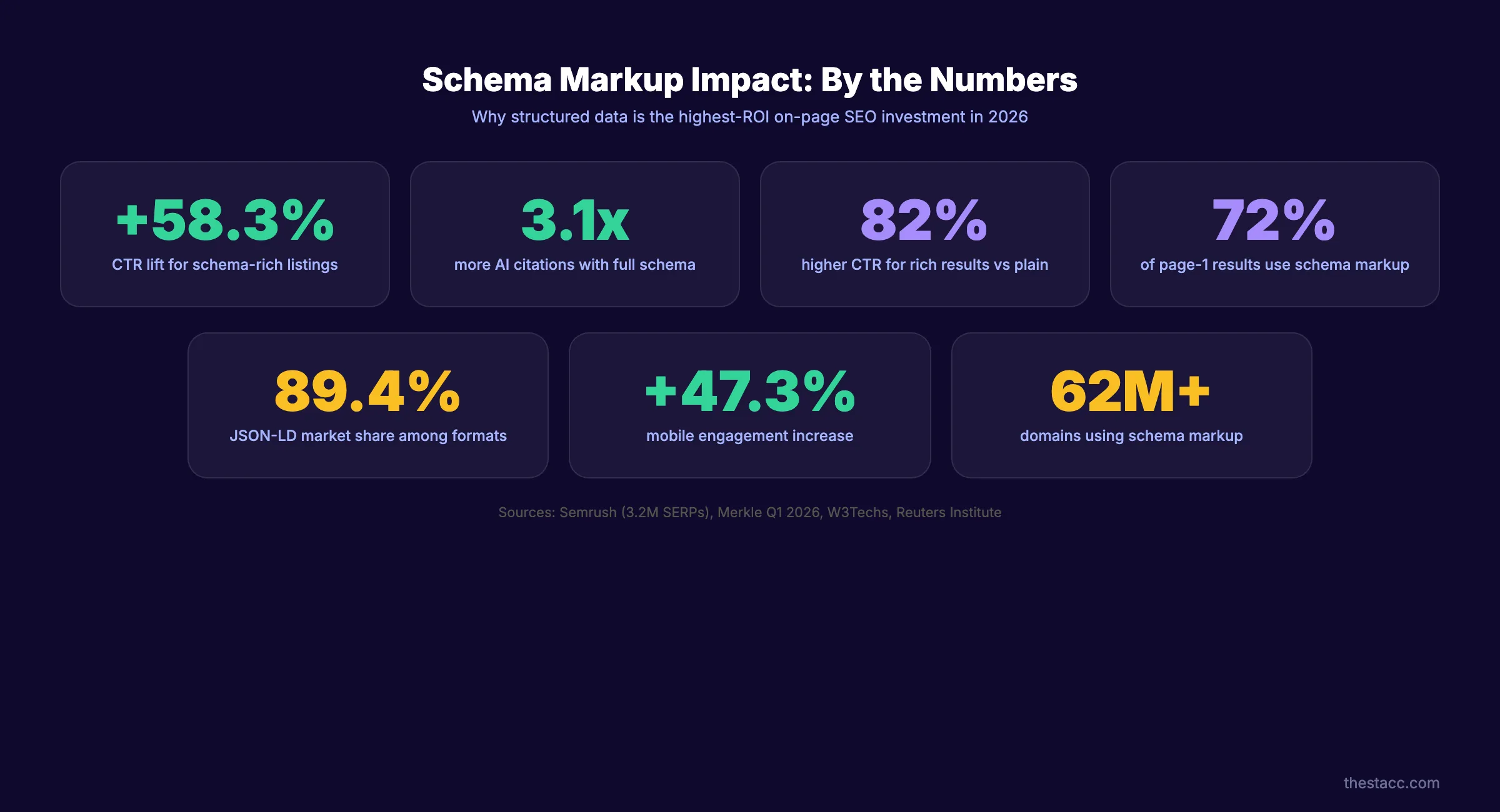
That gap costs real traffic. Schema-rich listings earn a 58.3% higher click-through rate than plain blue links. Pages with proper Article schema get cited 2.6x more often by AI search engines. Every blog post you publish without schema markup hands those clicks to a competitor who bothered to add it.
This guide covers everything you need to add schema markup for blog posts. You will get JSON-LD code templates for Article, FAQ, and HowTo schema. You will learn what changed in 2026, what still works, and how schema now feeds AI trust signals.
We publish 3,500+ blogs across 70+ industries. Every one ships with Article schema, author markup, and breadcrumb data baked in. The results speak for themselves.
Here is what you will learn:
- What schema markup is and why 72% of first-page results use it
- The 5 schema types that matter for blog posts in 2026
- What changed after the March 2026 update (FAQ and HowTo deprecation)
- How to add Article and FAQ schema with copy-paste JSON-LD
- How to validate, test, and troubleshoot your markup
- How schema drives AI search citations (3.1x lift)
What Is Schema Markup (and Why Blog Posts Need It)
Schema markup is structured data vocabulary that tells search engines what your content means. Not just what it says. What it means.
Think of it as a translation layer. Your blog post is written for humans. Schema markup translates it into a format that Google, Bing, and AI search engines can parse instantly.
How Schema Markup Works
Schema markup uses a standardized vocabulary from Schema.org. Over 900 types exist. Blog posts typically need 3 to 5 of them.
You add the code as JSON-LD (JavaScript Object Notation for Linked Data) in your page’s <head> section. Search engines read it during crawling. They use it to generate rich results, knowledge panels, and AI citations.
JSON-LD holds 89.4% market share among structured data formats. Microdata and RDFa still exist. Ignore them. Google recommends JSON-LD, and that settles the debate.
Why Blog Posts Need Schema Markup
72% of first-page Google results use schema markup. That is not a coincidence.
Schema markup unlocks rich results. Star ratings, FAQ dropdowns, how-to steps, author photos, publication dates. These visual enhancements make your listing larger and more clickable in search results.
Rich results earn 82% higher CTR compared to standard listings. Mobile engagement increases by 47.3%, and mobile bounce rates drop by 23.1% according to Merkle Q1 2026 data.
For a full breakdown of ranking factors, read our on-page SEO guide.
The AI Search Factor
Schema markup now serves a second purpose. AI search engines use structured data as a trust signal when selecting sources to cite.
Google confirmed at I/O 2026 that pages with proper schema see a 3.1x increase in AI citation frequency. Article schema with complete author data gives AI models confidence that the content comes from a real, identifiable source.
If you want your blog posts to appear in AI Overviews, Perplexity answers, and ChatGPT citations, schema markup is no longer optional. It is infrastructure. Read our guide on how to get cited by AI search for the full strategy.
Schema Types That Matter for Blog Posts in 2026
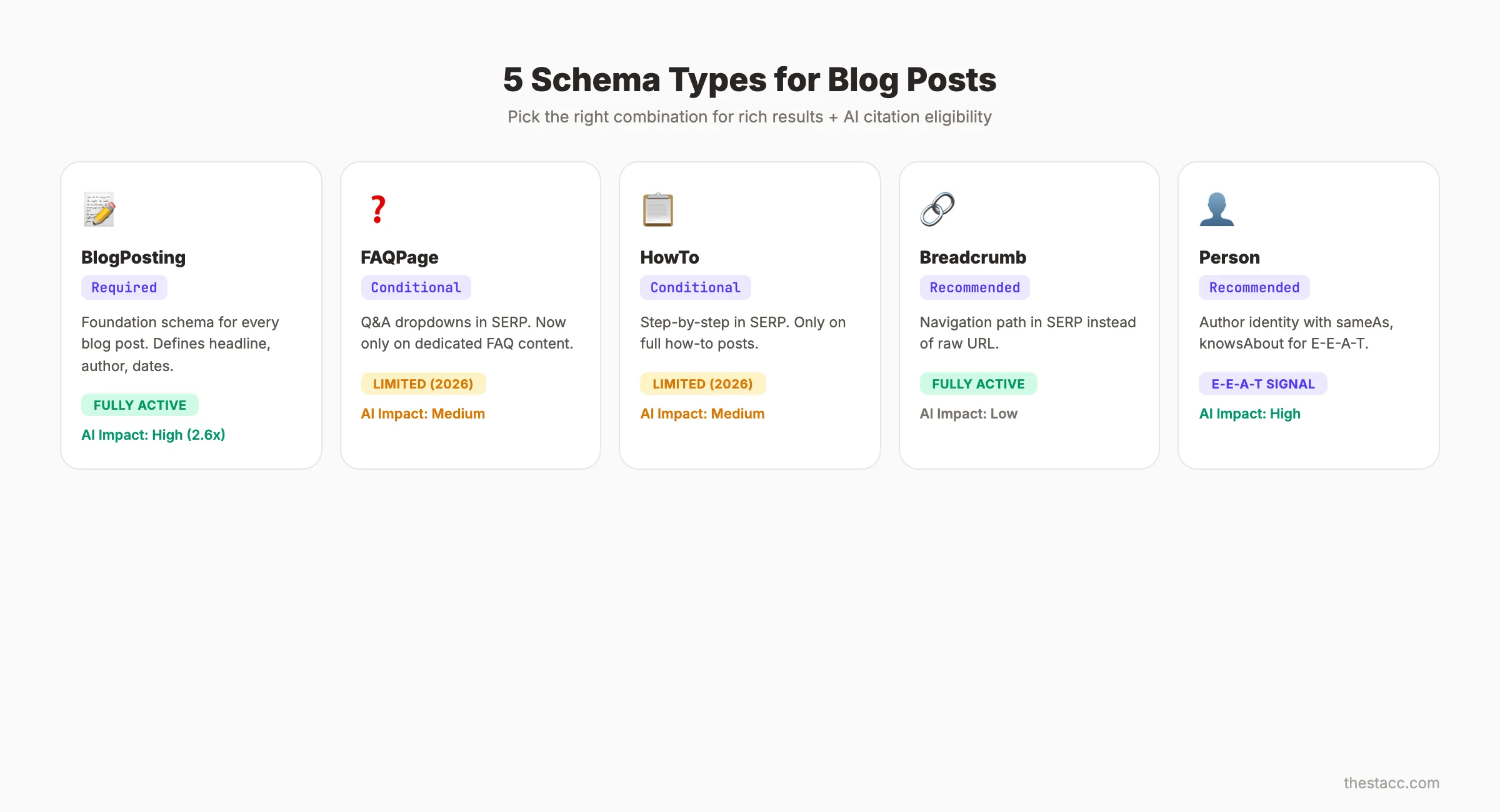
Over 900 schema types exist in the Schema.org vocabulary. Most do not apply to blog content. Five types carry the weight for blog posts. Pick the right combination and you cover rich results, E-E-A-T signals, and AI citation eligibility.
Article and BlogPosting Schema
Article schema is the foundation. Every blog post needs it.
The Article type covers general articles. BlogPosting is a more specific subtype that inherits all Article properties. Google treats them almost identically for rich result purposes.
Use BlogPosting for blog content. Use NewsArticle only for timely, news-style reporting. The distinction matters because NewsArticle qualifies for Top Stories carousel placement, which delivers a +178% CTR lift according to the Reuters Institute.
FAQ Schema
FAQ schema generates expandable question-and-answer dropdowns directly in search results. It still works, but with major caveats after March 2026.
Use FAQ schema only on pages where FAQ content is the primary purpose. Google removed FAQ rich results from supplementary FAQ sections on general articles. Dedicated FAQ pages and blog posts structured entirely around questions still qualify.
HowTo Schema
HowTo schema displays step-by-step instructions with optional images in search results. It remains active for genuine instructional content.
The March 2026 update removed HowTo rich results from pages where instructions are secondary content. If your entire blog post is a how-to guide, use it. If you have a small how-to section inside a broader article, skip it.
Breadcrumb Schema
Breadcrumb schema replaces your raw URL in search results with a readable navigation path. Instead of example.com/blog/schema-markup, users see Home > Blog > Schema Markup.
This schema type requires zero maintenance once implemented. It improves click-through rates by making your listing look more trustworthy and organized. Learn more about blog post structure and how it connects to breadcrumb hierarchy.
Author and Person Schema
Author schema links your content to a real person or organization. This is the E-E-A-T schema play.
Add @type: Person with name, url, sameAs (linking to LinkedIn, Twitter, Wikidata), and knowsAbout properties. This tells Google and AI search engines exactly who created the content and why they are qualified.
| Schema Type | Use Case | Rich Result | AI Citation Impact |
|---|---|---|---|
| BlogPosting | Every blog post | Article rich result, author info | High (2.6x citation lift) |
| FAQPage | Dedicated FAQ content | Expandable Q&A dropdowns | Medium |
| HowTo | Step-by-step guides | Numbered steps with images | Medium |
| BreadcrumbList | All pages with navigation | Breadcrumb trail in SERP | Low |
| Person (Author) | Author attribution | Author knowledge panel | High (E-E-A-T signal) |
Schema markup on every blog post. Zero effort required. We add Article, Author, and Breadcrumb schema to all 3,500+ blogs we publish. Start for $1 →
What Changed in 2026 (FAQ and HowTo Deprecation)
The March 2026 Google update reshaped the schema markup playbook. If you are following a guide from 2024, your strategy is outdated.
The FAQ Rich Result Collapse
FAQ rich result impressions dropped 47% after the March 2026 update. Google did not eliminate FAQ schema entirely. It narrowed eligibility.
FAQ rich results now appear only on pages where FAQ content is the primary content type. Blog posts with a small FAQ section at the bottom no longer trigger the dropdown. Google classified these as “supplementary FAQ” and stopped rendering them.
This does not mean you should remove FAQ schema from your blog posts. The markup still helps AI search engines parse your Q&A content. It just will not generate visible rich results on most blog pages anymore.
HowTo Rich Results Follow the Same Path
HowTo schema followed the same pattern. Step-by-step rich results now appear only on pages where instructions are the core content.
A blog post titled “How to Add Schema Markup” still qualifies. A blog post titled “Complete SEO Guide” with a brief how-to section does not.
What Still Works (31 Active Schema Types)
31 schema types retain active rich result support as of March 2026. The types that matter for blog content all survived:
- Article and BlogPosting (fully active)
- BreadcrumbList (fully active)
- FAQPage (active on dedicated FAQ pages only)
- HowTo (active on dedicated instructional pages only)
- Person and Organization (active for knowledge panels)
- Speakable (active for voice and AI citations)
Schema Now Feeds AI Trust Signals
The bigger shift is not about SERP display. It is about AI search.
Google confirmed at I/O 2026 that structured data directly influences AI citation decisions. Pages with complete Article schema, author data, and entity connections see a 3.1x increase in AI Overviews citations.
Schema markup has evolved from a rich result trigger into an AI trust signal. Even schema types that no longer generate visible SERP features still feed the AI ranking layer.
How to Add Article Schema to Blog Posts (JSON-LD)
Article schema is the single most impactful schema type for blog content. Here is the complete JSON-LD template with every recommended property.
The Complete Article Schema Template
Add this code inside the <head> section of your blog post. Replace placeholder values with your actual content data.
{
  "@context": "https://schema.org",
  "@type": "BlogPosting",
  "mainEntityOfPage": {
    "@type": "WebPage",
    "@id": "https://example.com/blog/your-post-slug"
  },
  "headline": "Your Blog Post Title (Max 110 Characters)",
  "description": "A concise summary of the blog post content.",
  "image": [
    "https://example.com/images/featured-16x9.jpg",
    "https://example.com/images/featured-4x3.jpg",
    "https://example.com/images/featured-1x1.jpg"
  ],
  "datePublished": "2026-03-27T08:00:00+00:00",
  "dateModified": "2026-03-27T08:00:00+00:00",
  "author": {
    "@type": "Person",
    "name": "Author Name",
    "url": "https://example.com/about/author-name",
    "sameAs": [
      "https://linkedin.com/in/author-name",
      "https://twitter.com/author-name"
    ],
    "knowsAbout": ["SEO", "Content Marketing", "Schema Markup"]
  },
  "publisher": {
    "@type": "Organization",
    "name": "Your Company Name",
    "logo": {
      "@type": "ImageObject",
      "url": "https://example.com/logo.png"
    }
  },
  "wordCount": 3500,
  "articleSection": "SEO Tips",
  "keywords": ["schema markup", "blog posts", "structured data"]
}
Required vs Recommended Properties
Google’s Article structured data documentation lists required and recommended fields. Missing required fields means no rich result.
| Property | Status | Notes |
|---|---|---|
| headline | Required | Max 110 characters |
| image | Required | Min 50,000 pixels. Provide 16:9, 4:3, and 1:1 |
| datePublished | Required | ISO 8601 format |
| author.name | Required | Full name, not “Admin” or “Staff” |
| dateModified | Recommended | Update when content changes |
| author.url | Recommended | Link to author bio page |
| publisher | Recommended | Organization with logo |
| wordCount | Optional | Helps AI models assess content depth |
| articleSection | Optional | Category of the post |
Image Requirements
Google requires at least 1 image in Article schema. The image must be at least 50,000 pixels (for example, 250x200).
Provide 3 aspect ratios for maximum rich result coverage: 16:9, 4:3, and 1:1. Google selects the best fit for each SERP placement. Failing to provide multiple sizes means Google may crop your image poorly or skip it.
Author Best Practices
Separate the author into its own @type: Person object. Do not use a plain text string.
Include sameAs links to the author’s LinkedIn, Twitter, or personal website. Add knowsAbout to list the author’s areas of expertise. These properties feed directly into Google’s E-E-A-T evaluation and AI citation confidence scoring.
Never use generic author names like “Admin,” “Staff,” or “Editorial Team” without also providing a url pointing to a real about page. Google discounts anonymous authors for E-E-A-T purposes.
Use our schema markup generator to create valid JSON-LD without writing code manually.
Properly structured blog posts rank higher and get cited more. We handle SEO content writing with schema baked in from the start. Start for $1 →
How to Add FAQ Schema to Blog Posts
FAQ schema still delivers value when used correctly. The key is understanding where it works after the March 2026 changes.
When FAQ Schema Still Triggers Rich Results
FAQ schema generates rich results on 2 page types:
- Dedicated FAQ pages where questions and answers are the primary content
- Blog posts structured around Q&A where the entire article is organized as questions with detailed answers
Blog posts with a small FAQ section at the bottom no longer trigger FAQ rich results. The schema still helps AI parsers, but visible SERP features require FAQ-first content structure.
The FAQ Schema JSON-LD Template
{
  "@context": "https://schema.org",
  "@type": "FAQPage",
  "mainEntity": [
    {
      "@type": "Question",
      "name": "What is schema markup for blog posts?",
      "acceptedAnswer": {
        "@type": "Answer",
        "text": "Schema markup for blog posts is structured data code added to your page that helps search engines understand your content. It uses the Schema.org vocabulary in JSON-LD format to define elements like the article headline, author, publish date, and FAQ content."
      }
    },
    {
      "@type": "Question",
      "name": "Does schema markup improve Google rankings?",
      "acceptedAnswer": {
        "@type": "Answer",
        "text": "Schema markup is not a direct ranking factor. However, it enables rich results that increase click-through rates by up to 58.3%. Higher CTR sends positive engagement signals that can indirectly improve rankings over time."
      }
    }
  ]
}
Stacking FAQ with Article Schema
You can use multiple schema types on the same page. This is called schema stacking.
Add both BlogPosting and FAQPage schema as separate JSON-LD blocks in your <head>. Each block gets its own <script type="application/ld+json"> tag. Google reads all schema blocks on a page and processes them independently.
Schema stacking is how top-performing blog posts maximize their SERP real estate. A single post can trigger an article rich result, breadcrumb navigation, and FAQ dropdowns simultaneously. This approach also boosts your chances of earning featured snippets from the FAQ content.
How to Validate and Test Schema Markup
Adding schema markup is half the job. Validating it ensures Google can actually read and process it. Broken schema is worse than no schema because it can trigger manual actions.
Google Rich Results Test
The Rich Results Test is the primary validation tool. Paste your URL or raw code. It returns a pass/fail result for each schema type detected.
Green check marks mean your schema is eligible for rich results. Warnings are non-blocking but worth fixing. Errors mean the schema will not generate any rich result.
Run this test after every schema change. Run it before publishing any new blog post.
Schema.org Validator
The Schema.org Validator checks syntax and vocabulary compliance. It catches issues the Google tool misses, like deprecated properties or incorrect nesting.
Use this tool when the Rich Results Test passes but you still see no rich results in search. Syntax validity does not guarantee rich result eligibility. The Schema.org Validator reveals the gap.
Google Search Console Rich Results Report
Google Search Console provides the richest validation data. The Rich Results report under “Enhancements” shows which pages have valid, invalid, or warning schema across your entire site.
Check this report weekly. It catches issues that single-page testing tools miss:
- Pages where schema was valid but became invalid after a content update
- Schema types that Google stopped supporting
- Pages where rich results are valid but not being served
Common Validation Errors and Fixes
| Error | Cause | Fix |
|---|---|---|
| ”Missing field: image” | No image property in Article schema | Add at least 1 image URL with min 50,000 pixels |
| ”Missing field: author” | Author is a plain string, not an object | Convert to @type: Person object with name |
| ”Invalid URL” | Image or page URL uses HTTP | Switch all URLs to HTTPS |
| ”Value is not valid” | datePublished uses wrong format | Use ISO 8601: 2026-03-27T08:00:00+00:00 |
| ”Duplicate markup detected” | Plugin + manual schema conflict | Remove one source, keep only 1 schema block per type |
Stop guessing whether your on-page SEO is right. Use our free on-page SEO checker to audit schema, meta tags, and content structure in seconds. Start for $1 →
Common Schema Markup Mistakes (and How to Fix Them)
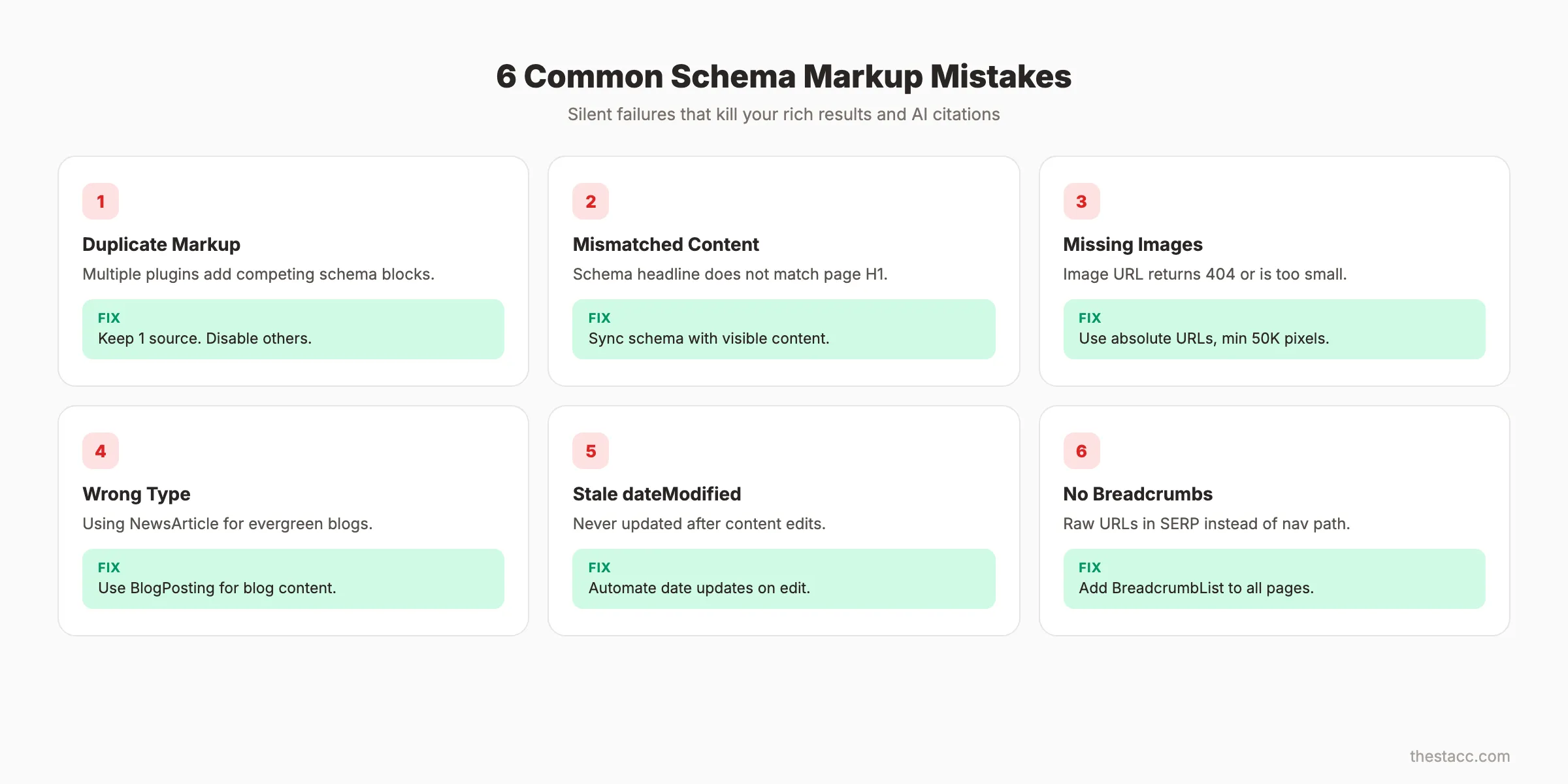
Schema markup fails silently. Your blog post looks fine to visitors. But behind the scenes, broken structured data means zero rich results and missed AI citations. These are the 6 mistakes we see most often.
Duplicate Markup from Plugins
WordPress sites are the worst offenders. Yoast SEO adds Article schema. Rank Math adds Article schema. A theme adds Article schema. The page ends up with 3 competing schema blocks for the same type.
Google does not merge duplicate schema. It picks one or ignores all of them. Audit your page source and remove all but 1 source.
Mismatched Content
Your schema says the headline is “10 SEO Tips for 2026.” The actual H1 on the page says “SEO Tips That Work.” Google flags this as misleading structured data.
Schema properties must match visible page content. The headline must match your H1 or title tag. The dateModified must reflect the actual last edit. The author must match the visible byline.
Run a regular SEO audit to catch these mismatches before Google does.
Missing Required Images
Article schema requires at least 1 image. Many implementations point to an image URL that returns a 404 or redirect. Google treats missing images as invalid schema.
Check that every image URL in your schema resolves to an actual file. Use absolute URLs, not relative paths. Verify the image meets the minimum 50,000-pixel threshold.
Wrong Schema Type Selection
Article, BlogPosting, and NewsArticle are not interchangeable. Each has specific eligibility rules.
Use BlogPosting for blog content. Use NewsArticle only for time-sensitive news reporting from recognized news publishers. Use Article as a fallback when content does not fit either subtype.
Not Updating dateModified
Search engines use dateModified to assess content freshness. Many blogs set dateModified once during publishing and never update it.
Every time you edit a blog post, update dateModified in the schema. Automate this through your CMS or build process. Stale dateModified values tell Google the content has not been maintained.
Ignoring Breadcrumb Schema
Breadcrumb schema takes 5 minutes to implement and improves every page on your site. Yet most blogs skip it entirely.
Add BreadcrumbList schema to every blog post. Define the hierarchy: Home, Blog Category, Post Title. This small addition makes your SERP listing cleaner and provides navigation context that improves Core Web Vitals engagement metrics.
Schema Markup for AI Search Citations
Schema markup was built for search engine result pages. In 2026, its most powerful application is AI search visibility. Every AI search engine. Google AI Mode, Perplexity, ChatGPT, Copilot. Uses structured data to evaluate source trustworthiness.
The 2.6x AI Citation Lift
The Reuters Institute measured AI citation patterns across 50,000 queries. Blog posts with complete Article schema (headline, author, datePublished, dateModified, publisher) received 2.6x more AI citations than identical content without schema.
AI models need confidence signals. They need to know who wrote the content, when it was published, and whether it has been updated. Schema markup provides all of that in a machine-readable format.
The 3.1x Effect with Full Structured Data
Google I/O 2026 data showed an even larger effect. Pages with full structured data. Article schema plus Author schema plus Breadcrumb plus entity connections. Saw a 3.1x citation increase in AI Mode responses.
Full structured data means going beyond basic Article schema. It means adding:
sameAslinks connecting your author to LinkedIn, Wikidata, and TwitterknowsAboutlisting the author’s areas of expertisepublisherwith organization details and logospeakableidentifying AI-citable passages
Speakable Schema for AI-Citable Passages
Speakable schema identifies sections of your content that are especially suitable for audio playback and AI citation. Google uses this as a signal for which passages to surface in voice search and AI answers.
{
  "@context": "https://schema.org",
  "@type": "BlogPosting",
  "speakable": {
    "@type": "SpeakableSpecification",
    "cssSelector": [".article-summary", ".key-takeaway"]
  },
  "headline": "Schema Markup for Blog Posts: Complete Guide"
}
Add speakable to your Article schema and point it at CSS selectors for your most citation-worthy paragraphs. This gives AI models explicit guidance on which content to extract.
Entity-Based Schema for E-E-A-T
Entity connections verify that your author and organization are real, established entities. sameAs is the key property.
Link to your organization’s Wikidata entry, Crunchbase profile, or Wikipedia page. Link to your author’s LinkedIn, Google Scholar, or industry publication profiles.
These connections help AI models verify that the author exists, has credentials, and is associated with the publishing organization. It is the structured data equivalent of showing your ID.
Read our full guides on generative engine optimization and managing AI crawlers for the complete AI visibility strategy.
Your blog posts should work for you in every search engine. We publish schema-optimized content that ranks in Google and gets cited by AI. Start for $1 →
FAQ
What is schema markup for blog posts?
Schema markup for blog posts is structured data code you add to your page’s HTML. It uses the Schema.org vocabulary in JSON-LD format to tell search engines what your content is about. It defines elements like the article headline, author, publish date, and content type. Search engines use this data to generate rich results and AI citations.
Does schema markup directly improve Google rankings?
Schema markup is not a direct ranking factor. Google has confirmed this repeatedly. However, it enables rich results that increase CTR by up to 58.3%. Higher click-through rates send positive engagement signals. Those signals can indirectly improve rankings over time. The indirect effect is well-documented across SEO statistics studies.
Which schema type should I use for my blog. Article or BlogPosting?
Use BlogPosting for blog content. It is a subtype of Article with the same properties but more specific classification. Google treats them similarly for rich result purposes. Use Article as a fallback for content that does not fit the blog format. Use NewsArticle only for timely news content from recognized publishers.
Can I use multiple schema types on one blog post?
Yes. Schema stacking is a best practice. Add separate JSON-LD blocks for BlogPosting, BreadcrumbList, FAQPage, and Person on the same page. Each gets its own script tag. Google processes each schema block independently. Stacking maximizes your rich result eligibility.
Does schema markup help with AI search visibility?
Yes. This is the most important development in schema strategy for 2026. Pages with complete structured data see a 3.1x increase in AI citation frequency. AI search engines use schema markup as a trust signal when selecting sources. Article schema with author data, entity connections, and speakable properties gives AI models the confidence to cite your content.
Does Stacc add schema markup to blog posts?
Every blog post we publish includes Article schema, Author schema, and Breadcrumb schema as standard. We add FAQ schema to posts with dedicated Q&A sections. All schema is validated against Google’s Rich Results Test before publication. You do not need to touch a line of code. Check our best on-page SEO tools for additional validation options.
Add Schema to Every Blog Post You Publish
Schema markup for blog posts is the gap between publishing content and publishing content that search engines fully understand. 62 million domains now implement structured data. The rest are leaving rich results, AI citations, and click-through rates on the table.
Start with Article schema on every blog post. Add Breadcrumb and Author schema next. Stack FAQ schema on dedicated Q&A content. Validate everything through Google’s Rich Results Test. Then watch your meta descriptions and SERP listings transform from plain text into rich, clickable results.
3,500+ blog posts. Schema on every one. $99 per month. Rank Everywhere. Do Nothing. Start for $1 →

Written by
Siddharth GangalSiddharth is the founder of theStacc and Arka360, and a graduate of IIT Mandi. He spent years watching great businesses lose organic traffic to competitors who simply published more. So he built a system to fix that. He writes about SEO, content at scale, and the tactics that actually move rankings.
30 SEO blog articles published every month
Keyword-optimized, scheduled, and live on your site. Automatically.
30-day trial · Cancel anytime
theStacc
Stop writing SEO content manually
30 blog articles, 30 GBP posts, and social media content. Published every month. Automatically.
Start Your $1 Trial$1 for 3 days · Cancel anytime