Multi-location SEO for businesses with many branches: location pages that differ, profile governance, citation control, and per-site tracking.
Multi-location businesses achieve 33.4% Google local pack presence for their most competitive keywords. Single-location businesses average 23.8%. The gap exists because multi-location SEO requires a system, and most businesses treat it like a bigger version of single-location SEO. It is not.
Managing local SEO across 5, 20, or 100+ locations introduces challenges that single-location businesses never face. Duplicate content penalties from copy-pasted city pages. Cannibalization between locations competing for the same keywords. Inconsistent NAP data across hundreds of directory listings. Review management at scale. GBP posting across dozens of profiles.
Multi-location SEO fails when businesses treat it as a checklist. It works when they build a repeatable system with clear architecture, consistent GBP management, and standardized processes.
We publish 3,500+ blog posts across 70+ industries with a 92% average SEO score. This guide covers everything we know about ranking multiple business locations.
Here is what you will learn:
- How to structure your website for multiple locations without duplicate content
- GBP management at scale (one profile per location, managed as a system)
- How to build location pages that rank individually
- Review management across all locations
- Citation building and NAP consistency at scale
- Content strategy that supports every location
Site Architecture for Multi-Location Businesses
Your website structure determines whether your locations compete against each other or complement each other. Get the architecture wrong and your own pages cannibalize each other in search results.
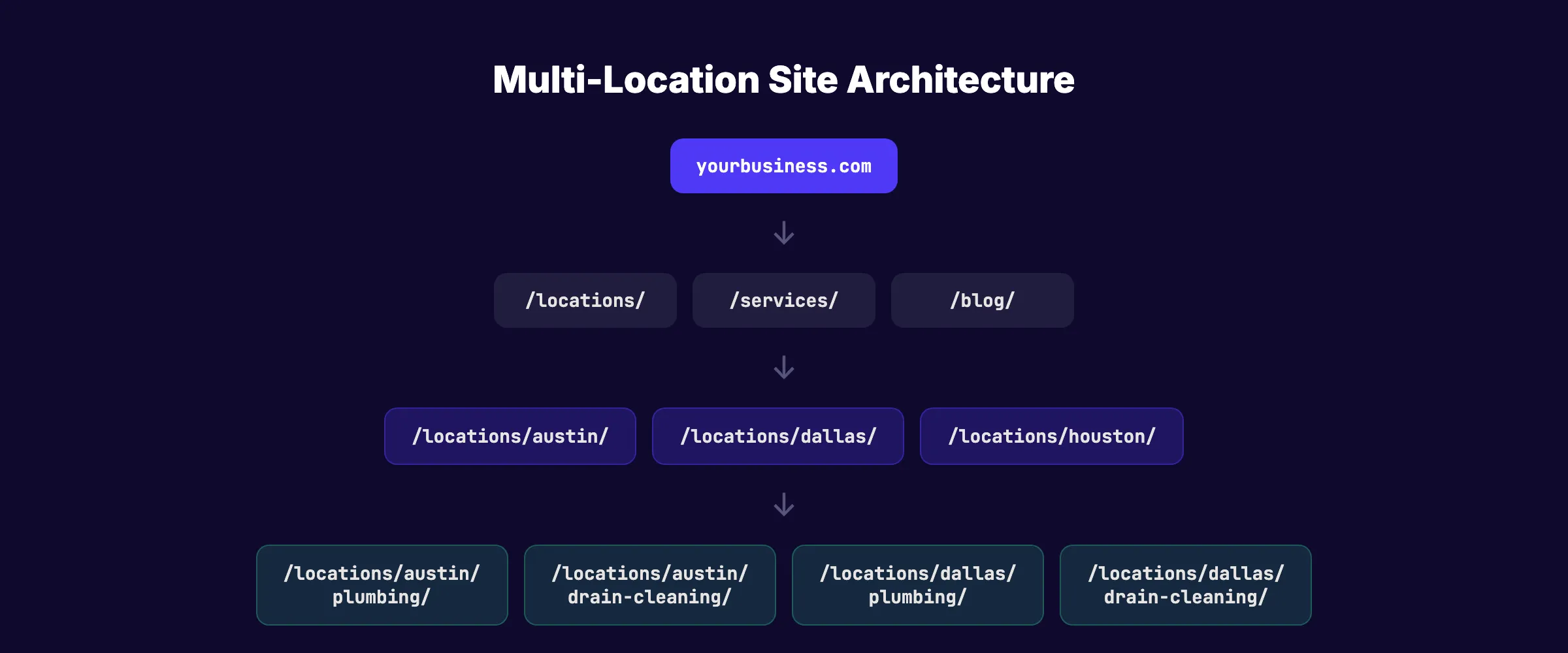
The Recommended URL Structure
Use a consistent hierarchy:
yourbusiness.com/locations/                   → Location hub page
yourbusiness.com/locations/austin/            → Austin location page
yourbusiness.com/locations/austin/plumbing/   → Austin-specific service page
yourbusiness.com/locations/dallas/            → Dallas location page
yourbusiness.com/locations/dallas/plumbing/   → Dallas-specific service page
This structure gives each location its own URL namespace. Google can clearly associate each location with its geographic area. Internal links flow logically from the hub to individual locations to specific services.
What to Avoid
- Subdomains per location (austin.yourbusiness.com). Splits domain authority across separate domains. Each subdomain starts from zero.
- Separate websites per location. Creates management overhead and prevents authority consolidation.
- Flat URL structure (/austin-plumbing, /dallas-plumbing). No hierarchy. Hard to manage at scale. Creates navigation confusion.
The Location Hub Page
Create a central /locations/ page that lists every location with:
- City name and state
- Address and phone number
- Link to each location page
- An embedded map showing all locations
- A search-by-zip-code function (for 10+ locations)
The hub page targets broad "near me" searches and passes authority down to individual location pages through internal links.
Your SEO team. $99/month. 30 optimized articles published automatically. Ideal for multi-location businesses.
Google Business Profile Management at Scale
Each physical location needs its own verified Google Business Profile. GBP signals account for 32% of local pack ranking factors. For multi-location businesses, GBP management is the highest-impact activity.
One Profile Per Location
Google requires a separate GBP for each physical location. Service-area businesses without a physical office can create one GBP per distinct service area.
Every GBP needs:
- Unique business description referencing that specific location's services and area
- Correct primary and secondary categories (may vary by location if services differ)
- Location-specific photos (15+ per location). Do not reuse the same team photo across all locations.
- Local phone number for that branch. Avoid routing all locations to a central 1-800 number.
- Accurate hours including holiday and special hours per location
- Services listed individually with descriptions tailored to each market
GBP Posting Across Locations
Post 2 to 3 times per week per location. Each location's posts should reference that specific area. A post about "our Austin team completing a kitchen remodel" does not belong on the Dallas profile.
At scale (10+ locations), this means 20 to 15 GBP posts per week. This is where automation becomes essential. Use GBP management tools built for multi-location businesses, or outsource GBP posting entirely. For posting strategy details, see our GBP posting frequency guide.
Avoiding GBP Suspensions
Multi-location GBPs face higher suspension risk. Common triggers:
- Multiple locations verified from the same IP address in rapid succession
- Copy-pasted business descriptions across locations
- Using virtual office addresses without genuine staff presence
- Inconsistent NAP between GBP and your website
Verify locations gradually. Use unique descriptions. Ensure every listed address has real operational activity.
Building Location Pages That Rank
Location pages are the most common failure point in multi-location SEO. The biggest mistake is creating template pages that swap only the city name.
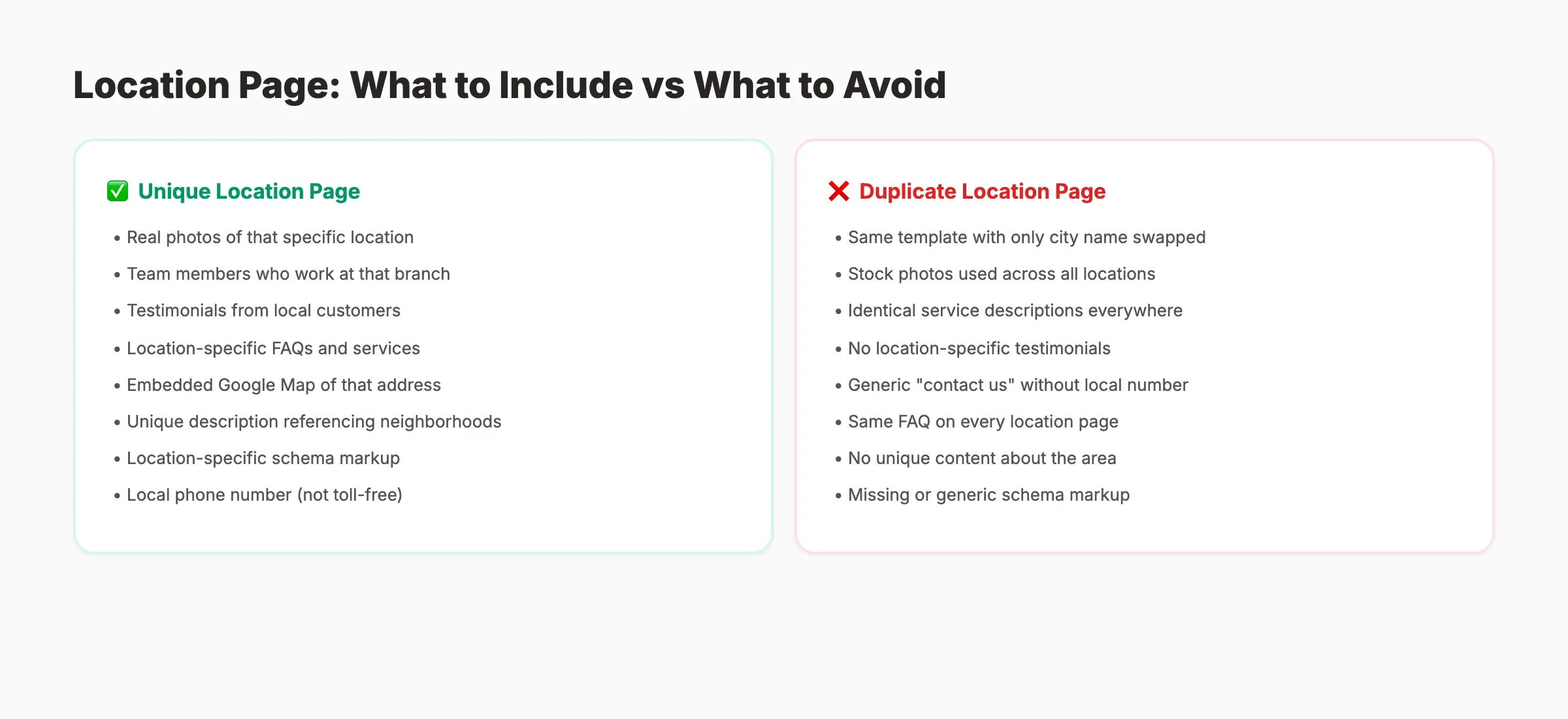
Why Duplicate Location Pages Fail
Google's Helpful Content Update penalizes sites with patterns of low-quality content. 20 location pages with identical text and only the city name changed triggers this penalty. Google treats them as thin content. They either do not get indexed or get indexed and never rank.
The link authority also gets diluted. Backlinks split across 20 near-identical pages instead of consolidating into one strong page. Neither page accumulates enough authority to compete.
What Every Location Page Needs
Each location page must include genuinely unique content:
- Real photos of that specific location. The building, the team, completed projects in that area.
- Team members who work at that branch. Names, photos, and brief bios.
- Testimonials from local customers. Reviews from people in that service area.
- Location-specific FAQs. "Do you serve [neighboring city]?" and "What is your response time in [area]?"
- Unique service descriptions. If the Austin location specializes in commercial work and Dallas focuses on residential, say so.
- Local context. Reference neighborhoods, zip codes, landmarks, and local conditions relevant to your services.
- Embedded Google Map of that specific address.
- LocalBusiness schema markup with the specific location's NAP, hours, and geographic coordinates.
- Clear CTA with a local phone number and booking form.
Content Volume Per Location Page
Aim for 500+ words of unique content per location page. Pages under 300 words are too thin to rank for competitive local terms. Include 3 to 5 paragraphs about the location, 3 to 5 customer testimonials, and a local FAQ section with 4 to 6 questions.
Location-Specific Service Pages
For competitive markets, create service pages nested under each location:
/locations/austin/roof-repair//locations/austin/roof-replacement//locations/dallas/roof-repair/
Each page targets "[service] in [city]" with unique content about how you deliver that service in that specific area. This approach works for businesses with 3 to 10 locations. For 50+ locations, it creates too many pages to maintain quality.
Review Management Across Locations
Review management at scale requires a system per location. A business with 10 locations needs 10 active review generation campaigns, 10 response processes, and 10 sets of review metrics.
Why Per-Location Reviews Matter
Google evaluates review signals per location, not per brand. Your Austin location's reviews do not help your Dallas location rank. Each branch stands on its own in the local pack.
A location with 400 reviews from 3 years ago can get outranked by a competitor with 120 reviews but consistent new reviews every week. Review recency matters as much as total count.
Building a Per-Location Review System
For each location:
- ✓ Set up a unique review request link per location
- ✓ Create a review QR code for that branch's printed materials
- ✓ Assign a review response owner (branch manager or central team)
- ✓ Target 2 to 4 new reviews per month per location
- ✓ Respond to every review within 24 hours
- ✓ Track review volume, rating, and response rate per location monthly
Review Response at Scale
With 10+ locations, centralized review response becomes necessary. Options:
| Approach | Best For | Speed |
|---|---|---|
| Branch managers respond | 2-5 locations | 24-48 hours |
| Central marketing team | 5-20 locations | Same business day |
| Review management tool | 20+ locations | Within 4 hours |
| Third-party service | 50+ locations | Within 2 hours |
Use our review response generator to create personalized templates for each location. Customize every response with the reviewer's name and specific details.
For complete review strategies, see our guide on getting more Google reviews.
3,500+ blogs published. Every article is SEO-scored before publish. See what theStacc can do for your multi-location business.
Citation Building and NAP Consistency at Scale
Citation errors multiply with every location you add. A single formatting inconsistency ("Suite 100" vs "Ste 100") across 10 locations and 50 directories creates 500 potential mismatches.
The NAP Consistency Challenge
For multi-location businesses, NAP consistency means:
- Every location's name matches exactly across GBP, website, and all directories
- Every address uses identical formatting everywhere
- Every phone number is unique per location and consistent across all listings
- Business name variations ("Smith Plumbing LLC" vs "Smith Plumbing") are standardized
Priority Directories for Multi-Location Businesses
Submit each location individually to:
| Directory | Priority | Notes |
|---|---|---|
| Google Business Profile | Critical | One verified listing per location |
| Bing Places | High | Bulk upload available for 10+ locations |
| Apple Maps | High | Bulk upload via Apple Business Connect |
| Yelp | High | Separate page per location |
| High | Separate business page or location pages | |
| Industry-specific directories | High | Varies by industry |
| BBB | Medium | Per-location accreditation |
Bulk Citation Management
For 10+ locations, manual citation building is impractical. Use local citation tools that support bulk uploads and automated NAP auditing. These tools scan hundreds of directories, identify inconsistencies, and submit corrections in bulk.
Audit citations quarterly. Locations that move, change phone numbers, or update hours need immediate updates across all directories.
Content Strategy for Multi-Location Businesses
Content strategy for multi-location businesses balances central authority with local relevance. Your blog builds brand authority. Your location pages build local authority. The two work together through internal linking.
Central Blog Content
Publish blog content on your main domain that targets industry-wide keywords:
- "How Much Does [Service] Cost?" (national keyword, high volume)
- "[Service] vs [Alternative]: Which Is Better?" (comparison traffic)
- "[Industry] Tips for Homeowners" (informational authority)
Each blog post links to relevant location pages. A post about "roof replacement cost" links to your Austin, Dallas, and Houston location pages with anchor text like "roof replacement in Austin."
Location-Specific Content
Create content tied to specific markets:
- "[City] [Service] Guide", "Austin Roof Replacement Guide"
- Local case studies , "How We Helped [Client] in [City]"
- Seasonal content , "Preparing Your [City] Home for Winter"
- Local news tie-ins , "[City] Building Code Updates for 2026"
Publish 2 to 4 location-specific blog posts per month per market. This creates unique content signals for each location and builds topical authority in each service area.
Avoiding Content Cannibalization
The biggest risk for multi-location content is self-competition. Two pages targeting "plumber in Austin" cannibalize each other. Prevent this with clear keyword mapping:
| Page | Target Keyword | Notes |
|---|---|---|
| /locations/austin/ | plumber austin | Primary location page |
| /locations/austin/drain-cleaning/ | drain cleaning austin | Location-specific service |
| /blog/drain-cleaning-cost/ | drain cleaning cost | National informational keyword |
Assign one page per keyword target. Check Google Search Console monthly for pages competing for the same queries. If two pages rank for the same keyword, consolidate or differentiate them.
For a broader SEO strategy, see our local SEO checklist.
Multi-Location SEO Checklist (Per Location)
Use this checklist for every location you manage. Each location is its own SEO project.
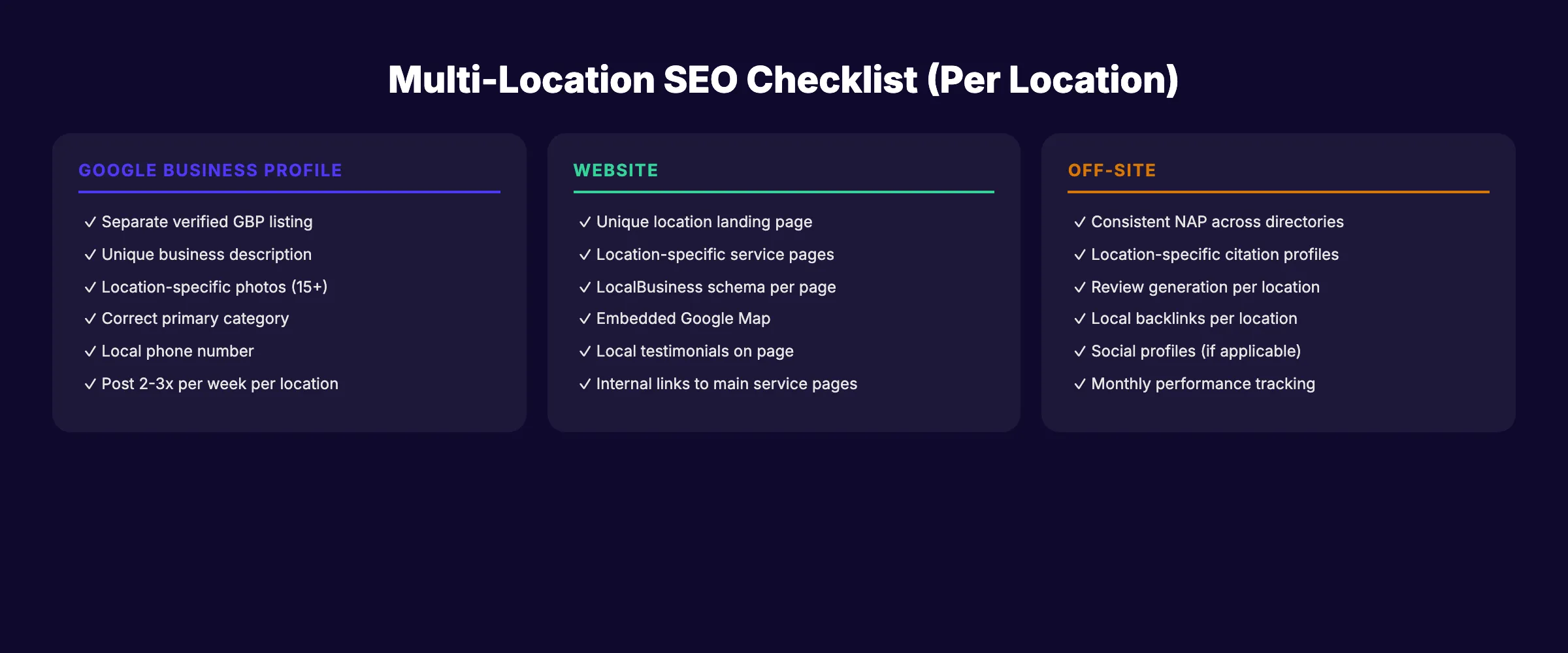
Google Business Profile
- ✓ Separate verified GBP with unique description
- ✓ Correct primary and secondary categories
- ✓ 15+ location-specific photos
- ✓ Local phone number (not central toll-free)
- ✓ Accurate hours including special hours
- ✓ All services listed with descriptions
- ✓ Post 2-3 times per week with local content
Website
- ✓ Unique location landing page (500+ words)
- ✓ Location-specific service pages (if competitive market)
- ✓ LocalBusiness schema markup with correct NAP
- ✓ Embedded Google Map
- ✓ Local customer testimonials
- ✓ Internal links to main service pages and blog
- ✓ Mobile-responsive with tap-to-call
Off-Site
- ✓ Consistent NAP across all directories
- ✓ Location-specific citation profiles (20+ directories)
- ✓ Active review generation campaign (2-4 new reviews/month)
- ✓ Review responses within 24 hours
- ✓ Local backlink building (chamber, sponsors, partners)
- ✓ Monthly performance tracking per location
Rank everywhere. Do nothing. Blog SEO, Local SEO, and Social on autopilot. theStacc starts at $49/mo.
Tracking Performance Across Locations
Multi-location SEO requires per-location tracking. Aggregate metrics hide underperforming locations behind the success of top performers.
Key Metrics Per Location
| Metric | Tool | Target |
|---|---|---|
| Local pack position | SEO tool | Top 3 for primary keywords |
| GBP views and actions | GBP Insights | 20%+ growth quarter over quarter |
| Organic traffic to location page | Google Analytics | Steady increase |
| Review count and rating | GBP | 2-4 new reviews/month, 4.5+ avg |
| Phone calls from GBP | GBP Insights | Tracked per location |
| Citation accuracy | Citation tool | 95%+ consistency score |
Monthly Reporting
Build a dashboard that shows all locations side by side. Identify:
- Top performers. What are they doing that others are not?
- Underperformers. Do they have fewer reviews? Incomplete GBP? No recent posts?
- Trends. Is review velocity increasing or decreasing per location?
Quarterly, review the overall strategy. Are location pages ranking? Are there cannibalization issues? Do citation audits show new inconsistencies?
Scaling from 5 to 50+ Locations
The jump from 5 to 50 locations changes the operational model. Manual processes break. Standardized templates, bulk citation tools, centralized review management, and automated GBP posting become requirements. Most businesses at this scale either hire a dedicated local SEO manager or outsource the entire system.
The investment pays off. Multi-location brands with active SEO programs across all locations achieve 33.4% local pack presence versus 23.8% for businesses that manage SEO inconsistently. That 10-percentage-point gap translates to thousands of additional leads per year across all locations combined.
For local SEO statistics that support multi-location investment, see our dedicated data page. For a step-by-step implementation, see our local SEO checklist.
What practitioners are saying on X
Local SEO advice ages quickly. Here is high-signal public discussion from operators who still win Map Pack visibility — context for your roadmap, not a substitute for primary data.
- @noelcetaSEO (Sep 2025): Local SEO playbook still centers complete GBP, NAP consistency, quality citations, local keywords, location content, review velocity, and local links. See the post on X.
- @irentdumpsters (Jan 2026): Most businesses have a GBP; few fully optimize every ranking-relevant section for Map Pack visibility. See the post on X.
- @EldarCohenSEO (Jul 2026): 2026 WhiteSpark-oriented reminder: primary Google Business category is a top Map Pack ranking factor — wrong primary category can erase visibility for money queries. See the post on X.
Grok, AI Overviews, and multi-engine visibility
For “multi location seo”, multi-engine visibility still starts with clear definitions, sourced numbers, and extractable section answers. Grok additionally factors live X discussion — keep public claims consistent with this page.
- Google AI Overviews: Use passage-ready answers, tables, and FAQ schema where relevant.
- ChatGPT / Perplexity: Cite named sources next to key claims.
- Grok: Maintain accurate entity facts on-site and in high-signal X posts.
Publish content built for Google and AI citations. theStacc’s Content SEO module ships SEO-scored articles structured for rankings and generative engines — including clearer entity pages models like Grok can quote.
FAQ
One verified Google Business Profile per physical location. If you have 15 office locations, you need 15 GBPs. Service-area businesses without physical offices can create one GBP per distinct service area. Each listing needs unique content, photos, and an active posting cadence.
No. Google penalizes near-duplicate location pages. Each location page needs unique content: local photos, area-specific testimonials, location-specific FAQs, and a unique business description. Pages that swap only the city name get flagged as thin content and either do not index or never rank.
Centralize review management with a dedicated team member or review management tool. Set up per-location review request links and QR codes. Assign response templates that can be customized per review. Track review volume, rating, and response rate per location monthly.
Create a keyword map that assigns one target keyword to one page. Use Google Search Console to monitor for cannibalization. If two location pages rank for the same query, differentiate their content or consolidate. Clear URL hierarchy (/locations/city/service/) prevents most cannibalization issues.
Target 500+ words of unique content per location page. Include a unique description of that location (3-5 paragraphs), 3-5 local customer testimonials, a 4-6 question FAQ specific to that area, and an embedded Google Map. Pages under 300 words are too thin to rank in competitive local markets.
Multi-location SEO is a system. Each location needs its own GBP, its own unique content, its own review generation campaign, and its own set of citations. The businesses that rank every branch treat each location as a separate SEO project with shared infrastructure. Build the system once. Scale it across every location. The compound effect multiplies with each branch you add.
Related Tools & Resources
Free SEO Tools:
Best Lists:
Sources & references
- [1] Princeton / Georgia Tech et al. — GEO research (arXiv:2311.09735)
- [2] @hridoyreh on X — Widely shared SEO skill tree: foundations, research, technical, on-page, content, links, AI SEO/GEO, analytics, UX, bran
- [3] @jakezward on X — 2026 SEO predictions emphasize AI Overview share-of-SERP, schema for LLM token efficiency, brand mentions in AI answers

Manage Google Business Profile posts, review replies, and local rank tracking.
Weekly local SEO teardowns
One practical email a week. Map Pack, GBP, AI Overviews — no fluff. Unsubscribe anytime.
Explore this topic: Best multi-location marketing agencies in 2026: 12 ranked.