
How to Submit Product Feeds to ChatGPT (2026)
Submit product feeds to ChatGPT to get your products in AI shopping results. Step-by-step setup for merchants and ecommerce stores. Updated April 2026.
Siddharth Gangal • 2026-04-02 • SEO Tips
In This Article
ChatGPT Shopping reaches over 800 million weekly users. When someone asks “best running shoes under $100,” ChatGPT shows product cards with images, prices, reviews, and direct links. Those product results are organic and unsponsored. They rank purely on relevance.
If you want to submit product feeds to ChatGPT, you now have 2 paths. The first is automatic: allow the OAI-SearchBot crawler to index your product pages. The second is direct: submit a structured product feed through OpenAI’s merchant portal.
Shopify and Etsy merchants already have their catalogs integrated automatically. Everyone else needs to take action. This guide walks through both paths step by step.
Time required: 1-3 hours for feed setup. Ongoing: 15-minute update cycles.
Difficulty: Intermediate (requires access to product data and basic feed formatting).
What you will need: Product catalog data, website with Product schema, robots.txt access, and optionally an account at chatgpt.com/merchants/.
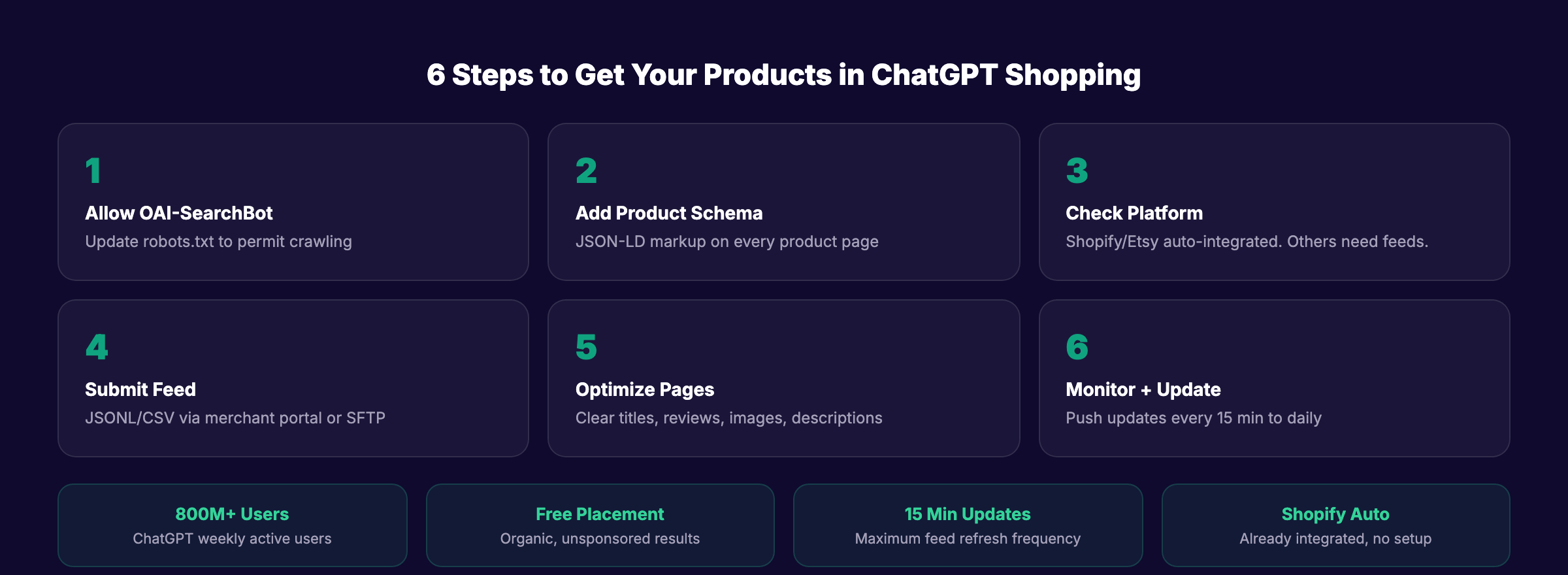
Step 1: Allow the OAI-SearchBot Crawler
Before any feed submission, make sure ChatGPT can find your product pages organically. OpenAI uses a crawler called OAI-SearchBot to index websites for shopping results. If this crawler is blocked in your robots.txt, your products will not appear.
Check your robots.txt file for these lines:
User-agent: OAI-SearchBot
Disallow: /
If those lines exist, remove them. The correct configuration allows OAI-SearchBot full access:
User-agent: OAI-SearchBot
Allow: /
Also confirm that GPTBot (used for general ChatGPT training and retrieval) has access. Both crawlers serve different functions. OAI-SearchBot specifically powers shopping results.
Why this step matters: Even if you submit a direct product feed, OAI-SearchBot crawls your product pages for additional context. Reviews, descriptions, and page content all influence how ChatGPT presents your products. Blocking the crawler eliminates your shopping visibility entirely.
Step 2: Implement Product Schema Markup
ChatGPT uses Product schema markup to extract structured product data from your pages. Without schema, ChatGPT must guess your product’s name, price, and availability from unstructured HTML. With schema, ChatGPT reads exact, labeled data.
Add schema.org/Product markup to every product page. Include these fields:
| Schema Field | What It Provides | Required? |
|---|---|---|
name | Product title | Yes |
description | Product description | Yes |
image | Product image URL | Yes |
offers.price | Current price | Yes |
offers.priceCurrency | Currency (USD, EUR, etc.) | Yes |
offers.availability | In stock / out of stock | Yes |
brand | Brand name | Recommended |
aggregateRating | Star rating + review count | Recommended |
sku | Product identifier | Recommended |
offers.url | Purchase URL | Recommended |
Use JSON-LD format. Place it in the <head> of each product page.
Why this step matters: Product schema markup is the primary way ChatGPT Shopping extracts product attributes. Pages with complete Product schema appear more accurately and more frequently in shopping results.
Step 3: Check if Your Platform Auto-Integrates
Some ecommerce platforms already have direct product feed integration with OpenAI. No manual feed submission needed.
| Platform | Integration Status | Action Required |
|---|---|---|
| Shopify | Automatically integrated | None. Your catalog is already in ChatGPT |
| Etsy | Automatically integrated | None |
| Google Merchant Center | Feeds indexed by OAI-SearchBot | Ensure GMC feed is active and up to date |
| Amazon | Products crawled organically | No direct feed. Optimize product listings |
| WooCommerce | Not auto-integrated | Submit feed manually (Step 4) |
| BigCommerce | Not auto-integrated | Submit feed manually (Step 4) |
| Custom store | Not auto-integrated | Submit feed manually (Step 4) |
If you sell on Shopify or Etsy, your products are already available to ChatGPT Shopping. Focus on Steps 1, 2, and 5 to maximize how they appear.
Why this step matters: Submitting a manual feed when your platform already auto-integrates wastes time and can create data conflicts. Check your platform first.
Your SEO team. $99 per month. 30 optimized articles that drive organic traffic to your product pages. Start for $1 →
Step 4: Submit a Direct Product Feed via OpenAI
For merchants not on auto-integrated platforms, OpenAI offers direct product feed submission through the Agentic Commerce Protocol (ACP).
How to Apply
- Visit chatgpt.com/merchants/
- Submit your business details for verification
- OpenAI reviews and approves your merchant account
- You receive an SFTP endpoint for feed uploads
- Push your feed via encrypted HTTPS to the provided endpoint
Feed Format Requirements
OpenAI accepts these formats (all must be compressed):
| Format | Compression |
|---|---|
| JSONL | gzip |
| CSV | gzip |
| TSV | gzip |
| Parquet | zstd |
Required Feed Fields
Every product in your feed must include:
feed_id— Unique identifier for the feedaccount_id— Your merchant account IDtarget_merchant— Merchant nametarget_country— ISO 3166-1 alpha-2 country code (e.g., “US”)product_id— Unique product identifiervariant_id— Variant identifier (e.g., size/color)variant_title— Variant display nametitle— Product titledescription— Product descriptionprice— Current pricecurrency— Currency codeavailability— Stock statusimage_url— Primary product imageproduct_url— Link to product page
Update Frequency
You can push feed updates every 15 minutes. Fresh pricing and inventory data ensure ChatGPT shows accurate information. Stale feeds with wrong prices or out-of-stock items create poor user experiences and reduce your visibility over time.
Why this step matters: Direct feeds give OpenAI the most accurate, structured version of your product catalog. Pages crawled organically may miss variants, pricing tiers, or inventory status. Direct feeds eliminate guesswork.
Pro tip: Major retailers including Target, Sephora, Nordstrom, and Best Buy already use direct feeds. OpenAI plans to launch a self-service merchant portal later in 2026.
Step 5: Optimize Product Pages for ChatGPT Discovery
Whether you use organic crawling or direct feeds, your product pages determine how ChatGPT presents your products.
- Write clear, specific product titles (include brand, product type, key attribute)
- Write detailed descriptions that answer common buyer questions
- Use high-quality product images (ChatGPT Shopping shows image carousels)
- Display real customer reviews on product pages (ChatGPT reads review sentiment)
- Show pricing clearly in HTML (not rendered by JavaScript only)
- Include size, color, and variant information in structured data
- Link to your product pages from category pages and blog content
- Maintain an ecommerce SEO foundation (fast load times, clean URLs, internal links)
ChatGPT reads your product pages the same way a human shopper would. Clear, complete, well-structured pages appear better in shopping results.
Why this step matters: The feed gets your products into ChatGPT’s index. The product page determines whether ChatGPT recommends your product over a competitor’s. Weak product pages lose to competitors with better content even if both are in the feed.
Step 6: Monitor and Maintain Your Feed
Product feeds are not a set-and-forget task. Prices change. Products go out of stock. New items launch.
Ongoing Maintenance Checklist
- Push feed updates at least daily (every 15 minutes for high-volume stores)
- Remove discontinued products from the feed immediately
- Update pricing within 1 hour of any price change
- Add new products to the feed within 24 hours of launch
- Monitor ChatGPT Shopping results for your brand and top products monthly
- Check that OAI-SearchBot is still allowed in
robots.txtquarterly - Verify Product schema is valid using Google’s Rich Results Test
Track Shopping Performance
ChatGPT Shopping does not currently offer a dedicated analytics dashboard for merchants. Track these proxy metrics:
- Referral traffic from
chatgpt.comin your analytics - Product page traffic from AI-related referrers
- Conversion rate on product pages segmented by AI referral source
- Brand mention tracking in ChatGPT responses (manual or via monitoring tools)
Why this step matters: Stale feeds with incorrect prices or unavailable products reduce trust signals. ChatGPT deprioritizes products with data quality issues over time.
3,500+ blogs published. 92% average SEO score. See what Stacc can do for your site. Start for $1 →
Results: What to Expect
After completing these steps:
- Immediately: OAI-SearchBot begins crawling your product pages (if not already doing so)
- 1-2 weeks: Products with strong schema markup begin appearing in ChatGPT Shopping results
- 2-4 weeks: Direct feed products are ingested and indexed by OpenAI
- Ongoing: Products appear when ChatGPT determines they match user shopping queries
ChatGPT Shopping results are unsponsored. There is no way to pay for placement. Relevance, data quality, and review sentiment determine which products appear.
FAQ
Is ChatGPT Shopping free for merchants?
Yes. Product results in ChatGPT Shopping are currently organic and unsponsored. There is no cost to submit a product feed or have products appear in shopping results. OpenAI began testing ads in January 2026 for Free and Go tier users, but product discovery results remain unpaid.
Do I need a direct feed if I use Shopify?
No. Shopify catalogs are automatically integrated with ChatGPT Shopping. Your products are already discoverable. Focus on Product schema markup, product page quality, and customer reviews to maximize how your products appear.
What file format should I use for the product feed?
JSONL with gzip compression is the most common choice. OpenAI also accepts CSV, TSV (both gzip-compressed), and Parquet with zstd compression. Use whichever format your ecommerce platform exports most easily.
How often should I update my product feed?
At minimum, daily. High-volume stores should update every 15 minutes (the maximum frequency OpenAI supports). Price changes and inventory updates should push to the feed within 1 hour. Stale data reduces your product’s visibility in shopping results.
Can I submit product feeds to other AI shopping platforms?
Google AI Shopping uses Google Merchant Center feeds. Perplexity crawls product pages organically. Each platform has different data sources. Read our Gemini vs ChatGPT search comparison for platform-specific details. Optimizing Product schema and allowing AI crawlers covers the broadest set of platforms.
ChatGPT Shopping is the largest new product discovery channel since Google Shopping. 800 million weekly users. Organic placement. No ad spend required. The merchants who submit their feeds and optimize their product pages now will capture the early traffic before the channel becomes as competitive as Google.
Written and published by Stacc. We publish 3,500+ articles per month across 70+ industries. All data verified against public sources as of March 2026.
