
Ecommerce SEO (2026): Strategies, Tactics & Examples
Practical ecommerce seo guide strategies for 2026: step-by-step tactics, real examples, and tools to improve rankings and drive organic traffic.
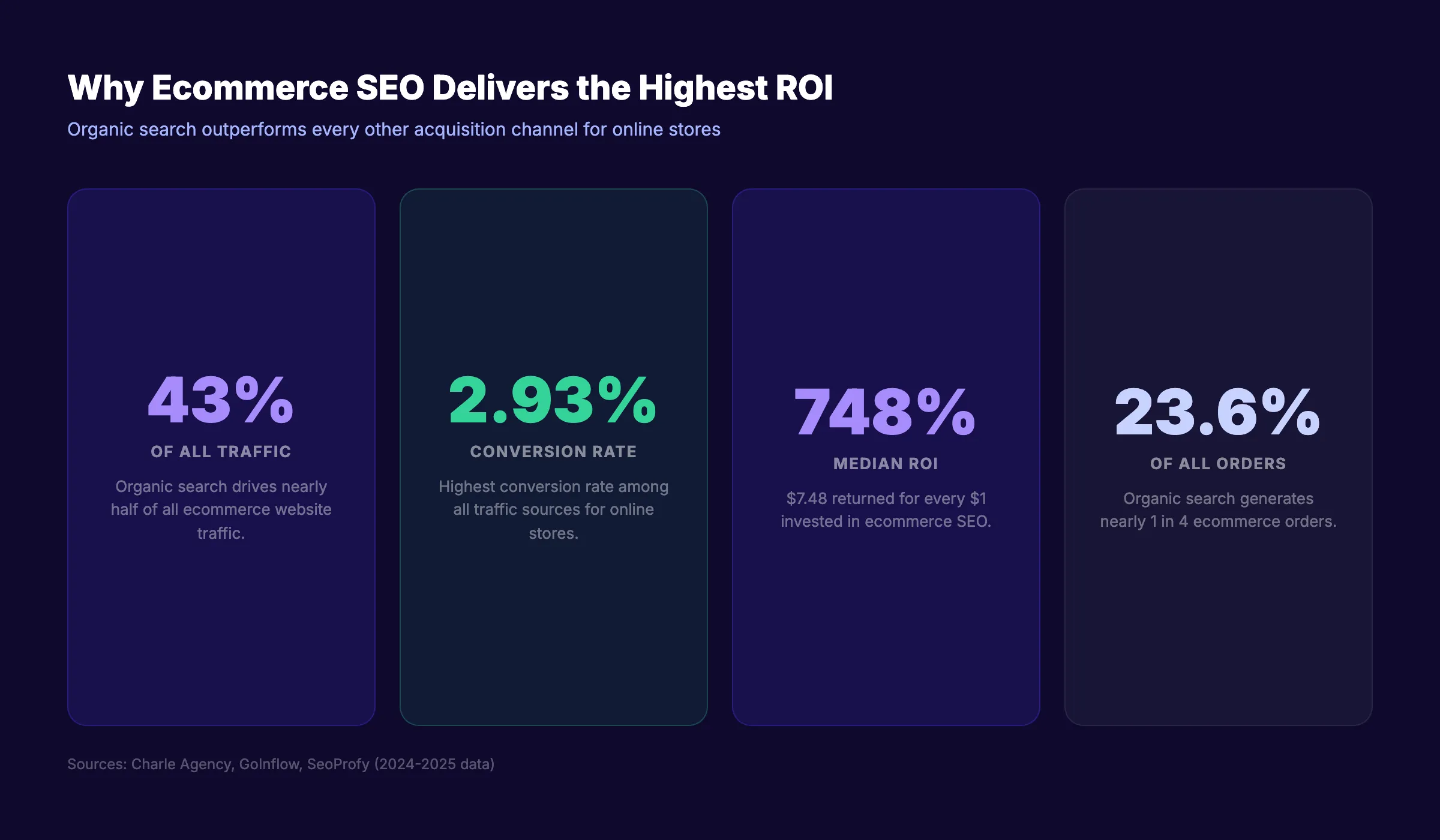
Organic search drives 43% of all ecommerce traffic (Charle Agency). That is nearly half your potential revenue sitting inside Google results. Yet most online stores pour their budgets into paid ads and ignore the channel with the highest conversion rate.
The cost is real. Every month without an ecommerce SEO strategy means losing ground to competitors who already rank for your product terms. With global ecommerce sales exceeding $6 trillion in 2025, the gap between stores that invest in organic search and those that do not grows wider every quarter.
This ecommerce SEO guide breaks down the exact playbook we use at Stacc. We publish 3,500+ blog posts across 70+ industries and have watched the same SEO principles compound revenue for online stores of every size.
Here is what you will learn:
- Why organic search delivers the highest ROI for ecommerce brands
- How to find transactional and informational keywords that drive sales
- The site architecture that makes products easy to discover and crawl
- Product page and category page optimization tactics that rank
- Technical SEO fixes specific to large product catalogs
- Content marketing strategies that funnel readers to product pages
- Link building methods built for online stores
- How to prepare your ecommerce site for AI search and zero-click results
Chapter 1: Why Ecommerce SEO Delivers the Highest ROI
Organic search converts at 2.93% for ecommerce. That is the highest rate among all traffic sources, according to GoInflow. Paid social sits around 1.1%. Email hovers near 2.3%. No other acquisition channel matches the intent behind a Google search.
The numbers go deeper. Organic search generates 23.6% of all online orders while driving 43% of ecommerce traffic (Charle Agency). And 68% of US online shoppers search Google before making a purchase.
Organic Search vs Paid Ads for Online Stores
SEO yields a median ROI of 748%. That means $7.48 returned for every $1 invested (SeoProfy). Paid ads require continuous spend to maintain visibility. The moment you pause a Google Ads campaign, traffic drops to zero.
| Metric | Organic Search (SEO) | Paid Search (PPC) |
|---|---|---|
| Average conversion rate | 2.93% | 1.5-2.0% |
| Traffic when you stop spending | Continues | Drops to zero |
| Median ROI | 748% | 200-400% |
| Share of ecommerce orders | 23.6% | ~15% |
| Trust factor | Higher (earned result) | Lower (ad label) |
The difference compounds over time. A product page that ranks on page 1 today will continue sending traffic for months or years. A paid ad disappears the second your daily budget runs out. For a deeper breakdown of ranking factors, read our On-Page SEO Guide.
The Compounding Effect of Ecommerce SEO
The average ecommerce brand ranks for 1,783 keywords and generates 9,625 organic monthly visits (Reboot Online). That is a baseline. Brands that invest consistently in SEO see those numbers double and triple within 12 to 18 months.
This is what we call The Content Compound Effect. Each optimized product page, category page, and blog post adds another keyword to your footprint. Those keywords link to each other. Search engines recognize the depth and reward it with higher rankings across the board.
A store with 500 products and 50 blog posts has 550 indexable URLs. Each one is a potential entry point from Google. Paid ads give you 1 entry point per campaign. The math favors SEO at every scale.
Chapter 2: Ecommerce Keyword Research
The foundation of every ecommerce SEO strategy is keyword research. But ecommerce keyword research differs from standard blog keyword research in one critical way: buyer intent drives everything.
A searcher typing “best running shoes for flat feet” is closer to a purchase than someone typing “how to start running.” Both queries matter. But they serve different roles in your funnel.
Transactional Keywords That Drive Sales
Transactional keywords signal purchase intent. These are the money terms for any online store.
| Keyword type | Example | Intent level | Where to target |
|---|---|---|---|
| Product + buy | ”buy Nike Air Max 90” | High | Product page |
| Product + review | ”Dyson V15 review” | High | Product or review page |
| Product + best price | ”best price MacBook Air M4” | High | Product page |
| Category + best | ”best wireless earbuds 2026” | Medium-high | Category page or blog |
| Product + vs | ”AirPods Pro vs Sony WF-1000XM6” | Medium-high | Comparison page |
Target transactional keywords on product pages and category pages. These pages already have the purchase mechanism (add to cart, buy now). Matching high-intent keywords to high-conversion pages is where revenue grows fastest.
Use tools like Ahrefs, Semrush, or Google Keyword Planner to identify these terms. Check out our list of the Best Keyword Research Tools for a full comparison.
Informational Keywords That Build Authority
Informational keywords attract shoppers earlier in their journey. They do not convert immediately. But they build topical authority and capture email subscribers who become buyers later.
Examples for a running shoe store:
- “how to prevent shin splints”
- “difference between stability and neutral shoes”
- “what is pronation”
- “best stretches for runners”
- “how to clean running shoes”
- “running shoe rotation guide”
Map informational keywords to specific stages of the buyer journey. Someone searching “what is pronation” is in the awareness stage. Someone searching “best stability shoes for overpronation” is in the consideration stage. Your content should meet them at each point and guide them forward.
Businesses that blog see 55% more web visitors (SeoProfy). And 61% of US online shoppers have purchased a product because of blog recommendations. Target informational keywords with blog content and guide them toward product pages through internal linking.
Create a keyword-to-page mapping spreadsheet. Assign every keyword to a specific page type: product page, category page, blog post, or buying guide. This prevents keyword cannibalization where multiple pages compete for the same term.
Where to Find Ecommerce Keywords (Beyond Google)
Google Keyword Planner is a starting point. Not the finish line.
- Amazon autocomplete. Type your product category and note every suggestion. Amazon searchers have high purchase intent.
- Reddit and forums. Search “best [product] reddit” to find the exact language buyers use. Our guide on keyword research for blog posts covers this method in detail.
- Competitor product pages. Run competitor URLs through Ahrefs or Semrush to extract their ranking keywords. Learn how to analyze competitor keywords step by step.
- Google Search Console. Filter by pages receiving impressions but few clicks. These are quick-win opportunities.
- YouTube autocomplete. Product review queries on YouTube often mirror Google searches.
Ecommerce SEO starts with the right keywords. Stacc publishes SEO-optimized content across 70+ industries, including ecommerce. Start for $1 →
Chapter 3: Site Architecture and URL Structure
Google cannot rank pages it cannot find. Site architecture determines how easily search engines crawl, index, and understand your product catalog.
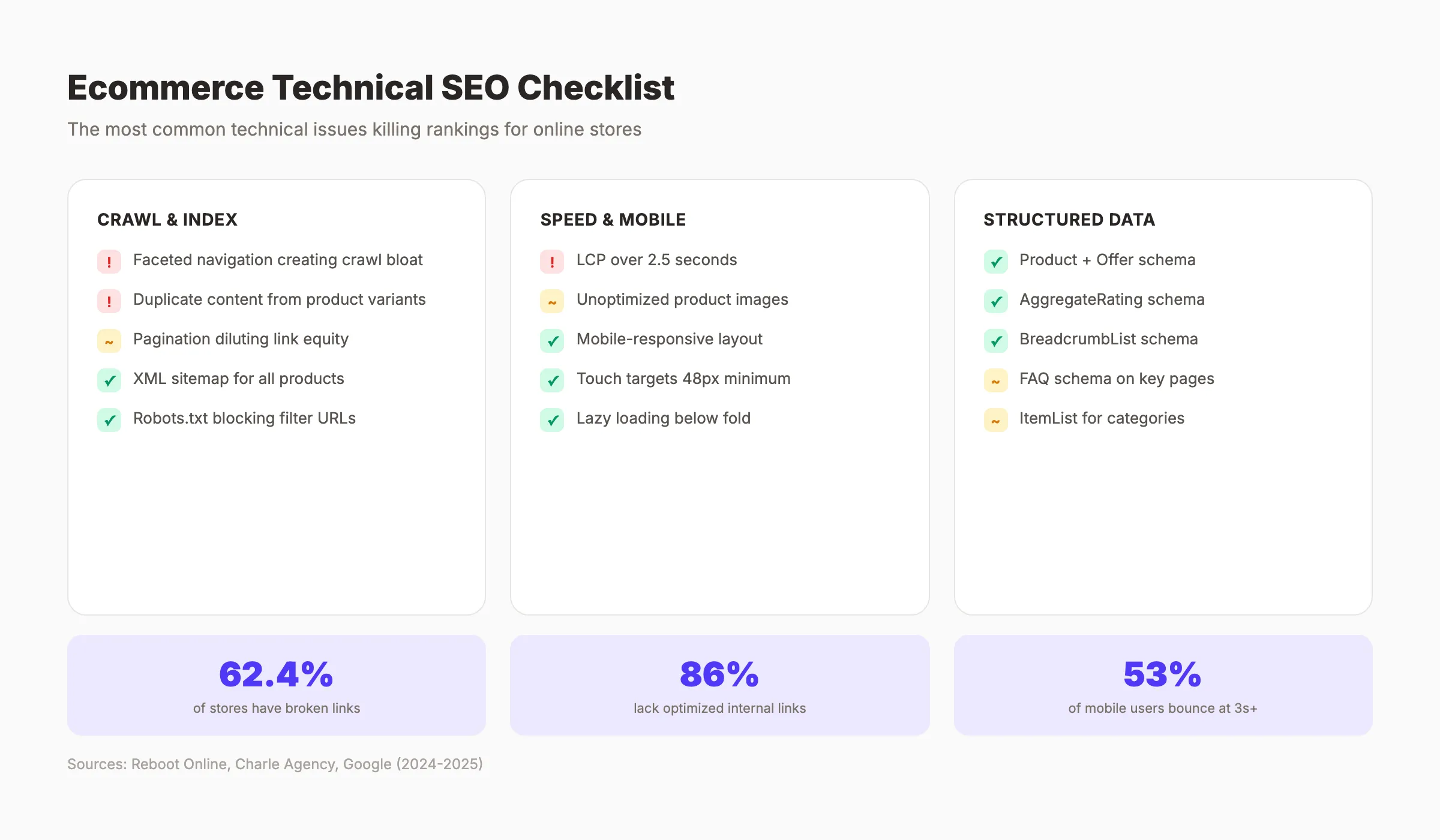
86% of ecommerce brands lack optimized internal links (Charle Agency). That means the majority of online stores have products buried so deep that neither Google nor shoppers can find them efficiently.
The 3-Click Rule for Product Discovery
Every product on your site should be reachable in 3 clicks or fewer from the homepage. This is not just a UX principle. It is a crawl efficiency principle.
A flat site structure looks like this:
Homepage → Category → Subcategory → ProductThree levels. No product orphaned in a 6-level deep folder. Search engines allocate limited crawl budget to each site. Pages deeper than 3 levels receive fewer crawls and rank worse as a result.
URL Structure Best Practices
Clean, descriptive URLs outperform random strings in both rankings and click-through rates.
| Pattern | Example | Verdict |
|---|---|---|
| Category + product | /shoes/nike-air-max-90 | Best |
| Flat product URL | /nike-air-max-90 | Good |
| ID-based URL | /product?id=48291 | Avoid |
| Parameter-heavy | /shoes?color=red&size=10&sort=price | Avoid for indexing |
Rules for ecommerce URLs:
- Use hyphens between words, not underscores
- Keep URLs under 60 characters when possible
- Include the primary keyword for that page
- Remove stop words (the, and, of, in)
- Use lowercase letters only
- Avoid session IDs or tracking parameters in indexed URLs
Category and Subcategory Organization
Organize categories as silos. A silo groups related products and content under a shared parent. This signals topical relevance to Google.
Example for an electronics store:
/laptops/
  /laptops/gaming-laptops/
  /laptops/ultrabooks/
  /laptops/2-in-1-laptops/
/headphones/
  /headphones/wireless-earbuds/
  /headphones/over-ear/
  /headphones/noise-cancelling/
Each category page links down to subcategories. Each subcategory links to products. Products link back up to their category. Breadcrumb navigation reinforces this structure for both users and crawlers. For a deeper understanding of how to organize content clusters, read our guide on building topical authority.
Chapter 4: Product Page Optimization
Product pages generate revenue. Yet most ecommerce sites treat them as afterthoughts with manufacturer descriptions copied from a spreadsheet.
Google flags duplicate content. If 200 retailers use the same product description from the manufacturer, none of them stand out. Unique product page SEO is a competitive advantage most stores overlook.
Product Titles and Meta Descriptions That Convert
The title tag is your first impression in search results. It must include the primary product keyword and a reason to click.
Formula: Brand + Product Name + Key Differentiator + Year (if relevant)
Examples:
- “Nike Air Max 90 Running Shoes | Lightweight Comfort for Daily Runs”
- “Dyson V15 Detect Cordless Vacuum | Laser Dust Detection”
Meta descriptions should include the product name, 1 benefit, and a call to action. Keep them between 145 and 155 characters.
- Include the primary keyword in the title tag
- Keep title tags under 60 characters
- Write a unique meta description for every product page
- Add the price or a promotion to the meta description when relevant
Writing Unique Product Descriptions at Scale
Stores with 500+ products face a real challenge. Writing unique descriptions for every SKU takes time. But it is necessary.
Start with your top 20% revenue-generating products. These pages deserve 200 to 400 words of unique copy. Include:
- What the product does (features)
- Why it matters to the buyer (benefits)
- Who it is best for (audience)
- How it compares to alternatives (differentiation)
For long-tail product variations (size, color), use a template with dynamic sections. The core description stays unique. Variations change only the specific attribute details. Our SEO content writing guide covers techniques for writing optimized copy at scale.
Add user-generated content to every product page. Reviews, Q&As, and customer photos add unique text that Google indexes. They also build E-E-A-T signals.
For the remaining 80% of products, use a structured template approach:
- Write a unique opening sentence (15 to 20 words)
- Include 3 bullet points covering key features
- Add a “Best for” line identifying the ideal buyer
- Pull in dynamic review snippets from verified buyers
This template method produces semi-unique descriptions in minutes rather than hours. It is not as strong as fully custom copy. But it outperforms duplicate manufacturer text by a wide margin. Use programmatic SEO principles to automate the template across your catalog.
Product Schema Markup (JSON-LD Examples)
Schema markup tells search engines exactly what your product page contains. This unlocks rich results in Google: star ratings, price ranges, stock status, and review counts displayed directly in the SERP.
| Schema type | What it shows | Priority |
|---|---|---|
| Product | Name, image, description | Essential |
| Offer | Price, currency, availability | Essential |
| AggregateRating | Star rating, review count | High |
| Review | Individual review text, author | Medium |
| BreadcrumbList | Navigation path | Medium |
| FAQ | Q&A pairs on page | Medium |
Use JSON-LD format. Place it in the <head> of each product page. Our Schema Markup for Blog Posts guide walks through the implementation process. You can also generate markup with our free Schema Markup Generator.
Your product pages deserve more than copied descriptions. Stacc creates original, SEO-optimized content for online stores at $99/month. Start for $1 →
Chapter 5: Category Page SEO
Category pages are the highest-value pages on most ecommerce sites. They target head terms (“wireless earbuds,” “running shoes,” “organic dog food”) that carry massive search volume.
Yet most category pages contain nothing but a grid of product thumbnails. No text. No internal links. No SEO value beyond the page title.
Adding Content Without Hurting UX
The fix is straightforward. Add 200 to 400 words of unique content to each category page. Place it below the product grid or use a collapsible section above it.
This content should:
- Define the category and explain what shoppers will find
- Include the primary keyword and 2 to 3 secondary keywords naturally
- Link to relevant subcategories, buying guides, and top products
- Answer 1 to 2 common questions buyers have about the category
Do not bury products below a wall of text. The product grid stays above the fold. Content supports SEO without disrupting the shopping experience.
Some stores add category content in a tabbed or accordion layout. This keeps the page clean while giving Google 300+ words to index. Test both approaches and monitor rankings. The key metric is whether the category page starts ranking for its target keyword within 8 weeks.
Link from category content to your best-performing blog posts in that niche. A “Wireless Earbuds” category page should link to your “Best Wireless Earbuds 2026” buying guide and your “How to Choose Wireless Earbuds” post. This creates a content hub structure that strengthens the entire cluster.
Faceted Navigation and Crawl Budget
Faceted navigation lets shoppers filter by size, color, price, brand, and other attributes. It is essential for UX. It is dangerous for SEO.
Every filter combination creates a new URL. A store with 10 size options, 15 colors, and 5 brands can generate 750 URL combinations per category. Google wastes crawl budget indexing these near-duplicate pages.
The fix:
- Use
noindextags on filtered pages with thin content - Apply canonical tags pointing filtered URLs to the main category page
- Block low-value filter combinations in robots.txt
- Use AJAX-based filtering that does not generate new URLs when possible
- Selectively index high-search-volume filter combinations (e.g., “/running-shoes/size-10” if the query has volume)
Pagination Best Practices
Category pages with hundreds of products need pagination. Google recommends using rel="next" and rel="prev" tags, though their direct SEO impact is debated.
Better approaches:
- Load more button. Keeps all products on a single URL. Best for SEO.
- Infinite scroll with pushState. Updates the URL as users scroll. Google can crawl each state.
- Traditional pagination. Use self-referencing canonicals on each page. Include the page number in the title tag (“Running Shoes - Page 2”).
Generate an XML sitemap that includes all paginated URLs. This ensures Google discovers every product regardless of pagination depth.
Chapter 6: Technical SEO for Ecommerce
62.4% of ecommerce websites have broken links (Reboot Online). Technical debt accumulates fast in online stores. Products go out of stock. Categories get renamed. Seasonal pages expire. Without a technical SEO strategy, these issues quietly erode your rankings.
Run a full SEO audit before starting any optimization work. Use our free SEO Audit Tool to identify issues fast.
Duplicate Content and Canonical Tags
Ecommerce sites generate duplicate content in several ways:
- The same product appearing under multiple categories (
/shoes/nike-air-maxand/sale/nike-air-max) - HTTP vs HTTPS versions
- Trailing slashes vs no trailing slashes
- Sorting and filtering parameters (
?sort=price-low) - Www vs non-www variations
The fix is canonical tags. Every product page should have a self-referencing canonical URL. Every duplicate variation should canonicalize to the primary version.
Check for duplicate title tags and meta descriptions across your site. The Meta Tag Analyzer flags these issues instantly.
Crawl Budget Management for Large Catalogs
Google allocates a finite crawl budget to every site. Large ecommerce stores with 10,000+ URLs must manage it carefully.
Priority actions:
- Block internal search result pages from indexing
- Noindex tag pages, sort-order URLs, and empty filter combinations
- Submit a clean XML sitemap containing only indexable URLs
- Fix broken links that waste crawl budget on 404 pages
- Use server-side rendering for JavaScript-heavy product pages
- Monitor crawl stats in Google Search Console weekly
Site Speed: Every 100ms Matters
Sites loading in 1 second convert at 3.05%. Sites loading in 4 seconds drop to 0.67% (Mirasvit). That is a 78% drop in conversions from 3 extra seconds.
Every 100ms improvement in load time nudges conversion rates up by roughly 1% (Portent). And 53% of mobile users abandon sites taking over 3 seconds to load (Google).
| Load time | Conversion rate | Revenue impact (per $100K/mo) |
|---|---|---|
| 1 second | 3.05% | Baseline |
| 2 seconds | 1.68% | -$44,900/mo |
| 3 seconds | 1.12% | -$63,300/mo |
| 4 seconds | 0.67% | -$78,000/mo |
Speed fixes for ecommerce:
- Compress product images to WebP format (see our image optimization guide)
- Implement lazy loading for product grids below the fold
- Use a CDN for static assets and product images
- Minimize JavaScript bundles, especially third-party tracking scripts
- Improve Core Web Vitals scores across all templates
Out-of-Stock Product Page Handling
Products go out of stock. How you handle those pages matters for SEO.
Do not delete the page. A product page that ranked on Google and earned backlinks still holds value.
Options:
- Temporarily out of stock. Keep the page live. Show a “notify me” email capture. Maintain all SEO signals.
- Permanently discontinued , 301 redirect to the closest alternative product or parent category.
- Seasonal products. Keep the page live year-round. Update it when the product returns. This preserves link equity and ranking history.
Never 404 a product page that has backlinks or ranks for keywords. Use a backlink audit to check before removing any URL.
Technical SEO issues cost ecommerce stores thousands monthly. Stacc identifies and fixes them as part of every SEO engagement. Start for $1 →
Chapter 7: Content Marketing for Ecommerce
61% of US online shoppers have purchased a product because of a blog recommendation (SeoProfy). Businesses that blog see 55% more web visitors. Content marketing is not optional for ecommerce. It is the bridge between informational searches and product pages.
Buying Guides That Funnel to Product Pages
Buying guides target high-intent informational queries. “Best running shoes for flat feet,” “how to choose a standing desk,” and “espresso machine buying guide” all attract shoppers actively considering a purchase.
Structure every buying guide to funnel readers toward your products:
- Open with the problem the shopper faces
- Explain the criteria for choosing the right product
- Recommend specific products from your catalog (with internal links to product pages)
- Close with a comparison table
This model turns blog traffic into product page visits. Our blog SEO guide covers how to optimize these posts for search. And our content marketing strategy resource explains how to build a sustainable editorial calendar.
Building Topical Authority Around Your Catalog
Google rewards sites that demonstrate deep expertise in a subject. An electronics store that publishes 30 articles about headphones (reviews, comparisons, buying guides, care tips) ranks higher for “best wireless earbuds” than a store with zero supporting content.
This is topical authority in action. Build it by:
- Creating a topical map around each major product category
- Linking all related content back to the category page (the pillar)
- Covering every subtopic a buyer might search before purchasing
- Updating content quarterly to maintain freshness
Learn how to plan this systematically with our content calendar for SEO guide.
Publishing Frequency for Ecommerce Blogs
There is no universal answer. But the data suggests a minimum of 8 to 12 posts per month for stores competing in mid-volume niches. High-competition niches like fashion, electronics, and beauty may need 20+ per month.
Consistency matters more than volume. Publishing 8 posts per month for 12 months beats publishing 30 posts in month 1 and nothing after. The Content Compound Effect requires sustained output.
Track which content types drive the most product page visits. For most ecommerce blogs, the breakdown looks like this:
| Content type | Share of product page referrals | Priority |
|---|---|---|
| Buying guides | 35-40% | Highest |
| Product comparisons | 20-25% | High |
| How-to tutorials | 15-20% | Medium |
| Trend/news posts | 10-15% | Medium |
| Listicles | 5-10% | Lower |
Allocate your publishing calendar accordingly. If buying guides drive 40% of product page visits, make them 40% of your content output. Learn how to structure an effective publishing schedule in our guide to creating a content calendar for SEO.
For stores without a content team, scaling blog content with AI is a viable path. Stacc publishes 30 to 80 SEO-optimized posts per month starting at $99. Check our Blog SEO Module for details.
Chapter 8: Link Building for Online Stores
Backlinks remain a top 3 ranking factor. Ecommerce sites have a natural advantage: they sell physical products that people talk about, review, and recommend. Turn that into link building opportunities.
Product-Led Digital PR
Your products are your best link-building assets. Send products to journalists, bloggers, and YouTube reviewers. Every honest review earns a backlink from a relevant, authoritative site.
Tactics:
- Product launches. Pitch new releases to industry publications. Include high-resolution images and a clear angle (what makes this product different).
- Data studies. Analyze your sales data and publish findings. “We analyzed 10,000 orders and found…” earns links from news sites and blogs.
- Seasonal roundups. Pitch your products for “best gifts for [occasion]” lists. These earn links and drive seasonal traffic.
Supplier and Manufacturer Link Opportunities
If you are an authorized retailer, ask manufacturers to list you on their “where to buy” page. This is an easy, high-authority backlink that most competitors do not pursue.
Also check:
- Industry association directories
- Local business directories (if you have a physical location)
- Review sites like Trustpilot, G2, or Capterra (for SaaS-adjacent products)
- Supplier partner pages
Broken Link Building at Scale
62.4% of ecommerce websites have broken links. Your competitors are among them. Find broken links on industry blogs and resource pages. Offer your content as a replacement.
The process:
- Find resource pages in your niche (“running gear resources,” “home office setup guide”)
- Check for broken outbound links using Ahrefs or Check My Links
- Create content that matches or exceeds the dead page
- Email the site owner with a replacement suggestion
This works especially well for ecommerce blogs. Buying guides and comparison posts make natural replacement content. Read our guide on how to fix broken links for a full walkthrough.
Measuring Link Building ROI
Track referring domains, domain rating, and organic keyword growth monthly. A successful link building campaign for ecommerce looks like this:
- 5 to 15 new referring domains per month for small stores
- 20 to 50 new referring domains per month for mid-size stores
- Organic traffic growth of 10 to 20% quarter over quarter
Focus on earning links to category pages and cornerstone blog content. These pages distribute authority to the rest of your site through internal links. A single high-authority backlink to your “Wireless Earbuds” category page lifts every product page in that category.
Use the backlink audit guide to monitor your existing link profile and disavow toxic backlinks before they harm your rankings.
Link building takes time. Content compounds faster. Stacc publishes the blog content your link-building campaigns need to succeed. Start for $1 →
Chapter 9: Ecommerce SEO in the Age of AI Search
AI Overviews now appear on roughly 40% of commercial queries (ResultFirst). This changes how shoppers find and choose products in Google. Ecommerce brands that ignore this shift will watch their organic click-through rates drop.
How AI Overviews Change Ecommerce Search
The data is stark. Organic CTR dropped from 1.41% to 0.64% for queries where AI Overviews appear (Charle Agency). That is a 55% decline in clicks.
But there is an upside. Being cited in an AI Overview earns 35% more organic clicks compared to a standard result without citation (Charle Agency). The goal is not to fight AI Overviews. The goal is to get cited in them.
| Scenario | Organic CTR |
|---|---|
| No AI Overview on query | 1.41% |
| AI Overview present (not cited) | 0.64% |
| Cited in AI Overview | ~0.86% (35% lift) |
How to Get Your Products Cited in AI Answers
Google pulls AI Overview content from pages that provide clear, structured, factual answers. Optimize for citation with these tactics:
- Use structured data (Product, FAQ, HowTo schema) on every relevant page
- Write concise, direct answers to common product questions
- Include comparison tables that AI can parse and reference
- Add specific numbers: prices, dimensions, weights, ratings
- Build authority through consistent content publishing
- Format product specs as structured lists, not paragraphs
Our Generative Engine Optimization Guide covers this topic in full. The Optimize for Google AI Overviews guide offers specific tactical steps.
Zero-Click Commerce and Brand Building
Some queries will never send a click. Google answers them directly. “Is the iPhone 16 waterproof?” does not need a full page visit. The answer appears in the AI Overview.
For ecommerce, this means brand visibility matters more than ever. Even without a click, your brand name appearing in an AI Overview builds recognition. Shoppers remember the brands Google references.
Strategies for zero-click visibility:
- Earn brand mentions on review sites and comparison posts
- Publish authoritative content that Google cites as a source
- Build featured snippet positions (many become AI Overview sources)
- Invest in branded search demand through content marketing and PR
Mobile commerce accounts for 59% of global ecommerce sales in 2025 (Mobiloud) and is projected to reach 63% by 2028. Most AI Overview interactions happen on mobile. Ensure your pages load fast, render correctly, and deliver a clean mobile experience.
The stores that win in AI search are the same ones winning in traditional search: those with deep product content, strong schema markup, and consistent publishing. There is no separate “AI SEO” strategy. There is just good SEO applied with structured data awareness.
Start by auditing your existing product pages for structured data coverage. Use our SEO Audit Tool to identify pages missing schema markup. Then build a publishing calendar that fills content gaps in your product categories. Read our guide on how to do a content audit for the step-by-step process.
The ecommerce stores that adapt to AI search early will capture market share from slower competitors. The window is open now. It will not stay open forever.
Frequently Asked Questions
How long does ecommerce SEO take to show results?
Most ecommerce sites see measurable ranking improvements within 3 to 6 months. Competitive product categories may take 6 to 12 months. The timeline depends on domain authority, content volume, and technical health. New sites take longer than established stores with existing backlinks.
What is the difference between ecommerce SEO and regular SEO?
Ecommerce SEO focuses on product pages, category pages, and large-scale catalogs. Regular SEO often targets blog content and service pages. Ecommerce SEO must handle duplicate content from product variations, faceted navigation, out-of-stock pages, and Product schema markup. The core principles of on-page SEO remain the same.
How much does ecommerce SEO cost?
In-house ecommerce SEO costs between $3,000 and $10,000 per month when accounting for tools, content production, and staff time. Agencies charge $2,000 to $15,000 per month depending on scope. Stacc offers blog SEO content starting at $99 per month for 30 articles.
Should I use Shopify, WooCommerce, or another platform for ecommerce SEO?
All major platforms support basic SEO. Shopify handles technical SEO well but limits URL structure customization. WooCommerce offers full control but requires more manual optimization. BigCommerce and Magento serve enterprise stores with complex catalogs. Choose based on your catalog size and technical resources.
How do I handle seasonal product pages for SEO?
Keep seasonal pages live year-round. Update the content and product selection when the season returns. Deleting and recreating pages each year destroys accumulated backlinks and ranking history. A “Summer Dresses 2026” page that stays live retains its authority for next season.
Is blogging worth it for ecommerce stores?
Yes. 61% of US online shoppers have purchased due to blog recommendations (SeoProfy). Blogging drives organic traffic, builds topical authority, and creates internal linking opportunities to product pages. Learn how to get started with our how to write SEO blog posts guide.
Rank your store without building a content team. Stacc publishes 30 to 80 SEO blog posts per month for ecommerce brands. 92% average SEO score. Start for $1 →
Related Tools & Resources
Free SEO Tools:
Best Lists:

Written by
Siddharth GangalSiddharth is the founder of theStacc and Arka360, and a graduate of IIT Mandi. He spent years watching great businesses lose organic traffic to competitors who simply published more. So he built a system to fix that. He writes about SEO, content at scale, and the tactics that actually move rankings.
30 SEO blog articles published every month
Keyword-optimized, scheduled, and live on your site. Automatically.
30-day trial · Cancel anytime
theStacc
Stop writing SEO content manually
30 blog articles, 30 GBP posts, and social media content. Published every month. Automatically.
Start Your $1 Trial$1 for 3 days · Cancel anytime