
404 Error SEO: The Complete Guide (2026)
Learn how 404 errors affect SEO and how to find, fix, or redirect them. Covers soft 404s, 410 codes, crawl budget, and custom 404 pages. Updated March 2026.
Siddharth Gangal • 2026-03-29 • SEO Tips
In This Article
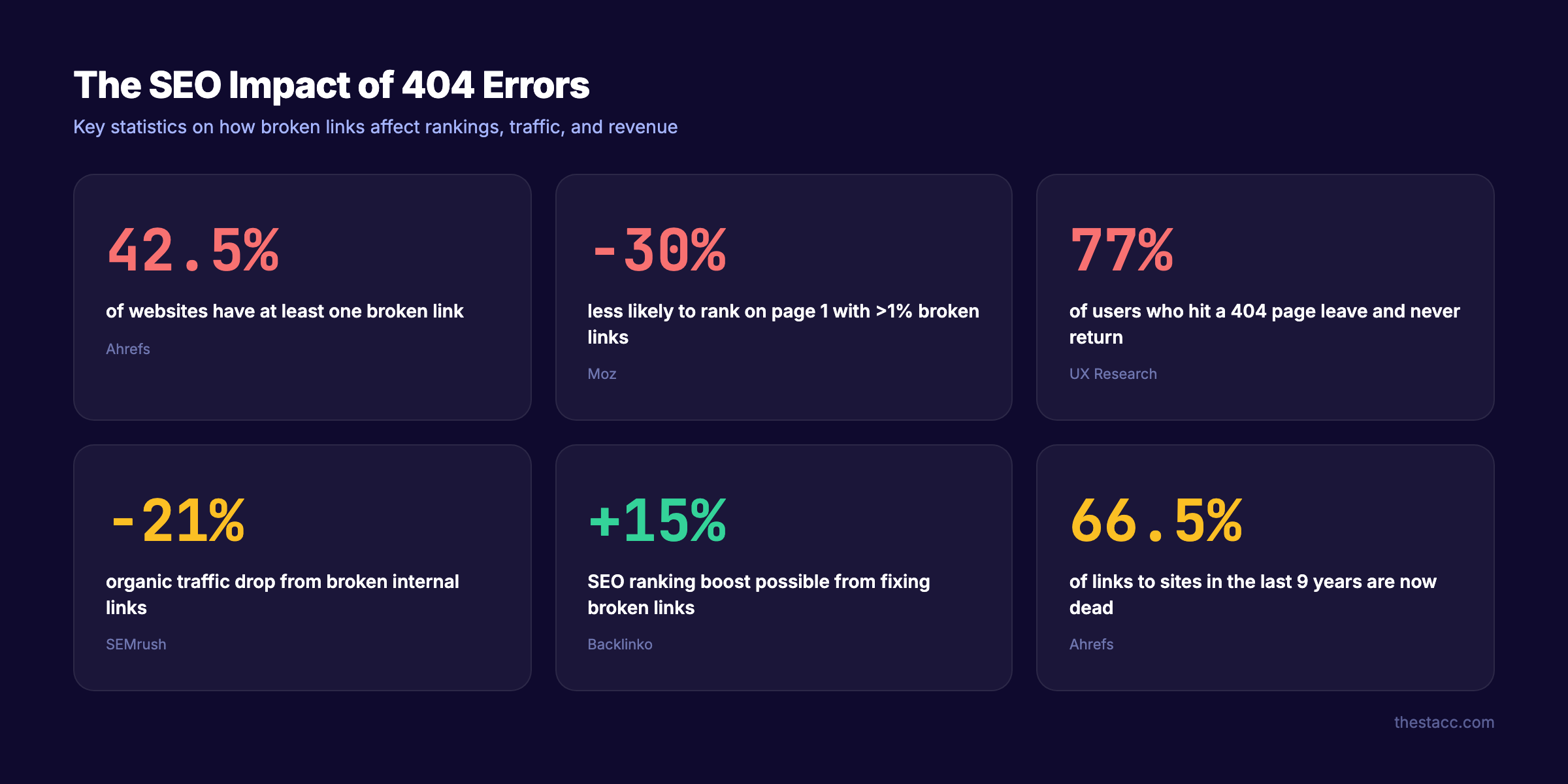
A single 404 error will not tank your rankings. But 42.5% of websites have at least one broken link, and sites with over 1% broken links are 30% less likely to rank on Google’s first page. The gap between “one harmless 404” and “a 404 problem that costs you traffic” is smaller than most people think.
This guide covers everything about 404 error SEO. We have published 3,500+ blog posts across 70+ industries and dealt with every type of broken link scenario at scale.
Here is what you will learn:
- Whether 404 errors actually hurt your rankings (the real answer is nuanced)
- The difference between hard 404s, soft 404s, and 410 status codes
- How to find every 404 error on your site using free tools
- When to redirect, when to fix, and when to leave a 404 alone
- How to build a custom 404 page that recovers lost visitors
- The crawl budget impact most guides ignore
What Is a 404 Error?
A 404 error means the server received your request but could not find the page at that URL. The page either never existed, was deleted, or moved without a redirect.
Every web server returns HTTP status codes. A 404 is part of the 4xx family, which signals client-side errors. The server works fine. The URL just points to nothing.
Common causes of 404 errors:
| Cause | Example |
|---|---|
| Page deleted without redirect | Removing a blog post and not setting up a 301 redirect |
| URL typo in internal links | Linking to /blog/seo-tps instead of /blog/seo-tips |
| Changed URL structure | Migrating from /blog/post-name to /articles/post-name |
| External site links to wrong URL | Someone linking to a URL that never existed |
| CMS or plugin issues | WordPress permalink changes breaking old URLs |
| Expired content | Seasonal pages, discontinued products, ended promotions |
Not every 404 is a problem. Google’s own documentation states: “404 errors will not impact your site’s search performance if you are certain the URLs should not exist.” The key word is “certain.”
Do 404 Errors Hurt SEO?
Google says no. SEO data says it depends.
John Mueller has stated clearly: “404s and 410s are not a negative quality signal.” Gary Illyes confirmed Google treats 404 and 410 status codes the same way. On the surface, the answer seems straightforward.
But the indirect effects tell a different story.
The Indirect SEO Damage
Lost link equity. When a page with backlinks returns a 404, all the link authority pointing to that URL disappears. A Majestic SEO study found sites can lose up to 17% of domain authority from dead backlinks. That authority could pass to other pages through a redirect.
Wasted crawl budget. Every time Googlebot hits a 404, it spends crawl resources on a dead page instead of your real content. For sites with thousands of pages, this adds up. Google’s own crawl budget documentation confirms that soft 404s are the primary crawl budget drain.
Higher bounce rates. 77% of users who hit a 404 page leave the site and never return. Only 23% make a second attempt to find what they were looking for. That lost traffic does not come back.
Trust erosion. 71% of visitors say broken links reduce their trust in a website. 51% view them as a sign of poor site maintenance.
When 404s Actively Hurt Rankings
404 errors cause measurable ranking damage in these scenarios:
- The 404 page had significant backlinks (link equity lost)
- The 404 page ranked for valuable keywords (rankings gone)
- Internal links point to the 404 URL (authority leaks and poor UX)
- Hundreds or thousands of 404s exist (crawl budget wasted)
- Soft 404s serve a 200 status code (confuses Google entirely)
One study from Moz found that 74% of SEO professionals report broken links negatively affect search rankings. Another from SEMrush documented a 21% drop in organic traffic from broken internal links alone.
The bottom line: a few natural 404s from deleted content are normal. A pattern of broken links signals a neglected site.
Stop writing. Start ranking. Stacc publishes 30 SEO articles per month for $99. Every link checked. Every redirect handled. Start for $1 →
Hard 404 vs. Soft 404 vs. 410: Key Differences
Not all “not found” responses are the same. Understanding the differences determines how Google processes your missing pages.
Hard 404
A hard 404 returns the correct HTTP 404 status code. The server tells the browser and search engines: “This page does not exist.” Google eventually removes the URL from its index, typically within 6-12 months.
This is the correct behavior for genuinely deleted pages.
Soft 404
A soft 404 returns a 200 (OK) status code for a page that does not actually exist. The server says “everything is fine” while showing an error message, an empty page, or irrelevant content.
Soft 404s are the worst type of 404 error for SEO. They:
- Waste crawl budget because Google keeps recrawling the “live” URL
- Confuse Google about which pages are real content
- Prevent proper deindexing of dead pages
- Can cause Google to flag legitimate thin pages as soft 404s
Google Search Console reports soft 404s separately because they are a distinct problem. If your site has soft 404 warnings, fix them before anything else.
410 (Gone)
A 410 status code means the page existed but is permanently and intentionally removed. Unlike a 404, which implies the page might come back, a 410 says “this is gone forever.”
A Reboot Online experiment testing 119 URLs over 3 months found that 404 URLs were crawled 49.6% more frequently than 410 URLs. Google recrawls 404 pages to check if they return. A 410 tells Googlebot to stop checking.
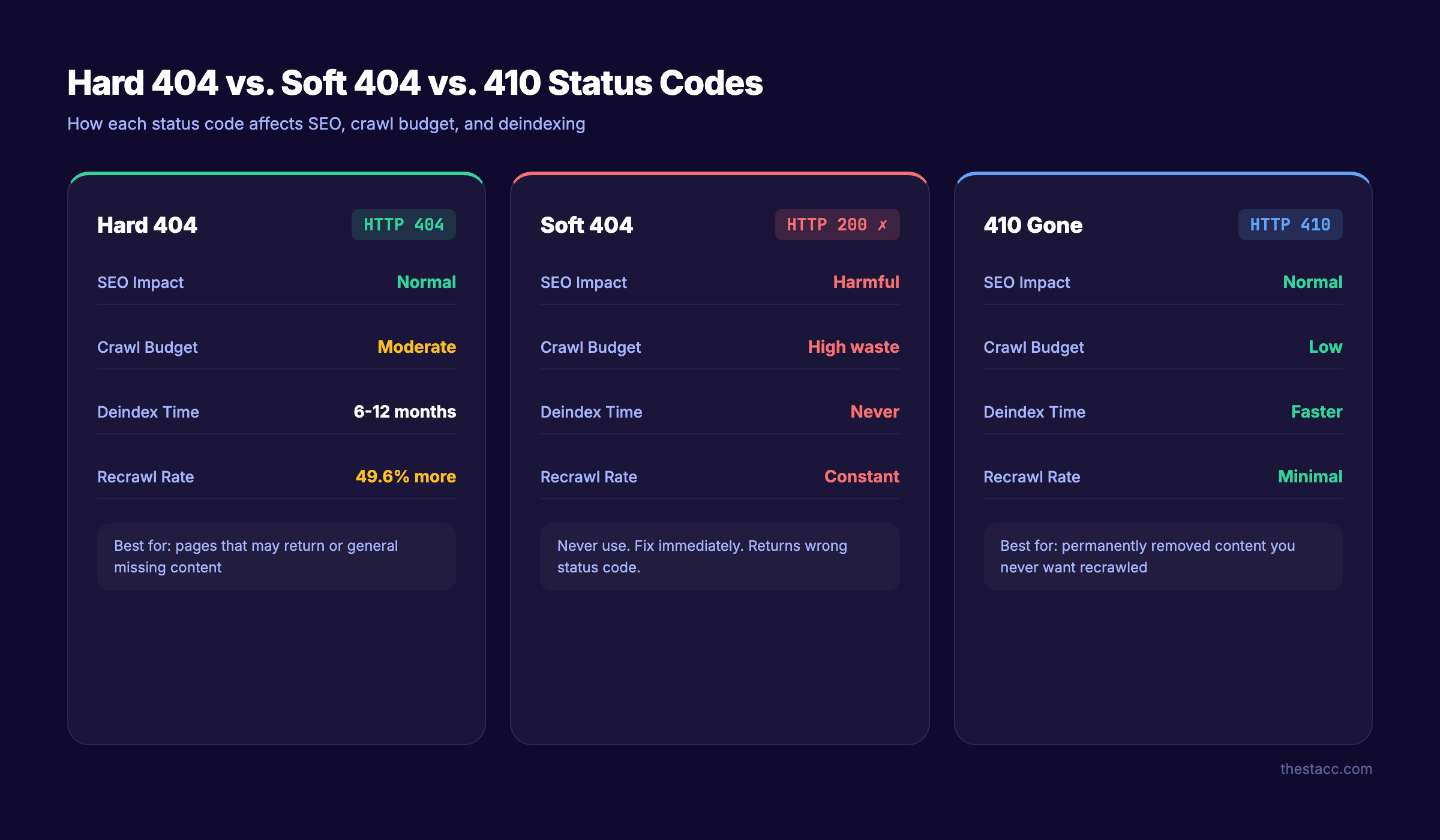
| Feature | Hard 404 | Soft 404 | 410 Gone |
|---|---|---|---|
| HTTP status code | 404 | 200 (incorrect) | 410 |
| Google deindex time | 6-12 months | Does not deindex | Faster than 404 |
| Crawl budget impact | Moderate | High (worst) | Low (best) |
| When to use | Page may return | Never (fix this) | Page gone permanently |
| Link equity | Lost | Lost | Lost |
For most sites, the practical difference between 404 and 410 is minimal. Use 410 when you want Google to stop recrawling a URL faster. Use 404 as the default for missing pages.
How to Find 404 Errors on Your Website
You cannot fix what you do not know about. Use these tools to audit your site for broken links and 404 errors.
Google Search Console (Free)
Google Search Console is the primary tool for finding 404 errors Google has already discovered.
- Open Google Search Console
- Go to Indexing > Pages
- Filter by “Not found (404)” and “Soft 404”
- Review the list of affected URLs
- Click any URL to see which pages link to it
Google Search Console shows both 404 and soft 404 errors. It also shows which internal pages link to the broken URL, which helps you fix the source of the problem.
Screaming Frog (Free for up to 500 URLs)
Screaming Frog crawls your entire site and reports every URL that returns a 4xx status code. It catches internal broken links that Google Search Console may not report yet.
Run a full crawl and filter by Response Codes > Client Error (4xx). Export the results with the “Inlinks” tab to see every page that links to each broken URL.
Ahrefs / Semrush
Both tools maintain backlink databases that show external links pointing to your 404 pages. This is critical for recovering lost link equity.
In Ahrefs: Site Explorer > Best by Links > filter by 404 status In Semrush: Site Audit > Issues > Broken internal links
Manual Browser Check
For smaller sites, use browser extensions like “Check My Links” (Chrome) to scan individual pages for broken links. This works well for checking high-value pages like your homepage and main category pages.
| Tool | Best For | Price |
|---|---|---|
| Google Search Console | Google-discovered 404s + soft 404s | Free |
| Screaming Frog | Full site crawl, internal link audit | Free (500 URLs) |
| Ahrefs | External broken backlinks, link equity recovery | Paid |
| Semrush | Site audit, broken internal links | Paid |
| Check My Links | Quick per-page scan | Free extension |
For a step-by-step process, see our guide on how to do an SEO audit.
How to Fix 404 Errors (Decision Framework)
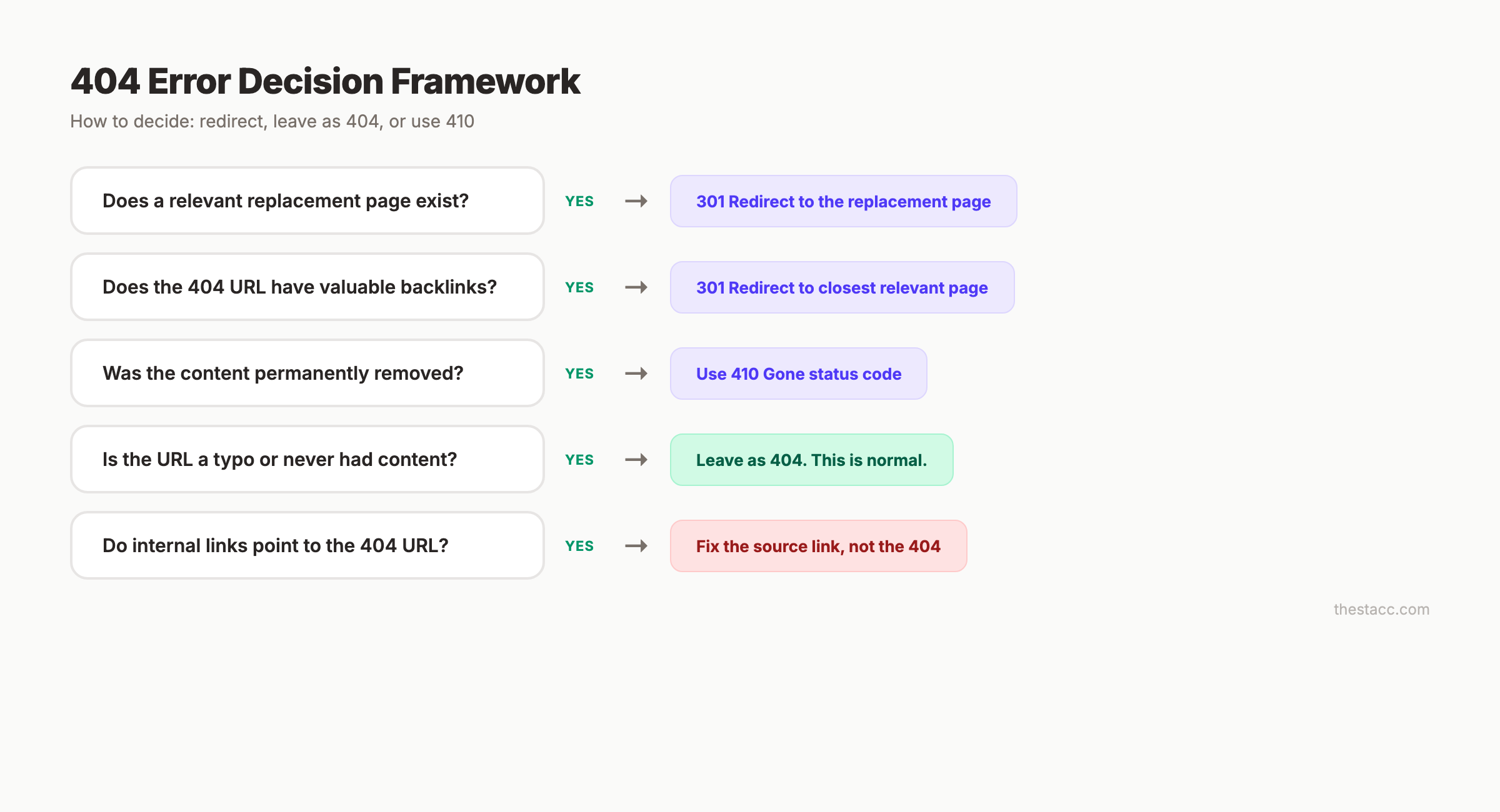
Not every 404 error needs a redirect. Some should stay as 404s. Others need a 301 redirect. A few should become 410s. Here is how to decide.
Redirect with a 301 (Page Moved)
Use a 301 redirect when:
- The content moved to a new URL
- A close equivalent page exists
- The 404 page has valuable backlinks you want to preserve
- The old URL still receives traffic
Rule: Only redirect to a relevant page. Redirecting a deleted blog post about “email marketing” to your homepage is a soft 404 in disguise. Google’s Martin Splitt confirmed that redirecting all 404s to the homepage negatively impacts rankings.
Leave as 404 (Page Should Not Exist)
Leave the 404 in place when:
- The URL was a typo and never had real content
- No backlinks point to the URL
- No relevant replacement page exists
- The page covered outdated or irrelevant content
A natural 404 is not a problem. Google expects them.
Use a 410 (Permanently Gone)
Use a 410 status code when:
- You intentionally removed the content forever
- You want Google to stop recrawling the URL
- Your site has thousands of dead URLs consuming crawl budget
- The content was removed for legal or compliance reasons
Fix the Source (Broken Internal Links)
If an internal page links to a 404 URL, fix the link at the source. Update the internal link to point to the correct destination. This is better than adding a redirect because:
- Direct links pass more link authority than redirected ones
- No redirect latency for users
- Cleaner site architecture
Run a broken link audit monthly. Broken internal links are the most damaging type of 404 error because you control them directly.
Your SEO team. $99 per month. 30 optimized articles, published automatically. Clean links. Zero broken pages. Start for $1 →
Crawl Budget and 404 Errors
Most 404 guides skip crawl budget. That is a mistake for any site with more than a few hundred pages.
Crawl budget is the number of pages Googlebot will crawl on your site within a given period. Every 404 URL Googlebot hits wastes part of that budget on a dead page instead of your real content.
Why This Matters
For small sites (under 1,000 pages), crawl budget is rarely an issue. Google crawls small sites frequently enough that a few 404s do not cause problems.
For large sites (10,000+ pages), crawl budget becomes critical. Thousands of 404 errors can prevent Googlebot from discovering and indexing new content. Google’s own documentation confirms: soft 404s are the primary crawl budget drain because Google keeps recrawling them.
How to Minimize Crawl Budget Waste
- Remove 404 URLs from your XML sitemap
- Block crawling of known dead URL patterns in robots.txt
- Use 410 instead of 404 for permanently deleted content (49.6% fewer recrawls)
- Fix soft 404s first (they waste the most crawl budget)
- Clean up redirect chains (each hop consumes crawl resources)
- Monitor crawl stats in Google Search Console under Settings > Crawl Stats
The Soft 404 Crawl Budget Problem
Soft 404s are uniquely destructive to crawl budget. Because they return a 200 status code, Google treats them as live pages. Googlebot crawls them repeatedly, indexes thin or empty content, and never removes them from the index.
Fix every soft 404 by either:
- Returning a proper 404 or 410 status code
- Adding real, valuable content to the page
- Redirecting to a relevant page with a 301
How to Build a Custom 404 Page
A custom 404 page recovers visitors who would otherwise leave. A well-designed custom 404 page can reduce bounce rates by up to 20%.
What Every Custom 404 Page Needs
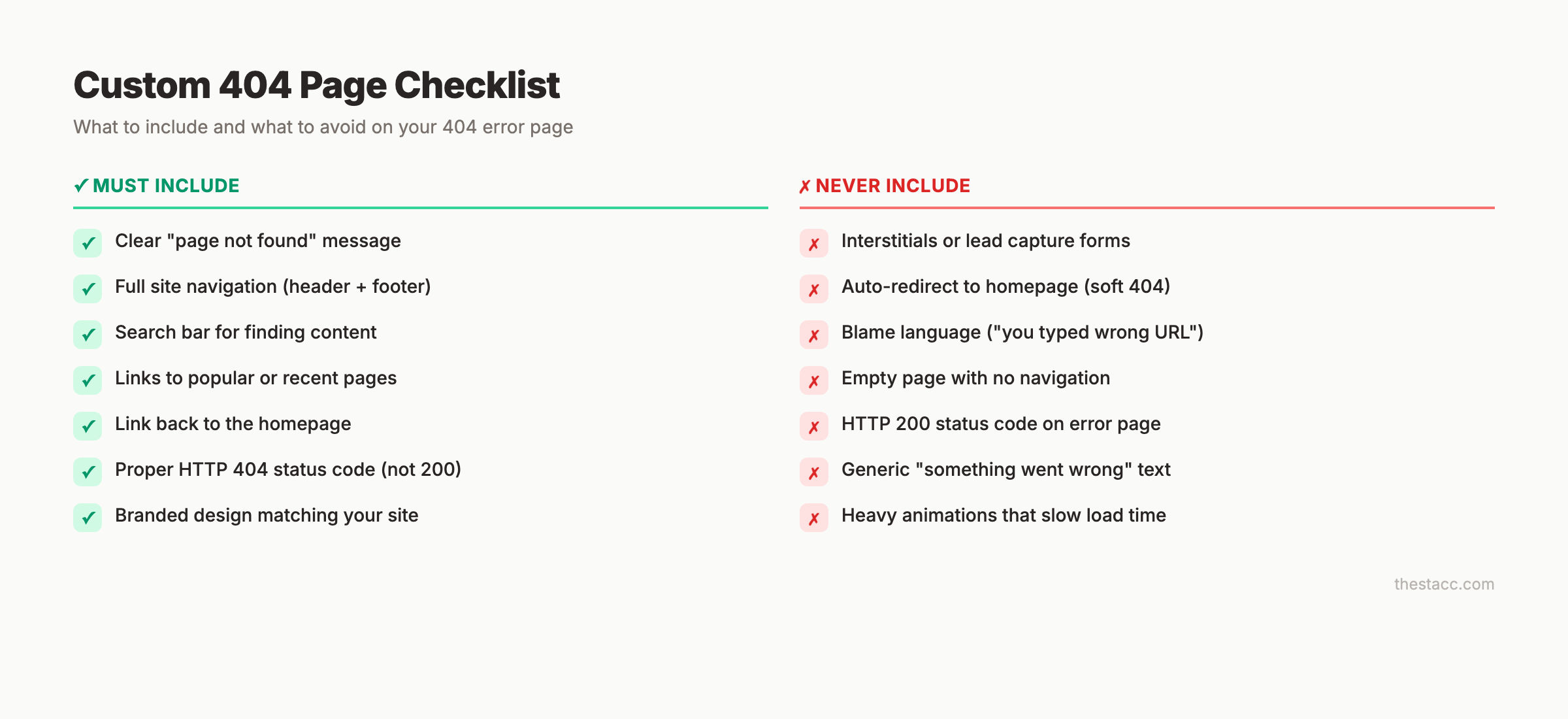
Must-have elements:
- Clear message that the page was not found (do not hide the error)
- Site navigation (header and footer at minimum)
- Search bar (let visitors find what they came for)
- Links to popular or recent content
- Link back to the homepage
Good additions:
- Related content suggestions based on the URL path
- Contact information or support link
- Branded design that matches your site
Never include:
- Interstitials or lead capture forms (visitors are already frustrated)
- Auto-redirects to the homepage (creates a soft 404)
- Blame language (“you typed the wrong URL”)
Technical Requirements
Your custom 404 page must return a 404 HTTP status code. This is the most common mistake. Many CMS platforms serve custom 404 pages with a 200 status code, turning them into soft 404s.
Test your 404 page by requesting a URL that does not exist and checking the HTTP response code in your browser’s developer tools (Network tab). The status must say 404, not 200.
## .htaccess (Apache)
ErrorDocument 404 /404.html

## nginx
error_page 404 /404.html;
For a full technical SEO checklist that covers 404 page configuration alongside other critical elements, see our guide.
404 Errors in E-Commerce
E-commerce sites face unique 404 challenges. 40% of e-commerce sites have broken product page links. 53% of online shoppers abandon websites after encountering a broken link.
Temporarily Out-of-Stock Products
Do not return a 404 for temporarily out-of-stock products. Keep the URL indexed and the page live. Show a message that the product is temporarily unavailable. Offer alternatives or a notification signup.
Returning a 404 for a temporarily out-of-stock product delists the page from Google. When the product returns, you start from zero in rankings.
Permanently Discontinued Products
For products that are gone forever:
| Scenario | Action |
|---|---|
| Product has backlinks or rankings | 301 redirect to the closest equivalent product |
| Product has no SEO value | Let it 404 naturally |
| Entire product line discontinued | 301 redirect to the category page |
| Seasonal product returning next year | Keep the page live with “coming soon” messaging |
Category Page Restructuring
When you reorganize categories, map every old URL to its new equivalent. Do not redirect old category pages to the homepage. Each old URL should point to the most relevant new category or product page.
A content audit helps identify which product pages have SEO value worth preserving.
404 Errors and AI Search
AI search engines handle 404 errors differently than traditional search. This is a new consideration for 2026.
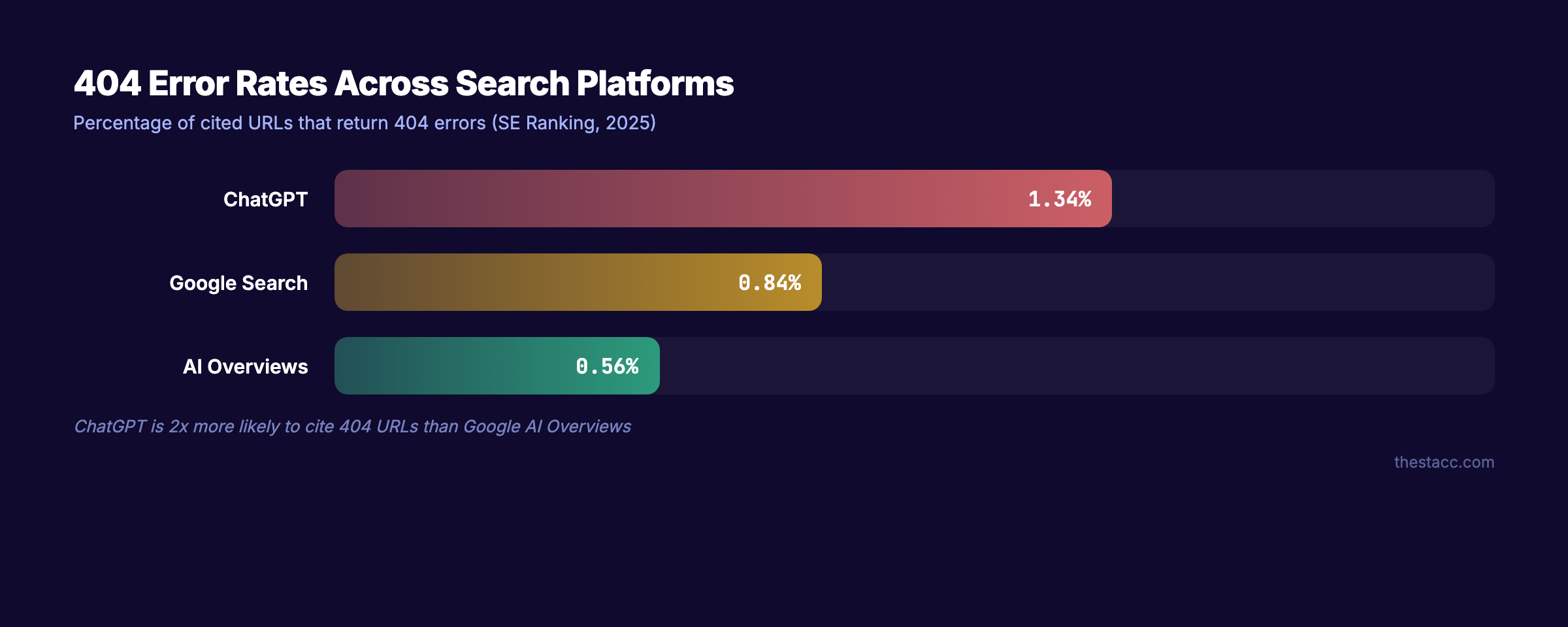
A SE Ranking study found that 1.34% of URLs cited by ChatGPT return 4xx errors, with 91% of those being 404s. ChatGPT is 2x more likely to cite a broken URL than Google’s AI Overviews.
Google’s AI Overviews have the lowest 404 citation rate at 0.56%. Traditional Google search results fall in between at 0.84%.
What this means for your site:
- AI search engines cache and cite URLs that may later become 404s
- Broken pages hurt your visibility in AI-generated answers
- Maintaining stable URLs is more important than ever
- If you must remove a page, use a 301 redirect so AI citations still resolve
For more on optimizing for AI search engines, see our on-page SEO guide.
3,500+ blogs published. 92% average SEO score. See what Stacc can do for your site. We handle technical SEO so you do not have to. Start for $1 →
404 Error Monitoring and Prevention
Fixing 404 errors once is not enough. New broken links appear constantly. 66.5% of links to sites in the last 9 years are dead. Link rot is ongoing.
Monthly Monitoring Checklist
- Check Google Search Console for new 404 and soft 404 errors
- Run a crawl with Screaming Frog or similar tool
- Review backlink audit for external links pointing to 404s
- Test all internal links on high-value pages (homepage, top landing pages)
- Verify XML sitemap contains no 404 URLs
Prevention Strategies
Use consistent URL structures. Decide on a URL pattern and stick with it. Do not change slugs after publishing unless absolutely necessary.
Set up redirect rules during migrations. Before any site restructuring, map every old URL to its new destination. Test redirects before going live.
Monitor before and after CMS updates. Plugin updates, theme changes, and CMS upgrades can break URL routing. Run a crawl after every major update.
Audit external links periodically. Links to external sites break over time. Replace dead external links before they erode user trust.
FAQ
Do 404 errors directly hurt Google rankings?
No. Google has confirmed that 404 errors are not a negative ranking signal. However, 404 errors cause indirect damage through lost link equity, wasted crawl budget, and increased bounce rates. Sites with over 1% broken links are 30% less likely to rank on the first page.
What is the difference between a 404 and a soft 404?
A hard 404 returns the correct 404 HTTP status code. A soft 404 returns a 200 (OK) status code for a page that does not actually exist. Soft 404s are worse for SEO because Google keeps crawling and indexing them, wasting crawl budget and creating confusion.
Should I redirect all 404 errors to the homepage?
No. Google’s Martin Splitt confirmed this practice negatively impacts rankings. Only redirect 404 errors to relevant replacement pages. If no relevant page exists, let the URL return a proper 404 response.
How long does Google take to deindex a 404 page?
Google typically removes 404 pages from its index within 6-12 months. Using a 410 status code speeds up this process. A Reboot Online experiment found that 404 URLs were crawled 49.6% more frequently than 410 URLs.
What is the difference between 404 and 410 status codes?
A 404 means “not found” and implies the page might return. A 410 means “gone” and tells search engines the removal is permanent. Google says the practical difference is minimal, but 410 results in fewer recrawls and faster deindexing.
How do 404 errors affect crawl budget?
Each 404 URL Googlebot visits consumes part of your crawl budget. For small sites, this rarely matters. For large sites with 10,000+ pages, thousands of 404 errors can prevent Google from discovering new content. Soft 404s waste the most crawl budget because Google keeps recrawling them.
404 errors are a normal part of how the web works. The goal is not zero 404s. The goal is zero 404s that waste link equity, drain crawl budget, or send visitors to dead pages. Audit regularly. Redirect strategically. Fix broken internal links at the source. And build a custom 404 page that gives lost visitors a way back.
Written and published by Stacc. We publish 3,500+ articles per month across 70+ industries. All data verified against public sources as of March 2026.
