
Technical SEO Checklist (2026): Strategies, Tactics & Examples
Practical technical seo checklist strategies for 2026: step-by-step tactics, real examples, and tools to improve rankings and drive organic traffic.
Your pages are not ranking. You have published strong content, built links, and targeted the right keywords. But something underneath is broken.
That something is technical SEO. A single misconfigured robots.txt file can deindex an entire site overnight. One redirect loop can block Google from reaching your best pages. A Semrush study of 50,000 domains found that 52% contain broken links, 96% fail Core Web Vitals on at least 1 page, and 70% are missing meta descriptions.
This technical SEO checklist fixes all of it. We organized 60+ action items into 9 categories you can work through section by section.
We publish 3,500+ blog posts across 70+ industries every month. Every site we touch goes through this exact checklist before content goes live.
Here is what you will learn:
- How to audit and fix crawlability issues that block Google
- How to clean up indexing problems that waste your crawl budget
- How to pass Core Web Vitals on every page
- How to secure your site with HTTPS and security headers
- How to implement schema markup that earns rich results
- How to verify mobile optimization for Google’s mobile-first index
- How to manage AI crawlers for AI search visibility
- How to set up ongoing monitoring so nothing breaks silently
Why You Need a Technical SEO Checklist
Great content cannot rank on a broken website. Google’s own documentation states that a page must meet minimum technical requirements before it is even eligible for indexing.
Those requirements sound simple. Googlebot must not be blocked. The page must return a 200 status code. The page must contain indexable content.
But the gap between “simple” and “done correctly” is where most sites fail.
The Real Cost of Technical Debt
Semrush data from 50,000 domains tells the story:
| Issue | % of Sites Affected |
|---|---|
| Broken internal or external links | 52% |
| Failed Core Web Vitals (1+ page) | 96% |
| Missing meta descriptions | 70% |
| Orphan pages (no internal links) | 69% |
| Internal duplicate content | 41% |
| HTTP/HTTPS dual versions live | 27% |
| Redirect chains or loops | 12% |
Each of those issues reduces your organic visibility. Stacked together, they create a ceiling that no amount of content can break through.
When to Run This Checklist
Run a full SEO audit at minimum once per quarter. Monthly is better for sites with 500+ pages or frequent content updates.
Run it immediately after:
- A site migration or redesign
- A CMS update or platform change
- A sudden drop in organic traffic
- Launching a new subdomain or subfolder
- Adding 50+ pages at once (like with programmatic SEO)
Use a free SEO audit tool to catch the most critical issues fast. Then work through this checklist section by section.
Crawlability Checklist
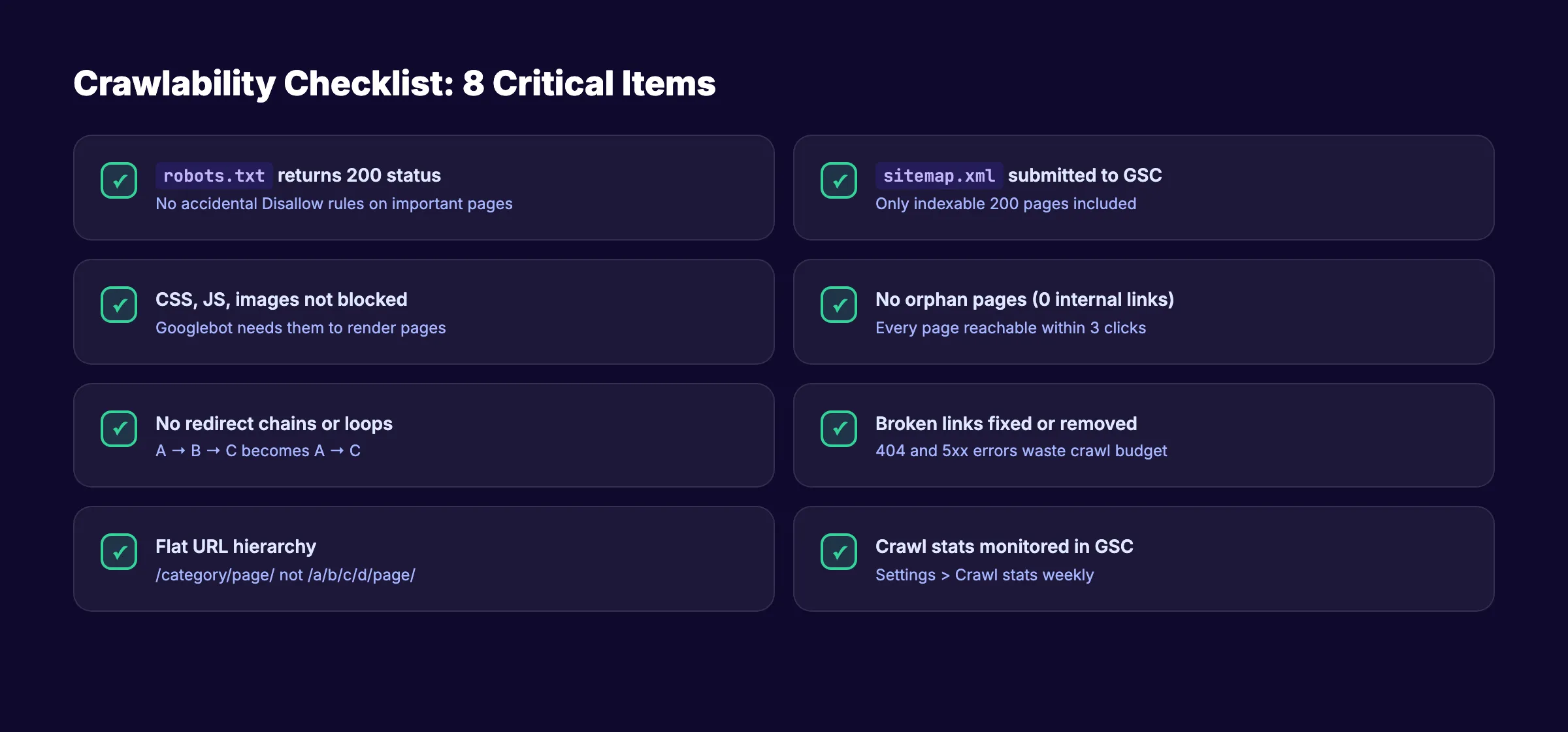
Crawling is step zero. If Google cannot reach a page, that page does not exist in search results. Period.
Crawlability issues are the most damaging and the most silent. Your site looks fine in a browser. But Googlebot sees something completely different.
Robots.txt Configuration
Your robots.txt file tells search engines which URLs they can and cannot access. One wrong line blocks your entire site.
- Verify
robots.txtloads atyourdomain.com/robots.txtand returns a 200 status - Confirm no
Disallow: /rules are blocking important sections - Check that CSS, JS, and image files are not blocked (Googlebot needs them to render pages)
- Remove any leftover staging or development
Disallowrules - Reference your XML sitemap in
robots.txtwithSitemap: https://yourdomain.com/sitemap.xml - Test your file with Google Search Console’s robots.txt tester
Read the full walkthrough in our robots.txt optimization guide.
XML Sitemap
Your XML sitemap is a roadmap for search engines. A clean sitemap speeds up discovery of new and updated pages.
- Confirm your
sitemap.xmlis accessible atyourdomain.com/sitemap.xml - Include only indexable pages (200 status, no
noindex, self-referencing canonical) - Remove 404, 301, and
noindexpages from the sitemap - Keep each sitemap file under 50,000 URLs and 50MB uncompressed
- Use a sitemap index file if you need multiple sitemaps
- Submit your sitemap in Google Search Console under “Sitemaps”
- Verify
<lastmod>dates reflect actual content changes (not automated timestamps)
See our step-by-step XML sitemap creation guide for details.
Site Architecture and Crawl Depth
Every important page should be reachable within 3 clicks from your homepage. Pages buried deeper get crawled less often and rank worse.
- Map your site structure and confirm no important page is more than 3 clicks deep
- Use a flat URL hierarchy (
/category/page/not/a/b/c/d/page/) - Implement breadcrumb navigation on all inner pages
- Build logical internal linking between related pages
- Fix orphan pages (pages with zero internal links pointing to them)
Crawl Budget Management
Crawl budget matters most for large sites (10,000+ pages). But even smaller sites waste budget on junk URLs.
- Block low-value URLs from crawling (filtered search results, session IDs, print pages)
- Fix or remove broken links that return 404 or 5xx errors
- Eliminate redirect chains (2+ redirects in sequence)
- Reduce parameter-based duplicate URLs with
rel="canonical"or URL parameter handling - Monitor crawl stats in Google Search Console under “Settings” > “Crawl stats”
Your technical SEO foundation determines your ranking ceiling. We audit and optimize every site we publish to. Start for $1 →
Indexability Checklist
Indexing determines whether Google keeps a page in search results after crawling it.
A page can be crawled but never indexed. Google evaluates quality, relevance, and canonical signals before adding a page to its index.
Index Coverage
- Check the “Pages” report in Google Search Console for indexing errors
- Fix all “Discovered. Currently not indexed” pages (usually quality or crawl signals)
- Fix all “Crawled. Currently not indexed” pages (usually thin content or duplicate issues)
- Resolve “Page with redirect” errors by updating internal links to point to final URLs
- Remove soft 404 pages (they waste crawl budget while showing users empty content)
Canonical Tags
The rel="canonical" tag tells Google which version of a page is the primary one. Incorrect canonicals cause indexing chaos.
- Verify every page has a self-referencing
<link rel="canonical" href="...">tag - Confirm canonical URLs use the exact same protocol (
https://), domain, and trailing slash format - Check that paginated pages do not canonical back to page 1 (unless that is intentional)
- Ensure no page canonicals to a
noindexpage (contradictory signals) - Audit canonical tags on URL variants (www vs non-www, HTTP vs HTTPS, trailing slash vs no slash)
Meta Robots and Noindex Tags
A single misplaced <meta name="robots" content="noindex"> tag can remove a page from Google entirely. This is the most common technical SEO disaster during site launches.
- Audit all pages for unintended
noindextags - Check HTTP response headers for
X-Robots-Tag: noindex(hidden from page source) - Verify staging environments use different domains or password protection instead of
noindex - Confirm thin or duplicate pages you want excluded actually have
noindexapplied - Double-check after every deployment that production pages remain indexable
Duplicate Content
Duplicate content dilutes ranking signals and wastes crawl budget. 41% of sites have internal duplicate content issues.
- Identify exact and near-duplicate pages using Screaming Frog or Sitebulb
- Consolidate duplicates with 301 redirects or canonical tags
- Add
noindexto filtered, sorted, or paginated archive pages that create duplicates - Check for HTTP/HTTPS and www/non-www duplicate versions of your entire site
- Handle URL parameter duplicates with canonical tags or Google Search Console parameter settings
Site Speed and Core Web Vitals Checklist
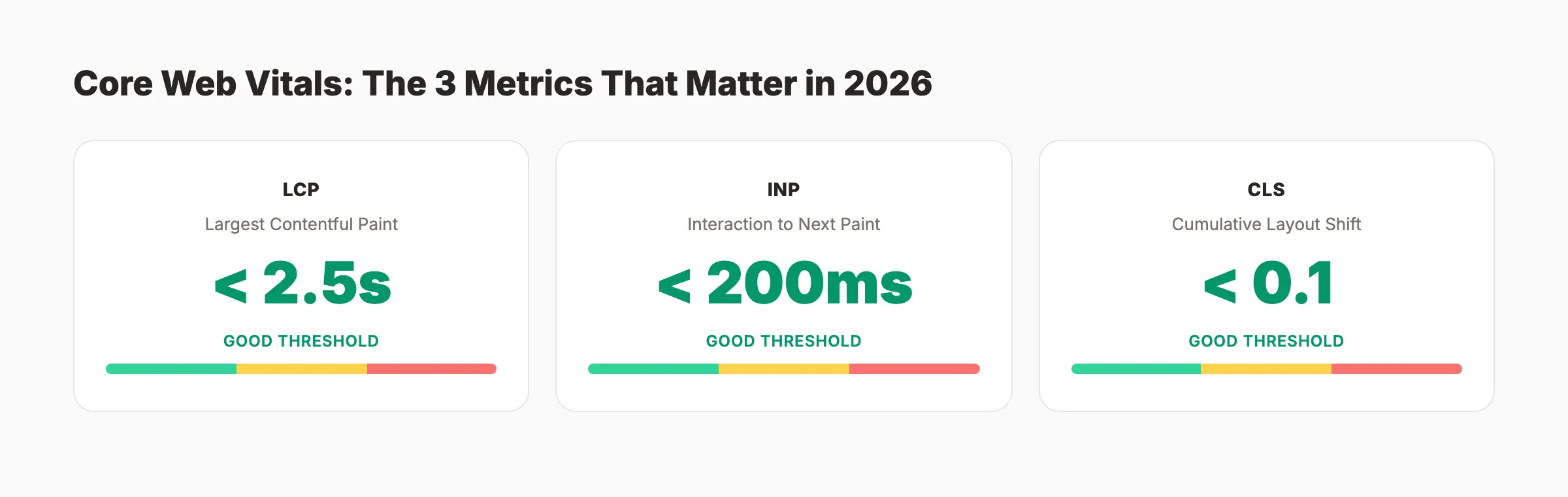
Google uses Core Web Vitals as a ranking factor. Less than 33% of websites pass the assessment. That means passing gives you an immediate edge over 67% of competing pages.
The 3 Core Web Vitals metrics for 2026:
| Metric | What It Measures | Good Threshold |
|---|---|---|
| Largest Contentful Paint (LCP) | Loading speed of largest visible element | Under 2.5 seconds |
| Interaction to Next Paint (INP) | Responsiveness to user input | Under 200 milliseconds |
| Cumulative Layout Shift (CLS) | Visual stability during loading | Under 0.1 |
LCP Optimization
- Test LCP on PageSpeed Insights for both mobile and desktop
- Optimize the LCP element (usually a hero image or heading text)
- Preload critical resources with
<link rel="preload"> - Serve images in WebP or AVIF format with proper sizing
- Use a CDN for static assets (images, CSS, JS, fonts)
- Reduce server response time (TTFB) to under 800ms
Read the full breakdown in our Core Web Vitals improvement guide.
INP Optimization
- Minimize JavaScript execution time on interactive elements
- Break long tasks (50ms+) into smaller async chunks
- Defer non-critical third-party scripts (analytics, chat widgets, ad tags)
- Use
requestAnimationFrameorrequestIdleCallbackfor non-essential work - Test INP in Chrome DevTools Performance panel under “Interactions”
CLS Optimization
- Set explicit
widthandheightattributes on all images and videos - Reserve space for ad slots and embeds with fixed-dimension containers
- Avoid injecting content above existing visible content after page load
- Use
font-display: swaporfont-display: optionalto handle web font loading - Test CLS after every layout change with Lighthouse or Web Vitals extension
General Performance
- Enable Gzip or Brotli compression on your server
- Minify HTML, CSS, and JavaScript files
- Implement browser caching with proper
Cache-Controlheaders - Lazy-load images and videos below the fold
- Eliminate render-blocking CSS and JS in the document
<head> - Optimize blog images before uploading (compress to under 200KB per image)
Sites that pass Core Web Vitals outrank 67% of the competition by default. We build every page we publish for speed. Start for $1 →
Mobile Optimization Checklist
Google uses mobile-first indexing. Your mobile site IS your site in Google’s eyes. Mobile devices account for over 60% of organic search traffic.
Mobile Rendering
- Test every page template with Google’s Mobile-Friendly Test
- Verify your viewport meta tag:
<meta name="viewport" content="width=device-width, initial-scale=1"> - Confirm text is readable without zooming (16px minimum font size for body text)
- Ensure tap targets (buttons, links) are at least 48x48 pixels with 8px spacing
- Check that no content is wider than the screen (horizontal scrolling is a fail)
Content Parity
- Verify mobile pages contain the same content as desktop pages
- Confirm all structured data exists on the mobile version
- Check that images, videos, and alt text appear on mobile
- Ensure heading tags and meta descriptions are identical across versions
- Test lazy-loaded content with Googlebot Smartphone user agent
Mobile Speed
- Test mobile page speed separately (mobile connections are slower)
- Prioritize LCP optimization for mobile specifically
- Reduce total page weight to under 3MB on mobile
- Avoid large JavaScript bundles that block mobile rendering
- Compress images to mobile-appropriate sizes using
srcsetandsizesattributes
Security Checklist
HTTPS is a confirmed Google ranking signal. Beyond rankings, browsers flag HTTP sites as “Not Secure,” which kills user trust and conversion rates.
HTTPS Implementation
- Install a valid SSL/TLS certificate on all domains and subdomains
- Redirect all HTTP URLs to HTTPS with 301 redirects
- Update all internal links to use
https://(not protocol-relative//) - Verify no mixed content warnings (HTTP resources loaded on HTTPS pages)
- Set HSTS headers:
Strict-Transport-Security: max-age=31536000; includeSubDomains - Confirm your SSL certificate is not expired or misconfigured
Security Headers
- Add
Content-Security-Policyheaders to prevent XSS attacks - Implement
X-Content-Type-Options: nosniffto prevent MIME-type sniffing - Set
X-Frame-Options: SAMEORIGINto prevent clickjacking - Add
Referrer-Policy: strict-origin-when-cross-originfor referrer data control - Enable
Permissions-Policyto control browser feature access (camera, microphone, geolocation)
Malware and Spam Protection
- Monitor Google Search Console “Security issues” report weekly
- Scan for injected spam or malware using Sucuri SiteCheck or similar tools
- Keep your CMS, plugins, and server software updated to the latest stable versions
- Review user-generated content areas (comments, forums) for spam links
- Set up Google Safe Browsing alerts for your domain
Structured Data and Schema Checklist
Structured data helps Google understand the meaning of your content. It also earns rich results like FAQ dropdowns, star ratings, how-to steps, and breadcrumbs in search results.
Google’s structured data documentation lists 30+ supported schema types.
Required Schema Types
Not every type applies to every site. Start with these based on your content:
| Schema Type | Use For | Rich Result |
|---|---|---|
Article | Blog posts and news articles | Headline + date in results |
FAQPage | FAQ sections within pages | Expandable Q&A in results |
HowTo | Step-by-step tutorials | Numbered steps in results |
LocalBusiness | Physical business locations | Knowledge panel, map pack |
Organization | Company information | Logo + social links in panel |
BreadcrumbList | Site navigation breadcrumbs | Breadcrumb trail in results |
Product | E-commerce product pages | Price, availability, ratings |
Implementation Checklist
- Add
Organizationschema to your homepage with name, logo, URL, and social profiles - Implement
ArticleorBlogPostingschema on all blog content - Add
FAQPageschema to pages with FAQ sections - Use
BreadcrumbListschema on all inner pages - Add
LocalBusinessschema if you have a physical location - Include author and publisher markup for E-E-A-T signals
Read the complete walkthrough in our schema markup guide.
Validation and Testing
- Test all schema with Google’s Rich Results Test
- Validate JSON-LD syntax with Schema.org Validator
- Check the “Enhancements” section of Google Search Console for schema errors
- Monitor rich results appearance in Search Console Performance report
- Use our free schema markup generator to build valid JSON-LD fast
Structured data earns rich results that boost click-through rates by 20-30%. Every blog post we publish includes full schema markup. Start for $1 →
URL Structure and Redirects Checklist
Clean URLs help users and search engines understand your content before clicking. Proper redirect handling preserves link equity and prevents crawl waste.
URL Best Practices
- Use lowercase, hyphen-separated URLs:
/technical-seo-checklist/not/Technical_SEO_Checklist - Keep URLs short and descriptive (under 75 characters when possible)
- Include your target keyword in the URL slug
- Avoid URL parameters for content pages (
?id=123creates duplicate content) - Use consistent trailing slash convention site-wide (either always or never)
- Avoid date-based URLs for evergreen content (
/2026/03/post/makes content feel outdated)
Redirect Management
- Audit all redirects for chains (A redirects to B redirects to C) and fix them to go A to C
- Replace 302 (temporary) redirects with 301 redirects for permanent moves
- Update internal links to point directly to final URLs (avoid relying on redirects)
- Set up 301 redirects for all deleted or moved pages to the closest relevant page
- Monitor 404 errors in Google Search Console and redirect high-traffic ones
- Keep a redirect map document updated whenever you change URL structures
404 Page Optimization
- Create a custom 404 page with navigation, search, and links to popular content
- Return a proper 404 HTTP status code (not a soft 404 that returns 200)
- Regularly crawl your site to find and fix internal links pointing to 404 pages
- Check for 404s caused by external links and redirect them if the content moved
AI Crawler and LLM Readiness Checklist
In 2026, search extends beyond Google. AI answer engines like ChatGPT Search, Perplexity, and Google AI Overviews pull from websites to generate responses. Your robots.txt now governs access for both traditional and AI crawlers.
AI Crawler Access
- Decide your AI crawler policy: allow training bots, retrieval bots, both, or neither
- Add explicit rules for
GPTBot,ClaudeBot,PerplexityBot, andGoogle-Extendedinrobots.txt - Allow retrieval bots if you want visibility in AI search results
- Block training bots if you do not want your content used for model training
- Review your policy quarterly as new AI crawlers emerge
Example robots.txt rules:
## Allow retrieval for AI search
User-agent: GPTBot
Allow: /blog/
Disallow: /private/

## Block training
User-agent: Google-Extended
Disallow: /
Read our complete AI crawlers guide for the full breakdown of every bot.
LLM Content Optimization
- Create an
llms.txtfile at your domain root with a structured summary of your site (see our llms.txt guide) - Structure content with clear headings, bullet points, and direct answers
- Include entity-rich content with named tools, brands, and specific data points
- Add author bios and E-E-A-T signals that AI systems use to evaluate source authority
- Monitor AI search visibility using tools like Otterly.ai or manual testing in ChatGPT and Perplexity
Learn how to optimize specifically for Google AI Overviews.
Monitoring and Maintenance Checklist
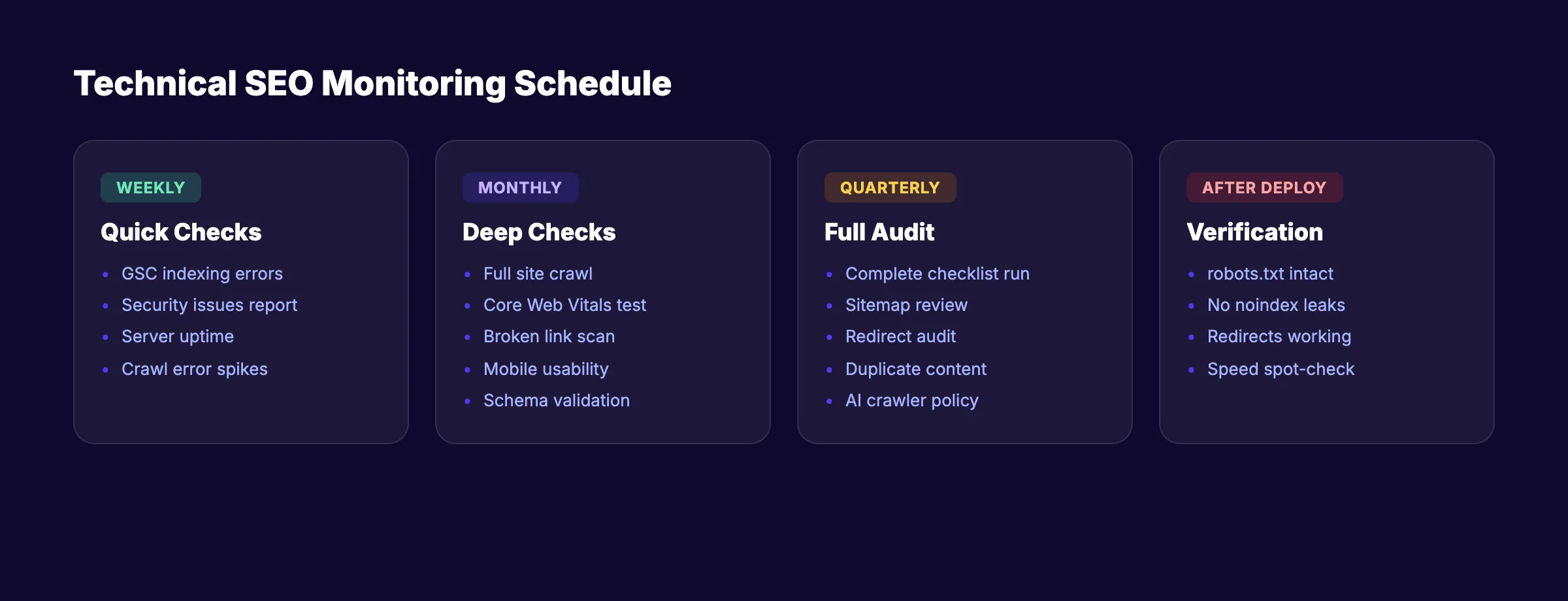
Technical SEO is not a one-time project. Sites break silently. CMS updates introduce bugs. Plugins add bloat. Developers push code that blocks indexing.
Build a recurring monitoring system to catch issues before they hurt rankings.
Weekly Checks
- Review Google Search Console “Pages” report for new indexing errors
- Check “Security issues” report for malware or hacking alerts
- Monitor server uptime and response time
- Review crawl error spikes in Search Console crawl stats
Monthly Checks
- Run a full site crawl with Screaming Frog, Sitebulb, or our free audit tool
- Test Core Web Vitals on your 10 highest-traffic pages
- Check for new broken links across the site
- Review mobile usability report in Google Search Console
- Audit schema validation for any new or updated pages
- Check your website SEO score for overall health
Quarterly Checks
- Run a complete audit using this entire technical SEO checklist
- Review and update your XML sitemap (remove dead pages, add new ones)
- Audit redirect chains and loops
- Check for new duplicate content issues
- Review AI crawler policies and update
robots.txtas needed - Analyze Google Analytics 4 data for pages with high impressions but low clicks
After Every Deployment
- Verify
robots.txthas not been overwritten with staging rules - Confirm
noindextags have not been pushed to production pages - Test that 301 redirects still work
- Run a quick crawl of 50-100 key pages to check for errors
- Test page speed on 3-5 key templates
Recommended Tools
| Tool | What It Does | Cost |
|---|---|---|
| Google Search Console | Index coverage, crawl stats, Core Web Vitals | Free |
| Screaming Frog | Full site crawl up to 500 URLs | Free (paid for 500+) |
| PageSpeed Insights | Core Web Vitals testing | Free |
| Ahrefs Site Audit | Full technical audit with monitoring | Paid |
| Sitebulb | Visual crawl analysis | Paid |
| Stacc SEO Audit Tool | Quick site health check | Free |
Use Google Search Console as your primary free monitoring tool. It catches most critical technical issues and sends email alerts for severe problems.
If you want to skip the manual work entirely, automate your SEO workflow and let a system handle monitoring for you.
Technical SEO maintenance is the difference between ranking and not ranking. We handle the technical foundation for every site we publish to. Start for $1 →
FAQ
What is a technical SEO checklist?
A technical SEO checklist is a structured list of tasks that ensure search engines can crawl, index, render, and rank your website correctly. It covers server configuration, site speed, security, structured data, mobile optimization, and URL management. Think of it as the foundation inspection before you build anything on top.
How often should I run a technical SEO audit?
Run a full audit at least once per quarter. Large sites (10,000+ pages) or sites with frequent updates should audit monthly. Always run the checklist after a site redesign, CMS migration, or platform update. Check how to do an SEO audit for the complete process.
What are the most critical technical SEO issues to fix first?
Start with indexing blockers. Check for accidental noindex tags, robots.txt blocks, and canonical errors. These prevent Google from seeing your pages at all. Next, fix broken links and redirect chains. Then move to Core Web Vitals and site speed. You can use best free SEO tools to identify the biggest issues fast.
Does technical SEO affect rankings directly?
Yes. Google confirms that HTTPS, Core Web Vitals, and mobile-friendliness are ranking factors. Crawlability and indexing are prerequisites for ranking entirely. A page that Google cannot crawl or index has zero chance of appearing in search results. Sites that fix technical issues typically see ranking improvements within 60 to 90 days.
Can I do technical SEO myself without a developer?
Many items on this checklist require basic technical knowledge but not full development skills. You can audit your site with free tools like Google Search Console and Screaming Frog. For changes to server configuration, .htaccess files, or response headers, you may need a developer. If you want SEO for your new website handled without a team, done-for-you services eliminate the learning curve.
How does technical SEO relate to on-page SEO?
Technical SEO ensures Google can access and understand your site. On-page SEO optimizes individual page content for target keywords. Both are required. Technical SEO is the foundation. On-page SEO is the structure built on top. Neither works fully without the other.
Start Working Through Your Checklist
Every ranking improvement starts with the right technical foundation. Print this checklist. Open Google Search Console. Work through one section per day.
If you would rather skip the manual work, we handle the entire technical and content side of SEO for small businesses and service companies across 70+ industries. Your first 3 days cost $1.
Related Tools & Resources
Free SEO Tools:
Best Lists:

Written by
Siddharth GangalSiddharth is the founder of theStacc and Arka360, and a graduate of IIT Mandi. He spent years watching great businesses lose organic traffic to competitors who simply published more. So he built a system to fix that. He writes about SEO, content at scale, and the tactics that actually move rankings.
30 SEO blog articles published every month
Keyword-optimized, scheduled, and live on your site. Automatically.
30-day trial · Cancel anytime
theStacc
Stop writing SEO content manually
30 blog articles, 30 GBP posts, and social media content. Published every month. Automatically.
Start Your $1 Trial$1 for 3 days · Cancel anytime