
LLMs.txt: What It Is and How to Set It Up
Learn what llms.txt is and how to set it up on your website. Covers file structure, setup steps, real examples, and llms-full.txt. Updated for 2026.
AI search engines now process over 1 billion queries per month. Yet most websites give these systems zero guidance on what content matters most. That gap costs businesses citations, visibility, and traffic from AI-generated answers.
The llms.txt file fixes this. It is a plain-text Markdown file that sits in your root directory and tells large language models exactly which pages to read. Think of it as a curated table of contents for AI. Not a blocker like robots.txt. Not a discovery map like your XML sitemap. A curation layer.
We publish 3,500+ blogs across 70+ industries and track how AI search engines discover and cite content. This guide covers everything you need to know about llms.txt in one place.
Here is what you will learn:
- What llms.txt is and why it was created
- How it differs from robots.txt and sitemap.xml
- The exact file structure and formatting rules
- Step-by-step setup for any website platform
- What llms-full.txt is and when to use it
- Real examples from Anthropic, Cloudflare, and Vercel
- Whether your site actually needs one right now
Table of Contents
- Chapter 1: What Is LLMs.txt?
- Chapter 2: LLMs.txt vs Robots.txt vs Sitemap.xml
- Chapter 3: How the LLMs.txt File Is Structured
- Chapter 4: How to Set Up LLMs.txt on Your Website
- Chapter 5: LLMs-full.txt. The Extended Version
- Chapter 6: Real Examples from Major Companies
- Chapter 7: Should You Add LLMs.txt to Your Site?
- FAQ
Chapter 1: What Is LLMs.txt? {#chapter-1}
LLMs.txt is a Markdown-formatted text file placed at your website’s root directory. It provides large language models with a structured summary of your most important content. The official specification was proposed as a community-driven standard to help AI systems parse websites more accurately.
Traditional web pages are built for humans. HTML, CSS, JavaScript, navigation menus, and sidebars create visual structure. But AI models do not browse pages the way people do. They process raw text. And when an LLM encounters a complex website, it often struggles to identify which pages carry the most weight.
Why LLMs.txt Was Created
Search engines have had robots.txt since 1994 and XML sitemaps since 2005. These files guide traditional crawlers. But LLMs work differently. They do not crawl and index pages. They ingest text and generate answers.
The llms.txt file bridges that gap. It gives AI models a pre-organized, Markdown-formatted map of your site. The model reads this file and immediately understands your most important pages, products, and documentation.
Who Created the Standard
Jeremy Howard, co-founder of fast.ai and a leading AI researcher, proposed the llms.txt specification. The standard is maintained through an open GitHub repository and community Discord channel. It is not owned by any single AI company.
How AI Models Use This File
When an AI system encounters your llms.txt file, it reads the Markdown structure and follows your curated links. This gives the model a clear hierarchy of your content. Instead of parsing thousands of HTML pages, the model gets a focused summary.
ChatGPT, Claude, Perplexity, and Gemini can all process this format. The file acts as a table of contents that these systems can use to prioritize which content to reference when generating answers about your brand or industry.
Chapter 2: LLMs.txt vs Robots.txt vs Sitemap.xml {#chapter-2}
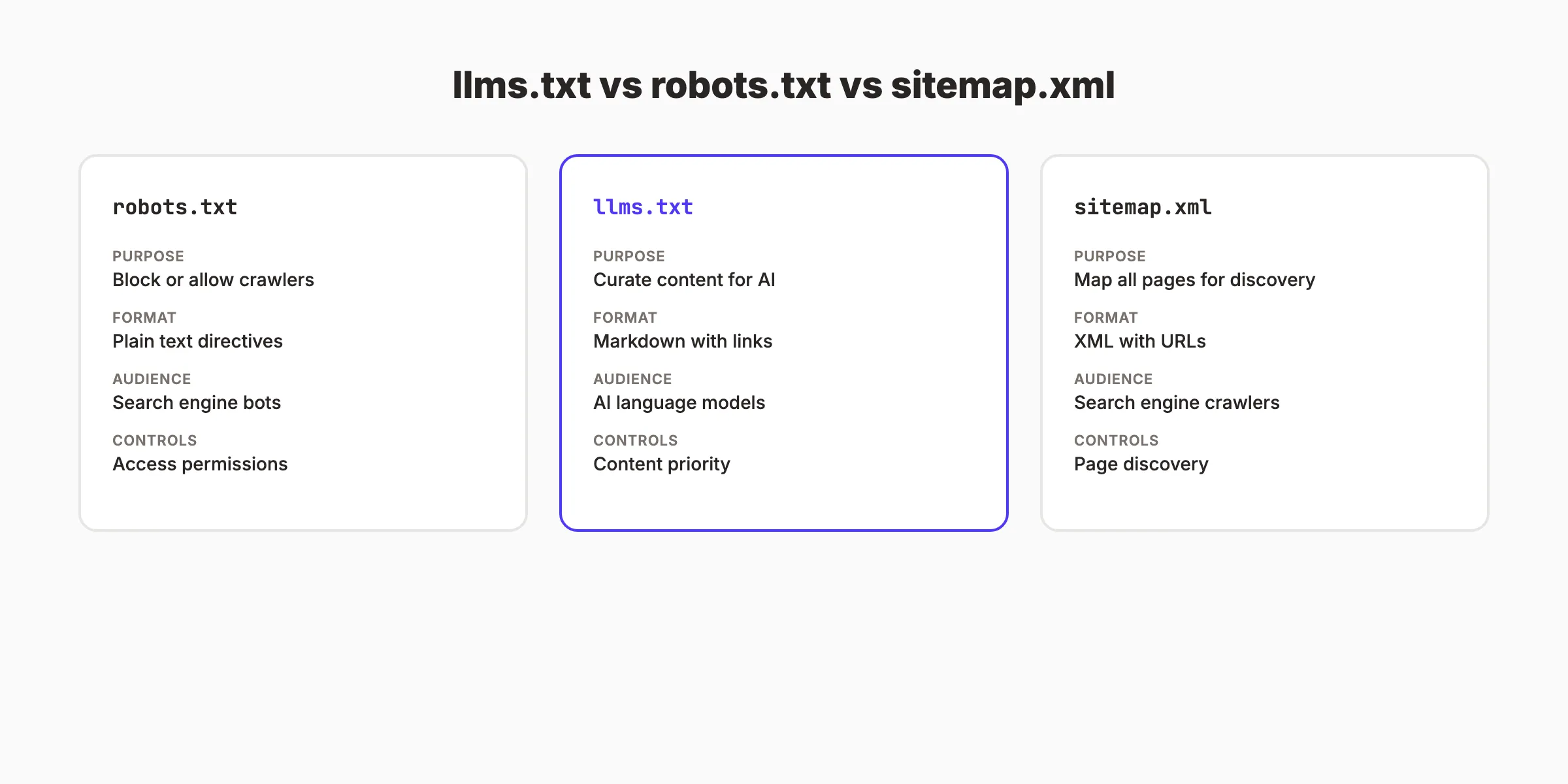
These 3 files serve different purposes. Confusing them leads to poor technical SEO decisions. Here is how they compare when managing your site for both traditional search engines and AI search engines.
The Core Difference
Robots.txt is about exclusion. It tells crawlers which pages to avoid. Sitemap.xml is about discovery. It lists every page you want indexed. LLMs.txt is about curation. It highlights only your best content for AI consumption.
| Feature | robots.txt | sitemap.xml | llms.txt |
|---|---|---|---|
| Purpose | Block crawlers | Help indexing | Guide AI models |
| Format | Plain text directives | XML | Markdown |
| Target | Googlebot, Bingbot | Search engines | GPTBot, ClaudeBot |
| Action | Exclude pages | Discover pages | Curate pages |
| Required | No (but expected) | No (but recommended) | No (optional) |
| Location | /robots.txt | /sitemap.xml | /llms.txt |
Why You Need All 3
A strong technical SEO setup uses all 3 files together. Your robots.txt blocks private areas. Your sitemap lists every indexable page. Your llms.txt tells AI systems which pages matter most.
Skipping any one of these creates a gap. Without robots.txt, crawlers waste budget on admin pages. Without a sitemap, new pages take longer to get indexed. Without llms.txt, AI models guess which content represents your brand.
What Google Says About LLMs.txt
Google has compared llms.txt to the keywords meta tag. This means Google itself does not use llms.txt for ranking purposes. But AI search features like AI Overviews and tools like Perplexity operate independently from traditional search ranking.
The file is not a ranking signal. It is a visibility tool for AI answer engines.
Want your content to rank in both Google and AI search? Stacc publishes 30 SEO-optimized articles per month that are structured for traditional search and AI citation. Start for $1 →
Chapter 3: How the LLMs.txt File Is Structured {#chapter-3}
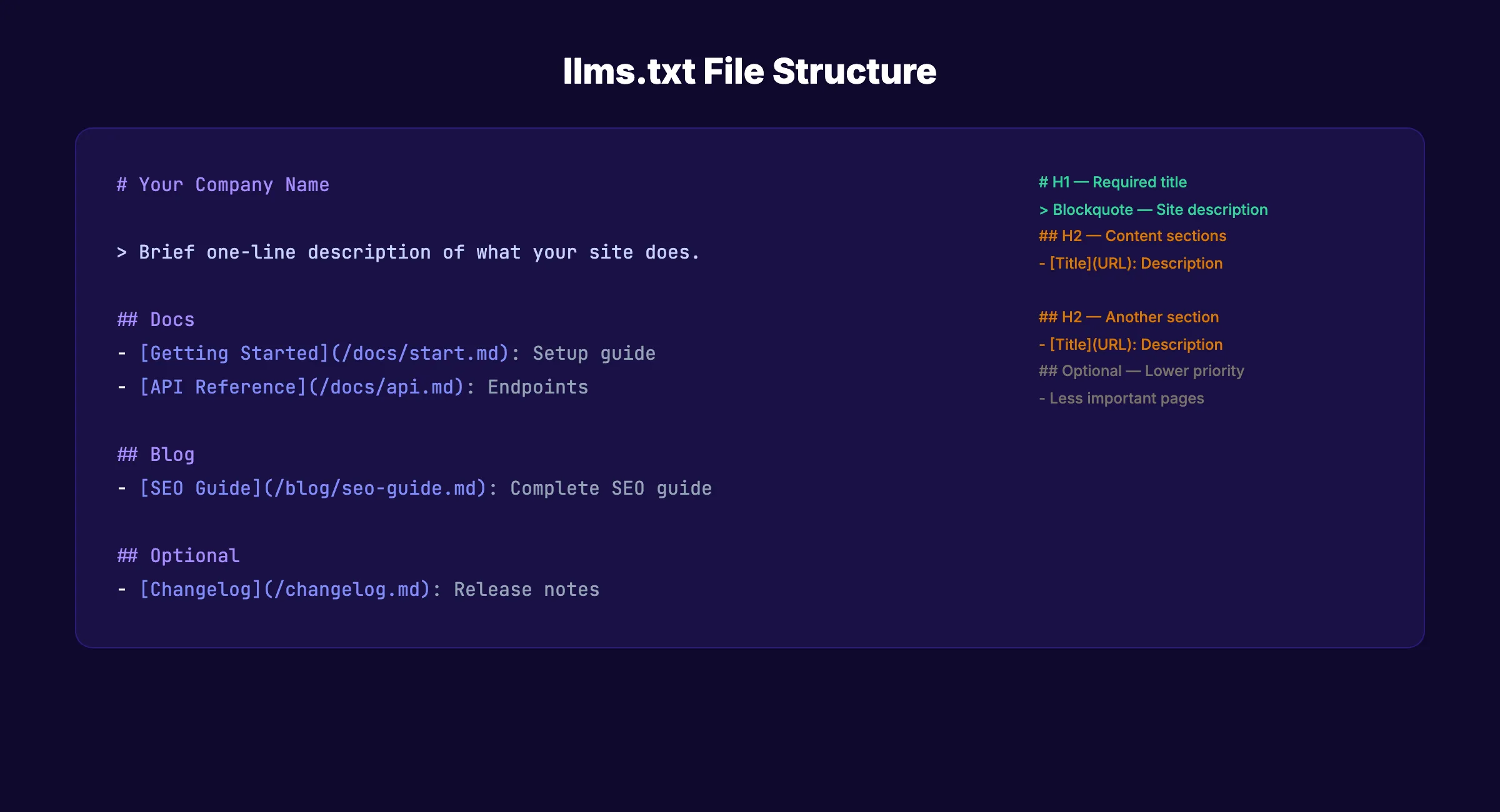
The llms.txt file follows a strict Markdown format. Every section has a specific purpose. Deviating from this structure reduces the file’s effectiveness. Here is the exact anatomy of a properly formatted llms.txt file.
Required Elements
The specification requires only 1 element: an H1 heading with your project or site name. Everything else is optional but strongly recommended. A minimal valid llms.txt file looks like this:
## Your Company NameThat single line is technically valid. But it provides zero value. A useful llms.txt file includes several more sections.
Full File Structure
Here is the recommended structure in order:
## Company Name

> A 1-2 sentence summary of what your company does.
> Include the most critical context an AI needs.

## Documentation

- [Getting Started](https://yoursite.com/docs/start): Setup guide for new users
- [API Reference](https://yoursite.com/docs/api): Full API documentation
- [Pricing](https://yoursite.com/pricing): Plans and features

## Blog

- [SEO Guide](https://yoursite.com/blog/seo-guide): Complete SEO walkthrough
- [Product Updates](https://yoursite.com/blog/updates): Latest features

## Optional

- [Changelog](https://yoursite.com/changelog): Version history
- [Legal](https://yoursite.com/terms): Terms of service
Section Breakdown
H1 heading. Your company or project name. Required. Use only 1 H1.
Blockquote. A brief summary of your business. Keep it to 2-3 sentences. Include your core offering and target audience.
H2 sections. Organize your links by category. Common categories include Documentation, Products, Blog, Resources, and About.
Link format. Each link follows this pattern: [Page Name](URL): Brief description. The description after the colon helps AI models understand context before visiting the page.
Optional section. Any content under an H2 labeled “Optional” signals to AI models that these links can be skipped when working within tight context windows.
Formatting Rules
| Rule | Correct | Incorrect |
|---|---|---|
| Heading syntax | # Company | Company (no heading marker) |
| Link format | [Name](url): Note | url - Name |
| File encoding | UTF-8 | Other encodings |
| Content type | text/plain | text/html |
| Line breaks | Standard line breaks | HTML <br> tags |
Keep the file concise. The llms.txt specification recommends brevity. AI models have limited context windows. A 200-line file is better than a 2,000-line file.
Chapter 4: How to Set Up LLMs.txt on Your Website {#chapter-4}
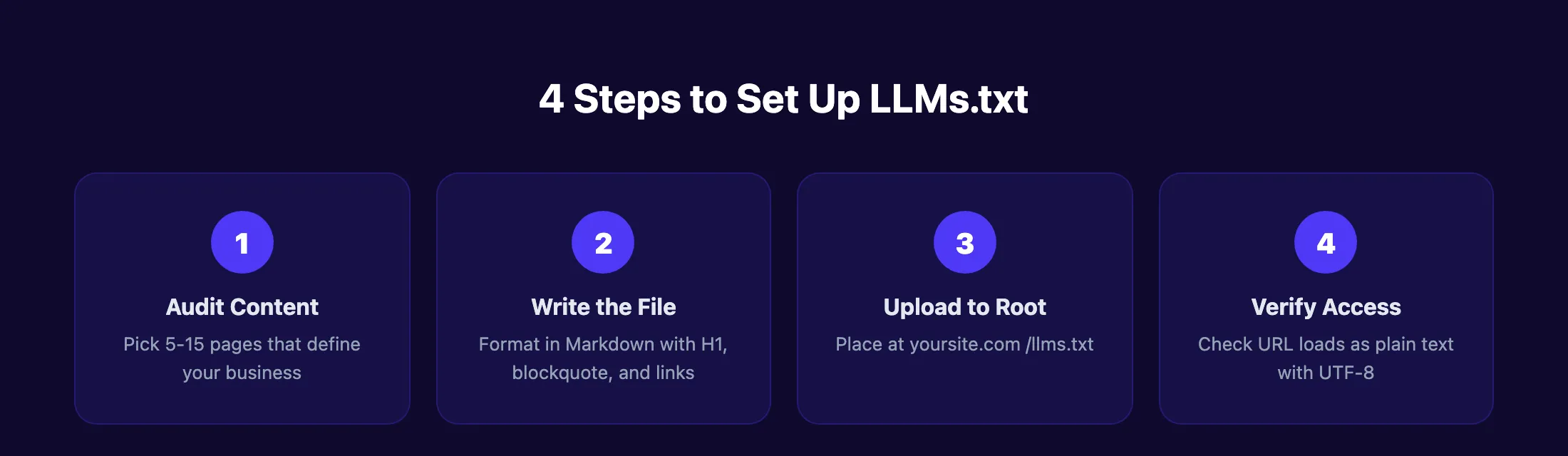
Setting up llms.txt takes under 10 minutes on any platform. The process has 4 steps: audit your content, write the file, upload it, and verify it works. Here is the exact process.
Step 1: Audit Your Content
Before writing the file, list the 5-15 pages that best represent your business. These should be pages an AI model needs to understand what you do, what you sell, and what expertise you offer.
Start with these categories:
- Homepage or About page
- Core product or service pages
- Pricing page
- 3-5 best-performing blog posts
- Documentation or FAQ page
- Contact information
Do not include every page on your site. The goal is curation, not completeness. Your XML sitemap already handles full page discovery.
Step 2: Write the File
Open any text editor. VS Code, Notepad, TextEdit, or Sublime Text all work. Create a new file named llms.txt and format it using the structure from Chapter 3.
Here is a real example for a local plumbing business:
## ABC Plumbing Co.

> ABC Plumbing provides residential and commercial plumbing
> services in Austin, Texas. Licensed, insured, 15+ years
> in business.

## Services

- [Emergency Plumbing](https://abcplumbing.com/emergency): 24/7 emergency repairs
- [Drain Cleaning](https://abcplumbing.com/drains): Residential drain services
- [Water Heater Install](https://abcplumbing.com/water-heaters): Tank and tankless options

## About

- [About Us](https://abcplumbing.com/about): Company history and team
- [Service Areas](https://abcplumbing.com/areas): Cities and zip codes we serve
- [Reviews](https://abcplumbing.com/reviews): Customer testimonials

## Optional

- [Blog](https://abcplumbing.com/blog): Plumbing tips and guides
- [Careers](https://abcplumbing.com/careers): Open positions
Step 3: Upload to Your Root Directory
The file must be accessible at yoursite.com/llms.txt. Upload method depends on your platform.
WordPress (self-hosted): Use FTP or your hosting file manager. Upload llms.txt to the same directory as wp-config.php. Some SEO plugins like Yoast now generate this file automatically through their settings panel.
WordPress.com: Go to Settings and look for the llms.txt option. WordPress.com added native llms.txt support in 2025.
Static sites (Astro, Next.js, Hugo): Place the file in your /public directory. It will be served at the root URL after build.
Webflow: Upload via the Assets panel and configure a redirect rule, or add it through custom hosting settings.
Shopify: Place the file in your theme’s root or use a custom app. Some themes allow file uploads through the admin panel.
Step 4: Verify the File
Open a browser and go to yoursite.com/llms.txt. The file should display as plain text. Check these items:
- File loads without errors
- Content displays in Markdown format (not rendered HTML)
- All links point to valid, live pages
- Content-Type header is text/plain
- File encoding is UTF-8
You can also verify through Google Search Console by checking the URL inspection tool. While Google does not use llms.txt for ranking, the inspection confirms the file is accessible to crawlers.
Skip the technical setup. Stacc handles content publishing, optimization, and AI search visibility for you. 30 articles per month, fully managed. Start for $1 →
Chapter 5: LLMs-full.txt. The Extended Version {#chapter-5}
The llms.txt specification includes a companion file: llms-full.txt. This extended version serves a different purpose than the standard file. Understanding when to use each one prevents wasted effort.
What Is LLMs-full.txt?
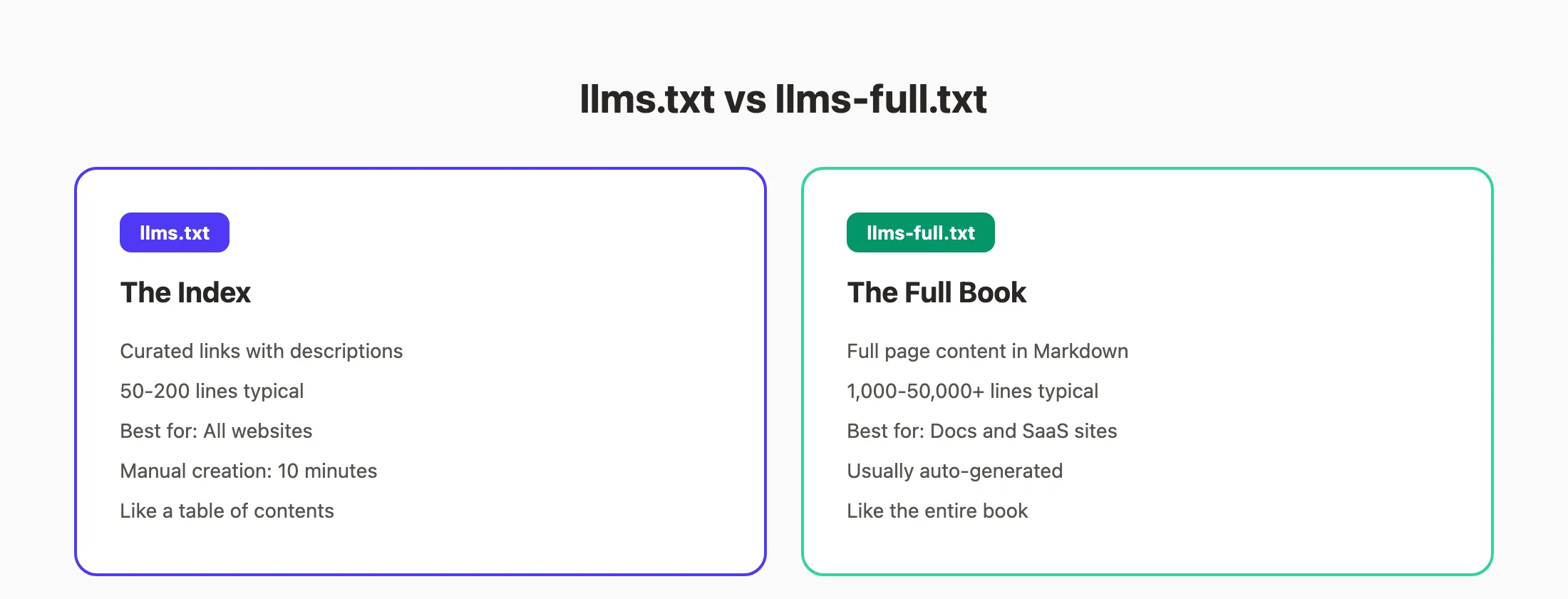
While llms.txt provides a curated index of links, llms-full.txt contains the actual content of those pages in a single Markdown document. Think of llms.txt as the table of contents. LLMs-full.txt is the entire book.
This distinction matters for how AI models process your content.
When to Use Each File
| File | Best For | Content | Typical Size |
|---|---|---|---|
| llms.txt | All websites | Curated links with descriptions | 50-200 lines |
| llms-full.txt | Documentation sites | Full page content in Markdown | 1,000-50,000+ lines |
Use llms.txt alone if you run a business website, blog, or e-commerce store. The curated link format gives AI models enough context.
Add llms-full.txt if you maintain technical documentation, an API reference, or a knowledge base. Developer tools and SaaS products with extensive docs benefit most from this extended format.
How to Create LLMs-full.txt
Creating llms-full.txt manually is impractical for large sites. Most teams use automated tools:
- Mintlify generates both files automatically for documentation sites
- VitePress offers a plugin that builds llms-full.txt from your docs
- Custom scripts can concatenate Markdown files from your content directory
The file follows the same Markdown format but includes full page content under each link instead of just a description. Anthropic’s llms-full.txt file contains over 481,000 tokens of API documentation in a single file.
Size Considerations
Context windows for AI models vary. Claude supports up to 200,000 tokens. GPT-4 supports 128,000 tokens. A massive llms-full.txt file exceeding these limits will be truncated. Structure your most important content near the top of the file.
Chapter 6: Real Examples from Major Companies {#chapter-6}
Studying real implementations reveals best practices. Here are 3 companies that have published well-structured llms.txt files. Each takes a different approach based on their content type and audience.
Anthropic
Anthropic (the company behind Claude) publishes both llms.txt and llms-full.txt. Their index file is approximately 8,364 tokens. It links to their API documentation, model guides, prompt engineering resources, and SDK references.
Their approach: a slim index for quick reference, paired with a full export (481,349 tokens) for deep ingestion. This two-file strategy works well for building topical authority with AI systems.
Cloudflare
Cloudflare takes a product-specific approach. Instead of 1 massive llms-full.txt file, they publish separate files for each product line. Workers has its own file. Pages has its own file. AI Gateway has its own file.
This segmented approach lets AI models fetch only the relevant documentation for a specific query. It reduces noise and improves accuracy.
Vercel
Vercel organizes their llms.txt by common developer questions rather than by product hierarchy. Their file maps to the questions developers actually ask, not just the internal structure of their documentation.
This user-intent approach mirrors good SEO content strategy. Structure content around what people search for, not how your team organizes it internally.
Patterns Worth Copying
All 3 companies share these traits:
- Concise summaries in the blockquote section
- Clear H2 categories that match user intent
- Descriptive link annotations after each URL
- Separate llms-full.txt files for extended content
- Regular updates when documentation changes
Small business websites do not need the complexity of these enterprise examples. A 20-30 line llms.txt file covering your core services, about page, and top blog content is enough.
Chapter 7: Should You Add LLMs.txt to Your Site? {#chapter-7}
The honest answer: it depends on your goals and current AI search visibility. The data on llms.txt effectiveness is mixed. Here is what the numbers show.
Current Adoption Rates
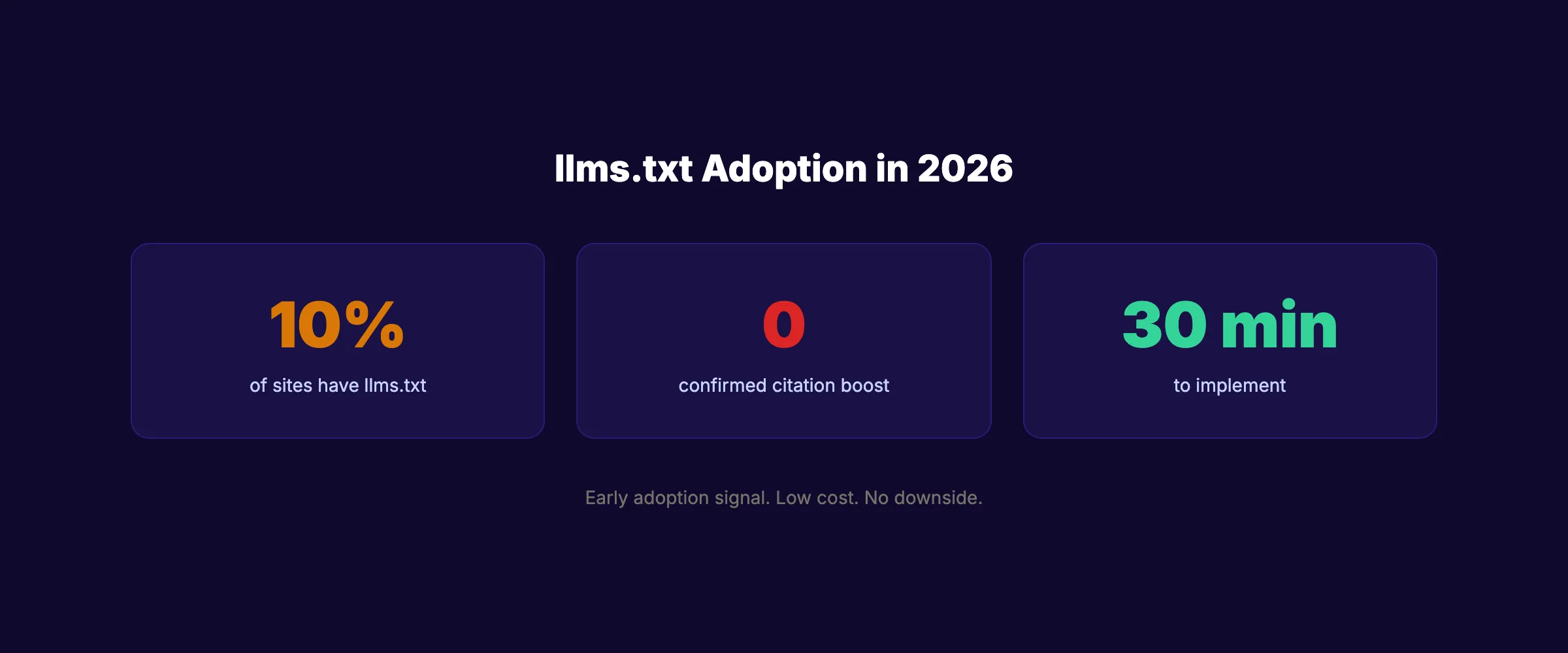
A study of nearly 300,000 domains found that only 10.13% had an llms.txt file. Adoption remains concentrated among tech companies, documentation platforms, and AI-focused startups. Most small businesses have not yet created one.
For context, robots.txt adoption exceeds 95% among active websites. Sitemap.xml adoption sits around 70%. LLMs.txt is still in its early stages.
What the Data Says About Effectiveness
Here is the nuance most guides skip: analysis of those 300,000 domains found no statistical correlation between having an llms.txt file and receiving more AI citations. Semrush tracked AI crawler visits to Search Engine Land’s llms.txt file and recorded zero visits from GPTBot, ClaudeBot, or PerplexityBot over a 3-month period.
This does not mean llms.txt is useless. It means the standard has not been widely adopted by AI crawlers yet. The situation resembles XML sitemaps in 2006. Early adopters saw no immediate benefit. But when Google standardized sitemap support, the sites that already had them gained an advantage.
Who Should Add It Now
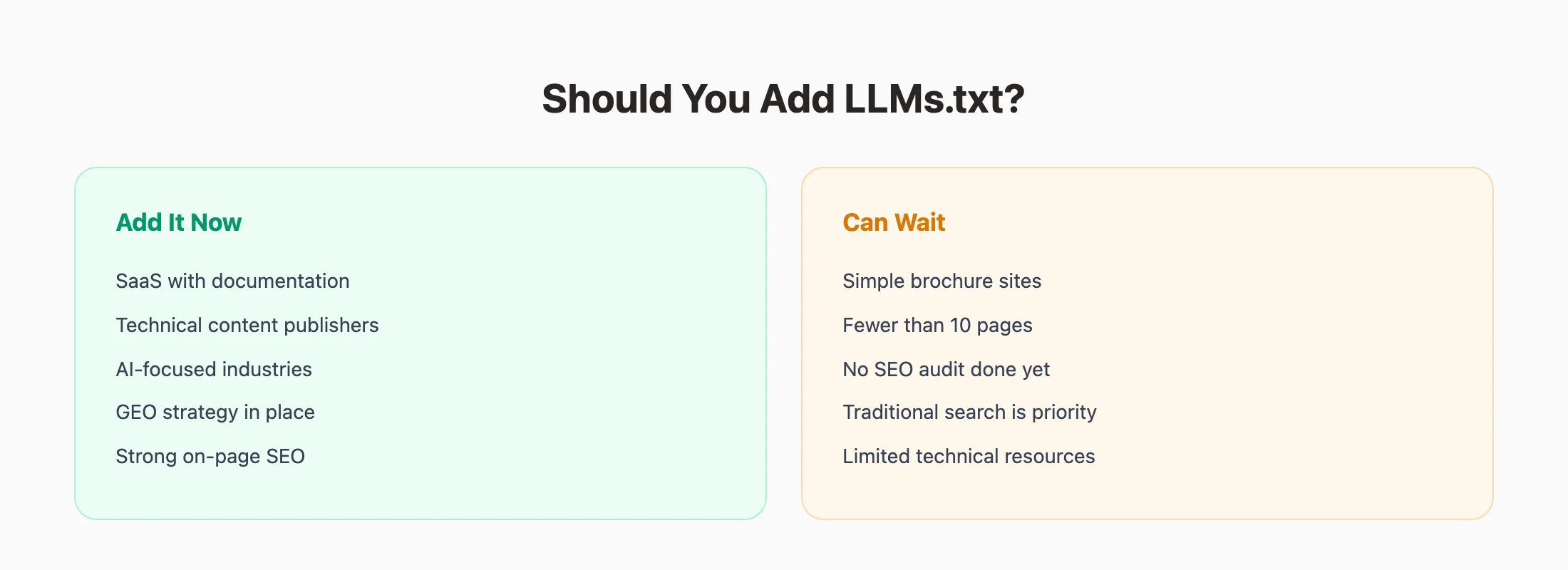
Add llms.txt now if you:
- Run a SaaS product with documentation
- Publish technical content or API references
- Want to prepare for generative engine optimization
- Compete in AI-heavy industries (dev tools, marketing, finance)
- Already have strong on-page SEO foundations
You can wait if you:
- Run a simple brochure website
- Have fewer than 10 pages total
- Have not started any SEO audit process yet
- Need to focus on traditional search ranking first
The Low-Risk Argument
Creating an llms.txt file takes 10 minutes. It costs nothing. It does not interfere with your existing robots.txt or sitemap. The downside risk is near zero.
The upside is preparation. AI search traffic is growing fast. Sites that structure their content for AI discovery now will be ahead when AI crawlers start using llms.txt at scale. This mirrors the Content Compound Effect. Small actions today create large advantages later.
Stacc publishes AI-optimized content every month. 30 articles built for both Google rankings and AI citations. No writers needed. Start for $1 →
FAQ {#faq}
Does llms.txt affect Google rankings?
No. Google has stated that llms.txt is comparable to the keywords meta tag in terms of search ranking impact. The file does not influence traditional search results. It is designed for AI language models, not search engine crawlers. Focus on proven ranking factors for Google performance.
Is llms.txt the same as robots.txt?
No. Robots.txt tells web crawlers which pages to avoid. LLMs.txt tells AI models which pages to prioritize. Robots.txt uses plain-text directives (Allow, Disallow). LLMs.txt uses Markdown formatting. They serve opposite functions. You need both files for complete technical SEO coverage.
Do ChatGPT and Claude read llms.txt files?
These models can read and process llms.txt files when they access web content. However, data from Semrush shows that AI crawlers (GPTBot, ClaudeBot, PerplexityBot) are not consistently visiting llms.txt files yet. The standard is still gaining traction among AI providers.
What should I include in my llms.txt file?
Include 5-15 of your most important pages. Start with your homepage, core service or product pages, pricing page, about page, and your 3-5 strongest blog posts. Do not list every page. Use your XML sitemap for full page discovery.
How often should I update my llms.txt file?
Update it whenever you add a major new page, product, or service. Monthly updates work for most businesses. Documentation-heavy sites should update weekly or automate the process. Stale links in your llms.txt file reduce its value.
Can llms.txt help me get cited in AI search results?
Not directly. Yet. Current data shows no correlation between llms.txt and AI citation rates. But structuring your content for AI readability is part of a broader GEO strategy. Combined with strong schema markup and authoritative content, llms.txt positions your site for future AI search developments.
The llms.txt standard is early. Adoption is low. Direct impact on AI citations is unproven. But the setup takes 10 minutes and costs nothing. That risk-reward ratio makes it worth doing today, especially if your content strategy already targets AI search visibility. Create the file, keep it updated, and focus the rest of your energy on publishing content that ranks.
Your SEO team. $99/month. Stacc publishes, optimizes, and manages your blog content on autopilot. Start for $1 →

Written by
Siddharth GangalSiddharth is the founder of theStacc and Arka360, and a graduate of IIT Mandi. He spent years watching great businesses lose organic traffic to competitors who simply published more. So he built a system to fix that. He writes about SEO, content at scale, and the tactics that actually move rankings.
30 SEO blog articles published every month
Keyword-optimized, scheduled, and live on your site. Automatically.
30-day trial · Cancel anytime
theStacc
Stop writing SEO content manually
30 blog articles, 30 GBP posts, and social media content. Published every month. Automatically.
Start Your $1 Trial$1 for 3 days · Cancel anytime