
How to Automate Your SEO Workflow in 8 Steps
Learn how to automate your SEO workflow with 8 practical steps. Save 20+ hours per week on keyword research, content, reporting, and more. Updated for 2026.
Most SEO teams spend 60% of their time on tasks a machine could handle. Rank tracking, report building, sitemap updates, broken link checks. The manual grind eats hours that should go toward strategy and content.
That time adds up fast. A HubSpot study found that marketers waste 12.5 hours per week on repetitive tasks. Over a year, that is 650 hours of lost productivity per person. For a small team, that is the equivalent of losing an entire employee to copy-paste work.
This guide shows you exactly how to automate your SEO workflow in 8 steps. Each step covers a specific area of SEO, the tools that handle it, and how to set up automation without breaking what already works.
We publish 3,500+ blog posts across 70+ industries every month. Automation is not optional at that scale. It is the foundation. The systems in this guide come from real workflows we run daily.
Here is what you will learn:
- How to audit your current workflow and find the biggest time drains
- Which SEO tasks you can fully automate versus partially automate
- How to set up automated keyword tracking, technical monitoring, and reporting
- Where content automation fits and what still requires a human
- How to scale your SEO output without scaling your team
Time required: 4 to 6 hours for full setup Difficulty: Intermediate What you will need: Google Search Console, Google Analytics 4, a rank tracking tool, and a content publishing system
Step 1: Audit Your Current SEO Workflow
Before you automate anything, you need a clear map of what you actually do. Most teams skip this step and automate the wrong things.
Start by listing every SEO task you or your team performs in a typical week. Write down each task, who does it, how long it takes, and how often it repeats. Be specific. “Do keyword research” is too vague. “Pull keyword data from Semrush for 5 new blog topics” is clear enough to evaluate.
Specifically:
- Open a spreadsheet and create 4 columns: Task, Frequency, Time Spent, Automation Potential
- List every recurring SEO task from the past 30 days
- Mark each task as Fully Automatable, Partially Automatable, or Manual Only
- Sort by time spent (highest first)
| Task Category | Example Tasks | Avg Weekly Hours | Automation Potential |
|---|---|---|---|
| Rank tracking | Check keyword positions, track competitors | 3 to 5 hours | Fully automatable |
| Technical SEO | Crawl errors, broken links, sitemap updates | 2 to 4 hours | Fully automatable |
| Reporting | Build weekly/monthly SEO reports | 3 to 6 hours | Fully automatable |
| Content creation | Write blog posts, optimize pages | 10 to 20 hours | Partially automatable |
| On-page SEO | Meta tags, headers, internal links | 2 to 4 hours | Partially automatable |
| Link building | Outreach, guest posts, PR | 5 to 10 hours | Manual only |
The goal is not to automate everything. Some tasks require human judgment. Link building outreach, for example, depends on relationships and context. Keyword strategy requires business knowledge. Focus your automation energy on the high-frequency, low-judgment tasks first.
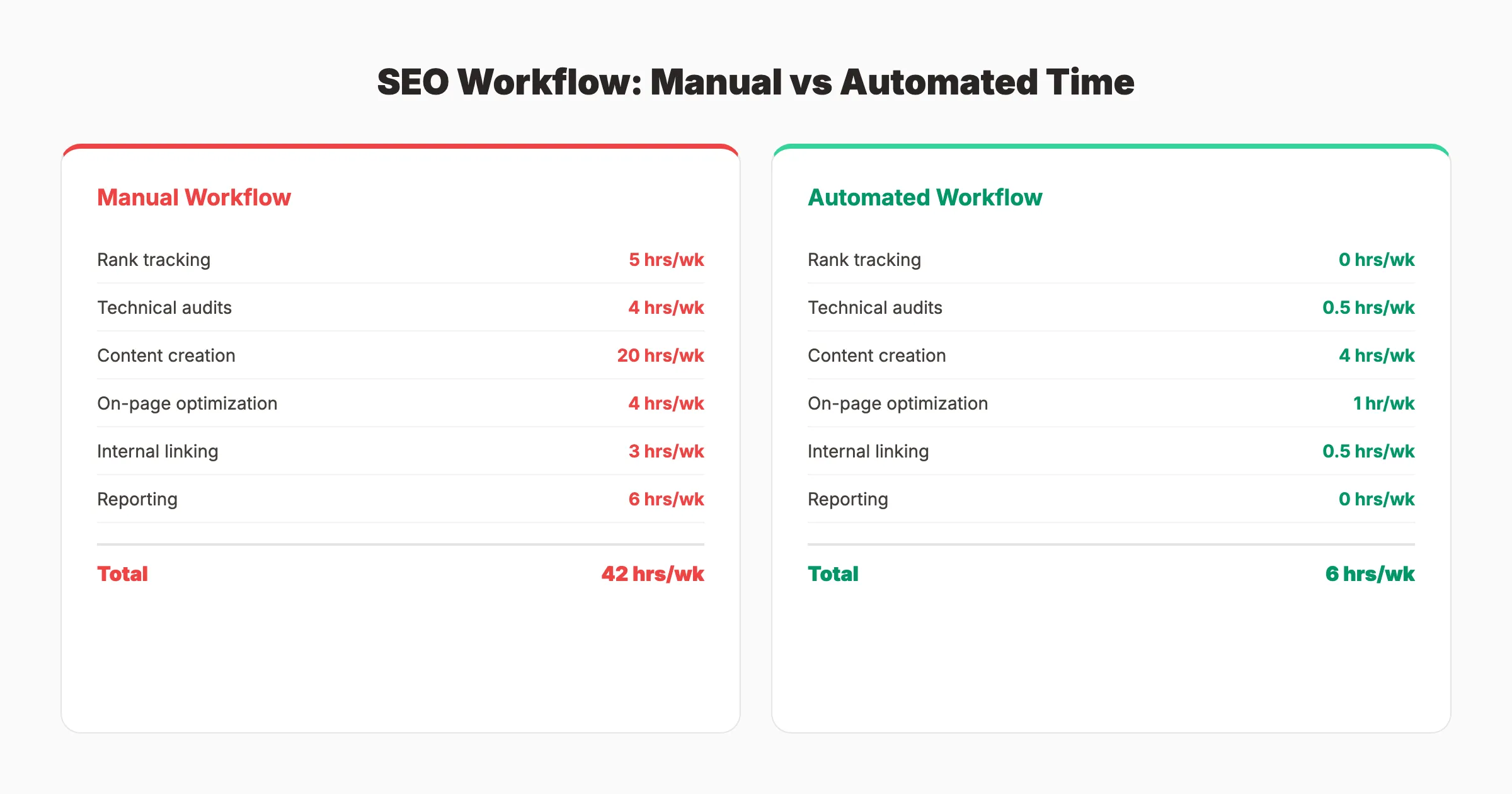
Why this step matters: Without an audit, you will automate tasks that do not move the needle. The audit reveals where your time actually goes. Most teams discover that reporting and rank tracking eat 30% of their week. That is where automation pays off fastest.
Pro tip: Track your time for 1 full week before building your automation list. Estimates are usually wrong by 40% or more.
Step 2: Automate Keyword Research and Tracking
Keyword research has 2 parts: discovery (finding new keywords) and tracking (monitoring rankings for existing ones). Both can be automated to different degrees.
For keyword tracking, set up a dedicated rank tracking tool that runs daily. Tools like SE Ranking, Ahrefs, or Semrush update positions automatically and send alerts when rankings change by more than 3 positions. This eliminates the need to manually check Google Search Console every morning.
Specifically:
- Set up automated daily rank tracking for your top 100 to 500 keywords
- Create alert rules: notify when any keyword drops more than 5 positions
- Schedule weekly keyword position reports delivered to your inbox
- Set up competitor rank tracking for your top 3 to 5 competitors
For keyword discovery, use tools that surface opportunities automatically. Google Search Console’s Performance report shows queries where your site already appears on page 2. These are keywords you can target with small optimizations. Set up a monthly export or connect GSC to a dashboard that highlights these opportunities.
Automated discovery workflow:
- Connect Google Search Console to Looker Studio
- Filter for queries where average position is between 8 and 20
- Sort by impressions (highest first)
- These are your quick-win keywords. Small content updates can push them to page 1
For content planning, tools like Semrush’s Topic Research or Ahrefs’ Content Explorer can surface trending topics in your niche. Schedule monthly reports that deliver fresh keyword opportunities to your team.
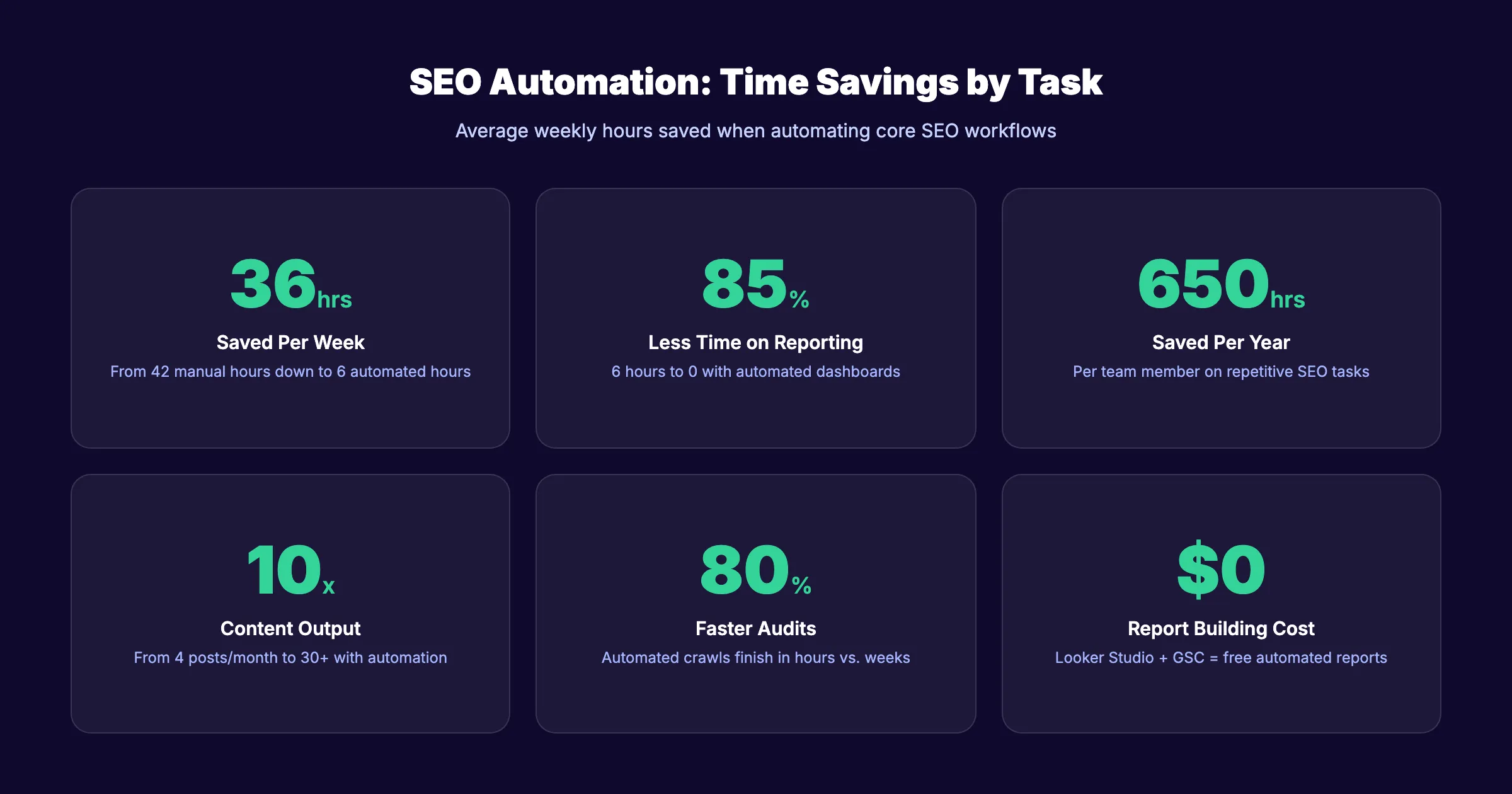
Why this step matters: Manual rank tracking is the biggest time sink in SEO. A team tracking 200 keywords manually spends 4 to 5 hours per week on a task a tool handles in seconds. Automated alerts also catch ranking drops within 24 hours instead of discovering them weeks later.
For a deeper breakdown of keyword research methods, read our guide on keyword research for blog posts.
Step 3: Set Up Automated Technical SEO Monitoring
Technical SEO issues are silent killers. A broken redirect chain, a sudden spike in 404 errors, or a robots.txt change can tank your traffic overnight. Manual monitoring catches these problems too late.
Set up automated crawling on a weekly or daily schedule. Tools like Screaming Frog (scheduled crawls), Sitebulb, or Ahrefs Site Audit run full crawls and flag issues automatically. Configure alerts for critical problems.
Specifically:
- Schedule weekly full-site crawls with automatic error detection
- Set up alerts for: new 404 errors, broken internal links, orphan pages, duplicate content
- Automate XML sitemap validation after every content publish
- Monitor Core Web Vitals through Google Search Console API
| Technical SEO Task | Manual Time | Automated Time | Tool |
|---|---|---|---|
| Full site crawl | 2 to 3 hours | 0 (runs on schedule) | Screaming Frog, Ahrefs |
| Broken link detection | 1 to 2 hours | 0 (alerts sent) | Ahrefs, SE Ranking |
| Core Web Vitals check | 30 min per page | 0 (dashboard) | PageSpeed Insights API |
| Robots.txt monitoring | 15 min/day | 0 (change alerts) | ContentKing |
| Sitemap validation | 20 min | 0 (auto-validated) | Screaming Frog |
For broken links, set up a weekly crawl that automatically flags any new 404s. Most site audit tools can email a summary every Monday morning. You review the list in 5 minutes instead of running a manual check.
Robots.txt and indexing issues deserve real-time monitoring. Tools like ContentKing or Lumar track your site continuously and alert you the moment something changes. One accidental noindex tag on your homepage could deindex your entire site. Real-time monitoring catches that within minutes.
Why this step matters: A Semrush study found that 42% of websites have broken internal links. Most site owners do not know until traffic drops. Automated monitoring turns reactive firefighting into proactive maintenance.
Pro tip: Connect your crawl tool to Slack or Microsoft Teams. Critical alerts should reach you within minutes, not buried in an email inbox.
Step 4: Automate Content Creation and Publishing
Content creation is where most SEO teams spend the most time and get the least return on automation. Here is why: writing a blog post involves research, strategy, drafting, editing, optimization, and publishing. Each phase has different automation potential.
What you can automate:
- Content brief generation (topic, keywords, outline, word count targets)
- First-draft creation using AI writing tools
- Publishing and scheduling across your CMS
- Social media distribution of published posts
What still needs a human:
- Content strategy and topic selection
- Final editing for accuracy and brand voice
- Expert quotes and original data
- Quality assurance before publishing
The publishing pipeline is where automation delivers the most value. Manual publishing means logging into your CMS, formatting the post, adding images, writing meta tags, setting internal links, and clicking publish. That process takes 30 to 45 minutes per post. At 30 posts per month, that is 15 to 22 hours just on publishing.
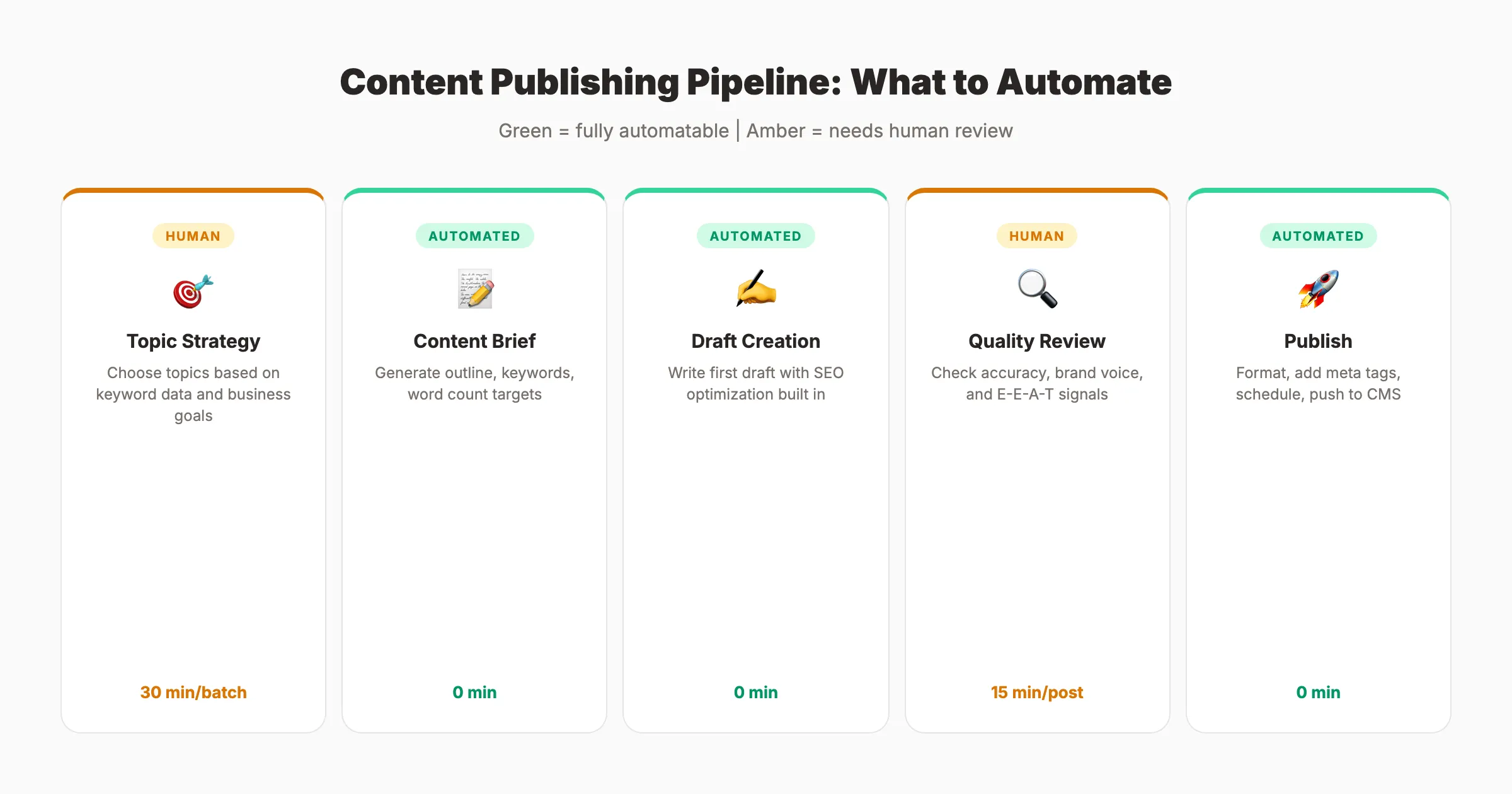
Services like Stacc handle content creation and publishing end-to-end. We generate the content, optimize it for search, and publish it directly to your CMS on a set schedule. For teams that need 30+ articles per month, this eliminates the entire content production bottleneck.
If you prefer to keep content creation in-house, tools like SurferSEO and Frase help with optimization. WordPress scheduling handles publish timing. But you still need someone to manage the workflow.
For teams exploring AI writing, read our guide on how to use AI to write blog posts. It covers where AI helps and where it creates more problems than it solves.
Publish 30 SEO blog posts per month without writing a single one. Stacc handles content creation, optimization, and publishing on autopilot. Start for $1 →
Why this step matters: Content is the engine of organic growth. But most teams publish 2 to 4 articles per month because the manual process is too slow. Automating content production is the difference between publishing enough to rank and publishing enough to hope.
Pro tip: Start with a content calendar. Map out 3 months of topics before automating anything. Automation without strategy just produces more low-quality content faster. Our guide on creating a content calendar for SEO walks through the full process.
Step 5: Automate On-Page SEO Optimization
On-page SEO is repetitive by nature. Every page needs a title tag, meta description, header structure, image alt text, and internal links. Doing this manually for every piece of content is tedious and error-prone.
Specifically:
- Use templated title tag and meta description formulas for consistent formatting
- Set up automated internal linking suggestions using tools like Link Whisper or Yoast
- Configure image compression and alt text generation as part of your publishing workflow
- Run automated on-page audits after each publish to catch missing elements
| On-Page Element | Manual Approach | Automated Approach |
|---|---|---|
| Title tags | Write individually | Template formula + review |
| Meta descriptions | Write individually | Generate from content + review |
| Internal links | Search manually | Tool suggestions + approval |
| Image alt text | Write for each image | Auto-generate from context |
| Header structure | Check manually | Audit tool flags issues |
| Schema markup | Code by hand | Plugin/tool generates |
For schema markup, plugins like Yoast, RankMath, or custom JSON-LD generators handle the technical implementation. You define the schema type once, and the plugin applies it to every matching page automatically.
Internal linking deserves special attention. A site with 200+ blog posts has thousands of potential internal link opportunities. No human can track them all manually. Automated internal linking tools scan your content and suggest relevant links based on anchor text matches and topical relevance.
The key principle is “automate the detection, keep the decision.” Let tools find missing meta descriptions, suggest internal links, and flag thin content. Then a human reviews and approves. This hybrid approach is faster than fully manual and more accurate than fully automated.
For a complete on-page playbook, see our on-page SEO guide.
Why this step matters: On-page optimization is the foundation of every ranking page. Missing or duplicate meta descriptions affect 25% of pages on the average website. Automated audits catch these issues before they affect rankings.
Step 6: Set Up Automated Internal Linking
Internal linking is one of the most neglected parts of SEO. It is also one of the easiest to automate. Strong internal links help Google understand your site structure, distribute page authority, and keep visitors on your site longer.
Specifically:
- Map your site’s content clusters and pillar pages
- Use an internal linking tool to scan for opportunities across your entire site
- Set up rules: every new blog post should link to 3 to 5 existing posts
- Every existing post that mentions a new topic should link to the new post
- Audit orphan pages (pages with zero internal links pointing to them)
The typical approach looks like this:
- Define your topical clusters. Group related content under pillar pages.
- Run an internal link audit using Screaming Frog or Ahrefs. Identify pages with fewer than 3 internal links.
- Install an internal linking plugin (Link Whisper for WordPress) that suggests links as you publish.
- Create a linking checklist: every new post must include links to the relevant pillar page and 2 to 4 cluster pages.
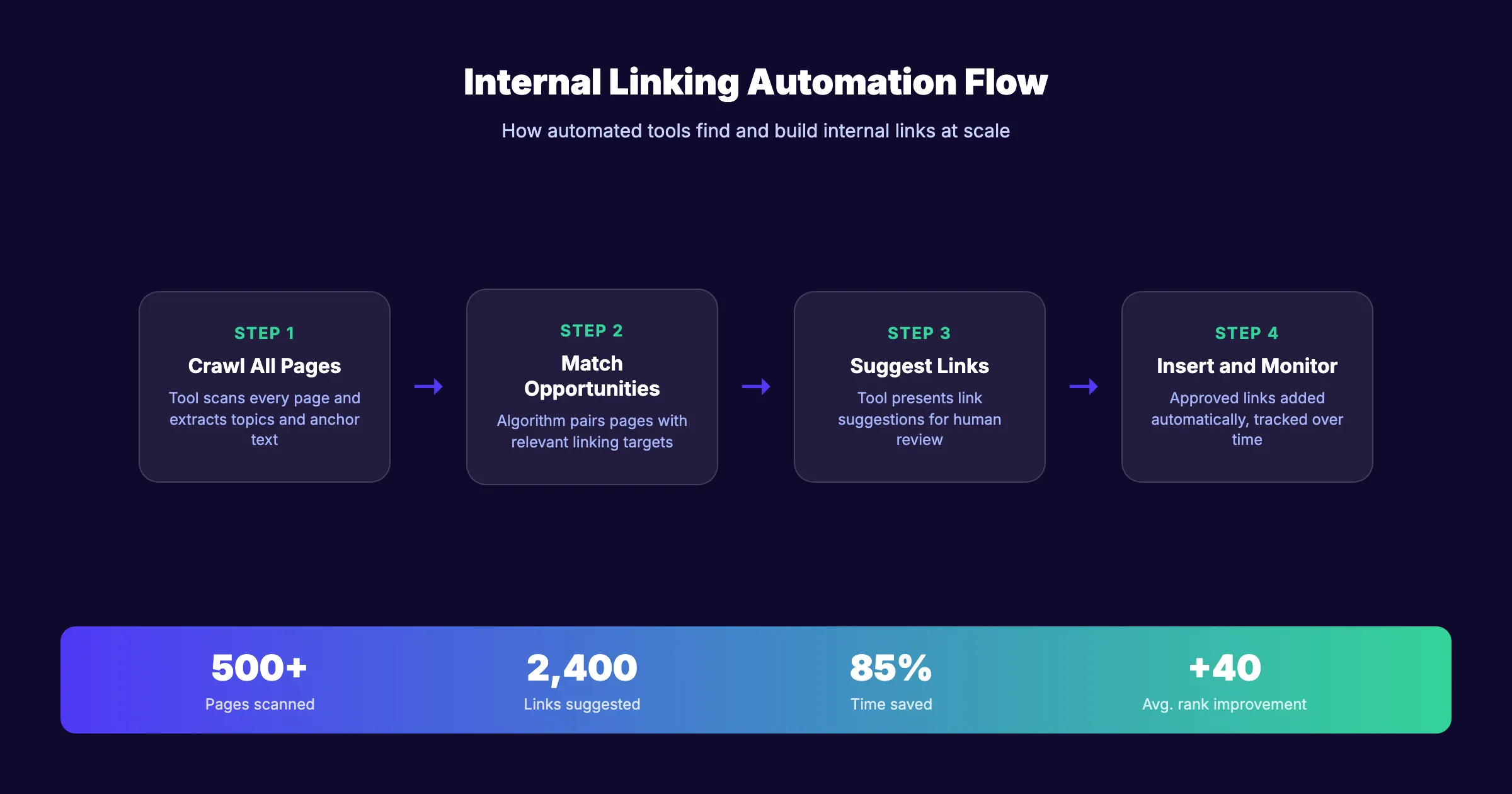
For larger sites, automated internal linking tools save massive amounts of time. A site with 500 blog posts has over 100,000 possible link combinations. Manual linking means opening each post individually, searching for relevant phrases, and inserting links. That is a multi-day project. Automated tools complete the same scan in minutes.
The result is a tighter site structure that helps both users and search engines. Pages that were buried 5 clicks deep suddenly become accessible in 2 clicks. Authority flows from high-performing pages to newer content.
For a full breakdown of internal linking strategy, see our internal linking guide for blog posts.
Why this step matters: Google uses internal links to discover and rank pages. Pages with zero internal links are effectively invisible to crawlers. A study from Ahrefs found that increasing internal links to underperforming pages improved their rankings by an average of 40 positions.
Your SEO team, on autopilot. Stacc publishes optimized, interlinked blog content every week. No writers, no editors, no manual work. Start for $1 →
Step 7: Automate Reporting and Analytics
SEO reporting is the single most automatable task in your entire workflow. Yet most teams still build reports manually in spreadsheets every month. That is 4 to 8 hours of work that a dashboard can handle in zero.
Specifically:
- Connect Google Analytics 4 and Google Search Console to a reporting dashboard
- Use Looker Studio (free) or AgencyAnalytics (paid) for automated report generation
- Schedule weekly email reports for key metrics: organic traffic, keyword rankings, top pages
- Set up monthly executive summaries that pull data automatically
Your automated reporting stack should track:
| Metric | Source | Frequency |
|---|---|---|
| Organic traffic | Google Analytics 4 | Weekly |
| Keyword positions | Rank tracker | Daily |
| Click-through rate | Google Search Console | Weekly |
| Core Web Vitals | PageSpeed API | Monthly |
| Backlink profile | Ahrefs / Semrush | Monthly |
| Conversion rate | GA4 + CRM | Monthly |
| Content published | CMS | Weekly |
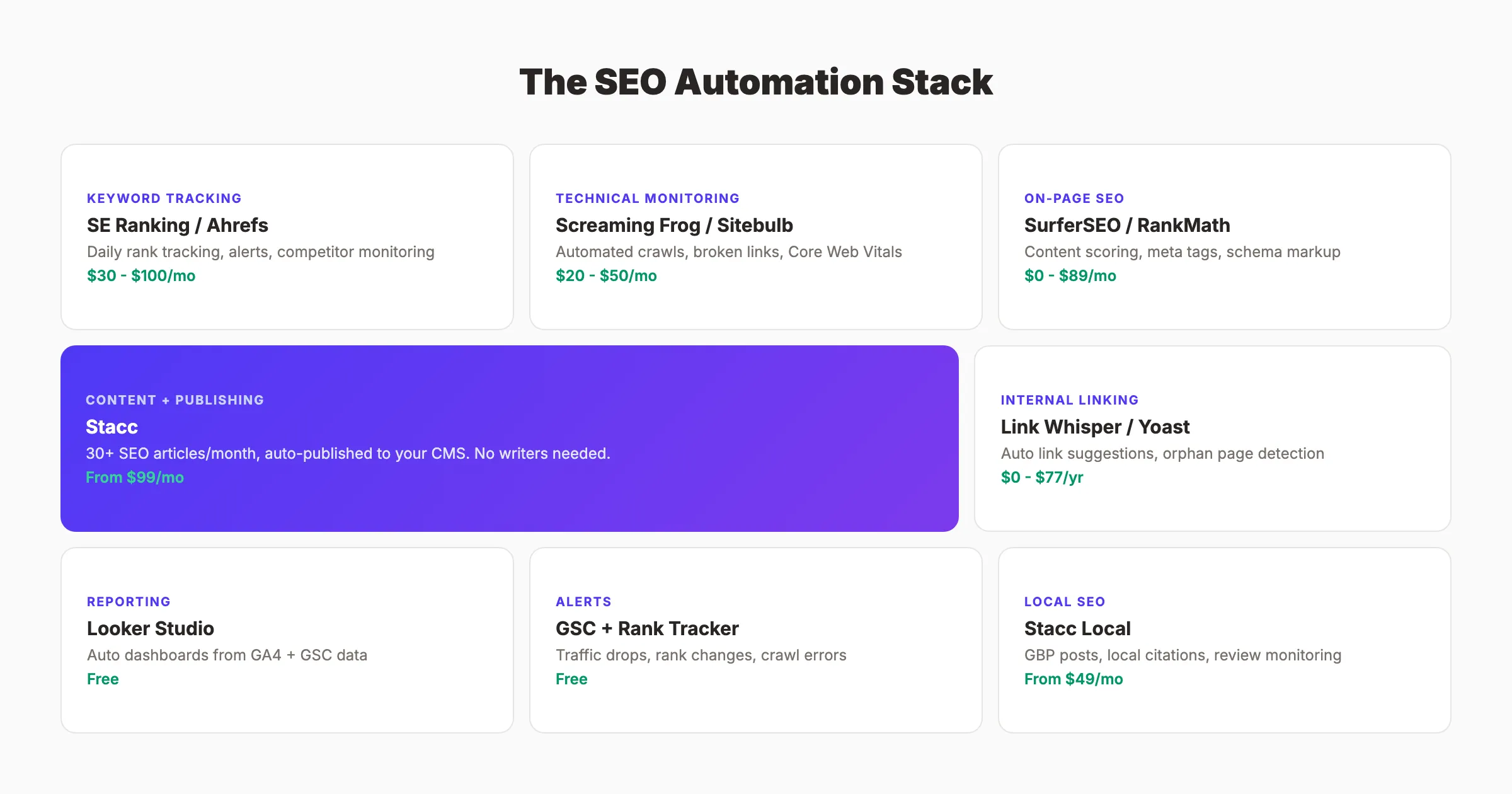
Build your dashboard once. Update it never. The data flows in automatically. Every Monday morning, your team gets a 1-page summary of what happened, what improved, and what needs attention.
For agencies managing multiple clients, automated reporting is even more critical. A tool like AgencyAnalytics or Databox can generate white-label reports for 50+ clients simultaneously. That is the difference between 200 hours of report building and 0.
Custom alerts add another layer. Set up notifications for:
- Traffic drops greater than 15% week over week
- New keywords entering the top 10
- Pages losing more than 20 positions
- Crawl errors exceeding 50
These alerts turn your reporting from a retrospective activity into a real-time monitoring system.
Why this step matters: Reports that take 6 hours to build get built once a month. Reports that take 0 hours get checked every week. Frequency of review directly correlates with speed of response. Automated reporting means you catch problems and opportunities faster.
Step 8: Monitor, Adjust, and Scale
Automation is not a one-time setup. It is a system that needs ongoing monitoring and adjustment. The final step is building a review cadence that keeps your automated workflows running smoothly and scaling over time.
Specifically:
- Schedule a monthly automation review (30 minutes)
- Check each automated workflow: Is it still running? Is the output accurate?
- Review alert thresholds: Are you getting too many false positives? Too few alerts?
- Identify new tasks that can be automated based on the past month
- Scale successful automations to new sections of your site or new clients
Monthly review checklist:
- All automated crawls completed without errors
- Rank tracking data matches spot-checks in Google Search Console
- Content publishing pipeline delivered on schedule
- Reporting dashboards show accurate, current data
- Alert thresholds are still appropriate (no alert fatigue)
- New automation opportunities identified
The scaling phase is where automation truly compounds. Once your core workflows run smoothly, you can expand. Add more keywords to tracking. Automate content for additional topic clusters. Set up reporting for new business units or clients.
This is where the Content Compound Effect becomes visible. Every automated workflow stacks on the last. Keyword tracking feeds content planning. Content publishing feeds internal linking. Internal linking feeds rankings. Rankings feed reporting. The entire system reinforces itself.
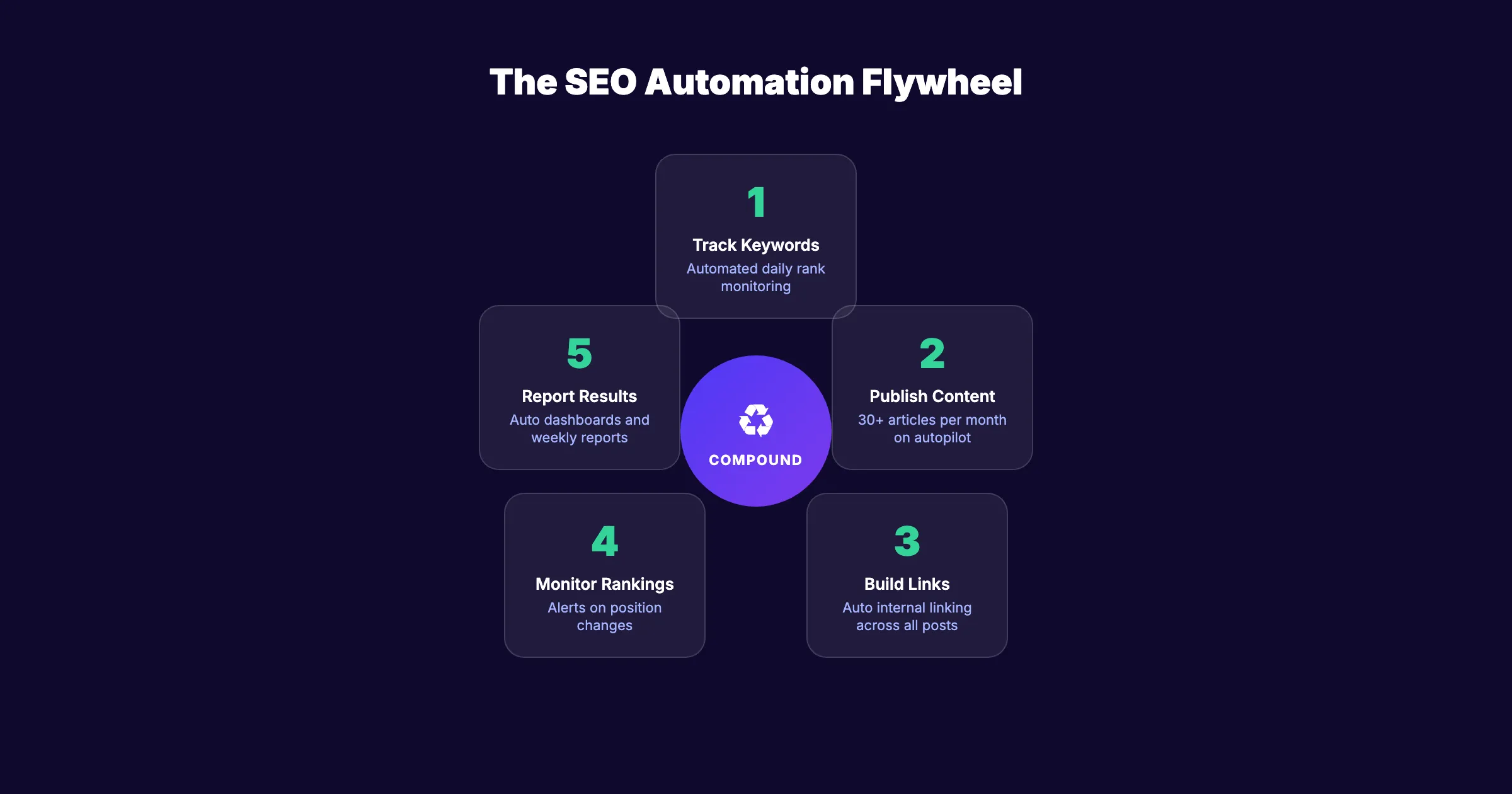
Teams that automate well do not just save time. They change what is possible. A 2-person team running automated workflows can produce the SEO output of a 10-person team doing everything manually. The gap widens every month.
Why this step matters: Automation that is not monitored degrades over time. APIs change. Tools update. Data sources shift. A 30-minute monthly check prevents small issues from becoming big problems.
Pro tip: Keep a log of every automation you set up, including the tool, the trigger, and the expected output. When something breaks, the log tells you exactly where to look.
Results: What to Expect
After completing these 8 steps, you should expect:
- Week 1 to 2: Rank tracking, technical monitoring, and reporting fully automated. Immediate time savings of 8 to 12 hours per week.
- Month 1 to 2: Content creation and publishing pipeline running. On-page optimization automated for new content. Time savings increase to 15 to 20 hours per week.
- Month 3 to 6: Internal linking automated. Full system operational. Organic traffic growth accelerates as consistent publishing compounds. Total time savings of 20+ hours per week.
The exact timeline depends on your starting point. A team already using some tools will see results faster. A team doing everything manually needs more setup time upfront.
The critical metric is not hours saved. It is what you do with those hours. Teams that reinvest saved time into strategy, content quality, and finding content gaps see 2 to 3x better results than teams that simply reduce headcount.
FAQ
Can you fully automate SEO?
No. SEO has components that require human judgment. Strategy, content quality review, and relationship-based link building cannot be automated. But 60% to 70% of recurring SEO tasks can be fully or partially automated. The goal is to automate the repetitive work so humans focus on high-impact decisions.
What SEO tasks should you automate first?
Start with rank tracking and reporting. These tasks are purely data-driven, repeat weekly or daily, and require no creative judgment. Most teams save 6 to 10 hours per week by automating just these 2 areas. Then move to technical monitoring and content publishing.
How much does SEO automation cost?
It ranges from free to several hundred dollars per month. Google Search Console and Looker Studio are free. Rank tracking tools cost $30 to $100 per month. Full content automation services like Stacc start at $99 per month for 30 articles. The total depends on how many parts of your workflow you automate.
Does automated content hurt SEO rankings?
Not if the content is high-quality and optimized correctly. Google does not penalize automated content. Google penalizes low-quality content regardless of how it was created. The key is ensuring every published piece meets E-E-A-T standards and provides real value to readers. Read our guide on how to humanize AI content for specific techniques.
What tools do you need to automate an SEO workflow?
At minimum: Google Search Console (free), a rank tracker (SE Ranking or Ahrefs), a site audit tool (Screaming Frog or Sitebulb), and a reporting dashboard (Looker Studio). For content automation, you need either an AI writing tool plus CMS, or a done-for-you service that handles the full pipeline.
How long does it take to see results from SEO automation?
Time savings are immediate. You will recover 8 to 12 hours in the first week just from automating tracking and reporting. Ranking improvements from increased content output take longer. Expect initial organic traffic growth within 60 to 90 days and compounding results over 6 to 12 months.
Now you know how to automate your SEO workflow from audit to scale. The 8 steps cover every major area: keyword tracking, technical monitoring, content creation, on-page optimization, internal linking, and reporting.
The teams that win at SEO in 2026 are not the ones with the biggest budgets. They are the ones with the best systems. Start with Step 1, automate the biggest time drain, and build from there.
Ready to automate your content pipeline? Stacc publishes 30+ SEO blog posts per month, starting at $99. No writers needed. Start for $1 →
Related Tools & Resources
Free SEO Tools:
Best Lists:

Written by
Siddharth GangalSiddharth is the founder of theStacc and Arka360, and a graduate of IIT Mandi. He spent years watching great businesses lose organic traffic to competitors who simply published more. So he built a system to fix that. He writes about SEO, content at scale, and the tactics that actually move rankings.
30 SEO blog articles published every month
Keyword-optimized, scheduled, and live on your site. Automatically.
30-day trial · Cancel anytime
theStacc
Stop writing SEO content manually
30 blog articles, 30 GBP posts, and social media content. Published every month. Automatically.
Start Your $1 Trial$1 for 3 days · Cancel anytime