
SEO for Small Business (2026): Strategies, Tactics & Examples
Practical seo small business guide strategies for 2026: step-by-step tactics, real examples, and tools to improve rankings and drive organic traffic.
You know your business deserves more customers. But your website sits on page 3 of Google, buried under competitors with bigger budgets and full marketing teams.
That invisibility costs you real money. 53% of all website traffic comes from organic search. Every day you do not rank, potential customers choose someone else. The average small business spends $497 per month on SEO services alone. And many still see no return because they follow the wrong advice.
This guide fixes that. It covers SEO for small business from the ground up: keyword research, on-page optimization, local search, content strategy, link building, technical basics, and measuring ROI. No fluff. No jargon without explanation. Just the exact playbook a small business owner needs to start ranking.
We publish 3,500+ blogs across 70+ industries every month. We have seen what works for small businesses and what wastes time. This guide distills all of it.
Here is what you will learn:
- Why SEO is the highest-ROI marketing channel for small businesses
- How search engines decide which websites rank first
- The exact keyword research process for small business owners
- How to optimize every page on your website
- Local SEO tactics that put you in the map pack
- A content strategy that builds authority on a small budget
- Technical SEO basics you cannot ignore
- Link building methods that do not require a big budget
- How to measure SEO results and prove ROI
- When to DIY and when to outsource
Why SEO Matters for Small Businesses
74% of small businesses invest in SEO, according to recent industry data. The other 26% leave money on the table every single day.
Organic Search Drives the Majority of Your Traffic
Google processes over 8.5 billion searches per day. 53% of all website traffic originates from organic search. That dwarfs social media, email, and paid ads combined.
For a small business, this means one thing. Your next customer is already searching for what you sell. If your website does not appear, a competitor gets that click instead.
SEO Levels the Playing Field
A local plumber cannot outspend a national franchise on Google Ads. But that plumber absolutely can outrank the franchise for “emergency plumber in [city]” with solid SEO.
Search engines rank pages based on relevance and quality, not budget size. A well-optimized small business website can beat a Fortune 500 company for specific search terms. This is the only marketing channel where that is true.
The ROI Outperforms Every Other Channel
SEO campaigns commonly produce 200% to 300% ROI within the first year. Many small businesses see 400% or more within 2 years. Compare that to paid ads, where ROI drops to zero the moment you stop spending.
The cost difference is stark. Running Google Ads for 30 keywords might cost $3,000 to $10,000 per month. Ranking organically for those same keywords costs a fraction of that. And the traffic keeps flowing after you stop actively investing.
The Compounding Effect
Every blog post you publish, every page you optimize, and every link you earn stacks on top of previous work. SEO compounds. A business that publishes consistently for 12 months does not just have 12 months of results. It has an asset that generates traffic for years.
We call this the Content Compound Effect. It is the reason small businesses that commit to SEO early outpace competitors who start late. Even if those competitors have larger budgets.
How Search Engines Rank Websites
Before you optimize anything, you need a basic understanding of how Google decides which pages appear first. You do not need a computer science degree. You need to understand 4 core concepts.
Crawling and Indexing
Google uses automated programs called crawlers to discover web pages. These crawlers follow links from page to page, reading content and storing it in Google’s index. A massive database of every page Google knows about.
If Google cannot crawl your site, you do not exist in search results. Period. Make sure your website is not accidentally blocking crawlers through your robots.txt file. Then submit your website to Google through Google Search Console.
Ranking Factors That Matter Most
Google uses over 200 ranking signals. But for small businesses, 5 factors drive 80% of results:
| Factor | What It Means | Your Priority |
|---|---|---|
| Relevance | Content matches search intent | High |
| Backlinks | Other sites link to your pages | High |
| Content quality | Depth, accuracy, freshness | High |
| Page experience | Speed, mobile-friendliness, Core Web Vitals | Medium |
| E-E-A-T | Experience, Expertise, Authority, Trust | Medium |
Focus your energy on these 5. Ignore everything else until you have these right.
Search Intent Drives Everything
Google does not just match keywords. It matches intent. When someone searches “best pizza near me,” they want a list of local options, not a recipe.
Understanding search intent separates effective SEO from wasted effort. Every page on your website should target one specific intent: informational (learning), navigational (finding), commercial (comparing), or transactional (buying).
E-E-A-T and Why It Matters for Small Businesses
Google’s E-E-A-T framework evaluates Experience, Expertise, Authoritativeness, and Trustworthiness. For small businesses, this is actually an advantage.
You have real-world experience that generic content farms cannot replicate. A local HVAC company writing about furnace maintenance has more E-E-A-T than a freelancer who has never touched a furnace. Show your credentials. Add author bios. Include photos of your work. Google rewards authenticity.
Your SEO team. $99/month. Stacc publishes 30 SEO-optimized blog posts every month. On autopilot. No writers to manage. No strategy to figure out. Start for $1 →
Keyword Research for Small Businesses
Keyword research is the foundation of every SEO strategy. Get it right, and every piece of content you create has a target. Get it wrong, and you spend months chasing terms you will never rank for. Small businesses need a specific approach. Not the same playbook that works for enterprise brands.
Start With What Your Customers Actually Search
Open a blank document. Write down every question a customer has ever asked you. Every service you offer. Every problem you solve. Every location you serve.
A divorce attorney in Austin might list: “how to file for divorce in Texas,” “Austin divorce lawyer cost,” “custody lawyer near me,” “how long does divorce take in Texas.” These are real searches with real volume. They are also far easier to rank for than “divorce lawyer.”
Target Long-Tail Keywords First
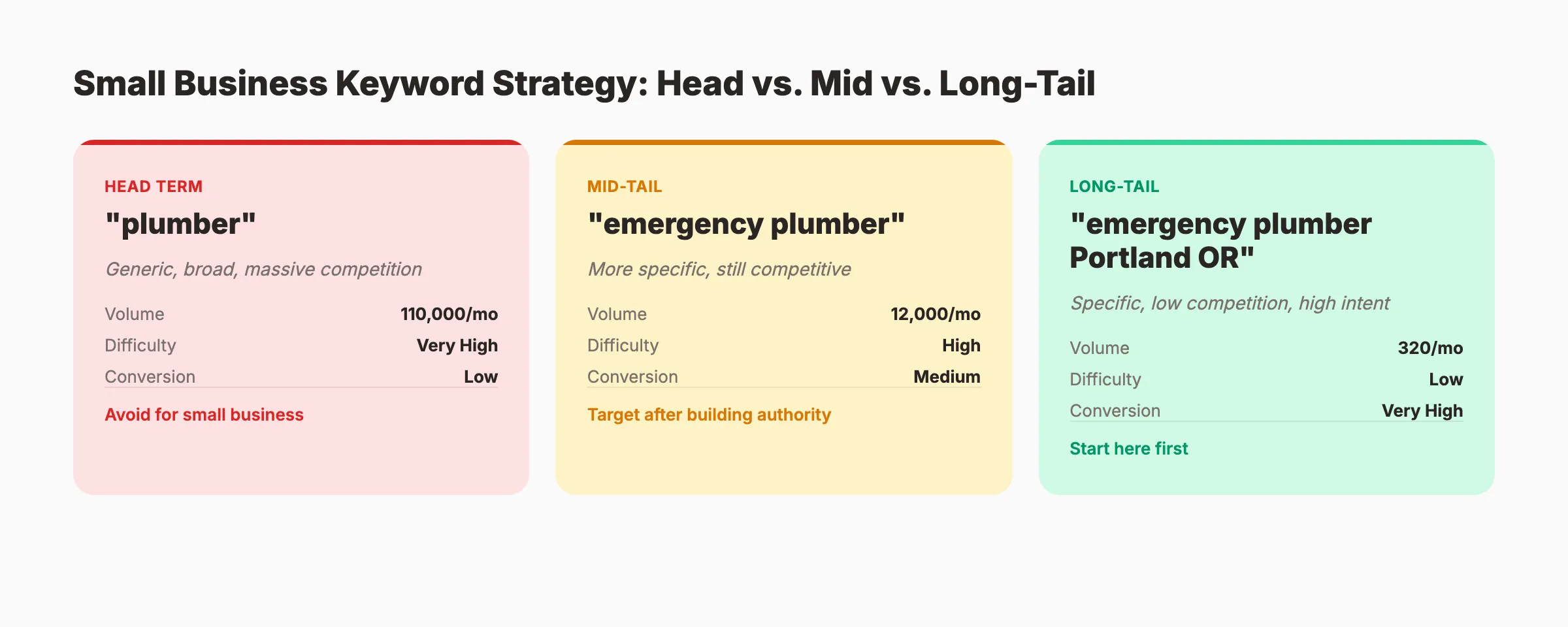
Long-tail keywords contain 3 or more words. They have lower search volume but much higher conversion rates. They are also significantly easier to rank for.
| Keyword Type | Example | Monthly Volume | Difficulty | Conversion Rate |
|---|---|---|---|---|
| Head term | ”plumber” | 110,000 | Very high | Low |
| Mid-tail | ”emergency plumber” | 12,000 | High | Medium |
| Long-tail | ”emergency plumber Portland OR” | 320 | Low | Very high |
A small business should target 15 to 20 long-tail keywords to start. You can find these using free SEO tools like Google Keyword Planner, Ubersuggest, or AnswerThePublic.
Use Free Keyword Research Tools
You do not need a $200/month keyword research tool to get started. Google Search Console shows you what queries already bring visitors to your site. Google’s “People Also Ask” boxes reveal related questions. Google autocomplete suggests popular searches as you type.
For more advanced research, Semrush and Ahrefs offer limited free plans. Both show keyword difficulty scores and search volumes.
Map Keywords to Pages
Every keyword needs a destination page. Create a simple spreadsheet with 3 columns: keyword, target URL, and search intent.
- Homepage → Your primary service keyword (“Portland emergency plumber”)
- Service pages → Specific service keywords (“drain cleaning Portland”)
- Blog posts → Informational keywords (“how to unclog a drain”)
- Location pages → City or neighborhood keywords (“plumber in SE Portland”)
Never target the same keyword on 2 different pages. That creates keyword cannibalization, where your own pages compete against each other.
On-Page SEO. Optimizing Your Website
On-page SEO is the set of optimizations you make directly on your web pages. It is the fastest way to improve rankings because you control every element. No waiting for backlinks. No dependence on third parties.
Title Tags and Meta Descriptions
Your title tag is the single most important on-page element. It appears in search results as the clickable blue link. Follow this formula:
Primary Keyword + Modifier + Brand Name
Example: “Emergency Plumber Portland | 24/7 Service | Smith Plumbing”
Keep title tags under 60 characters. Include your primary keyword as close to the front as possible.
Meta descriptions do not directly affect rankings, but they affect click-through rates. Write 145 to 155 characters that describe the page benefit. Include your keyword naturally.
Header Tags and Content Structure
Use one H1 tag per page. Your main headline. Structure supporting content with H2 and H3 tags. This creates a clear hierarchy that both users and search engines understand.
Good blog post structure follows a logical flow. Each H2 covers a major subtopic. H3 tags break those subtopics into specific points. This is not just an SEO best practice. It also keeps readers on the page longer.
Image Optimization
Every image on your website needs an alt text description. Alt text helps search engines understand what the image shows. It also helps visually impaired users.
Use descriptive alt text that includes your keyword when relevant. “Red 2024 Toyota Camry at Smith Auto Portland” beats “car-image-1.jpg” every time. Compress images before uploading. Large image files slow your page speed, which hurts rankings.
Internal Linking
Internal linking connects your pages together. It helps Google discover new content, understand page relationships, and distribute ranking power across your site.
Every page should link to at least 2 to 3 other relevant pages on your site. Use descriptive anchor text. “Learn more about on-page SEO” is better than “click here.”
URL Structure
Keep URLs short, descriptive, and keyword-rich. Use hyphens between words. Avoid numbers, dates, and special characters.
- Good:
/services/emergency-plumbing-portland - Bad:
/page?id=47293&cat=services
Clean URLs rank better and earn more clicks in search results.
30 blog posts per month. Zero effort from you. Stacc handles keyword research, writing, optimization, and publishing. Small businesses across 70+ industries trust us to grow their organic traffic. Start for $1 →
Local SEO. Getting Found in Your Area
If your business serves customers in a specific geographic area, local SEO is your highest-priority channel. 46% of all Google searches have local intent. That means nearly half of all searches are people looking for businesses near them. This chapter covers the complete local SEO playbook.
Google Business Profile Is Your Foundation
Your Google Business Profile (GBP) is the single most important local SEO asset you own. It determines whether you appear in the map pack. The 3 local results that show above organic listings.
Complete every field. Add your business name, address, phone number, hours, categories, services, and at least 10 high-quality photos. Businesses with complete profiles are 70% more likely to attract location visits.
Post to your GBP weekly. Google rewards active profiles with better visibility. Share updates, offers, new photos, and service highlights.
NAP Consistency Across the Web
NAP stands for Name, Address, Phone number. Your NAP must be identical everywhere it appears online: your website, GBP, Yelp, Facebook, industry directories, and local business listings.
Even small inconsistencies hurt. “123 Main St” on your website and “123 Main Street” on Yelp creates confusion for search engines. Audit your listings quarterly using local SEO tools for small business.
Google Reviews Drive Rankings and Conversions
Reviews directly influence local rankings. Businesses with more positive reviews rank higher in the map pack. They also convert better , 88% of consumers trust online reviews as much as personal recommendations.
Build a system to get more Google reviews. Ask every satisfied customer. Send a follow-up email with a direct link to your Google review page. Respond to every review. Positive and negative.
Local Content Strategy
Create content that targets your specific service areas. A roofing company in Denver should publish pages for “roof repair Denver,” “roof replacement Aurora CO,” and “storm damage roofing Lakewood.”
These location-specific pages capture searches that national competitors ignore. Combine them with locally relevant blog posts , “How Denver Hailstorms Damage Roofs”. To build topical authority in your area.
The Local Pack Formula
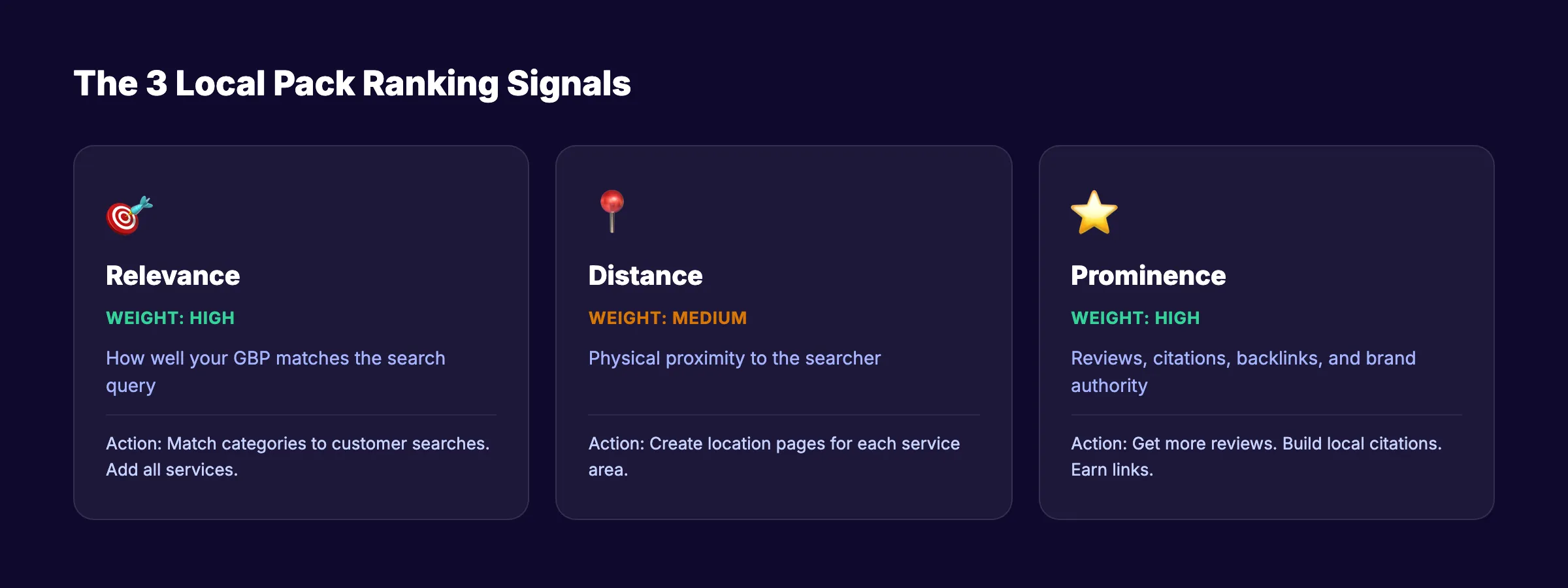
Ranking in Google’s local pack comes down to 3 signals:
| Signal | Weight | What To Do |
|---|---|---|
| Relevance | High | Match your GBP categories to what people search |
| Distance | Medium | Cannot control, but multiple location pages help |
| Prominence | High | More reviews, more citations, more local backlinks |
Focus on relevance and prominence. You cannot change your physical location, but you can make your business the most prominent option in your area.
Content Marketing for Small Business SEO
Content is how you rank for informational keywords, build authority, and earn backlinks. But most small businesses approach content wrong. They publish 1 or 2 blog posts, see no results, and quit. This chapter shows you the right approach.
Publish Consistently, Not Occasionally
Google rewards consistency. Websites that publish 16+ blog posts per month get 3.5 times more traffic than those publishing 4 or fewer. You do not need 16 posts. But you do need a steady cadence.
For most small businesses, 4 to 8 posts per month is the sweet spot. That is enough to build momentum without overwhelming your schedule. Use a content calendar to plan topics 30 to 60 days ahead.
Write for Search Intent, Not Just Keywords
Every piece of content should answer a specific question or solve a specific problem. If someone searches “how to fix a leaky faucet,” they want step-by-step instructions. Not a sales pitch for your plumbing services.
Match your content format to the intent. “How to” searches need tutorials. “Best [product]” searches need comparison lists. “What is” searches need clear definitions. Check search intent before writing anything.
The Topic Cluster Approach
A topical map organizes your content around core themes. Start with a pillar page (a broad guide on your main topic). Then create cluster posts that cover specific subtopics. Link everything together.
A personal injury law firm might build:
- Pillar: “Personal Injury Claims Guide”
- Cluster: “How to Calculate Settlement Value,” “What to Do After a Car Accident,” “How Long Personal Injury Cases Take”
This structure signals to Google that you are an authority on the entire topic, not just one narrow angle.
Blog Posts That Actually Rank
Not all blog formats perform equally. These 4 formats consistently outperform for small businesses:
- How-to guides. Step-by-step tutorials targeting “how to [X]” searches
- Local content. Area-specific posts that national competitors cannot replicate
- FAQ posts. Answer clusters of related questions on one page
- Comparison posts , “[Service A] vs. [Service B]” posts that capture commercial intent
Focus on these 4 before experimenting with other formats. Learn how to write SEO blog posts that rank and drive traffic.
How Many Posts Do You Need?
The honest answer: it depends on your competition. Some local niches require 20 to 30 solid posts to dominate. Competitive national topics might need 100 or more. Read our guide on how many blog posts to rank for realistic benchmarks.
The exception is hyper-local businesses in small markets. A dentist in a town of 15,000 might rank with 10 well-optimized pages. A dentist in Manhattan needs 10 times that.
Rank everywhere. Do nothing. Stacc writes, optimizes, and publishes blog content for your small business every month. 30 articles for $99. No agency fees. No writer management. Start for $1 →
Technical SEO Basics Every Small Business Needs
Technical SEO sounds intimidating. Most of it is not. For small businesses, a handful of technical fixes produce 90% of the impact. This chapter covers only what matters. Nothing more.
Site Speed and Core Web Vitals
Websites that load in under 2 seconds are 40% more likely to rank well and get referenced by AI search tools. Google measures speed through Core Web Vitals: Largest Contentful Paint (LCP), Interaction to Next Paint (INP), and Cumulative Layout Shift (CLS).
Test your site at PageSpeed Insights (pagespeed.web.dev). If your mobile score is below 50, you have a problem. Common fixes: compress images, enable caching, minimize JavaScript, and upgrade your hosting.
Mobile-Friendliness Is Non-Negotiable
Over 60% of all Google searches happen on mobile devices. Google uses mobile-first indexing, which means it evaluates the mobile version of your site for rankings. Not the desktop version.
Test your site on your own phone. If you have to pinch and zoom to read text, your mobile experience needs work. Most modern website builders produce responsive designs by default. But always verify.
XML Sitemaps and Robots.txt
An XML sitemap tells Google which pages on your site exist and which ones matter most. Every small business website should have one. Most CMS platforms generate sitemaps automatically.
Your robots.txt file tells search engines which pages they can and cannot crawl. A misconfigured robots.txt file can accidentally block Google from your entire site. Check yours at yourdomain.com/robots.txt.
Schema Markup
Schema markup adds structured data to your pages. It helps Google understand your content and can earn you rich results. Star ratings, FAQ dropdowns, and business hours displayed directly in search results.
For small businesses, 3 schema types matter most:
- LocalBusiness schema. Your name, address, phone, hours, and service area
- FAQ schema. Question and answer pairs on your pages
- Review schema. Customer ratings and reviews
Use our schema markup generator or a plugin to add schema without writing code.
Fix Broken Links and Crawl Errors
Broken links frustrate users and waste crawl budget. Google views them as a sign of a poorly maintained website. Run a crawl of your site quarterly to find and fix broken links.
Check Google Search Console regularly for crawl errors. It reports pages that Google tried to access but could not. Fix 404 errors by redirecting broken URLs to relevant live pages.
HTTPS Is Mandatory
If your website still runs on HTTP, fix it today. Google confirmed HTTPS as a ranking signal in 2014. In 2026, any site without HTTPS looks untrustworthy to both Google and visitors. Most hosting providers offer free SSL certificates through Let’s Encrypt.
Link Building on a Small Business Budget
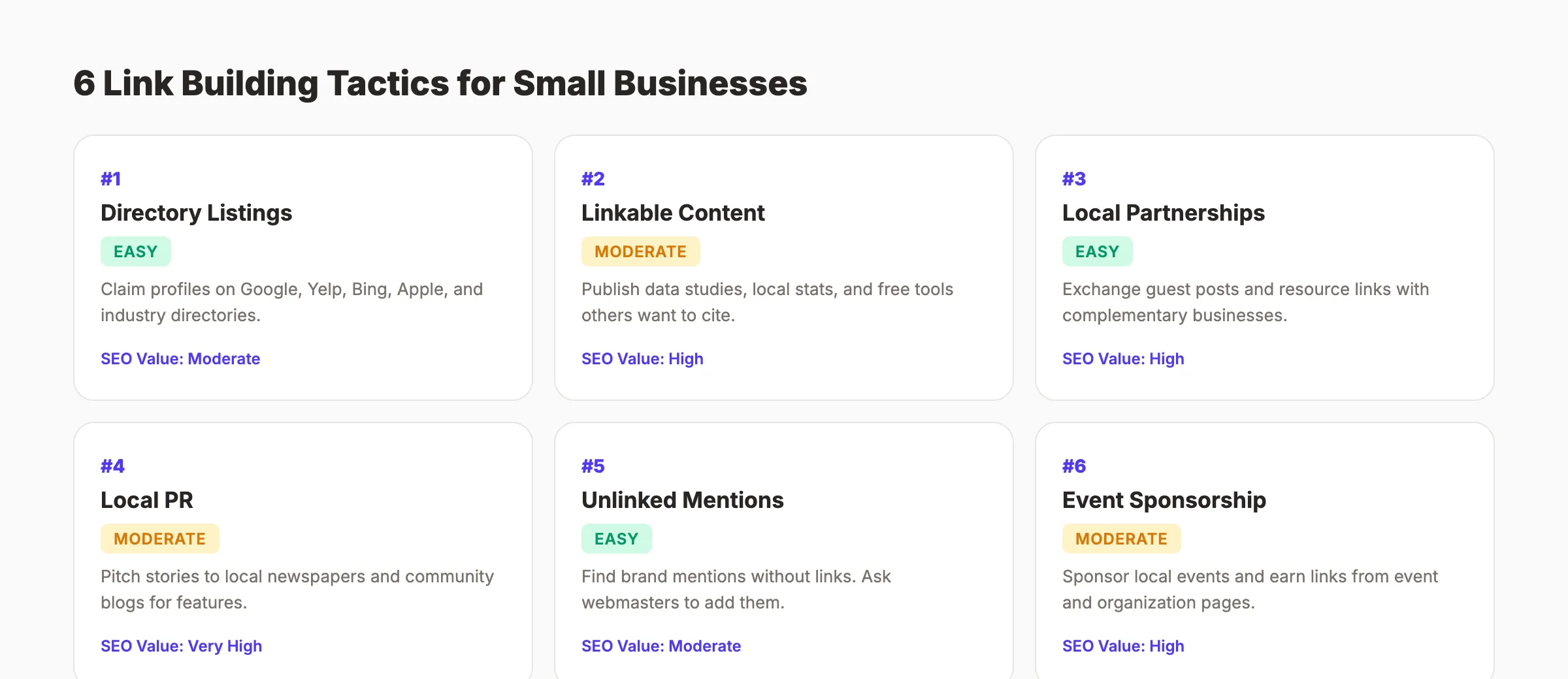
Backlinks remain one of Google’s top 3 ranking factors. But most link building advice assumes you have a marketing team and a budget for outreach campaigns. Small businesses need different tactics. Here are 6 that work without a big budget.
Claim Directory and Citation Links
The easiest links to earn are directory listings. Every small business should claim profiles on:
- Google Business Profile
- Yelp
- Bing Places
- Apple Business Connect
- Your local Chamber of Commerce
- Industry-specific directories (Avvo for lawyers, Healthgrades for doctors, Houzz for contractors)
These links carry moderate SEO value. More importantly, they build the citation consistency that drives local rankings.
Create Linkable Content
The best long-term link building strategy is publishing content that other websites want to reference. Data studies, original surveys, industry statistics, and free tools earn links naturally.
A landscaping company could publish “Average Landscaping Costs in [City]: 2026 Data.” Local real estate blogs, home improvement sites, and neighborhood forums would link to it as a resource.
Build Relationships, Not Just Links
Partner with complementary local businesses. A wedding photographer can collaborate with florists, venues, and caterers. Exchange guest posts. Feature each other in resource lists. Sponsor local events and earn links from event pages.
These relationship-based links are nearly impossible for competitors to replicate. They also drive referral traffic beyond the SEO benefit.
Earn Links Through Local PR
Local newspapers and community blogs need content. Pitch them stories about your business: a charity event, a milestone anniversary, an interesting project, a unique employee story.
A single feature in a local publication can earn a domain authority boosting backlink plus dozens of customers who read the article.
Reclaim Unlinked Mentions
Search Google for your business name. If someone mentioned you but did not link to your website, email them and ask. Most webmasters will add the link because you are giving them a reason to improve their own content.
Avoid These Link Building Mistakes
Do not buy links. Do not participate in link exchange schemes. Do not use Private Blog Networks (PBNs). Google detects and penalizes all of these. One penalty can erase months of SEO progress. The risk is never worth it for a small business.
Blog SEO + Local SEO. One price. The Stacc Stack Method combines blog content and local search optimization for compound growth. Most agencies charge $2,000+ for what Stacc delivers at $99/month. Start for $1 →
Measuring SEO Results and ROI
SEO without measurement is guessing. This chapter shows you exactly what to track, which tools to use, and how to calculate whether your SEO investment is profitable.
Set Up Your Tracking Foundation
You need 2 free tools before anything else:
- Google Search Console. Shows which queries bring visitors, your average ranking positions, click-through rates, and technical issues.
- Google Analytics 4. Tracks visitor behavior: pages viewed, time on site, conversions, and revenue attribution.
Set up both within your first week. Without them, you cannot measure anything. Use the website SEO score checker for a quick health snapshot.
The 6 Metrics That Matter
Small businesses drown in data. Track only these 6 metrics:
| Metric | What It Tells You | Check Frequency |
|---|---|---|
| Organic traffic | Total visitors from search | Weekly |
| Keyword rankings | Position for target keywords | Bi-weekly |
| Click-through rate (CTR) | Percentage of impressions that click | Monthly |
| Conversion rate | Visitors who become leads/customers | Monthly |
| Backlink count | Number of sites linking to you | Monthly |
| Revenue from organic | Actual dollars from SEO traffic | Monthly |
Everything else is a vanity metric until these 6 are trending up.
How to Calculate SEO ROI
The formula is simple:
SEO ROI = (Revenue from Organic - SEO Cost) / SEO Cost x 100
If you spend $500 per month on SEO and organic search generates $3,000 in new revenue, your ROI is 500%.
Track this monthly. Learn more about measuring content marketing ROI with attribution models that connect blog visits to actual sales.
Realistic Timelines
SEO is not instant. Here is what a typical small business timeline looks like:
- Month 1 to 3: Technical fixes, content publishing begins. Minimal traffic changes.
- Month 3 to 6: Rankings start moving. Some keywords reach page 1. Traffic increases 20% to 50%.
- Month 6 to 12: Compound growth kicks in. Significant traffic and lead increases.
- Month 12+: SEO becomes your most profitable marketing channel.
Read our detailed guide on how long SEO takes for more specific benchmarks by industry and competition level.
When to Adjust Your Strategy
If you see zero ranking movement after 4 months, something is wrong. Common culprits: targeting overly competitive keywords, thin content, technical crawl issues, or not enough backlinks.
Run an SEO audit quarterly. Use the SEO audit tool to identify specific issues. Then run a content audit to find underperforming pages that need improvement.
DIY vs. Outsourcing. What Makes Sense
Every small business owner faces the same question: should I do SEO myself, hire an agency, or use a service? The answer depends on your time, budget, and growth goals.
The DIY Path
DIY SEO works best when you have more time than money. If you can dedicate 5 to 10 hours per week, you can handle the basics: keyword research, on-page optimization, GBP management, and 2 to 4 blog posts per month.
Pros:
- Zero cost beyond your time
- Deep understanding of your own SEO
- Full control over content and strategy
Cons:
- Slow progress (5 to 10 hours per week produces limited output)
- Steep learning curve
- Competes with running your actual business
Start with best free SEO tools to minimize costs. Use the on-page SEO checker and meta tag analyzer to audit pages yourself.
The Agency Path
Traditional SEO agencies charge $1,000 to $5,000 per month for small business clients. Some deliver results. Many do not.
Pros:
- Hands-off for you
- Access to experienced strategists
- Faster results (in theory)
Cons:
- Expensive ($12,000 to $60,000 per year)
- Long contracts (6 to 12 months typical)
- Output is often low (4 to 8 blog posts per month at best)
- Difficult to evaluate quality
If you consider the agency route, check our list of SEO agency alternatives first.
The Done-for-You Service Path
A third option exists between DIY and full-service agencies: done-for-you SEO services. These services handle content creation and publishing at a fraction of agency pricing.
| Approach | Monthly Cost | Output | Your Time Required |
|---|---|---|---|
| DIY | $0 to $100 (tools) | 2 to 4 posts | 20 to 40 hours |
| Agency | $1,000 to $5,000 | 4 to 8 posts | 2 to 5 hours |
| Done-for-you service | $99 to $199 | 30 to 80 posts | Under 1 hour |
The math favors done-for-you services for most small businesses. You get 5 to 10 times the content output of an agency at 5% to 10% of the cost. You can scale blog content with AI and automate your SEO workflow without hiring a single writer.
A Decision Framework
Ask yourself 3 questions:
- Do I have 10+ hours per week to dedicate to SEO? If no, do not DIY.
- Do I have $1,000+ per month for marketing? If no, skip the agency.
- Do I need results within 6 months? If yes, outsource the content production.
Most small businesses land on a hybrid approach: handle strategy and GBP management in-house, outsource content creation. That is the model that produces the best ROI per hour invested.
Tools That Make Any Path Easier
Regardless of which approach you choose, these tools accelerate results:
- SEO tools for small business. Complete roundup
- AI SEO tools for small business. AI-specific options
- Affordable SEO tools. Budget-friendly picks
- SEO tools under $100. Best value options
- Content marketing tools. Content production aids
Use the SEO ROI calculator to model the potential return before committing to any approach.
Skip the agency. Keep the results. Stacc gives you the content output of a full marketing team for $99/month. 30 articles. Fully optimized. Published automatically. Start for $1 →
FAQ
How much should a small business spend on SEO?
Most small businesses spend between $500 and $1,500 per month on SEO services. A good benchmark is 0.5% to 2% of annual revenue. For a business generating $500,000 per year, that means $200 to $800 per month. Done-for-you services like Stacc start at $99 per month, making professional SEO accessible to businesses of any size.
How long does SEO take to work for a small business?
Expect initial ranking movement within 3 to 4 months. Meaningful traffic increases typically appear between month 4 and 6. Full ROI usually materializes between month 6 and 12. Local SEO for low-competition areas can produce results faster. Sometimes within 4 to 8 weeks.
Can a small business do SEO without hiring an agency?
Yes. Many small businesses handle SEO in-house using free tools like Google Search Console, Google Analytics, and Google Keyword Planner. The trade-off is time. Budget 5 to 10 hours per week for basic SEO tasks. For content production specifically, done-for-you services offer a middle ground between full DIY and expensive agency retainers.
What is the most important SEO task for a small business?
If you do only one thing, optimize your Google Business Profile. It is free, takes under 2 hours, and directly impacts your visibility in local search results and Google Maps. After that, focus on publishing consistent blog content targeting long-tail keywords your customers search for.
Is SEO worth it for a very small business with 1 to 5 employees?
Absolutely. SEO is disproportionately valuable for very small businesses because organic traffic does not require ongoing ad spend. A well-optimized website generates leads 24/7 without scaling your team. The key is focusing on local and long-tail keywords where competition is low and conversion intent is high.
What are the biggest SEO mistakes small businesses make?
The 3 most common mistakes: targeting keywords that are too competitive, inconsistent content publishing (1 to 2 posts then stopping), and ignoring Google Business Profile. Other frequent errors include missing title tags, slow site speed, no mobile optimization, and failing to set up analytics tracking from day one.
Your Next Step
Small business SEO is not a mystery. It is a system: research keywords, optimize your pages, claim your local listings, publish useful content, earn links, and measure results. The businesses that win at SEO are not the ones with the biggest budgets. They are the ones that execute consistently.
Pick one chapter from this guide and take action today. Set up Google Search Console. Optimize your Google Business Profile. Publish your first blog post. Small, consistent steps produce outsized results over 6 to 12 months.
Start your $1 trial → and let Stacc handle the content while you run your business.
Related Tools & Resources
Free SEO Tools:
Best Lists:

Written by
Siddharth GangalSiddharth is the founder of theStacc and Arka360, and a graduate of IIT Mandi. He spent years watching great businesses lose organic traffic to competitors who simply published more. So he built a system to fix that. He writes about SEO, content at scale, and the tactics that actually move rankings.
30 SEO blog articles published every month
Keyword-optimized, scheduled, and live on your site. Automatically.
30-day trial · Cancel anytime
theStacc
Stop writing SEO content manually
30 blog articles, 30 GBP posts, and social media content. Published every month. Automatically.
Start Your $1 Trial$1 for 3 days · Cancel anytime