
AI Image Generation for SEO: The Complete Guide
Learn how to use AI image generation for SEO. Covers tools, optimization, Google guidelines, prompting, and copyright. Updated March 2026.
Siddharth Gangal • 2026-03-30 • Content Strategy
In This Article
Most blog posts use the same recycled stock photos. Readers scroll past them. Google ignores them. They add nothing to the page.
AI image generation changes that equation. You can create original visuals for every post, every landing page, and every social campaign. No photographer. No designer. No $300 stock photo budget.
But speed without strategy creates new problems. Poorly optimized AI images slow your site, confuse search engines, and risk copyright issues.
We have published 3,500+ blog posts across 70+ industries. Every one includes custom visuals. This guide covers everything you need to know about using AI image generation for SEO and content marketing.
Here is what you will learn:
- How Google treats AI-generated images in search results
- The best AI image tools for marketing teams in 2026
- How to optimize AI images for search rankings and page speed
- Prompt engineering techniques that produce usable marketing visuals
- Copyright and licensing rules you cannot afford to ignore
- When AI images beat stock photography and when they do not
What AI Image Generation Is and Why Marketers Should Care
AI image generation uses machine learning models to create visuals from text prompts. You type a description. The model produces an image. The entire process takes seconds.
How It Works
Models like DALL-E 3, Midjourney, and Adobe Firefly train on millions of image-text pairs. They learn the relationship between words and visual patterns. When you input a prompt, the model generates a new image that matches your description.
The output is not a collage of existing images. It is a newly created visual that did not exist before.
Why It Matters for Content Marketing
Nearly 75% of marketers now use AI for media creation, including images and video. The shift happened because of 3 factors:
- Speed. A custom blog graphic that took a designer 2 hours now takes 30 seconds.
- Cost. No stock photo subscriptions. No freelance design invoices.
- Originality. Every image is unique to your content. No more “woman pointing at whiteboard” stock photos that 47 other blogs also use.
For SEO specifically, original images earn more image search visibility. Google values unique visuals over recycled stock. And 22.6% of all Google searches happen in Google Images. That is traffic most content teams ignore entirely.
The Catch
AI images look professional. They do not always look right. Hands with 6 fingers. Text that melts into gibberish. Brand colors that shift between generations. The technology is powerful but requires editing and quality control before publishing.
How Google Treats AI-Generated Images
Google does not penalize AI-generated content. That includes images. But the rules around quality, originality, and E-E-A-T still apply.
Google Official Position
According to Google’s guidance on AI-generated content, the search engine rewards “helpful, reliable, people-first content” regardless of how it was produced. The evaluation criteria focus on quality signals, not production method.
Google’s Gary Illyes confirmed in 2025 that AI content is acceptable as long as it meets quality standards. The key phrase: content should be “human-curated” even if it is AI-generated.
What This Means for Images
- AI images are indexable. Google crawls and indexes them the same way it indexes any other image.
- Alt text still matters. Search engines cannot “see” images. They rely on alt text, file names, and surrounding context to understand what an image shows.
- Unique images rank better. A custom AI visual ranks higher in Google Images than a stock photo used on 500 other sites.
- Quality control is your job. Google does not flag AI images automatically. But low-quality visuals hurt user experience metrics like bounce rate and dwell time.
Disclosure Requirements
Google does not require you to label AI-generated images on blog posts or marketing pages. However, for YMYL topics (health, finance, news), transparency about content creation methods builds trust.
For most marketing content, no disclosure is necessary. Just make sure the images accurately represent your message.
Stop writing. Start ranking. Stacc publishes 30 SEO articles per month for $99. Start for $1 →
Best AI Image Generation Tools for Marketing
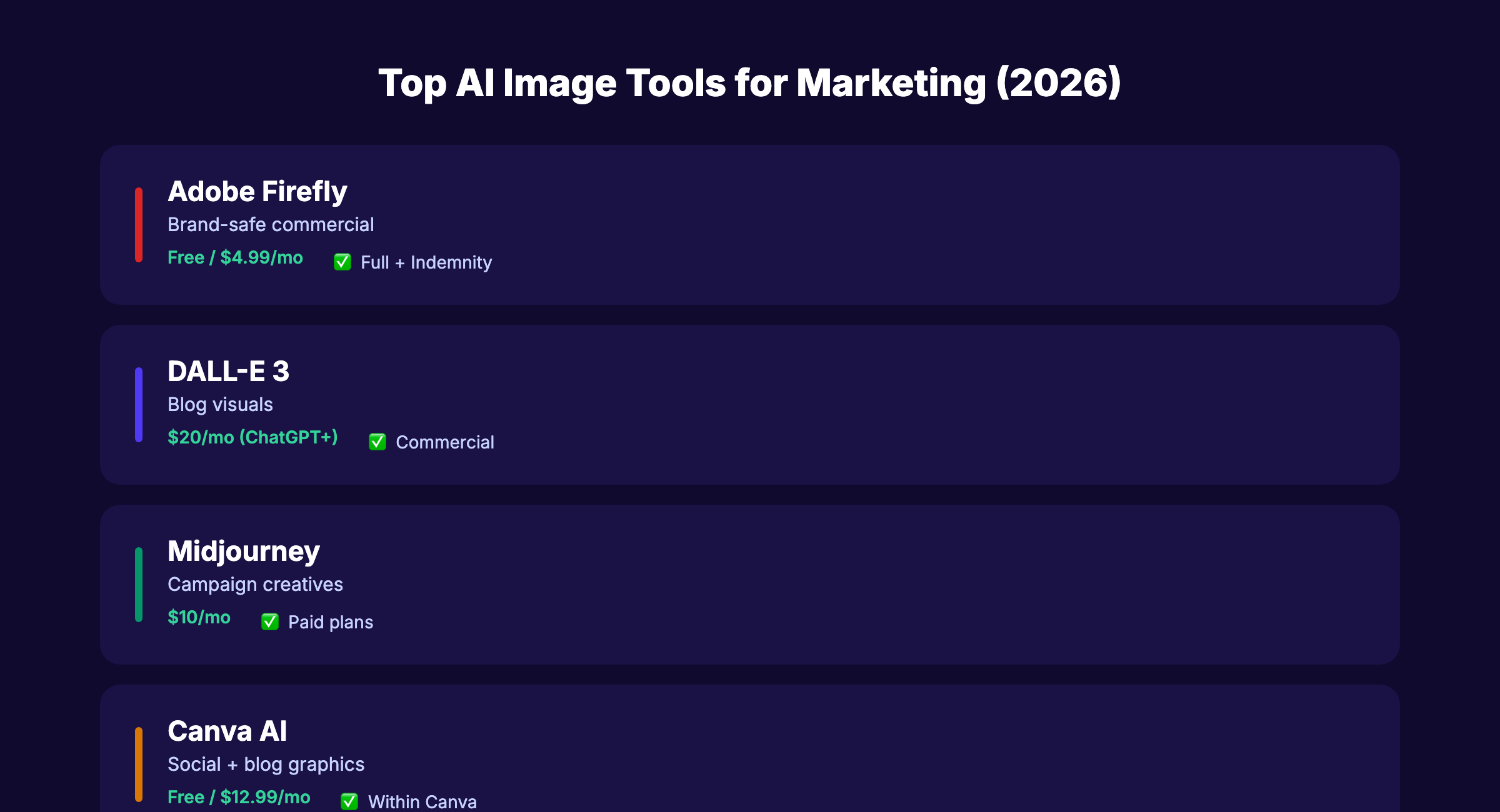
Not every AI image tool suits marketing use cases. You need commercial licensing, brand consistency, and fast iteration. Here are the tools worth using in 2026.
Tier 1: Best for Marketing Teams
| Tool | Best For | Commercial License | Starting Price |
|---|---|---|---|
| Adobe Firefly | Brand-safe commercial content | Yes (trained on licensed content) | Free tier / $4.99/mo |
| Canva Magic Studio | Social media and blog graphics | Yes | Free tier / $12.99/mo |
| DALL-E 3 (ChatGPT) | General marketing visuals | Yes (with usage rights) | ChatGPT Plus $20/mo |
| Midjourney | Creative campaign visuals | Yes | $10/mo |
Adobe Firefly
Best for teams that need legally safe images. Firefly trains exclusively on Adobe Stock, openly licensed content, and public domain materials. You get commercial usage rights and indemnification.
The integration with Photoshop and Illustrator makes editing fast. Generate a base image. Refine it in Photoshop. Export for web.
Canva Magic Studio
Best for non-designers creating social media and blog graphics. Upload your brand kit (logos, colors, fonts) and Magic Studio applies them to AI-generated designs automatically.
The batch generation feature saves time when you need 30 social media images for a monthly calendar.
DALL-E 3 via ChatGPT
Best for quick blog visuals and concept images. The natural language interface means you do not need to learn complex prompting. Describe what you want in plain English.
ChatGPT Plus users get commercial usage rights for all generated images.
Midjourney
Best for high-impact campaign visuals that need a creative edge. Midjourney excels at stylized, artistic images that stand out on social media and landing pages.
The learning curve is steeper (Discord-based interface). But the output quality for hero images and ad creatives is unmatched.
Tier 2: Specialized Tools
- Ideogram — Best for images with readable text (logos, infographics).
- Leonardo.ai — Best for consistent character and product imagery across multiple images.
- Recraft — Best for vector graphics and icon generation.
- Photoroom — Best for product photography and background removal.
How to Choose
If you publish blog content at scale, start with DALL-E 3 or Canva. If you run paid ad campaigns, invest in Midjourney or Adobe Firefly for higher-quality hero images.
How to Optimize AI Images for SEO
Generating the image is step one. Optimizing it for search engines and page speed is where most teams fail.
File Naming
Search engines read file names. A descriptive name tells Google what the image contains before it even processes the visual.
| Bad File Name | Good File Name |
|---|---|
image-1.png | ai-image-generation-tools-comparison.png |
download.jpg | midjourney-marketing-example.jpg |
output-final-v2.png | email-marketing-infographic-2026.png |
Rules for file names:
- Use hyphens between words (not underscores)
- Include the target keyword when relevant
- Keep it under 5-7 words
- Make it descriptive of the image content
Alt Text
Alt text is the single most important SEO element for images. Google uses it to understand image content and match it to search queries.
Write alt text that:
- Describes what the image shows (not “image of” or “picture of”)
- Includes a keyword naturally when relevant
- Stays under 125 characters
- Provides context a screen reader user would find helpful
Example: Instead of alt="AI image" write alt="Comparison table of 4 AI image generation tools with pricing and features"
For a deeper dive, read our image SEO guide.
File Format and Compression
AI tools typically output PNG or JPEG files. Neither is ideal for web without compression.
| Format | Best For | Typical Savings |
|---|---|---|
| WebP | Photos and complex graphics | 25-35% smaller than JPEG |
| AVIF | High-quality photos | 50% smaller than JPEG |
| SVG | Icons and simple graphics | Scales without quality loss |
| Optimized PNG | Graphics with transparency | 40-60% reduction with tools |
Use tools like Squoosh, TinyPNG, or ShortPixel to compress before uploading. Target under 100KB for blog images and under 200KB for hero images.
Lazy Loading
Add loading="lazy" to images below the fold. This prevents offscreen images from blocking initial page load. Your largest contentful paint (LCP) improves. Rankings improve.
Never lazy-load the first image visible on screen. That image should load immediately.
Structured Data
Add image structured data for important visuals. Google uses schema markup to understand image context and display rich results.
For blog posts, the image property in Article schema should point to your feature image. For product pages, use Product schema with image arrays.
Your SEO team. $99 per month. 30 optimized articles, published automatically. Start for $1 →
AI Image Prompting for Marketing Content
The quality of your prompt determines the quality of your image. Vague prompts produce generic output. Specific prompts produce usable marketing assets.
The Marketing Prompt Framework
Every marketing image prompt should include 5 elements:
- Subject — What the image shows
- Style — The visual approach (photo-realistic, flat design, isometric, watercolor)
- Composition — How elements are arranged (centered, rule of thirds, overhead)
- Color palette — Specific hex codes or color descriptions
- Context — Where the image will be used (blog header, social post, ad creative)
Prompt Examples by Use Case
Blog Feature Image: “A clean, modern flat-design illustration of a laptop displaying analytics charts with a magnifying glass over a graph. Purple and navy blue color palette. White background. No text. Minimal style. 1200x630 aspect ratio.”
Social Media Post: “A photo-realistic overhead shot of a desk with a coffee cup, notebook, and phone showing a marketing dashboard. Warm lighting. Shallow depth of field. Instagram square format.”
Infographic Background: “An abstract geometric background with soft purple gradients and floating circles. Minimal, clean, professional. Space for text overlay on the right side. Dark navy base.”
Product Comparison Graphic: “A side-by-side comparison layout with 3 column cards on a light gray background. Each card has a colored header bar. Professional, corporate style. No text in the image.”
Tips for Consistent Brand Imagery
- Save your best prompts as templates. Reuse and modify them.
- Include your brand colors in every prompt (e.g., “use #4f39f6 purple and #0f0a2e navy”).
- Specify “no text” unless you want AI-generated text (which often has errors).
- Generate 4-6 variations and pick the best one. Do not publish the first output.
- Use the same style keyword across all prompts for visual consistency (e.g., “minimal flat design” or “isometric illustration”).
For more on creating content with AI tools, including text and images together, see our AI blogging guide.
Copyright, Licensing, and Legal Considerations
AI-generated images sit in a legal gray area. The rules are evolving. Here is what you need to know as of March 2026.
Copyright Ownership
In the United States, the Copyright Office has ruled that AI-generated images without significant human creative input cannot be copyrighted. This means:
- You can use AI images commercially in most cases.
- You cannot claim exclusive copyright over a purely AI-generated image.
- If you significantly modify an AI-generated image (editing, compositing, adding elements), the modified version may qualify for copyright protection.
Commercial Licensing by Tool
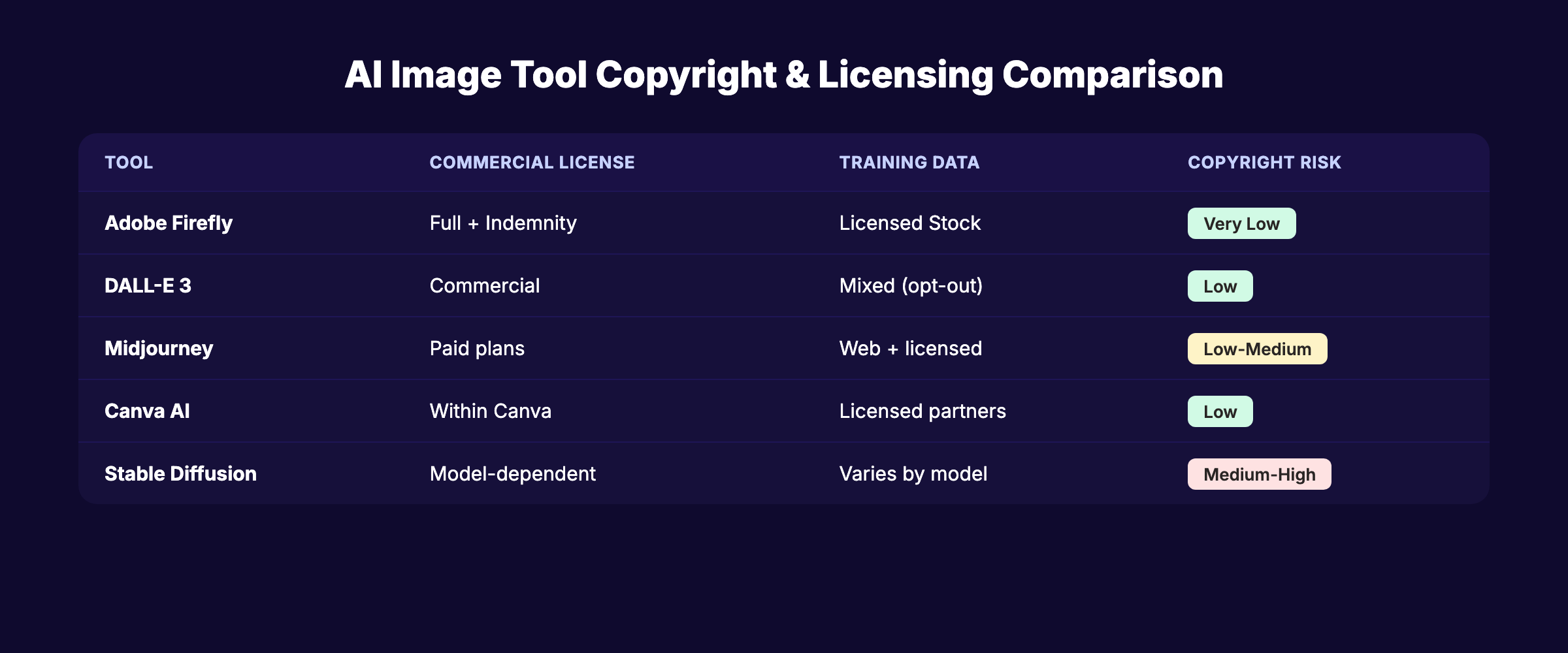
| Tool | Commercial Use | Indemnification | Training Data |
|---|---|---|---|
| Adobe Firefly | Full commercial rights | Yes (up to $25K for enterprise) | Licensed Adobe Stock |
| DALL-E 3 | Yes (with ChatGPT Plus) | No | Mixed (with opt-out) |
| Midjourney | Yes (paid plans) | No | Web-scraped + licensed |
| Canva AI | Yes (within Canva license) | Limited | Licensed partners |
| Stable Diffusion | Depends on model | No | Mixed (varies by model) |
Best Practices for Legal Safety
- Use tools trained on licensed data when possible. Adobe Firefly is the safest option.
- Do not generate images of real people unless you have their consent.
- Do not replicate copyrighted art styles by prompting “in the style of [specific artist].”
- Keep records of your prompts and generation dates for any commercially important images.
- Add human modification. Even minor editing strengthens your position on ownership.
Disclosure Best Practices
While not legally required for most marketing content, some brands now disclose AI image use in image credits or footer notes. This builds trust and aligns with growing consumer expectations for transparency about AI content.
3,500+ blogs published. 92% average SEO score. See what Stacc can do for your site. Start for $1 →
When to Use AI Images vs Stock vs Custom Photography
AI images are not always the right choice. Different content types call for different visual strategies.
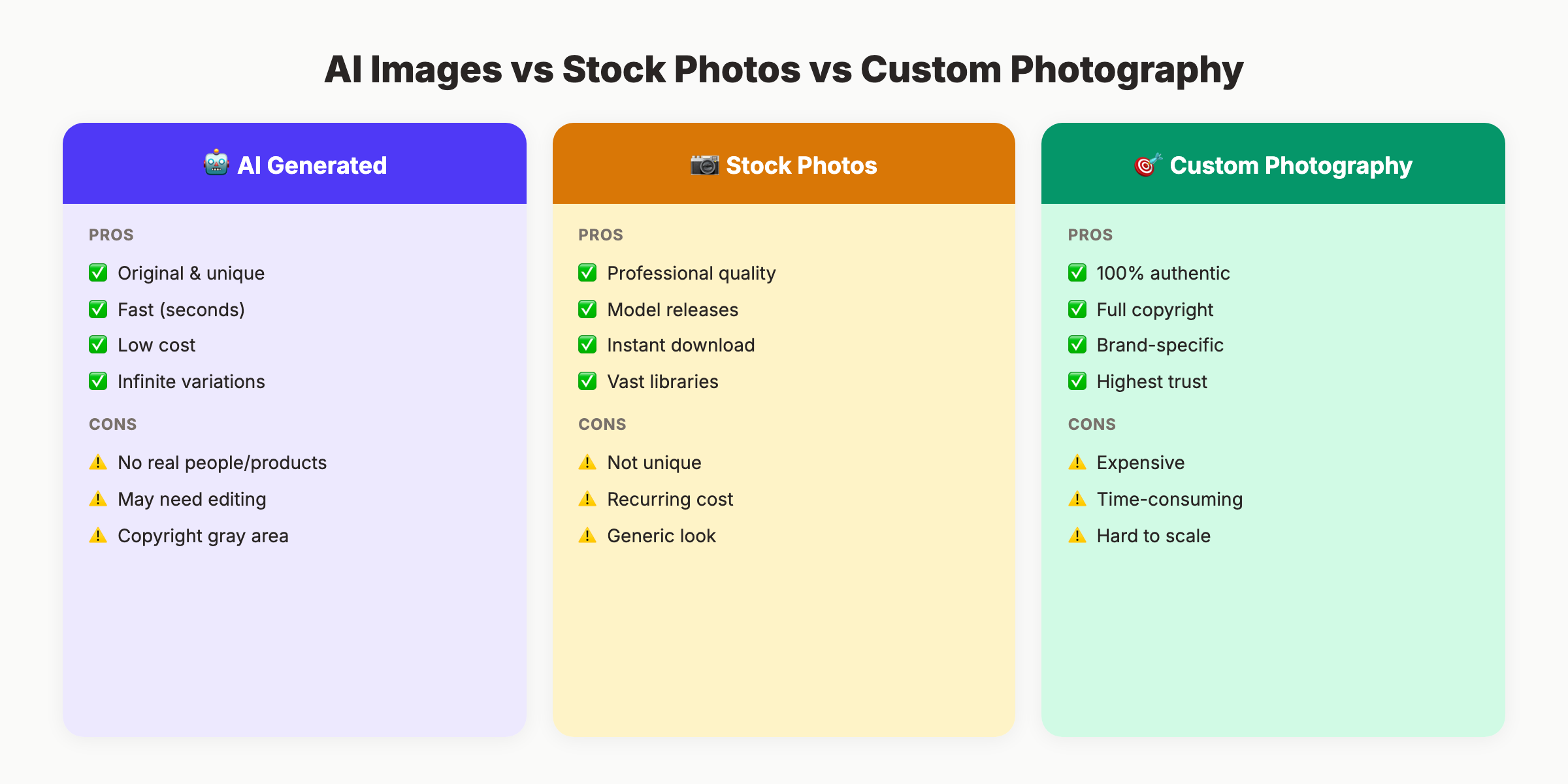
Use AI Images When:
- You need original blog graphics at scale (20-30+ posts per month)
- Your budget does not support custom photography or design
- You want unique visuals that match your exact content angle
- You need quick iterations (A/B testing ad creatives)
- You are creating abstract or conceptual illustrations
Use Stock Photography When:
- You need photos of specific real-world locations
- Authenticity matters more than uniqueness (team pages, about pages)
- You need images with recognizable model releases
- Speed matters and stock has the exact image you need
Use Custom Photography When:
- You sell physical products (AI cannot photograph your actual product)
- Your brand relies on authenticity (restaurants, real estate, hotels)
- You need consistent imagery across a large campaign
- Legal or regulatory requirements demand real images (medical, legal)
The Hybrid Approach
The best content strategies combine all 3. Use AI for blog graphics and infographics. Use stock for supplementary lifestyle images. Use custom photography for product pages and team photos.
For teams publishing at high velocity, AI images handle 70-80% of visual needs. The remaining 20-30% comes from stock and custom sources.
Common AI Image Mistakes That Hurt SEO
These errors appear in almost every content team using AI images for the first time.
Mistake 1: Uploading Uncompressed Images
AI tools output high-resolution files. A single DALL-E image can be 4-8MB. Uploading that directly to your blog destroys page speed. Always compress before uploading. Target under 100KB for inline images.
Mistake 2: Using Generic File Names
image-1.png tells Google nothing. Rename every file with descriptive, keyword-relevant names before uploading.
Mistake 3: Skipping Alt Text
No alt text means Google cannot index the image for search. It also means screen reader users cannot access it. Write alt text for every image, every time.
Mistake 4: Inconsistent Visual Style
One blog post has watercolor illustrations. The next has photorealistic renders. The third has cartoon graphics. This inconsistency weakens brand perception. Pick a style and stick with it across your content.
Mistake 5: Publishing AI Text in Images
AI-generated text inside images is almost always garbled. Misspelled words, random characters, and nonsensical phrases. Never include text in AI prompts unless you plan to overlay real text in an editor afterward.
Mistake 6: Ignoring Mobile Optimization
AI images are often generated at desktop dimensions. They may not crop well on mobile screens. Test every image at 375px width (standard mobile viewport) before publishing.
Mistake 7: Not Adding Structured Data
Image-heavy pages benefit from ImageObject schema. Without it, Google may not associate your images with the right content. Add schema for your most important visuals.
For more optimization techniques, read our full guide on on-page SEO best practices.
AI Image SEO Checklist
Use this before publishing any AI-generated image:
- File name is descriptive and includes a relevant keyword
- Alt text describes the image in under 125 characters
- Image is compressed to under 100KB (inline) or 200KB (hero)
- Format is WebP or AVIF for photos, SVG for simple graphics
- Lazy loading is applied to below-the-fold images
- First visible image is NOT lazy loaded
- Image dimensions match the container (no oversized files)
- Visual style matches the rest of the site
- No AI-generated text visible in the image
- Commercial licensing is confirmed for the tool used
- Image is unique (not duplicated across multiple pages)
- Structured data includes the image where applicable
Skip the agency. Keep the results. Stacc starts at $99/mo with a $1 trial. Start for $1 →
FAQ
Does Google penalize AI-generated images?
No. Google indexes AI-generated images the same way it indexes any other image. The evaluation focuses on quality, relevance, and proper optimization (alt text, file names, compression). According to Google’s official guidance, the search engine rewards helpful content regardless of production method.
What is the best AI image generator for SEO content?
For blog content at scale, DALL-E 3 (via ChatGPT) and Canva Magic Studio offer the best balance of quality, speed, and commercial licensing. For premium campaign visuals, Adobe Firefly provides the safest commercial licensing with indemnification.
Do I need to disclose AI-generated images on my website?
No legal requirement exists for most marketing content in 2026. Google does not require disclosure either. Some brands add image credits voluntarily to build trust. For YMYL content (health, finance), transparency is a stronger expectation.
Can I copyright AI-generated images?
In the US, purely AI-generated images without significant human creative input cannot be copyrighted. If you substantially modify the image (compositing, editing, adding elements), the modified version may qualify. Adobe Firefly offers the strongest commercial licensing and indemnification.
How do AI images affect page speed?
Uncompressed AI images hurt page speed significantly. A single unoptimized image can add 4-8MB to page load. Always compress AI images to under 100KB for inline graphics and convert to WebP or AVIF format. Use lazy loading for images below the fold.
Should I use AI images or stock photos for blog posts?
AI images are better for unique, topic-specific illustrations that do not exist in stock libraries. Stock photos are better when you need authentic real-world imagery. The best approach combines both. Use AI for custom graphics (70-80% of images) and stock for lifestyle and supplementary photos.
AI image generation is not a shortcut. It is a capability that requires the same SEO discipline as any other content asset. Name your files. Write your alt text. Compress your images. Match your brand.
The teams that treat AI images as first-class SEO assets will rank in Google Images, reduce bounce rates, and publish faster than competitors still paying $300 per stock photo.
Written and published by Stacc. We publish 3,500+ articles per month across 70+ industries. All data verified against public sources as of March 2026.
