
Image SEO Guide (2026): How to Rank in Google Images [8 Steps]
Image SEO guide covering Google Images ranking factors: file naming, alt text, image sitemaps, structured data, compression, and visual search optimization. Step-by-step with examples.
Image SEO: The Complete Guide to Ranking in Google Images (2026)
Google Images drives 22.6% of all web search traffic. Yet most websites treat image optimization as an afterthought. They compress a few files, add generic alt text, and move on.
That approach leaves an entire search channel on the table. Image SEO is not just about making pages load faster. It is a distinct ranking system with its own signals, discovery paths, and commercial intent.
Images now appear on 37.8% of all search result pages. Google Lens processes over 20 billion visual searches per month. Ecommerce brands generate thousands of product clicks directly from image packs. And none of that traffic requires a single extra word of written content.
We publish 3,500+ blog posts across 70+ industries. Every one includes optimized images that rank. This guide covers the full image SEO system we use and recommend.
Here is what you will learn:
- How Google discovers, indexes, and ranks images
- The file naming and alt text system that drives image rankings
- How to build and submit an image sitemap
- How to use structured data to earn rich results from images
- How to optimize product images for Google Lens and visual search
- How to audit your existing image SEO and fix gaps
- How to track image search traffic in Google Search Console
- How ecommerce sites win with image-first SEO strategies
Table of Contents
- Chapter 1: How Google Images Search Actually Works
- Chapter 2: Image File Names, Formats, and Technical Foundations
- Chapter 3: Alt Text That Ranks and Converts
- Chapter 4: Image Sitemaps and Crawl Optimization
- Chapter 5: Structured Data for Images
- Chapter 6: Visual Search and Google Lens Optimization
- Chapter 7: Image SEO for Ecommerce and Product Pages
- Chapter 8: Auditing and Tracking Image SEO Performance
- Frequently Asked Questions
Chapter 1: How Google Images Search Actually Works {#ch1}
Most SEO guides skip this step. They jump straight to alt text without explaining how Google actually finds, processes, and ranks images. Understanding the system behind image search changes how you approach every optimization that follows.
How Google Discovers Images
Google finds images through 3 primary paths. The Googlebot crawler follows links on your pages and discovers <img> elements in your HTML. Image sitemaps provide a direct list of image URLs for the crawler to process. And the Google Images bot specifically crawls pages looking for visual content.
One critical detail: Google does not index CSS background images. Only images rendered through standard HTML <img> tags with src attributes get discovered. JavaScript-rendered images can also be indexed, but they require additional rendering steps that slow discovery.
If your images use CSS background-image properties, Google will never see them. Switch to proper <img> elements for any image you want ranked.
How Google Understands Image Content
Google uses multiple signals to understand what an image shows. The file name provides initial context. Alt text acts as the primary description signal. Surrounding page content, captions, and headings add topical relevance.
But Google now goes beyond metadata. Its multimodal AI systems analyze pixel-level content directly. Google can identify objects, scenes, text within images, and even brand logos without relying solely on your descriptions.
This means low-quality, irrelevant, or misleading images get filtered out. The visual content of the image itself is now a ranking factor.
How Google Ranks Images
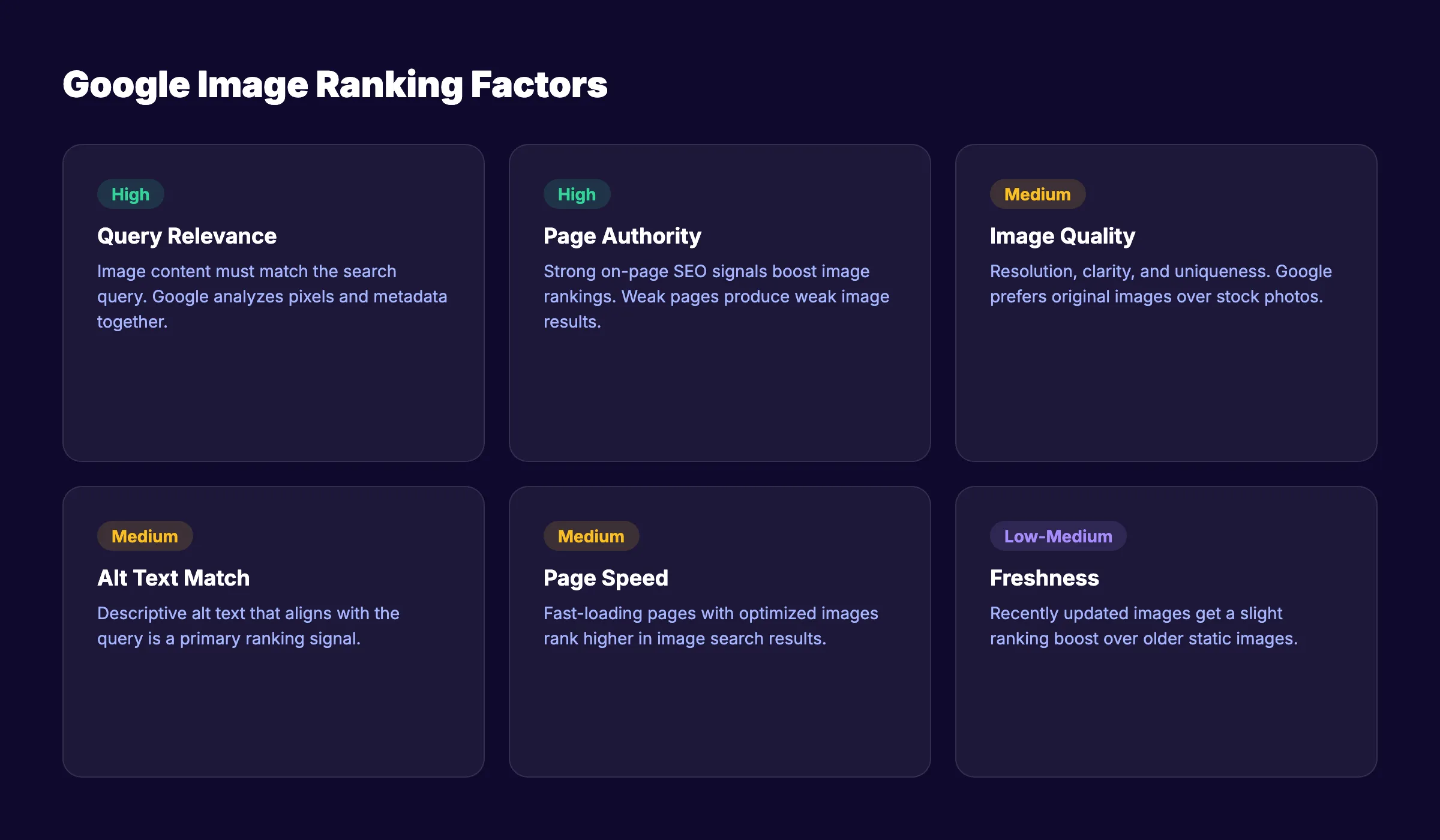
Image ranking uses a different algorithm than web search. The key ranking factors include:
| Ranking Factor | Weight | What It Means |
|---|---|---|
| Relevance to query | High | Image content matches what the user searched |
| Page authority | High | The hosting page has strong on-page SEO signals |
| Image quality | Medium | Resolution, clarity, and uniqueness |
| Alt text match | Medium | Descriptive alt text aligns with the search query |
| Page speed | Medium | Fast-loading pages with optimized images rank higher |
| Freshness | Low-Medium | Recently updated images get a slight boost |
| User engagement | Low-Medium | Click-through rate and dwell time from image results |
Page authority matters more than most people expect. A perfectly optimized image on a weak page will lose to a decent image on a high-authority page. That is why image SEO and content SEO work together.
Chapter 2: Image File Names, Formats, and Technical Foundations {#ch2}
Technical image optimization is the foundation of every image SEO strategy. Get the file name, format, and delivery wrong, and no amount of alt text will save your rankings. This chapter covers the decisions you make before an image ever reaches your page.
File Naming Best Practices
Your image file name is the first signal Google reads. A file named IMG_7489.jpg tells Google nothing. A file named tropical-green-smoothie-recipe.jpg tells Google exactly what the image contains.
Follow these rules for every image file name:
- Use lowercase letters and hyphens (no underscores or spaces)
- Describe the image content in 3 to 6 words
- Include your target keyword naturally when relevant
- Avoid keyword stuffing or repeating the same term
- Keep file names under 50 characters
Bad: photo1.png, DSC_0042.jpg, best-best-seo-tool-best.png
Good: google-search-console-dashboard.png, white-running-shoes-side-view.jpg
Rename every image before uploading. This is a one-time effort with permanent ranking benefits.
Choosing the Right Image Format
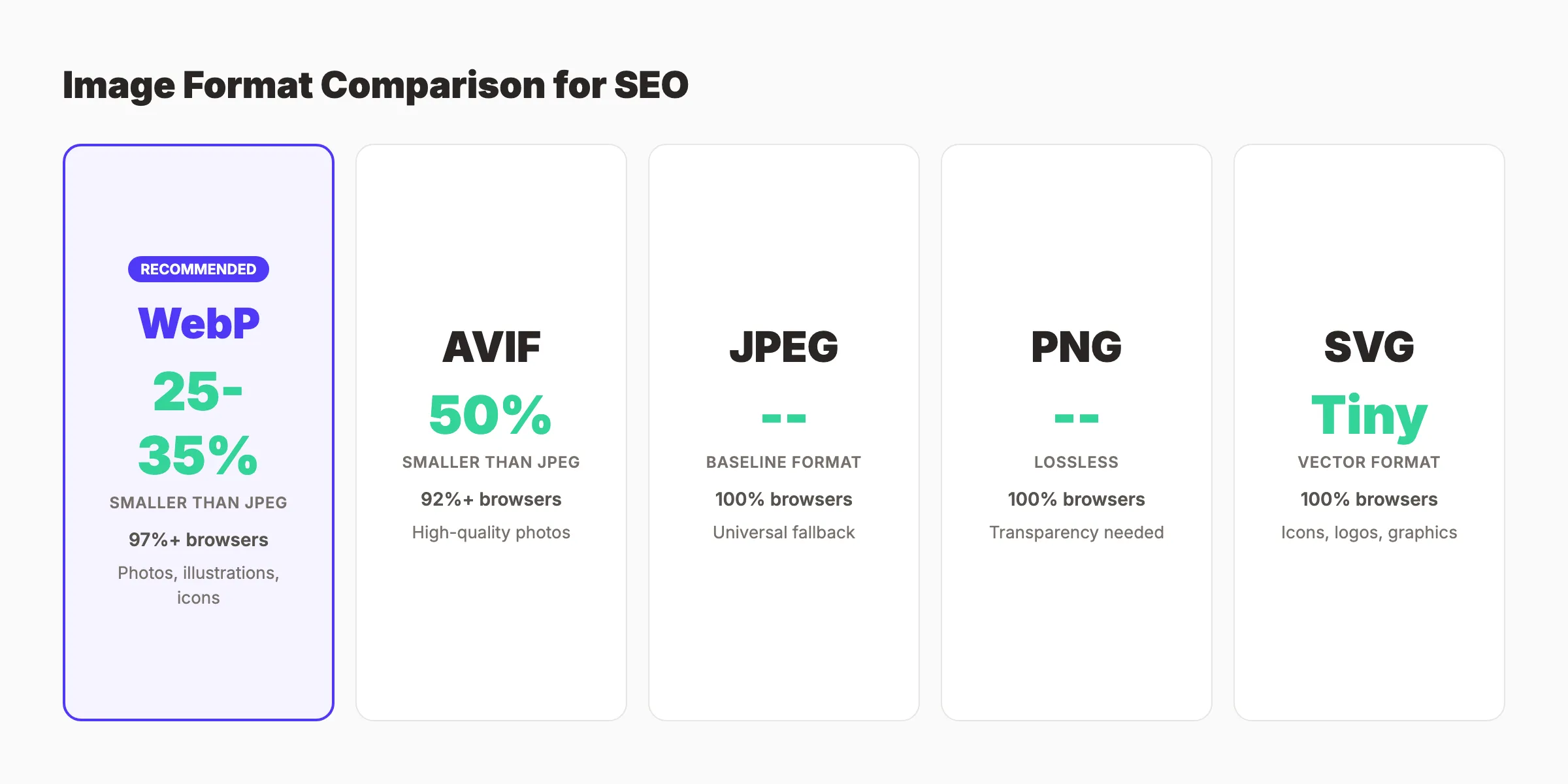
Format choice affects both quality and page speed. Here is when to use each format:
| Format | Best For | Compression | Browser Support |
|---|---|---|---|
| WebP | Photos, illustrations, icons | 25-35% smaller than JPEG | 97%+ browsers |
| AVIF | Photos where quality matters | 50% smaller than JPEG | 92%+ browsers |
| JPEG | Fallback for older browsers | Good compression, lossy | 100% |
| PNG | Graphics with transparency | Larger files, lossless | 100% |
| SVG | Icons, logos, simple graphics | Tiny file size, scalable | 100% |
WebP is the default standard for 2026. Use it for most images. AVIF offers better compression but slower encoding. Serve AVIF with WebP fallback using the <picture> element for maximum performance.
For a deep dive on compression techniques and format conversion, read our blog image optimization guide.
Responsive Images and Srcset
A single image file does not work for every screen size. A 2400px hero image loads unnecessarily on a 375px mobile screen. Responsive images solve this by serving different file sizes based on the device.
Use the srcset attribute to define multiple image sizes:
<img src="product-shoes-800.webp"
     srcset="product-shoes-400.webp 400w,
             product-shoes-800.webp 800w,
             product-shoes-1200.webp 1200w"
     sizes="(max-width: 600px) 400px,
            (max-width: 1000px) 800px,
            1200px"
     alt="White running shoes side view">
Google recommends a minimum of 50,000 pixels (width multiplied by height) for any image you want indexed. An image at 250 by 200 pixels meets this threshold. Anything smaller risks being ignored by the image indexer.
Lazy Loading and Performance
Lazy loading defers off-screen images until the user scrolls near them. This directly improves Largest Contentful Paint and overall Core Web Vitals scores.
Add loading="lazy" to every image below the fold. Never lazy-load the hero image or any image visible on initial page load. That delays LCP and hurts your performance score.
Your images deserve SEO that runs on autopilot. Stacc publishes 30 optimized blog posts per month with properly formatted images, alt text, and schema markup. Start for $1 →
Chapter 3: Alt Text That Ranks and Converts {#ch3}
Alt text is the single highest-impact image SEO action you can take. It serves 3 purposes: accessibility for screen readers, context when images fail to load, and the primary signal Google uses to match images with search queries. Writing it well is a skill most teams never develop.
The Alt Text Formula
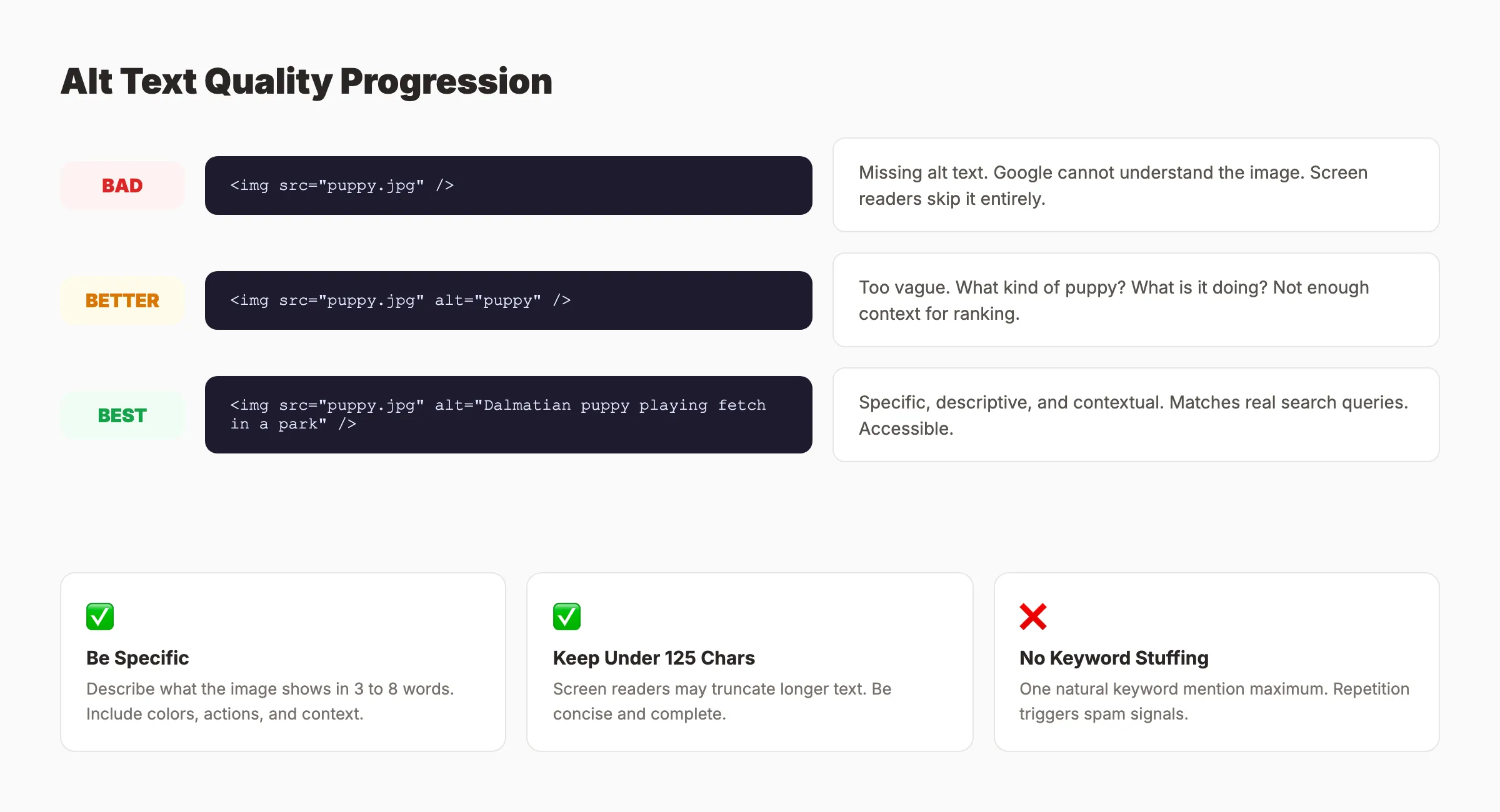
Effective alt text follows a consistent pattern. Describe what the image shows in plain language. Include the target keyword once if it fits naturally. Keep it under 125 characters.
Google provides a clear quality progression:
- Bad (missing):
<img src="puppy.jpg"/> - Acceptable:
<img src="puppy.jpg" alt="puppy"/> - Good:
<img src="puppy.jpg" alt="Dalmatian puppy playing fetch in a park"/>
The best alt text is specific, descriptive, and contextual. It tells a screen reader user exactly what they would see. It tells Google exactly what the image contains.
Common Alt Text Mistakes
Most websites make at least 1 of these errors:
- Keyword stuffing: Repeating the target keyword 3 to 4 times in a single alt attribute. Google flags this as spam.
- Generic descriptions: Using “image of” or “photo of” as a prefix. Screen readers already announce images. The prefix wastes characters.
- Empty alt on content images: Decorative images (borders, spacers) should have empty alt (
alt=""). Content images should never have empty alt. - Identical alt text: Using the same alt text for every image on a page. Each image needs a unique description.
- Alt text over 125 characters: Screen readers may truncate long alt text. Keep descriptions concise and complete.
Run a site audit to find missing or duplicate alt text across your pages.
Alt Text for Different Image Types
Different image types need different alt text approaches:
Product images: Include the product name, color, size, and key feature. Example: alt="Navy blue leather messenger bag with brass buckle closure"
Infographics: Summarize the key data point. Example: alt="Bar chart showing 62% of marketers increased SEO budgets in 2026"
Screenshots: Describe the interface and what it shows. Example: alt="Google Search Console performance report filtered by image search"
Team photos: Name the people and context. Example: alt="Sarah Chen presenting quarterly SEO results to the marketing team"
Charts and graphs: State the main insight the visual communicates. Do not describe every data point. Let the surrounding text provide full detail.
Chapter 4: Image Sitemaps and Crawl Optimization {#ch4}
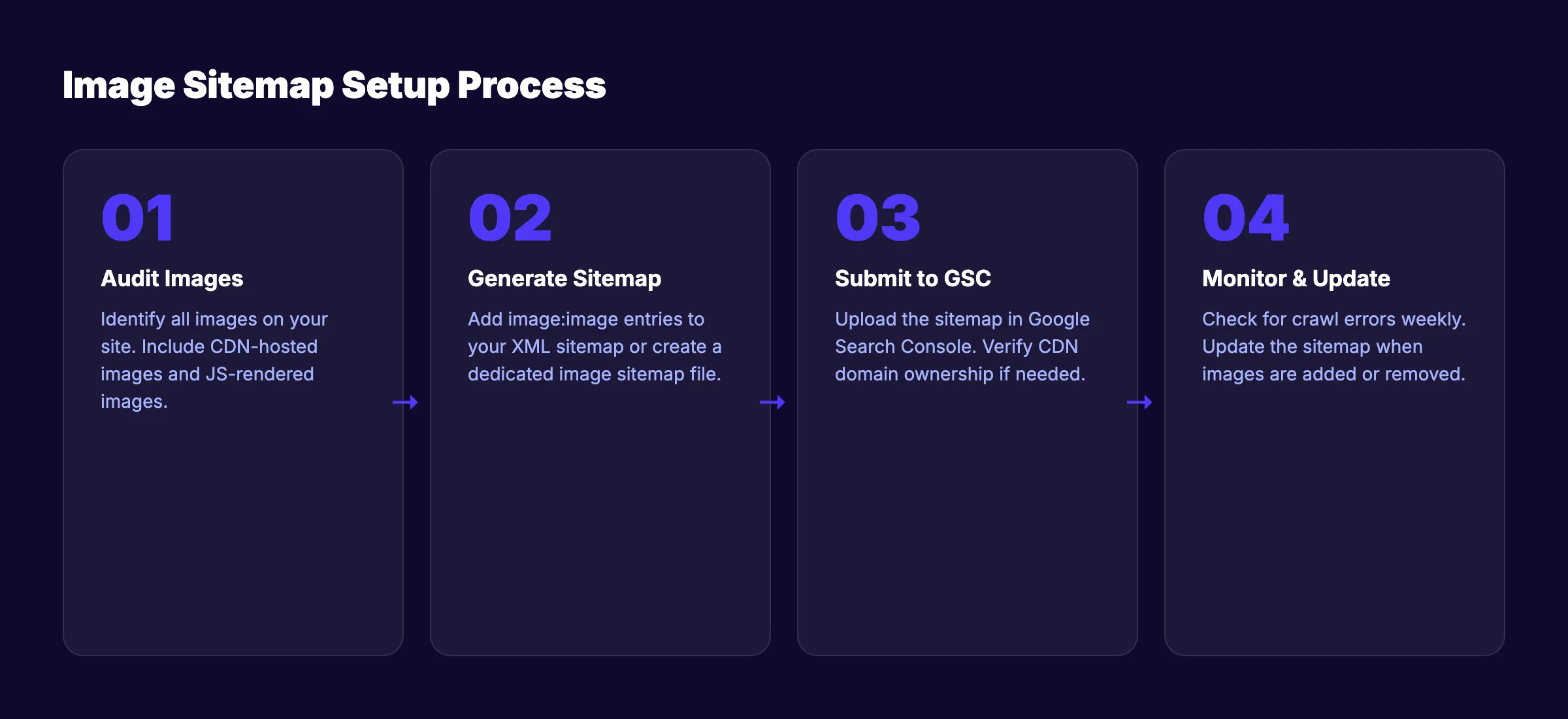
Google cannot rank images it has not crawled. Image sitemaps give search engines a direct path to every image on your site. They are especially important for JavaScript-heavy sites, CDN-hosted images, and large image libraries that standard crawling might miss.
What Is an Image Sitemap
An image sitemap is an extension of your standard XML sitemap. It lists the URLs of images on each page, making discovery faster and more reliable.
You can add image data to your existing sitemap or create a separate image-specific sitemap. The format uses the <image:image> namespace:
<url>
  <loc>https://example.com/running-shoes</loc>
  <image:image>
    <image:loc>https://example.com/images/white-running-shoes.webp</image:loc>
    <image:caption>White running shoes with mesh upper</image:caption>
  </image:image>
  <image:image>
    <image:loc>https://example.com/images/white-running-shoes-sole.webp</image:loc>
    <image:caption>Outsole pattern of white running shoes</image:caption>
  </image:image>
</url>
When Image Sitemaps Matter Most
Not every site needs a dedicated image sitemap. But several scenarios make them essential:
- CDN-hosted images: When your images live on a different domain (like
cdn.example.com), Google may not associate them with your main site. An image sitemap creates that connection. Google confirms that CDN-hosted images are permitted in image sitemaps. - JavaScript-rendered images: Single-page apps and React-based sites often load images through JavaScript. The sitemap ensures Google discovers these images without waiting for rendering.
- Large image catalogs: Ecommerce sites with thousands of product images benefit from direct submission. Standard crawling may miss deep pages with hundreds of images.
- New sites: If your site is new and has limited crawl budget, an image sitemap prioritizes image discovery.
Submitting and Maintaining Image Sitemaps
Submit your image sitemap through Google Search Console. Go to Sitemaps, enter the sitemap URL, and click Submit.
Monitor the indexing status regularly. Check for errors like broken image URLs, 404 responses, or blocked resources. Update the sitemap whenever you add, move, or delete images.
Automate sitemap generation with your CMS or build tool. Manual maintenance breaks down at scale. Most WordPress plugins and static site generators can produce image sitemaps automatically.
Crawl Access and Robots.txt
Your robots.txt file can accidentally block image crawling. Check that Googlebot and Googlebot-Image are not blocked from your image directories.
Common mistake: Blocking /wp-content/uploads/ in robots.txt. This prevents Google from accessing every image uploaded through WordPress.
Use this robots.txt pattern to ensure full image access:
User-agent: Googlebot-Image
Allow: /images/
Allow: /wp-content/uploads/
Verify access by testing image URLs in the URL Inspection tool in Search Console.
Stacc handles your blog content and SEO automatically. 30 articles per month with optimized images, alt text, and proper technical setup. Start for $1 →
Chapter 5: Structured Data for Images {#ch5}
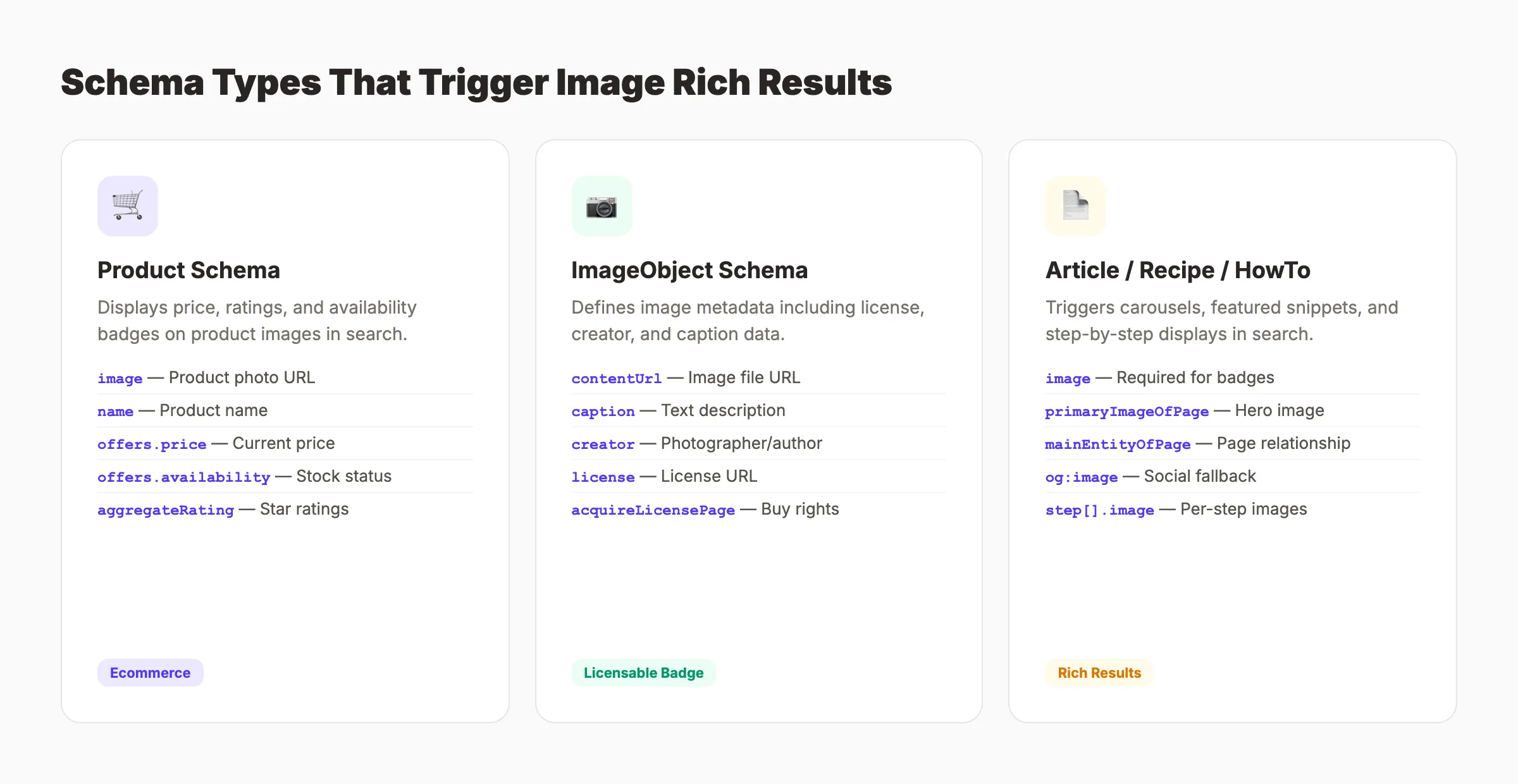
Structured data tells Google exactly what your images represent. It turns a simple photo into a product listing, recipe card, or article thumbnail in search results. Without it, you rely on Google to figure out context on its own. With it, you control the narrative.
ImageObject Schema
The ImageObject schema type lets you define detailed metadata about an image. Properties include:
contentUrl. The direct URL to the image filecaption. A text description of the imagecreator. The author or photographerlicense. URL to the image licenseacquireLicensePage. Where users can buy usage rightscreditText. Attribution text for the image
This schema is especially useful for photographers, stock image sites, and brands that want to control how their images appear in search. Google uses license and acquireLicensePage to show a “Licensable” badge on images in Google Images.
For a full guide on implementing schema, read our schema markup SEO guide.
Product Image Structured Data
Product pages with schema markup earn rich results that display price, availability, and ratings directly in image search. This is one of the highest-converting image SEO strategies for ecommerce.
The Product schema should include an image property pointing to your primary product photo. Google uses this image for rich result displays:
{
  "@context": "https://schema.org",
  "@type": "Product",
  "name": "Wireless Noise-Cancelling Headphones",
  "image": "https://example.com/images/headphones-black.webp",
  "description": "Over-ear wireless headphones with active noise cancellation",
  "offers": {
    "@type": "Offer",
    "price": "249.99",
    "priceCurrency": "USD",
    "availability": "https://schema.org/InStock"
  }
}
PrimaryImageOfPage and MainEntity
Google lets you tell it which image should represent the page. Use the primaryImageOfPage schema property or the mainEntityOfPage relationship to flag your hero image.
This influences which image Google selects for featured snippets, knowledge panels, and Discover cards. Without this signal, Google picks whatever image it thinks fits best. That could be your logo, a sidebar ad, or a low-quality thumbnail.
Use og:image meta tags as a fallback signal. Google reads Open Graph data when choosing representative images for a page.
Recipe, Article, and How-To Images
Different content types trigger different image displays in search. Recipe schema pulls images into recipe carousels. Article schema uses images for Top Stories and Discover placements. HowTo schema displays step-by-step images in rich results.
The image property is required for badge eligibility in Google Images across all these schema types. Pages without a declared image in their structured data miss these visual placements entirely.
Use our schema markup generator to create structured data for your pages without writing JSON-LD manually.
Chapter 6: Visual Search and Google Lens Optimization {#ch6}
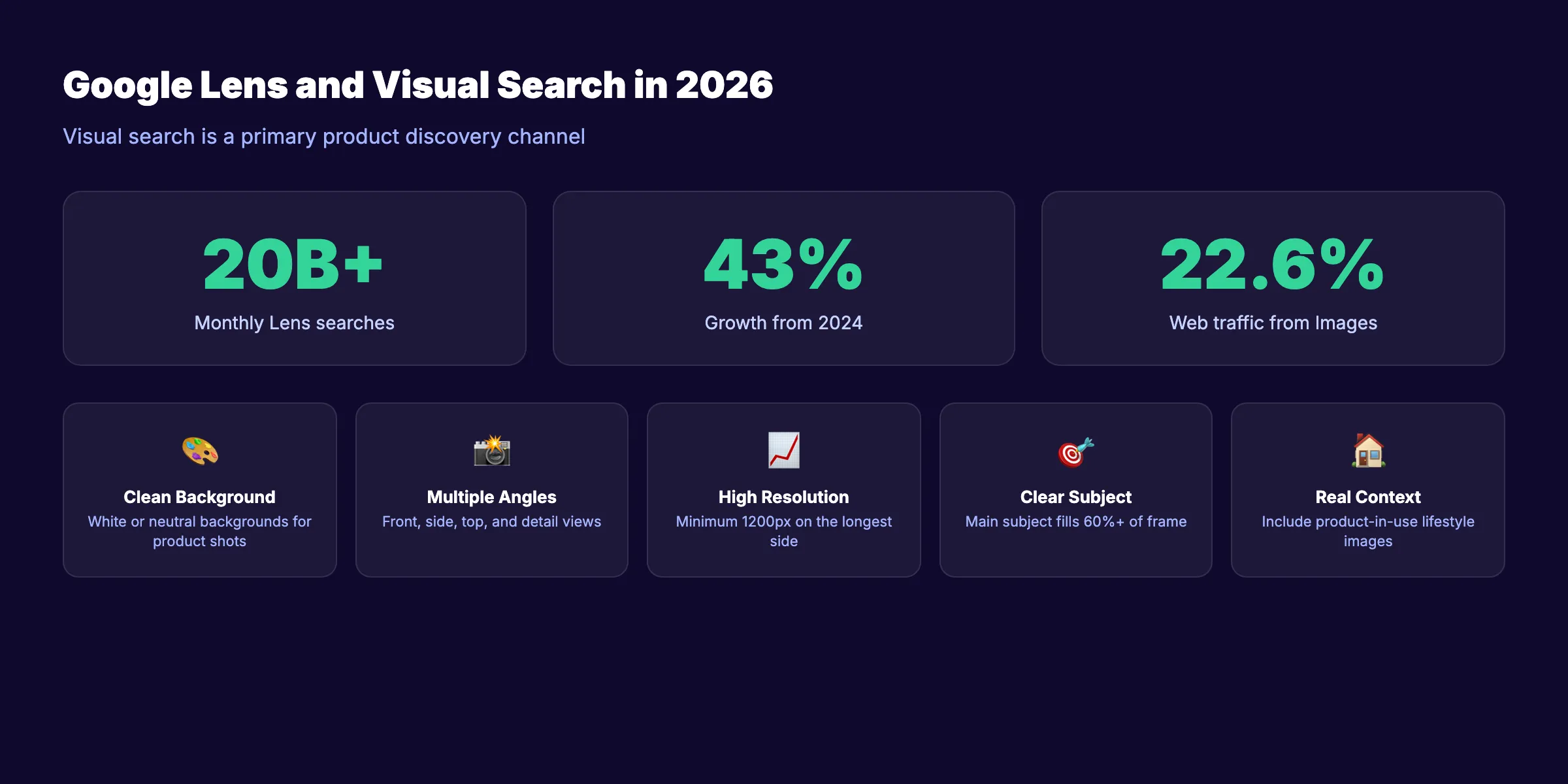
Google Lens processes over 20 billion visual searches per month. That number grew 43% from 2024. Users point their camera at a product, landmark, or text. Google returns matching results, shopping links, and related information. Visual search is no longer a novelty. It is a primary discovery channel.
How Google Lens Works
Google Lens uses computer vision to analyze images in real time. It identifies objects, reads text, recognizes products, and matches visual patterns against its index. The results pull from Google Images, Google Shopping, and the Knowledge Graph.
3 types of Lens queries drive the most traffic:
- Product identification: User photographs a product and wants to buy it
- Visual matching: User sees something and wants to learn about it
- Text extraction: User photographs text to translate, copy, or search
Product identification generates the most commercial intent. A user pointing their phone at a pair of shoes is closer to buying than someone typing “best running shoes.” This makes Lens optimization especially valuable for ecommerce.
Optimizing Images for Google Lens
Google Lens matches your images against visual queries. Optimization focuses on making your images easy to identify and match:
- Clean backgrounds: Product images with white or neutral backgrounds get matched more accurately than cluttered lifestyle shots
- Multiple angles: Provide front, side, top, and detail views. Lens matches against various perspectives
- High resolution: Minimum 1200px on the longest side. Lens needs pixel detail to match accurately
- Clear subjects: The main subject should occupy 60% or more of the frame. Do not bury products in busy scenes
- Real-world context: Include at least 1 “product in use” image alongside clean product shots. This captures lifestyle queries
Visual Search for Brand Visibility
Every image you publish is a potential entry point through visual search. When users photograph competitors or similar products, optimized images from your site can appear as alternatives.
This creates a passive brand discovery channel. You do not need to bid on keywords. You do not need the user to know your brand name. Your image just needs to match what they see.
Protect your own visual brand by maintaining consistent product photography. When your images appear across multiple sites (through distribution, press, or affiliates), reverse image search connects them back to your domain.
Monitor reverse image searches for your brand. Tools like Google Reverse Image Search and TinEye show where your images appear online. This reveals unauthorized usage and partnership opportunities.
SEO that publishes itself. Stacc writes, optimizes, and publishes 30 blog posts per month. Images, alt text, and schema included. Start for $1 →
Chapter 7: Image SEO for Ecommerce and Product Pages {#ch7}
Ecommerce sites live and die by product images. A single product page can generate hundreds of image search impressions per month. Multiply that across a catalog of 500 or 5,000 products, and image SEO becomes one of the largest organic traffic channels available.
Product Image Requirements
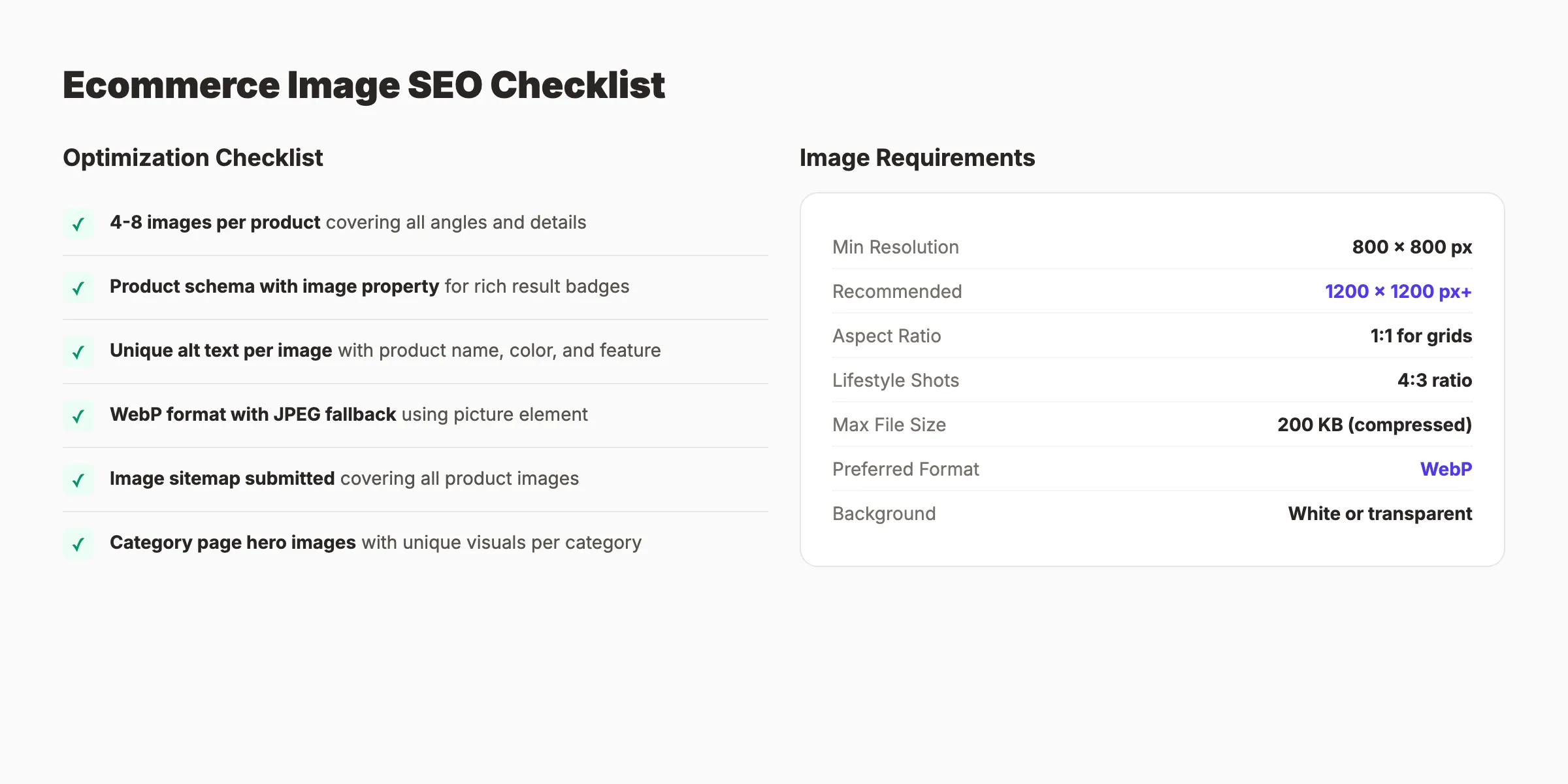
Google Shopping and image search have specific requirements for product images. Meeting these ensures your products appear in shopping results, image packs, and Lens matches.
| Requirement | Minimum | Recommended |
|---|---|---|
| Resolution | 800 x 800 px | 1200 x 1200 px or higher |
| Aspect ratio | 1:1 for product grids | 4:3 for lifestyle shots |
| Background | White or transparent | Clean, distraction-free |
| File format | JPEG or PNG | WebP with JPEG fallback |
| File size | Under 500 KB | Under 200 KB with compression |
| Images per product | 1 minimum | 4 to 8 covering all angles |
Products with 4 or more images see higher engagement in search results. Google can match these images against more visual queries. More angles mean more potential Lens matches.
For a full ecommerce optimization strategy, see our ecommerce SEO guide.
Image-Based Shopping Features
Google Image search now includes direct shopping integrations. When a product image appears in search, Google can display:
- Price badges: Show the current price directly on the image thumbnail
- In-stock badges: Confirm product availability
- Store name: Display the retailer name
- Product ratings: Show star ratings from structured data
These features require valid Product schema with Offer data. Pages without structured data show plain image thumbnails with no commerce signals. The difference in click-through rate is significant.
Category and Collection Page Images
Product category pages are often overlooked for image SEO. A well-optimized category page image can rank for broad terms like “winter jackets” or “organic skincare products.”
Use a representative product image or a curated collection image as the category hero. Add descriptive alt text that matches the category keyword. Include the category image in your image sitemap.
Avoid using the same generic banner across all category pages. Each category should have a unique representative image that Google can match to distinct queries.
User-Generated Product Images
Customer photos and review images add authenticity and visual variety. Google indexes these images the same as your professional shots. They often rank for long-tail queries because they show products in real-world settings.
Encourage customers to upload photos with reviews. Display them in a gallery on the product page with proper <img> tags and descriptive alt text. Moderate quality but do not over-filter. Authentic images outperform polished stock photos for many queries.
Chapter 8: Auditing and Tracking Image SEO Performance {#ch8}
Image SEO is not a one-time project. Sites add, remove, and replace images constantly. Pages get redesigned. New products launch. Without regular audits and tracking, optimization gaps compound over time. This chapter covers how to find problems and measure results.
Running an Image SEO Audit
A complete image SEO audit checks 6 areas. Run this audit quarterly or after any major site redesign.
- Missing alt text: Scan all pages for
<img>tags without alt attributes or with empty alt on content images - Generic file names: Search for images with names like
IMG_,DSC_,image1, oruntitled - Oversized files: Flag any image over 500 KB that has not been compressed
- Broken image URLs: Check for 404 responses on image files
- Missing from sitemap: Compare indexed images against your image sitemap entries
- No structured data: Identify product, recipe, and article pages missing image schema
Use our SEO audit tool to scan for missing alt text and broken images across your site. For a full audit process, follow our SEO audit guide.
Tracking Image Search Traffic in Google Search Console
Google Search Console separates image search data from web search data. This is the only free tool that shows exactly how your images perform in Google Images.
To access image search data:
- Open Search Console and go to Performance
- Click “Search type” and select “Image”
- Review impressions, clicks, CTR, and average position
Filter by query to see which search terms trigger your images. Filter by page to see which URLs generate the most image traffic. Export the data monthly to track trends.
Key metrics to monitor:
| Metric | What It Tells You | Action Threshold |
|---|---|---|
| Impressions | How often your images appear | Increasing = good coverage |
| Clicks | How often users click through | Below 2% CTR = improve relevance |
| Average position | Where your images rank | Above position 20 = re-optimize |
| Pages with image traffic | Coverage across your site | Under 30% = expand optimization |
Common Image SEO Issues and Fixes
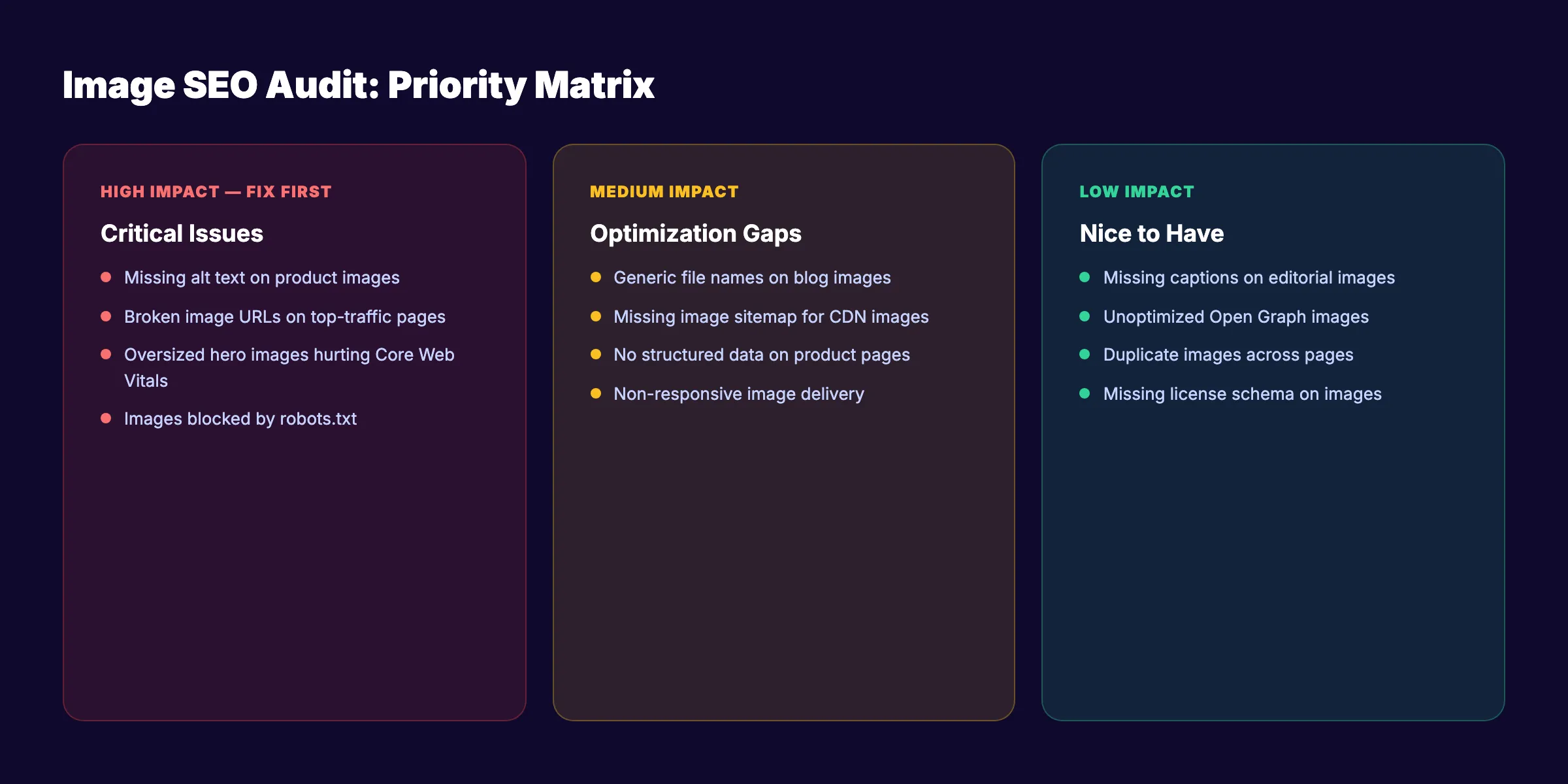
After running an audit, prioritize fixes by impact:
High impact: Missing alt text on product images, broken image URLs on top-traffic pages, oversized hero images hurting Core Web Vitals.
Medium impact: Generic file names on blog images, missing image sitemap for CDN-hosted images, no structured data on product pages.
Low impact: Missing captions on editorial images, unoptimized Open Graph images, duplicate images across pages.
Fix high-impact issues first. Track the results in Search Console over 4 to 6 weeks. Image search changes propagate faster than web search because Google re-crawls images frequently.
Ongoing Image SEO Maintenance
Build image optimization into your content workflow. Do not treat it as a separate project.
Before publishing any page, verify: file name is descriptive, format is WebP or AVIF, alt text is written, image is in the sitemap, and structured data includes the image property.
Set up automated alerts in Search Console for crawl errors on image URLs. Review the image search performance report monthly. Update image sitemaps automatically through your CMS.
Consistent optimization compounds over time. The Content Compound Effect applies to images just as it applies to written content. Every properly optimized image adds to your visual search presence. After 6 months of consistent image SEO, the traffic difference is measurable and significant.
For sites publishing regular blog content, building topical authority through text and images together creates a stronger ranking signal than either channel alone.
Let Stacc handle your blog SEO end to end. 30 articles per month with optimized images, proper schema, and internal linking. No writing required. Start for $1 →
Google Images Ranking Factors: The Complete Checklist
Google ranks images using a distinct set of signals from its web search algorithm. Understanding these factors lets you optimize images systematically rather than guessing. Here are the 12 ranking factors that influence Google Images placement.
-
Filename. The file name is Google’s first signal about what an image contains. A descriptive, hyphen-separated name like
red-leather-hiking-boots-side-view.webptells the crawler the subject, color, and angle before a single pixel is processed. Generic names likeIMG_3847.jpgprovide no information. -
Alt text. Alt text is the primary signal Google Images uses to match an image against a search query. It should describe what is actually in the image and include the target keyword once where it fits naturally. Empty or missing alt text means Google must infer meaning from surrounding context alone.
-
Image title attribute. The
titleattribute on an<img>tag is an optional but supported signal. It appears as a tooltip on hover and provides additional text context for Google. It should not duplicate the alt text — use it to add complementary detail when relevant. -
Surrounding text context. The body copy, headings, and captions near an image all contribute to how Google interprets it. An image of a running shoe embedded in an article about marathon training carries more relevance for running-related queries than the same image on a generic photography page.
-
Page relevance. Google evaluates whether the image matches the page’s overall topic. An image of a kitchen appliance on a recipe page signals strong relevance. The same image on a car dealership page signals weak relevance and will rank poorly for appliance queries.
-
Image resolution and quality. Google measures image dimensions. The minimum threshold for indexing is approximately 50,000 pixels (width multiplied by height — so 250 x 200 is sufficient). Higher-resolution images rank better because they provide a better user experience in Google Images’ expanded view. Google’s own documentation recommends images at least 1,200px wide for rich result eligibility.
-
File size and loading speed. Page speed is a Google ranking signal. Large, uncompressed images slow Largest Contentful Paint and overall page load time, which depresses rankings in both web search and Google Images. WebP images are 25–35% smaller than equivalent JPEG files at the same quality level.
-
Structured data. ImageObject schema, Product schema, Recipe schema, and Article schema all include image properties that Google reads at indexing time. Structured data enables rich result formats — price badges, star ratings, recipe thumbnails — that increase click-through rate from image search.
-
Image sitemap inclusion. An image sitemap gives Google a direct, verified list of your images. It is especially important for CDN-hosted images, JavaScript-rendered images, and large image catalogs that standard crawling might process slowly.
-
EXIF data. Metadata embedded in the image file — including copyright holder, creator name, and location data — is a minor supporting signal. Google reads this data. Correct EXIF data reinforces legitimacy for licensed and branded images. It will not overcome weak alt text or a slow page, but it adds to the overall authority picture.
-
Page authority and backlinks. An image hosted on a high-authority page with strong backlinks will outrank a better-optimized image on a low-authority page. This is why image SEO and overall content SEO work together — your domain’s accumulated authority lifts every image you publish.
-
SafeSearch signals. Google filters images based on its assessment of content appropriateness. Avoid images that could be misclassified as adult content through file names, alt text, or surrounding context. Misclassification can remove your image from filtered search results and suppress the page overall.
Image SEO Before and After: Real Optimization Examples
The difference between an optimized and unoptimized image is rarely visible to the user. It is entirely visible to Google. These examples show the specific changes that shift images from invisible to indexed and ranked.
Example 1: Filename
- Before:
IMG_3847.jpg - After:
red-running-shoes-nike-air-zoom-size-10.webp - Why it matters: Googlebot cannot see images in the way humans do. The file name is the first text signal the crawler reads. A generic camera-assigned filename gives Google nothing to work with. A descriptive filename that matches the image content and target keyword gives Google an immediate relevance signal before the page is even rendered.
Example 2: Alt Text
- Before:
alt="" - After:
alt="Nike Air Zoom running shoes in red, size 10, worn on a track" - Why it matters: Alt text is the primary signal Google Images uses to match images against search queries. An empty alt attribute means Google must infer all relevance from surrounding text alone. A descriptive alt text that names the product, color, and context gives Google exactly the information it needs to match the image to relevant visual and text queries. This single change is the most impactful optimization for most sites — and audits routinely find that 30–50% of content images have empty or missing alt attributes.
Example 3: File Format and Size
- Before:
product-hero.png(1.2 MB) - After:
product-hero.webp(180 KB) - Why it matters: Page speed is a confirmed Google ranking signal affecting both web search and Google Images. A 1.2 MB image delayed LCP by over a second on mobile connections. Converting to WebP and running compression reduces file size by 85% with no perceptible quality loss. Faster LCP improves both the search ranking and the user experience when someone lands on the page from an image search result.
Frequently Asked Questions {#faq}
What are the most important image SEO factors?
Alt text and filename are the highest-impact changes for most sites because they are frequently missing or poorly written and they directly affect how Google matches images to queries. Beyond those, page authority (the overall strength of the page hosting the image) and file size (which affects page speed) have the most consistent ranking influence. Structured data matters for ecommerce and recipe sites where rich result eligibility in image search drives measurable additional traffic.
Does alt text help images rank in Google Images?
Yes. Alt text is the primary text signal Google Images uses to understand what an image contains and match it to search queries. Pages where alt text describes the image content accurately — including the relevant keyword where it fits naturally — consistently outrank pages with empty, generic, or keyword-stuffed alt attributes. It is also the most commonly neglected optimization: site audits regularly find 30–50% of images with missing or empty alt text.
What image format is best for SEO?
WebP is the recommended default for 2026. It delivers 25–35% smaller file sizes than JPEG at equivalent visual quality, which directly improves page load speed and Largest Contentful Paint scores. AVIF offers even better compression but slower encoding and slightly lower browser support (approximately 92% vs 97% for WebP). Use WebP for most images, serve AVIF with WebP fallback via the <picture> element for performance-critical pages. PNG is appropriate only for images requiring true transparency where WebP is not an option.
Do I need an image sitemap for SEO?
Not for every site. Image sitemaps are most valuable when your images are hosted on a CDN subdomain, when your site uses JavaScript to render images, or when you have a large image catalog that standard crawling might process slowly. For straightforward sites with images served from the same domain via standard <img> tags, Googlebot will find and index them through normal crawling. The sitemap accelerates discovery but does not change what eventually gets indexed.
How long does it take for images to rank in Google Images?
Google re-crawls images faster than it re-indexes web pages. After making changes — updating alt text, converting file formats, adding structured data — expect indexing updates within 1–2 weeks for existing pages that Google already crawls regularly. Ranking improvements from systematic image optimization across a site typically become visible in 4–8 weeks in the Google Search Console Image search type report. New images on new pages take longer, as the page itself needs to accumulate crawl priority first.
That covers the full image SEO system for 2026. Start with the highest-impact fixes from your audit. Then build image optimization into every page you publish going forward. The sites that treat images as a first-class SEO channel will capture traffic that text-only strategies miss entirely.
Your SEO team. $99 per month. Stacc publishes 30 optimized blog posts every month. Proper images, alt text, schema, and internal links included. Start for $1 →
Related Tools & Resources
Free SEO Tools:
Best Lists:

Written by
Siddharth GangalSiddharth is the founder of theStacc and Arka360, and a graduate of IIT Mandi. He spent years watching great businesses lose organic traffic to competitors who simply published more. So he built a system to fix that. He writes about SEO, content at scale, and the tactics that actually move rankings.
30 SEO blog articles published every month
Keyword-optimized, scheduled, and live on your site. Automatically.
30-day trial · Cancel anytime
theStacc
Stop writing SEO content manually
30 blog articles, 30 GBP posts, and social media content. Published every month. Automatically.
Start Your $1 Trial$1 for 3 days · Cancel anytime