Step-by-step guide to do a content audit for SEO. 8 steps to inventory, score, and fix your content. Free and paid methods. Updated March 2026.
Most websites have content that hurts them more than it helps. Old blog posts with outdated stats. Pages that target the same keyword and compete against each other. Articles that Google indexed 3 years ago and has not sent a single click to since.
A content audit fixes that. It is a systematic review of every page on your site, scored by performance, relevance, and quality. HubSpot pruned 2,888 URLs from their blog and saw a 458% cumulative traffic increase over 6 months. That is the power of knowing what to keep, what to fix, and what to cut.
The problem is most content audits stall. Teams export a spreadsheet, stare at 500 rows of data, and never take action. The audit sits in a Google Drive folder and nothing changes.
We have published 3,500+ blog posts across 70+ industries. Every high-performing content strategy we manage starts with an audit. Not a vague review. A structured, scored analysis that produces a clear action plan.
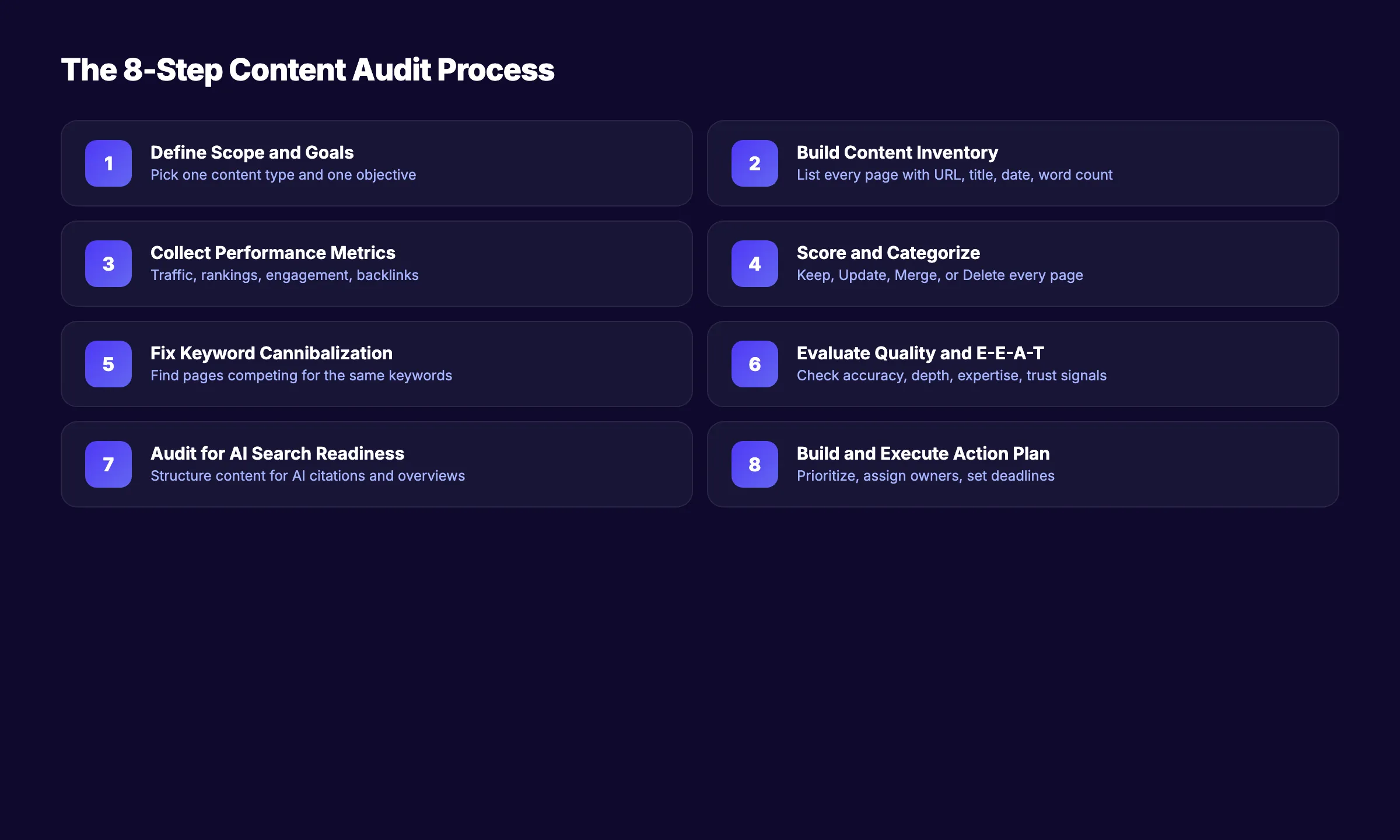
Here is what you will learn:
- How to build a complete content inventory without missing pages
- Which metrics actually matter (and which ones waste your time)
- A scoring system to categorize every page as keep, update, merge, or delete
- How to check your content for AI search readiness
- How to turn audit results into an action plan that gets executed
What You Will Need
Time required: 4-8 hours for a site with 50-200 pages. 2-3 days for 500+ pages.
Difficulty: Intermediate
What you will need:
- Google Search Console access (free)
- Google Analytics 4 access (free)
- A spreadsheet (Google Sheets works well)
- Optional: Screaming Frog, Ahrefs, or Semrush for deeper analysis
Step 1: Define Your Audit Scope and Goals
Do not audit everything at once. The most common reason content audits fail is scope creep. A team starts reviewing blog posts, expands to product pages, adds landing pages, and the project never finishes.
Pick one content type and one goal.
Common audit goals:
| Goal | What You Are Looking For | Best Starting Point |
|---|---|---|
| Improve organic traffic | Low-performing pages with ranking potential | Blog posts with impressions but low clicks |
| Reduce content bloat | Thin, duplicate, or obsolete content | Pages with zero traffic for 12+ months |
| Fix keyword cannibalization | Multiple pages targeting the same keyword | Blog posts in the same topic cluster |
| Improve conversion rates | High-traffic pages with low engagement | Landing pages and bottom-of-funnel content |
| AI search readiness | Content not structured for AI citations | Pages missing clear definitions and structured data |
Specifically:
- Choose one goal from the table above
- Define which content types to include (blog posts only, or all pages)
- Set a completion deadline (2 weeks is realistic for most sites)
- Assign an owner who will drive the audit to completion
Why this step matters: Without a clear scope, the audit expands until it collapses under its own weight. 33% of marketers conduct content audits twice a year. The ones who succeed treat each audit as a focused project, not an open-ended exploration.
Step 2: Build Your Content Inventory
Before you can analyze anything, you need a complete list of every page in scope. This is your content inventory. It is not the same as a content audit. The inventory is the raw data. The audit is the analysis.
Three methods to build your inventory:
Method 1: Google Search Console (free)
- Go to Performance > Pages
- Set the date range to the last 12 months
- Export all pages with impressions, clicks, CTR, and average position
- This captures every page Google knows about
Method 2: Screaming Frog (free up to 500 URLs)
- Crawl your entire site
- Export the full URL list with status codes, word count, title tags, and meta descriptions
- This catches pages GSC might miss (orphan pages, noindexed pages)
Method 3: CMS export
- Export all posts and pages from your CMS (WordPress, Webflow, etc.)
- Include: URL, title, publish date, author, category, and word count
- Fastest method but misses technical data
Your inventory spreadsheet should have these columns:
| Column | Source | Purpose |
|---|---|---|
| URL | Crawl or CMS | Unique identifier |
| Title | Crawl or CMS | Quick reference |
| Publish date | CMS | Age of content |
| Last updated | CMS | Freshness signal |
| Word count | Crawl | Content depth indicator |
| Organic clicks (12 mo) | GSC | Traffic performance |
| Impressions (12 mo) | GSC | Visibility indicator |
| Average position | GSC | Ranking performance |
| Backlinks | Ahrefs/Semrush | Link equity indicator |
| Target keyword | Manual | Intent alignment |
Why this step matters: A content audit without a complete inventory is guesswork. You will miss pages that need attention and waste time on pages that are fine. Export from at least 2 sources (GSC + crawl) to ensure full coverage.
Pro tip: Export GSC data for the last 16 months, not just 12. This captures seasonal patterns. A holiday gift guide with zero summer traffic is not a failing page. It is a seasonal page.
Step 3: Collect Performance Metrics
Raw page counts tell you nothing. You need performance data to make decisions. The right metrics depend on the goal you set in Step 1, but every audit needs these baseline numbers.
Essential metrics (collect for every page):
- Organic clicks (last 12 months from GSC)
- Impressions (last 12 months from GSC)
- Average position (current, from GSC)
- Bounce rate or engagement rate (from GA4)
- Conversions or goal completions (from GA4)
Optional but valuable:
- Backlink count (from Ahrefs or Semrush)
- Referring domains (from Ahrefs or Semrush)
- Page speed score (from PageSpeed Insights)
- Content decay rate (year-over-year traffic change)
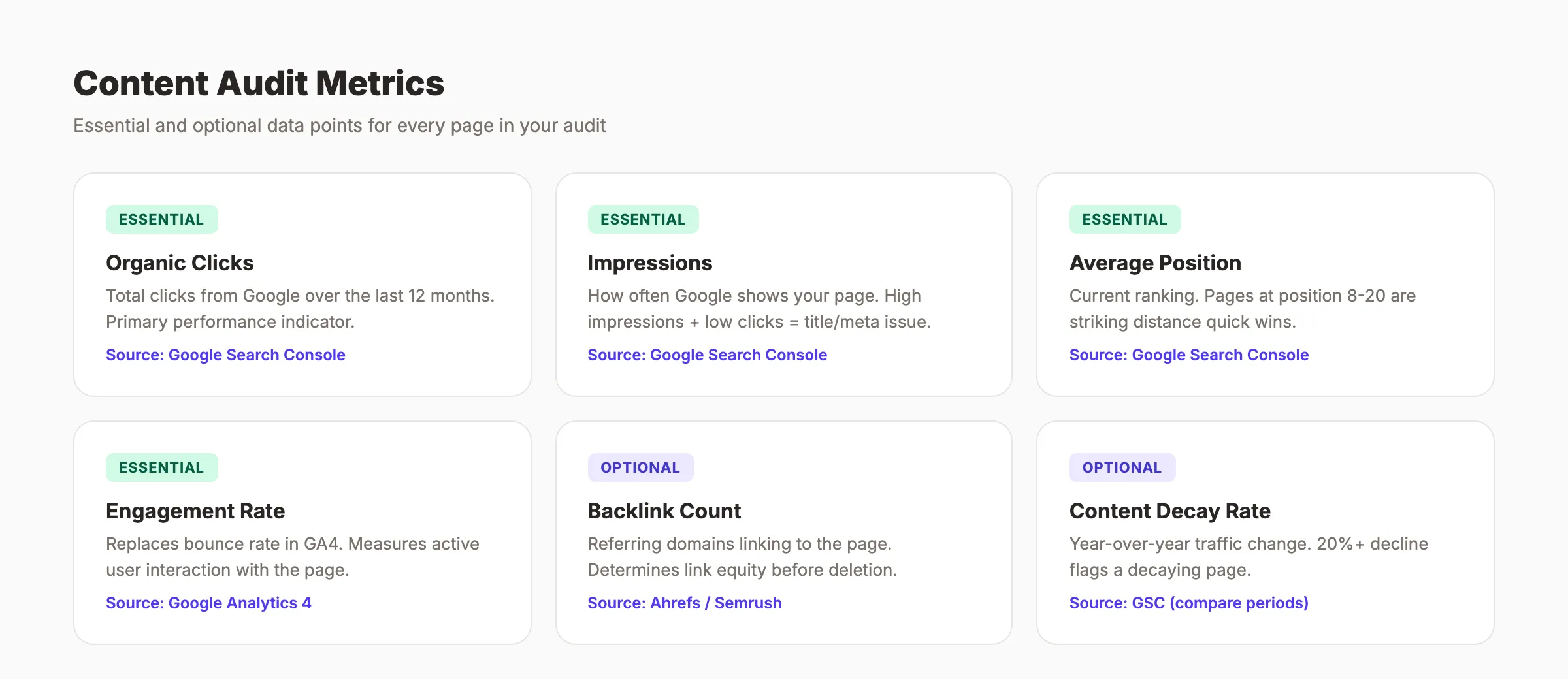
Content decay is one of the most underused audit signals. If a page lost 20% or more of its organic traffic compared to the same period last year, it is decaying. Flag these pages. They represent content that once performed but is losing ground to fresher competitors.
Why this step matters: Metrics are the difference between opinion-based decisions and data-based decisions. Without traffic data, you will delete pages that quietly drive conversions and keep pages that do nothing.
Pro tip: Do not obsess over vanity metrics like total pageviews. A page with 50 monthly visits that generates 5 leads is more valuable than a page with 5,000 visits and zero conversions. Always tie metrics back to business outcomes.
Stop writing. Start ranking. theStacc publishes 30 SEO articles per month for $99. Every article is optimized, on schedule, and built to compound.
Step 4: Score and Categorize Every Page
This is the step that separates a useful audit from a wasted spreadsheet. You need a scoring system that produces a clear action for every page.
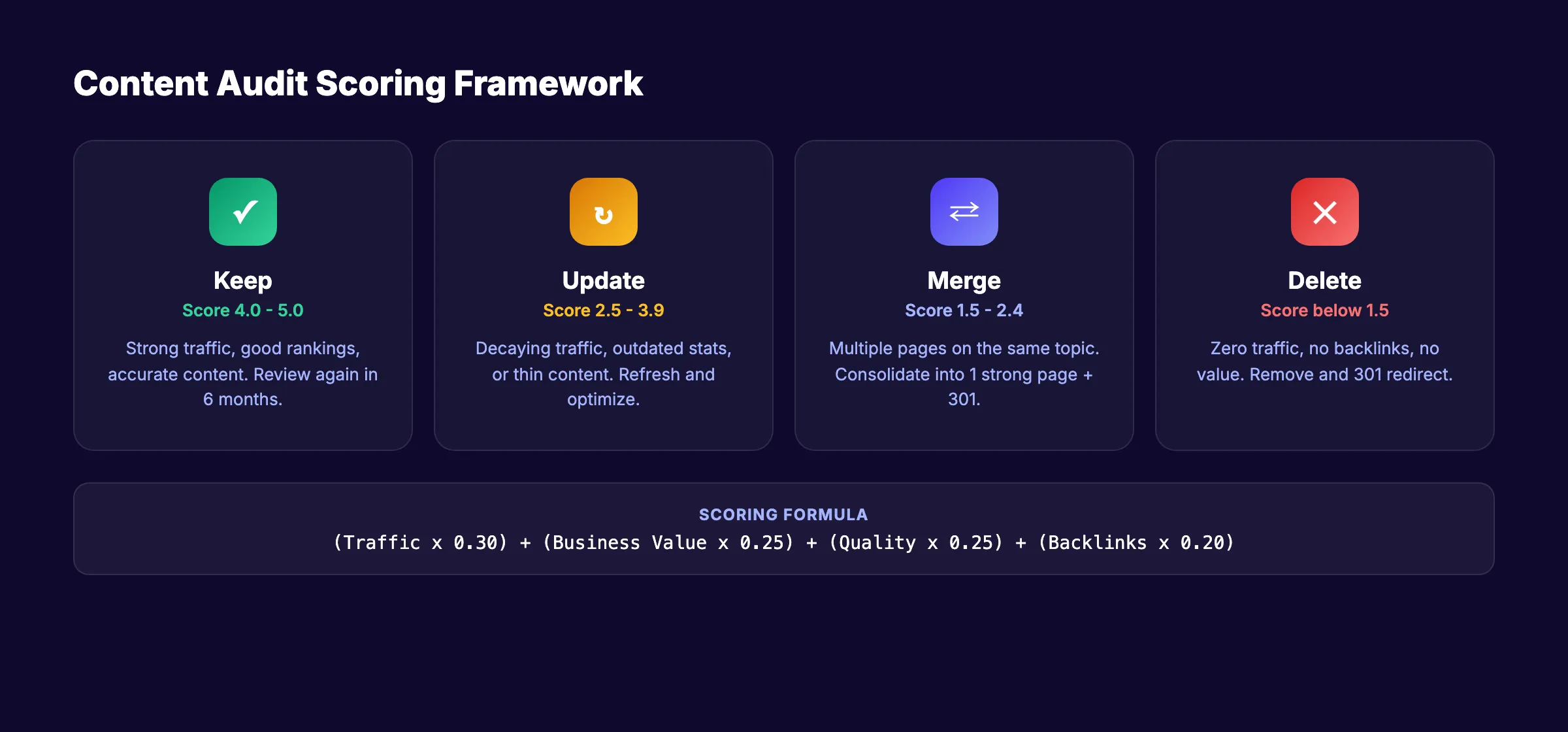
The 4-action framework:
Every page gets one label: Keep, Update, Merge, or Delete.
| Action | Criteria | What to Do |
|---|---|---|
| Keep | Strong traffic, good rankings, accurate content | No changes needed. Review again in 6 months. |
| Update | Decaying traffic, outdated info, thin content, or ranking position 8-20 | Refresh stats, expand sections, improve on-page SEO. |
| Merge | Multiple pages targeting the same keyword or covering the same topic | Consolidate into 1 strong page. 301 redirect the others. |
| Delete | Zero traffic for 12+ months, no backlinks, outdated, and no business value | Remove and 301 redirect to closest relevant page. |
Scoring formula (1-5 scale for each factor):
| Factor | Weight | 1 (Low) | 5 (High) |
|---|---|---|---|
| Organic traffic | 30% | 0 clicks/month | 500+ clicks/month |
| Business value | 25% | No conversion potential | Directly drives leads/sales |
| Content quality | 25% | Outdated, thin, or inaccurate | Accurate, deep, and well-structured |
| Backlink equity | 20% | 0 referring domains | 10+ referring domains |
Total score = (Traffic x 0.30) + (Value x 0.25) + (Quality x 0.25) + (Links x 0.20)
- Score 4.0-5.0 → Keep
- Score 2.5-3.9 → Update
- Score 1.5-2.4 → Merge (if similar pages exist) or Update
- Score below 1.5 → Delete
Why this step matters: Without a scoring system, decisions become emotional. Team members defend their content regardless of performance. A number-based score removes bias and focuses on results.
Pro tip: Always check backlinks before deleting any page. A page with zero traffic but 15 referring domains still carries link equity. 301 redirect it to a relevant page to preserve that equity. Deleting without redirecting wastes accumulated authority.
Step 5: Check for Keyword Cannibalization
Keyword cannibalization happens when multiple pages on your site compete for the same keyword. Google cannot decide which page to rank, so it ranks neither well. This is one of the most common and damaging content problems.
How to find cannibalization during your audit:
- Open Google Search Console > Performance > Queries
- Click on any keyword that matters to your business
- Switch to the Pages tab
- If 2+ pages appear for the same query, you have cannibalization
What to do when you find it:
| Scenario | Action |
|---|---|
| 1 page is clearly stronger (more traffic, better content) | Keep the strong page. 301 redirect the weak page to it. |
| Both pages have traffic but target the same keyword | Merge the best content from both into 1 page. 301 redirect the other. |
| Both pages rank but for slightly different intents | Differentiate them. Adjust titles, H1s, and target keywords so each serves a unique intent. |
| Neither page ranks well | Merge into 1 strong page and delete the other. |
Cannibalization is especially common on sites that have published content for years without a topical map. Articles written in 2021 and 2024 might target the same keyword without anyone realizing it.
Why this step matters: Fixing cannibalization often produces the fastest ranking improvements of any audit action. You are not creating new content. You are consolidating existing authority into fewer, stronger pages.
Step 6: Evaluate Content Quality and E-E-A-T
Google's Helpful Content system applies a site-wide signal. If your site has a high proportion of low-quality content, it drags down everything. Including your best pages.
During your audit, evaluate each page against these quality criteria:
Content quality checklist:
- ✓ Is the information accurate and current?
- ✓ Does the content provide original insight (not just rehashed from competitors)?
- ✓ Is there a clear author or editorial voice?
- ✓ Does the page answer the search query completely?
- ✓ Are claims backed by data, examples, or external sources?
- ✓ Is the content well-structured with clear headings and formatting?
E-E-A-T signals to check:
- ✓ Experience: Does the content show first-hand experience with the topic?
- ✓ Expertise: Is the author qualified to write about this subject?
- ✓ Authoritativeness: Does the site have topical authority in this area?
- ✓ Trustworthiness: Are sources cited? Is the content transparent?
Pages that fail multiple quality checks should be marked for update or deletion. Google has stated that removing unhelpful content can help the rankings of your other content. This is not theory. A brand that no-indexed 600,000 low-quality pages saw clicks and impressions rise by 30%.
Why this step matters: Traffic metrics tell you what is performing now. Quality evaluation tells you what will perform in 6 months. Google's algorithms increasingly reward depth, accuracy, and demonstrated expertise. A page with decent traffic but poor quality is a liability, not an asset.
Your SEO team. $99 per month. 30 optimized articles published automatically. Built for topical authority, not just traffic.
Step 7: Audit for AI Search Readiness
This step did not exist 2 years ago. In 2026, AI Overviews appear on 21% of keyword searches. ChatGPT, Perplexity, and Gemini pull content from web pages to generate answers. If your content is not structured for AI citation, you are invisible to a growing share of searchers.
AI readiness checklist for each page:
- ✓ Does the page lead with a clear, concise definition or answer in the first 2 sentences?
- ✓ Are key facts presented as standalone statements (not buried in long paragraphs)?
- ✓ Does the page use schema markup (FAQ, HowTo, Article)?
- ✓ Are statistics presented with source attribution?
- ✓ Is the content structured with clear H2/H3 hierarchy?
What AI models prefer to cite:
| Content Trait | Why AI Cites It |
|---|---|
| Clear definitions | Easy to extract and quote |
| Numbered lists and steps | Structured for step-by-step answers |
| Statistics with sources | Verifiable and authoritative |
| Tables and comparisons | Structured data that AI can reference |
| Short, factual paragraphs | Easier to parse than long-form prose |
76.4% of ChatGPT's most-cited pages were updated within 30 days. Freshness matters even more for AI citations than for traditional search. Long-form content (2,000+ words) gets cited 3x more than shorter content.
Read our generative engine optimization guide for a full breakdown of how to structure content for AI search visibility.
Why this step matters: Traditional audits only check Google rankings. But AI search is growing fast. Pages that rank well in Google but never get cited by AI models will lose traffic as AI adoption increases. Auditing for AI readiness now puts you ahead of competitors who are still auditing for 2020-era signals.
Step 8: Build and Execute Your Action Plan
The audit is worthless if it stays in a spreadsheet. This final step converts your scored, categorized content into an execution plan with owners, deadlines, and measurable outcomes.
Prioritize actions by impact and effort:
| Priority | Action Type | Expected Impact | Effort |
|---|---|---|---|
| 1 | Fix keyword cannibalization | High (immediate ranking improvement) | Low (redirects + minor edits) |
| 2 | Update striking distance pages (position 8-20) | High (move to page 1) | Medium (content refresh) |
| 3 | Delete or no-index zero-traffic pages | Medium (improves crawl budget and site-wide quality signal) | Low (redirects) |
| 4 | Merge thin content into pillar pages | High (builds topical authority) | Medium (content consolidation) |
| 5 | Expand thin content on high-value topics | Medium (improves depth and rankings) | High (writing new content) |
| 6 | Add AI-ready formatting to top pages | Medium (improves AI citations) | Low (formatting changes) |
For each action, document:
- Page URL
- Current status (traffic, position, quality score)
- Action: keep, update, merge, or delete
- Specific changes needed (e.g., "update statistics, add FAQ section, fix meta description")
- Owner (who will do the work)
- Deadline
- Success metric (e.g., "move from position 14 to top 5 within 90 days")
Implementation timeline:
- Week 1-2: Execute all deletes and redirects (quick wins, lowest effort)
- Week 2-4: Fix cannibalization issues and merge overlapping content
- Week 3-6: Update striking distance pages with fresh content and better on-page optimization
- Week 4-8: Expand thin content and create new pages to fill content gaps
Why this step matters: Companies that execute content audit findings see an average 53% engagement increase and 49% boost in organic traffic. The audit produces the roadmap. Execution produces the results. Set a 90-day review date to measure the impact of your changes.
Pro tip: Do not wait for the entire audit to finish before taking action. Start implementing quick wins (deletes, redirects, meta tag fixes) while you are still scoring the rest of the inventory. Momentum matters more than perfection.
Results: What to Expect
After completing these 8 steps, you should expect:
- Week 1-2: A complete content inventory with every page scored, categorized, and assigned an action
- Month 1-2: Quick wins implemented. Cannibalization fixed. Low-value pages removed. Striking distance pages refreshed.
- Month 3-6: Organic traffic increases as updated content regains rankings and site-wide quality signals improve
HubSpot saw a 458% cumulative monthly traffic increase after their audit. Results scale with the size of your content library and the severity of existing problems. Sites with more content debt see bigger gains.
Plan to repeat the audit every 90 days. Quarterly mini-audits take 2-4 hours and prevent content decay from accumulating. Annual audits are too infrequent. By the time you catch problems, they have compounded for months.
Troubleshooting
Problem: Your site has 1,000+ pages and the audit feels impossible. Solution: Start with blog content only. Blog posts decay fastest and have the highest audit ROI. Product pages and landing pages can wait for a separate audit cycle.
Problem: You deleted pages and traffic dropped. Solution: Check your 301 redirects. Every deleted page with any backlinks or traffic needs a redirect to the closest relevant page. A drop after deletion usually means missing redirects, not a bad decision. Give it 4-6 weeks to stabilize.
Problem: You do not have budget for Ahrefs or Semrush. Solution: Google Search Console + Google Analytics 4 + a spreadsheet covers 80% of what you need. Use Screaming Frog's free version (up to 500 URLs) for the crawl. The only metric you lose is backlink data, which you can check manually for high-priority pages using free tools like Ahrefs Webmaster Tools.
What practitioners are saying on X
Fundamentals plus AI-search measurement remain the dual stack.
- @jakezward (Feb 2026): 2026 SEO predictions emphasize AI Overview share-of-SERP, schema for LLM token efficiency, brand mentions in AI answers as a KPI, proprietary data as a moat, and content refresh beating net-new AI slop. See the post on X.
- @hridoyreh (Mar 2026): Widely shared SEO skill tree: foundations, research, technical, on-page, content, links, AI SEO/GEO, analytics, UX, brand, programmatic — useful map for stats and how-to posts. See the post on X.
- @HlynurStefDev (Jul 2026): Public case: niche site traffic jumped from ~18 to 4,162 Google visits/month after focused technical/on-page SEO work (GSC screenshots claimed) — reminds that fundamentals still move numbers. See the post on X.
Grok, AI Overviews, and multi-engine visibility
Content topics like “how to content audit” get AI citations when process steps, quality bars, and examples are concrete. Operator consensus on X is clear: research-backed pages beat unedited bulk generation — reflect that honestly.
- Google AI Overviews: Use passage-ready answers, tables, and FAQ schema where relevant.
- ChatGPT / Perplexity: Cite named sources next to key claims.
- Grok: Maintain accurate entity facts on-site and in high-signal X posts.
Publish content built for Google and AI citations. theStacc’s Content SEO module ships SEO-scored articles structured for rankings and generative engines — including clearer entity pages models like Grok can quote.
FAQ
A content audit is a systematic review of all content on your website. You inventory every page, collect performance data (traffic, rankings, engagement), evaluate quality, and assign each page an action: keep, update, merge, or delete. The goal is to improve your overall content quality and search performance.
Every 90 days for a focused mini-audit. A full audit once or twice per year. 33% of marketers run content audits at least twice per year. Quarterly reviews prevent content decay from going undetected for too long.
4-8 hours for a site with under 200 pages. 2-3 full days for 500+ pages. The inventory and data collection take the most time. Scoring and categorizing go faster once your spreadsheet is set up. Do not let the audit drag past 2 weeks or momentum dies.
Only if they have zero organic traffic for 12+ months, no backlinks worth preserving, and no business value. Always 301 redirect deleted pages to the closest relevant page on your site. Never just delete and leave a 404. Google treats unhelpful content as a site-wide quality signal, so removing genuinely low-quality pages can help your remaining content rank better.
A content inventory is a list of all your pages with basic metadata (URL, title, date, word count). A content audit goes further. It adds performance data, quality scoring, and action recommendations. The inventory is step 2. The audit is the full 8-step process.
Yes. Step 7 of this guide covers AI search readiness. Pages structured with clear definitions, factual statements, schema markup, and fresh data are more likely to be cited by ChatGPT, Perplexity, and Google AI Overviews. Auditing for AI readiness is increasingly important as AI Overviews appear on 21% of keyword searches.
3,500+ blogs published. Every article is SEO-scored before publish. See what theStacc can do for your content strategy.
Now you know how to do a content audit that produces real results. The process works for sites with 20 pages or 20,000.
Start with Step 1. Define your scope. Then work through each step. The sites that win in search are not the ones with the most content. They are the ones with the least dead weight.
Related Tools & Resources
Free SEO Tools:
Best Lists:
Sources & references
- [1] Princeton / Georgia Tech et al. — GEO research (arXiv:2311.09735)
- [2] @varunram on X — Critique of GEO slopfarm products that combine SEO clickbait with unresearched content marketing — quality and research
- [3] @jakezward on X — 2026 SEO predictions emphasize AI Overview share-of-SERP, schema for LLM token efficiency, brand mentions in AI answers
- [4] @HlynurStefDev on X — Public case: niche site traffic jumped from ~18 to 4,162 Google visits/month after focused technical/on-page SEO work (G
- [5] Referenced source — blog.hubspot.com

Plan topics, review article drafts, and publish to a connected CMS.
Weekly local SEO teardowns
One practical email a week. Map Pack, GBP, AI Overviews — no fluff. Unsubscribe anytime.
Explore this topic: Content Audit.