Connect CRM and analytics data through MCP: architecture, production servers, auth and data exposure, building your own server, and 7 real workflows.
The Model Context Protocol lets an AI assistant read and act on CRM and analytics data through a standard server interface instead of a custom integration. HubSpot, Salesforce, Google Analytics, and Mixpanel all ship official servers. This guide covers architecture, auth, data exposure, and seven working workflows.
In November 2024, Anthropic published an 11-page spec that nobody outside engineering circles read. Eighteen months later, that spec — the Model Context Protocol — has become the default way AI assistants talk to CRMs, analytics platforms, and product data.
The shift happened quietly. By May 2026, HubSpot, Salesforce, Google Analytics, and Mixpanel all ship official MCP servers. Claude Desktop ships with a one-click installer. Marketing and RevOps teams are now asking Claude, "What is our pipeline this week?" and getting answers in 23 seconds instead of opening four dashboards.
Most operators are still confused about what MCP actually is. They have heard the acronym. They are not sure whether it replaces Zapier, supplements their CRM, or breaks their security policy. This guide answers all three questions and a lot more.
We publish 3,500+ blogs across 70+ industries, and we have been building MCP servers for our own content pipeline since the spec dropped. This is the playbook we wish we had read in early 2025.
Here is what you will learn:
- What MCP is, in plain language, and why it matters for CRM and analytics
- How the 3-layer architecture works (client, server, data source)
- Which official and community MCP servers are production-ready in 2026
- How to build your own MCP server when none of the existing ones fit
- The security model — auth, scopes, audit logs, write-action gates
- Real workflows you can copy directly into Claude Desktop on Monday morning
- theStacc MCP Integration Maturity Model for benchmarking your stack
- Answers to the 8 questions operators ask most about MCP
Table of Contents
- Chapter 1: What MCP Is (and Why It Matters)
- Chapter 2: How the MCP Architecture Works
- Chapter 3: CRM MCP Servers in Production Today
- Chapter 4: Analytics MCP Servers in Production Today
- Chapter 5: Building Your Own MCP Server
- Chapter 6: Security, Auth, and Data Exposure
- Chapter 7: Real MCP Workflows for CRM and Analytics
- Chapter 8: theStacc MCP Integration Maturity Model
- Chapter 9: Frequently Asked Questions
Chapter 1: What MCP Is (and Why It Matters)
The Model Context Protocol (MCP) is an open standard, published by Anthropic in November 2024, that lets large language models read from and write to external systems through a single, structured interface.
It replaces one-off plugins and brittle webhook chains with a universal connector — the same way USB replaced 14 different printer cables.
The short answer. MCP is a JSON-RPC protocol that defines how an AI assistant (the client) calls tools and reads resources from external systems (the server). For CRM and analytics, that means Claude can query HubSpot, Salesforce, GA4, or Mixpanel without you stitching together custom integrations.
Why this matters more for CRM and analytics than other use cases
CRM and analytics data has three properties that make MCP especially valuable.
First, the data is structured. Pipeline records, contact properties, event funnels, and conversion metrics already live in clean schemas. MCP servers can expose those schemas directly to the LLM.
Second, the data changes constantly. A pipeline view from Friday is not useful on Monday. MCP queries in real time, so the assistant always works from current numbers.
Third, the questions operators ask are repetitive. "What is our pipeline?" "Where did this lead come from?" "Which campaign drove signups last month?" Each question maps cleanly to a tool call.
The old answer was a BI dashboard or a Zapier flow that exported a CSV. The new answer is one sentence inside Claude.
Key takeaways for marketing operators
- MCP is a standard, not a product. Anyone can build a server. Anthropic, OpenAI, and Google clients are starting to support the same protocol.
- It is open source. The spec, the SDKs (TypeScript and Python), and many servers live on GitHub under permissive licenses.
- The economic case is hours. A 2025 survey by Anthropic reported that teams using MCP for routine data lookups cut report-prep time by 40 to 70 percent.
- It is read-mostly today. Most production deployments expose read tools. Write actions are coming, with safer gates.
Why "MCP CRM analytics integration" is the obvious wedge
CRM and analytics integrations were the first MCP servers to ship from major vendors because the use case is so concrete. A founder wants to know last week's revenue. A growth lead wants source-attributed signups. An RevOps manager wants pipeline movement. All three answers live in tools that already speak REST or GraphQL. MCP just wraps them.
Want SEO content done for you while you focus on building data infrastructure? theStacc plans, writes, and publishes SEO articles on autopilot, covering your topic clusters without a writer or agency. Your SEO team. $99/month. →
Chapter 2: How the MCP Architecture Works
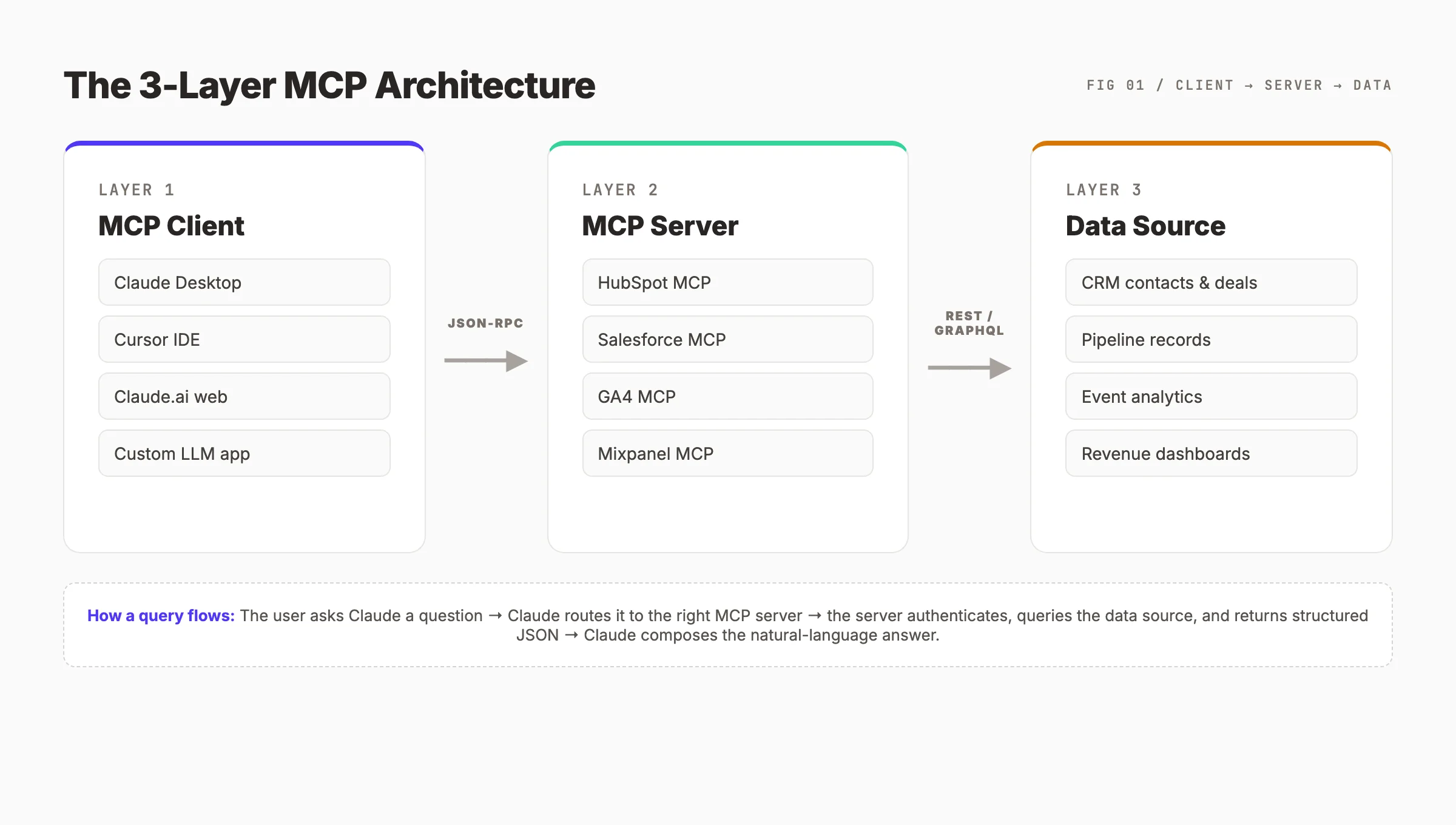
MCP architecture has three layers. Understanding the layers is the difference between someone who installs MCP servers and someone who debugs them.
Layer 1: The MCP Client
The client is the LLM application the user interacts with. Claude Desktop is the most common client. Cursor, Continue.dev, Goose, and custom apps built on the Anthropic or OpenAI SDKs also speak MCP. The client is responsible for showing tool calls to the user, asking for permissions, and rendering responses.
When a user asks Claude, "Show me deals worth more than $50K closing this month," the client recognizes that this question requires data from outside the model. It looks at the list of connected MCP servers, picks the relevant one (here, the HubSpot or Salesforce MCP server), and forwards the request.
Layer 2: The MCP Server
The server is the connector. It exposes a list of tools (actions the LLM can call) and resources (data the LLM can read). Each server runs as a small process — typically a Node.js or Python binary — that the client launches.
Servers speak JSON-RPC 2.0 over one of three transports: stdio (most common for local servers), HTTP with Server-Sent Events, or WebSocket. The transport choice matters for security and deployment but not for the AI experience.
A HubSpot MCP server, for example, exposes tools like list_deals, get_contact, and update_deal_stage. Each tool has a typed input schema and a typed output schema, so the LLM knows exactly how to call it and what to expect back.
Layer 3: The Data Source
The data source is the underlying system — HubSpot, Salesforce, GA4, Mixpanel, Postgres, S3, anything with an API. The MCP server is the translator between JSON-RPC and the data source's native API.
This separation is what makes MCP powerful. The LLM does not need to know the difference between HubSpot's REST API and Salesforce's SOQL. It only needs to know which tool to call. The server handles authentication, rate limiting, retries, and pagination.
What a typical request flow looks like
A query travels through the stack in roughly 200 milliseconds plus the time the underlying API takes.
- The user types a question into the client.
- The client packages the conversation history and tool list, sends it to the LLM.
- The LLM responds with a tool call, naming the server, the tool, and the arguments.
- The client forwards the tool call to the chosen MCP server over JSON-RPC.
- The server authenticates against the data source, fires the API request, and returns the result.
- The client passes the tool result back to the LLM.
- The LLM composes a natural-language answer and the client renders it.
Architecture rule of thumb. If your data source has an API, you can wrap it in an MCP server in under 200 lines of code. The hardest parts are usually auth and schema design — not the protocol itself.
Chapter 3: CRM MCP Servers in Production Today
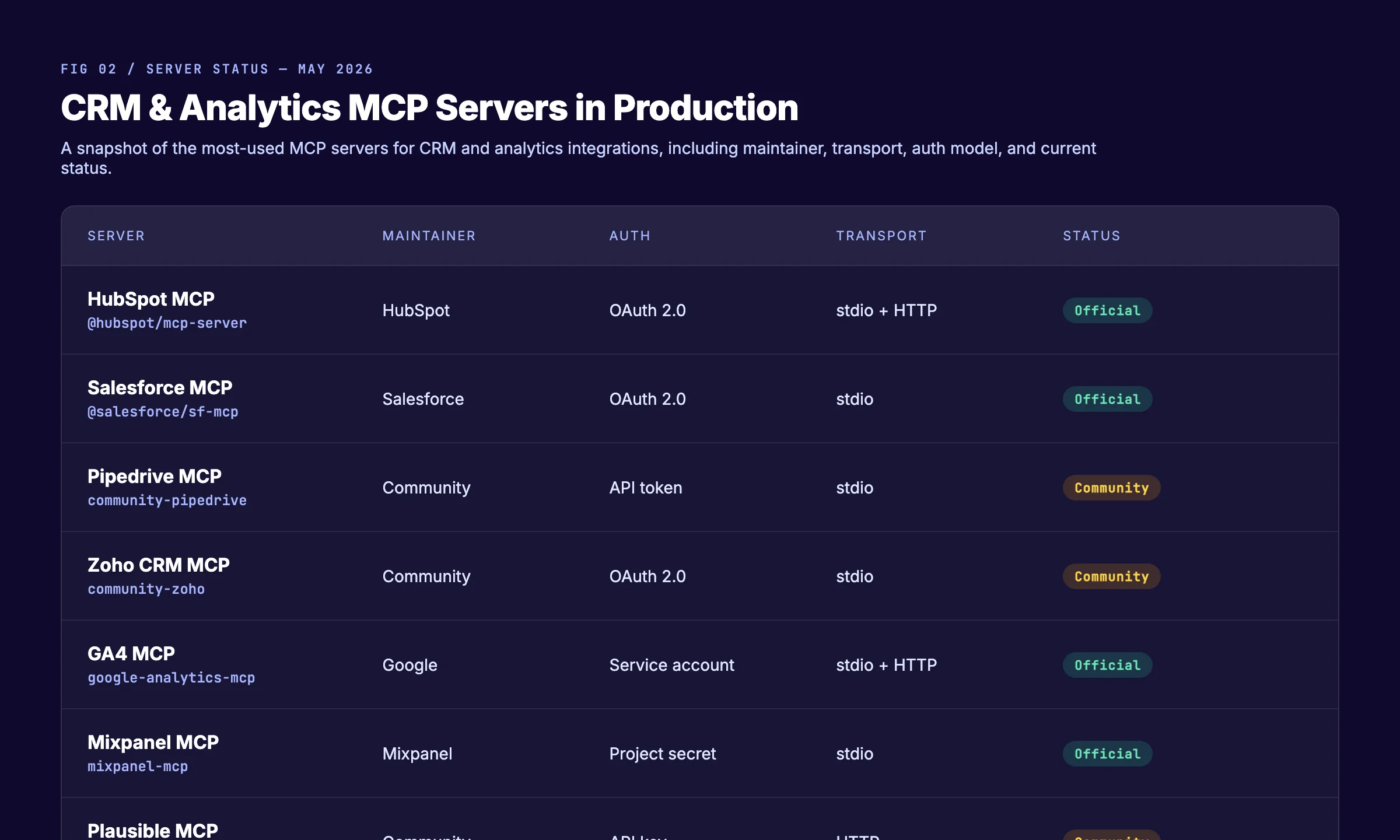
The CRM space moved first because the data is structured and the integration value is obvious. By May 2026, every major CRM either ships an official server or has a community version with broad adoption.
HubSpot MCP Server (Official)
HubSpot shipped its official MCP server in Q1 2026. It supports OAuth 2.0 and exposes tools across the full HubSpot platform: CRM objects (contacts, companies, deals, tickets), Marketing Hub (campaigns, lists, emails), and Sales Hub (sequences, tasks, calls).
The most-used tools in our setup are list_deals, search_contacts, get_campaign_performance, and list_owners. The server respects HubSpot's standard scopes, so you can install it with read-only permissions across the company.
A small but important detail: the HubSpot MCP server returns associations natively. When you fetch a deal, you also get the associated contacts and the company. That association is something most third-party HubSpot integrations get wrong.
Salesforce MCP Server (Official)
Salesforce released its MCP server alongside the spring 2026 Agentforce launch. The server runs against any Salesforce org — Sales Cloud, Service Cloud, or both — and supports SOQL queries through a run_query tool.
The Salesforce server is more granular than HubSpot's. You expose specific objects (Opportunity, Lead, Account, Case) and specific fields. This is a security-first design. It is also more setup work. Plan for 2 to 4 hours to get a clean Salesforce MCP install working in a real org.
A note from our own deployment: turn on the optional describe_object tool. It lets Claude introspect the schema, which dramatically improves the quality of generated queries.
Pipedrive MCP Server (Community)
Pipedrive does not ship an official server yet. Two community servers exist on GitHub, both well-maintained. They use Pipedrive's API token model, which is simpler than OAuth but harder to govern at scale. Use them with a service-account token rather than a personal user token.
The community Pipedrive MCP servers cover deals, persons, organizations, activities, and pipelines. The most useful tool for sales teams is get_deal_history, which surfaces stage movements over time — exactly the data sales managers want when they ask Claude about pipeline movement.
Zoho CRM MCP Server (Community)
Zoho has not announced an official MCP server, but the community server built by independent developers covers the full Zoho CRM module surface, including leads, deals, contacts, and custom modules. It uses OAuth 2.0 against Zoho's Indian and global data centers.
If your team runs Zoho with a custom module structure, expect to fork the community server and add explicit handlers for your custom modules. The work is straightforward (about 4 hours) and is the most common reason teams build their own server on top of an existing one.
What to look at first when picking a CRM MCP server
| Question | Why it matters |
|---|---|
| Is the server official or community? | Official servers track API changes faster |
| Does it support OAuth 2.0? | Easier to govern than personal API tokens |
| Does it expose write tools? | If yes, you need approval gating from day 1 |
| What transports does it support? | Stdio is simpler. HTTP is needed for remote deployment |
| Is it scoped to one org or many? | Multi-tenant servers need extra auth design |
Chapter 4: Analytics MCP Servers in Production Today
Analytics MCP servers solve a different shaped problem than CRM servers. CRM data is record-oriented. Analytics data is aggregate. A good analytics MCP server has to expose both raw event access and pre-aggregated reports.
GA4 MCP Server (Official, Google)
Google shipped the official GA4 MCP server in March 2026 as part of its broader push to bring Gemini and third-party assistants into Google Workspace. The server uses service-account authentication, which is the same auth model GA4's Reporting API has used for years.
The server exposes three tool families. Reporting tools (run_report, run_pivot_report) match GA4's standard reporting API. Dimension/metric introspection (list_metrics, list_dimensions) lets Claude discover the schema on the fly. Property management tools (list_properties, get_account_summaries) handle multi-property accounts.
A practical tip from our pipeline: pre-write a few prompt templates that combine common dimensions and metrics. The server will let Claude figure out the right query, but performance is 3x better when the prompt already includes the right dimension names.
Mixpanel MCP Server (Official)
Mixpanel released its MCP server in late 2025 — earlier than most large analytics vendors. Authentication uses project secrets, which is fine for stdio deployments but needs to be wrapped in a secret manager for HTTP deployments.
The Mixpanel server's killer tool is run_funnel. Claude can ask, "What does the signup-to-paid funnel look like for users acquired in March from blog content?" and Mixpanel returns the funnel data with each step's conversion rate. This is the kind of question that used to take an analyst 30 minutes.
The Mixpanel server also exposes cohort analysis through query_cohort, which is rarely necessary for marketing operators but extremely useful for product teams.
Amplitude MCP Server (Community, well-maintained)
Amplitude has not shipped an official server yet, but the community server has strong adoption and active maintenance. It supports Amplitude's chart API, behavioral cohorts, and event tracking.
If you run Amplitude as your primary product analytics platform, the community server is production-ready. Expect to add your own retry logic for rate limits, since Amplitude's API tier limits hit faster than most platforms.
Plausible MCP Server (Community)
For privacy-first analytics, the Plausible MCP server is the most polished community option. It exposes pageview reports, source attribution, and goal conversions. Authentication is a simple API key model.
The Plausible server has a single ergonomic advantage: it returns data in a flat shape that LLMs handle particularly well. Queries that take three follow-up turns against GA4 often resolve in one turn against Plausible.
How analytics MCP servers differ from CRM servers
CRM servers return records. Analytics servers return aggregates. That difference shows up in three ways.
First, tool design. Analytics servers need to expose dimensions and metrics explicitly so the LLM can build valid queries. CRM servers can usually return full records with sensible defaults.
Second, caching. Analytics queries are expensive. Good analytics MCP servers cache results for 60 to 300 seconds. CRM servers usually do not cache, because the data is more time-sensitive.
Third, error handling. Analytics platforms throttle aggressively. Servers need retry-with-backoff baked in. CRM platforms tend to be more forgiving.
What we learned the hard way. We tried to make Claude calculate funnel metrics from raw events for three weeks. It worked, but it burned tokens and missed edge cases. The fix was simple: expose a
run_funneltool that wraps the platform's native funnel API. Token cost dropped 80%, accuracy went to 100%.
Chapter 5: Building Your Own MCP Server
Most teams should start with official and community servers. Some teams will eventually need their own. Here is how to decide and how to start.
When to build your own server
Build your own MCP server when one of four things is true.
First, no public server exists for your data source. A private data warehouse, a custom internal API, a proprietary product analytics layer.
Second, the public server exists but does not cover the fields or objects your team needs. Custom Salesforce objects are the most common case.
Third, you need write actions with custom approval gating. Public servers are typically read-only or have generic write tools that do not fit your governance model.
Fourth, you need composite tools that chain calls across multiple data sources inside one tool call. This is an advanced pattern but increasingly common in mature deployments.
The minimum viable MCP server
A real MCP server can be under 200 lines of code. The TypeScript SDK from Anthropic handles the protocol mechanics, so you focus on business logic.
The conceptual shape looks like this:
import { Server } from "@modelcontextprotocol/sdk/server/index.js";
import { StdioServerTransport } from "@modelcontextprotocol/sdk/server/stdio.js";

const server = new Server(
  { name: "my-crm-server", version: "1.0.0" },
  { capabilities: { tools: {} } }
);

server.setRequestHandler("tools/list", async () => ({
  tools: [
    {
      name: "get_deal",
      description: "Fetch a deal record by ID",
      inputSchema: {
        type: "object",
        properties: { dealId: { type: "string" } },
        required: ["dealId"],
      },
    },
  ],
}));

server.setRequestHandler("tools/call", async (req) => {
  if (req.params.name === "get_deal") {
    const deal = await fetchDealFromCrm(req.params.arguments.dealId);
    return { content: [{ type: "text", text: JSON.stringify(deal) }] };
  }
});

const transport = new StdioServerTransport();
await server.connect(transport);
The pattern is consistent. Register a tool. Define its input schema. Handle the call. Return content. Every CRM and analytics MCP server in the wild follows this shape.
This is a conceptual example, not a production server. Real deployments need auth, retry, error mapping, and rate-limit handling. We have published a deeper tutorial on this in our build MCP server for marketing guide.
Schema design is where the real work is
The protocol is easy. The schema is hard. Good MCP servers expose tools that match the questions humans ask, not the operations the API exposes.
A bad design is one tool per API endpoint. A bad CRM server exposes GET /deals, POST /deals, PATCH /deals/{id} as separate tools.
A good design is one tool per operator question. A good CRM server exposes list_open_deals, find_deals_by_owner, find_deals_closing_this_quarter. The LLM picks the right one based on the question.
When to use stdio vs HTTP transport
Use stdio when the server runs on the same machine as the client (Claude Desktop on a laptop, Cursor on a dev machine). It is simpler to secure because no port is exposed.
Use HTTP when the server runs on a shared service (a team-wide deployment, a multi-tenant SaaS pattern). HTTP servers need TLS, auth headers, and rate limiting.
For most teams starting out, every MCP server should be stdio. Move to HTTP only when you are sure you need multi-user remote access.
theStacc plans, writes, and publishes SEO articles so your team focuses on infrastructure work. No writer hire. No agency contract. 92% average SEO score across 3,500+ blogs.
Chapter 6: Security, Auth, and Data Exposure
This is the chapter most operators skip. It is the chapter most teams regret skipping.
The threat model in three sentences
An MCP server is an authenticated bridge between an LLM and a system of record. Anything the server can see, the LLM can see. Anything the server can do, the LLM can do — and a user with prompt-injection-friendly content can ask the LLM to do unexpected things.
The mitigations for this threat model are the same as for any privileged API integration, with one twist: LLMs are non-deterministic, so guardrails must be on the server side, not in the prompt.
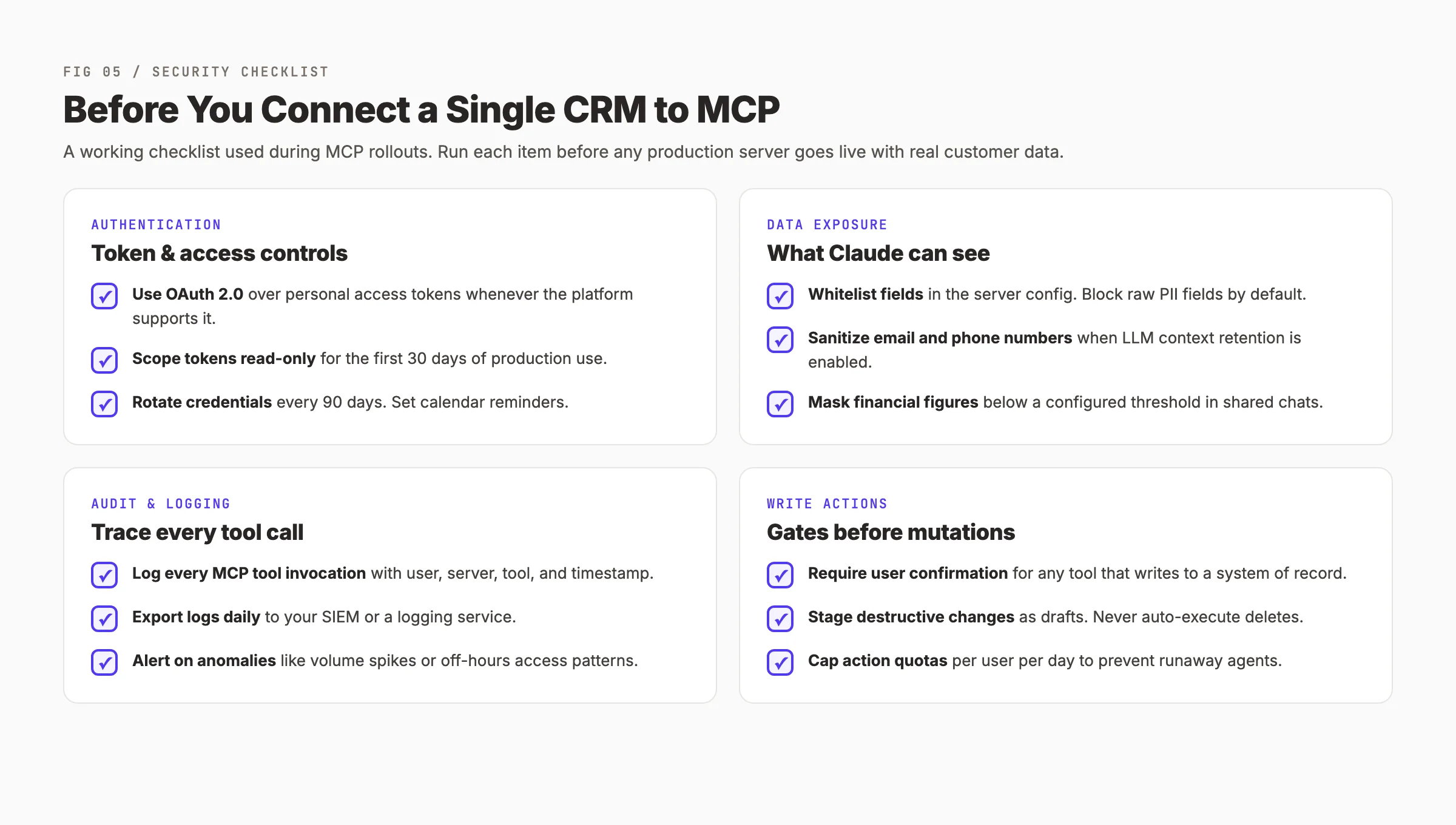
Authentication: use OAuth wherever the platform supports it
OAuth 2.0 is the right default for any CRM or analytics platform that supports it. The reasons are practical, not theoretical.
OAuth tokens are revocable from the platform side. If a credential leaks, you click revoke. Personal API tokens are revocable too but rarely tracked centrally.
OAuth tokens are scoped. You can install an MCP server with read-only scope and a separate, named OAuth app. Personal tokens are usually full-access by default.
OAuth tokens expire. The refresh-token flow forces a credential refresh on a regular cadence, which mitigates long-lived credential risk.
Scope tokens read-only for the first 30 days
The most common mistake teams make is enabling write tools on day one. Do not. Run for 30 days with read-only tools. Watch what your team actually asks for. The vast majority of CRM and analytics questions are read questions. Write tools should be added one at a time with explicit approval gating.
Field-level data masking
LLMs are good at memorizing patterns. They are bad at forgetting them. Assume that anything the model sees can show up later in a generated answer to a different user.
For CRM data, mask raw PII fields by default. Email addresses, phone numbers, personal addresses. Most useful answers do not require the raw values — they only require knowing that the field exists or matches a pattern.
For analytics data, mask financial figures below a configured threshold in shared contexts. A 7-figure annual revenue number is sensitive. A 4-figure marketing spend number usually is not.
Audit logging is non-negotiable
Every tool call should be logged with at minimum: timestamp, user identity, server name, tool name, arguments, response size, and execution time. Export logs daily to your SIEM or to a logging service like Datadog or Better Stack.
A practical detail from our deployment: log the arguments before any masking. The full argument set is what makes incident response possible six months later.
Write actions need approval gates
Any tool that mutates a system of record — update_deal, create_contact, delete_record — must require explicit user confirmation in the client. Claude Desktop supports this natively. If you are building a custom client, build the confirmation step before you ship the first write tool.
For destructive actions specifically (deletes, mass updates, anything irreversible), do not auto-execute. Stage the change as a draft. Send the draft to the user. Let them approve, modify, or cancel.
The security checklist we run before any new MCP server goes live
- ✓ OAuth 2.0 in use where the platform supports it
- ✓ Scoped read-only for the first 30 days
- ✓ Field-level masking configured for PII
- ✓ Tool calls logged with full context
- ✓ Logs exported daily to external storage
- ✓ Write tools gated with confirmation
- ✓ Destructive tools require explicit draft + approval
- ✓ Credentials rotated on a 90-day cycle
- ✓ Anomaly alerts configured on log volume and access patterns
Chapter 7: Real MCP Workflows for CRM and Analytics
The theory of MCP is interesting. The practice of MCP is what changes a team's work. Here are workflows we either run ourselves or have seen run inside teams we work with.
Workflow 1: Monday morning pipeline review
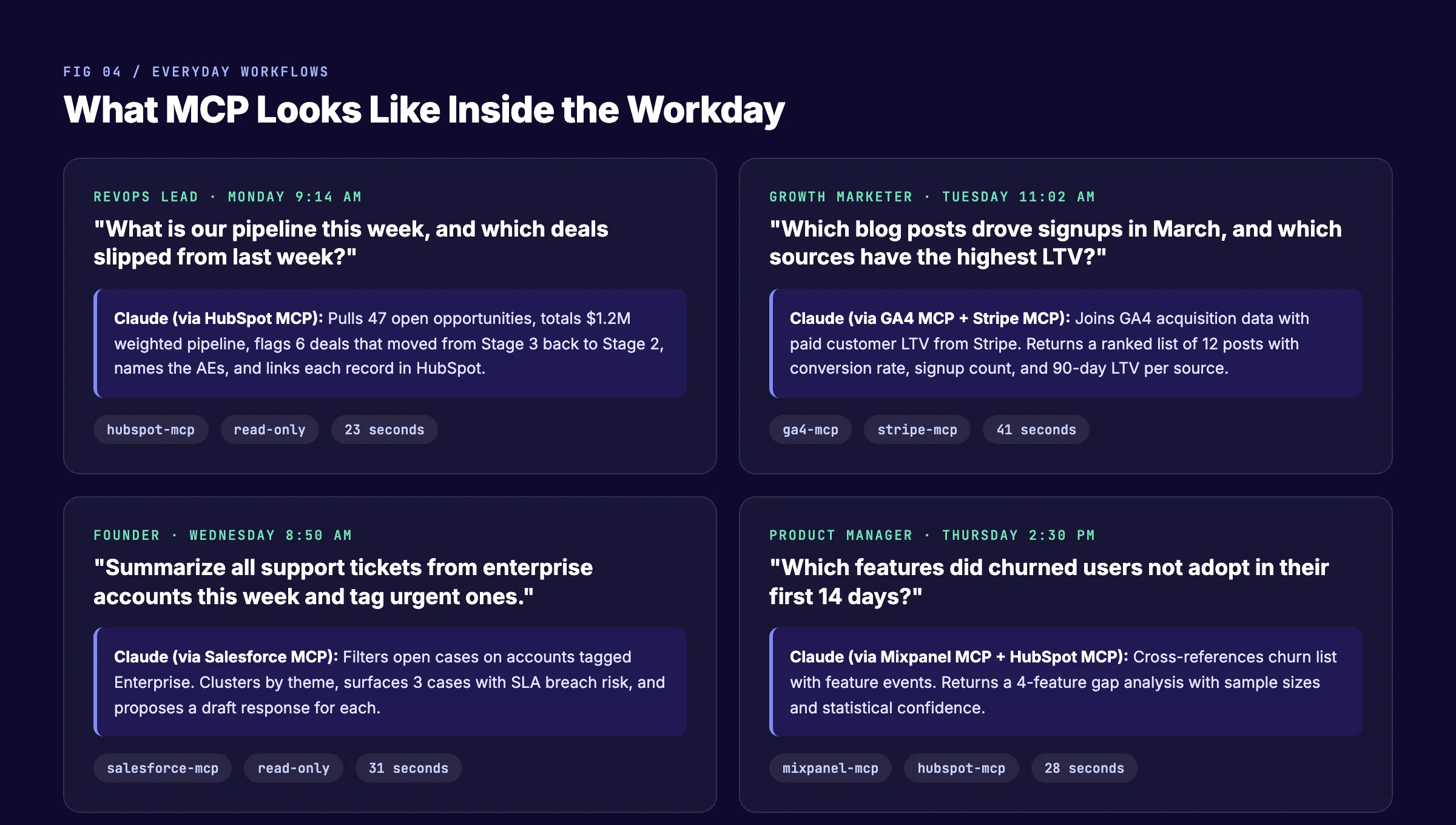
A RevOps lead opens Claude Desktop. The question is simple. "What is our pipeline this week, and which deals slipped from last week?"
Claude calls the HubSpot MCP server twice. Once to get the current open opportunities. Once to get the snapshot from the previous Monday. The server returns both sets of records. Claude diffs them and answers in a structured table: stage movements, owner names, deal values, slipped-deal flags.
Time to answer: 23 seconds. Time to the same answer through manual HubSpot navigation: 18 minutes.
Workflow 2: Source-attributed signups
A growth marketer asks Claude, "Which blog posts drove signups in March, and which sources have the highest LTV?"
This is a cross-source question. Claude calls the GA4 MCP server for acquisition data and the Stripe MCP server for paid customer LTV. The server returns both. Claude joins them by user ID and ranks them by LTV.
The answer is a ranked list of 12 posts with conversion rate, signup count, and 90-day LTV per source. This is a question that used to require a SQL developer or a 45-minute manual export. Now it is a single question.
Workflow 3: Enterprise support summary
A founder asks Claude, "Summarize all support tickets from enterprise accounts this week and tag urgent ones."
Claude calls the Salesforce MCP server. It filters cases on accounts tagged Enterprise. The server returns a list. Claude clusters by theme, surfaces 3 cases with SLA breach risk, and proposes a draft response for each.
The founder reviews and approves. The drafts go to the case owners. Total time: 4 minutes.
Workflow 4: Cross-source churn analysis
A product manager asks Claude, "Which features did churned users not adopt in their first 14 days?"
Claude calls the HubSpot MCP server to get the list of accounts that churned in the last month. Then it calls the Mixpanel MCP server to get the feature events for those user IDs in their first 14 days. Then it cross-references.
The answer is a 4-feature gap analysis with sample sizes and confidence intervals. The product manager uses it to prioritize onboarding improvements. This is the kind of analysis that used to require a data analyst and a half-day of work.
Workflow 5: Daily growth pulse
A growth lead sets up a daily prompt that runs at 8:00 AM. The prompt asks Claude to pull yesterday's signups by source from GA4, yesterday's revenue by plan from Stripe, and the top 5 new customer accounts from HubSpot.
Claude assembles a 4-paragraph summary that lands in Slack. The growth lead reads it on the way to standup. No dashboard tab-switching.
Why these workflows matter
The point is not that AI is faster than humans. The point is that the bottleneck shifts. The bottleneck used to be data access. Now the bottleneck is asking the right question. That is a much better bottleneck to have.
If you are interested in how MCP fits into broader AI agent infrastructure, our agentic AI marketing guide covers the wider context. For teams building MCP servers specifically for content operations, MCP content marketing goes deeper on those workflows.
Chapter 8: theStacc MCP Integration Maturity Model
After a year of building and watching teams build MCP integrations, the same four-stage pattern keeps appearing. We named it the MCP Integration Maturity Model because every team we have observed passes through these stages, in order, and almost all of them stall at Level 2.
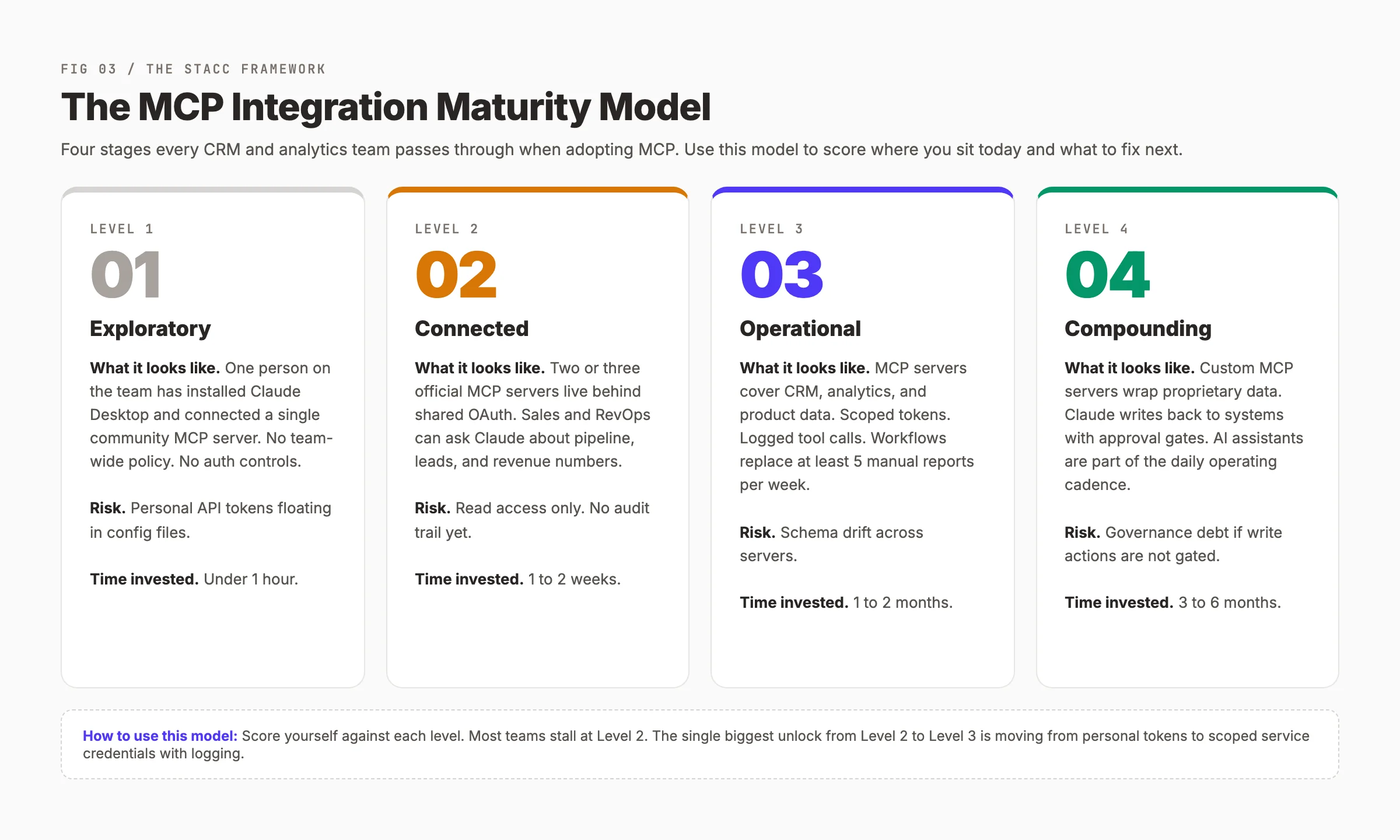
Level 1: Exploratory
One person on the team — usually an engineer or a curious operator — installs Claude Desktop and connects a single community MCP server. They share screenshots in Slack. There is no team-wide policy. No auth controls. Personal API tokens sit in config files.
The investment is under an hour. The risk is moderate: a single leaked config file exposes the connected systems. Most teams pass through Level 1 in their first week.
Level 2: Connected
Two or three official MCP servers run behind shared OAuth credentials. Sales and RevOps can ask Claude about pipeline, leads, and revenue. The team has a written policy on which servers are approved.
This is where most teams stop. The reason is simple: Level 2 is useful enough. The marginal pain of staying at Level 2 is lower than the marginal effort of moving to Level 3. The unlock that breaks Level 2 is usually one of two things: a security incident that forces logging, or a high-volume workflow that requires a custom server.
Level 3: Operational
MCP servers cover CRM, analytics, and product data. Tokens are scoped per environment. Tool calls are logged. The team has replaced at least 5 manual reports per week with MCP-driven workflows. There is a runbook for adding new servers.
The risk profile at Level 3 is schema drift. As servers multiply, tools start to overlap, and the LLM can pick a confusing default. Mature Level 3 teams maintain a server catalog with explicit guidance on which tool to prefer.
Level 4: Compounding
Custom MCP servers wrap proprietary data — internal data warehouses, custom product analytics, role-specific aggregations. Claude can write back to systems through approval gates. AI assistants are part of the daily operating cadence, not a side experiment.
The investment to reach Level 4 is 3 to 6 months of dedicated infrastructure work. The payoff is that the assistant becomes faster than any human analyst at routine analytical questions. Less than 5% of teams we observe are at Level 4 today. By end of 2026, we expect that share to be closer to 20%.
How to use the maturity model
Score your team honestly. Most teams overestimate by half a level. The honest version of "we are at Level 3" is usually "we are at Level 2 with some Level 3 ambitions."
The single biggest unlock from Level 2 to Level 3 is moving from personal access tokens to scoped service credentials with logging. It is unglamorous infrastructure work. It is also the gate that everything else depends on.
Want the SEO side of your marketing operation on autopilot while you build MCP infrastructure? theStacc handles blog publishing, local SEO, and social posts as a service — your team focuses on the hard problems. See plans and pricing →
What practitioners are saying on X
AI search advice ages quickly. Here is high-signal public discussion from SEO and growth operators — context for your roadmap, not a substitute for primary data.
- @hridoyreh (Mar 2026): Widely shared SEO skill tree: foundations, research, technical, on-page, content, links, AI SEO/GEO, analytics, UX, brand, programmatic — useful map for stats and how-to posts. See the post on X.
- @jakezward (Feb 2026): 2026 SEO predictions emphasize AI Overview share-of-SERP, schema for LLM token efficiency, brand mentions in AI answers as a KPI, proprietary data as a moat, and content refresh beating net-new AI slop. See the post on X.
- @alexgroberman (Jul 2026): Case narrative: organic value plus multi-engine citations (ChatGPT, Perplexity, Grok) from knowledge-hub pages, category authority links, commercial intent content, and tight internal linking — not thin product copy. See the post on X.
Grok, AI Overviews, and multi-engine visibility
Tool guides like “mcp crm analytics integration” win multi-engine citations when setup steps, screenshots-as-text, and use cases are clear. Name the product accurately so Grok and other models do not invent features or pricing.
- Google AI Overviews: Use passage-ready answers, tables, and FAQ schema where relevant.
- ChatGPT / Perplexity: Cite named sources next to key claims.
- Grok: Maintain accurate entity facts on-site and in high-signal X posts.
Chapter 9: Frequently Asked Questions
MCP CRM analytics integration means connecting your CRM and analytics tools to an AI assistant through the Model Context Protocol. The result is that you can ask Claude or another MCP-compatible assistant questions about your pipeline, revenue, or campaign performance in plain English, and the assistant pulls live data from systems like HubSpot, Salesforce, GA4, and Mixpanel. Key takeaway: MCP replaces export-and-paste workflows with conversational queries against live data.
No. MCP and workflow automation tools solve different problems. Zapier and Make trigger actions when events happen. MCP lets an AI assistant query and act on data when a human asks a question. Many teams run both — Zapier for event-driven automation, MCP for ad-hoc analysis and conversational interfaces. Key takeaway: Use Zapier for "when X happens, do Y." Use MCP for "let me ask the AI about X."
MCP is as safe as the server and the auth model you choose. The protocol itself does not weaken security. The risks live in the server implementation, the credentials, and the data masking policy. Use official servers, OAuth 2.0, scoped tokens, field-level masking, and full audit logging. With those controls in place, MCP is no more risky than any other authenticated API integration. Key takeaway: MCP risk equals the lowest-scored item in your auth, scope, masking, and logging policy.
HubSpot's official MCP server is the most polished for marketing and sales operators because it covers the full HubSpot platform in one install. Salesforce's official server is the strongest for organizations with custom objects and strict governance, because it forces explicit scope decisions. For Pipedrive and Zoho, community servers are production-ready but require slightly more setup care. Key takeaway: Pick the server that matches your current CRM. Switching CRMs to get a better MCP server is not justified yet.
You can use MCP with multiple clients. Claude Desktop and Claude.ai have the most mature native support. Cursor IDE supports MCP. Custom apps built on either the Anthropic API or the OpenAI API can implement MCP through the official SDKs. ChatGPT's native MCP support is rolling out in 2026 across paid plans. Key takeaway: The protocol is open. The client ecosystem is broader every month.
For a single official server with OAuth, expect 15 to 45 minutes from install to first useful query. For a full team-wide deployment with logging, OAuth, scoped tokens, and policy documentation, expect 1 to 2 weeks. For a fully custom server tailored to your data warehouse, expect 1 to 2 months of engineering work. Key takeaway: A useful first install fits inside a lunch break. A production-grade deployment is a multi-week project.
The same thing that happens when any internal tool has a bug. The LLM returns a bad answer or no answer. The remedy is the same as for any production system: good logging, fast rollback, and a clear escalation path. The unique risk with MCP is that the LLM may hallucinate plausible-sounding answers when the tool call fails silently. Make sure your server returns clear error responses rather than empty data. Key takeaway: Treat MCP servers like any production microservice. Log, monitor, and version them.
No. The protocol is stable enough for production use across CRM and analytics workflows. The MCP spec has gone through three formal releases since November 2024 with backward compatibility. Major vendors are committing roadmap and engineering resources. Waiting costs you the compounding benefit of months of practice. Start with one official server, get one workflow working, then expand. Key takeaway: The cost of waiting is higher than the cost of starting small.
What to Do Next
You now have the architecture, the server matrix, the security model, and the workflows. The next step is not to read more. The next step is to install one official MCP server and run one query against your real CRM data.
Pick the CRM your team uses today. Install the official MCP server. Connect it to Claude Desktop. Ask one question: "What is our pipeline this week?" That single query, against real data, will teach you more than another guide.
By end of 2026, MCP will be a standard part of every operator's toolkit. The teams who start in May will have a six-month head start on the teams who start in November. The protocol is open. The servers are free. The only constraint is your willingness to begin.
Sources:
- Model Context Protocol — Official Specification (modelcontextprotocol.io)
- Anthropic — Introducing the Model Context Protocol
- HubSpot — Official MCP Server (GitHub)
- Awesome MCP Servers — Community Index
Sources & references
- [1] Princeton / Georgia Tech et al. — GEO research (arXiv:2311.09735)
- [2] @hridoyreh on X — Widely shared SEO skill tree: foundations, research, technical, on-page, content, links, AI SEO/GEO, analytics, UX, bran
- [3] @jakezward on X — 2026 SEO predictions emphasize AI Overview share-of-SERP, schema for LLM token efficiency, brand mentions in AI answers
- [4] @alexgroberman on X — Case narrative: organic value plus multi-engine citations (ChatGPT, Perplexity, Grok) from knowledge-hub pages, category
- [5] Referenced source — modelcontextprotocol.io

Plan topics, review article drafts, and publish to a connected CMS.
Weekly local SEO teardowns
One practical email a week. Map Pack, GBP, AI Overviews. No fluff. Unsubscribe anytime.