
SEO Monitoring: The Complete Guide (Tools + Process)
Learn how to monitor SEO performance with the right metrics, tools, and review cadence. Practical SEO monitoring process for 2026.
Stacc Editorial • 2026-04-04 • SEO Tips
In This Article
Most businesses check their SEO once. They run an audit, fix a few issues, and move on. Then 6 months later they wonder why traffic dropped.
SEO monitoring is the ongoing process of tracking your site’s search performance, identifying problems early, and making data-driven improvements. Without it, you are flying blind. A single unnoticed indexing error can erase months of organic growth in days.
90% of pages get zero traffic from Google, according to Ahrefs’ content study. The pages that do rank need constant attention. Rankings fluctuate. Competitors publish. Algorithms update. Content decays. SEO monitoring catches these changes before they become crises.
We have published 3,500+ blog posts across 70+ industries. This guide covers our exact SEO monitoring process: what to track, which tools to use, how often to review, and how to act on the data.
Here is what you will learn:
- The 12 SEO metrics that actually matter (and which ones to ignore)
- The exact monitoring cadence: daily, weekly, monthly, and quarterly tasks
- The best SEO monitoring tools for every budget
- How to set up alerts that catch problems before they cost traffic
- Common monitoring mistakes that waste time
- A ready-to-use SEO monitoring checklist
Chapter 1: What SEO Monitoring Covers
SEO monitoring is not a single activity. It is a system of checks across 5 categories.
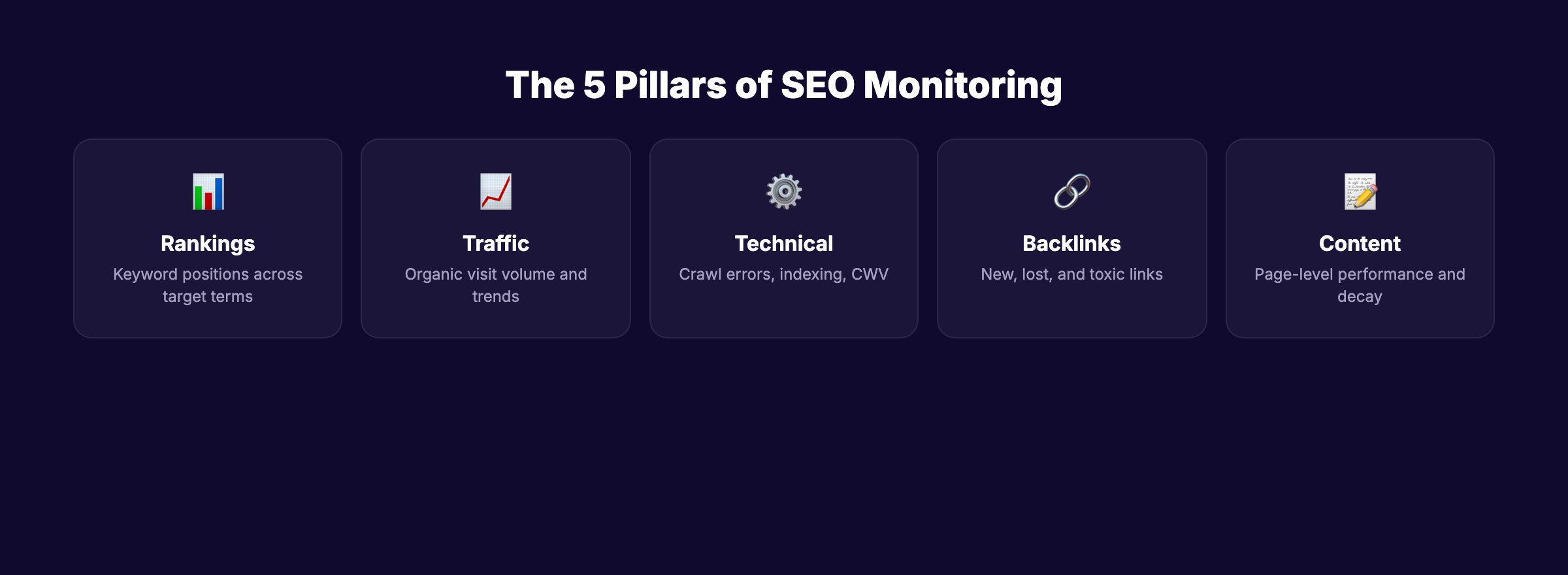
The 5 Pillars of SEO Monitoring
| Pillar | What You Track | Why It Matters |
|---|---|---|
| Rankings | Keyword positions across target terms | Shows if your content is gaining or losing visibility |
| Traffic | Organic traffic volume and trends | Measures the actual visitors your SEO delivers |
| Technical health | Crawl errors, indexing, Core Web Vitals | Catches issues that block Google from ranking your pages |
| Backlinks | New links, lost links, toxic links | Tracks your authority growth and protects against spam |
| Content performance | Page-level traffic, engagement, conversions | Identifies which pages drive results and which need updates |
Monitoring one pillar while ignoring others creates blind spots. A site can rank well but have broken pages. Traffic can grow but conversions can drop. The full picture requires all 5.
Chapter 2: The 12 SEO Metrics That Matter
Not every number in Google Analytics deserves attention. These 12 metrics tell you whether your SEO is working.
Visibility Metrics
1. Organic traffic. Total visitors from unpaid search results. This is your SEO north star. If organic traffic trends up month over month, your strategy works. Track in Google Analytics with the “Organic Search” channel filter.
2. Keyword rankings. Where your target pages appear in search results for specific keywords. Track your top 50 to 100 target keywords weekly. Focus on movement patterns, not daily noise. Use Ahrefs or Semrush for tracking.
3. Search impressions. How often your pages appear in search results, regardless of clicks. Rising impressions with flat clicks means your rankings improved but your titles and meta descriptions need work.
4. Click-through rate (CTR). The percentage of impressions that result in clicks. Average organic CTR is 2 to 3%. Position 1 averages 27%. Low CTR on high-impression pages signals a title tag or meta description problem.
Technical Metrics
5. Indexation coverage. How many of your pages Google has indexed vs. how many you submitted. Check Google Search Console’s “Pages” report. If 40% of your pages are “not indexed,” you have a crawling or quality issue.
6. Core Web Vitals. LCP (under 2.5s), INP (under 200ms), CLS (under 0.1). Google uses these as ranking signals. Only 47 to 54% of sites pass all 3. Check monthly in Search Console.
7. Crawl errors. 404 errors, server errors, redirect chains, and blocked resources. These prevent Google from accessing your content. Fix crawl errors weekly.
Authority Metrics
8. Referring domains. The number of unique websites linking to yours. More referring domains generally correlates with higher rankings. Track new and lost links monthly.
9. Domain authority / Domain Rating. A composite score estimating your site’s overall backlink strength. Useful for tracking progress over time and comparing against competitors. Not a Google metric, but a reliable proxy.
Performance Metrics
10. Top pages by organic traffic. Your top 20 pages by organic visits. These are your money pages. Monitor them closely. A 10% drop on a top page matters more than a 50% drop on a page with 20 monthly visits.
11. Conversions from organic. Leads, signups, purchases, or goal completions driven by organic traffic. This is the metric that connects SEO to revenue. Track with Google Analytics goal or event tracking.
12. Revenue per organic session. Total organic revenue divided by organic sessions. This tells you the dollar value of your SEO. If revenue per session drops while traffic grows, your traffic quality is declining.
Your SEO team. $99 per month. 30 optimized articles, published automatically. Start for $1 →
Chapter 3: The SEO Monitoring Cadence
How often you check each metric matters. Checking rankings hourly creates anxiety. Checking them quarterly misses problems. Here is the cadence that balances signal and noise.
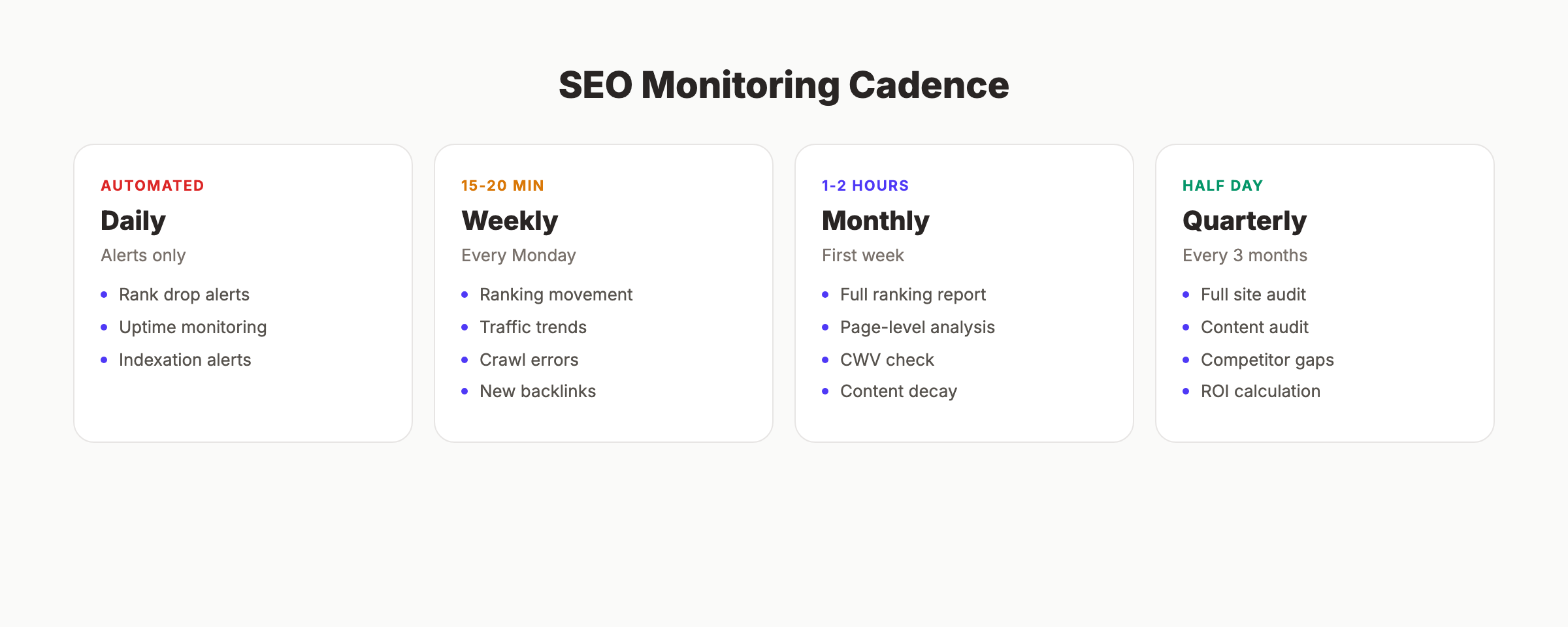
Daily Monitoring (Automated)
Set alerts. Do not check dashboards manually every day.
- Rank tracking for top 10 priority keywords (automated alerts for drops of 5+ positions)
- Uptime monitoring (site goes down = immediate traffic loss)
- Indexation alerts (Search Console notifies of coverage issues)
Tools: Ahrefs or Semrush rank alerts, UptimeRobot or Pingdom for uptime, Search Console email notifications.
Weekly Review (15 to 20 Minutes)
Every Monday or Friday, spend 15 minutes on these checks.
- Keyword ranking movement for top 50 terms
- Organic traffic trend vs. previous week in Google Analytics
- Crawl errors in Search Console (fix anything new)
- New and lost backlinks in Ahrefs or Semrush
- Any manual action notifications in Search Console
Action rule: If any metric drops more than 15% week over week, investigate immediately. Small fluctuations are normal. Sustained drops signal a real issue.
Monthly Deep Review (1 to 2 Hours)
Once per month, run a thorough analysis.
- Full keyword ranking report: gainers, losers, new rankings
- Organic traffic by page: identify top performers and declining pages
- Core Web Vitals check across top 20 pages
- Backlink profile review: quality of new links, domain rating trend
- Content decay check: pages that peaked and are now declining
- Conversion rate from organic: trending up or down?
- Competitor ranking comparison for shared keywords
Action rule: Flag any page that lost 20%+ traffic month over month for a content refresh. Schedule updates for the following month.
Quarterly Strategic Review (Half Day)
Every 3 months, step back and evaluate the system.
- Full technical site audit with Screaming Frog or Ahrefs Site Audit
- Content audit: identify thin, outdated, or duplicate pages
- Internal linking audit: are new pages connected to existing clusters?
- Competitor gap analysis: what keywords are they ranking for that you are not?
- ROI calculation: cost of SEO activities vs. revenue from organic traffic
- Strategy adjustment: update priorities based on what the data shows
Stop writing. Start ranking. Stacc publishes 30 SEO articles per month for your business, on autopilot. Start for $1 →
Chapter 4: SEO Monitoring Tools by Category
You do not need 10 tools. You need 3 to 4 that cover different categories.
Free Tools (Essential for Everyone)
| Tool | Category | What It Does |
|---|---|---|
| Google Search Console | Rankings, indexing, CWV | The only source of real Google data. Shows actual impressions, clicks, and indexation status. |
| Google Analytics | Traffic, behavior, conversions | Tracks visitor volume, sources, on-site behavior, and goal completions. |
| Google PageSpeed Insights | Performance | Tests Core Web Vitals and page speed for any URL. Uses real user data. |
| Bing Webmaster Tools | Rankings, indexing | Covers Bing search. Also provides data that feeds into some AI search engines. |
Paid All-in-One Platforms
| Tool | Best For | Starting Price |
|---|---|---|
| Ahrefs | Backlink analysis, rank tracking, content gaps | $99/month |
| Semrush | Keyword research, competitive analysis, site audit | $139/month |
| Surfer SEO | Content optimization scoring | $99/month |
| SE Ranking | Budget-friendly rank tracking | $55/month |
Specialized Monitoring Tools
For technical SEO: Screaming Frog (desktop crawler, free up to 500 URLs), Sitebulb (visual technical audits)
For uptime: UptimeRobot (free, 5-minute checks), Pingdom (1-minute checks, $10/month)
For Core Web Vitals: DebugBear (real user monitoring + lab testing)
For backlink alerts: Ahrefs Alerts (new/lost backlinks), Semrush Backlink Audit

The Recommended Stack by Budget
| Budget | Stack | Monthly Cost |
|---|---|---|
| Free | Search Console + Analytics + PageSpeed Insights | $0 |
| Starter | Free stack + SE Ranking | $55/month |
| Professional | Free stack + Ahrefs + Screaming Frog | $99/month |
| Agency | Free stack + Semrush + Ahrefs + DebugBear | $300+/month |
Most businesses perform well with the Professional stack. Search Console provides real data. Ahrefs covers rank tracking, backlinks, and competitive analysis. Screaming Frog handles technical crawls.
Chapter 5: Setting Up SEO Alerts
Alerts turn passive monitoring into active protection. Set them once and they notify you when something changes.
Critical Alerts to Configure
Rank drop alert. Set in Ahrefs or Semrush. Trigger when any top 20 keyword drops 5+ positions. A sudden drop across multiple keywords usually signals an algorithm update or technical issue.
Indexation alert. Search Console sends email notifications when coverage issues arise. Enable them in Settings → Email preferences. A spike in “excluded” pages means Google found problems.
Uptime alert. Configure UptimeRobot to check your site every 5 minutes. Downtime kills rankings. Even a few hours of downtime during a Google crawl can cause pages to drop.
Backlink alert. Ahrefs Alerts notifies you of new and lost backlinks. New high-authority links validate your content strategy. Lost links from important pages need investigation.
Core Web Vitals regression. DebugBear or Search Console can alert when CWV metrics degrade. A code deploy that breaks INP can affect rankings within weeks.
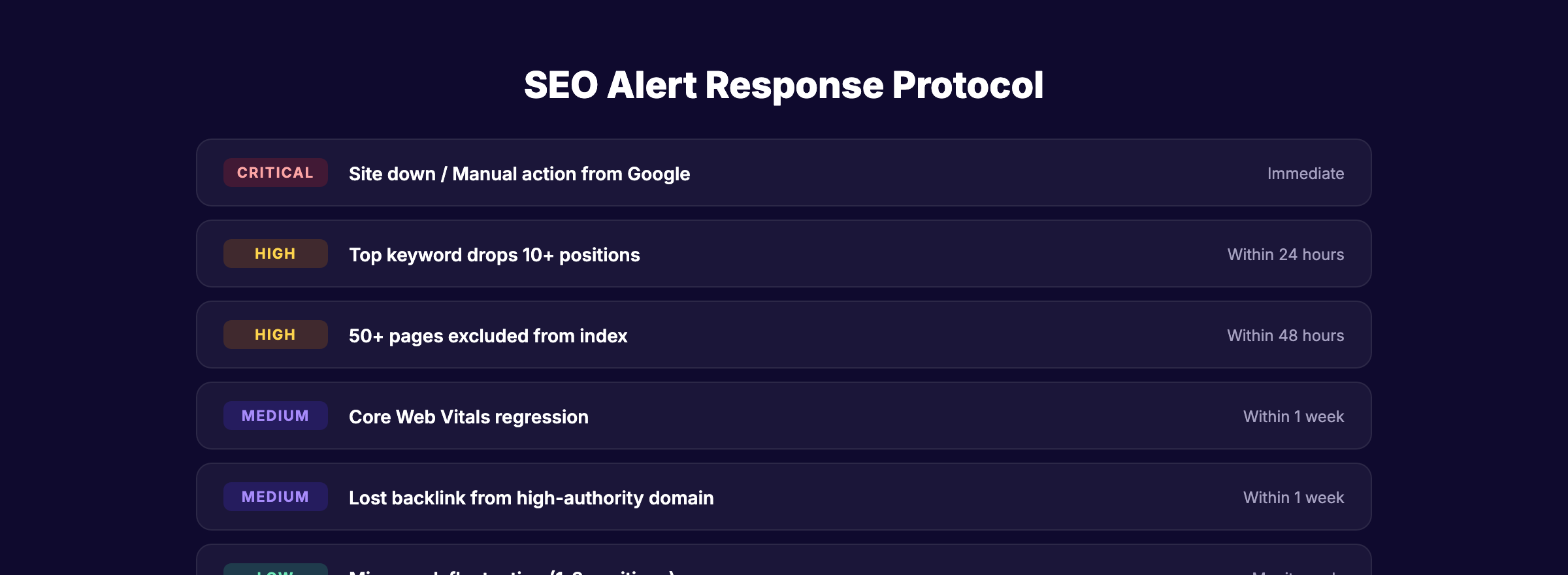
Alert Response Protocol
Not every alert requires action. Use this triage:
| Alert Type | Severity | Response Time |
|---|---|---|
| Site down | Critical | Immediate |
| Manual action from Google | Critical | Same day |
| Top keyword drops 10+ positions | High | Within 24 hours |
| Indexation spike (50+ pages excluded) | High | Within 48 hours |
| CWV regression | Medium | Within 1 week |
| Lost backlink from high-authority domain | Medium | Within 1 week |
| Minor rank fluctuation (1 to 3 positions) | Low | Monitor, no action needed |
Chapter 6: Common SEO Monitoring Mistakes
These mistakes waste time or miss real problems.
Mistake 1: Checking Rankings Manually
Searching Google for your own keywords while logged into your browser gives misleading results. Google personalizes results based on location, search history, and device. Manual checks are never accurate.
Fix: Use a rank tracking tool with neutral user profiles. Check automated reports, not manual searches.
Mistake 2: Tracking Too Many Keywords
Monitoring 500 keywords creates noise that drowns out signal. Most of those keywords drive zero traffic. You waste time analyzing meaningless fluctuations.
Fix: Track your top 50 to 100 high-value keywords. Review the full keyword list quarterly. Remove terms that rank beyond page 5 and show no movement.
Mistake 3: Reacting to Daily Fluctuations
Rankings fluctuate daily. A 2-position drop on a Tuesday does not mean your SEO is broken. Google tests different results constantly.
Fix: Compare weekly averages, not daily snapshots. Only investigate drops that persist for 7+ days or exceed 5 positions.
Mistake 4: Ignoring Technical Health
Teams focus on rankings and traffic while ignoring indexing errors, broken links, and page speed degradation. Technical problems compound silently.
Fix: Run a weekly crawl error check and a monthly Core Web Vitals review. Quarterly full technical audits catch everything else.
Mistake 5: Monitoring Without Acting
The most common mistake. Teams track 50 metrics, build beautiful dashboards, and never change anything based on the data. Monitoring without action is just reporting.
Fix: Every monitoring review must produce at least 1 action item. No action needed? Great. But actively decide that. Do not let reports accumulate unread. Assign action items to specific people with deadlines. Track completion in your project management tool.
Mistake 6: Not Monitoring Competitors
Tracking only your own metrics means missing competitive shifts. A competitor publishing 20 articles per month on your core topic will eventually outrank you. You will not see it coming without competitive monitoring.
Fix: Add your top 3 competitors to your rank tracking tool. Monitor their new content weekly. Run a competitor keyword gap analysis quarterly to find terms they rank for that you do not.
3,500+ blogs published. 92% average SEO score. See what Stacc can do for your site. Start for $1 →
Chapter 7: The SEO Monitoring Checklist
Use this checklist to build your monitoring system from scratch.
Initial Setup (One-Time)
- Connect Google Search Console and verify site ownership
- Set up Google Analytics with goal/event tracking for conversions
- Choose a rank tracking tool and add your top 50 to 100 keywords
- Configure uptime monitoring with 5-minute checks
- Set up rank drop alerts (5+ position threshold)
- Enable Search Console email notifications
- Set up backlink alerts for new and lost links
- Run a baseline technical audit and document current state
- Create a monitoring dashboard or report template
Weekly Checks (15 to 20 Minutes)
- Review keyword ranking movement for top 50 terms
- Check organic traffic trend vs. previous week
- Review and fix new crawl errors in Search Console
- Check for new or lost backlinks
- Verify no manual actions in Search Console
Monthly Review (1 to 2 Hours)
- Run full keyword ranking report (gainers and losers)
- Analyze organic traffic by page (top performers and decliners)
- Check Core Web Vitals across top 20 pages
- Review backlink profile (new links quality, domain rating trend)
- Identify content decay candidates (pages losing traffic)
- Calculate organic conversion rate
- Compare keyword overlap with top 3 competitors
- Produce monthly SEO report
Quarterly Audit (Half Day)
- Run full technical site audit (Screaming Frog or Ahrefs)
- Audit content for thin, outdated, or duplicate pages
- Review internal linking structure
- Run competitor gap analysis
- Calculate quarterly SEO ROI
- Update keyword targets and content strategy
- Document findings and adjust priorities
Rank everywhere. Do nothing. Blog SEO, Local SEO, and Social on autopilot. Start for $1 →
FAQ
What is SEO monitoring?
SEO monitoring is the ongoing process of tracking your website’s search engine performance across rankings, traffic, technical health, backlinks, and content effectiveness. It involves using tools like Google Search Console, Ahrefs, and Semrush to collect data, setting up alerts for important changes, and reviewing metrics on a regular cadence to identify problems and opportunities.
How often should I check my SEO metrics?
Use automated daily alerts for critical metrics (uptime, major rank drops). Review rankings and traffic weekly (15 to 20 minutes). Do a deep monthly review of all metrics (1 to 2 hours). Run a full technical audit quarterly (half day). This cadence catches problems early without creating analysis paralysis.
What are the most important SEO metrics to track?
The 5 most impactful metrics are: organic traffic (overall volume), keyword rankings (visibility), Core Web Vitals (technical performance), conversions from organic (business impact), and referring domains (authority). Track these consistently and you will catch 90% of meaningful changes.
Do I need paid tools for SEO monitoring?
You can monitor SEO effectively with free tools (Google Search Console, Google Analytics, PageSpeed Insights). Paid tools like Ahrefs add rank tracking, backlink analysis, and competitive intelligence that free tools do not provide. Most businesses benefit from at least one paid tool at $55 to $99 per month.
What should I do when rankings drop?
First, determine if the drop is temporary (daily fluctuation) or sustained (7+ days). If sustained, check for technical issues (indexation, crawl errors, Core Web Vitals regression). Then check if Google released an algorithm update. Compare your page against competitors who gained. Update content depth, improve page experience, and strengthen E-E-A-T signals.
Can Stacc help with SEO monitoring?
Stacc handles the content production layer that feeds your SEO monitoring metrics. We publish 30 optimized articles per month. You monitor the performance. Our consistent publishing cadence means your organic traffic, keyword rankings, and topical authority metrics trend upward over time without you producing a single article.
SEO monitoring is the difference between reacting to traffic losses and preventing them. Build the system once. Run the cadence consistently. Act on the data quickly. The sites that rank year after year are not the ones with the best content on day 1. They are the ones that monitor, iterate, and improve every month.
Written and published by Stacc. We publish 3,500+ articles per month across 70+ industries. All data verified against public sources as of March 2026.
