
What Is INP? Interaction to Next Paint Guide
INP (Interaction to Next Paint) measures page responsiveness. Learn the 200ms threshold, how to measure it, and 5 optimization techniques. Updated April 2026.
Your website loads fast. But when a visitor clicks a button, nothing happens for 400 milliseconds. That delay costs you rankings. INP (Interaction to Next Paint) is the Core Web Vital that measures exactly this: how fast your page responds to user interactions.
Google replaced First Input Delay (FID) with INP as the official responsiveness metric on March 12, 2024. A good INP score is 200 milliseconds or less. Globally, 77% of mobile pages achieve a passing score. The other 23% are losing a ranking signal that directly affects search visibility.
What Is INP (Interaction to Next Paint)?
INP stands for Interaction to Next Paint. It is a Core Web Vital metric that measures how quickly a webpage responds to user interactions like clicks, taps, and key presses.
Unlike its predecessor FID, which only measured the delay before the first interaction, INP measures every interaction a user makes with the page. It then reports a single value that represents the page’s overall responsiveness. That value is the interaction at the 75th percentile. In practical terms: 75% of all interactions must complete in under 200ms for the page to pass.
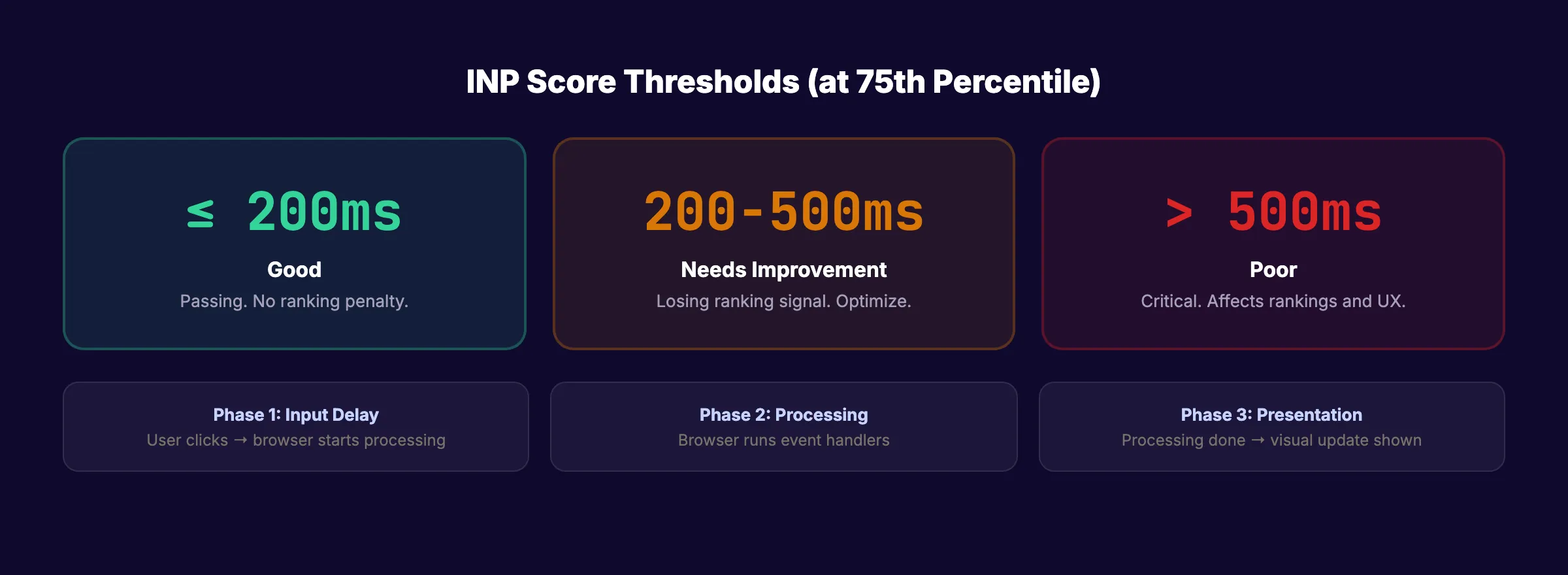
INP captures the full cycle of an interaction across 3 phases:
| Phase | What It Measures | Common Cause of Delay |
|---|---|---|
| Input delay | Time from user click to browser starting to process | JavaScript blocking the main thread |
| Processing time | Time the browser spends running event handlers | Heavy or inefficient JavaScript |
| Presentation delay | Time from processing complete to visual update on screen | Large DOM, layout recalculations |
Key point: INP measures responsiveness across ALL interactions on a page, not just the first one. A page can have a fast first click but slow subsequent interactions. INP catches both.
Why INP Matters for SEO
Core Web Vitals are a confirmed Google ranking factor. They became part of Google’s page experience signals in June 2021. INP is the responsiveness component of that system.
Ranking impact. Content relevance remains the primary ranking factor. But in competitive niches where 2 pages have similar content quality, Core Web Vitals act as a tiebreaker. Passing INP can be the difference between position 5 and position 8.
User experience impact. Slow interactions cause users to abandon pages. A 400ms delay between clicking a button and seeing a response feels broken to users. They click again, click away, or leave entirely. That behavioral signal (pogo-sticking) compounds the ranking loss.
Mobile matters most. INP scores are typically worse on mobile devices due to slower processors. Google uses mobile-first indexing. If your mobile INP score exceeds 200ms, your page speed is hurting rankings regardless of how fast desktop performs.
The bottom line: Failing INP is a ranking signal you can fix with technical optimization. Every other ranking factor (content, backlinks, authority) requires months of work. INP improvements can take effect within days of Google re-crawling your pages.
Your SEO team. $99 per month. 30 optimized articles, published automatically. We handle the content. You handle the technical performance. Start for $1 →
How to Measure INP
INP can only be measured with field data from real users. Lab tools cannot produce meaningful INP scores because INP depends on real human interactions. There is no way to simulate which buttons a user will click or how they will interact with your page.
Where to Check Your INP Score
| Tool | What It Shows |
|---|---|
| Google PageSpeed Insights | 75th percentile INP from real Chrome users (28-day average) |
| Google Search Console | Core Web Vitals report with INP status for all pages |
| Chrome User Experience Report (CrUX) | Raw field data accessible via BigQuery or CrUX dashboard |
| Web Vitals Chrome Extension | Real-time INP measurement during your own browsing |
INP Score Thresholds
| Score | Rating | Action |
|---|---|---|
| ≤200ms | Good (green) | Passing. No action needed |
| 200-500ms | Needs improvement (amber) | Optimize. You are losing ranking signal |
| >500ms | Poor (red) | Critical. Likely affecting rankings and user experience |
Google uses the 75th percentile. This means 75% of your real users must experience interactions faster than 200ms. The metric captures the experience of users on slower devices, not just high-end hardware.
How to Optimize INP
Poor INP scores come from 3 sources: heavy JavaScript blocking the main thread, slow event handlers, and large DOM trees that delay visual updates. Here are the 5 most effective fixes.
1. Break Up Long JavaScript Tasks
The main thread handles user interactions. If a long JavaScript task (over 50ms) is running when a user clicks, the browser cannot respond until that task finishes. Break long tasks into smaller chunks using setTimeout, requestIdleCallback, or the Scheduler API.
2. Defer and Lazy-Load Non-Critical Scripts
Third-party scripts (analytics, chat widgets, ad trackers) often block the main thread. Audit every script on your page. Defer scripts that do not need to run immediately. Use loading="lazy" for below-the-fold content. Remove scripts you do not actually need.
3. Reduce DOM Size
Large DOM trees (over 1,500 nodes) slow down every visual update. The browser recalculates layout and repaints more slowly as DOM size grows. Remove unused HTML elements. Use CSS content-visibility: auto for off-screen content. Virtualize long lists.
4. Optimize Event Handlers
Keep JavaScript event handlers lightweight. Do not run complex calculations inside click or input handlers. Move heavy processing to Web Workers. Use debouncing for inputs like search bars where every keystroke would otherwise trigger a function call.
5. Minimize Layout Thrashing
Reading and writing DOM properties in rapid succession forces the browser to recalculate layout repeatedly. Batch DOM reads together, then batch DOM writes together. Avoid reading layout properties (like offsetHeight) inside loops.
For a broader guide on all 3 Core Web Vitals (LCP, INP, CLS), read our Core Web Vitals improvement guide.
Common Mistakes to Avoid
-
Testing INP in lab tools only. Lighthouse and similar lab tools cannot measure INP accurately because they simulate page loads, not real user interactions. Always check field data in PageSpeed Insights or Search Console.
-
Fixing only the homepage. INP is measured per page. A blog post with a sticky nav, comment section, and embedded forms may have worse INP than your homepage. Check all high-traffic page templates.
-
Ignoring mobile scores. Mobile INP is almost always worse than desktop due to slower processors. Google indexes mobile-first. Optimize for mobile INP specifically.
INP and Stacc
Stacc publishes content optimized for search performance. While INP is a technical metric that depends on your site’s code and hosting, every article we publish uses clean HTML structure, minimal JavaScript, and properly formatted content that does not bloat your DOM. We focus on the content. You focus on the technical performance. Together, both sides of on-page SEO are covered.
3,500+ blogs published. 92% average SEO score. See what Stacc can do for your site. Start for $1 →
Learn More
Related topics:
- How to Improve Core Web Vitals
- On-Page SEO Guide
- How to Do an SEO Audit
- Core Web Vitals Glossary
- LCP (Largest Contentful Paint) Glossary
FAQ
What is a good INP score?
A good INP score is 200 milliseconds or less at the 75th percentile. This means at least 75% of user interactions on your page must complete in under 200ms. Scores between 200ms and 500ms need improvement. Scores above 500ms are poor and likely affecting your search rankings.
Did INP replace FID?
Yes. INP officially replaced First Input Delay (FID) as a Core Web Vital on March 12, 2024. FID only measured the delay before the first interaction. INP measures the responsiveness of every interaction on the page. FID has been deprecated and removed from Google Search Console.
Does INP affect Google rankings?
Yes. Core Web Vitals (including INP) are a confirmed Google ranking factor. They function as a tiebreaker in competitive niches. Passing all 3 Core Web Vitals (LCP, INP, CLS) gives your pages a ranking advantage over pages with similar content that fail these metrics.
Can I measure INP with Lighthouse?
Not accurately. INP requires field data from real user interactions. Lighthouse runs in a lab environment and simulates page loads, not real clicks and taps. Use PageSpeed Insights (which shows field data from Chrome users) or Google Search Console for accurate INP scores.
INP is the Core Web Vital that catches the interactions keyword-focused SEO cannot fix. Pass the 200ms threshold, and you remove a ranking barrier that affects every page on your site.

Written by
Siddharth GangalSiddharth is the founder of theStacc and Arka360, and a graduate of IIT Mandi. He spent years watching great businesses lose organic traffic to competitors who simply published more. So he built a system to fix that. He writes about SEO, content at scale, and the tactics that actually move rankings.


30 SEO blog articles published every month
Keyword-optimized, scheduled, and live on your site. Automatically.
30-day trial · Cancel anytime
theStacc
Stop writing SEO content manually
30 blog articles, 30 GBP posts, and social media content. Published every month. Automatically.
Start Your $1 Trial$1 for 3 days · Cancel anytime