
Internal Linking Strategy: The Complete Guide (2026)
Build an internal linking strategy that boosts rankings and traffic. Covers topic clusters, anchor text, the Reasonable Surfer model, and audits. Updated 2026.
Pages with 40-44 internal links get 4x more Google traffic than pages with fewer than 5. But after 45-50 links, traffic starts to decline. That is the kind of nuance most internal linking advice misses entirely.
A strong internal linking strategy does more than connect your pages. It tells Google which pages matter most, distributes link equity across your site, and helps users find content they did not know they needed. Sites with a clear internal linking strategy generate 30% more organic traffic and maintain rankings 2.5x longer than sites without one.
We have published 3,500+ blog posts across 70+ industries. Every single one uses a deliberate internal linking strategy. This guide covers the exact framework we follow.
Here is what you will learn:
- How internal links affect Google rankings (with data from 23 million links)
- The topic cluster model that multiplies your traffic
- Anchor text rules that differ from external link building
- Google’s Reasonable Surfer model and why link placement matters
- How to audit and fix your current internal linking structure
- The optimal number of internal links per page
Why Internal Links Matter for SEO
Google’s John Mueller called internal linking “super critical for SEO” and “one of the most important elements of a website.” That is not marketing speak. Internal links serve 4 distinct functions that directly affect rankings.
1. They Help Google Discover and Index Your Pages
Googlebot follows internal links to discover new pages. A page with zero internal links pointing to it is an orphan page. Google may never find it. Even if Google discovers an orphan page through an XML sitemap, the lack of internal links signals that the page is unimportant.
2. They Distribute Link Equity
When an external site links to your homepage, that authority needs to flow to your other pages. Internal links are the pipes. Without them, your homepage hoards all the authority while your blog posts and product pages starve.
The flow works like water through a network. Every internal link passes a portion of the source page’s authority to the target page. Pages with more internal links pointing to them receive more authority.
3. They Define Site Architecture
Internal links tell Google which pages are most important and how they relate to each other. A page linked from your homepage, navigation, and 50 blog posts signals “this is a pillar page.” A page linked from 1 sidebar widget signals “this is secondary content.”
Google recommends a clear structure: homepage to top categories to subcategories to individual pages. Every key page should be reachable within 3 clicks of the homepage.
4. They Build Topical Authority
When you link related pages together, Google understands that your site covers a topic in depth. A cluster of 15 articles about “SEO content strategy” linked to a pillar page about “content strategy” tells Google you are an authority on that subject.
This is topical authority in action. Sites that build it rank higher for competitive terms because Google trusts their depth of coverage.
Stop writing. Start ranking. Stacc publishes 30 SEO articles per month for $99. Every post internally linked to your existing content. Start for $1 →
The Topic Cluster Model for Internal Linking
Most internal linking advice boils down to “link to related content.” That is not a strategy. A strategy requires structure.
The topic cluster model provides that structure. It organizes your content into groups of related pages with clear linking rules.
How Topic Clusters Work
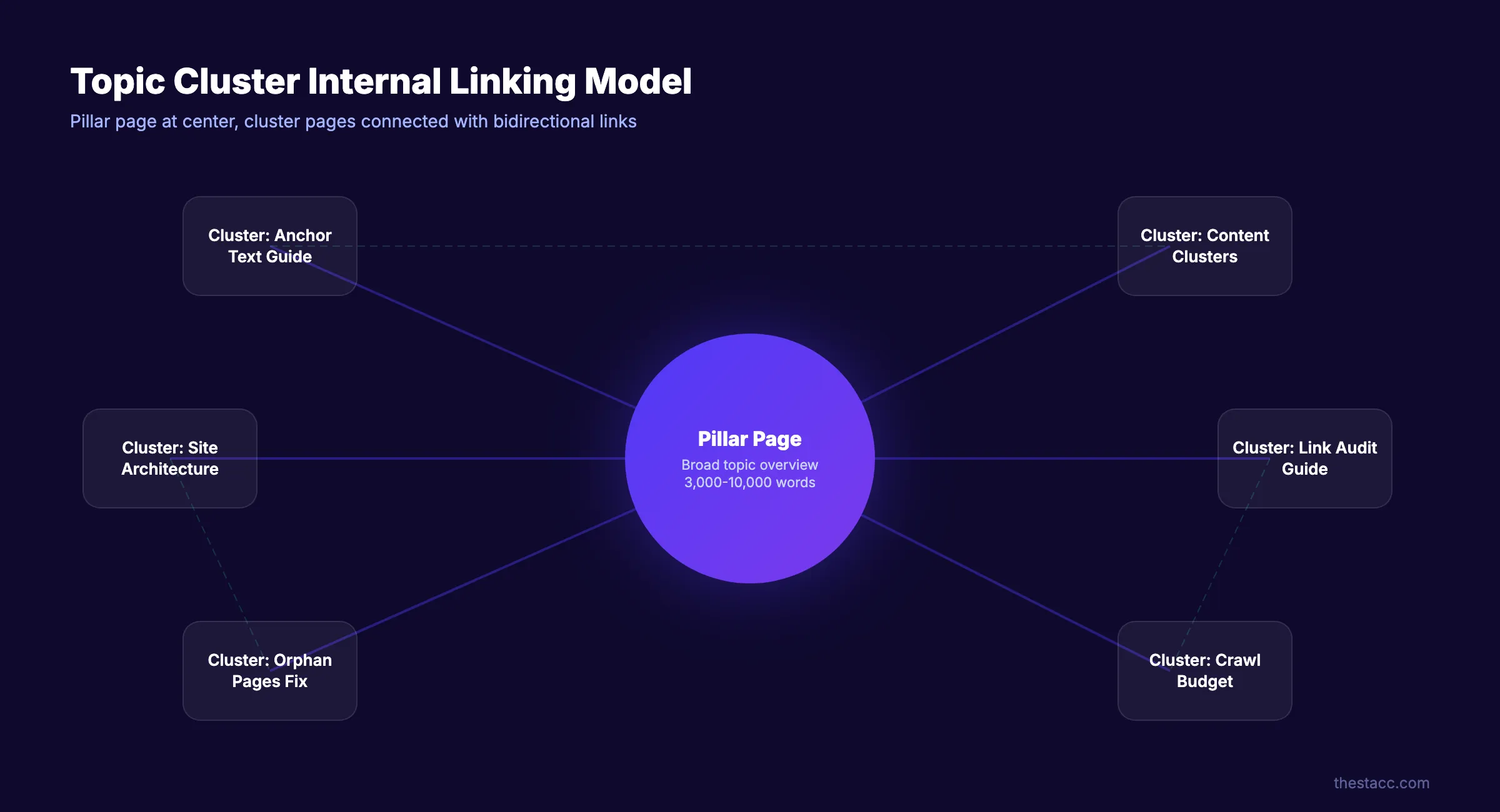
Every cluster has 3 components:
| Component | Purpose | Example |
|---|---|---|
| Pillar page | Broad overview of a major topic (3,000-10,000 words) | “SEO Content Writing: The Complete Guide” |
| Cluster pages | Deep dives into specific subtopics (1,000-3,000 words) | “How to Write Meta Descriptions,” “Keyword Density Guide” |
| Internal links | Connect every cluster page to the pillar and to each other | Bidirectional links between all related pages |
Linking Rules Within a Cluster
- Every cluster page links to the pillar page
- The pillar page links to every cluster page
- Cluster pages cross-link to 2-3 other cluster pages in the same cluster
- Place the pillar link high on the page (first or second paragraph)
- Use descriptive anchor text that includes the target keyword
For a detailed walkthrough of building clusters, see our guide on content clusters and writing pillar pages.
The Data Behind Clusters
Properly built topic clusters generate approximately 30% more organic traffic than standalone posts. They also maintain rankings 2.5x longer because Google recognizes the site as an authority on the topic, not just a single page.
One seoClarity case study documented a 100% jump in discovered keywords for a large marketplace after implementing city-level topic clustering with internal links.
How Many Internal Links Per Page?
This is the most asked question about internal linking. The answer comes from the largest study on the topic.
The Zyppy Study: 23 Million Internal Links
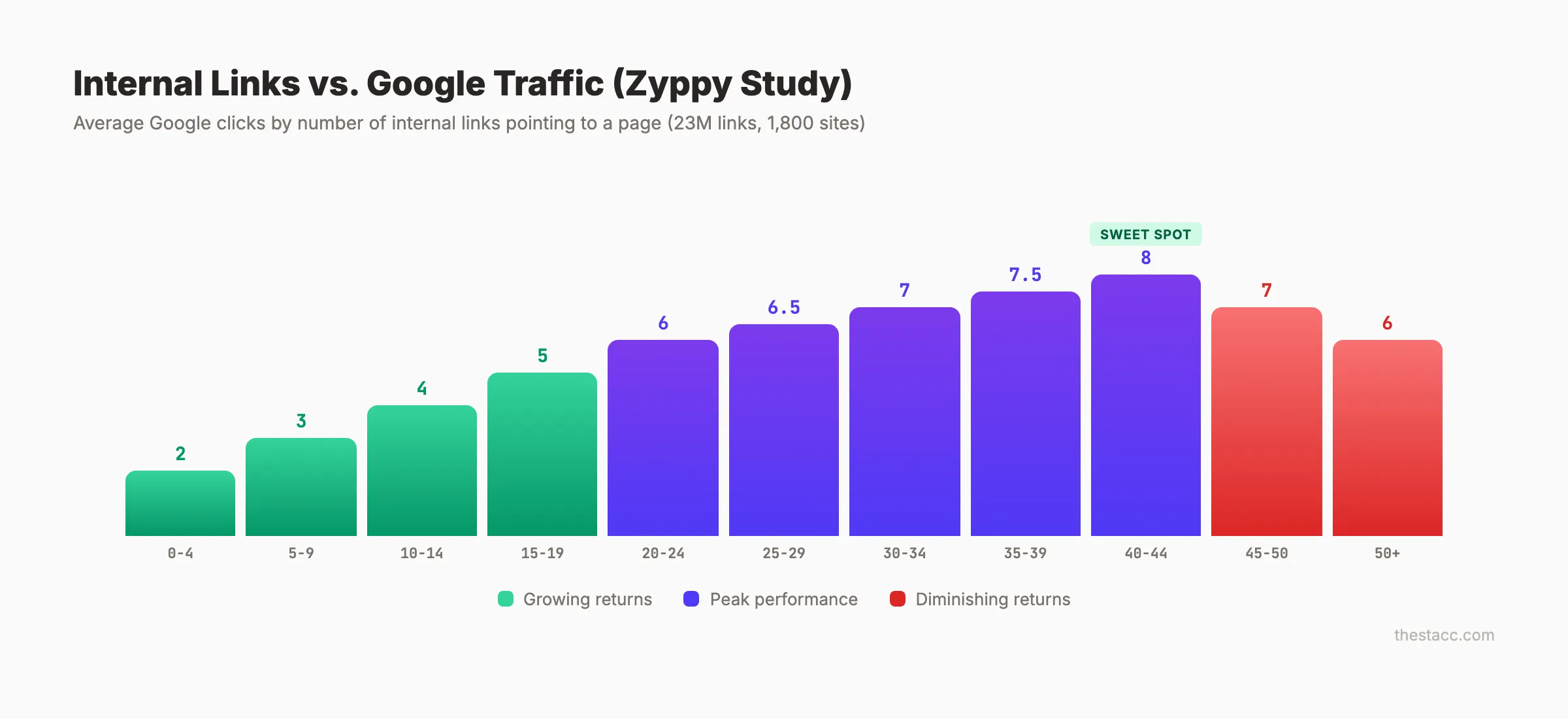
Zyppy analyzed 23 million internal links across 1,800 websites and 520,000 URLs. Here are the findings:
- Pages with 0-4 internal links received only 2 clicks on average from Google
- Pages with 40-44 internal links received 4x more clicks (8 clicks average)
- After 45-50 internal links, Google traffic begins to decline
- The relationship is not linear. There is a clear ceiling.
Practical Recommendations
| Content Length | Recommended Internal Links |
|---|---|
| Short posts (500-1,000 words) | 3-10 links |
| Standard posts (1,000-2,000 words) | 10-20 links |
| Long-form guides (2,000-5,000 words) | 20-40 links |
| Pillar pages (5,000+ words) | 30-50 links |
| Total page links (nav + content + footer) | Under 150 |
These are contextual internal links within your content body. Navigation links, footer links, and sidebar links count separately but still contribute to the total.
The key insight: more internal links help up to a point. Beyond 45-50, they dilute value and signal to Google that nothing on the page is truly important.
Anchor Text for Internal Links
Anchor text rules for internal links differ from external backlink anchor text. Most SEOs know not to over-optimize external anchors. But internal links follow different rules.
What the Data Shows
The Zyppy study found that pages linked with exact-match anchor text receive 5x more traffic from Google than pages without exact-match internal anchors.
This is a major departure from external link building, where exact-match anchors trigger spam filters. For internal links, Google expects you to use descriptive, keyword-rich anchor text because you control your own site.
Anchor Text Best Practices
| Do | Do Not |
|---|---|
| Use descriptive text: “internal linking strategy” | Use generic text: “click here” |
| Include the target keyword naturally | Stuff multiple keywords: “best internal linking SEO strategy guide 2026” |
| Keep it concise: 2-5 words | Write full sentences as anchor text |
| Vary slightly across pages | Use identical text on every single page |
| Match the anchor to the destination content | Mislead with unrelated anchor text |
One important nuance: the Zyppy study also found that sites with very high anchor text variation sometimes saw traffic drops. The counterintuitive takeaway is that consistency in your anchor text may help more than variety.
Use your target keyword as the primary anchor. Vary it slightly (“internal linking guide” vs. “internal linking strategy” vs. “internal link strategy”) but do not force completely different phrases every time.
For a deeper guide on anchor text optimization across internal and external links, see our anchor text optimization guide.
Your SEO team. $99 per month. 30 optimized articles, published automatically. Every post linked to your existing content library. Start for $1 →
Google’s Reasonable Surfer Model
Most internal linking guides miss this entirely. Google does not treat all links on a page equally. The Reasonable Surfer model determines how much value each link passes.
How It Works
Google patented the Reasonable Surfer model around 2004 and updated it in 2012 and 2016. The original PageRank model (the “Random Surfer”) assumed every link on a page had an equal probability of being clicked. The Reasonable Surfer replaced that assumption with reality.
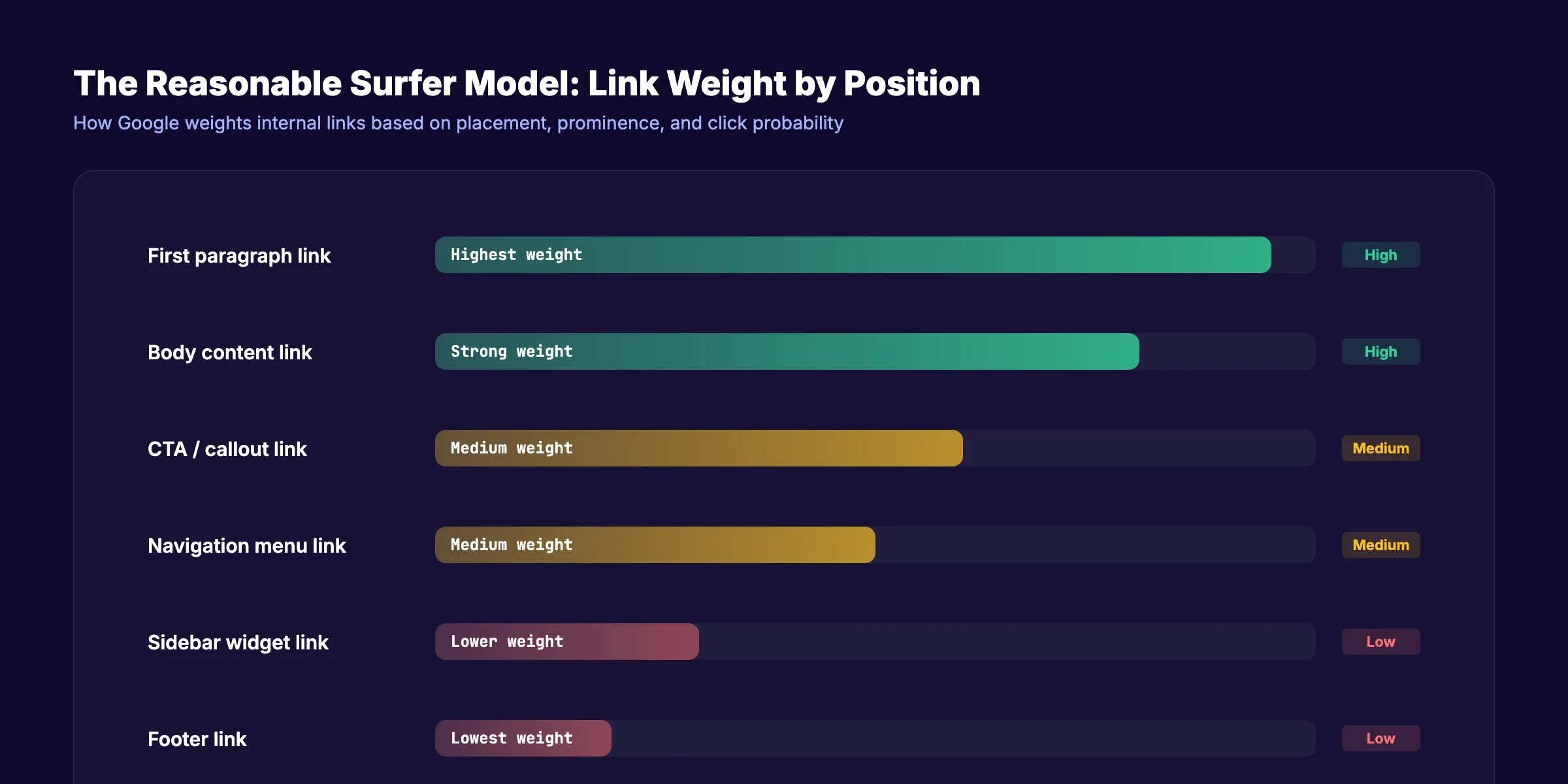
Under this model, Google weights each link based on the probability that a real user would click it. The factors include:
- Position on the page. Links in the main body content pass more value than links in the navigation, sidebar, or footer.
- Prominence. A link in the first paragraph carries more weight than a link buried at the bottom of a 5,000-word article.
- Relevance. A link contextually related to the surrounding content passes more value than an unrelated link.
- Font size and styling. A prominent, styled link (larger text, different color) signals higher importance than a tiny footer link.
- Anchor text quality. Descriptive anchor text that matches the destination page passes more contextual value.
What This Means for Your Strategy
Place your most important internal links:
- In the first 2 paragraphs of the content (highest weight)
- Within the main body text (not sidebars or footers)
- Near contextually relevant content (not random insertions)
- With descriptive anchor text (not generic phrases)
- Using standard
<a href>tags (not JavaScript-generated links)
Navigation and footer links still pass value. But a contextual link in your opening paragraph passes significantly more authority than the same link in your footer.
This is why strategic internal linking outperforms automated “related posts” widgets. Widgets place links at the bottom of the page in a sidebar. Manual contextual links appear exactly where they are most valuable.
Types of Internal Links
Not all internal links serve the same purpose. Understanding the types helps you build a balanced linking structure.
| Link Type | Where It Appears | Purpose | SEO Weight |
|---|---|---|---|
| Contextual (in-content) | Within body text | Topic relevance, equity flow | Highest |
| Navigation | Header menu | Site structure, UX | Medium |
| Breadcrumb | Above content | Hierarchy signals | Medium |
| Footer | Site footer | Secondary navigation | Lower |
| Sidebar | Sidebar widgets | Related content | Lower |
| CTA links | Buttons, callouts | Conversion | Medium |
| Image links | Linked images | Visual navigation | Medium (with alt text) |
| Pagination | Next/previous | Sequential content | Lower |
Contextual links carry the most weight under the Reasonable Surfer model. Prioritize placing your most important links within the body content of your articles.
For a breakdown of how to structure blog content for maximum linking impact, see our blog post structure guide.
How to Build Your Internal Linking Strategy (Step by Step)
Step 1: Map Your Site Architecture
Before linking anything, understand your current site architecture. Export your sitemap or run a crawl with Screaming Frog. Identify:
- How many pages exist
- How deep the click path goes (ideal: 3 clicks max from homepage)
- Which pages have the most internal links pointing to them
- Which pages are orphaned (zero internal links)
Step 2: Identify Your Pillar Pages
Your pillar pages are your most important content assets. They target competitive head keywords and serve as the hub for each topic cluster.
If you do not have pillar pages yet, create them. A pillar page covers a broad topic in depth (3,000-10,000 words) and links to every supporting article in its cluster.
See our guide on building topical authority for the full process.
Step 3: Organize Content Into Clusters
Group your existing content by topic. Each cluster should have:
- 1 pillar page
- 5-20 supporting articles
- Clear topical relationships between all pieces
Use a topical map to visualize the connections before adding links.
Step 4: Add Contextual Links
Go through each piece of content and add internal links where they naturally fit. For every article:
- Link to the cluster’s pillar page (usually in the first 2 paragraphs)
- Link to 2-3 related cluster pages
- Link to relevant glossary definitions for technical terms
- Link to relevant tools or product pages where appropriate
Target 2-5 contextual links per 1,000 words. Use keyword-rich anchor text.
Step 5: Strengthen High-Value Pages
Identify your pages with the most external backlinks (using Ahrefs or Semrush). These pages have the most authority to distribute. Add internal links from these high-authority pages to the pages you want to rank higher.
This is one of the fastest ways to improve rankings for underperforming pages.
Step 6: Link to Every New Post
Every time you publish new content, add 3-5 internal links within the post. Then go back to 3-5 existing posts and add links to the new content. This two-way linking prevents new posts from becoming orphan pages.
Step 7: Audit Monthly
Internal links break over time. Pages get deleted, URLs change, redirects expire. Run a monthly audit to catch:
- Broken internal links (404 errors)
- Orphan pages
- Pages with only 1 internal link
- Redirect chains
- Pages buried more than 3 clicks deep
For a complete audit process, see our SEO audit guide.
3,500+ blogs published. 92% average SEO score. See what Stacc can do for your site. We handle internal linking automatically across your content library. Start for $1 →
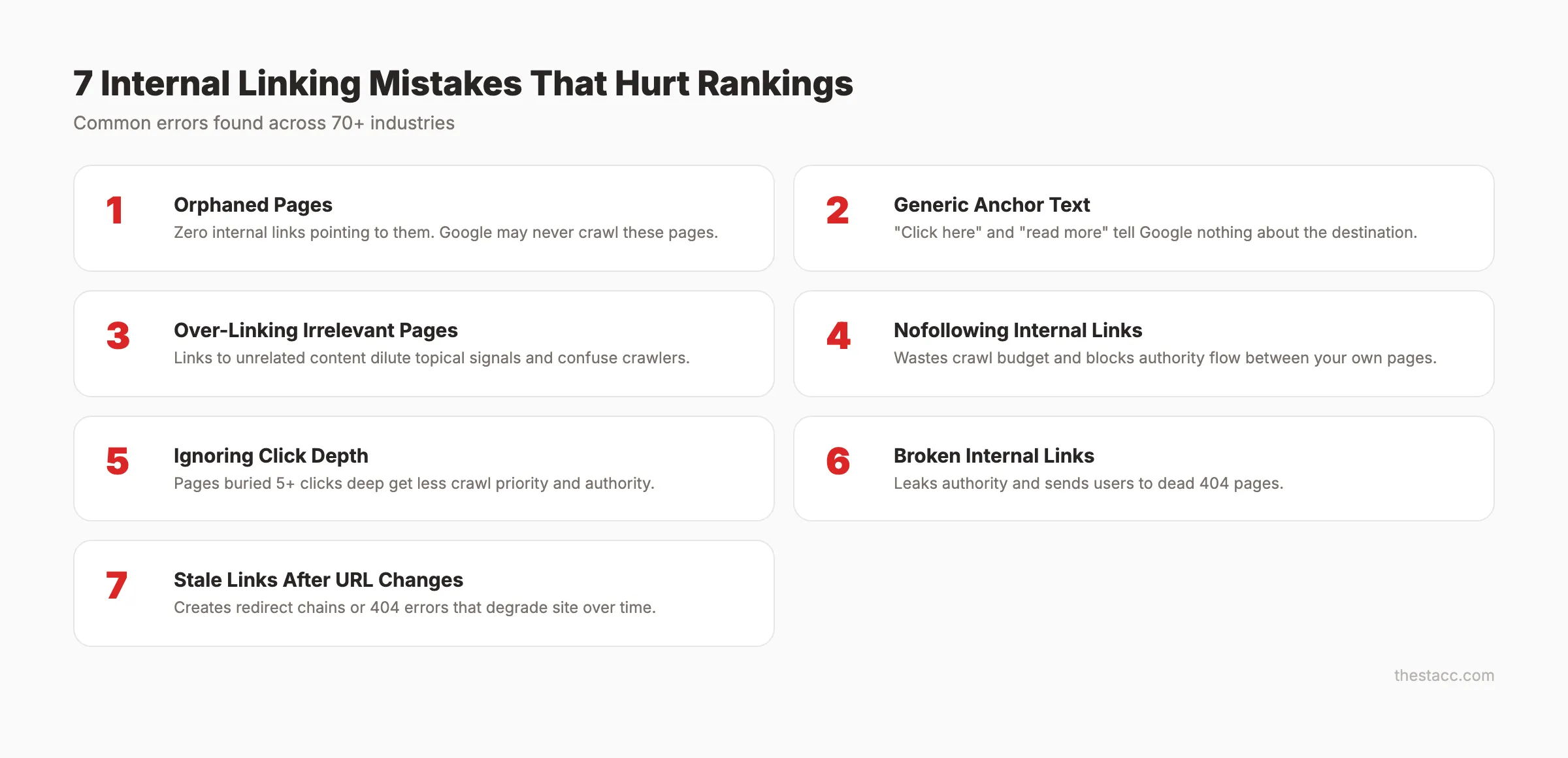
Internal Linking Mistakes That Hurt Rankings
These are the errors we see most often across the 70+ industries we publish for.
1. Orphaned Pages
An orphan page has zero internal links pointing to it. Google may never crawl it. Even if it gets indexed, the lack of internal links signals low importance. Approximately 40% of internal link value is wasted on sites with orphaned pages.
2. Generic Anchor Text
“Click here,” “read more,” and “this article” tell Google nothing about the destination page. Use descriptive anchor text that includes the target keyword. Pages with exact-match internal anchors receive 5x more Google traffic.
3. Over-Linking Irrelevant Pages
Linking to unrelated content dilutes the topical signal. A blog post about “email marketing” should not link to your “plumbing SEO” page. Every internal link should make sense to the reader, not just to your SEO strategy.
4. Nofollowing Internal Links
Adding rel="nofollow" to internal links wastes crawl budget and prevents authority flow. There is almost never a reason to nofollow an internal link. Google’s Mueller has confirmed: do not nofollow internal links.
5. Ignoring Click Depth
Pages buried 5 or 6 clicks deep from the homepage receive less crawl priority and less authority. Restructure your navigation and internal links so every important page is within 3 clicks of the homepage.
6. Broken Internal Links
Every broken internal link leaks authority and sends users to a dead page. Run a monthly crawl to find and fix broken links before they accumulate.
7. Not Updating Links When Content Changes
When you update a URL slug, delete a page, or merge content, you must update every internal link that pointed to the old destination. Stale links create redirect chains or 404 errors that degrade your site over time.
Internal Linking for Different Site Types
The optimal internal linking strategy varies by site type. A 50-page blog needs a different approach than a 10,000-page ecommerce store.
Content Sites and Blogs
Focus on topic clusters. Group posts into 5-10 clusters. Create a pillar page for each cluster. Cross-link within clusters. Target 10-20 internal links per post.
Use the hub-and-spoke model: pillar page at the center, cluster pages radiating outward, with lateral links between related spokes.
For blog-specific internal linking tactics, see our internal linking for blog posts guide.
Ecommerce Sites
Focus on category-to-product and product-to-product linking. Key patterns:
- Category pages link to top products
- Product pages link to related products (“customers also bought”)
- Blog content links to relevant product and category pages
- Breadcrumbs reflect the full category hierarchy
Ecommerce sites often have 1,000+ product pages. Automated related-product widgets help, but manual contextual links from blog content to product pages carry more weight per the Reasonable Surfer model.
SaaS and Service Sites
Focus on linking from educational content (blog) to conversion pages (pricing, features, case studies). The internal linking funnel looks like:
- Blog posts (awareness) → link to pillar guides (consideration)
- Pillar guides → link to feature pages and case studies (evaluation)
- Feature pages → link to pricing and signup (conversion)
Every stage of the funnel should link to the next. Do not skip stages.
Internal Linking Tools
| Tool | Type | Best For | Price |
|---|---|---|---|
| Link Whisper | WordPress plugin | Auto-suggestions while writing | $77/year |
| Yoast SEO Premium | WordPress plugin | Linking suggestions + blocks | Included in Premium |
| Screaming Frog | Desktop crawler | Full site audit, orphan detection | Free (500 URLs) / $259/year |
| Ahrefs Site Audit | SaaS | Link opportunities, broken links | Part of subscription |
| Semrush Site Audit | SaaS | 9-category audit, redirect chains | Part of subscription |
| Google Search Console | Free | Crawl errors, internal link report | Free |
For small sites (under 100 pages), manual linking works fine. For sites with 500+ pages, use a crawler like Screaming Frog to identify opportunities and a plugin like Link Whisper to speed up implementation.
FAQ
How many internal links should I have per page?
The Zyppy study of 23 million internal links found that pages with 40-44 internal links receive 4x more Google traffic than pages with fewer than 5. After 45-50 links, traffic declines. For most blog posts, target 10-20 contextual internal links. For pillar pages, 30-50 is appropriate. Always prioritize relevance over quantity.
Do internal links help with SEO rankings?
Yes. Google’s John Mueller has called internal linking “super critical for SEO.” Internal links help Google discover pages, distribute authority, and understand site structure. A seoClarity case study documented a 43% organic traffic increase from implementing a structured internal linking strategy.
Should I use exact-match anchor text for internal links?
Yes, for internal links. The Zyppy study found that pages with exact-match internal anchor text receive 5x more Google traffic. Unlike external backlinks, where exact-match anchors can trigger spam filters, Google expects descriptive, keyword-rich anchor text on internal links because you control your own site.
What is an orphan page and why is it bad?
An orphan page has no internal links pointing to it. Google may never discover or crawl it. Even if indexed, the lack of internal links signals low importance, resulting in poor rankings. Approximately 40% of internal link value is wasted on sites with orphaned pages.
Is it bad to have too many internal links on one page?
Yes, past a certain point. The Zyppy study showed traffic declines after 45-50 internal links per page. Excessive links dilute the value passed to each destination. Google also states that “extremely excessive” linking can look spammy. Keep total page links (navigation + content + footer) under 150.
How often should I audit my internal links?
Run a full internal link audit monthly. Check for broken links, orphan pages, redirect chains, pages buried more than 3 clicks deep, and pages with only 1 internal link. Use Screaming Frog or Google Search Console to identify issues. Fix broken links immediately and add links to orphaned pages.
Internal linking is the highest-leverage SEO tactic you fully control. Unlike backlinks, you do not need anyone’s permission. Unlike content creation, you can improve hundreds of pages in a single afternoon. Build your clusters, link your pillar pages, audit monthly, and watch the compound effect stack up over time.

Written by
Siddharth GangalSiddharth is the founder of theStacc and Arka360, and a graduate of IIT Mandi. He spent years watching great businesses lose organic traffic to competitors who simply published more. So he built a system to fix that. He writes about SEO, content at scale, and the tactics that actually move rankings.

30 SEO blog articles published every month
Keyword-optimized, scheduled, and live on your site. Automatically.
30-day trial · Cancel anytime
theStacc
Stop writing SEO content manually
30 blog articles, 30 GBP posts, and social media content. Published every month. Automatically.
Start Your $1 Trial$1 for 3 days · Cancel anytime