
AIOSEO Review 2026: Complete In-Depth Verdict (From a Competitor)
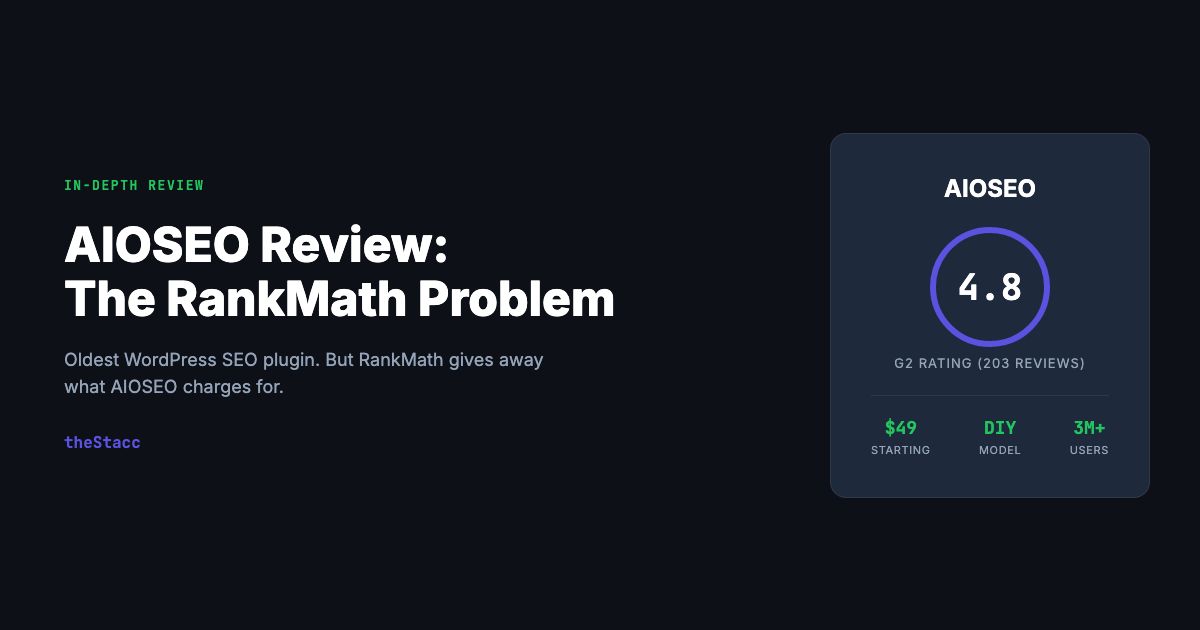
AIOSEO review covering features, pricing ($49–$299/yr), pros & cons, security issues, the RankMath problem, and who it's actually worth it for in 2026.
Siddharth Gangal • March 18, 2026
In This Review
Editorial disclosure: This review was written and published by Stacc, a competing product to AIOSEO. We have a commercial interest as an alternative. We’ve worked to present AIOSEO’s features fairly and accurately, but you should weigh that context. All pricing and feature data was verified against AIOSEO’s public pricing page as of March 2026.
By Stacc Editorial Team · SEO practitioners. We publish 30+ articles/month for businesses using our own platform — including this one. · Last updated: March 18, 2026
📌 Quick Verdict: This AIOSEO review covers the full picture: AIOSEO (All in One SEO) is the second most popular WordPress SEO plugin with 3 million+ active installs. The setup wizard is genuinely best-in-class for beginners. Schema markup support covers 40+ types. But the free version locks features that RankMath gives away for free — redirections, local SEO, advanced schema, 5 focus keywords — and the paid plans renew at undisclosed higher prices after year one. 6 security vulnerabilities were disclosed in 2025 alone. AIOSEO does not write content, does not publish anywhere, and does not do off-site SEO. If you need articles created and published, the real cost is $49–$299/year (AIOSEO) + $2,400–$7,500/month (writers) + $99–$229/month (keyword tools) = $2,503–$7,754/month total. G2: 4.8/5 (203 reviews). Starting price: $49/year.
theStacc vs. AIOSEO: Where We’re Better
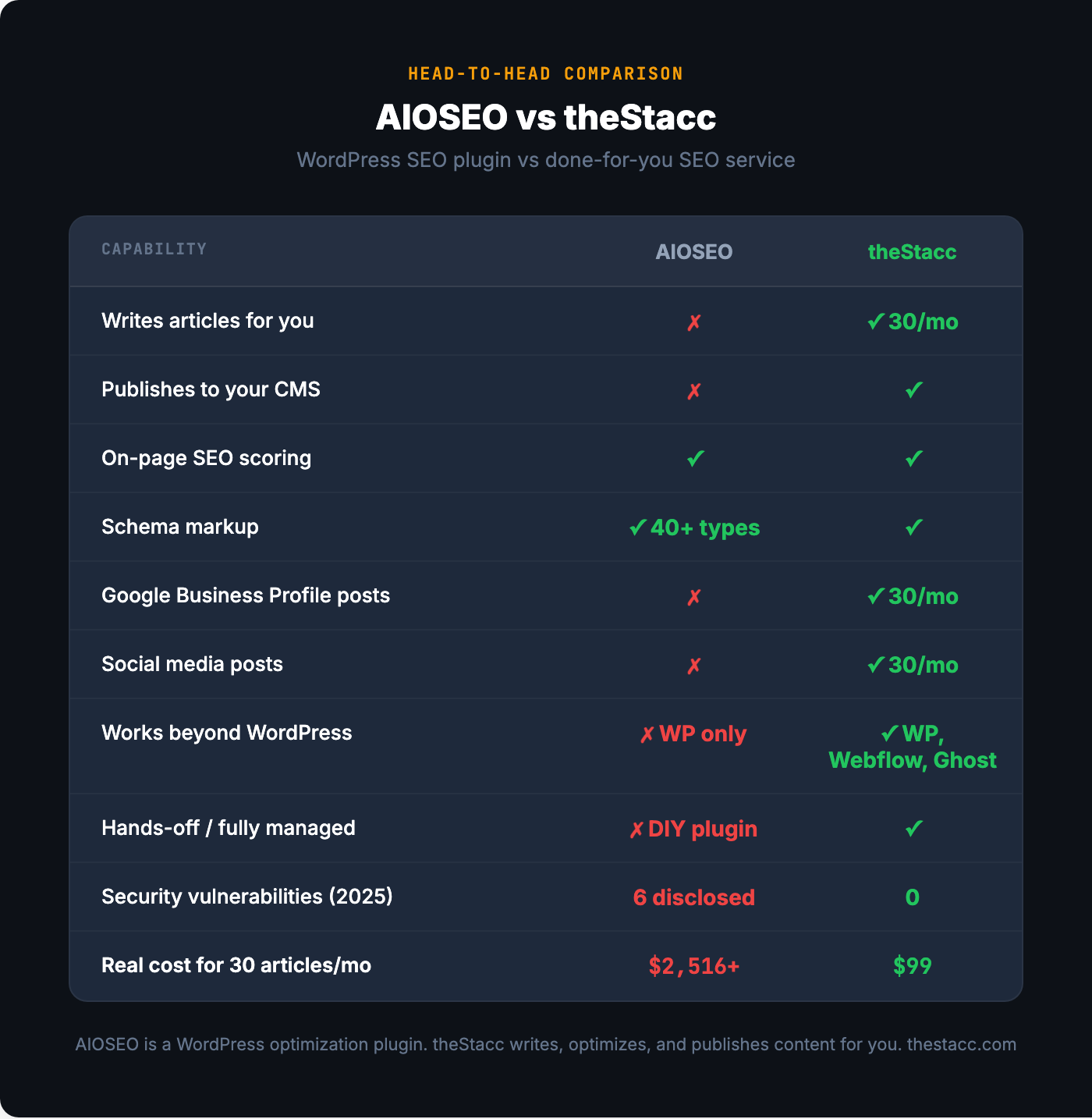
We wrote this review. We’re a competitor. Here’s exactly where theStacc is better — so you can weigh what follows.
| Feature | AIOSEO | theStacc |
|---|---|---|
| Starting price | $49.50/year (1 site, Basic) | $99/month |
| Articles written for you | ✗ No — optimizes content you’ve already written | ✓ 30 articles/month |
| Auto-publishes to your CMS | ✗ No — WordPress optimization plugin only | ✓ Yes (WordPress, Webflow, Ghost) |
| Local SEO / Google Business Profile posts | ✗ Local SEO schema only (Plus+ plan) — no GBP posting | ✓ 30 GBP posts/month |
| Social media posts | ✗ No — only controls how shared links appear | ✓ 30 posts/month (Instagram, LinkedIn, X, Facebook) |
| Done-for-you (no workflow to manage) | ✗ DIY plugin — you optimize everything yourself | ✓ Fully managed, hands-off |
| Works beyond WordPress | ✗ WordPress only | ✓ WordPress, Webflow, Ghost, Custom Webhook |
| Real monthly cost at 30 published articles | $2,503–$7,754+/month (plugin + keyword tools + writers) | $99/month flat |
See how theStacc works → Start for $1
AIOSEO has been around since 2007 — making it one of the oldest WordPress SEO plugins in existence. With 3 million+ active installs and 200 million+ total downloads, it has a massive footprint. Most of those installs happened before Awesome Motive acquired it in 2020 and reshaped the business model.
This AIOSEO review covers what changed after the acquisition, where the plugin genuinely excels, why RankMath has become the default recommendation in most WordPress communities, the security vulnerability pattern that should concern anyone running it on a business-critical site, and the billing practices that have generated a 14% one-star rate on Trustpilot.
What Is AIOSEO?
AIOSEO (All in One SEO) is a WordPress SEO plugin that helps site owners optimize their pages for search engines directly from the WordPress dashboard. It handles on-page content scoring, XML sitemaps, schema markup, meta tags, social media appearance, redirections, and technical SEO settings.
The core engine is TruSEO — a real-time scoring system that analyzes your content as you write in the WordPress editor. It checks focus keyword placement, readability, heading structure, meta length, and internal linking. You get a score with actionable recommendations. The concept is similar to Yoast’s traffic light system and RankMath’s content scoring.
AIOSEO targets WordPress beginners, small business owners, WooCommerce stores, and agencies. Its primary selling point is guided setup — the installation wizard walks new users through every setting with plain-English explanations and recommended defaults.
What AIOSEO does not do: write content, publish articles, do keyword research, analyze backlinks, post to social media, manage Google Business Profile listings, or handle any off-site SEO. It optimizes content you have already written, within WordPress only.
The plugin was originally created in 2007 by Michael Torbert as “All in One SEO Pack.” It was acquired in February 2020 by Awesome Motive, the company led by Syed Balkhi that also owns WPBeginner, OptinMonster, WPForms, MonsterInsights, SeedProd, WP Mail SMTP, and a dozen other WordPress products. Current president is Benjamin Rojas (formerly of OptinMonster). Since the acquisition, the plugin has been overhauled with new features, a modern UI — and a significantly more aggressive monetization strategy.
AIOSEO Features (2026)
TruSEO On-Page Analysis
TruSEO is AIOSEO’s content scoring system. As you write in the WordPress editor, it evaluates focus keyword density, keyword placement in titles and headings, readability (sentence length, paragraph structure, transition words), and meta tag optimization.
The free version allows 1 focus keyword per post. The paid plans also allow 1 keyword per post on Basic and Plus tiers. Unlimited focus keywords require the Pro or Elite plan ($199–$299/year).
For comparison: RankMath gives you 5 focus keywords per post for free.
Insight: The 1-keyword limitation in the free version is AIOSEO’s most significant competitive disadvantage. Most blog posts naturally target 3–5 keyword variations. Being limited to 1 means you either ignore secondary keywords or pay $49+/year for a feature a competitor gives away.
XML Sitemaps
AIOSEO generates XML, HTML, and RSS sitemaps automatically. You can include or exclude specific post types, taxonomies, and individual pages. Priority and frequency settings are configurable.
Video sitemaps and News sitemaps (for Google News submission) are locked to the Pro plan ($199.50/year). Standard XML sitemaps work well in the free version and are genuinely one of the better implementations among WordPress SEO plugins.
Schema Markup
The free version includes basic schema: sitelinks searchbox, breadcrumbs, and site-level Organization/Person markup. Paid plans unlock 40+ schema types including Article, Product, Recipe, FAQ, How-To, Course, Event, Video, LocalBusiness, and more.
AIOSEO’s schema implementation is thorough once you are on a paid plan. The FAQ block integrates with Gutenberg and generates proper JSON-LD. WooCommerce Product schema handles price, availability, and review data correctly.
Insight: Schema markup is one area where AIOSEO genuinely outperforms Yoast. The 40+ schema types cover more use cases, and the implementation is cleaner. But RankMath also offers comprehensive schema markup in its free version — so this advantage is relative to Yoast, not to the broader market.
Local SEO Module
Business NAP (name, address, phone) management, Google Maps embed, business hours display, local business schema, and multi-location support. The opening hours block integrates with Gutenberg.
This entire module is locked behind the Plus plan at $99.50/year. RankMath includes local SEO features in its free version.
Important clarification: AIOSEO’s local SEO adds structured data and display elements to your WordPress site. It does not post to Google Business Profile, does not manage citations, does not monitor reviews, and does not do anything outside of your WordPress pages.
WooCommerce SEO
Available on all paid plans. Adds product page SEO optimization, product schema markup (price, availability, reviews), WooCommerce-specific sitemaps, and product image SEO.
For WooCommerce stores, this is a genuine differentiator — the product schema implementation is well-built and handles variants, pricing, and review data cleanly. If you run a WooCommerce store and are already paying for AIOSEO, this feature justifies the Basic plan on its own.
Link Assistant
Automated internal linking suggestions, orphaned content detection (pages with zero internal links), link opportunity reports, and per-post inbound/outbound link tracking.
Locked to the Pro plan ($199.50/year). RankMath offers internal link suggestions in its free version.
The Link Assistant scans your entire site and generates a report of linking opportunities. For sites with 100+ published posts, this saves genuine manual research time. The orphaned content report is particularly useful — finding published pages with no internal links pointing to them is something most site owners never think to check.
Redirection Manager
Create 301, 302, and 307 redirects. Monitor 404 errors. Auto-suggest redirects when URLs change. Regex redirect support. Server-level redirect option for better performance.
Locked to the Pro plan ($199.50/year). RankMath includes redirections and 404 monitoring in its free version.
This is one of the most frustrating feature locks in AIOSEO’s pricing. Redirections are a basic SEO necessity — not an advanced feature. Locking them behind a $200/year plan when the primary competitor gives them away free is a hard sell.
Search Statistics (Google Search Console Integration)
Pulls Google Search Console data into your WordPress dashboard: keyword rankings, clicks, impressions, CTR, content performance trends, and content decay detection.
Locked to the Elite plan ($299.50/year) — the most expensive tier. This means seeing your own GSC data inside WordPress costs $299/year, when the same data is free at search.google.com and RankMath includes a GSC integration for free.
Insight: Locking Google Search Console data behind a $299/year paywall is arguably the most aggressive pricing decision in the WordPress SEO plugin market. Google gives this data away for free. AIOSEO charges $299/year to display it inside WordPress.
AI Features
AIOSEO’s AI generates titles, meta descriptions, FAQ text, and social media share text. It uses a credit-based system:
- Basic: 10,000 credits/year
- Plus: 25,000 credits/year
- Pro: 50,000 credits/year
- Elite: 200,000 credits/year
- Additional credits: $9.99 per 10,000 (expire after 1 year)
The AI does not write full articles. It generates short-form text only — titles, descriptions, and FAQ answers. For a plugin that costs up to $299/year, the AI feature set is thin compared to standalone AI writing tools.
SEO Site Audit
A site health scoring tool that checks for common SEO issues: missing meta descriptions, broken links, crawlability problems, and schema errors. Provides a prioritized list of fixes.
The audit is basic compared to dedicated tools like Screaming Frog, Sitebulb, or Ahrefs Site Audit. For small WordPress sites (under 100 pages), it catches the obvious issues. For larger sites, you need a dedicated crawler.
AIOSEO Pricing (2026)
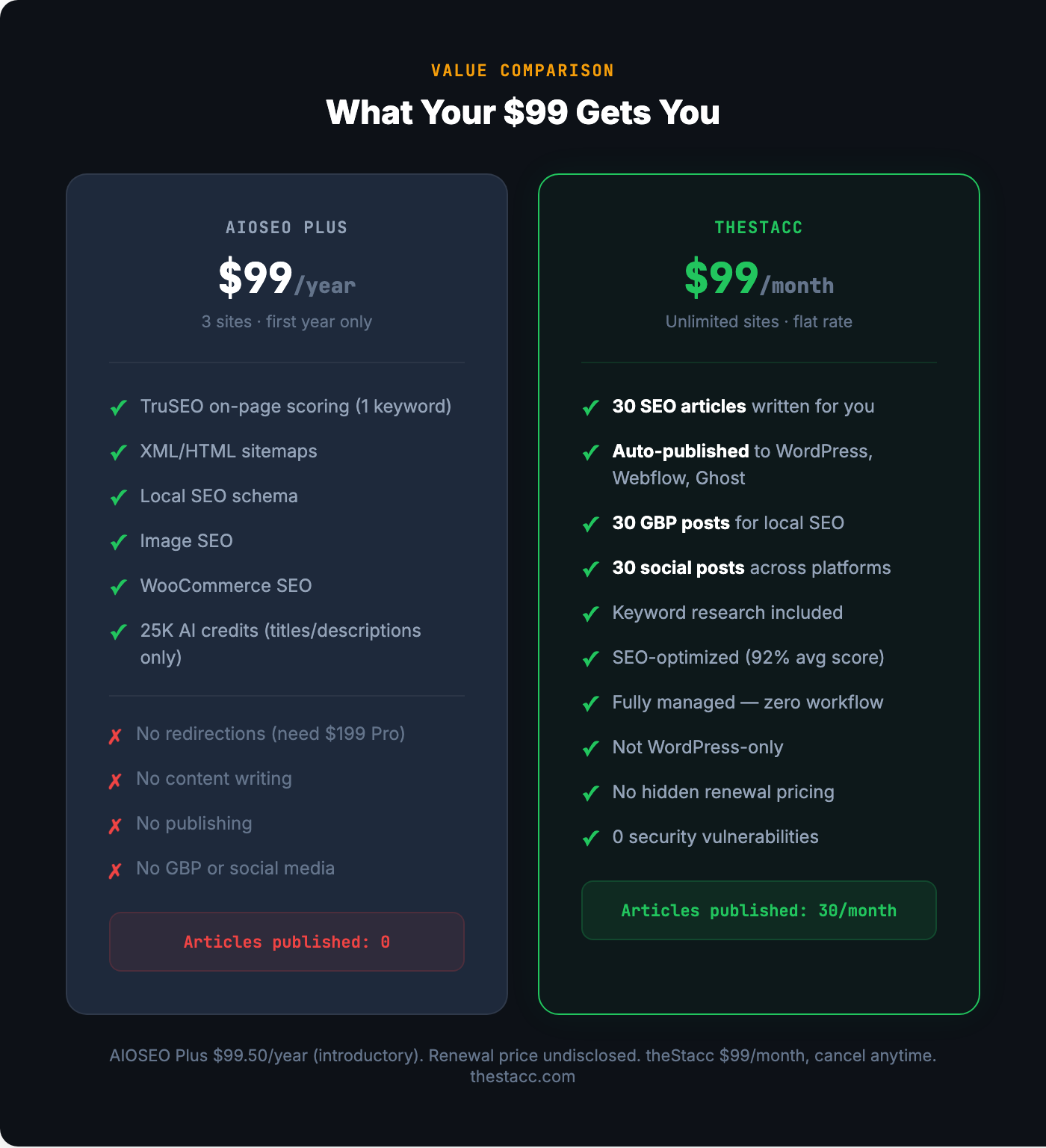
| Plan | Introductory Price | Sites | Key Features |
|---|---|---|---|
| Free (Lite) | $0 | Unlimited | 1 focus keyword, basic sitemaps, basic schema, robots.txt editor, site audit |
| Basic | $49.50/year | 1 site | + WooCommerce SEO, 10K AI credits, social media meta |
| Plus | $99.50/year | 3 sites | + Local SEO, Image SEO, E-E-A-T/Author SEO, 25K AI credits |
| Pro | $199.50/year | 10 sites | + Redirections, Link Assistant, Video/News sitemaps, 50K AI credits |
| Elite | $299.50/year | 100 sites | + Search Statistics (GSC), keyword tracking, 200K AI credits |
Add-ons:
- Additional AI credits: $9.99 per 10,000 (expire after 1 year)
- No monthly billing option — annual only
Annual discount: N/A — annual is the only option. Free trial: No — 14-day money-back guarantee.
The Renewal Price Problem
The prices above are introductory first-year rates. AIOSEO auto-renews at “full, non-discounted” pricing that is significantly higher. The exact renewal prices are not displayed on the pricing page.
Multiple Trustpilot reviewers report surprise at the renewal amount. One user wrote: “The auto renewal rate is nothing like the initial rate.” This lack of pricing transparency is a recurring complaint.
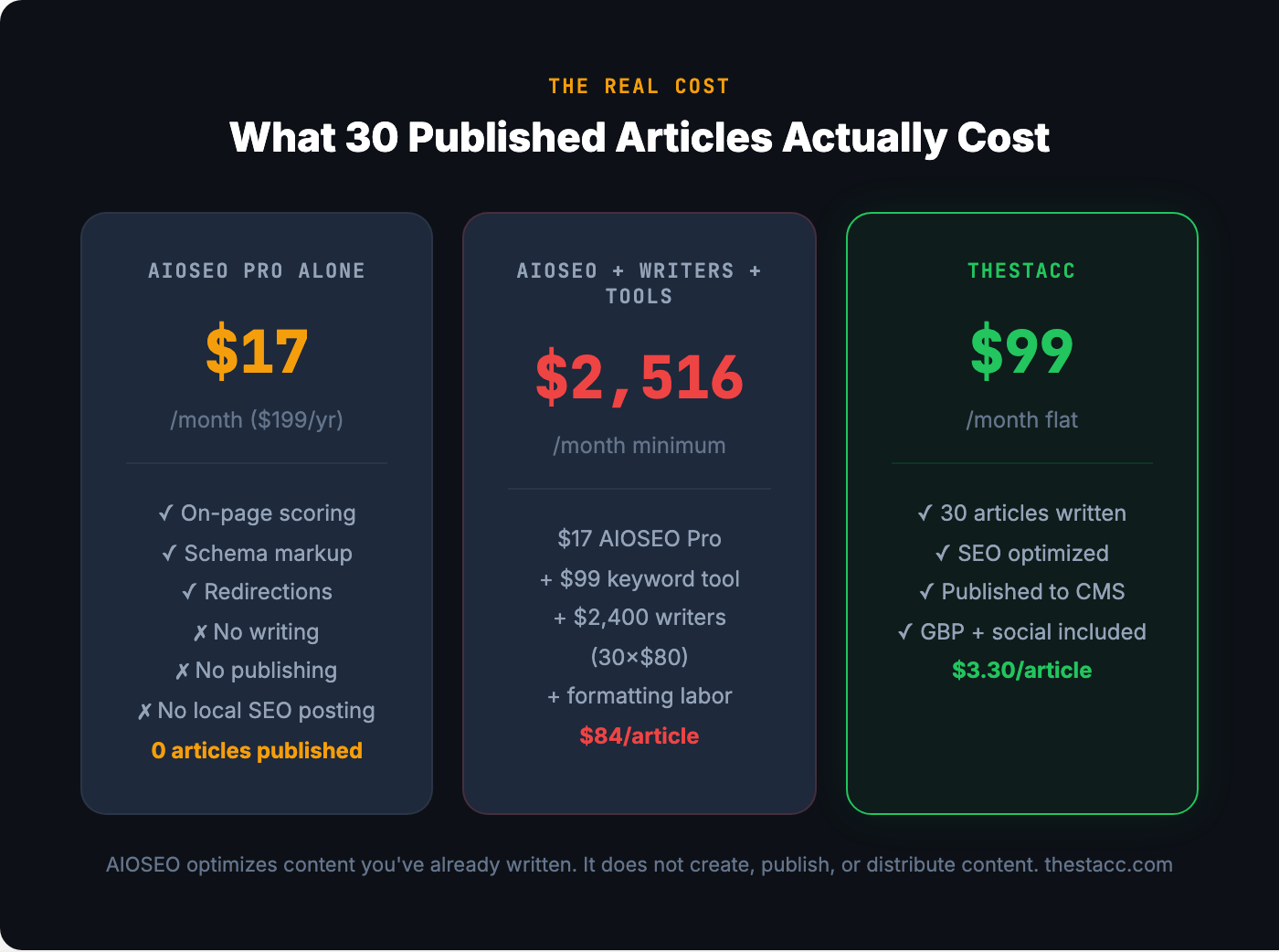
The Real Cost of AIOSEO
$2,503–$7,754/month — the real monthly cost to publish 30 articles on a WordPress site using AIOSEO + professional writers + a keyword research tool.
AIOSEO does not write content. It does not find keywords. It does not build backlinks. It optimizes content you have already created within WordPress. To run a full SEO operation with AIOSEO, you need:
- AIOSEO Pro plan: ~$17/month ($199.50/year)
- Keyword research tool (Ahrefs or Semrush): $99–$229/month
- Professional writers at 30 articles ($80–$250/article): $2,400–$7,500/month
- Publishing and formatting labor: ~$0–$50/month
Total: $2,516–$7,796/month. AIOSEO’s pricing page makes it look like SEO costs $49–$299/year. The plugin is one small piece of the actual cost.
See how theStacc works → Start for $1
How to Use AIOSEO: The Right 6-Step Workflow
Most WordPress users install AIOSEO, run through the setup wizard, and then wonder why their rankings haven’t changed. The plugin optimizes your pages — it does not make them rank. Here is the workflow that actually produces results.
Step 1: Run the Setup Wizard Properly
The setup wizard is genuinely AIOSEO’s best feature. It walks you through site type, business category, social profiles, schema defaults, and sitemap configuration. Do not skip any steps. The defaults are well-chosen for most sites.
Step 2: Do Keyword Research in a Separate Tool
AIOSEO does not do keyword research. Use Ahrefs, Semrush, Ubersuggest, or even Google’s free Keyword Planner to identify target keywords before writing. Enter those keywords as focus keywords in AIOSEO after you have written your content.
Step 3: Write Your Content First, Then Optimize
Write your article naturally. Then open the TruSEO panel and address the recommendations. Do not write to the score — write for the reader, then use the checklist to catch gaps.
Step 4: Set Up Schema Markup for Every Post Type
Configure default schema types for posts, pages, products, and any custom post types. This is where AIOSEO adds genuine value — proper schema markup improves how your pages appear in search results (rich snippets, FAQ dropdowns, product ratings).
Step 5: Configure Redirections for Any URL Changes
If you have the Pro plan, set up the Redirection Manager to auto-catch 404 errors and suggest redirects when you change URLs. If you are on a lower plan, use a free plugin like Redirection (by John Godley) instead.
Step 6: Run Monthly Site Audits
Use the built-in site audit to catch new issues: missing meta descriptions, broken internal links, schema errors, and crawlability problems. Address high-priority items first. For sites over 100 pages, supplement with a dedicated crawler quarterly.
Does AIOSEO Actually Work? What the Data Says
AIOSEO does not publish ranking correlation data or case studies with verifiable traffic metrics.
What can be validated: AIOSEO correctly implements technical SEO fundamentals — sitemaps, schema markup, canonical tags, meta tags, and robots directives. These are table-stakes for WordPress SEO, and AIOSEO handles them reliably. The TruSEO scoring system catches genuine on-page optimization gaps.
3 million+ active installs means it works at scale without breaking WordPress. Plugin compatibility is broad. The codebase is actively maintained with regular updates (last update: March 9, 2026).
Enterprise adoption is difficult to verify — AIOSEO does not publish a customer list. The plugin is most commonly found on small business sites, blogs, and WooCommerce stores rather than enterprise deployments.
Important caveat: An SEO plugin does not cause rankings. It optimizes your pages technically. Rankings come from content quality, backlinks, domain authority, and user engagement — none of which AIOSEO controls. Users who expect rankings to improve just from installing a plugin will be disappointed.
AIOSEO Pros & Cons
Pros
- Setup wizard is genuinely the best onboarding experience in the WordPress SEO plugin market
- 40+ schema types with clean JSON-LD implementation
- WooCommerce SEO integration is well-built for product pages
- 3M+ active installs — battle-tested plugin stability
- TruSEO scoring system catches real on-page optimization gaps
- Link Assistant finds orphaned content and internal linking opportunities (Pro+)
- Video and News sitemaps for publishers and media sites (Pro+)
- IndexNow integration for faster search engine discovery
- 16 custom Gutenberg blocks (FAQ, TOC, Author Bio, Local Business)
- 58+ language translations
Cons
- Free version locks features that RankMath gives away: redirections, local SEO, 5 focus keywords, advanced schema, 404 monitoring
- Renewal pricing is not disclosed — users report significant price increases after year one
- 6 security vulnerabilities disclosed in 2025 alone — a recurring pattern affecting 3M+ sites
- Aggressive upselling throughout the free version dashboard — locked features visible but unusable
- Search Console integration locked behind $299/year Elite plan — Google gives this data away free
- Redirections locked behind $199/year Pro plan — a basic SEO necessity, not an advanced feature
- Only 1 focus keyword per post in free version (RankMath gives 5)
- AI credits expire after 1 year and only generate titles/descriptions — not full content
- Trustpilot: 14% one-star reviews, primarily about billing and cancellation difficulties
- Awesome Motive’s acquisition-and-monetize business model has generated community backlash
- Does not work outside WordPress — Webflow, Ghost, Shopify, and static site users cannot use it
Who Is AIOSEO Best For?
Strong fit:
- WordPress beginners who want guided, wizard-driven SEO setup
- WooCommerce store owners who need proper product schema
- Agencies managing 10–100 WordPress sites (Pro/Elite plans)
- News publishers who need video and news sitemaps
- Users already invested in the Awesome Motive plugin ecosystem
Probably not the right call:
- Budget-conscious users — RankMath offers more features for free
- Performance-focused developers — The SEO Framework is lighter
- Anyone on Webflow, Ghost, Shopify, or a non-WordPress platform
- Business owners who need content written and published, not just optimized
- Local businesses that need GBP posting and review management
- Users who dislike aggressive upselling and undisclosed renewal pricing
- Security-sensitive sites that cannot tolerate the 2025 vulnerability pattern
AIOSEO vs. Alternatives
| Plugin | Price | Free keywords | Free redirects | Free local SEO | Best for |
|---|---|---|---|---|---|
| AIOSEO | $49–$299/yr | 1 | ✗ | ✗ | WordPress beginners |
| RankMath | Free / $59/yr | 5 | ✓ | ✓ | Best free features |
| Yoast SEO | Free / $99/yr | 1 (free) | Premium | ✗ | Brand recognition |
| SEOPress | Free / $49/yr | Unlimited | ✓ (Pro) | ✓ (Pro) | No-upsell experience |
| The SEO Framework | Free | N/A | Extension | ✗ | Performance-first |
Done-for-you alternatives (different category):
| Service | Price | Articles/mo | Auto-publishes | Local SEO |
|---|---|---|---|---|
| Stacc | $99/mo | 30 | ✓ WordPress + Webflow | ✓ GBP included |
| Outrank.so | $99/mo | Varies | ✓ WordPress | ✗ |
| SEO.AI | $149/mo | Unstated | ✓ WordPress + others | ✗ |
What Real Users Say
Review Ratings (March 2026):
- WordPress.org: 4.7/5 — 5,064 reviews
- G2: 4.8/5 — 203 reviews
- Trustpilot: 3.5/5 — 309 reviews
Praised consistently: Setup wizard, ease of use for beginners, schema markup depth, WooCommerce integration, plugin stability, support responsiveness (paid plans).
Criticized consistently: Feature locks that RankMath provides free, aggressive upselling in the free version, undisclosed renewal pricing, billing and cancellation difficulties, security vulnerabilities (6 in 2025), Awesome Motive cross-sell pressure.
Trustpilot distribution is polarized: 78% five-star, 14% one-star, 8% everything else. The one-star reviews almost exclusively describe billing problems — surprise renewals, difficulty canceling, admin fees on refunds.
Reddit consensus (r/wordpress, r/SEO): AIOSEO is “the Toyota Camry of SEO plugins — reliable but not exciting.” Most Reddit threads recommend RankMath instead because of the free feature advantage. AIOSEO’s setup wizard is consistently praised, but the upselling is consistently criticized.
Is AIOSEO Worth It? The Verdict
For WordPress beginners who want guided setup: yes, conditionally. The setup wizard is genuinely the best in the category. If you are installing your first SEO plugin and find RankMath’s options overwhelming, AIOSEO walks you through everything. But know that you will hit feature walls quickly — and RankMath gives away most of what AIOSEO charges for.
For WooCommerce store owners: yes, on the Basic plan. The product schema implementation is clean. At $49.50/year, the WooCommerce SEO features justify the cost. But do not upgrade to Pro or Elite unless you have a specific need — the jump from $49 to $199–$299 is steep for incremental features.
For agencies managing multiple WordPress sites: depends. The Elite plan ($299/year for 100 sites) is competitive for multi-site management. But RankMath’s agency plan ($499/year for 500 clients) offers more features per site at a lower per-site cost.
For budget-conscious users: no. RankMath offers 5 focus keywords, redirections, local SEO, advanced schema, and 404 monitoring — all for free. AIOSEO charges $99–$299/year for the same capabilities. The math does not work unless you specifically value AIOSEO’s setup wizard over RankMath’s broader free tier.
For businesses that need content created and published: no. AIOSEO is an optimization plugin, not a content service. It scores content you have already written. It does not create it, publish it, distribute it, or track its off-site performance. If you need 30 articles per month published to your site, AIOSEO is one small piece of a $2,500–$7,800/month operation.
Overall rating: 3.6/5
| Category | Rating |
|---|---|
| Setup experience | ⭐⭐⭐⭐⭐ |
| Schema markup | ⭐⭐⭐⭐⭐ |
| WooCommerce SEO | ⭐⭐⭐⭐ |
| On-page optimization | ⭐⭐⭐⭐ |
| Free version value | ⭐⭐ |
| Pricing transparency | ⭐⭐ |
| Security track record | ⭐⭐ |
| Upsell experience | ⭐⭐ |
| Feature value vs. RankMath | ⭐⭐ |
| Platform flexibility | ⭐ |
AIOSEO FAQ
What is AIOSEO? AIOSEO (All in One SEO) is a WordPress SEO plugin with 3 million+ active installs. It handles on-page optimization, sitemaps, schema markup, redirections, and technical SEO settings within the WordPress dashboard. It does not write content, publish articles, or do off-site SEO. Originally created in 2007, acquired by Awesome Motive (Syed Balkhi) in 2020.
How much does AIOSEO cost? Free (Lite) version available. Paid plans: Basic $49.50/year (1 site), Plus $99.50/year (3 sites), Pro $199.50/year (10 sites), Elite $299.50/year (100 sites). These are introductory first-year prices — renewal rates are higher but not disclosed on the pricing page. Annual billing only, no monthly option.
Is AIOSEO free? There is a free Lite version with basic features: 1 focus keyword, XML/HTML sitemaps, basic schema, robots.txt editor, and site audit. Key features are locked: local SEO, redirections, advanced schema, WooCommerce SEO, Link Assistant, Search Statistics, and more require paid plans starting at $49.50/year.
Is AIOSEO better than RankMath? For beginners who want guided setup — AIOSEO’s wizard is better. For feature value — RankMath wins decisively. RankMath’s free version includes 5 focus keywords, redirections, local SEO, advanced schema, 404 monitoring, and Google Search Console integration. AIOSEO charges $99–$299/year for the same features.
Is AIOSEO better than Yoast? AIOSEO has better schema markup (40+ types vs. fewer in Yoast), a better setup wizard, and more flexible sitemap options. Yoast has larger market share (5M+ installs) and broader brand recognition. Both lock similar features behind paywalls. Neither is dramatically better than the other.
Does AIOSEO write content for you? No. AIOSEO’s AI features generate titles, meta descriptions, and FAQ text only — not full articles. The AI uses a credit system (10,000–200,000 credits/year depending on plan). Additional credits cost $9.99 per 10,000 and expire after 1 year.
Is AIOSEO safe? Are there security concerns? 6 security vulnerabilities were disclosed in 2025 alone, including a January 2026 API vulnerability that exposed AI access tokens to low-privilege users (all versions up to 4.9.2). Previous vulnerabilities included stored XSS and privilege escalation allowing remote code execution. With 3M+ active installs, each vulnerability affects millions of sites. The plugin is actively maintained and patches are released — but the frequency of vulnerabilities is a concern.
Why do people switch from AIOSEO to RankMath? The most common reasons: RankMath offers more features for free (5 keywords, redirections, local SEO, schema, 404 monitoring), RankMath Pro is cheaper ($59/year vs. $199.50/year), renewal price shock after AIOSEO’s introductory year, and frustration with AIOSEO’s upsell banners.
Does AIOSEO work with Webflow, Shopify, or Ghost? No. AIOSEO is a WordPress-only plugin. It cannot be installed on or integrated with any other platform.
Does AIOSEO do local SEO? Partially. The Local SEO module (Plus plan, $99.50/year) adds business schema, NAP display, Google Maps embed, and business hours to your WordPress site. It does not post to Google Business Profile, manage citations, monitor reviews, or do anything outside your WordPress pages.
What is Awesome Motive and why does it matter? Awesome Motive is the parent company that acquired AIOSEO in 2020. Led by Syed Balkhi, it owns WPBeginner, OptinMonster, WPForms, MonsterInsights, and 10+ other WordPress products. The company has faced community criticism for aggressive monetization after acquiring free plugins, persistent cross-selling between products, undisclosed renewal pricing, and — in some cases — DMCA takedowns against critics.
Can AIOSEO replace an SEO agency? No. AIOSEO handles on-page optimization and technical SEO within WordPress. It does not do keyword research, content creation, backlink building, competitor analysis, local citation management, social media, or any off-site SEO work. An SEO agency does all of these.
Is the AIOSEO $1 trial real? AIOSEO does not offer a $1 trial. It offers a 14-day money-back guarantee on paid plans. There is no free trial — you pay the full annual price upfront. (Note: the $1 trial is offered by aiseo.ai, a completely different product.)
What are AIOSEO’s biggest limitations? No content creation, WordPress-only, 1 focus keyword in the free version, redirections locked behind $199/year, Search Console data locked behind $299/year, undisclosed renewal pricing, 6 security vulnerabilities in 2025, aggressive upselling in the free version, and no off-site SEO capabilities.
Bottom Line
AIOSEO is a competent WordPress SEO plugin with a genuinely excellent setup wizard and strong schema markup implementation. The WooCommerce integration works well. 3 million active installs and 19 years of history mean it is stable and battle-tested. If you are a WordPress beginner who values guided hand-holding over feature breadth, AIOSEO’s onboarding is best-in-class.
The problems are real. RankMath gives away most of AIOSEO’s paid features for free — redirections, local SEO, advanced schema, 5 focus keywords, 404 monitoring, and Google Search Console integration. AIOSEO charges $99–$299/year for the same capabilities. Add 6 security vulnerabilities in a single year, undisclosed renewal pricing, 14% one-star Trustpilot reviews about billing, and persistent upselling throughout the free dashboard — and the value proposition erodes fast for informed buyers.
If you need 30 SEO articles published to your website every month — without hiring writers, optimizing each page yourself, or building an entire SEO stack around a WordPress plugin — that is a fundamentally different product category. That is what theStacc builds.
See how theStacc works → Start for $1
This article was researched, written, and published by Stacc — the same platform businesses use to publish SEO content automatically. That means we compete with AIOSEO. We’ve worked to present the plugin fairly, and we’d encourage you to verify features and pricing directly on aioseo.com before deciding.
More Reviews
- Surfer SEO Review
- Clearscope Review
- Frase.io Review
- Jasper AI Review
- Writesonic Review
- Scalenut Review
- SEO.AI Review
- Outrank Review
- Koala AI Review
- Junia AI Review
- Semrush Review
- Ahrefs Review
- Copy.ai Review
- MarketMuse Review
- Grammarly Review
- QuillBot Review
- GPTZero Review
- NeuronWriter Review
- BrandWell Review
- Outranking Review
- AISEO Review
This review was written and published by Stacc, a competing product. We have a commercial interest as an alternative. All pricing and feature data verified against public sources as of March 2026.
