
How to Audit Your Website for AI Agent Readability
A 7-step audit to make your website readable by AI agents like ChatGPT, Perplexity, and Gemini. Covers robots.txt, llms.txt, schema, and more. April 2026.
Siddharth Gangal • 2026-04-02 • SEO Tips
In This Article
Your website looks great to humans. But AI agents cannot read most of it.
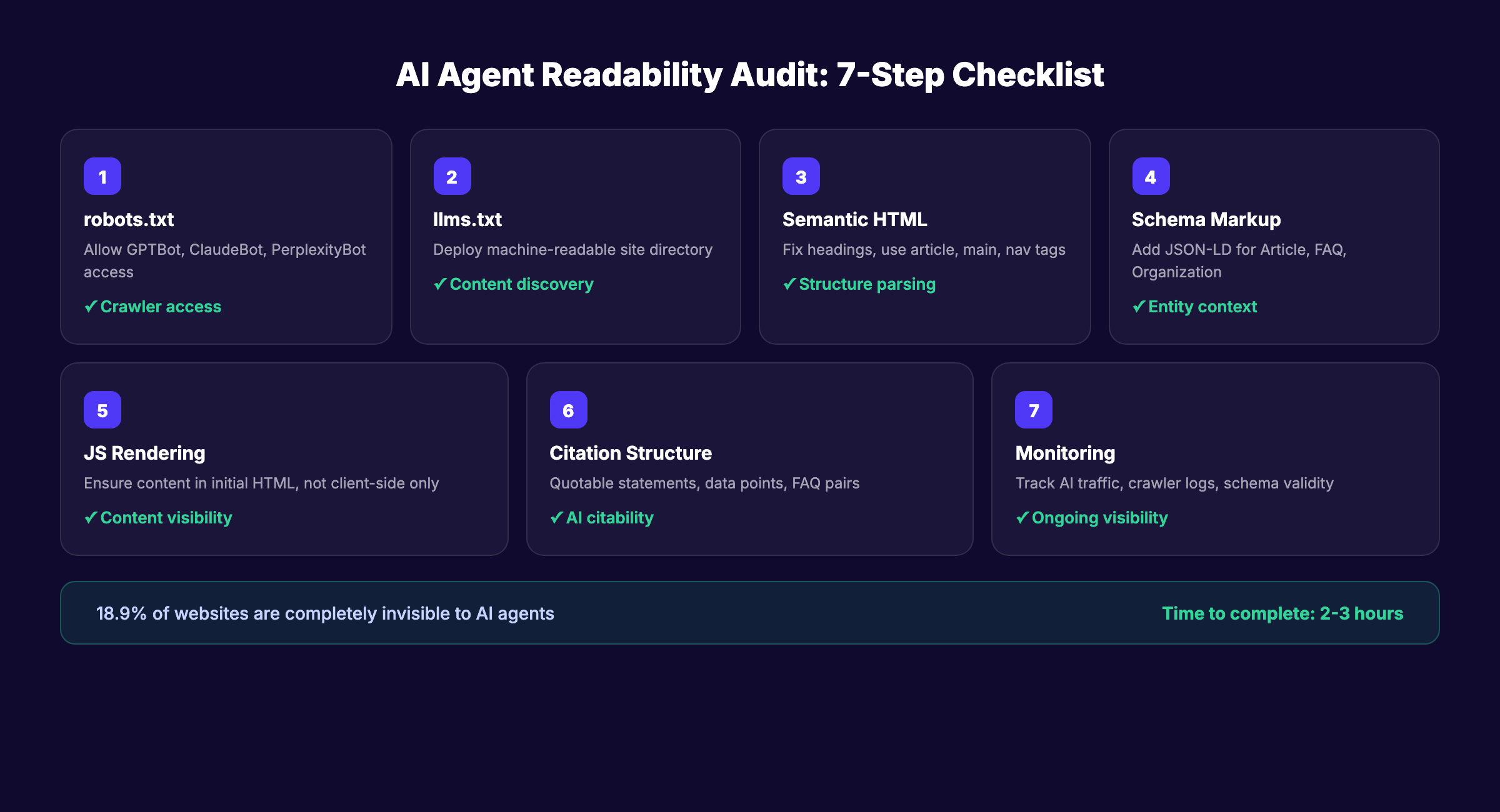
An AI agent readability audit checks whether systems like ChatGPT, Perplexity, Gemini, and Claude can access, parse, and cite your content. According to a study of 1,500 websites by Website AI Score, 18.9% of audited sites were completely inaccessible to AI agents. Another 30% actively blocked AI crawlers without knowing it.
That matters because over 60% of B2B research interactions now involve AI agents. If your site is invisible to them, you lose traffic you never knew existed.
We have published 3,500+ blogs across 70+ industries and optimized every one for both traditional search and AI readability. This guide walks through the exact audit process we use.
Here is what you will learn:
- How to check if AI crawlers can access your site
- How to deploy an
llms.txtfile that guides AI agents - How to fix heading hierarchy and semantic HTML issues
- How to validate structured data for AI parsing
- How to test JavaScript rendering for AI bots
- How to structure content so AI agents cite it
- How to monitor AI visibility over time
Time required: 2 to 3 hours Difficulty: Intermediate What you will need: Access to your site’s server or hosting panel, Google Search Console, a text editor
Step 1: Audit Your robots.txt for AI Crawler Access
Most websites block AI agents without realizing it. Your robots.txt file is the first thing any crawler checks. If it blocks AI bots, nothing else in this audit matters.
What to Check
Open your robots.txt file at yourdomain.com/robots.txt. Look for these user agents:
| AI Crawler | Serves | What It Does |
|---|---|---|
GPTBot | ChatGPT | Trains and powers ChatGPT web search |
OAI-SearchBot | ChatGPT Search | Retrieves content for real-time search |
ChatGPT-User | ChatGPT Browse | Fetches pages when users share URLs |
ClaudeBot | Claude | Trains and retrieves for Anthropic |
PerplexityBot | Perplexity | Powers Perplexity AI search results |
Google-Extended | Gemini | Trains Google AI models |
CCBot | Common Crawl | Feeds open datasets used by multiple AI models |
How to Fix It
If any of these agents appear in a Disallow directive, you are blocking AI traffic. Update your robots.txt to explicitly allow them:
User-agent: GPTBot
Allow: /

User-agent: ClaudeBot
Allow: /

User-agent: PerplexityBot
Allow: /
You can selectively block specific directories (like /admin/ or /staging/) while allowing AI access to your public content.
Why this step matters: Blocking AI crawlers is the single most common reason websites get zero AI search traffic. 30% of sites do it accidentally through overly restrictive robots.txt rules.
Pro tip: Use the MRS Digital AI Crawler Access Checker to instantly see which AI bots can reach your site.
Step 2: Deploy and Configure Your llms.txt File
robots.txt tells AI agents where they can go. llms.txt tells them what to read. It is a new standard that acts as a machine-readable directory of your most important content.
What llms.txt Does
The file sits at your site root (yourdomain.com/llms.txt) and provides a structured markdown summary of your site. AI agents use it to understand your site’s purpose, navigate to key pages, and prioritize which content to process.
How to Create It
Create a file called llms.txt at your domain root with this structure:
## Your Company Name

> One-line description of what your company does.

## Main Pages

- [Homepage](https://yourdomain.com): Brief description
- [About](https://yourdomain.com/about): Brief description
- [Pricing](https://yourdomain.com/pricing): Brief description
- [Blog](https://yourdomain.com/blog): Brief description

## Key Content

- [Topic Guide](https://yourdomain.com/blog/topic-guide): Description
- [Product Overview](https://yourdomain.com/product): Description
For a deeper dive on this standard, read our llms.txt guide.
Advanced: Create a Markdown Mirror
Some teams go further and create markdown versions of key pages. Cloudflare offers a “Markdown for Agents” feature that automatically serves markdown when an AI agent requests it using the Accept: text/markdown HTTP header.
If your site runs on a static site generator like Astro or Next.js, you can also publish .md versions of each page alongside the HTML. Add a <link rel="alternate" type="text/markdown"> tag to your HTML so AI agents discover the markdown version automatically.
Markdown mirrors strip away all HTML noise. AI agents parse clean text faster and extract citable passages more accurately.
Validation Checklist
- File is accessible at
/llms.txt - Uses markdown formatting
- Lists your 10 to 20 most important pages
- Each link includes a brief description
- File stays under 10,000 tokens (AI models have context limits)
Why this step matters: AI agents without an llms.txt file must crawl your entire site to find relevant pages. With the file, they go directly to your best content. Faster discovery means higher citation probability.
Step 3: Fix Your Heading Hierarchy and Semantic HTML
AI agents do not see your website the way humans do. They do not see colors, fonts, or layouts. They read raw HTML. If your HTML structure is messy, AI agents misunderstand your content.
Common Problems
The Website AI Score study found that 60% of sites skip heading levels. They jump from <h1> to <h4> just to make text smaller. AI agents interpret this as broken document structure and may skip the content entirely.
What to Audit
Check every page for these issues:
| Element | Correct Usage | Common Mistake |
|---|---|---|
<h1> | 1 per page, the page title | Multiple H1s or no H1 |
<h2> | Major section headings | Skipping to H3 or H4 |
<h3> | Subsections under an H2 | Using for styling only |
<header> | Page header area | Missing entirely |
<main> | Primary content block | All content in generic <div> |
<article> | Blog post or article content | Not used |
<nav> | Navigation sections | Using <div> instead |
How to Fix It
Replace styling-based heading choices with proper hierarchy. Use CSS for visual sizing. Use HTML tags for document structure.
Wrap your primary content in <main> and <article> tags. AI agents use these semantic elements to identify the core content and skip navigation, sidebars, and footers.
Add <section> wrappers around each major content block. Each section should contain one H2 and its associated content. This mirrors how AI agents segment pages into discrete topics for citation.
Check your text-to-HTML ratio. Vercel’s agent readability spec recommends a minimum 15% text-to-HTML ratio. Pages heavy with scripts, styles, and divs but light on actual content score poorly with AI agents.
Verify that every page uses <link rel="canonical"> correctly. AI agents use canonical URLs to avoid processing duplicate content. Missing or incorrect canonicals waste crawl budget and confuse entity resolution.
Why this step matters: AI agents use heading hierarchy to understand topic structure. Broken hierarchy means the agent cannot determine which sections answer which queries. Your content becomes uncitable.
Pro tip: Run your page through the W3C Markup Validation Service. It catches semantic HTML errors that AI crawlers will struggle with.
Your SEO team. $99 per month. Stacc publishes 30 articles per month with proper semantic structure built in. Start for $1 →
Step 4: Validate Your Structured Data and Schema Markup
Schema markup is how you tell AI agents exactly what your content represents. Without it, AI agents guess. With it, they know.
Priority Schema Types
Not all schema types matter equally for AI readability. Focus on these:
| Schema Type | When to Use | Why AI Agents Care |
|---|---|---|
Article | Blog posts and news pages | Identifies content type, author, dates |
FAQPage | FAQ sections on any page | AI agents extract Q&A pairs directly |
Organization | Homepage and about page | Establishes entity identity |
BreadcrumbList | Every page | Shows site hierarchy |
Product | Product and pricing pages | Enables product comparison citations |
HowTo | Step-by-step guides like this one | Enables step extraction |
What to Audit
Use Google’s Rich Results Test to check each page:
- JSON-LD script block present in
<head> - Schema type matches the page content
- Required fields populated (title, description, dateModified, author)
- No validation errors or warnings
- BreadcrumbList present on every page
- FAQ schema matches visible FAQ content
How to Fix It
Add JSON-LD schema to the <head> of every page. Here is the minimum for a blog post:
{
  "@context": "https://schema.org",
  "@type": "Article",
  "headline": "Your Page Title",
  "description": "Your meta description",
  "dateModified": "2026-04-02",
  "author": {
    "@type": "Organization",
    "name": "Your Company"
  }
}
For a detailed walkthrough, see our schema markup SEO guide.
Why this step matters: Structured data transforms your content from “text a machine has to interpret” to “data a machine already understands.” AI agents prioritize schema-rich pages when building responses.
Step 5: Test JavaScript Rendering for AI Crawlers
Most AI crawlers do not execute JavaScript. If your site relies on client-side rendering to display content, AI agents see an empty page.
The Rendering Problem
Modern websites built with React, Vue, Angular, or Next.js (in SPA mode) often load content through JavaScript after the initial HTML loads. Googlebot waits and renders JavaScript. AI crawlers like GPTBot and ClaudeBot typically do not.
How to Test
- Open your site in Chrome
- Right-click and select “View Page Source”
- Search for your main content text in the raw HTML
If your content does not appear in the page source, AI crawlers cannot see it. They only read the initial HTML response.
How to Fix It
| Fix | When to Use |
|---|---|
| Server-side rendering (SSR) | Best for dynamic sites (Next.js, Nuxt, Astro) |
| Static site generation (SSG) | Best for blogs and content sites |
| Prerendering | Workaround for SPA frameworks |
<noscript> fallbacks | Minimum viable fix for critical content |
The simplest fix: use SSR or SSG for all content pages. Marketing sites, blogs, and product pages should always deliver content in the initial HTML response.
Why this step matters: AI crawlers operate within 1 to 5 second timeouts. If your content requires JavaScript execution that takes longer, the crawler moves on. Your content never enters the AI model’s knowledge.
Pro tip: Test with curl from your terminal. Run curl -s https://yoursite.com/page | grep "your main headline". If it returns nothing, AI crawlers cannot see your content.
Step 6: Structure Content for AI Citation
Making content accessible is half the battle. The other half is structuring it so AI agents actually cite it. This connects directly to generative engine optimization.
What AI Agents Look For When Citing
AI agents prefer content that:
- Answers questions in 2 to 4 sentences (the ideal citation length)
- Includes specific numbers, statistics, and data points
- Uses clear definitions with the term and explanation in the same sentence
- Provides comparison tables with structured data
- Contains FAQ sections with standalone question-answer pairs
The Citation-Ready Checklist
Run this checklist on your top 20 pages:
- Each H2 section contains at least 1 clear, quotable statement
- Statistics include the source name and year
- Definitions follow the pattern: “[Term] is [definition]”
- Comparison tables have header rows with clear column labels
- FAQ answers work as standalone passages (no “as mentioned above” references)
- Lists use proper HTML list markup (
<ul>,<ol>) not just dashes in text - Each page has at least 1 unique data point not found on competitor pages
Example: Before and After
Before (hard for AI to cite): “There are many benefits to optimizing your site for search engines and the results can vary.”
After (easy for AI to cite): “Sites that optimize for AI readability see 39% more citations in AI search results, according to Semrush’s 2026 AI trust signals report.”
The second version gives the AI agent a specific fact, a number, and a source. That is what gets cited.
Why this step matters: Accessibility without citability is wasted effort. Your content can be perfectly crawlable and still never appear in AI responses if it is not structured for extraction.
3,500+ blogs published. 92% average SEO score. Every article Stacc publishes is structured for AI citation. Start for $1 →
Step 7: Set Up AI Visibility Monitoring
An audit is a snapshot. Monitoring turns that snapshot into an ongoing system.
What to Track
| Metric | Tool | Frequency |
|---|---|---|
| AI crawler access logs | Server logs or Cloudflare analytics | Weekly |
| AI search referral traffic | Google Analytics + UTM parameters | Weekly |
| AI citation tracking | Manual checks in ChatGPT, Perplexity, Gemini | Monthly |
| Schema validation | Google Rich Results Test | Monthly |
| Page rendering status | curl tests on key pages | Monthly |
How to Set Up GA4 for AI Traffic
Create a custom report in GA4 that filters traffic by AI referral sources:
chat.openai.com(ChatGPT)perplexity.ai(Perplexity)gemini.google.com(Gemini)claude.ai(Claude)
For a full tracking setup, see our AI search visibility tracking guide.
Monthly Audit Cadence
Run a quick check every month:
-
robots.txtstill allows AI crawlers (CMS updates can reset this) -
llms.txtreflects current site structure - No new pages missing schema markup
- Core Web Vitals still within acceptable range
- AI referral traffic trending up or stable
Why this step matters: AI crawlers update their indices regularly. A configuration change, CMS update, or new page deployment can break AI access without warning. Monthly monitoring catches problems before they cost traffic.
Results: What to Expect
After completing all 7 steps, you should expect:
- Immediate (day 1): AI crawlers can access your full site.
robots.txtandllms.txtare in place. - Within 2 to 4 weeks: AI search engines re-crawl and index your structured content. Schema markup appears in validation tools.
- Within 60 to 90 days: Measurable increase in AI referral traffic. Your content begins appearing in ChatGPT, Perplexity, and Gemini responses.
The timeline depends on your domain authority and content quality. Sites with strong existing SEO performance see faster AI visibility gains. Sites building from scratch should combine this audit with consistent SEO content publishing for the best results.
One thing worth knowing: AI search visibility compounds. Each page that passes the readability audit becomes a potential citation source. 30 optimized pages give AI agents 30 chances to cite you. 180 pages give them 180 chances. Volume matters as much as individual page quality.
Troubleshooting
Problem: AI crawlers show in server logs but your content does not appear in AI responses. Fix: Check your content structure (Step 6). Accessibility does not guarantee citation. Restructure top pages with quotable statements, specific data, and FAQ sections.
Problem: robots.txt changes keep reverting after CMS updates.
Fix: Many CMS platforms regenerate robots.txt on update. Use a static file override or a plugin that locks your custom rules in place.
Problem: Schema validation passes but rich results do not appear. Fix: Schema implementation and rich result display are separate. Google shows rich results based on eligibility, not just valid markup. Ensure your content meets quality thresholds and follows E-E-A-T guidelines.
FAQ
What is an AI agent readability audit?
An AI agent readability audit checks whether AI systems like ChatGPT, Perplexity, and Gemini can access, parse, and cite your website content. It covers crawler access, semantic HTML, structured data, JavaScript rendering, content structure, and ongoing monitoring.
How do I know if AI crawlers can access my site?
Check your robots.txt file for Disallow directives targeting GPTBot, ClaudeBot, or PerplexityBot. Use a tool like the MRS Digital AI Crawler Access Checker to test access for each major AI crawler instantly.
What is an llms.txt file?
An llms.txt file is a markdown document placed at your domain root that acts as a directory for AI agents. It lists your most important pages with descriptions so AI agents can find and prioritize your best content without crawling your entire site.
Does structured data help with AI search visibility?
Yes. Schema markup gives AI agents machine-readable context about your content. Article, FAQ, Organization, and BreadcrumbList schemas are the highest priority for AI readability. Pages with valid schema markup receive more AI citations than pages without it.
How long does an AI agent readability audit take?
The full 7-step audit takes 2 to 3 hours for a typical business website. Monthly maintenance checks take 30 to 45 minutes. The initial audit produces the biggest gains. Ongoing monitoring prevents regressions.
Can Stacc help with AI agent readability?
Every article Stacc publishes includes proper semantic HTML, schema markup, clean heading hierarchy, and content structured for AI citation. Stacc handles the technical details automatically across all 30+ monthly articles.
AI agent readability is not optional anymore. The sites that pass this audit today will capture AI search traffic tomorrow. The sites that ignore it will watch competitors appear in AI responses while they remain invisible.
Run the audit. Fix what is broken. Monitor monthly. Let the results compound.
Rank everywhere. Do nothing. Blog SEO, Local SEO, and Social on autopilot. Every article optimized for AI readability. Start for $1 →
Written and published by Stacc. We publish 3,500+ articles per month across 70+ industries. All data verified against public sources as of March 2026.
