
AMP Pages SEO: The Complete Guide (2026)
Learn whether AMP pages still help SEO in 2026. Covers implementation, migration, real case studies, and modern alternatives. Updated March 2026.
Siddharth Gangal • 2026-03-29 • SEO Tips

In This Article
Google introduced AMP pages in 2015 to fix mobile speed. For years, AMP pages dominated Top Stories and earned a lightning bolt badge in search results. That badge is gone. The Top Stories requirement is gone. And 40% of sites that used AMP have already removed it.
So where does AMP stand for SEO in 2026?
This guide breaks down everything. We have published 3,500+ blog posts across 70+ industries and tracked how AMP pages affect rankings, traffic, and conversions at scale.
Here is what you will learn:
- Whether AMP pages still influence Google rankings
- The real performance data behind AMP vs. standard pages
- When AMP still makes sense (and when it does not)
- How to implement AMP correctly if you choose to use it
- How to safely remove AMP without losing traffic
- Modern alternatives that deliver the same speed benefits
What Are AMP Pages?
AMP stands for Accelerated Mobile Pages. Google launched the open-source framework in October 2015 to create stripped-down versions of web pages that load near-instantly on mobile devices.
The core idea was simple. Mobile pages were slow. The average mobile page took over 15 seconds to load. AMP pages loaded in under 1 second.
AMP achieved this speed through three restrictions:
| Component | What It Does | Restriction |
|---|---|---|
| AMP HTML | Modified HTML markup | No custom tags like <img> (uses <amp-img> instead) |
| AMP JS | Pre-built JavaScript library | No custom JavaScript allowed. 150KB JS limit |
| AMP Cache | Google-hosted CDN | Pages served from Google servers, not yours |
AMP pages use a strict subset of HTML. You cannot use standard <img> tags, external stylesheets, or custom JavaScript. All CSS must be inlined within a single <style amp-custom> tag with a 75KB limit.
These restrictions force pages to be lightweight. But they also limit what you can build.
For a deeper look at how page load times affect rankings, see our page speed optimization guide.
How AMP Pages Affect SEO Rankings
Here is the most important thing to understand about AMP pages and SEO:
AMP is not a Google ranking factor.
Google’s John Mueller has confirmed this multiple times. AMP pages do not receive a direct ranking boost over non-AMP pages.
Before June 2021, AMP had two indirect SEO advantages:
- Top Stories requirement. Only AMP pages could appear in Google’s Top Stories carousel on mobile. This gave news publishers a massive visibility advantage.
- Lightning bolt badge. AMP pages displayed a small lightning bolt icon in mobile search results, which increased click-through rates.
Both advantages are gone.
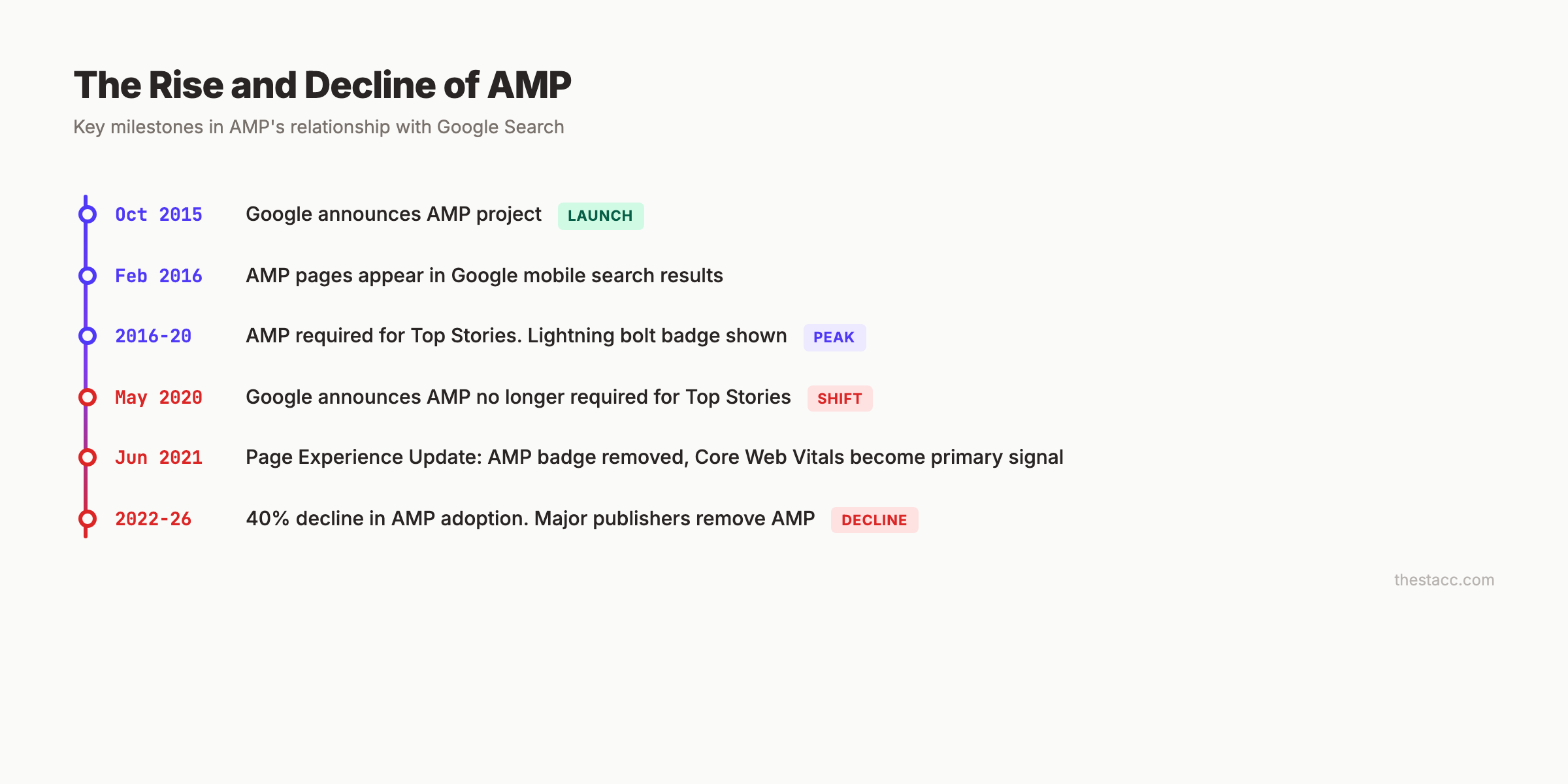
Google’s Page Experience Update (June 2021) removed the AMP requirement for Top Stories and eliminated the badge. Now, any page that meets Core Web Vitals thresholds can appear in Top Stories.
What AMP Does Affect
AMP pages still influence SEO indirectly through speed. Faster pages tend to rank better because they score higher on Core Web Vitals metrics:
- Largest Contentful Paint (LCP): AMP pages load primary content faster
- Cumulative Layout Shift (CLS): AMP’s required width/height attributes prevent layout shifts
- Interaction to Next Paint (INP): AMP’s limited JavaScript reduces input delay
AMP pages are 5x more likely to pass Core Web Vitals than non-AMP pages. But a well-optimized standard page can match or beat AMP performance without the restrictions.
Learn how to improve your Core Web Vitals scores without AMP.
The Real Performance Data: AMP vs. Standard Pages
AMP pages load 88% faster than traditional mobile pages on average. That is the headline stat. But the full picture is more nuanced.
| Metric | AMP Pages | Standard Mobile Pages |
|---|---|---|
| Median load time from Google Search | Under 1 second | 15.3 seconds (average) |
| Data usage | 10x less | Standard |
| Core Web Vitals pass rate | 5x higher | Varies widely |
| Pre-rendered speed advantage | ~9x faster | No pre-rendering |
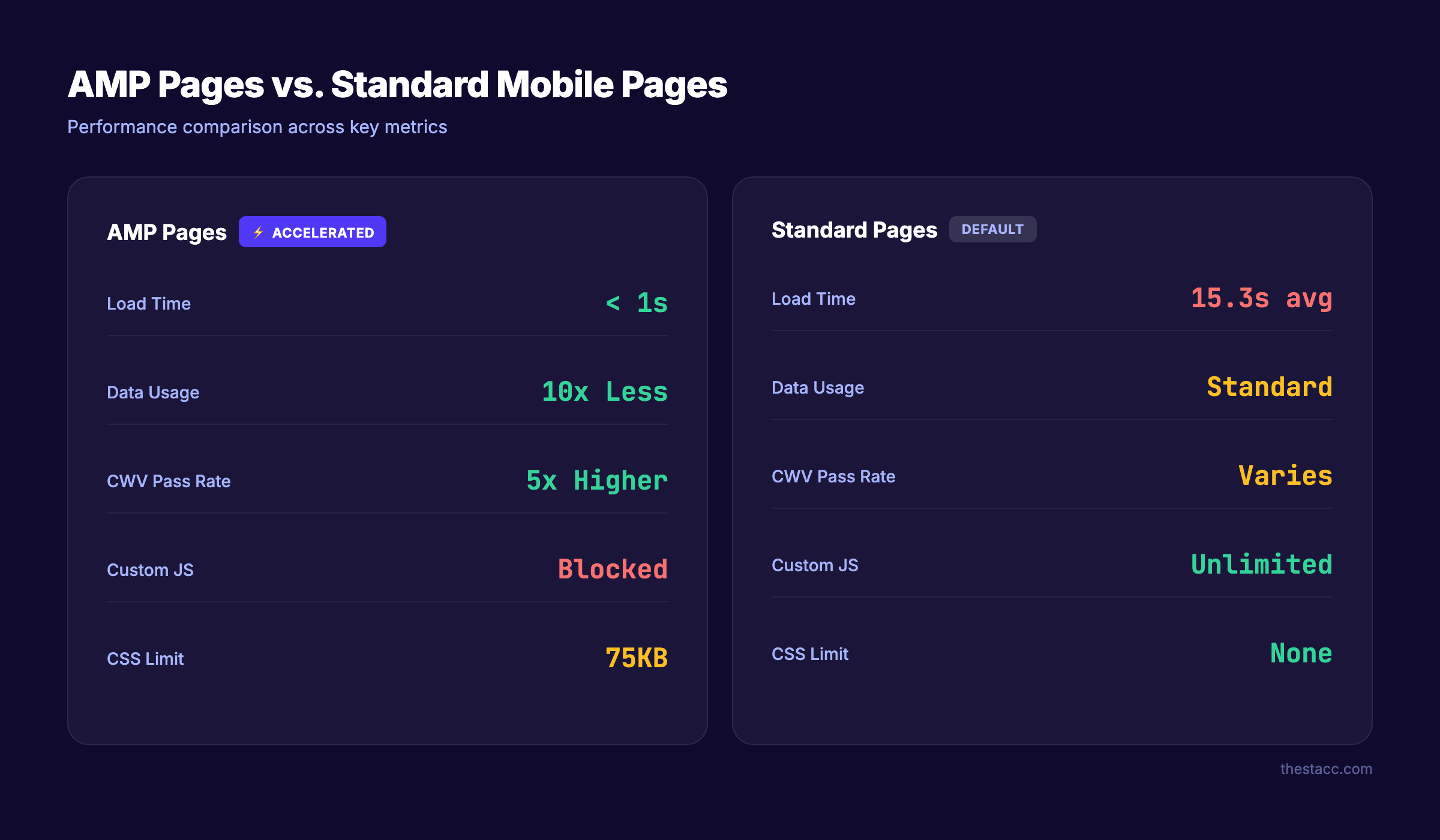
These numbers look dramatic. But they compare AMP to unoptimized standard pages. When you compare AMP to a properly optimized standard page (compressed images, CDN, lazy loading, minimal JavaScript), the gap shrinks significantly.
Case Studies That Tell the Real Story
Kinsta (removed AMP — rankings went up):
- Mobile leads dropped 59% while AMP was active
- Newsletter signups declined 17%
- After removing AMP, organic rankings actually improved
Search Engine Land (removed AMP — minimal impact):
- AMP traffic had already dropped 34% before removal
- Used 301 redirects to preserve link equity
- No significant ranking losses after migration
Tribune Publishing (removed AMP — small dip):
- Median daily search users fell 12.4% after removal
- Most losses were attributed to seasonal traffic patterns
- Overall site health remained stable
Future plc (removed AMP from 80-90% of pages):
- Traffic did not fall
- Ad revenue improved after removal
Independent News and Media (AMP hurt revenue):
- 49% decline in mobile ad revenue with AMP active
- 6.9% more clicks after removing AMP
- No impact on Google Discover performance
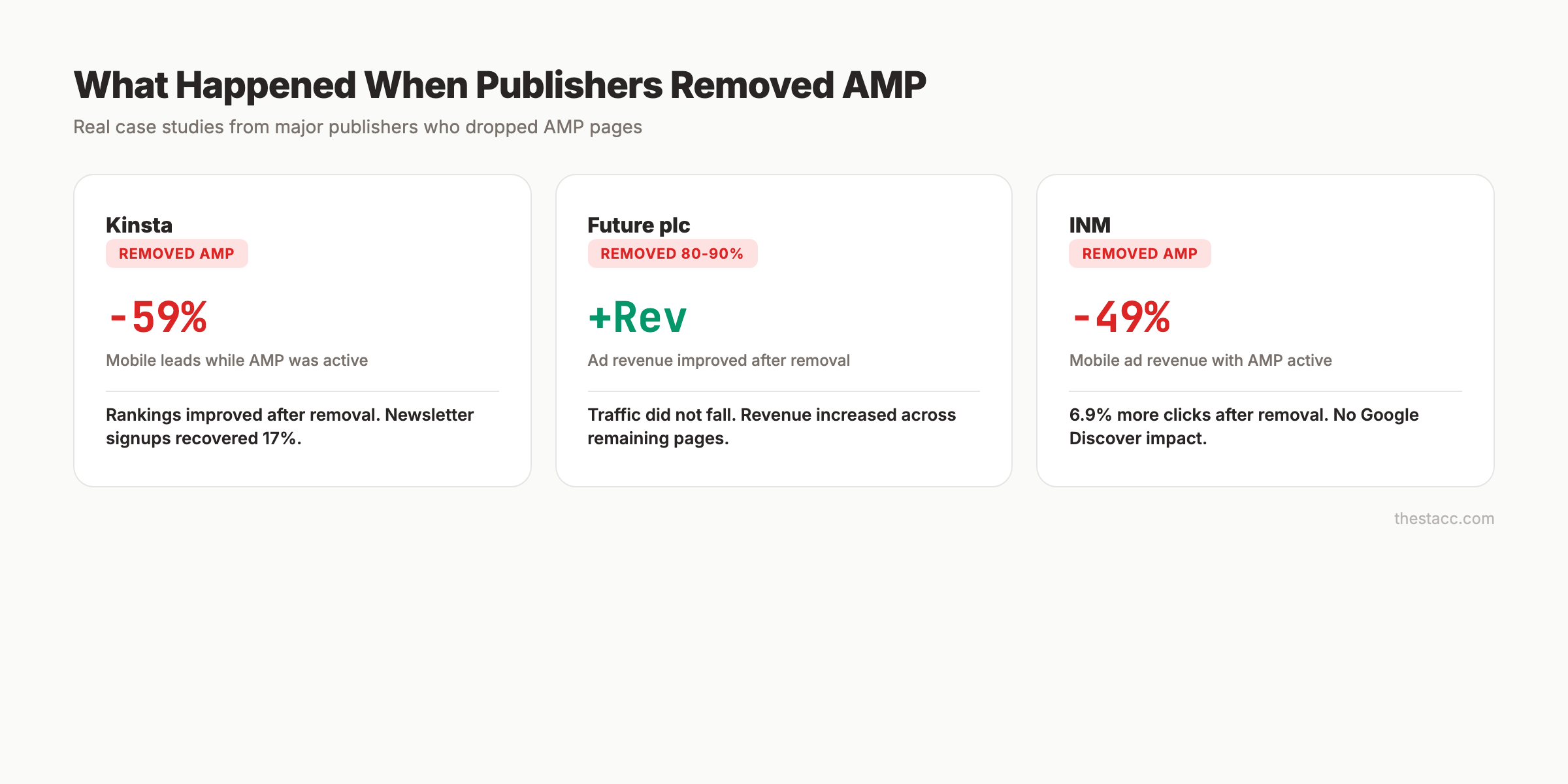
The pattern is clear. Most publishers who remove AMP see minimal traffic impact and often see improvements in conversions and revenue.
Stop writing. Start ranking. Stacc publishes 30 SEO articles per month for $99. No speed optimization headaches. No AMP maintenance. Start for $1 →
Benefits of AMP Pages for SEO
Despite the declining adoption, AMP pages still offer specific advantages for certain use cases.
1. Guaranteed Fast Load Times
AMP’s strict restrictions make it nearly impossible to build a slow page. If your team lacks the technical resources to optimize page speed manually, AMP provides guardrails that enforce performance.
2. Google AMP Cache
AMP pages can be served from Google’s CDN at no cost. This means your content loads from servers geographically close to the user. For sites without a premium CDN, this is a meaningful speed boost.
3. Pre-rendering in Search Results
Google can pre-render AMP pages before a user taps. This creates the perception of instant loading. Standard pages do not receive this pre-rendering treatment.
4. Structured Content Discipline
AMP forces clean markup. Required width and height attributes on images prevent layout shifts. The CSS size limit prevents bloated stylesheets. These constraints produce better technical SEO fundamentals as a side effect.
5. Email AMP Support
AMP for Email allows interactive email experiences (carousels, forms, live content). Gmail, Yahoo Mail, and Mail.ru support AMP emails. This is separate from web AMP but uses the same framework.
For a full breakdown of mobile SEO best practices, including AMP considerations, see our mobile guide.
Limitations and Risks of AMP
AMP’s restrictions create real problems that have driven the 40% decline in adoption since 2021.
Design and Functionality Restrictions
AMP prohibits custom JavaScript entirely. You cannot use standard HTML elements like <img> or <iframe> without AMP-specific replacements. Forms are restricted. Interactive features require AMP components that may not match your design needs.
This means:
- No custom analytics scripts (must use
<amp-analytics>) - No third-party widgets or embeds without AMP wrappers
- No A/B testing tools that rely on JavaScript
- Limited form functionality for lead generation
Maintenance Burden
Running AMP means maintaining two versions of every page: the canonical version and the AMP version. Content must stay synchronized. Any update to your standard page requires a matching update to the AMP version.
This doubles your development and QA workload.
Ad Revenue Impact
Multiple publishers have reported significant ad revenue declines with AMP. Independent News and Media saw a 49% drop in mobile ad revenue. AMP’s restricted ad formats and limited JavaScript make it harder to run premium ad units.
URL and Branding Issues
When served from Google’s AMP Cache, your pages display under a Google URL (e.g., google.com/amp/s/yoursite.com/page). Users see Google’s domain, not yours. This dilutes brand recognition and can confuse visitors.
Signed Exchanges (SXG) partially solve this by displaying your original URL. But SXG requires additional server configuration and HTTPS certificate setup.
Analytics Limitations
AMP’s analytics restrictions mean you lose granular tracking capabilities. Standard Google Analytics implementations do not work on AMP pages. You must use <amp-analytics> with limited event tracking options.
This affects your ability to measure user behavior, run attribution models, and optimize conversion funnels.
Should You Use AMP in 2026? (Decision Framework)
The answer depends on your site type, technical resources, and content strategy.
Use AMP If:
| Scenario | Why AMP Still Helps |
|---|---|
| News publisher competing for Top Stories | AMP pages still load fastest in Top Stories, even if not required |
| No technical team to optimize Core Web Vitals | AMP enforces speed without manual optimization |
| High-traffic content site with Google AMP Cache dependency | Free CDN saves significant hosting costs |
| AMP email campaigns are part of your marketing | The framework supports interactive emails |
Skip AMP If:
| Scenario | Why AMP Hurts More Than Helps |
|---|---|
| Ecommerce or lead generation site | JavaScript restrictions kill conversions |
| You need custom analytics or A/B testing | AMP blocks the tools you need |
| Your site already passes Core Web Vitals | AMP adds complexity without benefit |
| You rely on ad revenue | AMP’s ad restrictions reduce RPM |
| You have a technical team that can optimize speed | Standard optimizations match AMP speed |
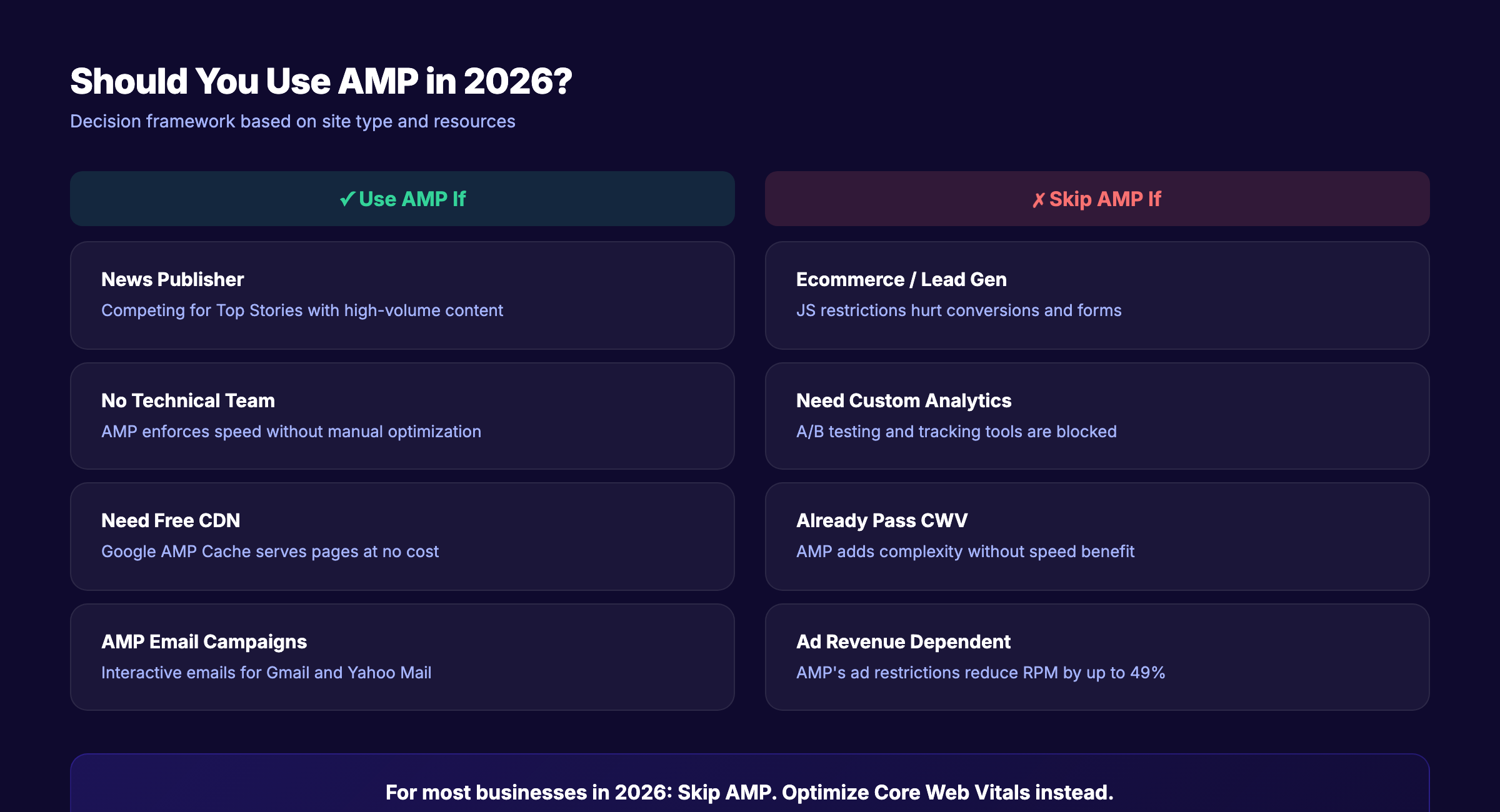
The Bottom Line
For most businesses in 2026, the answer is: skip AMP. Focus on passing Core Web Vitals through standard optimization. The maintenance burden and functionality restrictions outweigh AMP’s speed benefits for the vast majority of sites.
The exception is high-volume news publishers who still benefit from Google’s AMP Cache and pre-rendering.
Your SEO team. $99 per month. 30 optimized articles, published automatically. No AMP headaches. No technical debt. Start for $1 →
How to Implement AMP Pages Correctly
If AMP makes sense for your site, here is how to set it up without common SEO mistakes.
Step 1: Create the AMP HTML Document
Every AMP page needs this mandatory structure:
<!doctype html>
<html amp lang="en">
<head>
  <meta charset="utf-8">
  <meta name="viewport" content="width=device-width">
  <script async src="https://cdn.ampproject.org/v0.js"></script>
  <link rel="canonical" href="https://yoursite.com/original-page">
  <style amp-boilerplate>...</style>
  <style amp-custom>
    /* Your CSS here — 75KB max */
  </style>
</head>
<body>
  <!-- AMP content here -->
</body>
</html>
Key requirements:
<meta charset="utf-8">must be the first child of<head>- The
ampattribute on the<html>tag is mandatory - The canonical link must point to the original non-AMP version
- All styles go in a single
<style amp-custom>block
Step 2: Replace Standard HTML Elements
| Standard HTML | AMP Replacement | Notes |
|---|---|---|
<img> | <amp-img> | Width and height attributes required |
<video> | <amp-video> | Must include poster attribute |
<iframe> | <amp-iframe> | Must be 600px or 75% below the fold |
<form> | <amp-form> | Requires action-xhr attribute |
Step 3: Set Up Canonical Linking
Your non-AMP page needs this in the <head>:
<link rel="amphtml" href="https://yoursite.com/page/amp">Your AMP page needs this:
<link rel="canonical" href="https://yoursite.com/page">Both links must exist. Mismatched or missing canonical links are the most common AMP SEO error. Google Search Console flags these under the AMP section.
Step 4: Validate Your AMP Pages
Use these tools before publishing:
- AMP Validator: Built into Chrome DevTools (add
#development=1to your AMP URL) - Google AMP Test: Search “AMP test” in Google and paste your URL
- Google Search Console: The AMP report shows validation errors across your site
Fix every validation error. Invalid AMP pages do not receive AMP benefits and can create indexing issues.
Step 5: Monitor in Google Search Console
After implementation, check the Google Search Console AMP report weekly for the first month. Common issues include:
- Missing required attributes on AMP elements
- CSS exceeding the 75KB limit
- Disallowed JavaScript references
- Canonical URL mismatches
For a complete technical SEO checklist that covers AMP alongside other critical elements, see our guide.
How to Remove AMP Without Losing Traffic
More sites are removing AMP than adding it. Here is the safe migration process based on how Search Engine Land, Tribune Publishing, and Future plc handled their transitions.
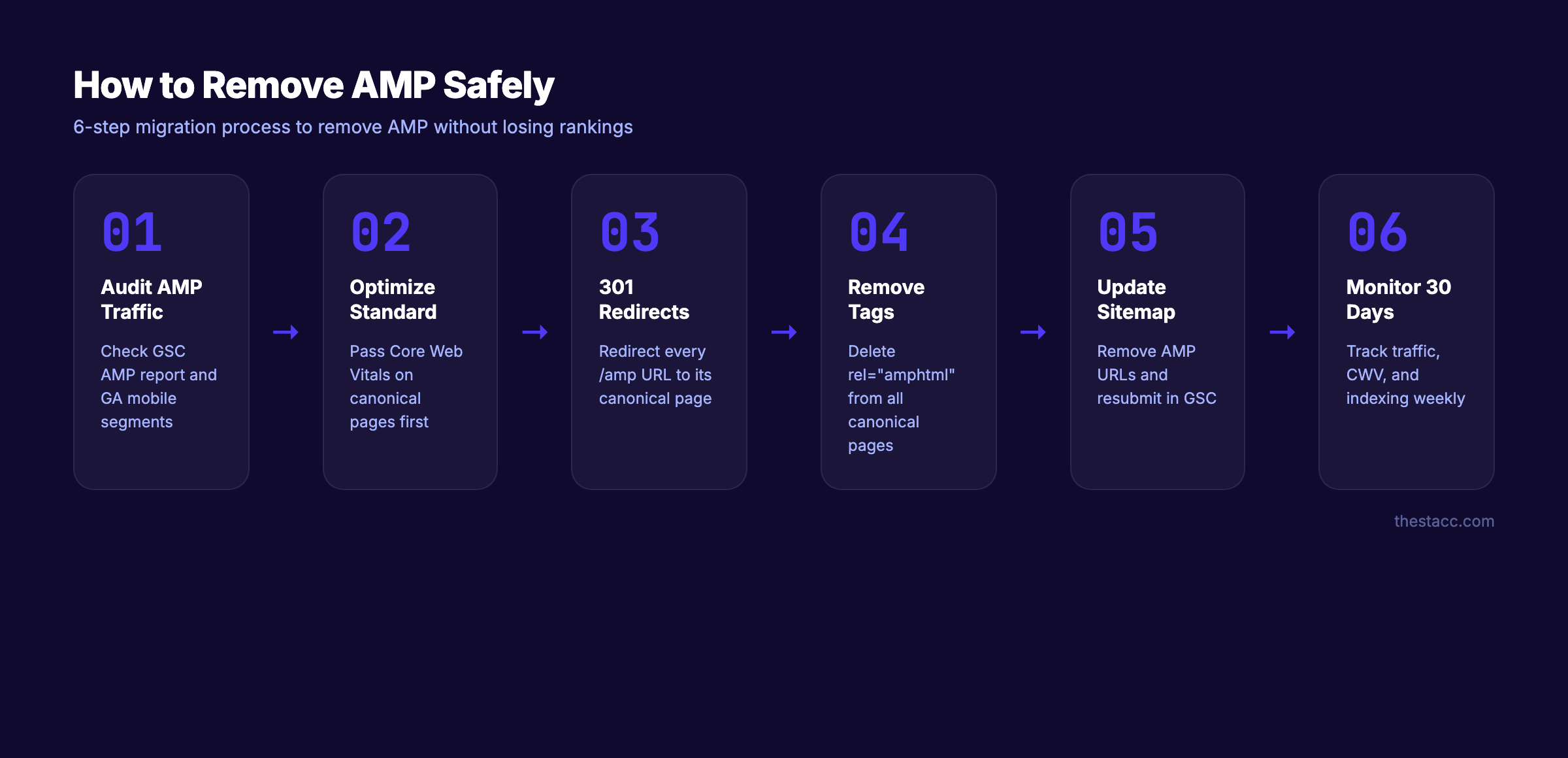
Step 1: Audit Your Current AMP Traffic
In Google Search Console, check the AMP report for:
- Total AMP pages indexed
- AMP-specific traffic volume
- Any existing AMP errors
In Google Analytics, segment mobile traffic to identify how much comes through AMP URLs.
Step 2: Optimize Your Standard Pages First
Before removing AMP, ensure your canonical pages pass Core Web Vitals. Run a full SEO audit and address:
- Image compression and lazy loading
- JavaScript minification and deferral
- CDN setup for static assets
- Font optimization
- Server response time (aim for under 200ms TTFB)
This is critical. If your standard pages are slow, removing AMP will hurt rankings.
Step 3: Set Up 301 Redirects
Redirect every AMP URL to its canonical equivalent:
/blog/post-title/amp → /blog/post-title (301 redirect)Use 301 redirects, not 302s. Search Engine Land initially used 302 redirects and switched to 301s for permanent migration.
Step 4: Remove AMP Tags
Remove the <link rel="amphtml"> tag from all canonical pages. This tells Google to stop looking for AMP versions.
Step 5: Update Your Sitemap
Remove all AMP URLs from your XML sitemap. Submit the updated sitemap in Google Search Console.
Step 6: Monitor for 30 Days
Track these metrics weekly for the first month:
- Organic traffic (mobile and desktop separately)
- Core Web Vitals scores in Search Console
- Indexing status of former AMP pages
- Click-through rates in Search Console
Tribune Publishing saw a 12.4% dip in search users that recovered within weeks. Expect a small temporary fluctuation during the transition.
3,500+ blogs published. 92% average SEO score. See what Stacc can do for your site. We handle the technical details so you do not have to. Start for $1 →
Modern Alternatives to AMP
If you want AMP-level speed without AMP’s restrictions, these approaches deliver comparable or better performance.
Core Web Vitals Optimization
The most direct alternative. Optimize your existing pages for LCP, CLS, and INP without rewriting anything in AMP format. This includes image optimization, JavaScript deferral, font loading strategies, and CDN deployment.
Read our complete guide to improving Core Web Vitals for step-by-step instructions.
Static Site Generators
Frameworks like Astro, Next.js (with static export), and Hugo generate pre-built HTML pages with minimal JavaScript. Astro ships 95% less JavaScript than traditional React apps. These tools produce pages that match AMP speed without AMP’s restrictions.
CDN and Edge Computing
Services like Cloudflare, Vercel, and Fastly serve your pages from edge locations worldwide. Combined with proper caching headers, edge-served pages load in under 1 second for most users.
Image Optimization
Images account for the largest performance bottleneck on most pages. Modern formats (WebP, AVIF), responsive sizing, and lazy loading can cut page weight by 60-80% without touching your HTML structure.
Server-Side Rendering (SSR)
Frameworks like Next.js, SvelteKit, and Remix render HTML on the server before sending it to the browser. Users see content immediately instead of waiting for JavaScript to build the page. SSR pages routinely score 90+ on Lighthouse performance audits.
For sites focused on on-page SEO, these alternatives provide better flexibility while maintaining top performance scores.
Common AMP SEO Mistakes to Avoid
Whether you are implementing or maintaining AMP, these errors cause the most SEO damage.
1. Content Mismatch Between AMP and Canonical
Your AMP page must contain the same primary content as the canonical version. Missing videos, images, or text sections on the AMP version can cause Google to index the wrong version or split ranking signals.
2. Missing or Incorrect Canonical Tags
Every AMP page needs a canonical link to the original. Every original page needs an amphtml link to the AMP version. One missing or mismatched tag breaks the entire AMP-canonical relationship.
3. Adding AMP URLs to Your Sitemap
Do not include AMP URLs in your XML sitemap. Google discovers AMP pages through the rel="amphtml" link on your canonical pages. Adding AMP URLs to the sitemap creates duplicate URL signals.
4. Implementing AMP on Every Page
Not every page benefits from AMP. Product pages, checkout flows, and interactive tools lose functionality. Apply AMP selectively to content pages where speed matters most and interactivity is minimal.
5. Skipping Validation
An AMP page with validation errors does not receive AMP benefits. Google treats invalid AMP pages as standard pages. Validate every AMP page before publishing using Google’s AMP Test Tool.
6. Ignoring Structured Data
Schema markup works on AMP pages the same way it works on standard pages. Include your Article, FAQ, or HowTo schema on both the AMP and canonical versions. Structured data improves how your pages appear in search results regardless of AMP status.
FAQ
Are AMP pages a Google ranking factor?
No. Google has confirmed that AMP is not a ranking factor. AMP pages may rank well because they load faster, which helps Core Web Vitals scores. But the AMP framework itself does not provide a ranking boost.
Is AMP required for Google Top Stories in 2026?
No. Google removed the AMP requirement for Top Stories in June 2021 as part of the Page Experience Update. Any page that meets Core Web Vitals thresholds and Google News guidelines can appear in Top Stories.
Will removing AMP hurt my rankings?
In most cases, no. Publisher case studies from Search Engine Land, Tribune Publishing, and Future plc show minimal ranking impact after AMP removal. The key is ensuring your standard pages pass Core Web Vitals before removing AMP. Set up proper 301 redirects from AMP URLs to canonical pages.
How much faster are AMP pages than standard pages?
AMP pages load 88% faster than typical mobile pages and use 10x less data. The median AMP page loads in under 1 second from Google Search. However, a well-optimized standard page can achieve similar load times through CDN deployment, image compression, and JavaScript optimization.
Should ecommerce sites use AMP?
Generally, no. AMP’s JavaScript restrictions prevent custom checkout flows, product configurators, A/B testing tools, and dynamic pricing. Some studies show a 20% conversion rate increase on AMP ecommerce pages, but others report a 70% conversion drop due to limited functionality. The risk usually outweighs the reward.
What is the best alternative to AMP for mobile speed?
Focus on Core Web Vitals optimization: compress images to WebP or AVIF format, defer non-critical JavaScript, use a CDN, implement lazy loading, and minimize CSS. Static site generators like Astro or Next.js produce pages that match AMP speed without the restrictions.
AMP pages played an important role in pushing the web toward faster mobile experiences. That mission succeeded. Core Web Vitals now handle what AMP was built to enforce. For most sites in 2026, standard speed optimization delivers the same SEO benefits without the maintenance burden, design limitations, or revenue risks that come with AMP.
If you are running AMP today, audit whether it still serves your goals. If you are considering AMP for a new site, start with Core Web Vitals optimization first. The data shows that is where Google’s attention is now.
Written and published by Stacc. We publish 3,500+ articles per month across 70+ industries. All data verified against public sources as of March 2026.
