Crawl budget optimization means spending Googlebot's limited crawl on the pages you want indexed. Start in Search Console's Crawl Stats report, find what wastes requests such as faceted URLs, redirect chains, soft 404s, and duplicate parameters, remove or consolidate it, then strengthen internal links to the pages that earn revenue.
Google crawled 96% more web pages in 2025 than in 2024. Googlebot now generates 4.5% of all HTML request traffic on the internet. AI crawlers surged 305% on top of that. Your server is handling more bot traffic than ever.
Crawl budget is the amount of time and resources Google devotes to crawling your site. If Google spends most of that budget crawling redirect chains, duplicate pages, and expired URLs, your important pages wait in line. Sites with crawl budget problems can see 30 to 50% of important pages remain unindexed.
Most websites under 10,000 pages do not need to worry about crawl budget. If your pages get indexed within a day of publishing, this problem does not apply to you. But for sites with 10,000+ URLs, e-commerce catalogs, or content that publishes faster than Google indexes it, crawl budget optimization is critical.
This guide covers how Google allocates crawl budget, the 10 most common wasters, how to monitor crawl behavior in Search Console, and the fixes that get your pages indexed faster.
We have published 3,500+ SEO articles across 70+ industries. This guide covers what actually moves the needle on crawl efficiency.
Here is what you will learn:
- How Google decides what to crawl and how often
- The 10 most common crawl budget wasters and how to fix each one
- How to read your crawl stats in Google Search Console
- Why AI crawlers now compete for the same server resources as Googlebot
- A tiered optimization framework from foundational fixes to enterprise strategy
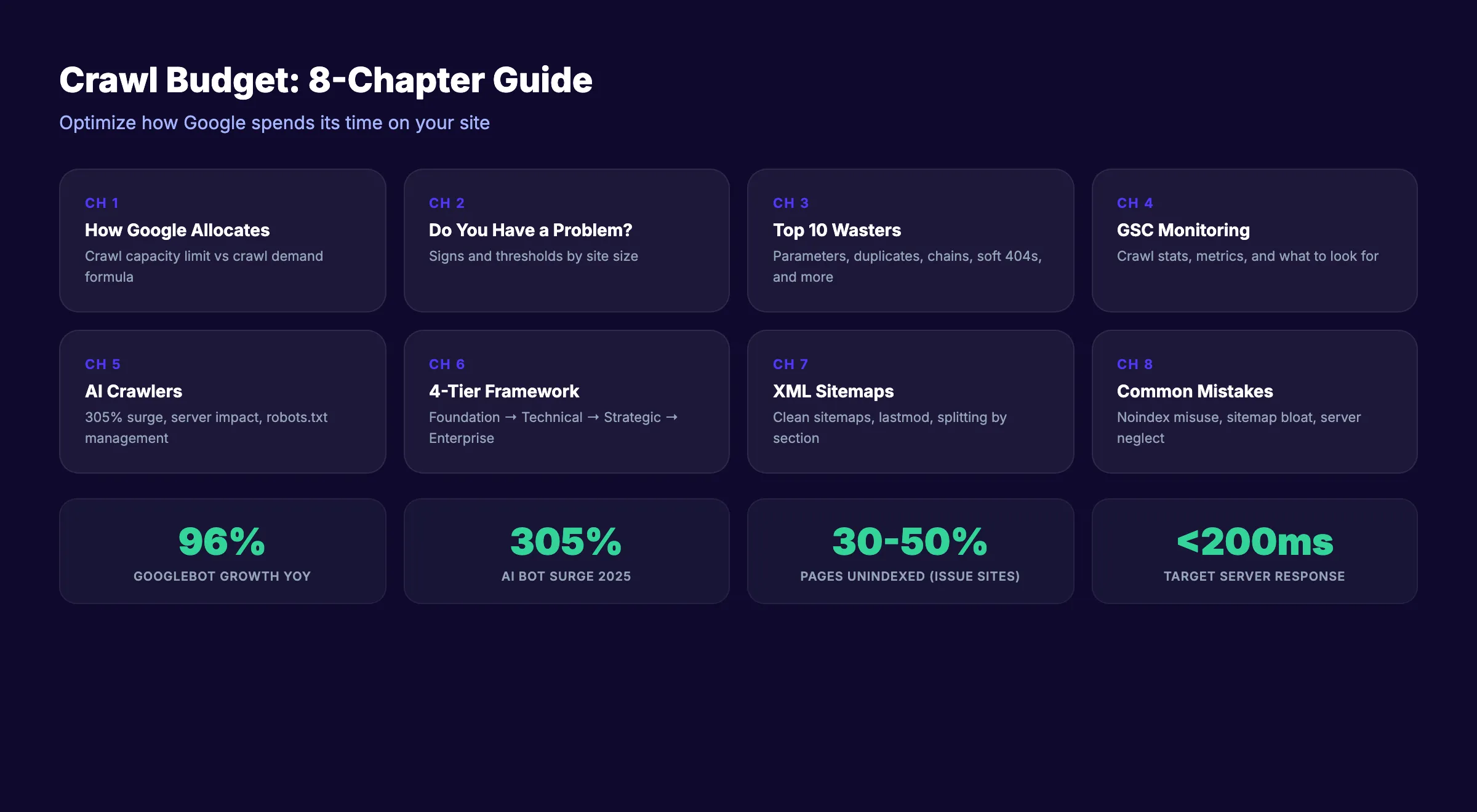
Chapter 1: How Google Allocates Crawl Budget
Google's official documentation defines crawl budget through two components: crawl capacity limit and crawl demand. Your actual crawl budget is the lower of the two.
Crawl Capacity Limit
The crawl capacity limit is the maximum number of simultaneous connections Googlebot uses to crawl your site, plus the delay between requests. Google adjusts this automatically based on your server's response.
- Fast server responses → Google increases the connection limit and crawls more pages
- Slow responses or server errors → Google reduces connections to avoid overloading your server
- 5xx errors → Google throttles crawling significantly until errors resolve
You can reduce the crawl rate in Google Search Console settings. You cannot increase it. The only way to raise your capacity limit is to make your server faster and more reliable.
Crawl Demand
Crawl demand is how much Google wants to crawl your site. Even if your server can handle more connections, Google will not crawl pages it does not value.
Crawl demand is driven by:
- URL popularity. Pages that users search for and click on get crawled more frequently
- Staleness. Pages that have not been crawled recently get prioritized for a refresh
- Content quality. Higher-quality pages earn more crawl attention
- Site-wide events. A site migration or major redesign triggers increased crawling
The Formula
Crawl budget = the lower of (crawl capacity limit, crawl demand).
If your server is fast but your content is low quality, crawl demand limits you. If your content is popular but your server is slow, capacity limits you. Optimizing crawl budget means addressing both sides.
For a full technical SEO overview, our technical SEO checklist covers crawlability alongside every other ranking factor.
Chapter 2: Do You Actually Have a Crawl Budget Problem?
Not every site has a crawl budget issue. Google's Gary Illyes has stated publicly that "crawl budget is not something most sites need to worry about."
When Crawl Budget Matters
| Site Type | Page Count | Likely an Issue? |
|---|---|---|
| Small business website | Under 500 pages | No |
| Blog or content site | 500-5,000 pages | Rarely |
| Medium business site | 5,000-10,000 pages | Possibly |
| Large content site | 10,000-100,000 pages | Yes |
| E-commerce catalog | 100,000+ pages | Almost certainly |
| Enterprise / news site | 1,000,000+ pages | Always |
Signs of a Crawl Budget Problem
- New pages take weeks to get indexed instead of days
- Google Search Console shows "Discovered - currently not indexed" for large numbers of URLs
- Crawl Stats report shows Google spending most of its time on low-value pages
- Important pages have not been recrawled in 30+ days
- XML sitemap shows pages that are not in the Google index
If your pages get indexed within 1 to 3 days of publishing, your crawl budget is fine. Focus your time on content and links instead.
Our SEO for beginners guide covers the fundamentals that apply to sites of every size.
Stop writing. Start ranking. theStacc writes, optimizes, and publishes SEO articles to your blog for $99 a month. Every article is built for fast indexing.
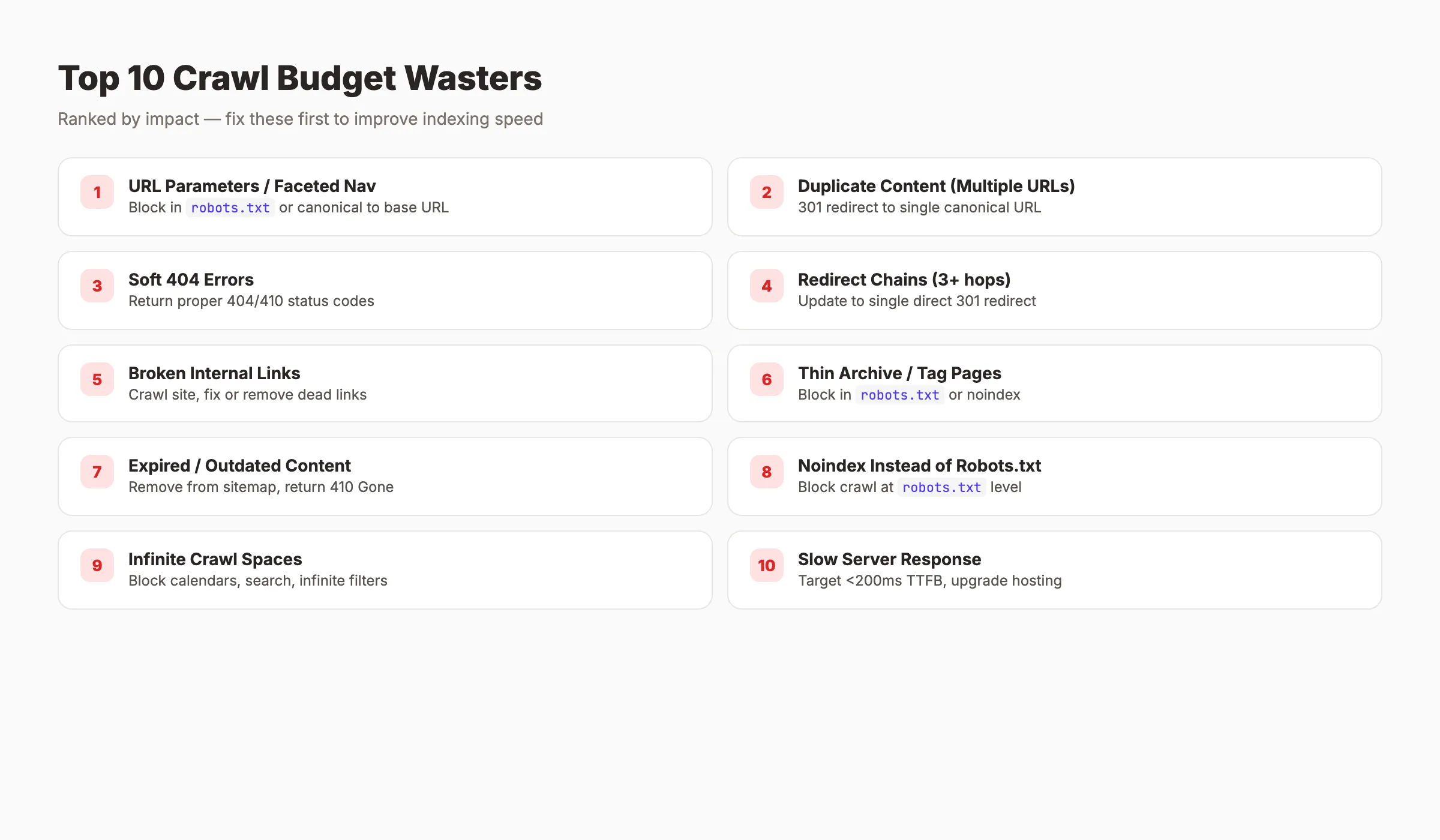
Chapter 3: The 10 Biggest Crawl Budget Wasters
Every URL Google crawls on a low-value page is a URL it does not spend on a high-value one. Here are the 10 most common wasters, ranked by impact.
1. URL Parameters and Faceted Navigation
E-commerce sites are the worst offenders. A product listing page with filters for size, color, price, brand, and sort order generates thousands of near-identical URLs:
/shoes?color=red
/shoes?color=red&size=10
/shoes?color=red&size=10&sort=price-asc
/shoes?sort=price-asc&color=red&size=10
Each URL looks like a unique page to Googlebot. A catalog with 1,000 products and 20 filter combinations creates 20,000 crawlable URLs from a single category.
Fix: Block parameter URLs in robots.txt or use canonical tags pointing all variations to the base URL. For complex setups, implement Google's URL parameter handling guidelines.
2. Duplicate Content Across Multiple URLs
The same page accessible at multiple URLs wastes crawl requests:
http://example.com/pageandhttps://example.com/pageexample.com/pageandwww.example.com/pageexample.com/pageandexample.com/page/example.com/Pageandexample.com/page
Fix: Set up 301 redirects to a single canonical URL. Enforce HTTPS, choose www or non-www, and handle trailing slashes consistently. Our SSL SEO impact guide covers the HTTPS migration process.
3. Soft 404 Errors
A soft 404 is a page that returns a 200 OK status code but shows thin or empty content. Google keeps recrawling these because the server says the page is fine.
Fix: Return proper 404 or 410 status codes for pages that no longer exist. Use Google Search Console's "Soft 404" report to identify them.
4. Redirect Chains
/old-page → /new-page → /newer-page → /final-page
Each hop costs a separate crawl request. A chain of 3 redirects wastes 3 requests to reach 1 page.
Fix: Update all redirects to point directly to the final destination. Maximum 1 hop per redirect.
5. Broken Internal Links
Internal links pointing to 404 pages waste crawl requests on dead ends. Googlebot follows every link it finds.
Fix: Run a site crawl with Screaming Frog or a similar tool. Fix or remove every broken internal link.
6. Thin Archive and Tag Pages
WordPress sites generate archive pages for every tag, category, date, and author. Most contain snippets of content that already exists on other pages.
Fix: Block thin archive pages in robots.txt or noindex them. Keep only the archives that provide genuine navigation value.
7. Expired and Outdated Content
Old product pages, expired event listings, and discontinued service pages still get crawled if they are linked internally or in your sitemap.
Fix: Remove expired pages from your sitemap. Update internal links. Return 410 Gone for permanently removed content (stronger signal than 404).
8. Using Noindex Instead of Robots.txt
A common mistake: putting noindex on pages you want Google to skip. Google still has to crawl the page to discover the noindex tag. The crawl is wasted.
Fix: Block pages you do not want crawled in robots.txt. Use noindex only for pages that need crawling but should not appear in search results.
9. Infinite Crawl Spaces
Calendar widgets, internal search result pages, and filter combinations can generate unlimited URLs. A calendar that goes back to 1970 creates thousands of empty date pages.
Fix: Block infinite spaces in robots.txt. Add rel="nofollow" to links within internal search results and calendar navigation.
10. Slow Server Response Times
If your server takes 2 seconds to respond to each request, Google reduces crawl frequency to avoid overloading it. A server that responds in 200ms gets crawled 10x more than one responding in 2 seconds.
Fix: Optimize server response time (TTFB). Target under 200ms for HTML responses. Upgrade hosting if needed.
Chapter 4: Monitoring Crawl Budget in Google Search Console
Google Search Console provides free crawl data. Most site owners never check it.
How to Access Crawl Stats
Go to Settings → Crawl Stats in Google Search Console. The report shows 90 days of crawl data.
Key Metrics to Monitor
| Metric | What It Tells You | Target |
|---|---|---|
| Total crawl requests (90 days) | Your approximate crawl budget | Divide by 90 for daily rate |
| Average response time | Server performance | Under 500ms (under 200ms ideal) |
| Response code breakdown | Crawl efficiency | 90%+ should be 200 OK |
| Host status | Server availability | Zero "Hostload exceeded" errors |
| File type breakdown | What Google is crawling | HTML should dominate |
| Crawl purpose | Discovery vs refresh | Balance depends on site type |
Reading the Data
Daily crawl requests: Divide total by 90. Example: 900,000 total = 10,000 URLs per day. If you have 50,000 pages and Google crawls 10,000 per day, every page gets crawled about once every 5 days. That is healthy.
Response time trending up: If average response time is increasing, your server is slowing down. Google will reduce crawl frequency in response.
High non-200 response rate: If 20%+ of responses are 301s, 404s, or 5xx errors, Google is wasting crawl budget on bad URLs.
File type ratio: If Google spends 40% of crawl requests on CSS and JavaScript files instead of HTML pages, your rendering setup needs attention.
Check these metrics weekly if your site has 10,000+ pages. Monthly is sufficient for smaller sites.
For a complete approach to SEO monitoring, our SEO reporting guide covers tracking and dashboards.
Your SEO team. $99 per month. SEO-scored articles, published automatically. Blog SEO, Local SEO, and Social on autopilot.
Chapter 5: AI Crawlers and the New Crawl Budget Challenge
Googlebot is no longer the only crawler consuming your server resources. AI bot crawling surged 305% in 2025. GPTBot, ClaudeBot, PerplexityBot, and others now compete for the same server bandwidth.
The Impact on Googlebot
Every request your server handles reduces its available capacity for the next request. If AI crawlers send thousands of requests per day, your server responds more slowly to Googlebot. Slower responses trigger Google to reduce its crawl rate.
This is a real problem for sites on shared hosting or limited server resources.
Managing AI Crawler Access
Use robots.txt to control which AI crawlers can access your site:
## Allow Googlebot full access
User-agent: Googlebot
Allow: /

## Block specific AI crawlers if they overload your server
User-agent: GPTBot
Disallow: /

User-agent: CCBot
Disallow: /
The decision to block AI crawlers depends on your goals. Blocking them protects server resources for Googlebot. Allowing them means your content can appear in AI search results and chatbot answers.
A balanced approach: allow AI crawlers on your most important pages and block them from low-value sections (archives, parameter URLs, media files).
Bot traffic is predicted to exceed human web usage by 2027. Managing crawler access is no longer optional for large sites.
Our SEO trends for 2026 guide covers how AI search is changing the SEO playbook.
Chapter 6: The Optimization Framework
Crawl budget optimization works in tiers. Start with foundational fixes. Move to advanced tactics only after the basics are clean.
Tier 1: Foundational Fixes
- ✓ Clean up
robots.txtto block low-value URL paths - ✓ Fix all redirect chains (maximum 1 hop per redirect)
- ✓ Return proper 404 or 410 for dead pages
- ✓ Submit a clean, accurate XML sitemap
- ✓ Fix all broken internal links
Tier 2: Technical Optimization
- ✓ Improve server response time to under 200ms TTFB
- ✓ Handle URL parameters via
robots.txtor canonical tags - ✓ Canonicalize all duplicate content variations
- ✓ Implement correct pagination (load-more or paginated sitemaps)
- ✓ Fix all mixed content and rendering issues
Tier 3: Strategic Improvements
- ✓ Strengthen internal linking to priority pages
- ✓ Prune thin, outdated, or expired content
- ✓ Manage AI crawler access via
robots.txt - ✓ Monitor GSC crawl stats weekly
- ✓ Review and clean sitemap monthly
Tier 4: Enterprise Scale (10,000+ pages)
- ✓ Implement crawl budget allocation by site section
- ✓ Use log file analysis tools (Screaming Frog Log Analyzer, Botify, Lumar)
- ✓ Set up real-time crawl monitoring with alerts
- ✓ Optimize JavaScript rendering to reduce render-dependent crawling
- ✓ Create priority sitemaps for your most important page types
Start at Tier 1. Most sites see meaningful improvements from foundational fixes alone.
For the full technical SEO picture, our technical SEO checklist covers every element beyond crawl budget.
3,500+ blogs published. Every article is SEO-scored before publish. See what theStacc can do for your site.
Chapter 7: XML Sitemaps and Crawl Prioritization
Your XML sitemap is a direct signal to Google about which pages matter. A clean sitemap improves crawl efficiency. A bloated sitemap wastes it.
Sitemap Best Practices for Crawl Budget
Only include indexable pages. Every URL in your sitemap should return a 200 status code and be the canonical version of that page. Remove redirected URLs, noindexed pages, and parameter variations.
Use lastmod dates accurately. The <lastmod> tag tells Google when a page was last meaningfully updated. Google uses this to prioritize recrawling. If every page shows today's date, the signal is useless. Only update lastmod when the content actually changes.
Split large sitemaps by section. For sites with 10,000+ pages, create separate sitemaps for blog posts, product pages, category pages, and static pages. This helps you identify which sections Google crawls most and least.
Submit sitemaps in Search Console. After creating or updating your sitemap, submit it through Google Search Console. This triggers Google to process it faster than waiting for natural discovery.
Keep sitemaps under 50,000 URLs each. Google's limit is 50,000 URLs or 50MB per sitemap file. Use a sitemap index file to link multiple sitemaps if needed.
Priority Tags
The <priority> tag in XML sitemaps is ignored by Google. Google has stated this publicly. Do not spend time setting priority values. Focus on <lastmod> and keeping the sitemap clean.
For a deeper look at how internal linking supports crawl efficiency, our SEO small business guide covers site architecture basics.
Common Crawl Budget Mistakes
Using noindex to save crawl budget. Google still fetches the page before reading the noindex tag. The crawl request is already spent. Use robots.txt to block pages you do not want crawled. Reserve noindex for pages that need rendering but should not appear in search results.
Obsessing over crawl budget on a small site. A business website with 200 pages does not have a crawl budget problem. Google can crawl the entire site in minutes. Focus on content quality and links instead.
Submitting every URL in the sitemap. Your XML sitemap should only include pages you want indexed. Including noindexed pages, redirected URLs, or parameter variations in your sitemap sends Google mixed signals and wastes crawl attention.
Ignoring server response time. A server that takes 2 seconds per request gets crawled 10x less than one responding in 200ms. Faster servers get more crawl budget automatically. This is the single highest-impact fix for most sites with crawl issues.
Blocking CSS and JavaScript in robots.txt. Google needs to render your pages to evaluate them. Blocking render resources forces Google to evaluate a broken version of your page. Allow Googlebot access to all CSS and JS files.
Never checking crawl stats. Google provides free crawl data in Search Console. Most site owners have never opened this report. Check it monthly at minimum. For large sites, check weekly.
For the full technical SEO audit approach, our SEO competitor analysis guide covers how to benchmark your technical setup against competitors.
What practitioners are saying on X
Systems and fundamentals still compound; AI search adds new KPIs.
- @jakezward (Feb 2026): 2026 SEO predictions emphasize AI Overview share-of-SERP, schema for LLM token efficiency, brand mentions in AI answers as a KPI, proprietary data as a moat, and content refresh beating net-new AI slop. See the post on X.
- @hridoyreh (Mar 2026): Widely shared SEO skill tree: foundations, research, technical, on-page, content, links, AI SEO/GEO, analytics, UX, brand, programmatic — useful map for stats and how-to posts. See the post on X.
- @HlynurStefDev (Jul 2026): Public case: niche site traffic jumped from ~18 to 4,162 Google visits/month after focused technical/on-page SEO work (GSC screenshots claimed) — reminds that fundamentals still move numbers. See the post on X.
Grok, AI Overviews, and multi-engine visibility
Technical topics like “crawl budget optimization” win AI citations when steps, code samples, and failure modes are explicit. Grok and other engines prefer ordered fix lists over vague “best practices” marketing language.
- Google AI Overviews: Use passage-ready answers, tables, and FAQ schema where relevant.
- ChatGPT / Perplexity: Cite named sources next to key claims.
- Grok: Maintain accurate entity facts on-site and in high-signal X posts.
Publish content built for Google and AI citations. theStacc’s Content SEO module ships SEO-scored articles structured for rankings and generative engines — including clearer entity pages models like Grok can quote.
FAQ
Crawl budget is the amount of time and resources Google devotes to crawling your website. It is determined by two factors: crawl capacity limit (how fast your server can handle requests) and crawl demand (how much Google wants to crawl based on content value and popularity).
Indirectly, yes. If Google cannot crawl your important pages, it cannot index them. Pages that are not indexed cannot rank. Crawl budget problems prevent pages from entering the ranking pool rather than directly lowering rankings of indexed pages.
Go to Google Search Console → Settings → Crawl Stats. The report shows total crawl requests, average response time, and response code breakdown over 90 days. Divide total requests by 90 to estimate your daily crawl budget.
Usually not. Google's Gary Illyes has stated that most sites do not need to worry about crawl budget. If your site has fewer than 10,000 pages and new content gets indexed within 1 to 3 days, crawl budget is not limiting you.
URL parameters and faceted navigation are the biggest wasters, especially on e-commerce sites. Other major wasters include duplicate content across multiple URLs, redirect chains, soft 404 errors, and broken internal links.
AI crawlers (GPTBot, ClaudeBot, PerplexityBot) consume server resources that Googlebot also needs. If AI crawlers slow your server, Google reduces its crawl rate. Use robots.txt to manage which AI crawlers can access your site. AI bot crawling surged 305% in 2025.
Crawl budget optimization is about directing Google's attention to the pages that matter. Clean up the wasters. Speed up your server. Monitor the data in Search Console. The sites that get indexed fastest are the ones that make it easy for Google to find, fetch, and understand their best content.
Sources & references
- [1] Princeton / Georgia Tech et al. — GEO research (arXiv:2311.09735)
- [2] @hridoyreh on X — Widely shared SEO skill tree: foundations, research, technical, on-page, content, links, AI SEO/GEO, analytics, UX, bran
- [3] @jakezward on X — 2026 SEO predictions emphasize AI Overview share-of-SERP, schema for LLM token efficiency, brand mentions in AI answers
- [4] @HlynurStefDev on X — Public case: niche site traffic jumped from ~18 to 4,162 Google visits/month after focused technical/on-page SEO work (G
- [5] Referenced source — blog.cloudflare.com

Plan topics, review article drafts, and publish to a connected CMS.
Weekly local SEO teardowns
One practical email a week. Map Pack, GBP, AI Overviews — no fluff. Unsubscribe anytime.
Explore this topic: Crawl Budget.