
SSL and SEO: Does HTTPS Still Impact Rankings? (2026)
Learn how SSL certificates affect SEO rankings. Covers HTTPS as a ranking factor, migration checklist, certificate types, and common mistakes. Updated 2026.
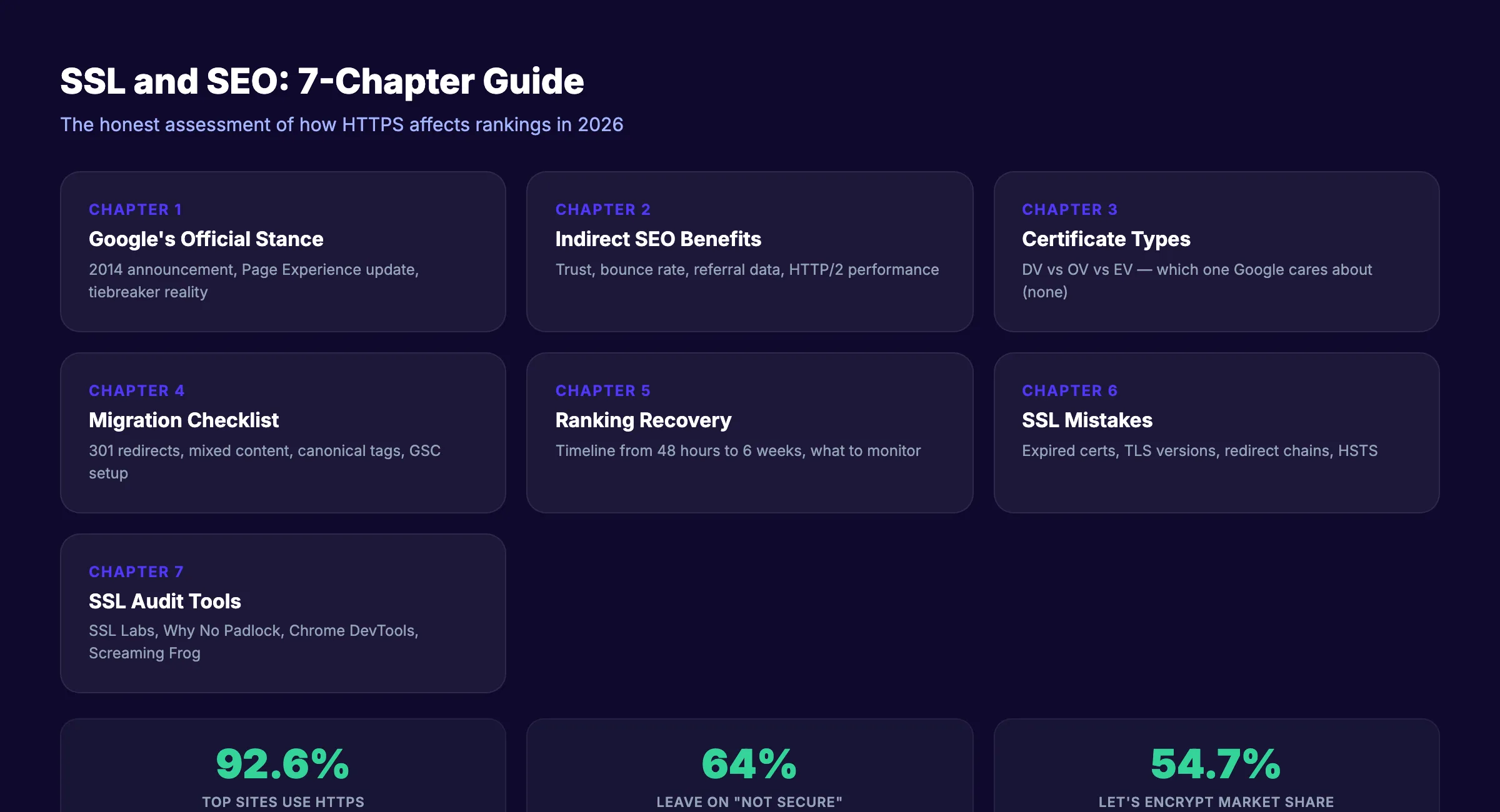
92.6% of the top 100,000 websites use HTTPS by default. Google Chrome marks every HTTP page as “Not Secure.” And 64% of users leave a site immediately after seeing that warning.
The relationship between SSL and SEO is one of the most misunderstood topics in search optimization. Some marketers claim that switching to HTTPS will boost your rankings overnight. Others say it makes no difference at all. Both are wrong.
The truth is specific. Google confirmed HTTPS as a ranking signal in 2014. It called it “lightweight.” It functions as a tiebreaker when all other signals are equal. It will not save a bad website and it will not rank a page that has no business ranking. But without it, you lose trust, lose visitors, and lose the tiebreaker.
This guide covers exactly how SSL affects SEO, what type of certificate you need, how to migrate without losing rankings, and the mistakes that cause traffic drops after switching.
We have published 3,500+ SEO articles across 70+ industries. This is what you need to know about SSL and SEO in 2026.
Here is what you will learn:
- What Google has officially said about HTTPS as a ranking factor
- Whether the type of SSL certificate matters for rankings
- The complete HTTPS migration checklist that prevents traffic loss
- How long ranking recovery takes after migration
- The SSL mistakes that actively hurt your SEO right now
Chapter 1: What Google Has Said About HTTPS and Rankings
Google has been clear about this. Unusually clear, by Google standards.
The 2014 Announcement
In August 2014, Google published a blog post titled “HTTPS as a ranking signal” on the Google Search Central Blog. The key statements:
- HTTPS is a “very lightweight” ranking signal
- It affects fewer than 1% of global queries
- It carries “less weight than other signals such as high-quality content”
- Google “may decide to strengthen” the signal over time
That was 12 years ago. Google has not strengthened it into a major ranking factor since then.
The Page Experience Update
In 2021, Google folded HTTPS into the broader “page experience” ranking system alongside Core Web Vitals, mobile-friendliness, safe browsing, and the absence of intrusive interstitials. HTTPS is no longer treated as a standalone signal. It is one component of how Google evaluates the overall user experience of a page.
The Tiebreaker Reality
The most accurate way to describe HTTPS as a ranking factor: it is a tiebreaker. If two pages are equal in content quality, backlinks, relevance, and every other signal, the HTTPS page gets preference.
In practice, two pages are almost never perfectly equal. Content, links, and on-page optimization always create clear differences. That means HTTPS rarely determines who ranks #1 and who ranks #2.
But that does not mean HTTPS is irrelevant. The indirect effects matter far more than the direct ranking signal.
For a full breakdown of all ranking factors, our technical SEO checklist covers every element Google evaluates.
Chapter 2: The Indirect SEO Benefits of HTTPS
The direct ranking boost from HTTPS is minimal. The indirect benefits are substantial.
The “Not Secure” Warning
Since July 2018, Google Chrome displays a “Not Secure” warning on every HTTP page. Chrome controls over 65% of the global browser market. That means most of your visitors see this warning.
64% of users leave immediately. They do not read your content. They do not click your links. They bounce. And bounce rate is a user experience signal that indirectly affects rankings.
Trust and Conversion
An HTTP site looks unsafe in 2026. It signals neglect. Visitors question whether their data is secure. For e-commerce sites, contact forms, and login pages, HTTP actively prevents conversions.
| Metric | HTTP | HTTPS |
|---|---|---|
| Browser display | ”Not Secure” warning | Padlock icon |
| User trust perception | Low | Standard (expected) |
| Form submission willingness | Reduced | Normal |
| Immediate bounce likelihood | 64% increase | Baseline |
| Data encryption | None | Encrypted in transit |
Referral Data Preservation
When a user clicks from an HTTPS site to an HTTP site, the referral data is stripped. Your analytics show the visit as “direct” traffic instead of identifying the referring source. This means you lose visibility into where your traffic actually comes from.
HTTPS to HTTPS referrals preserve the full referral chain. Accurate attribution data leads to better marketing decisions.
HTTP/2 and HTTP/3 Performance
Modern web protocols like HTTP/2 and HTTP/3 require HTTPS. These protocols deliver faster page loads through multiplexing, header compression, and connection reuse. Sites on HTTP are stuck on HTTP/1.1, which loads resources sequentially and runs slower.
Faster page speed is a confirmed ranking factor. HTTPS enables the protocols that make your site faster.
For a deeper look at page speed optimization, our technical SEO checklist covers Core Web Vitals in detail.
Stop writing. Start ranking. Stacc publishes 30 SEO-optimized articles per month for $99. All published sites use HTTPS by default. Start for $1 →
Chapter 3: SSL Certificate Types and SEO
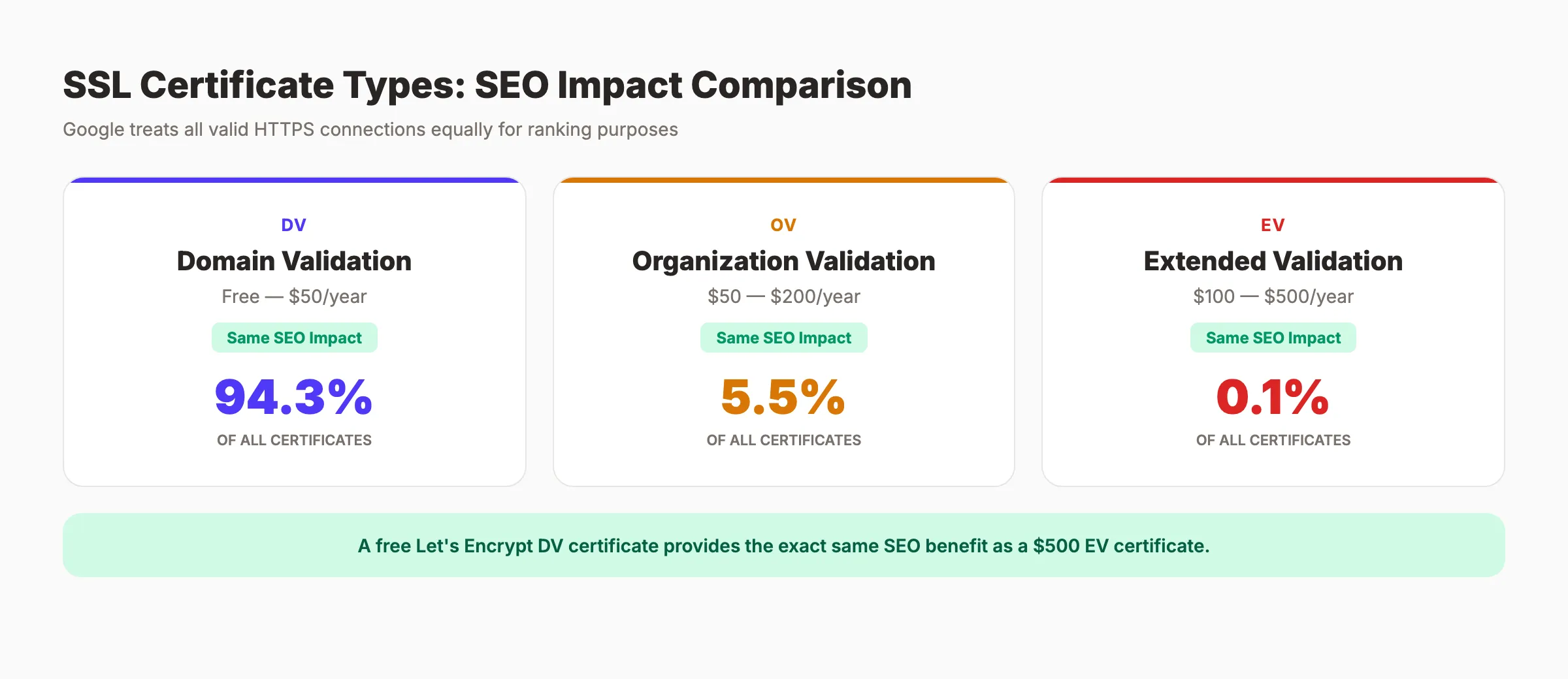
There are 3 main types of SSL certificates: Domain Validation (DV), Organization Validation (OV), and Extended Validation (EV). The SEO impact is the same for all of them.
Certificate Comparison
| Type | What It Validates | Cost | SEO Impact | Best For |
|---|---|---|---|---|
| DV (Domain Validation) | Domain ownership only | Free to $50/year | Same as any HTTPS | Blogs, small sites, startups |
| OV (Organization Validation) | Business identity | $50-$200/year | No additional benefit | Medium businesses |
| EV (Extended Validation) | Thorough business vetting | $100-$500/year | No additional benefit | E-commerce, finance |
| Wildcard | All subdomains | $75-$300/year | Same | Multi-subdomain sites |
| Multi-Domain (SAN) | Multiple domains | $100-$400/year | Same | Multi-brand businesses |
Google has confirmed that the type of SSL certificate does not affect rankings. A free Let’s Encrypt DV certificate provides the exact same SEO benefit as a $500 EV certificate.
The Market Reality
94.3% of all issued certificates are Domain Validation. Let’s Encrypt alone holds 54.73% of the certificate authority market and issues up to 10 million certificates per day. The barrier to HTTPS has been eliminated.
If you are still on HTTP, cost is not a valid reason. Let’s Encrypt certificates are free, auto-renew, and supported by every major hosting provider.
When to Choose EV or OV
EV and OV certificates offer no SEO advantage. But they do provide additional trust signals for users:
- EV certificates historically showed the company name in the browser address bar. Most browsers removed this display in 2019-2020. The trust benefit is now minimal.
- OV certificates verify your organization exists. Useful for compliance in regulated industries. Not useful for SEO.
For SEO purposes, use whatever certificate your hosting provider offers. If it is free DV from Let’s Encrypt, that is all you need.
Chapter 4: HTTPS Migration Checklist
Migrating from HTTP to HTTPS is a site-wide URL change. Every URL on your site changes. If you handle the migration incorrectly, you will lose traffic. The loss comes from redirect errors, not from HTTPS itself.
Pre-Migration Checklist
- Purchase or activate an SSL certificate for your domain
- Test the certificate on a staging environment before going live
- Create a complete list of all URLs on your site (use Screaming Frog or a sitemap)
- Back up your entire site and database
Migration Steps
- Install the SSL certificate on your server
- Set up 301 redirects from every HTTP URL to its HTTPS equivalent
- Update all internal links to use HTTPS
- Update canonical tags to point to HTTPS URLs
- Update your
sitemap.xmlwith HTTPS URLs - Update
robots.txtto reference the HTTPS sitemap - Fix mixed content (HTTP images, scripts, or CSS on HTTPS pages)
- Update any hardcoded URLs in your CMS, templates, or database
- Add the HTTPS property in Google Search Console
- Submit the updated sitemap in Google Search Console
- Update your Google Analytics settings to the HTTPS URL
- Update external profiles (Google Business Profile, social media, directories) to HTTPS
The Mixed Content Problem
Mixed content is the #1 cause of SSL issues after migration. It occurs when an HTTPS page loads resources (images, scripts, stylesheets) over HTTP. The browser blocks these resources or displays a warning.
Check for mixed content using:
- Chrome DevTools Console (look for mixed content warnings)
- Why No Padlock (free online tool)
- Screaming Frog (crawl your site and filter for HTTP resources on HTTPS pages)
Fix every instance. Replace HTTP resource URLs with HTTPS or use protocol-relative URLs (//example.com/image.jpg).
For SEO beginners handling their first migration, our SEO for beginners guide covers the foundational concepts.
Your SEO team. $99 per month. 30 optimized articles, published automatically. Blog SEO, Local SEO, and Social on autopilot. Start for $1 →
Chapter 5: Ranking Recovery After HTTPS Migration
A properly executed HTTPS migration causes minimal ranking disruption. An improperly executed one can tank your traffic for weeks.
Expected Timeline for Clean Migrations
| Phase | Timeline | What Happens |
|---|---|---|
| Initial disruption | 48 to 72 hours | Google recrawls your site, rankings fluctuate |
| High-authority pages stabilize | 1 to 2 weeks | Top pages return to normal positions |
| Long-tail pages recover | 3 to 4 weeks | Lower-traffic pages reindexed |
| Full normalization | 4 to 6 weeks | All rankings and traffic return to pre-migration levels |
| Warning threshold | 6 to 8 weeks | If not recovered by now, audit for systematic issues |
What to Monitor
Check Google Search Console daily during the first 2 weeks after migration:
- Coverage report: Look for indexing errors, excluded pages, or crawl anomalies
- Performance report: Compare impressions and clicks to pre-migration baseline
- URL Inspection tool: Test individual pages to verify Google sees the HTTPS version
Check for:
- Pages returning 404 (broken redirects)
- Redirect chains (HTTP → HTTPS → another HTTPS URL)
- Redirect loops (page A redirects to page B which redirects back to page A)
- Pages still indexed as HTTP (submit them for reindexing)
If Rankings Do Not Recover
If traffic has not returned after 6 weeks, check these common causes:
- Missing 301 redirects. Run a crawl and compare HTTP URLs to their HTTPS counterparts.
- Canonical tags still pointing to HTTP. Every canonical must reference the HTTPS URL.
- Sitemap still listing HTTP URLs. Resubmit the HTTPS sitemap.
- Mixed content blocking full HTTPS evaluation. Fix all HTTP resources.
- Certificate expiry. An expired certificate triggers browser warnings and ranking drops.
Our SEO reporting guide covers how to track migration performance.
Chapter 6: SSL Mistakes That Hurt SEO
Having an SSL certificate is not enough. Common configuration mistakes actively harm your rankings.
Expired Certificates
An expired SSL certificate triggers a full-page browser warning that blocks users from accessing your site. Traffic drops to near-zero until the certificate is renewed. Set up auto-renewal with your certificate authority and monitor expiry dates.
Mismatched Hostnames
If your certificate covers www.example.com but your site also serves traffic on example.com (without www), the non-www version triggers a security warning. Ensure your certificate covers all hostnames you use, or set up proper redirects.
Outdated TLS Versions
SSL 2.0 and SSL 3.0 are deprecated and insecure. TLS 1.0 and 1.1 are also deprecated. Modern browsers require TLS 1.2 or 1.3. 75.3% of top websites support TLS 1.3. Only 1.1% still support SSL 2.0/3.0.
Check your TLS version at SSL Labs. Aim for an A or A+ grade.
Redirect Chains
HTTP → HTTPS → www.HTTPS creates a 2-hop redirect chain. Each hop adds latency and dilutes a small amount of link equity. Set up a single 301 redirect from every non-preferred URL to the final canonical URL.
Not Forcing HTTPS
Having a certificate installed does not mean all traffic uses it. If both HTTP and HTTPS versions of your site are accessible, Google may index both. This creates duplicate content issues. Force all traffic to HTTPS through server-side redirects or HSTS headers.
HSTS Header Missing
HTTP Strict Transport Security (HSTS) tells browsers to always use HTTPS for your domain. Without it, a browser might still attempt an HTTP connection on the first visit, creating an unnecessary redirect. Add the HSTS header to your server configuration.
For a full technical audit, our technical SEO checklist covers SSL configuration alongside every other technical ranking factor.
3,500+ blogs published. 92% average SEO score. See what Stacc can do for your site. Start for $1 →
Chapter 7: How to Check Your SSL Configuration
You may already have HTTPS enabled but still have configuration issues hurting your SEO. Here is how to audit your SSL setup.
Free SSL Audit Tools
| Tool | What It Checks | Cost |
|---|---|---|
| SSL Labs Server Test | TLS version, certificate chain, vulnerabilities, grade (A+ to F) | Free |
| Why No Padlock | Mixed content issues on specific pages | Free |
| Chrome DevTools | Mixed content warnings, certificate details, security tab | Free |
| Screaming Frog | Site-wide crawl for HTTP resources on HTTPS pages | Free (500 URLs) |
| Google Search Console | Indexing issues, HTTPS coverage report | Free |
What to Look For
Run the SSL Labs test first. You want an A or A+ grade. Anything below B indicates configuration problems.
Common issues the test reveals:
- Weak cipher suites (outdated encryption methods)
- Missing certificate chain (intermediate certificates not installed)
- TLS 1.0/1.1 still enabled (should be disabled)
- HSTS header not present
- Certificate expiring within 30 days
After the SSL Labs test, crawl your site with Screaming Frog. Filter for any URL that loads an HTTP resource. Fix every instance.
Check Google Search Console’s Coverage report for pages indexed as HTTP. If both HTTP and HTTPS versions appear, your redirects are not working correctly.
Our SEO competitor analysis guide covers how to compare your technical setup against competitors.
Common SSL SEO Myths
“HTTPS will significantly boost my rankings.” It will not. HTTPS is a lightweight tiebreaker signal. Content quality, backlinks, and on-page optimization have 100x more impact on rankings. HTTPS is a baseline requirement, not a competitive advantage.
“EV certificates rank better than DV certificates.” Google treats all valid HTTPS connections equally. A free Let’s Encrypt certificate has the same SEO effect as a $500 EV certificate.
“Switching to HTTPS always causes a traffic drop.” A clean migration with proper 301 redirects causes minimal disruption. Traffic drops come from migration errors, not from HTTPS itself.
“HTTPS makes my site secure.” HTTPS encrypts data in transit between the browser and your server. It does not protect against server-side vulnerabilities, SQL injection, XSS, or malware. 90% of phishing sites display the HTTPS padlock. HTTPS is necessary but not sufficient for security.
“I do not need HTTPS because I do not collect sensitive data.” Chrome marks all HTTP pages as “Not Secure” regardless of content type. 64% of users leave immediately. HTTPS is about trust and user experience, not just data protection.
Our SEO for beginners guide covers other common SEO myths and misconceptions.
FAQ
Does HTTPS affect SEO rankings?
Yes, but minimally. Google confirmed HTTPS as a “lightweight” ranking signal in 2014. It functions as a tiebreaker when all other signals are equal. The indirect benefits (user trust, reduced bounce rate, faster protocols) matter more than the direct ranking signal.
What type of SSL certificate is best for SEO?
Any valid SSL certificate works. Google does not differentiate between DV, OV, or EV certificates for ranking purposes. A free Let’s Encrypt DV certificate provides the same SEO benefit as a paid EV certificate. Choose based on your trust and compliance needs, not SEO.
How long does it take to recover rankings after switching to HTTPS?
A clean migration typically normalizes within 4 to 6 weeks. Initial fluctuations occur in the first 48 to 72 hours. High-authority pages stabilize in 1 to 2 weeks. If rankings have not recovered after 6 to 8 weeks, audit for redirect errors, mixed content, or canonical tag issues.
Does a free SSL certificate work for SEO?
Yes. Let’s Encrypt holds 54.73% of the certificate authority market and provides free DV certificates that auto-renew. Google treats free and paid certificates identically for ranking purposes.
What is mixed content and how does it hurt SEO?
Mixed content occurs when an HTTPS page loads images, scripts, or stylesheets over HTTP. Browsers block these resources or display warnings, breaking page functionality and triggering security alerts. Fix all HTTP resources on HTTPS pages to maintain a clean SSL implementation.
Is HTTPS still a Google ranking factor in 2026?
Yes. HTTPS is part of Google’s “page experience” ranking system. It is not a standalone major factor. With 92.6% adoption among top sites, HTTPS is the baseline expectation. Not having it is a ranking penalty. Having it is neutral.
HTTPS is the floor, not the ceiling. Every website needs it. No website ranks because of it. Install a certificate, redirect properly, fix mixed content, and then focus on the things that actually move rankings: content, links, and technical performance. SSL checks a box. Everything else builds the ranking.
Related Tools & Resources
Free SEO Tools:
Best Lists:

Written by
Siddharth GangalSiddharth is the founder of theStacc and Arka360, and a graduate of IIT Mandi. He spent years watching great businesses lose organic traffic to competitors who simply published more. So he built a system to fix that. He writes about SEO, content at scale, and the tactics that actually move rankings.
30 SEO blog articles published every month
Keyword-optimized, scheduled, and live on your site. Automatically.
30-day trial · Cancel anytime
theStacc
Stop writing SEO content manually
30 blog articles, 30 GBP posts, and social media content. Published every month. Automatically.
Start Your $1 Trial$1 for 3 days · Cancel anytime