Learn how to find and fix keyword cannibalization using Google Search Console. 7 steps with real case studies showing 466% click increases.
You published 50 blog posts last year. Your traffic flatlined. The problem is not your writing. The problem is that 6 of those posts target the same keyword and steal rankings from each other.
That is keyword cannibalization. And it costs you more than you think.
Backlinko fixed cannibalization on 2 competing articles and saw a 466% increase in clicks within 8 weeks. A Keyword Insights client saw 110% more traffic after consolidating 413 categories down to 85. These are not outliers. These are what happens when you stop competing against yourself.
We publish 3,500+ blog posts across 70+ industries. Cannibalization is the single most common ranking killer we see on client sites. Sites with 30 or more pages almost always have at least 3 cannibalization conflicts hiding in Google Search Console.
This guide gives you 7 steps to fix keyword cannibalization on your site. No paid tools required. Just Google Search Console, a spreadsheet, and 2 to 3 hours.
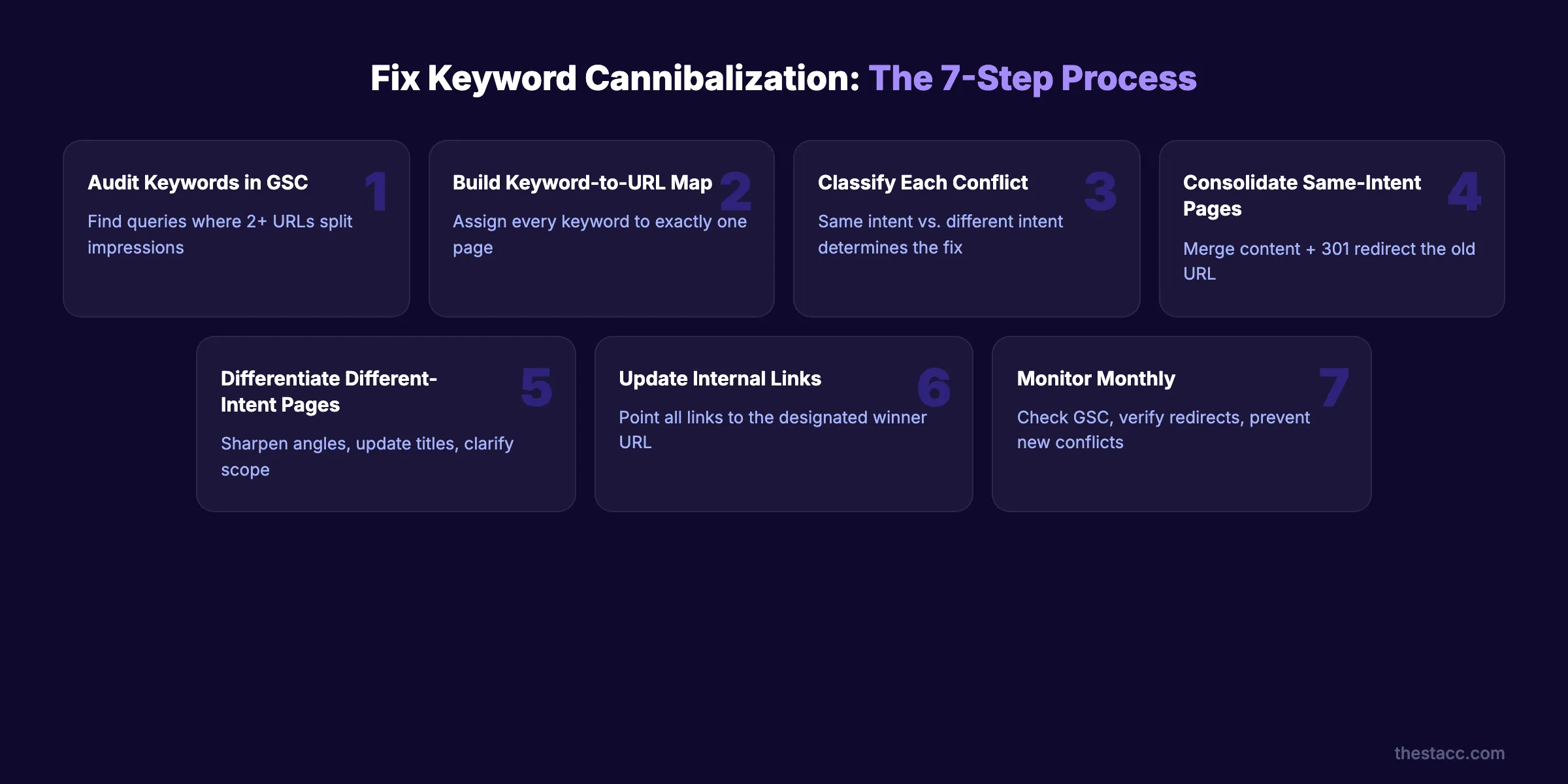
Here is what you will learn:
- How to audit every keyword on your site for competing pages
- How to build a keyword-to-URL map that prevents future conflicts
- The decision framework for merge vs. redirect vs. differentiate
- How to restructure internal linking to clarify page hierarchy
- Realistic timelines for ranking recovery after each fix
What You Will Need
Time required: 2 to 3 hours for the initial audit. 30 minutes per month for monitoring.
Difficulty: Intermediate. You need basic familiarity with Google Search Console.
What you will need:
- ✓ Google Search Console access (verified property)
- ✓ A spreadsheet tool (Google Sheets or Excel)
- ✓ Access to your CMS for content edits and redirects
- ✓ Optional: Ahrefs or Semrush for deeper keyword data
Step 1: Run a Site-Level Keyword Audit in Google Search Console
Open Google Search Console. Go to Search Results under Performance. Set the date range to the last 6 months.
Click the Pages tab. Sort by impressions (highest first). Pick any page with high impressions but a declining or stagnant click-through rate. That page is your first suspect.
Now click that page. Switch to the Queries tab. You will see every keyword that page ranks for. Write down the top 10 queries by impressions.
Here is the critical part. Go back to the main Search Results report. Search for one of those queries in the query filter. Then click the Pages tab again. If 2 or more URLs appear for the same query, you have a cannibalization conflict.
Repeat this for your top 20 pages by traffic. Most sites find 3 to 8 conflicts within the first hour.
Specifically:
- Filter by queries with more than 100 impressions per month
- Flag any query where 2 or more pages split impressions
- Note the click-through rate for each competing page
- Export the data to your spreadsheet
Why this step matters: You cannot fix what you have not found. Most websites rank 5 or more URLs for the same keyword without realizing it. Most site owners do not know this is happening until they check.
Pro tip: Sort by queries where the average position is between 5 and 15. These are keywords where cannibalization is actively preventing you from reaching page 1.
Step 2: Build a Keyword-to-URL Map
A keyword-to-URL map assigns every target keyword to exactly one page. No exceptions. No overlap.
Create a spreadsheet with 5 columns: Primary Keyword, Target URL, Secondary Keywords, Search Intent, and Current Rank. Fill in one row for every page on your site that targets an organic keyword.
Start with your existing content. Pull the primary keyword from each page's title tag or H1. Then add the secondary keywords from your keyword research.
The goal is simple. Every keyword in your plan points to one URL. If 2 URLs claim the same keyword, you have found a conflict to resolve in steps 3 through 5.
This map also prevents future cannibalization. Before publishing any new post, check the map. If the keyword already has a designated URL, do not create a competing page. Update the existing one instead.
Specifically:
- ✓ List every published page with its primary keyword
- ✓ Identify keyword overlaps between pages
- ✓ Mark each overlap as "same intent" or "different intent"
- ✓ Assign a single canonical URL for every primary keyword
Why this step matters: A topical map without a keyword-to-URL assignment is incomplete. The map is the single source of truth that prevents your team from accidentally creating competing content. This matters even more in 2026, when AI-generated content at scale makes accidental overlap nearly inevitable.
Step 3: Classify Each Conflict (Same Intent vs. Different Intent)
Not every overlap is a problem. Google's John Mueller stated clearly: "Pages are not duplicates just because they happen to appear in the same search results page."
The real question is intent. Two pages ranking for the same query with different intents can coexist. A blog post about "CRM software" and a product page for CRM software serve different user needs. Google may rank both.
But two blog posts both explaining "how to choose a CRM" with the same angle? That is true cannibalization. Google splits impressions between them. Neither reaches its full potential.
Use this threshold: Act when 2 or more pages rank in the top 50 for the same query AND impressions split beyond a 30/70 ratio. If one page gets 95% of impressions and the other gets 5%, the "conflict" is not hurting you.
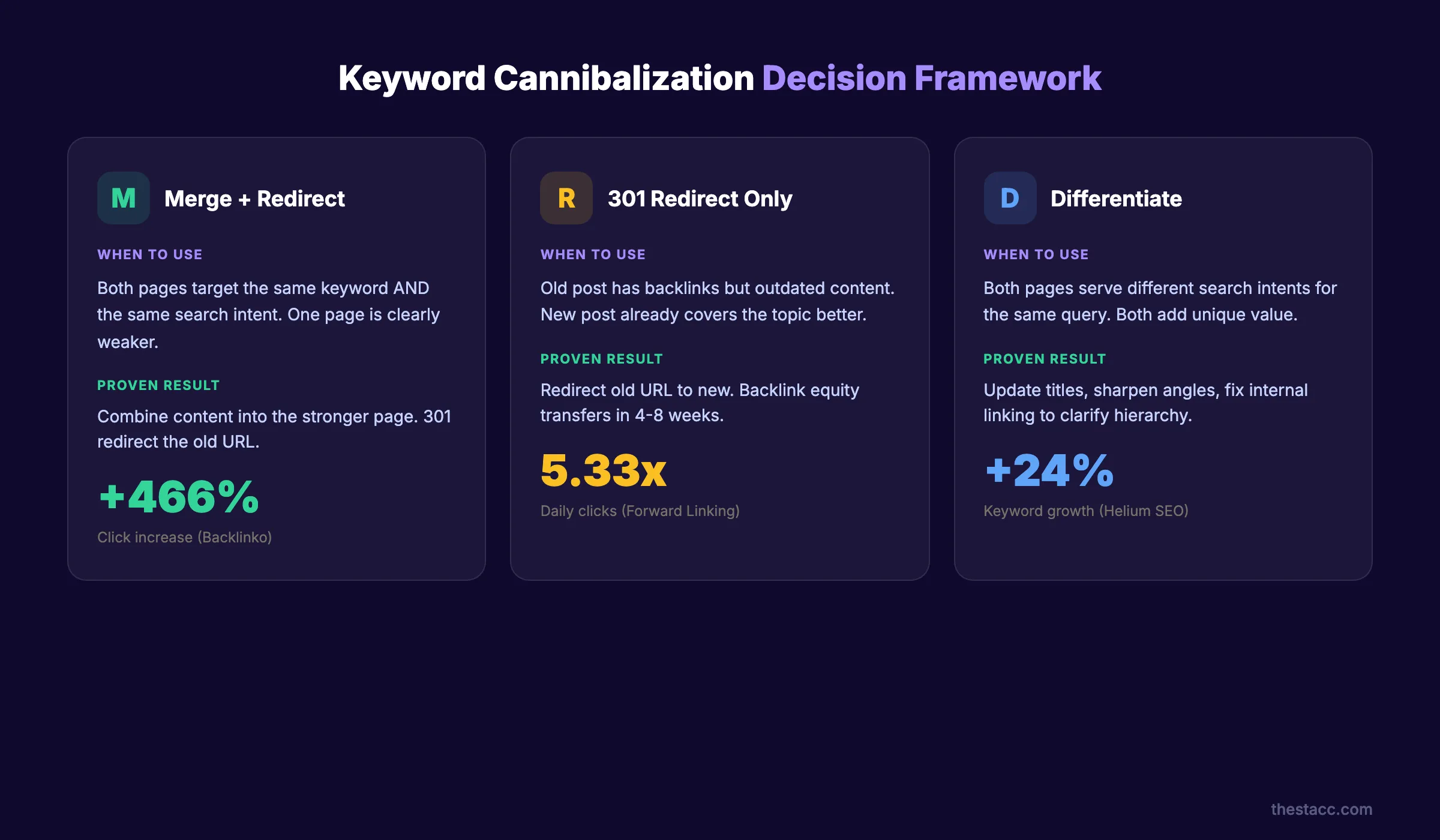
Classify each overlap into one of these categories:
| Scenario | Best Fix | Why |
|---|---|---|
| Two blog posts target identical keyword + intent | Merge into one post + 301 redirect | Consolidates ranking signals and backlinks |
| Blog post outranks a higher-converting product page | Canonical tag pointing to product page + internal link update | Keeps both pages live, signals priority |
| Location pages with identical content across cities | Differentiate with unique local content per page | Each page needs distinct value |
| Old post and new post compete, old one has backlinks | 301 redirect old to new, preserve backlink equity | Captures existing authority |
| Two pages rank for same query but serve different intents | Keep both, update internal links to clarify hierarchy | Google may rank both if intent differs |
| Category page and blog post compete in e-commerce | Noindex blog or canonical to category | Protect the conversion page |
Why this step matters: Choosing the wrong fix wastes time and can hurt rankings. Merging pages that serve different intents removes useful content. Keeping pages that serve the same intent splits your authority. Classification drives every decision in steps 4 and 5.
Step 4: Consolidate Pages That Target the Same Intent
For same-intent conflicts, merge the weaker page into the stronger one. Then set up a 301 redirect from the old URL to the consolidated page.
Here is the process:
- Pick the page with more backlinks, higher authority, or better conversion rate as the "winner"
- Copy every unique section, data point, and insight from the "loser" page into the winner
- Optimize the consolidated content for the target keyword
- Update the title tag, meta description, and H1 to reflect the combined scope
- Set up a 301 redirect from the old URL to the new one
- Update any internal links pointing to the old URL
Backlinko used this exact process. They consolidated 2 competing articles about "Google ranking factors" into one definitive guide. The result was a 466% increase in organic clicks over 8 weeks.
Forward Linking documented a similar case. After redirecting a competing page, daily clicks jumped from 18 to 96. That is a 5.33x increase from a single redirect.
Do not delete the old page without redirecting. You will lose every backlink pointing to that URL. The 301 redirect transfers that equity to the consolidated page.
Why this step matters: Consolidation is the highest-impact fix for cannibalization. It combines ranking signals, backlinks, and content depth into one page. Google rewards depth over duplication.
Pro tip: After merging, add new sections that neither original page covered. This is your chance to create the most thorough resource on the topic and build topical authority.
Stop writing. Start ranking. theStacc publishes 30 SEO articles per month for $99.
Step 5: Differentiate Pages That Serve Different Intents
Not every conflict needs a merge. Sometimes both pages deserve to exist. They just need clearer boundaries.
A blog post titled "What Is Email Marketing" and a guide titled "Email Marketing Strategy for E-commerce" can both rank for "email marketing." The first serves informational intent. The second serves commercial intent. Both pages add value.
To differentiate competing pages:
- Rewrite the title tag and H1 of the weaker page to target a long-tail variant
- Shift the secondary keywords so each page owns a distinct cluster
- Update the body content to sharpen the angle and remove overlap
- Add a canonical tag only if one page should clearly take priority
- Cross-link the 2 pages with descriptive anchor text explaining the relationship
Example: If you have "SEO Audit Guide" and "SEO Audit Checklist" competing, keep both. But make the guide focus on strategy and the checklist focus on execution. Link from the guide to the checklist with anchor text like "use this SEO audit checklist to verify each step."
Updating old blog posts is often all you need. Sharpening the angle, adjusting the keyword focus, and rewriting the intro can eliminate the overlap without losing either page.
Why this step matters: Aggressive merging can destroy pages that serve real user needs. Differentiation preserves your content depth while eliminating the ranking conflict. The goal is clarity for Google, not fewer pages.
Step 6: Update Your Internal Linking Structure
Internal links tell Google which page matters most for a given topic. If 10 pages link to your old blog post about "keyword research" but only 2 link to your new definitive guide, Google may rank the old post higher.
After completing steps 4 and 5, audit your internal linking strategy for every affected keyword.
Here is what to do:
- Search your site for every internal link pointing to competing pages
- Update all internal links to point to the designated "winner" URL from your keyword map
- Add 3 to 5 new internal links from high-authority pages to the target URL
- Use descriptive anchor text that includes the target keyword naturally
- Remove or redirect any internal links pointing to deleted or merged pages
Helium SEO documented a case where internal linking restructure alone (no content changes, no redirects) increased a page's keyword count from 68 to 84 organic keywords. That is a 24% increase from linking changes only.
The hierarchy principle: Your most important page for a keyword should receive the most internal links. Every supporting page should link to it. Not the other way around.
If you publish a pillar page on "content marketing," every blog post about content topics should link to that pillar. The pillar links back to the individual posts. This creates a clear hierarchy that Google can follow.
Why this step matters: Redirects and merges fix the content conflict. Internal links fix the signal conflict. Without updated links, Google may still see the wrong page as the authority for your keyword.
Pro tip: Use the site: search operator in Google to find internal links quickly. Search "site:yourdomain.com anchor text" to see which pages use specific anchor text.
Your SEO team. $99 per month. 30 optimized articles, published automatically.
Step 7: Monitor Rankings and Iterate Monthly
Fixing cannibalization is not a one-time task. New content creates new conflicts. Algorithm updates shift rankings. Competitors publish content that changes intent matching.
Set a monthly monitoring routine.
Monthly checklist:
- ✓ Review Google Search Console for any query with 2 or more ranking URLs
- ✓ Check your keyword-to-URL map against recently published content
- ✓ Verify that 301 redirects are still active and not broken
- ✓ Look for new pages that rank for keywords already assigned to other URLs
- ✓ Update your content calendar to avoid future overlap
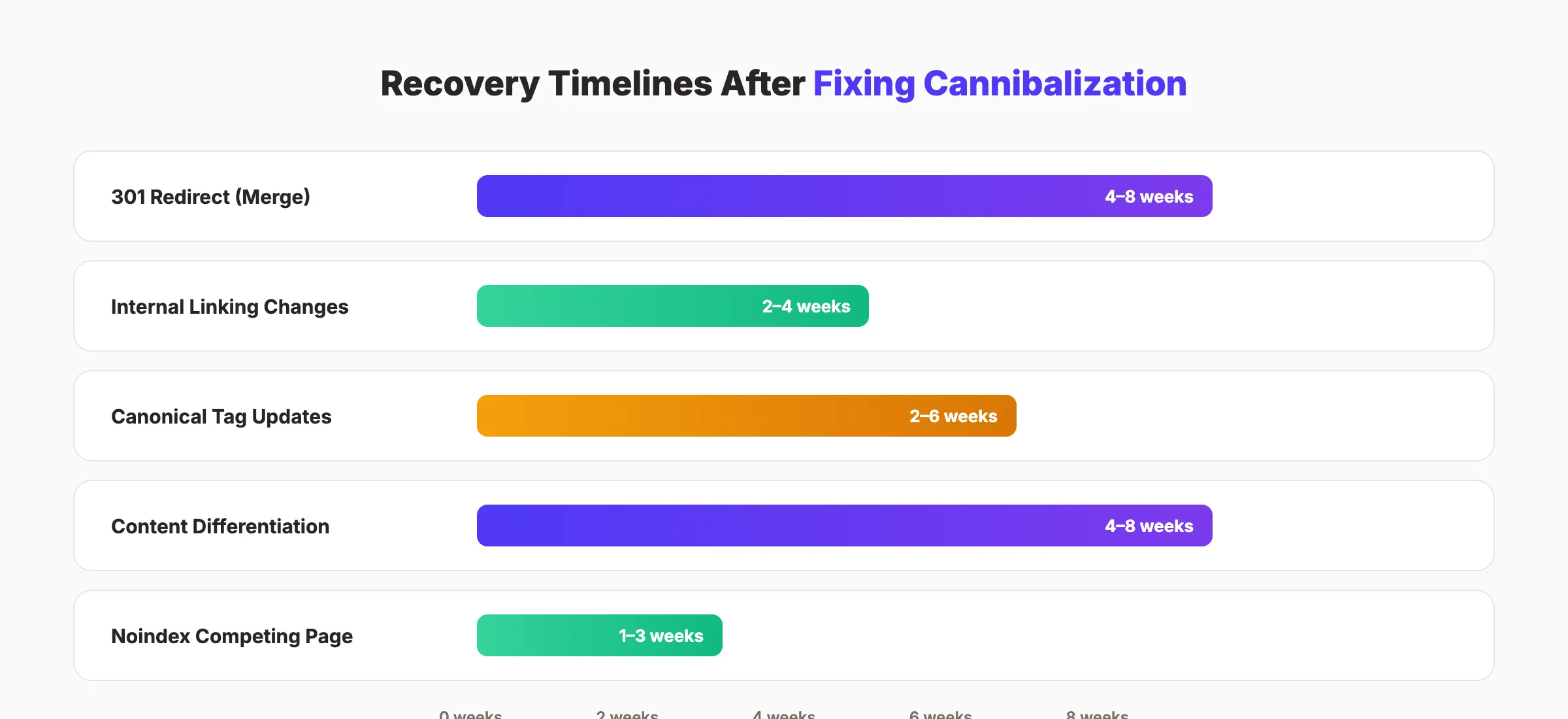
Recovery timelines after fixes:
| Fix Type | Expected Recovery Time |
|---|---|
| 301 redirect (merge) | 4 to 8 weeks for full ranking transfer |
| Internal linking changes only | 2 to 4 weeks for re-indexing |
| Canonical tag updates | 2 to 6 weeks depending on crawl frequency |
| Content differentiation (rewrite) | 4 to 8 weeks for Google to reassess |
| Noindex on competing page | 1 to 3 weeks after crawl |
Why this step matters: Keyword Insights reduced a client's site from 15 million pages and consolidated 413 categories down to 85. Traffic increased 110%. But that gain requires maintenance. Without monthly monitoring, new cannibalization creeps back within 3 to 6 months.
Results: What to Expect
After completing these 7 steps, expect the following:
- Week 1 to 2: Redirects begin transferring authority. Google starts recrawling updated pages.
- Week 3 to 4: Internal linking changes take effect. You may see ranking fluctuations as Google reassesses page hierarchy.
- Week 4 to 8: Consolidated pages climb in rankings. Click-through rates improve as Google shows one strong page instead of 2 weak ones.
- Month 3 and beyond: Compound effects. The cleared cannibalization allows your on-page SEO and new content to rank faster because Google sees clear topic ownership.
The sites that see the biggest gains are the ones with 50 or more published pages and active blogging programs. If you publish SEO content regularly, run this audit quarterly at minimum.
Realistic numbers from documented case studies:
- 466% click increase (Backlinko, 2 pages consolidated)
- 110% traffic increase (Keyword Insights, large-scale consolidation)
- 5.33x daily click increase (Forward Linking, single redirect)
- 24% keyword growth (Helium SEO, internal linking only)
Troubleshooting
Problem: You merged 2 pages and traffic dropped instead of increasing.
Fix: Check that the 301 redirect is working (use a redirect checker). Verify the consolidated page kept all unique content from both originals. Ensure internal links updated to the new URL. Traffic drops in week 1 are normal. Wait 4 to 6 weeks before reversing.
Problem: Google still shows both pages in search results after setting a canonical tag.
Fix: Canonical tags are hints, not directives. Google may ignore them if the pages are too different. If the canonical is not working after 4 weeks, consider a 301 redirect instead. Also verify the canonical tag is in the HTML head, not the body.
Problem: You are not sure which page to keep as the "winner."
Fix: Check 3 metrics. First, which page has more backlinks (use Ahrefs or Google Search Console links report). Second, which page has higher conversion rate or engagement. Third, which page covers the topic more thoroughly. The page that wins on 2 of 3 criteria is your keeper.
Problem: New blog posts keep creating cannibalization conflicts.
Fix: Your content planning process needs a keyword-to-URL map check before every new post. Add a mandatory step: before writing, search the keyword in your map. If it is already assigned, update the existing page instead of creating a new one. A topical map prevents this systematically.
3,500+ blogs published. Every article is SEO-scored before publish. See what theStacc can do for your site.
What practitioners are saying on X
AI search advice ages quickly. Here is high-signal public discussion from SEO and growth operators — context for your roadmap, not a substitute for primary data.
- @hridoyreh (Mar 2026): Widely shared SEO skill tree: foundations, research, technical, on-page, content, links, AI SEO/GEO, analytics, UX, brand, programmatic — useful map for stats and how-to posts. See the post on X.
- @jakezward (Feb 2026): 2026 SEO predictions emphasize AI Overview share-of-SERP, schema for LLM token efficiency, brand mentions in AI answers as a KPI, proprietary data as a moat, and content refresh beating net-new AI slop. See the post on X.
Grok, AI Overviews, and multi-engine visibility
Research topics like “fix keyword cannibalization” get cited when frameworks and decision rules are extractable. Lead with definitions and tables; keep Grok-ready entity language for tools and SERP features named on the page.
- Google AI Overviews: Use passage-ready answers, tables, and FAQ schema where relevant.
- ChatGPT / Perplexity: Cite named sources next to key claims.
- Grok: Maintain accurate entity facts on-site and in high-signal X posts.
Publish content built for Google and AI citations. theStacc’s Content SEO module ships SEO-scored articles structured for rankings and generative engines — including clearer entity pages models like Grok can quote.
Frequently Asked Questions
Keyword cannibalization happens when 2 or more pages on the same website compete for the same keyword and search intent. Google cannot decide which page to rank, so it splits impressions and clicks between them. Both pages rank lower than a single, consolidated page would. This is different from keyword diversification, where multiple pages rank for the same query but serve different user intents.
Open Google Search Console. Go to Performance and click the Queries tab. Select any keyword. Click Pages. If more than one URL appears for the same query with a meaningful impression split (beyond 30/70), you likely have cannibalization. You can also use a site-level SEO audit to find conflicts systematically. The threshold that matters: 2 or more pages in the top 50 for the same query with split impressions.
No. Merge only when both pages serve the same search intent. If a product page and a blog post both rank for "project management software," they may serve different intents (transactional vs. informational). In that case, differentiate them with unique angles and update internal links. Refer to the decision framework table in Step 3 to pick the right fix for each scenario.
Recovery depends on the fix. 301 redirects typically show full ranking transfer in 4 to 8 weeks. Internal linking changes take effect in 2 to 4 weeks. Canonical tag updates need 2 to 6 weeks. Expect temporary ranking fluctuations in the first 2 weeks. The documented case studies show meaningful traffic increases by week 6 to 8.
Yes. Teams using AI to scale content production often create multiple articles on similar topics without a keyword map. The speed of AI writing outpaces manual topic planning. This makes the keyword-to-URL map in Step 2 essential. Before publishing any AI-generated article, verify the target keyword is not already assigned to an existing page. A solid content calendar with keyword assignments prevents this entirely.
Absolutely. E-commerce sites face cannibalization frequently between category pages, product pages, and blog posts. A category page for "running shoes" and a blog post titled "Best Running Shoes 2026" will compete. The fix depends on which page converts better. Usually, protect the category page with a canonical tag or noindex the blog post. The category page drives revenue. The blog post should either target a different long-tail keyword or funnel traffic to the category through internal links.
Fix It Once, Rank for Months
Keyword cannibalization is fixable. The 7-step process above works for sites with 20 pages or 20,000 pages. The difference is scale, not strategy.
Start with Step 1. Pull up Google Search Console today. Find your top 3 cannibalization conflicts. Fix the highest-traffic one first. Most sites see measurable improvement within 6 weeks.
Every page on your site should have a clear purpose and a single keyword target. When that clarity exists, Google rewards it with higher rankings and more traffic. When it does not, your own content becomes your competition.
If you want to increase organic traffic without fighting your own pages, clean up cannibalization first. Then build forward with a keyword map that prevents it from returning.
Stop writing. Start ranking. theStacc publishes 30 SEO articles per month for $99.
Related Tools & Resources
Free SEO Tools:
Best Lists:
Sources & references
- [1] Princeton / Georgia Tech et al. — GEO research (arXiv:2311.09735)
- [2] @hridoyreh on X — Widely shared SEO skill tree: foundations, research, technical, on-page, content, links, AI SEO/GEO, analytics, UX, bran
- [3] @jakezward on X — 2026 SEO predictions emphasize AI Overview share-of-SERP, schema for LLM token efficiency, brand mentions in AI answers
- [4] Referenced source — ahrefs.com

Plan topics, review article drafts, and publish to a connected CMS.
Weekly local SEO teardowns
One practical email a week. Map Pack, GBP, AI Overviews — no fluff. Unsubscribe anytime.