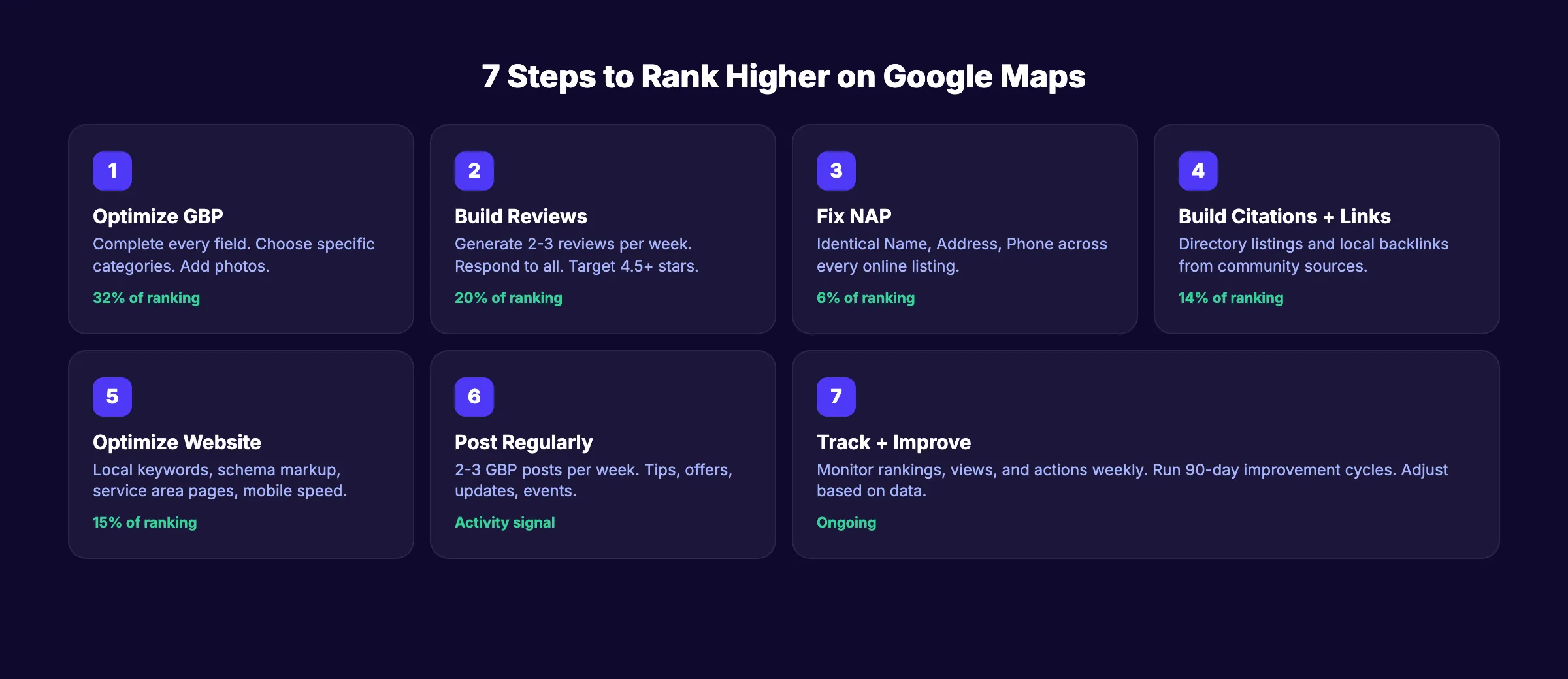
7 proven steps to rank higher on Google Maps, covering profile optimization, reviews, citations, and the local SEO factors that actually move.
If you want to rank higher on Google Maps, start with this fact: 42% of local searchers click on map pack results. Businesses in the top 3 positions get 126% more traffic and 93% more actions than those ranked 4 through 10.
Most local businesses lose these clicks because their Google Business Profile is incomplete, their reviews are thin, or their website sends no local signals. The gap between position 3 and position 4 on Google Maps is the difference between getting calls and getting ignored.
This guide walks through 7 steps to improve your Google Maps ranking. Each step is backed by data from the Whitespark 2026 Local Ranking Factors survey and BrightLocal research. No guesswork. Just the factors that actually move rankings.
We have published 3,500+ SEO articles across 70+ industries and manage local SEO for businesses in every category Google offers.
Here is what you will learn:
- The 3 ranking factors Google uses for Maps results
- How to optimize your Google Business Profile for maximum visibility
- Why review velocity matters more than review count
- How citations and NAP consistency affect your ranking
- The on-page signals that connect your website to local search
- How to track your Google Maps ranking over time
How Google Maps Rankings Work
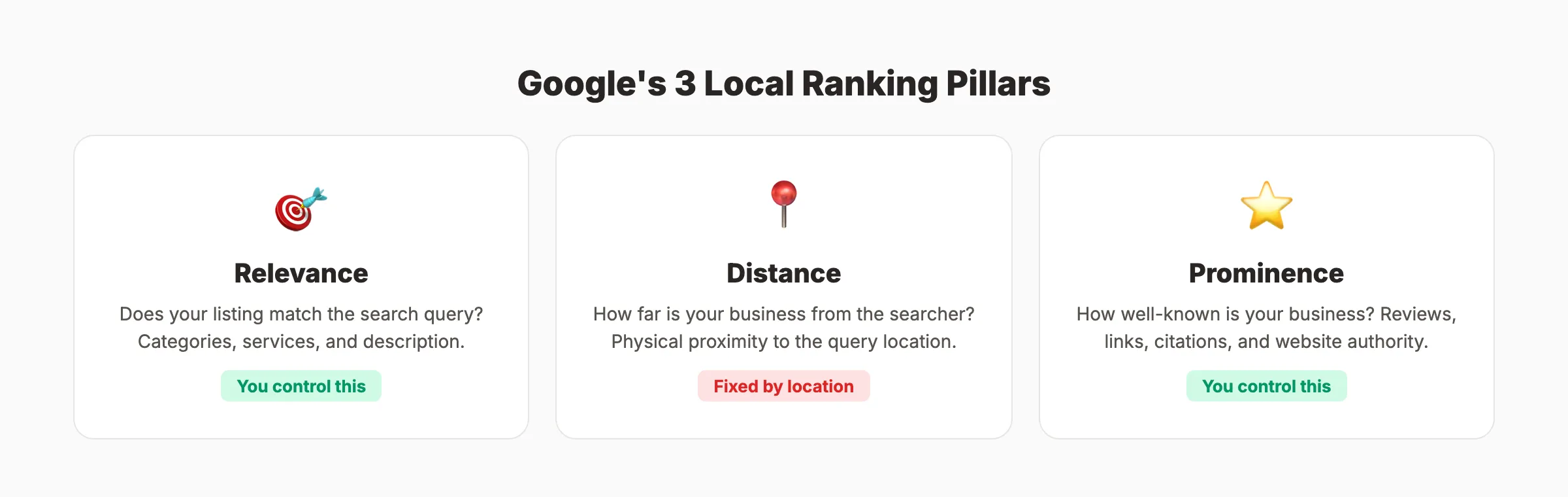
Google ranks local results on 3 factors: relevance, distance, and prominence. Understanding these determines where to focus your effort.
| Factor | What It Means | Can You Control It? |
|---|---|---|
| Relevance | How well your listing matches the search query | Yes. Categories, services, description, and website content |
| Distance | How far your business is from the searcher | No. Fixed by your physical location |
| Prominence | How well-known your business is online | Yes. Reviews, citations, links, and website authority |
You cannot change your location. But you control relevance and prominence entirely. Those 2 factors are where optimization happens.
Local Pack Ranking Factor Weights (2026)
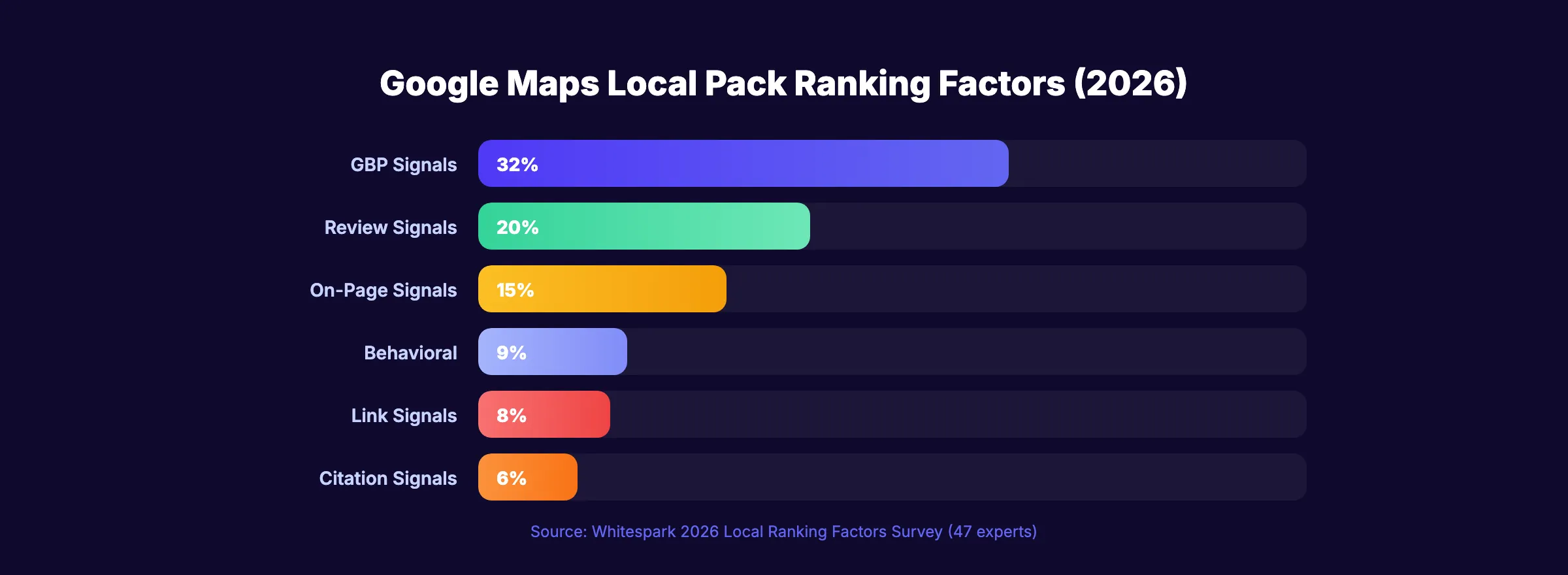
The Whitespark survey of 47 local SEO experts breaks down the weights:
| Factor Category | Weight |
|---|---|
| GBP signals (categories, completeness, posts) | 32% |
| Review signals (quantity, velocity, rating, responses) | 20% |
| On-page signals (local keywords, NAP, schema) | 15% |
| Behavioral signals (clicks, calls, direction requests) | 9% |
| Link signals (local backlinks, domain authority) | 8% |
| Citation signals (NAP consistency, directory listings) | 6% |
| Personalization + social | 11% |
GBP signals and reviews account for over half of your local ranking. That is where these 7 steps start.
Step 1: Optimize Your Google Business Profile
A complete Google Business Profile gets 7x more clicks than an incomplete one. Customers are 2.7x more likely to trust a business with a full profile.
Complete every field:
- ✓ Business name (exact legal name, no keyword stuffing)
- ✓ Primary category (the most specific option available)
- ✓ Secondary categories (3 to 4 additional categories)
- ✓ Business description (750 characters, include services and location)
- ✓ Services (enable every predefined service that applies, add custom ones)
- ✓ Business hours (include special hours and holidays)
- ✓ Phone number (local number, not toll-free)
- ✓ Website URL (link to your homepage or a location-specific landing page)
- ✓ Service area (if you serve customers at their location)
- ✓ Attributes (wheelchair accessible, veteran-owned, online appointments, etc.)
Your primary category is the single most important ranking signal. Use the most specific option available. "Personal Injury Attorney" outranks "Lawyer" for personal injury searches. See our full guide on GBP categories for industry-specific recommendations.
Why this step matters: GBP signals account for 32% of local pack rankings. An incomplete profile tells Google your business is not active or trustworthy.
Pro tip: Businesses with photos receive 42% more direction requests and 35% more website clicks. Upload at least 10 photos of your office, team, and work. Add new photos monthly. For complete GBP setup instructions, see our Google Business Profile optimization guide.
Your SEO team. $99 per month. 30 optimized articles published automatically. Local SEO starts at $49 per month.
Step 2: Build a Review Generation System
Review signals account for 20% of local pack rankings. That weight increased from 16% in 2023. Reviews are becoming more important, not less.
The Numbers That Matter
| Review Metric | Benchmark | Impact |
|---|---|---|
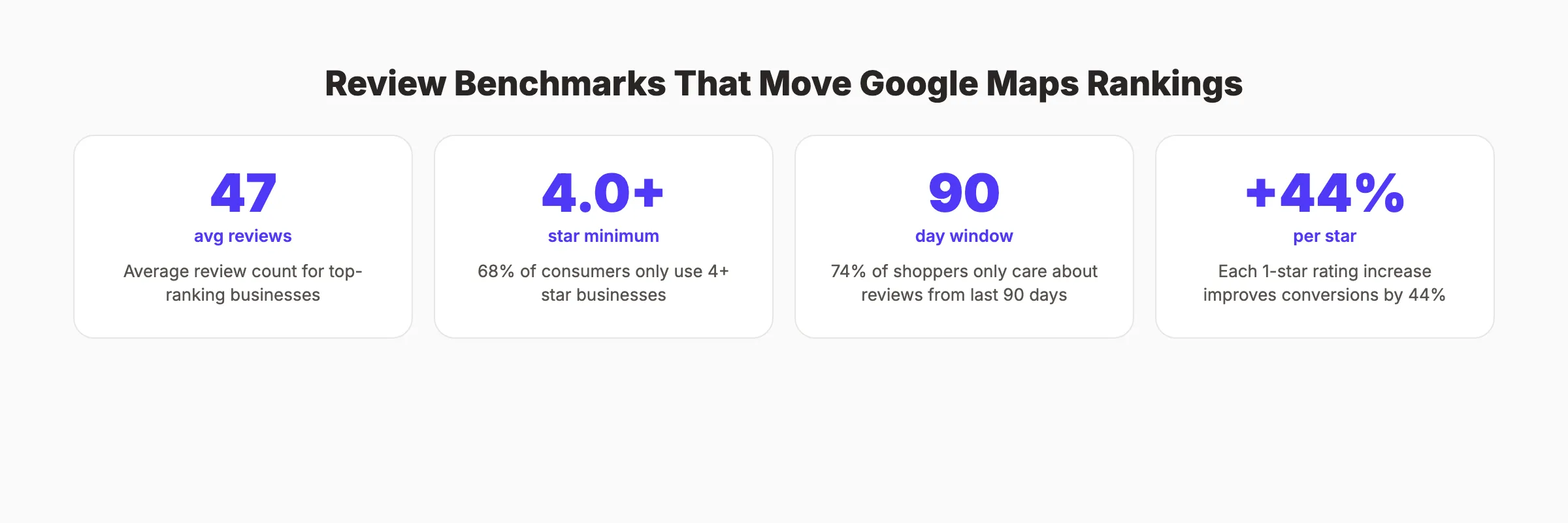
| Average reviews for top-ranking businesses | ~47 reviews | Minimum to compete in most markets |
| Star rating threshold | 4.0+ stars | 68% of consumers only use businesses rated 4+ |
| Review freshness | Last 90 days | 74% of shoppers only care about recent reviews |
| Response rate impact | Respond to 32%+ | Businesses that respond see 80% higher conversions |
| Each 1-star increase | +44% conversions | Star rating directly impacts whether searchers click or call |
How to Generate Reviews Consistently
- Ask after every positive interaction. Send a review request within 2 hours of service completion. The sooner you ask, the higher the response rate.
- Use a direct review link. Send customers straight to the Google review form, not your GBP listing page.
- Make it part of your process. Add review requests to your post-service email sequence, receipt, or follow-up text.
- Train your front desk. When a customer says "thank you," train staff to respond with "We would love it if you left us a Google review."
Why this step matters: Review velocity (the rate at which you gain new reviews) matters as much as total count. A business gaining 3 reviews per week signals an active, healthy operation. A business with 200 reviews but none in the last 6 months signals stagnation.
For the full playbook, see our guide on getting more Google reviews. For handling criticism, see responding to negative reviews.
Step 3: Fix Your NAP Consistency
NAP stands for Name, Address, Phone number. Every mention of your business online must match exactly. "Main Street Dental" on Google and "Main St. Dental Clinic" on Yelp creates a mismatch that confuses Google's algorithm.
Businesses with consistent NAP data are 40% more likely to appear in the local pack. And 62% of consumers would avoid a business with incorrect online information.
Where to Check NAP Consistency
- ✓ Google Business Profile
- ✓ Your website (header, footer, contact page)
- ✓ Yelp
- ✓ Facebook business page
- ✓ Bing Places
- ✓ Apple Maps
- ✓ Industry-specific directories
- ✓ BBB listing
- ✓ Local Chamber of Commerce
- ✓ Yellow Pages / Superpages
Common NAP Mistakes
| Mistake | Example | Fix |
|---|---|---|
| Abbreviated vs spelled out | "St." vs "Street" | Pick one format. Use it everywhere. |
| Suite/unit number inconsistent | "Suite 200" vs "Ste 200" vs missing | Include it identically on every listing |
| Phone number format | "(555) 123-4567" vs "555-123-4567" | Use the same format on all platforms |
| Old address still live | Previous location on abandoned directories | Find and update or remove old listings |
| Tracking numbers | Different call tracking numbers on different sites | Use one primary local number on all citations |
Why this step matters: Citation signals account for 6% of local pack rankings. That sounds small until you realize a single NAP mismatch can prevent you from appearing in the 3-pack entirely.
Run our free SEO audit tool to find NAP inconsistencies across your online listings.
Step 4: Build Local Citations and Links
Citations are mentions of your business name and address on other websites. Links are clickable references from other sites to yours. Both signal to Google that your business is real and established.
Priority Citation Sources
Build listings on these platforms first:
- Google Business Profile (already done in Step 1)
- Yelp (high domain authority, used by consumers and Google)
- Facebook (Google references Facebook business data)
- Bing Places (feeds Cortana and some voice assistants)
- Apple Maps (feeds Siri and Apple devices)
- Industry directories (Avvo for lawyers, Healthgrades for doctors, HomeAdvisor for contractors)
- Local directories (Chamber of Commerce, city business registries)
Building Local Backlinks
Local backlinks carry more weight than generic national links for Maps rankings. Earn them from:
- Local news sites. Sponsor a community event. Get mentioned in the article.
- Local business associations. Join and get listed on their member directory.
- Local charities and nonprofits. Donate or sponsor. Earn a link on their supporters page.
- Local blogs. Offer expert commentary on topics in your field.
- Partner businesses. Cross-reference with complementary (non-competing) local businesses.
Why this step matters: Link signals account for 8% of local rankings. But the quality and local relevance of links matters more than quantity. 5 links from local businesses outweigh 50 links from random directories.
3,500+ blogs published. Every article is SEO-scored before publish. Every article passes a 40-point quality audit before it goes live.
Step 5: Optimize Your Website for Local Search
Your website directly affects your Google Maps ranking. On-page signals account for 15% of local pack rankings. Google cross-references your GBP data with your website content to verify accuracy and determine relevance.
The Local On-Page Checklist
- ✓ Business name, address, and phone number on every page (footer or header)
- ✓ Dedicated contact page with embedded Google Map
- ✓ Title tags include city and service ("Plumber in Austin TX | [Business Name]")
- ✓ Meta descriptions include location and primary service
- ✓ H1 tags on service pages include location modifiers
- ✓ Schema markup with LocalBusiness or specific type (Dentist, Restaurant, etc.)
- ✓ Location pages for each city you serve (unique content per page)
- ✓ Mobile-responsive design (88% of consumers use Google Maps on mobile)
- ✓ Page loads under 3 seconds
Service Area Pages
If you serve multiple cities, create a dedicated page for each one. "Plumbing Services in Round Rock, TX" needs its own page with content specific to that area. Do not create thin, duplicate pages that only swap the city name. Include local landmarks, neighborhoods, and area-specific information.
Each service area page should:
- Target "[service] in [city]" as its primary keyword
- Include unique content about serving that area
- Link to your GBP listing and contact page
- Include testimonials from clients in that area when possible
Why this step matters: Google verifies your GBP information against your website. If your GBP says "plumber in Austin" but your website never mentions Austin, Google loses confidence in your listing's relevance.
For a deeper look at on-page SEO fundamentals, see our complete guide. For the full local SEO checklist, see our step-by-step resource.
Step 6: Post Regularly on Your Google Business Profile
GBP posts signal activity and freshness to Google. They also give searchers more reasons to engage with your listing. Post 2 to 3 times per week for best results.
Post Types That Work
| Post Type | Example | Best For |
|---|---|---|
| Updates | "We just expanded our team with 2 new technicians" | Showing your business is active |
| Offers | "15% off AC tune-ups this month" | Driving immediate action |
| Events | "Free dental checkup day. March 15" | Community engagement |
| Tips | "3 signs your water heater needs replacement" | Demonstrating expertise |
| Seasonal | "Storm season prep: check your roof before April" | Timely relevance |
Posts expire after 7 days (events expire after the event date). Consistent posting keeps your listing fresh in Google's eyes.
GBP Q&A: The Overlooked Feature
Google Business Profile has a Questions and Answers section that most businesses ignore. Customers (and anyone with a Google account) can ask questions about your business. If you do not answer, a random stranger will.
Take control of this section:
- Ask and answer your own frequently asked questions (Google allows business owners to do this)
- Monitor for new questions weekly and respond within 24 hours
- Upvote the most helpful answers so they appear first
- Use keywords naturally in your answers
The Q&A section appears directly on your listing in search results. Well-written answers with relevant keywords reinforce your relevance signals. For posting cadence data, see our guide on GBP posting frequency.
Why this step matters: Regular posts send freshness signals to Google. A listing with weekly posts ranks better than one that has not been updated in 6 months. Posts also increase engagement (calls, direction requests, website clicks), which feeds behavioral signals (9% of ranking weight).
Step 7: Track and Improve Your Rankings
You cannot improve what you do not measure. Track your Google Maps performance weekly and adjust your strategy based on what the data shows.
Metrics to Track
| Metric | Where to Find It | What It Tells You |
|---|---|---|
| Map pack position | Local rank tracker (BrightLocal, Semrush, Whitespark) | Whether your listing appears in the 3-pack |
| GBP views | GBP Insights | How many people see your listing |
| Search queries | GBP Insights | Which terms trigger your listing |
| Actions | GBP Insights | Calls, direction requests, website clicks |
| Review count + rating | GBP dashboard | Whether your review strategy is working |
| Website organic traffic | Google Analytics | Whether local SEO drives site visits |
The 90-Day Improvement Cycle
- Days 1 to 30: Complete Steps 1 through 3 (GBP optimization, reviews, NAP fixes). These produce the fastest visible impact.
- Days 31 to 60: Build citations and local links (Step 4). Publish service area pages (Step 5). Start GBP posting cadence (Step 6).
- Days 61 to 90: Review ranking data. Identify which keywords improved and which did not. Double down on what works. Fix what does not.
Most businesses see initial ranking improvements within 30 to 60 days of completing Steps 1 through 3. Competitive markets take 3 to 6 months of sustained effort. The key is consistency. Every review, every post, and every citation compounds over time.
For more on local ranking data, see our GBP performance study and local SEO statistics.
Rank everywhere. Do nothing. Blog SEO, Local SEO, and Social on autopilot. theStacc starts at $99 per month with a free trial.
What practitioners are saying on X
Local still bottoms out at GBP completeness, category, reviews, and NAP.
- @noelcetaSEO (Sep 2025): Local SEO playbook still centers complete GBP, NAP consistency, quality citations, local keywords, location content, review velocity, and local links. See the post on X.
- @irentdumpsters (Jan 2026): Most businesses have a GBP; few fully optimize every ranking-relevant section for Map Pack visibility. See the post on X.
- @EldarCohenSEO (Jul 2026): 2026 WhiteSpark-oriented reminder: primary Google Business category is a top Map Pack ranking factor — wrong primary category can erase visibility for money queries. See the post on X.
Grok, AI Overviews, and multi-engine visibility
Local topics like “improve google maps ranking” get cited when GBP, NAP, reviews, and service-area steps are concrete. Grok mixes those web facts with Map Pack operator advice circulating on X.
- Google AI Overviews: Use passage-ready answers, tables, and FAQ schema where relevant.
- ChatGPT / Perplexity: Cite named sources next to key claims.
- Grok: Maintain accurate entity facts on-site and in high-signal X posts.
Rank higher in the Map Pack without a full-time local SEO hire. theStacc’s Local SEO module handles daily GBP posts, review reply workflows, and local visibility tracking — built for service businesses that need calls, not vanity rankings.
FAQ
Most businesses see initial improvements within 30 to 60 days after optimizing their GBP and building reviews. Competitive markets take 3 to 6 months. The biggest factors for speed are review velocity, GBP completeness, and NAP consistency. Distance from the searcher is the one factor you cannot speed up or control.
Not in the organic local pack. Google does sell Local Services Ads and Local Pack ads that appear above or within the map results. But the organic 3-pack positions cannot be purchased. Optimization of your GBP, reviews, citations, and website is the only way to earn those positions.
The most common reasons: your GBP is not verified, your business category does not match the search query, your NAP is inconsistent across directories, or a competitor closer to the searcher outranks you on proximity. Verify your listing, audit your categories, and check for NAP mismatches using our SEO audit tool.
Top-ranking businesses average about 47 reviews. But review velocity matters more than total count. A business with 30 reviews and 3 new ones per week outranks a business with 100 reviews and none in the last 6 months. Aim for at least 2 to 3 new reviews per week.
Yes. On-page signals account for 15% of local pack rankings. Google cross-references your GBP information with your website to verify accuracy. A website with location-specific content, schema markup, and strong organic rankings directly lifts your Maps position.
Create a separate GBP listing for each physical location. If you serve multiple cities without an office in each (service area business), create dedicated service area pages on your website with unique content per city. Optimize each page for "[service] in [city]" keywords. Build citations specific to each service area.
Google Maps rankings reward businesses that maintain an active, accurate, and well-reviewed presence. Every step in this guide compounds on the last. Start with your GBP, build reviews, fix your citations, and the rankings follow.
Skip the agency. Keep the results. theStacc starts at $99 per month with a free trial. 30 articles published automatically. Local SEO from $49 per month.
Sources & references
- [1] Princeton / Georgia Tech et al. — GEO research (arXiv:2311.09735)
- [2] @noelcetaSEO on X — Local SEO playbook still centers complete GBP, NAP consistency, quality citations, local keywords, location content, rev
- [3] @irentdumpsters on X — Most businesses have a GBP; few fully optimize every ranking-relevant section for Map Pack visibility.
- [4] @EldarCohenSEO on X — 2026 WhiteSpark-oriented reminder: primary Google Business category is a top Map Pack ranking factor — wrong primary cat
- [5] Referenced source — www.brightlocal.com

Manage Google Business Profile posts, review replies, and local rank tracking.
Weekly local SEO teardowns
One practical email a week. Map Pack, GBP, AI Overviews — no fluff. Unsubscribe anytime.
Explore this topic: Top 10 Best Google Maps Ranking Tools (2026).