
GBP Categories (2026): Strategies, Tactics & Examples
Step-by-step gbp categories guide guide for 2026: proven tactics, real examples, common mistakes to avoid, and implementation tips.
GBP categories are the single most important ranking signal for the Google local map pack. The Whitespark 2026 Local Ranking Factors survey confirms it. Your primary category tells Google what your business is. Get it wrong and you disappear from the searches that matter most.
86% of all Google Business Profile views come from discovery searches, not direct brand searches. That means most of your potential customers find you by searching for a service (“plumber near me”), not your business name. Your GBP categories determine which of those service searches trigger your listing.
This guide covers how to choose the right primary category, how many secondary categories to add, which mistakes to avoid, and how to spy on competitor categories. Every recommendation is based on ranking data, not guesswork.
We have published 3,500+ SEO articles across 70+ industries. We manage local SEO for businesses in every category Google offers. This guide reflects what actually moves rankings.
Here is what you will learn:
- Why your primary category is the #1 local ranking factor
- How to pick the right primary category for your business type
- The optimal number of secondary categories (backed by data)
- Industry-specific category examples for 10 business types
- How to find what categories your competitors use
- Common category mistakes that hurt your rankings
What GBP Categories Are and Why They Matter
Google Business Profile categories are predefined labels that tell Google what type of business you operate. There are 4,039 categories as of March 2026, and Google adds new ones periodically.
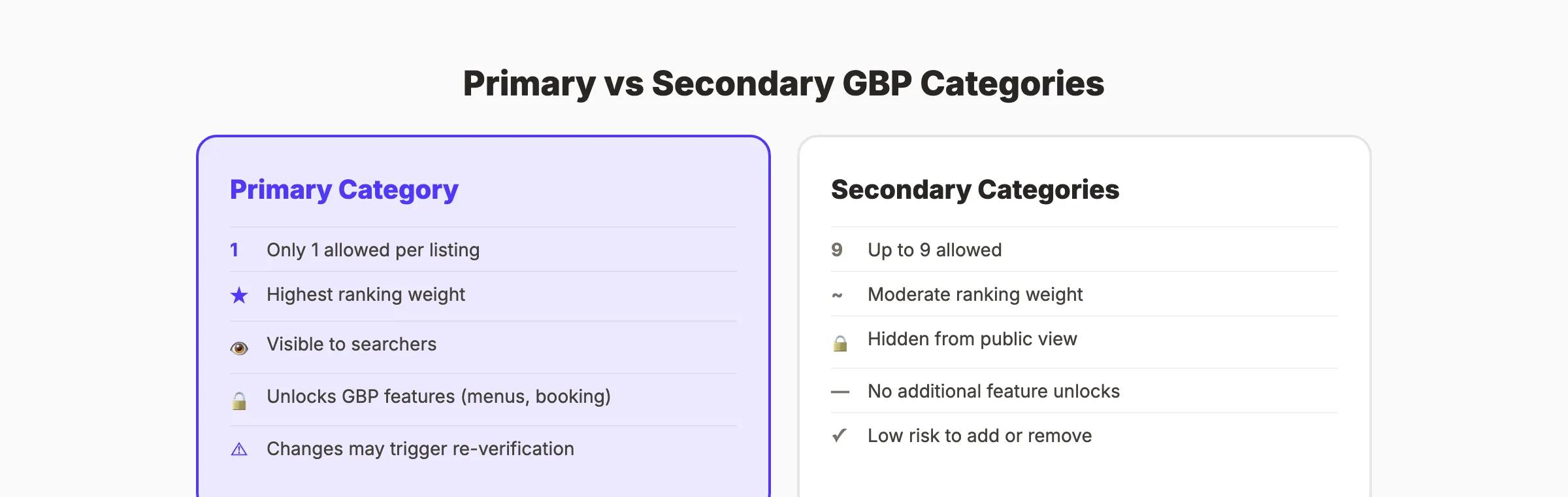
Each GBP listing has 1 primary category and up to 9 secondary categories.
Primary vs Secondary Categories
| Feature | Primary Category | Secondary Categories |
|---|---|---|
| Number allowed | 1 | Up to 9 |
| Ranking weight | Highest. Directly determines map pack eligibility | Moderate. Expands the searches your listing appears for |
| Visibility | Displayed on your listing in search results | Hidden from public view (only visible to the business owner) |
| Features unlocked | Determines which GBP features you get (menus, booking, etc.) | No additional feature unlocks |
Why Categories Matter for Rankings
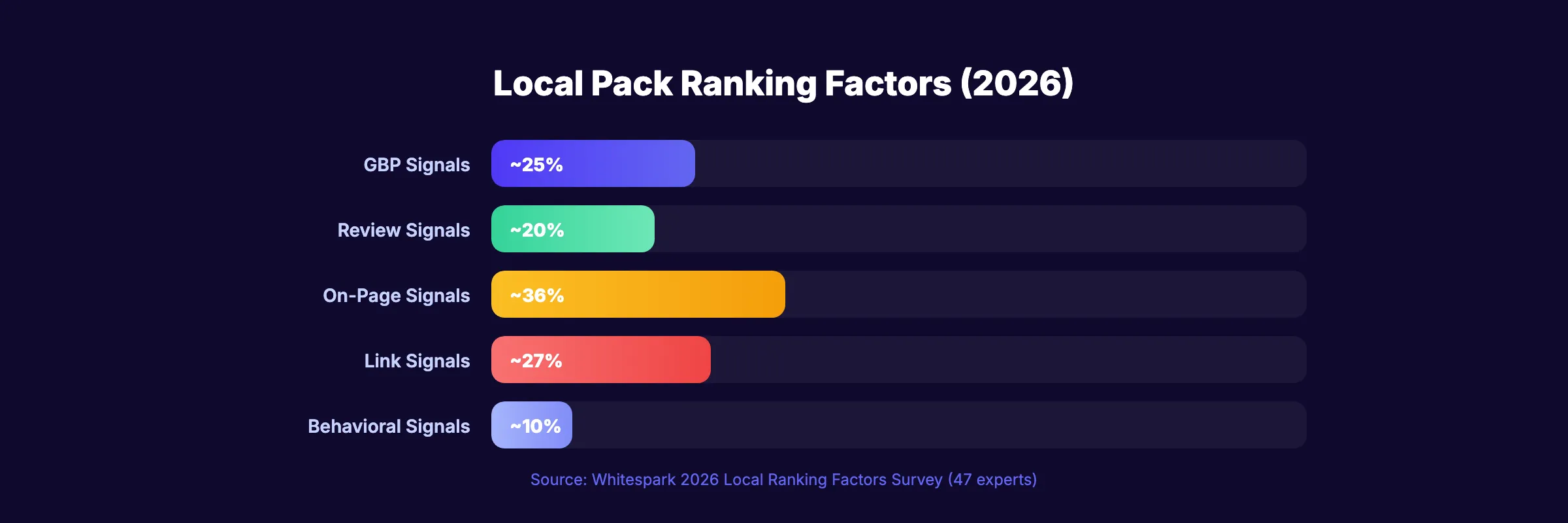
GBP signals (categories, attributes, and profile completeness) account for approximately 25% of local pack ranking factors. The primary category carries the most weight within that 25%.
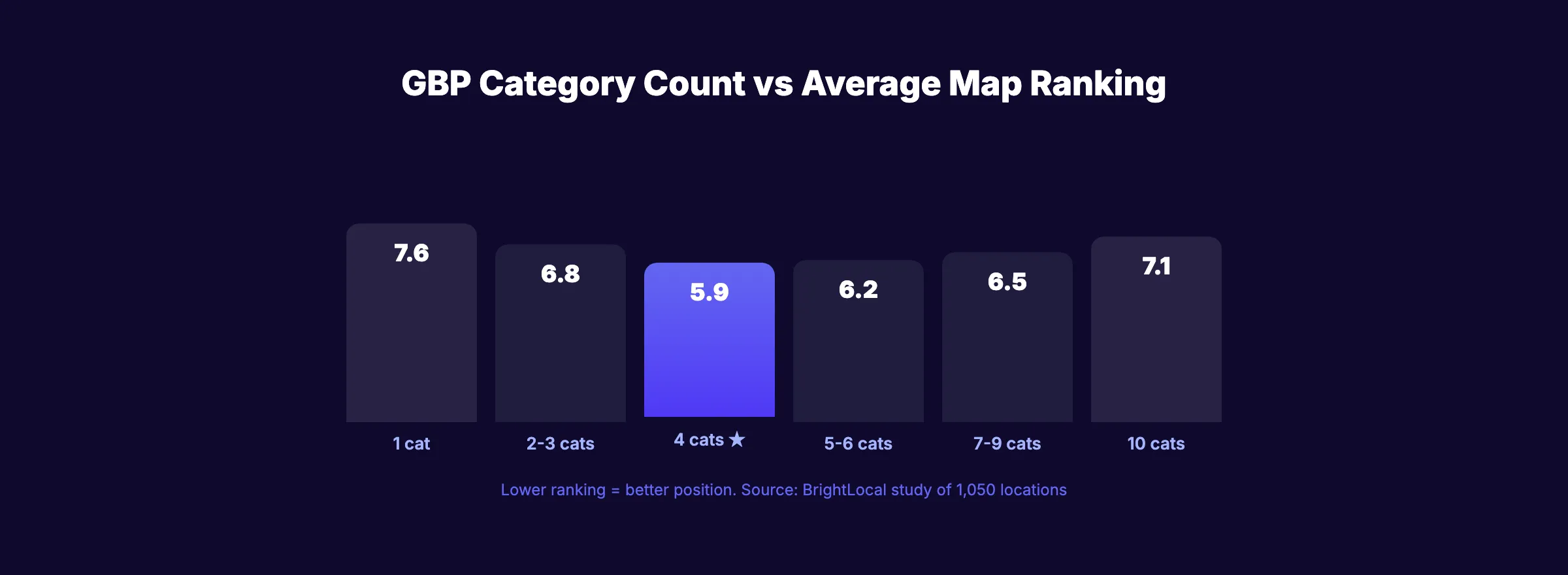
A BrightLocal study of 1,050 business locations found that businesses with 4 total categories (1 primary + 3 secondary) achieved an average map ranking of 5.9. Businesses with zero secondary categories averaged 7.6. That 1.7-position improvement is the difference between appearing in the 3-pack and being invisible.
Businesses in the Google 3-pack get 126% more traffic and 93% more actions than positions 4 through 10.
The numbers are clear. 46% of all Google searches have local intent. 68% of searchers prefer to click on a local 3-pack result. And listings with complete, accurate information get 7x more clicks than incomplete ones. Your category choice determines whether you appear in those results at all.
For the full picture of how Google Business Profile optimization affects local rankings, see our detailed guide. For the data behind local search behavior, check our GBP statistics roundup.
Categories and Reviews Work Together
Your GBP categories determine which searches show your listing. Your reviews determine whether searchers click on it. Review signals account for 20% of local ranking factors (up from 16% in 2023). A listing with the right categories and 50+ reviews outranks one with the right categories and 5 reviews every time.
The combination of accurate categories, strong review velocity, and consistent GBP posting creates a compounding effect. Each signal reinforces the others.
How to Choose Your Primary Category
Your primary category should complete this sentence: “This business IS a ___.”
Not “this business HAS a ___” or “this business OFFERS ___.” Google’s official category guidelines are clear on this distinction.
The 3-Step Selection Process
Step 1: Identify your core service.
What is the one thing you do most? A business that does plumbing, electrical, and HVAC work needs to choose one primary. Pick the service that generates the most revenue or has the highest search volume in your area.
Step 2: Use the most specific category available.
Google rewards specificity. “Pediatric Dentist” outperforms “Dentist” for pediatric-related searches. “Thai Restaurant” outperforms “Restaurant” for Thai food searches. Always check if a more specific category exists before defaulting to the broader option.
Step 3: Verify by searching.
Search your primary keyword on Google Maps. What category do the top 3 results use? If every result in the 3-pack uses “Personal Injury Attorney” and you selected “Lawyer,” switch to match.
What Your Primary Category Unlocks
Your primary category determines which special features appear on your listing:
| Business Type | Primary Category | Features Unlocked |
|---|---|---|
| Restaurant | Restaurant, Pizza Restaurant, etc. | Menu, online ordering, reservations |
| Hotel | Hotel, Motel, Resort | Amenities, room booking, star rating |
| Healthcare | Doctor, Dentist, Therapist | Appointment booking, insurance accepted |
| Service business | Plumber, Electrician, etc. | Service area, quotes, booking |
| Retail | Clothing Store, Pet Store, etc. | Product inventory, shopping tab |
If you select the wrong primary category, you lose access to features your competitors have. A restaurant without a menu section loses clicks to one that has it.
Seasonal Category Switching
Some businesses serve different primary needs at different times of year. HVAC contractors do air conditioning work in summer and heating work in winter. The searches change with the season.
A tactic that works: switch your primary category seasonally. Use “Air Conditioning Contractor” from April through September. Switch to “Heating Contractor” from October through March. This aligns your listing with the highest-volume searches each season.
The same approach works for businesses like haunted houses (switch from “Entertainment Company” to “Haunted House” in September), tax preparers (emphasize “Tax Preparation Service” January through April), and landscapers (switch between “Landscaper” and “Snow Removal Service” by season).
Monitor rankings for 2 weeks after each switch to confirm the change produced positive results.
Your SEO team. $99 per month. 30 optimized articles published automatically. Local SEO starts at $49 per month. Start for $1 →
Secondary Categories: How Many and Which Ones
Google allows up to 9 secondary categories. But more is not always better.
The Data on Optimal Category Count
The BrightLocal study found a clear pattern:
| Total Categories | Average Map Ranking |
|---|---|
| 1 (primary only) | 7.6 |
| 2-3 | 6.8 |
| 4 (optimal) | 5.9 |
| 5-6 | 6.2 |
| 7-9 | 6.5 |
| 10 | 7.1 |
The sweet spot is 4 total categories: 1 primary + 3 secondary. Adding more than 4 dilutes your relevance signal. Adding all 10 slots actually hurts rankings compared to using 4.
How to Select Secondary Categories
Rule 1: Only add categories that describe what your business IS.
A plumbing company that also does drain cleaning should add “Drain Cleaning Service” as a secondary. A plumbing company that sells plumbing supplies should not add “Plumbing Supply Store” unless it actually operates a retail store.
Rule 2: Do not add parent categories when you have a child category.
If your primary is “Thai Restaurant,” do not add “Restaurant” as a secondary. Google already understands that a Thai restaurant is a restaurant. Adding the parent category wastes a slot and adds no ranking benefit.
Rule 3: Match categories to actual services.
Every secondary category should correspond to a service you actively provide. Google can remove categories that do not match your business description, website content, or customer reviews.
The Secondary Category Checklist
- Each secondary category describes a distinct service your business provides
- No parent categories are added alongside their child categories
- Total category count does not exceed 5 (start with 4, test adding more)
- Every category aligns with content on your website
- Each category matches services mentioned in your GBP posts
GBP Categories by Industry
Here are recommended primary and secondary categories for 10 common business types:
| Business Type | Primary Category | Recommended Secondary Categories |
|---|---|---|
| Plumber | Plumber | Drain Cleaning Service, Water Heater Installation Service, Emergency Plumber |
| Dentist | Dentist | Cosmetic Dentist, Pediatric Dentist, Emergency Dental Service |
| Restaurant | [Cuisine Type] Restaurant | Restaurant, Catering Food and Drink Supplier, Bar |
| Law firm | [Practice Area] Attorney | Law Firm, Legal Services |
| HVAC | HVAC Contractor | Air Conditioning Contractor, Heating Contractor, Furnace Repair Service |
| Real estate agent | Real Estate Agent | Real Estate Agency, Real Estate Consultant |
| Auto repair | Auto Repair Shop | Brake Shop, Oil Change Service, Tire Shop |
| Veterinarian | Veterinarian | Animal Hospital, Emergency Veterinarian Service, Pet Boarding Service |
| Insurance agent | Insurance Agency | Health Insurance Agency, Auto Insurance Agency, Life Insurance Agent |
| Accountant | Accountant | Tax Preparation Service, Bookkeeping Service, CPA |
For multi-location businesses: Tailor categories per location. A dental practice with a pediatric-focused office and a general practice office should use different primary categories for each location.
For industry-specific local SEO guides, see our posts on local SEO statistics and local SEO fundamentals.
3,500+ blogs published. 92% average SEO score. Every article passes a 40-point quality audit before it goes live. Start for $1 →
How to Find Competitor Categories
Your competitors’ secondary categories are hidden from public view. But several methods reveal them.
Method 1: Google Maps Source Code
- Search for your competitor on Google Maps
- Click on their listing
- Right-click the page and select “View Page Source”
- Search for “category” in the source code
- You will find their primary and secondary categories listed in the data
Method 2: Chrome Extensions
PlePer GBP Audit Tool. Free Chrome extension that displays all categories when you view a listing on Google Maps. Also shows listing age, review count, and other hidden data.
GMB Everywhere. Shows competitor categories, services, and attributes directly in Google Maps and Google Search results.
Method 3: BrightLocal Local Search Grid
BrightLocal’s tool maps category usage across all competitors in a given area. You can see which categories the top-ranking businesses in your market use and identify gaps in your own category strategy.
What to Do With Competitor Data
- If every top-3 competitor uses a category you do not, add it
- If a competitor ranks for searches you want but you lack their category, test adding it
- If a competitor uses a more specific category than yours, consider switching
Do not copy a competitor’s entire category set blindly. Their business model may differ from yours. Use competitor data as a starting point, then filter through the “IS a” test. Only add categories that genuinely describe what your business is.
Predefined Services: The Hidden Category Bonus
Each GBP category unlocks a set of predefined services that appear as checkboxes in your profile. These services show up in your listing and help Google match you to specific service searches.
After selecting your categories, go to the “Services” section of your GBP dashboard. Enable every predefined service that you actually offer. Add custom services for anything not covered by the predefined list. Businesses that complete their services section get more visibility in local searches than those that leave it empty.
Common GBP Category Mistakes
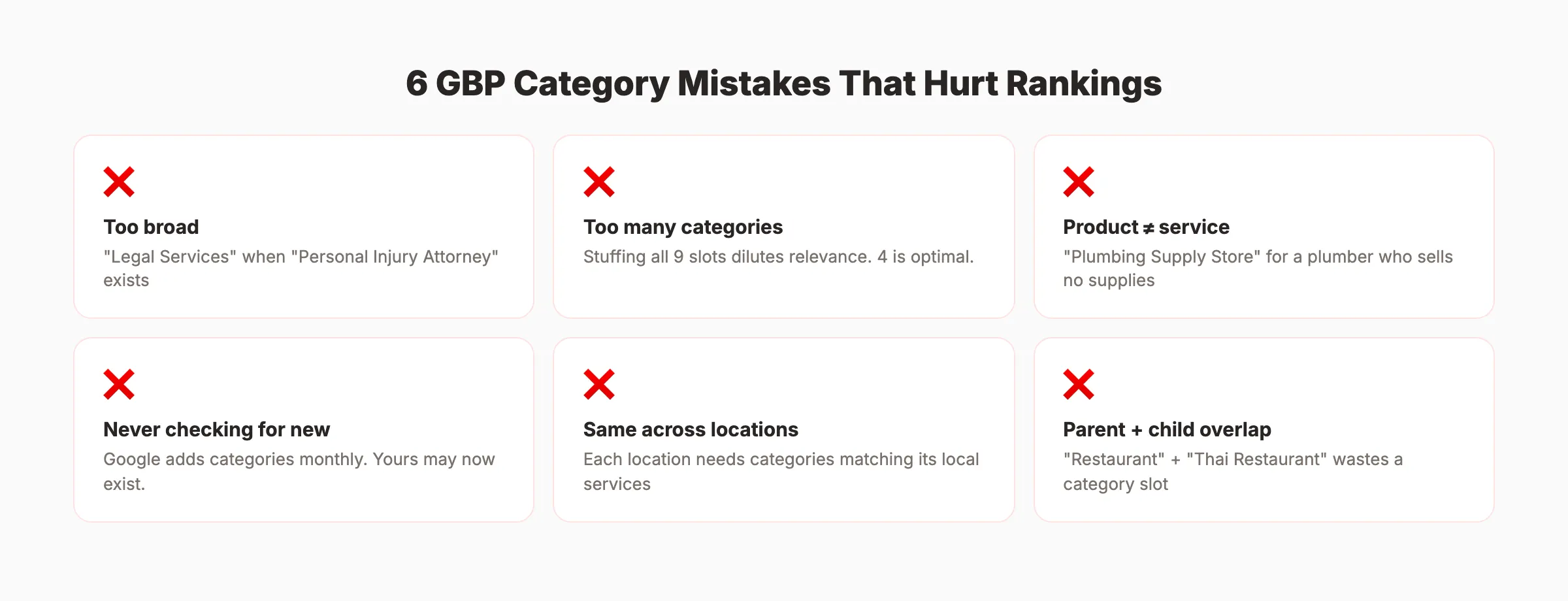
These mistakes are the most frequent category errors we see across the businesses we work with.
Mistake 1: Choosing a Broad Category When a Specific One Exists
“Legal Services” when “Personal Injury Attorney” is available. “Restaurant” when “Sushi Restaurant” is available. Always pick the most specific category that matches your business. Specificity improves ranking for targeted searches.
Mistake 2: Adding Every Possible Category
Stuffing all 9 secondary slots with loosely related categories dilutes your relevance. The data shows 4 total categories perform better than 10. Only add categories that describe what your business genuinely is.
Mistake 3: Adding Product Categories to Service Businesses
A plumber should not add “Plumbing Supply Store” unless they operate an actual retail location. A dentist should not add “Dental Supply Store” because they sell toothbrushes at the front desk. Categories must describe the business type, not products sold.
Mistake 4: Ignoring Category Changes Over Time
Google adds new categories regularly. A category that did not exist when you set up your listing may exist now. Sterling Sky tracks monthly category changes. Check quarterly for new categories that match your business.
Mistake 5: Not Checking for New Categories
Google adds new categories throughout the year. Sterling Sky tracks monthly additions. A category that did not exist when you created your listing may exist now. “Solar Energy Contractor” and “EV Charging Station” are examples of recently added categories. Check quarterly to see if a more specific or relevant category has become available.
Mistake 6: Using the Same Categories for Every Location
Multi-location businesses often copy the same category set across all locations. Each location should have categories that reflect its specific services and local market. An HVAC company with a location in Phoenix should emphasize “Air Conditioning Contractor” while a location in Minneapolis should lead with “Heating Contractor.”
Run our free SEO audit tool to check your current GBP setup.
Rank everywhere. Do nothing. Blog SEO, Local SEO, and Social on autopilot. Stacc starts at $99 per month with a $1 trial. Start for $1 →
Category Changes and What to Expect
Changing your GBP categories is not risk-free. Understanding the process prevents surprises.
What Happens When You Change Categories
- Primary category change: Rankings may fluctuate for 2 to 4 weeks as Google re-evaluates your listing. In most cases, rankings stabilize or improve if the new category is more accurate.
- Adding secondary categories: Lower risk. Changes typically take effect within 3 to 7 days.
- Removing categories: Immediate. You stop appearing for searches tied to the removed category.
Re-Verification Risk
Changing your primary category can trigger a re-verification process. Google may ask you to verify your listing again via postcard, phone, or video call. During re-verification, your listing may temporarily disappear from search results.
To minimize risk:
- Change one category at a time
- Wait 30 days between major category changes
- Document your current rankings before making changes
- Do not change categories during your busiest season
The 30-Day Test Framework
- Record your current rankings for target keywords
- Change one category (primary or add a secondary)
- Monitor rankings weekly for 30 days
- If rankings improve or hold steady, keep the change
- If rankings drop after 30 days, revert
For more on tracking local ranking performance, see our GBP performance study.
FAQ
How many GBP categories can I have?
Each Google Business Profile listing can have 1 primary category and up to 9 secondary categories. The optimal number based on ranking data is 4 total (1 primary + 3 secondary). Adding more than 5 can dilute your relevance signals and actually hurt rankings.
How do I choose the right primary GBP category?
Pick the most specific category that describes what your business IS. Not what it sells or offers. Search your target keyword on Google Maps and see what the top 3 results use. Match their specificity level. If “Pediatric Dentist” exists and you are a pediatric dentist, use it over “Dentist.”
Do secondary categories help with local rankings?
Yes. Businesses with secondary categories rank 1.7 positions higher on average than those with only a primary category (BrightLocal study of 1,050 locations). Secondary categories expand the range of searches your listing appears for without diluting your primary category signal.
What if my business category does not exist in Google?
Use the closest available category. Google adds new categories regularly. Check the PlePer category tool for the full searchable list. If your exact category is missing, use Google’s “Suggest an edit” feature to request it.
Can I change my GBP categories without losing rankings?
Changing secondary categories carries low risk. Changing your primary category may cause 2 to 4 weeks of ranking fluctuation. In most cases, switching to a more accurate primary category improves rankings after the adjustment period. Always test one change at a time and wait 30 days before making additional changes.
How do GBP categories affect which features my listing gets?
Your primary category unlocks specific listing features. Restaurants get menu and ordering sections. Hotels get amenity lists. Healthcare providers get appointment booking. Choosing the wrong primary category means missing features that competitors have. Check what features top competitors display and verify your category matches.
GBP categories are not a set-it-and-forget-it decision. The businesses that audit their categories quarterly, test changes methodically, and match specificity to their market dominate the local 3-pack. The data proves it. Four well-chosen categories outrank 10 random ones every time.
Skip the agency. Keep the results. Stacc starts at $99 per month with a $1 trial. 30 articles. Published automatically. Local SEO from $49 per month. Start for $1 →
Related Tools & Resources
Free SEO Tools:
Best Lists:

Written by
Siddharth GangalSiddharth is the founder of theStacc and Arka360, and a graduate of IIT Mandi. He spent years watching great businesses lose organic traffic to competitors who simply published more. So he built a system to fix that. He writes about SEO, content at scale, and the tactics that actually move rankings.
Automate your Google Business Profile content
30 GBP posts, local SEO articles, and review responses. Published every month automatically.
30-day trial · Cancel anytime
theStacc
Stop writing SEO content manually
30 blog articles, 30 GBP posts, and social media content. Published every month. Automatically.
Start Your $1 Trial$1 for 3 days · Cancel anytime